> ## Documentation Index
> Fetch the complete documentation index at: https://docs.flexprice.io/llms.txt
> Use this file to discover all available pages before exploring further.
# Overview
> Turn fragmented AI spend across gateways, clouds, and SaaS into one metered, priced, and governed view — internal cost by team, user, and application, plus customer-level cost and margin.
AI Cost Tracking makes Flexprice the single source of truth for AI usage. You stream usage from any AI gateway or provider, Flexprice attaches cost, and you get token-level visibility, spend alerts and limits, wallets, and margin analytics — at every level of your organization and for every customer you bill.
## Problem statement
AI spend is sprawling and hard to attribute. A single company typically consumes models through many disconnected paths at once:
* **Gateways** — LiteLLM, OpenRouter, Portkey
* **Observability layers** — Langfuse, Helicone
* **Clouds and platforms** — AWS Bedrock, Databricks, Snowflake Cortex
* **Packaged SaaS AI** — Salesforce Agentforce, SAP Joule
Each path has its own usage format, its own identifiers, and its own price list. That makes three questions surprisingly hard to answer:
1. **Internal cost** — what is each **team**, **user**, **application**, or **agent** spending on AI, and is it within budget?
2. **Customer cost** — for the AI features you resell, how much does serving each **customer** actually cost?
3. **Margin** — what is your AI **margin by revenue** once provider cost is subtracted from what you charge?
Without a common layer, teams stitch this together by hand — exporting CSVs, reconciling token counts, and guessing at cost. Flexprice replaces that with one ingestion and metering layer.
## Solution
Flexprice acts as a single point of AI usage ingestion. Once usage flows in, everything else is built on top of the same metered data:
* **Feature usage at the customer level** — every request is attributed to a billing entity (customer, team, user, or agent), so usage rolls up cleanly for showback, entitlements, and billing.
* **Total AI cost and token-level visibility** — break spend down by provider, model, and token type (input, output, cached, reasoning) for any entity and any time window.
* **Start from base model pricing** — Flexprice maintains a **public model pricing repository, refreshed daily**, so cost is computed out of the box for popular providers and models with no manual price setup.
* **Or customise costing for negotiated pricing** — override the base catalog with your committed or BYOK rates per provider, model, or customer, and apply markup when you resell.
* **Set spend alerts and limits, and optionally fund wallets with preloaded credits** — configure `info` → `warning` → `critical` thresholds on balances and usage, and give teams or customers a prepaid credit balance to draw down. See [Alerts and Notifications](/docs/customers/threshold-notifications).
* **Model your full org hierarchy** — represent organizations, workspaces, teams, and users with both individual and consolidated limits and rollups, sharing wallets where you need to. See [Customer Hierarchy](/docs/subscriptions/customer-hierarchy).
AI Cost Tracking builds directly on Flexprice's core metering primitives. Usage arrives through the same [event ingestion](/docs/event-ingestion/overview) pipeline, is measured with [features and aggregations](/docs/product-catalogue/features/overview), and is governed with [wallets](/docs/wallet/prepaid-and-promotional) and [alerts](/docs/customers/threshold-notifications) — nothing new to learn if you already use Flexprice.
## Architecture
At a high level, third-party sources send usage into Flexprice through one of two ingestion paths, and Flexprice turns that usage into cost, governance, and analytics.
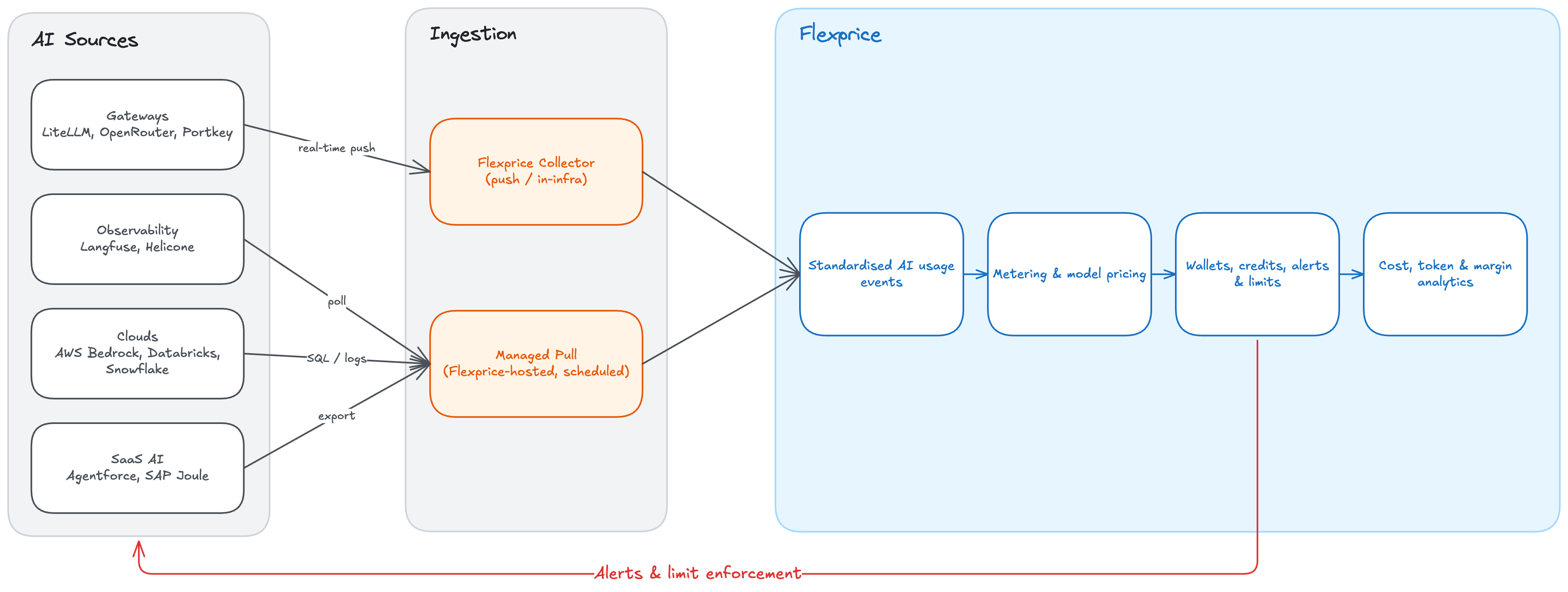 Two ingestion paths cover every source:
* **Flexprice Collector** — a lightweight, [Bento](/docs/collectors/overview)-based collector you can run in your own infrastructure. Best for **real-time push** sources (such as LiteLLM webhooks) and for data that must stay inside your network.
* **Managed pull** — Flexprice runs scheduled, credential-based pulls for sources reachable by API, SQL, or object storage (such as Langfuse, Databricks, Snowflake, and Bedrock logs). You paste credentials; there is **nothing to deploy**.
Either way, every source is normalised to the same standardised AI usage event, so metering, pricing, alerts, and analytics work identically regardless of where usage originated. The next page, [Ingesting AI Usage](/docs/ai-cost-tracking/ingesting-ai-usage), covers this in depth.
### Communication back to your systems
Cost tracking is not only inbound. When a budget threshold is crossed, Flexprice can push signals **back** to your systems so limits are actually enforced:
* **Webhooks** — every alert state change (`info` → `warning` → `critical`) is delivered as a webhook, so your automation can react however you choose. See [Alerts and Notifications](/docs/customers/threshold-notifications).
* **Native enforcement at the gateway** — for gateways that expose programmatic key controls, Flexprice can act on a breach directly:
* **LiteLLM** — using your LiteLLM master key, Flexprice can call the proxy's management API to lower or zero a key/team budget, or block a key, for a true hard cutoff. (LiteLLM also emits its own budget alerts to Slack and webhooks independently.)
* **OpenRouter** — Flexprice can use the Provisioning API to set a per-key credit limit or disable a key.
* **Portkey** — budgets are enforced at the gateway but configured in the Portkey dashboard, so enforcement there is alert-driven rather than API-driven.
Start with **soft** alerting (webhooks and notifications) to build confidence, then graduate the same thresholds to **hard** enforcement at the gateway once you trust the numbers.
The standardised event, connector types, and per-source mechanics.
Configure spend thresholds and webhook delivery.
Model orgs, teams, and users with shared and consolidated limits.
Fund teams or customers with prepaid credit balances.
Two ingestion paths cover every source:
* **Flexprice Collector** — a lightweight, [Bento](/docs/collectors/overview)-based collector you can run in your own infrastructure. Best for **real-time push** sources (such as LiteLLM webhooks) and for data that must stay inside your network.
* **Managed pull** — Flexprice runs scheduled, credential-based pulls for sources reachable by API, SQL, or object storage (such as Langfuse, Databricks, Snowflake, and Bedrock logs). You paste credentials; there is **nothing to deploy**.
Either way, every source is normalised to the same standardised AI usage event, so metering, pricing, alerts, and analytics work identically regardless of where usage originated. The next page, [Ingesting AI Usage](/docs/ai-cost-tracking/ingesting-ai-usage), covers this in depth.
### Communication back to your systems
Cost tracking is not only inbound. When a budget threshold is crossed, Flexprice can push signals **back** to your systems so limits are actually enforced:
* **Webhooks** — every alert state change (`info` → `warning` → `critical`) is delivered as a webhook, so your automation can react however you choose. See [Alerts and Notifications](/docs/customers/threshold-notifications).
* **Native enforcement at the gateway** — for gateways that expose programmatic key controls, Flexprice can act on a breach directly:
* **LiteLLM** — using your LiteLLM master key, Flexprice can call the proxy's management API to lower or zero a key/team budget, or block a key, for a true hard cutoff. (LiteLLM also emits its own budget alerts to Slack and webhooks independently.)
* **OpenRouter** — Flexprice can use the Provisioning API to set a per-key credit limit or disable a key.
* **Portkey** — budgets are enforced at the gateway but configured in the Portkey dashboard, so enforcement there is alert-driven rather than API-driven.
Start with **soft** alerting (webhooks and notifications) to build confidence, then graduate the same thresholds to **hard** enforcement at the gateway once you trust the numbers.
The standardised event, connector types, and per-source mechanics.
Configure spend thresholds and webhook delivery.
Model orgs, teams, and users with shared and consolidated limits.
Fund teams or customers with prepaid credit balances.