> ## Documentation Index
> Fetch the complete documentation index at: https://docs.flexprice.io/llms.txt
> Use this file to discover all available pages before exploring further.
# Build Credit-based Pricing like Apollo.io
> Credit-based pricing is a usage-based model where customers prepay for a set number of credits and spend them as they use features, with each action deducting a defined credit amount.
## Overview
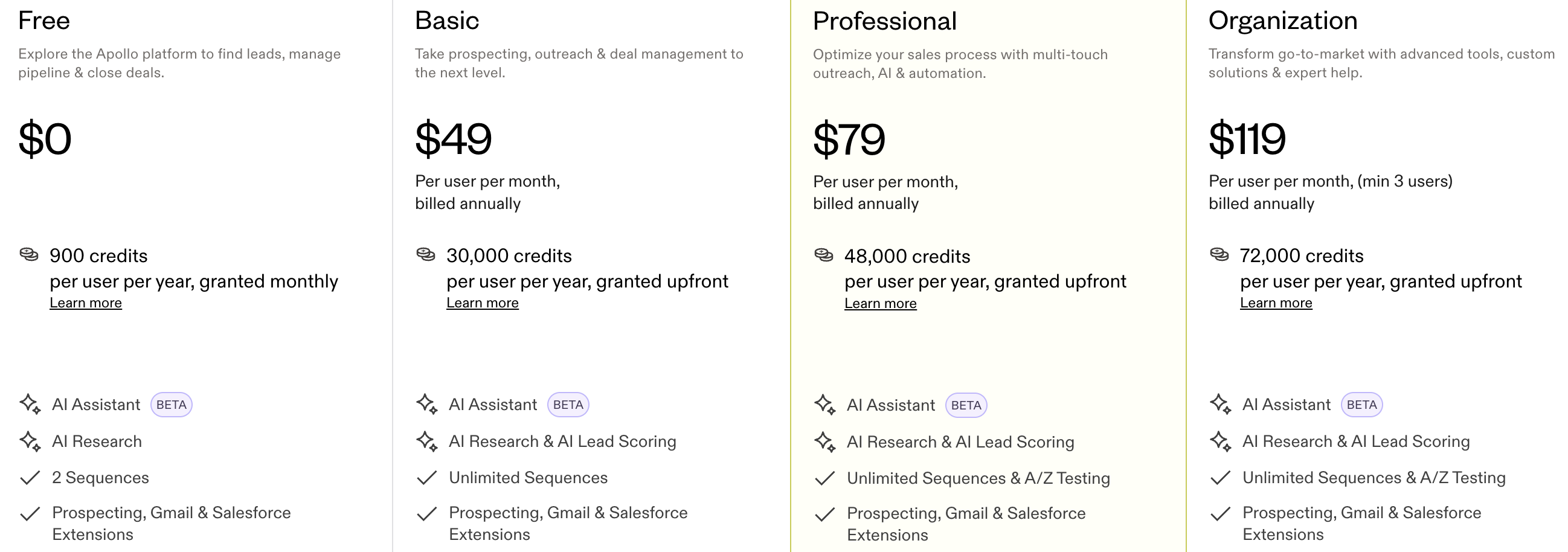
Apollo.io uses a credit-based pricing model where users spend credits to access contact data (like emails, phone numbers, and exports), with higher plans offering more monthly credits. This guide shows how to build the same model in Flexprice.
## Pricing Breakdown
 ## 1. Key Chargeable Features in Apollo
In this model, credits are deducted when the user does an action (e.g. unlock email, export). In Flexprice you will map each action to a credit cost and debit the wallet.
### A. Contact Data Unlock & Enrichment
#### How Credits Are Applied
**Prepaid allocation:** When a user subscribes, they receive credits up to the plan limit. You configure this as recurring grants on the plan. Plans can be billed annually with **recurring grants** (e.g. credits per month).
* **Professional plan → 48,000 credits/year** (or e.g. 4,000/month as recurring grants)
* **Basic → 30,000 credits/year** (or e.g. 2,500/month as recurring grants)
**Example:** For a Basic plan billed annually, give 2,500 credits per month via recurring grants. When you create your plan, mirror these as recurring grants.
**What you’ll do:** Assign a credit cost to each action and debit that amount from the wallet when the user does it.
| Action | Credit Cost |
| --------------------- | ------------------- |
| Unlock verified email | 1 credit |
| Unlock mobile number | 5–10 credits |
| Export contact | 1 credit |
| API enrichment | 1 credit per record |
### B. Email Sending & AI Outreach Credits
#### How Credits Are Applied
**Email Sending Model:** Depending on plan, choose one: **daily send limits per mailbox** or **credits per email sent**. When you set up features, create a metered feature (e.g. Emails Sent) and set the credit cost per use.
| Action | Credit Cost |
| ---------------------------- | ------------------- |
| Send 1 email | 1 credit |
| AI-generated personalization | 1 additional credit |
| Email verification | 1 credit per email |
## 2. Apollo-Style Credit Model
### Key Behaviors
Define a credit cost for each action (e.g. 1 for search, 5 for export) in your app or feature config.
Let users purchase credits (packages or add-ons) by topping up their wallet.
If balance is zero, block the action and prompt the user to buy more credits or upgrade.
### Example: Credit Cost per Action
| Action | Credit Cost |
| ---------------- | ----------- |
| Contact Search | 1 credit |
| Contact Export | 5 credits |
| Email Enrichment | 2 credits |
| Phone Reveal | 10 credits |
### Example: Credit Packages (Prepaid)
| Plan | Credits | Price |
| ------- | ------- | ----- |
| Starter | 1,000 | \$29 |
| Growth | 5,000 | \$99 |
| Pro | 20,000 | \$299 |
**You decide:** Credits can reset monthly, never expire, or expire after N days. Configure this in your plan or billing logic.
**To charge overage:** In Flexprice, configure overage on the plan or charge (e.g. 1.00 USD per extra credit). Usage above the included grant is then billed automatically.
***
## 3. When to Use Credit-Based Pricing
Use credit-based pricing when each action has a different cost (e.g. 1 credit to unlock an email vs 10 credits to reveal a phone number).
Use it when usage varies a lot per customer and a fixed plan doesn’t fit.
Use it when you want flexible consumption and optional add-ons or top-ups.
***
## 4. Complete Flow Summary
**High level, you will:**
Create **metered features** for each action that costs credits. Link each feature to plans via **entitlements**; there you set which features each plan gets and optional free usage (e.g. 50 free, then deduct from credits). See [Linking features to plans](/docs/product-catalogue/features/linking-to-plans).
Create a **Plan** with credit packages or usage charges (e.g. annually billed with recurring credit grants per month).
Create a **Customer** (with External ID for your system).
For **plan-based credits:** Add Subscription → choose the plan. The customer gets the plan’s credit grants and feature access. For **direct purchase only**, skip this and top up the wallet in the next step.
***
## Flexprice Set-up
To implement Apollo-style credit-based pricing in Flexprice, follow these steps in order.
Navigate to **Flexprice Dashboard** → **Product Catalog** → **Features**
## 1. Key Chargeable Features in Apollo
In this model, credits are deducted when the user does an action (e.g. unlock email, export). In Flexprice you will map each action to a credit cost and debit the wallet.
### A. Contact Data Unlock & Enrichment
#### How Credits Are Applied
**Prepaid allocation:** When a user subscribes, they receive credits up to the plan limit. You configure this as recurring grants on the plan. Plans can be billed annually with **recurring grants** (e.g. credits per month).
* **Professional plan → 48,000 credits/year** (or e.g. 4,000/month as recurring grants)
* **Basic → 30,000 credits/year** (or e.g. 2,500/month as recurring grants)
**Example:** For a Basic plan billed annually, give 2,500 credits per month via recurring grants. When you create your plan, mirror these as recurring grants.
**What you’ll do:** Assign a credit cost to each action and debit that amount from the wallet when the user does it.
| Action | Credit Cost |
| --------------------- | ------------------- |
| Unlock verified email | 1 credit |
| Unlock mobile number | 5–10 credits |
| Export contact | 1 credit |
| API enrichment | 1 credit per record |
### B. Email Sending & AI Outreach Credits
#### How Credits Are Applied
**Email Sending Model:** Depending on plan, choose one: **daily send limits per mailbox** or **credits per email sent**. When you set up features, create a metered feature (e.g. Emails Sent) and set the credit cost per use.
| Action | Credit Cost |
| ---------------------------- | ------------------- |
| Send 1 email | 1 credit |
| AI-generated personalization | 1 additional credit |
| Email verification | 1 credit per email |
## 2. Apollo-Style Credit Model
### Key Behaviors
Define a credit cost for each action (e.g. 1 for search, 5 for export) in your app or feature config.
Let users purchase credits (packages or add-ons) by topping up their wallet.
If balance is zero, block the action and prompt the user to buy more credits or upgrade.
### Example: Credit Cost per Action
| Action | Credit Cost |
| ---------------- | ----------- |
| Contact Search | 1 credit |
| Contact Export | 5 credits |
| Email Enrichment | 2 credits |
| Phone Reveal | 10 credits |
### Example: Credit Packages (Prepaid)
| Plan | Credits | Price |
| ------- | ------- | ----- |
| Starter | 1,000 | \$29 |
| Growth | 5,000 | \$99 |
| Pro | 20,000 | \$299 |
**You decide:** Credits can reset monthly, never expire, or expire after N days. Configure this in your plan or billing logic.
**To charge overage:** In Flexprice, configure overage on the plan or charge (e.g. 1.00 USD per extra credit). Usage above the included grant is then billed automatically.
***
## 3. When to Use Credit-Based Pricing
Use credit-based pricing when each action has a different cost (e.g. 1 credit to unlock an email vs 10 credits to reveal a phone number).
Use it when usage varies a lot per customer and a fixed plan doesn’t fit.
Use it when you want flexible consumption and optional add-ons or top-ups.
***
## 4. Complete Flow Summary
**High level, you will:**
Create **metered features** for each action that costs credits. Link each feature to plans via **entitlements**; there you set which features each plan gets and optional free usage (e.g. 50 free, then deduct from credits). See [Linking features to plans](/docs/product-catalogue/features/linking-to-plans).
Create a **Plan** with credit packages or usage charges (e.g. annually billed with recurring credit grants per month).
Create a **Customer** (with External ID for your system).
For **plan-based credits:** Add Subscription → choose the plan. The customer gets the plan’s credit grants and feature access. For **direct purchase only**, skip this and top up the wallet in the next step.
***
## Flexprice Set-up
To implement Apollo-style credit-based pricing in Flexprice, follow these steps in order.
Navigate to **Flexprice Dashboard** → **Product Catalog** → **Features**
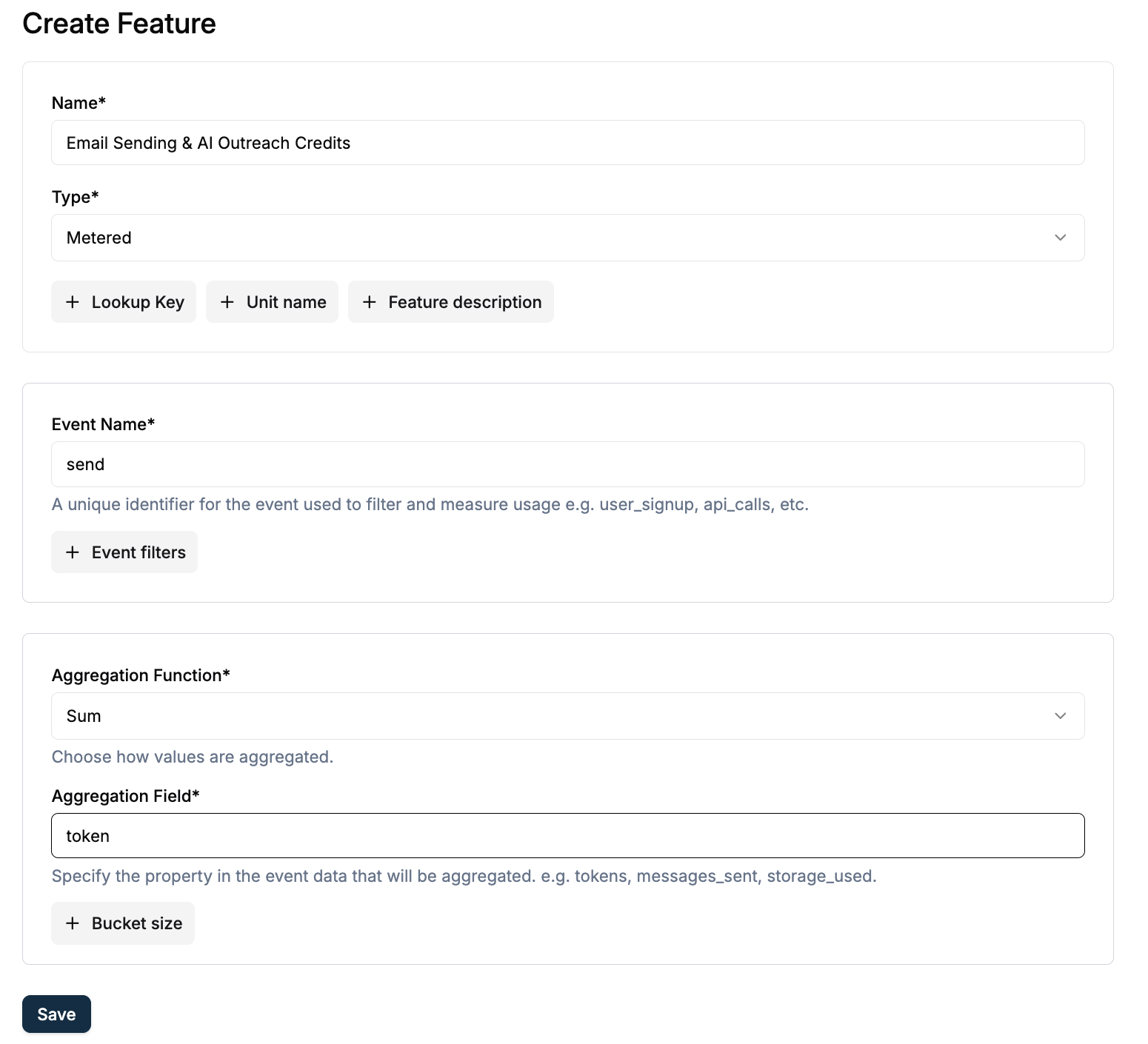 For each action that costs credits (e.g. Contact Export, Email Enrichment): click **Create Feature**, choose **Metered**, and set **Event Name** and **Aggregation**. Later you’ll link these to the plan and set entitlements (e.g. 50 free, then deduct from credits).
For more, see [Creating a feature](/docs/product-catalogue/features/create) and [Linking features to plans](/docs/product-catalogue/features/linking-to-plans).
Navigate to **Flexprice Dashboard** → **Product Catalog** → **Plans**
For each action that costs credits (e.g. Contact Export, Email Enrichment): click **Create Feature**, choose **Metered**, and set **Event Name** and **Aggregation**. Later you’ll link these to the plan and set entitlements (e.g. 50 free, then deduct from credits).
For more, see [Creating a feature](/docs/product-catalogue/features/create) and [Linking features to plans](/docs/product-catalogue/features/linking-to-plans).
Navigate to **Flexprice Dashboard** → **Product Catalog** → **Plans**
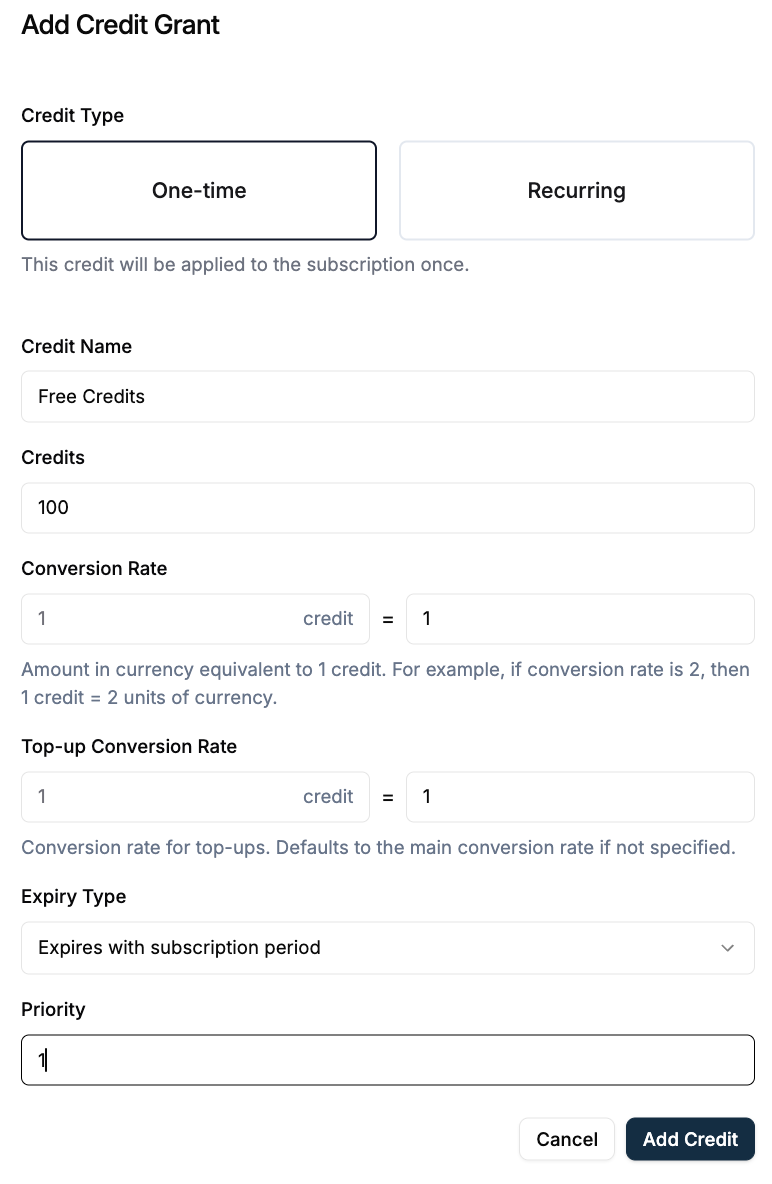 **Do this:** (1) Click **Add** and enter plan name and billing (e.g. Basic, annually). (2) Add charges that provide credits (e.g. recurring credit grant per month) or link metered features with pricing. (3) In **Entitlements**, link features so subscribers get the right access and optional free usage. When a customer is assigned this plan, they receive the credit grants you configured (e.g. monthly). For more, see [Creating a Plan](/docs/product-catalogue/plans/create) and [Linking features to plans](/docs/product-catalogue/features/linking-to-plans).
**Do this:** Open the customer → **Add Subscription** → select your plan. **Result:** The customer gets the plan’s credit grants (e.g. monthly) and access to the features you linked to that plan (including any free usage you set).
**Do this:** (1) Click **Add** and enter plan name and billing (e.g. Basic, annually). (2) Add charges that provide credits (e.g. recurring credit grant per month) or link metered features with pricing. (3) In **Entitlements**, link features so subscribers get the right access and optional free usage. When a customer is assigned this plan, they receive the credit grants you configured (e.g. monthly). For more, see [Creating a Plan](/docs/product-catalogue/plans/create) and [Linking features to plans](/docs/product-catalogue/features/linking-to-plans).
**Do this:** Open the customer → **Add Subscription** → select your plan. **Result:** The customer gets the plan’s credit grants (e.g. monthly) and access to the features you linked to that plan (including any free usage you set).
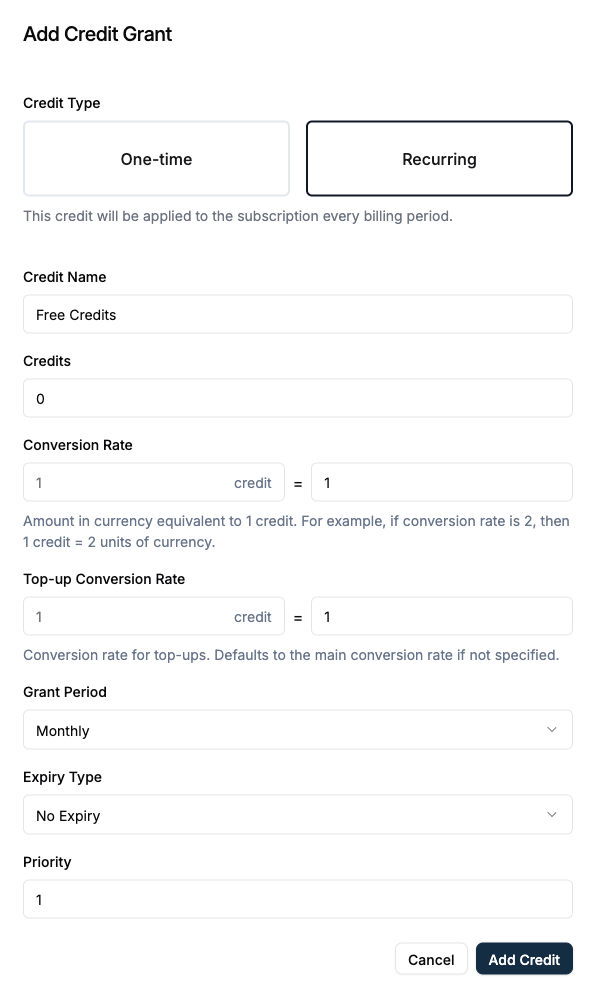 For **direct purchase only**, skip this step and top up the wallet in Step 6 (Top Up the Wallet). For more, see [Plans](/docs/product-catalogue/plans/create) and [Linking features to plans](/docs/product-catalogue/features/linking-to-plans).
Navigate to **Flexprice Dashboard** → **Customer Management** → **Customers**
For **direct purchase only**, skip this step and top up the wallet in Step 6 (Top Up the Wallet). For more, see [Plans](/docs/product-catalogue/plans/create) and [Linking features to plans](/docs/product-catalogue/features/linking-to-plans).
Navigate to **Flexprice Dashboard** → **Customer Management** → **Customers**
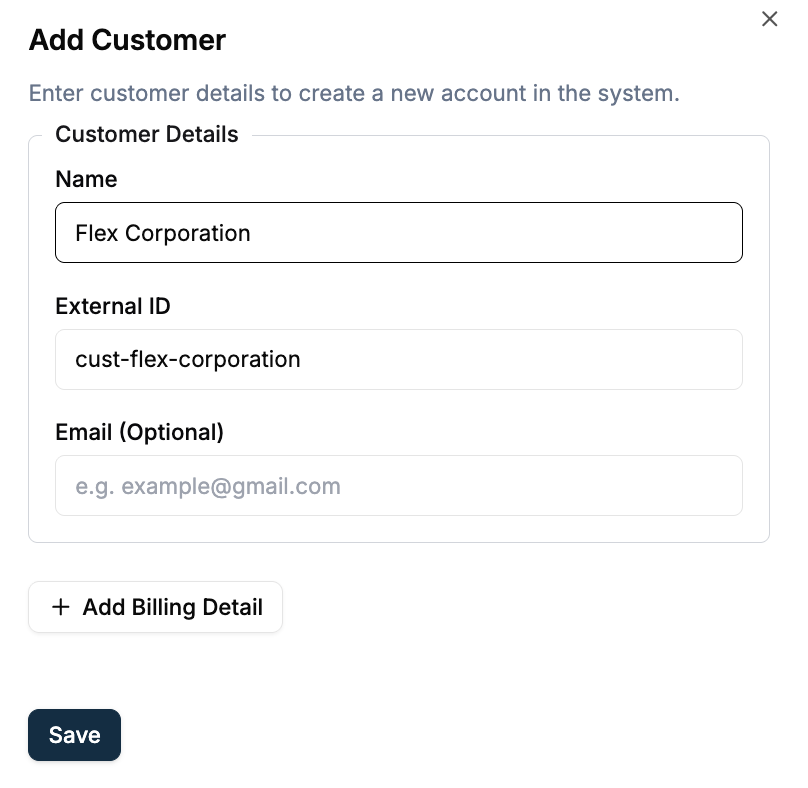 **Enter at least:** Customer Name (e.g. `Flex Corporation`). Add **External ID** if you use it for API lookups.
For details, see [Customer Management](/docs/customers/create).
Before allowing the user to perform a credit-consuming action, call the **Get Wallet Balance** API (e.g. with customer identifier or wallet ID). If balance is available and sufficient for the action cost, proceed. If not, do not proceed—block the action or prompt the user to top up, then leave.
On the customer’s **Wallet** tab, click **Top-up Wallet**.
* Choose the credit type that matches your Price Unit (**Custom** → Credits).
* Enter the amount in credits (e.g. 1,000).
* Complete the top-up (e.g. **Add Credits** or link to payment).
**Use this step for:** First-time credit purchase or add-on packs.
For more, see [Top-up wallet](/docs/wallet/top-up) and [Auto top-up](/docs/wallet/auto-top-up).
Each time a user does an action (search, export, enrichment), do the following in your app or backend:
**Check entitlement:** Does this customer’s plan allow this feature? (You set this when [linking features to plans](/docs/product-catalogue/features/linking-to-plans).) If not, block the action.
**Look up credit cost:** Use your mapping (e.g. the tables in **Key Chargeable Features in Apollo** above) and get the cost for this action.
**Check balance:** Call the Flexprice API or open the dashboard and read the customer's wallet balance.
If **balance ≥ cost**, call the Flexprice API to **debit** the wallet by that amount, then perform the action.
If **balance \< cost**, return an error or prompt to purchase more credits.
**Debit via API:** Call the wallet debit endpoint with the customer identifier (e.g. External ID) and the amount in credits.
**Debit via Dashboard:** **Customer** → **Wallet** → **Manual Debit**; enter the amount in credits and reason (e.g. “Contact export – 5 credits”).
For more, see [Manual Debit](/docs/wallet/manual-debit).
***
## Next Steps
**After setup, do this:**
Map actions to credit costs in your application (e.g. 1 credit per search, 5 per export) and call the debit API (or Manual Debit) after each action.
**Optional:** Set low-balance alerts; see [Low balance alert](/docs/product-catalogue/features/wallet-balance-alert).
Check that invoices show credit top-ups and usage correctly in base currency.
Add more plans with credit packages (recurring or one-time) using the same Price Unit; see [Custom pricing use cases](/docs/product-catalogue/custom-pricing/use-cases).
For custom pricing concepts and API details, see [Custom Pricing](/docs/product-catalogue/custom-pricing/pricing-unit) and the [API Reference](/api-reference/introduction).
**Enter at least:** Customer Name (e.g. `Flex Corporation`). Add **External ID** if you use it for API lookups.
For details, see [Customer Management](/docs/customers/create).
Before allowing the user to perform a credit-consuming action, call the **Get Wallet Balance** API (e.g. with customer identifier or wallet ID). If balance is available and sufficient for the action cost, proceed. If not, do not proceed—block the action or prompt the user to top up, then leave.
On the customer’s **Wallet** tab, click **Top-up Wallet**.
* Choose the credit type that matches your Price Unit (**Custom** → Credits).
* Enter the amount in credits (e.g. 1,000).
* Complete the top-up (e.g. **Add Credits** or link to payment).
**Use this step for:** First-time credit purchase or add-on packs.
For more, see [Top-up wallet](/docs/wallet/top-up) and [Auto top-up](/docs/wallet/auto-top-up).
Each time a user does an action (search, export, enrichment), do the following in your app or backend:
**Check entitlement:** Does this customer’s plan allow this feature? (You set this when [linking features to plans](/docs/product-catalogue/features/linking-to-plans).) If not, block the action.
**Look up credit cost:** Use your mapping (e.g. the tables in **Key Chargeable Features in Apollo** above) and get the cost for this action.
**Check balance:** Call the Flexprice API or open the dashboard and read the customer's wallet balance.
If **balance ≥ cost**, call the Flexprice API to **debit** the wallet by that amount, then perform the action.
If **balance \< cost**, return an error or prompt to purchase more credits.
**Debit via API:** Call the wallet debit endpoint with the customer identifier (e.g. External ID) and the amount in credits.
**Debit via Dashboard:** **Customer** → **Wallet** → **Manual Debit**; enter the amount in credits and reason (e.g. “Contact export – 5 credits”).
For more, see [Manual Debit](/docs/wallet/manual-debit).
***
## Next Steps
**After setup, do this:**
Map actions to credit costs in your application (e.g. 1 credit per search, 5 per export) and call the debit API (or Manual Debit) after each action.
**Optional:** Set low-balance alerts; see [Low balance alert](/docs/product-catalogue/features/wallet-balance-alert).
Check that invoices show credit top-ups and usage correctly in base currency.
Add more plans with credit packages (recurring or one-time) using the same Price Unit; see [Custom pricing use cases](/docs/product-catalogue/custom-pricing/use-cases).
For custom pricing concepts and API details, see [Custom Pricing](/docs/product-catalogue/custom-pricing/pricing-unit) and the [API Reference](/api-reference/introduction).