> ## Documentation Index
> Fetch the complete documentation index at: https://docs.flexprice.io/llms.txt
> Use this file to discover all available pages before exploring further.
# Build Hybrid Pricing like Resend
> **Hybrid pricing** combines fixed **subscription** fees (recurring base charge) with usage-based metering (pay-per-use overages), plus **entitlements** that gate features and set limits per plan.
## Overview
Resend does this with tiers (Free, Pro, Scale, Enterprise): each tier has a recurring fee, usage charges (emails sent or contacts stored), and feature gating (retention, domains, support, analytics). In Flexprice you use one plan with recurring + usage-based charges and features linked via entitlements.
## Pricing Breakdown
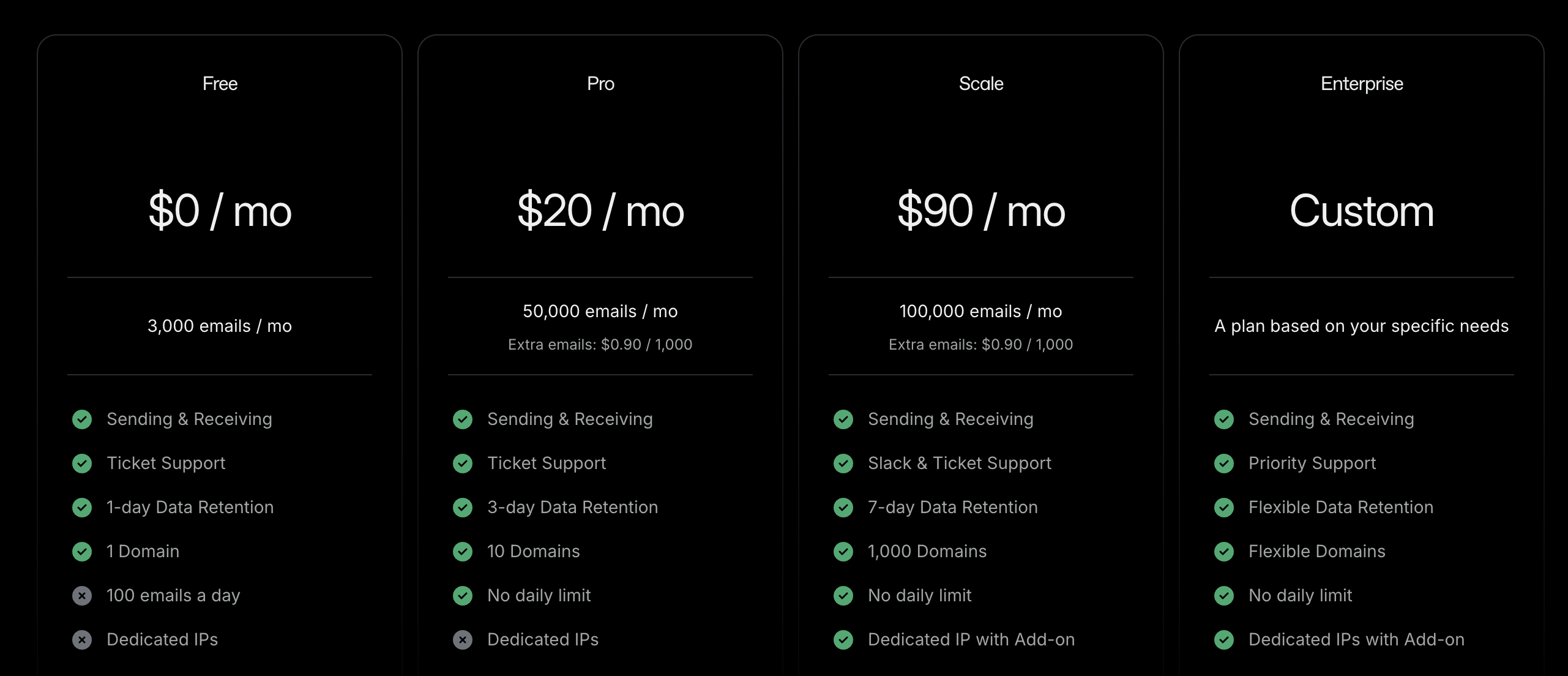 ## 1. Key Chargeable Features in Resend
Resend charges by **usage** (emails sent or contacts stored) and **gates features by plan** (data retention, domains, support, analytics, dedicated IP). Two tracks run in parallel; this cookbook uses the **Transactional** track for the Flexprice setup.
### A. Transactional Emails
**How pricing is applied:** You are charged by **emails sent per month**. Plans scale by volume; unit cost drops at higher tiers. Each tier also defines how many domains you can use, data retention for logs, support channel, and whether dedicated IP is available.
**Pricing (volume tiers):**
* **Transactional Scale:** 100,000 emails = $90 → $0.90 per 1,000 emails
* **Transactional Scale:** 1,000,000 emails/month = $650 → $0.65 per 1,000 emails
* **Transactional Pro:** e.g. \$20/mo for 50k emails (common entry point)
| Tier | Example volume | Effective rate |
| ----- | -------------- | ----------------- |
| Pro | 50k emails | \$0.90/1k overage |
| Scale | 100k emails | \$0.90/1k |
| Scale | 1M emails | \$0.65/1k |
Transactional emails are API-triggered (password resets, verification, order confirmations). In Flexprice you model this as a **metered feature** (e.g. Emails Sent) with event name and aggregation.
### B. Marketing Emails
**How pricing is applied:** You are charged by **contacts stored** (not by emails sent). Sends can be unlimited; cost scales with contact list size. Tiers control number of audiences, analytics, and dedicated IP (e.g. included on Enterprise for Marketing).
| Dimension | Unit | Notes |
| ----------- | ----------- | -------------------- |
| Contacts | count | Billed by list size |
| Emails sent | unlimited\* | \*Within plan/limits |
Marketing use cases include newsletters, onboarding campaigns, and promotions. For Flexprice, add a second metered feature (e.g. **Contacts Stored**) with its own event name if you model the Marketing track.
***
## 2. Subscription and Entitlement Model
Plan tiers (Free, Pro, Scale, Enterprise) control both **volume/price** and **which features** the customer can use. Features and limits vary by tier:
| Feature | Free | Pro | Scale | Enterprise |
| ---------------- | ------ | ------ | -------------- | --------------- |
| Data retention | 1 day | 3 days | 7 days | Custom |
| Domains (Tx) | 1 | 10 | 1,000 | Flexible |
| Support | Ticket | Ticket | Slack + Ticket | Priority |
| Analytics (Mktg) | No | Yes | Yes | Yes |
| Dedicated IP | — | Add-on | Add-on | Included (Mktg) |
In Flexprice you control this by **linking features to plans** (entitlements): set included quantity, usage reset, and soft or hard limits for metered features; grant or restrict boolean/static features per plan. For more, see [Linking features to plans](/docs/product-catalogue/features/linking-to-plans).
***
## 3. Overage and Upgrade Logic
Resend does **not** automatically charge for excess usage. When you exceed your monthly quota, you are notified and prompted to upgrade; if you repeatedly exceed limits without upgrading, Resend may temporarily pause sending.
In Flexprice you can choose **soft limit** (overage allowed, with or without extra charge) or **hard limit** (strict cap). Configure limits and overage per plan when [linking features to plans](/docs/product-catalogue/features/linking-to-plans).
***
## Concepts and Terms
* **Subscription:** A customer attached to a plan. The subscription determines billing and which entitlements the customer has.
* **Plan:** A set of pricing rules: **recurring charges** (flat fee per billing period) and optionally **usage-based charges** (metered). A plan that has both is **hybrid** in Flexprice.
* **Feature:** Something you track or gate—**Metered** (usage, e.g. emails sent), **Boolean** (on/off access), or **Static** (fixed attribute).
* **Entitlement:** A feature linked to a plan with access rules: for metered features, included quantity, reset period, and soft or hard limit; for boolean/static, grant or restrict.
**Entitlements are free.**
For more detail, check-out [Linking features to plans](/docs/product-catalogue/features/linking-to-plans) and [Plans overview](/docs/product-catalogue/plans/overview).
## Complete Flow Summary
The end-to-end flow for hybrid (subscription + entitlement) pricing in Flexprice:
```mermaid theme={null}
flowchart LR
Features --> Plan
Plan --> Entitlements
Plan --> Subscription
Customer --> Subscription
Subscription --> Events
Events --> Invoices
```
Define the usage dimensions (e.g. Emails Sent) as **metered features** with event names and aggregation.
Create a **plan** (e.g. Transactional Pro). Add a **recurring charge** (e.g. \$20/month) and **usage-based charge(s)** for the metered feature(s) (e.g. included 50k emails, then overage or tiered pricing).
**Link features to the plan.** Set included quantity, usage reset (e.g. monthly), and soft or hard limit for metered features. Add boolean/static features if you gate capabilities by tier.
Create a **customer** (name, External ID) in Customer Management.
**Add subscription** for the customer and select the plan. Start date determines billing and when entitlements apply.
Send **usage events** that match the metered feature event names. Usage is billed per the plan’s usage-based charges and respects entitlements. Invoices are generated per billing cycle.
## Flexprice Set-up
To implement Resend-style hybrid pricing in Flexprice (Transactional track), follow these steps in order.
Navigate to **Flexprice Dashboard** → **Product Catalog** → **Features**
## 1. Key Chargeable Features in Resend
Resend charges by **usage** (emails sent or contacts stored) and **gates features by plan** (data retention, domains, support, analytics, dedicated IP). Two tracks run in parallel; this cookbook uses the **Transactional** track for the Flexprice setup.
### A. Transactional Emails
**How pricing is applied:** You are charged by **emails sent per month**. Plans scale by volume; unit cost drops at higher tiers. Each tier also defines how many domains you can use, data retention for logs, support channel, and whether dedicated IP is available.
**Pricing (volume tiers):**
* **Transactional Scale:** 100,000 emails = $90 → $0.90 per 1,000 emails
* **Transactional Scale:** 1,000,000 emails/month = $650 → $0.65 per 1,000 emails
* **Transactional Pro:** e.g. \$20/mo for 50k emails (common entry point)
| Tier | Example volume | Effective rate |
| ----- | -------------- | ----------------- |
| Pro | 50k emails | \$0.90/1k overage |
| Scale | 100k emails | \$0.90/1k |
| Scale | 1M emails | \$0.65/1k |
Transactional emails are API-triggered (password resets, verification, order confirmations). In Flexprice you model this as a **metered feature** (e.g. Emails Sent) with event name and aggregation.
### B. Marketing Emails
**How pricing is applied:** You are charged by **contacts stored** (not by emails sent). Sends can be unlimited; cost scales with contact list size. Tiers control number of audiences, analytics, and dedicated IP (e.g. included on Enterprise for Marketing).
| Dimension | Unit | Notes |
| ----------- | ----------- | -------------------- |
| Contacts | count | Billed by list size |
| Emails sent | unlimited\* | \*Within plan/limits |
Marketing use cases include newsletters, onboarding campaigns, and promotions. For Flexprice, add a second metered feature (e.g. **Contacts Stored**) with its own event name if you model the Marketing track.
***
## 2. Subscription and Entitlement Model
Plan tiers (Free, Pro, Scale, Enterprise) control both **volume/price** and **which features** the customer can use. Features and limits vary by tier:
| Feature | Free | Pro | Scale | Enterprise |
| ---------------- | ------ | ------ | -------------- | --------------- |
| Data retention | 1 day | 3 days | 7 days | Custom |
| Domains (Tx) | 1 | 10 | 1,000 | Flexible |
| Support | Ticket | Ticket | Slack + Ticket | Priority |
| Analytics (Mktg) | No | Yes | Yes | Yes |
| Dedicated IP | — | Add-on | Add-on | Included (Mktg) |
In Flexprice you control this by **linking features to plans** (entitlements): set included quantity, usage reset, and soft or hard limits for metered features; grant or restrict boolean/static features per plan. For more, see [Linking features to plans](/docs/product-catalogue/features/linking-to-plans).
***
## 3. Overage and Upgrade Logic
Resend does **not** automatically charge for excess usage. When you exceed your monthly quota, you are notified and prompted to upgrade; if you repeatedly exceed limits without upgrading, Resend may temporarily pause sending.
In Flexprice you can choose **soft limit** (overage allowed, with or without extra charge) or **hard limit** (strict cap). Configure limits and overage per plan when [linking features to plans](/docs/product-catalogue/features/linking-to-plans).
***
## Concepts and Terms
* **Subscription:** A customer attached to a plan. The subscription determines billing and which entitlements the customer has.
* **Plan:** A set of pricing rules: **recurring charges** (flat fee per billing period) and optionally **usage-based charges** (metered). A plan that has both is **hybrid** in Flexprice.
* **Feature:** Something you track or gate—**Metered** (usage, e.g. emails sent), **Boolean** (on/off access), or **Static** (fixed attribute).
* **Entitlement:** A feature linked to a plan with access rules: for metered features, included quantity, reset period, and soft or hard limit; for boolean/static, grant or restrict.
**Entitlements are free.**
For more detail, check-out [Linking features to plans](/docs/product-catalogue/features/linking-to-plans) and [Plans overview](/docs/product-catalogue/plans/overview).
## Complete Flow Summary
The end-to-end flow for hybrid (subscription + entitlement) pricing in Flexprice:
```mermaid theme={null}
flowchart LR
Features --> Plan
Plan --> Entitlements
Plan --> Subscription
Customer --> Subscription
Subscription --> Events
Events --> Invoices
```
Define the usage dimensions (e.g. Emails Sent) as **metered features** with event names and aggregation.
Create a **plan** (e.g. Transactional Pro). Add a **recurring charge** (e.g. \$20/month) and **usage-based charge(s)** for the metered feature(s) (e.g. included 50k emails, then overage or tiered pricing).
**Link features to the plan.** Set included quantity, usage reset (e.g. monthly), and soft or hard limit for metered features. Add boolean/static features if you gate capabilities by tier.
Create a **customer** (name, External ID) in Customer Management.
**Add subscription** for the customer and select the plan. Start date determines billing and when entitlements apply.
Send **usage events** that match the metered feature event names. Usage is billed per the plan’s usage-based charges and respects entitlements. Invoices are generated per billing cycle.
## Flexprice Set-up
To implement Resend-style hybrid pricing in Flexprice (Transactional track), follow these steps in order.
Navigate to **Flexprice Dashboard** → **Product Catalog** → **Features**
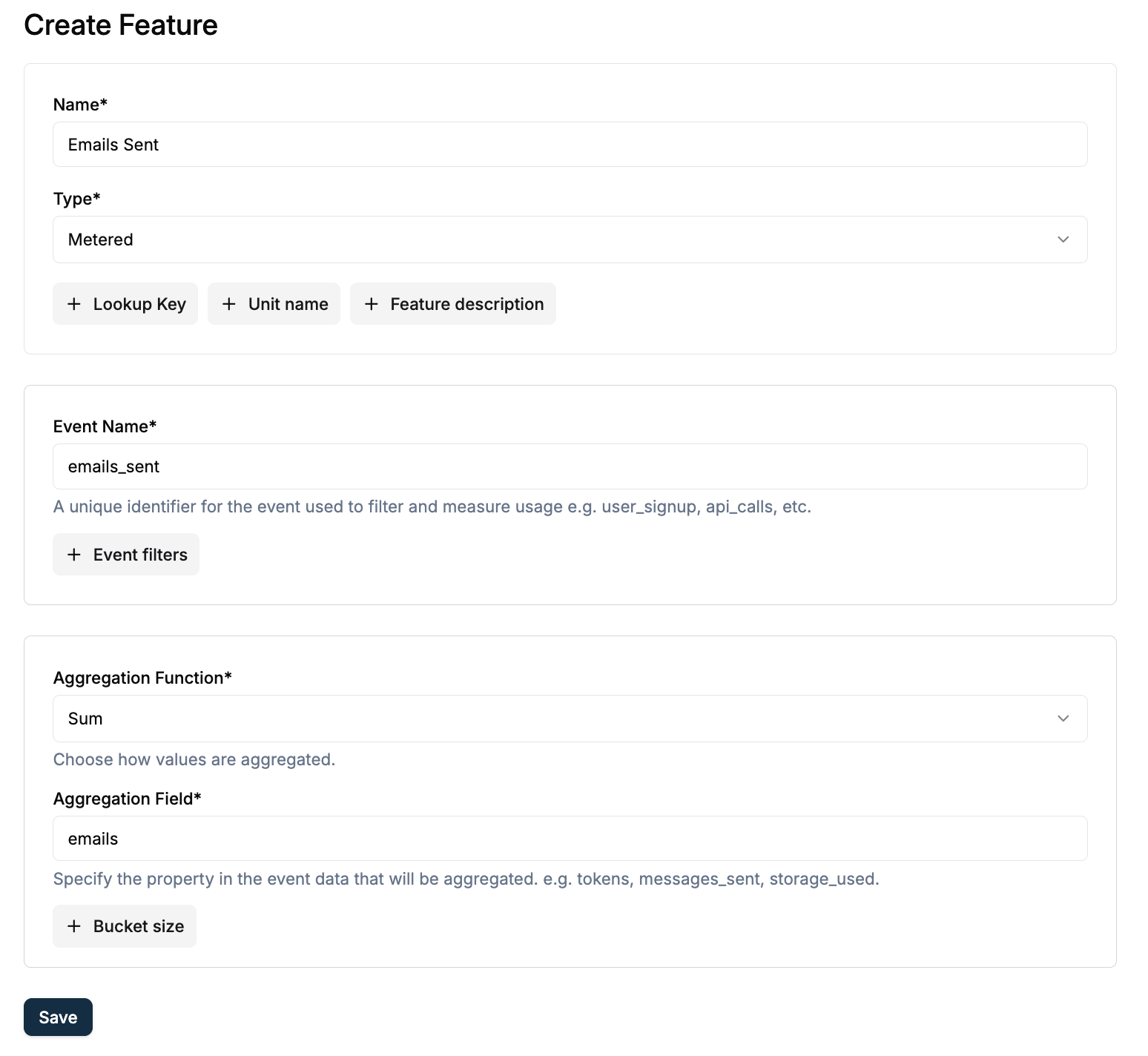 Click **Create Feature** (or **Add**) to create a metered feature. Enter **Name** and **Lookup Key**; the Lookup Key is immutable and unique.
**Feature 1: Emails Sent (Transactional)**
* **Feature Name**: `Emails Sent`
* **Feature Lookup Key**: `emails_sent` (immutable, unique)
* **Feature Type**: `Metered`
* **Event Name**: e.g. `emails.sent` (must match exactly when sending events)
* **Aggregation**: `Count` (e.g. over `Sum` or `emails`)
* **Unit**: `email` or `emails`
> **Note:** The Event Name must match exactly when you send usage events via API. Save it for later use.
For a second track (Marketing), add a feature such as **Contacts Stored** with its own event name and aggregation. This guide uses one metered feature: **Emails Sent**.
For more, check-out [Creating a feature](/docs/product-catalogue/features/create).
Navigate to **Flexprice Dashboard** → **Product Catalog** → **Plans**
Click **Create Feature** (or **Add**) to create a metered feature. Enter **Name** and **Lookup Key**; the Lookup Key is immutable and unique.
**Feature 1: Emails Sent (Transactional)**
* **Feature Name**: `Emails Sent`
* **Feature Lookup Key**: `emails_sent` (immutable, unique)
* **Feature Type**: `Metered`
* **Event Name**: e.g. `emails.sent` (must match exactly when sending events)
* **Aggregation**: `Count` (e.g. over `Sum` or `emails`)
* **Unit**: `email` or `emails`
> **Note:** The Event Name must match exactly when you send usage events via API. Save it for later use.
For a second track (Marketing), add a feature such as **Contacts Stored** with its own event name and aggregation. This guide uses one metered feature: **Emails Sent**.
For more, check-out [Creating a feature](/docs/product-catalogue/features/create).
Navigate to **Flexprice Dashboard** → **Product Catalog** → **Plans**
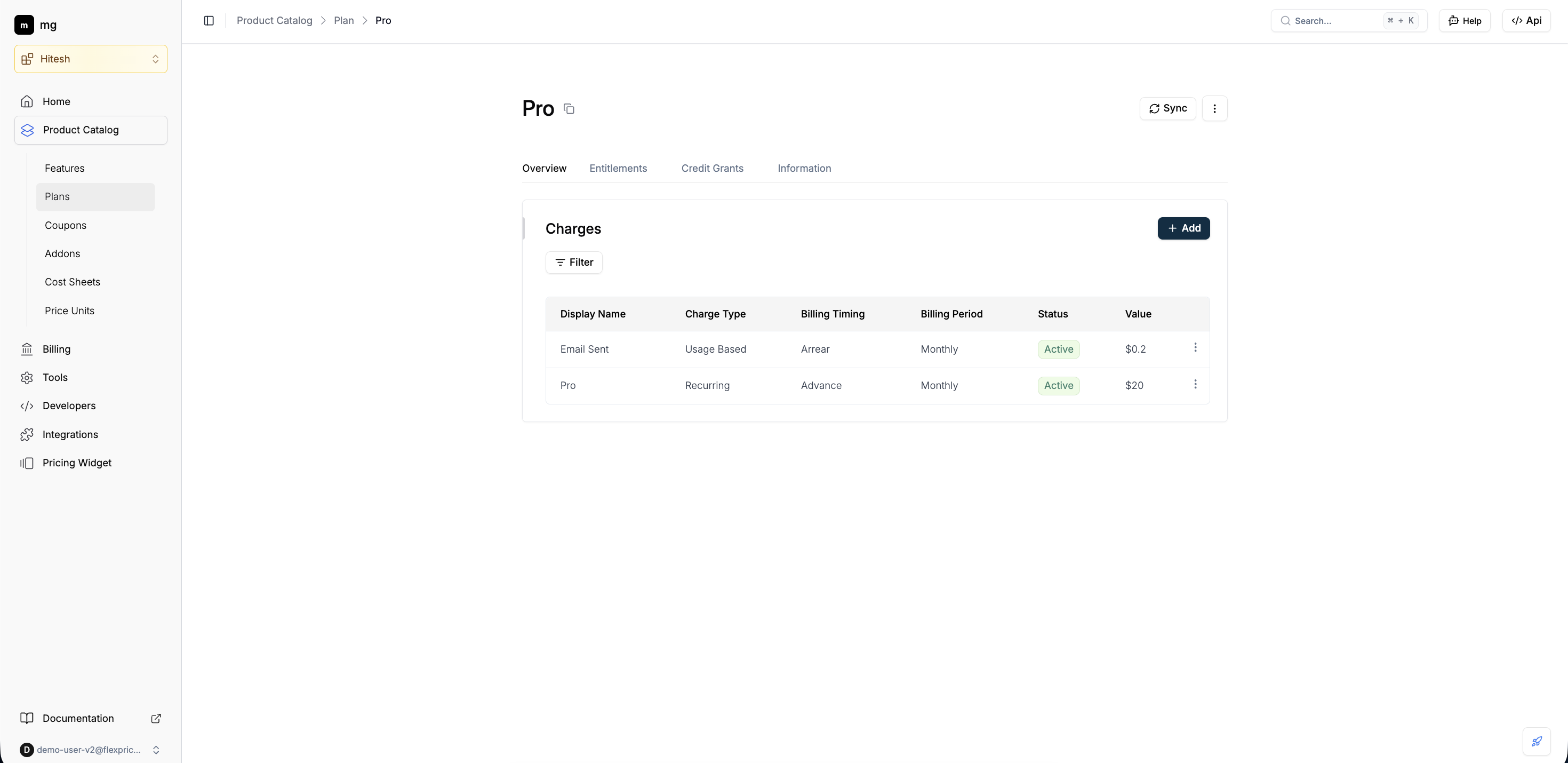 Click **Add** at the top-right to create a new plan. Enter plan details, then click **Next** to configure charges.
**Plan details:**
* **Plan Name**: `Pro`
* **Lookup Key**: e.g. `plan-pro` (Auto-generated)
* **Billing period**: e.g. Monthly
**Add hybrid charges:**
1. **Recurring charge:** Add a **recurring** charge (e.g. \$20/month). This is the base subscription fee for the tier. Click **Add** to save.
2. **Usage-based charge:** Add a **usage-based** charge for the metered feature **Emails Sent**. Set pricing (e.g. flat fee per email, or package/tiered with included quantity and overage). Example: first 50,000 emails included, then \$0.2 per 1,000 emails. Click **Add**, then **Save** to finalize the plan.
For more, check-out [Creating a Plan](/docs/product-catalogue/plans/create) and [Plans pricing](/docs/product-catalogue/plans/pricing) (recurring and hybrid charges).
Open the plan you created → **Entitlements** section. Click **Add** to link features to the plan.
Click **Add** at the top-right to create a new plan. Enter plan details, then click **Next** to configure charges.
**Plan details:**
* **Plan Name**: `Pro`
* **Lookup Key**: e.g. `plan-pro` (Auto-generated)
* **Billing period**: e.g. Monthly
**Add hybrid charges:**
1. **Recurring charge:** Add a **recurring** charge (e.g. \$20/month). This is the base subscription fee for the tier. Click **Add** to save.
2. **Usage-based charge:** Add a **usage-based** charge for the metered feature **Emails Sent**. Set pricing (e.g. flat fee per email, or package/tiered with included quantity and overage). Example: first 50,000 emails included, then \$0.2 per 1,000 emails. Click **Add**, then **Save** to finalize the plan.
For more, check-out [Creating a Plan](/docs/product-catalogue/plans/create) and [Plans pricing](/docs/product-catalogue/plans/pricing) (recurring and hybrid charges).
Open the plan you created → **Entitlements** section. Click **Add** to link features to the plan.
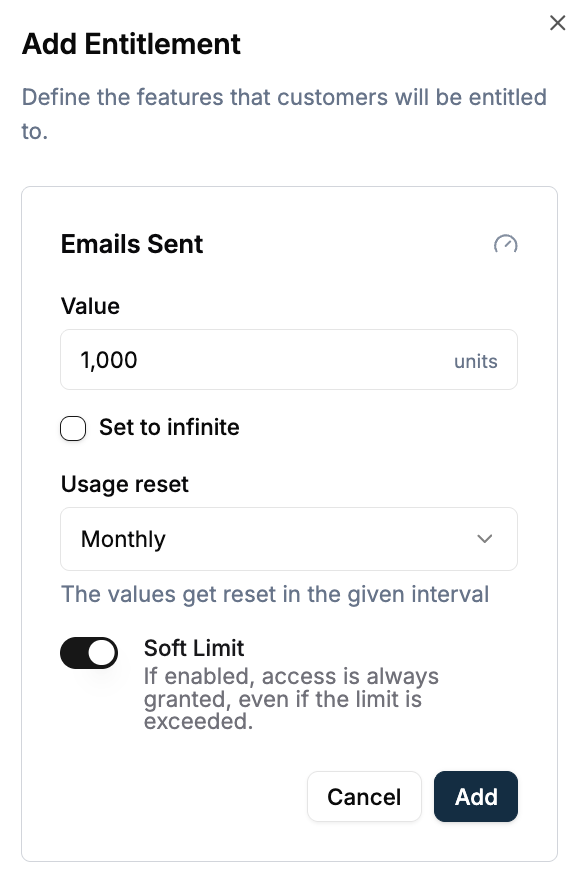 **Link the metered feature** (Emails Sent) to the plan:
* Set **included quantity** (e.g. 50,000 emails per month) or leave uncapped.
* Set **usage reset** (e.g. monthly) so limits reset each billing period.
* Choose **soft limit** (overage allowed, with billing per plan) or **hard limit** (strict cap).
If you created **boolean or static features** (e.g. Analytics, Slack support), add them to the plan and set grant/restrict so higher tiers get access. Click **Save**.
For more, check-out [Linking features to plans](/docs/product-catalogue/features/linking-to-plans).
Navigate to **Flexprice Dashboard** → **Customer Management** → **Customers**
Click **Add Customer**. Enter **Customer Name** and **External ID** (your system’s identifier; use this in APIs for usage and lookups).
**Required:**
* **Customer Name**: e.g. `flexprice organisation`
* **External ID**: e.g. `cust-flexprice-organisation`
Click **Save** to create the customer. For more, check-out [Customer Management](/docs/customers/create).
Open the customer you created, then click **Add Subscription**.
**Link the metered feature** (Emails Sent) to the plan:
* Set **included quantity** (e.g. 50,000 emails per month) or leave uncapped.
* Set **usage reset** (e.g. monthly) so limits reset each billing period.
* Choose **soft limit** (overage allowed, with billing per plan) or **hard limit** (strict cap).
If you created **boolean or static features** (e.g. Analytics, Slack support), add them to the plan and set grant/restrict so higher tiers get access. Click **Save**.
For more, check-out [Linking features to plans](/docs/product-catalogue/features/linking-to-plans).
Navigate to **Flexprice Dashboard** → **Customer Management** → **Customers**
Click **Add Customer**. Enter **Customer Name** and **External ID** (your system’s identifier; use this in APIs for usage and lookups).
**Required:**
* **Customer Name**: e.g. `flexprice organisation`
* **External ID**: e.g. `cust-flexprice-organisation`
Click **Save** to create the customer. For more, check-out [Customer Management](/docs/customers/create).
Open the customer you created, then click **Add Subscription**.
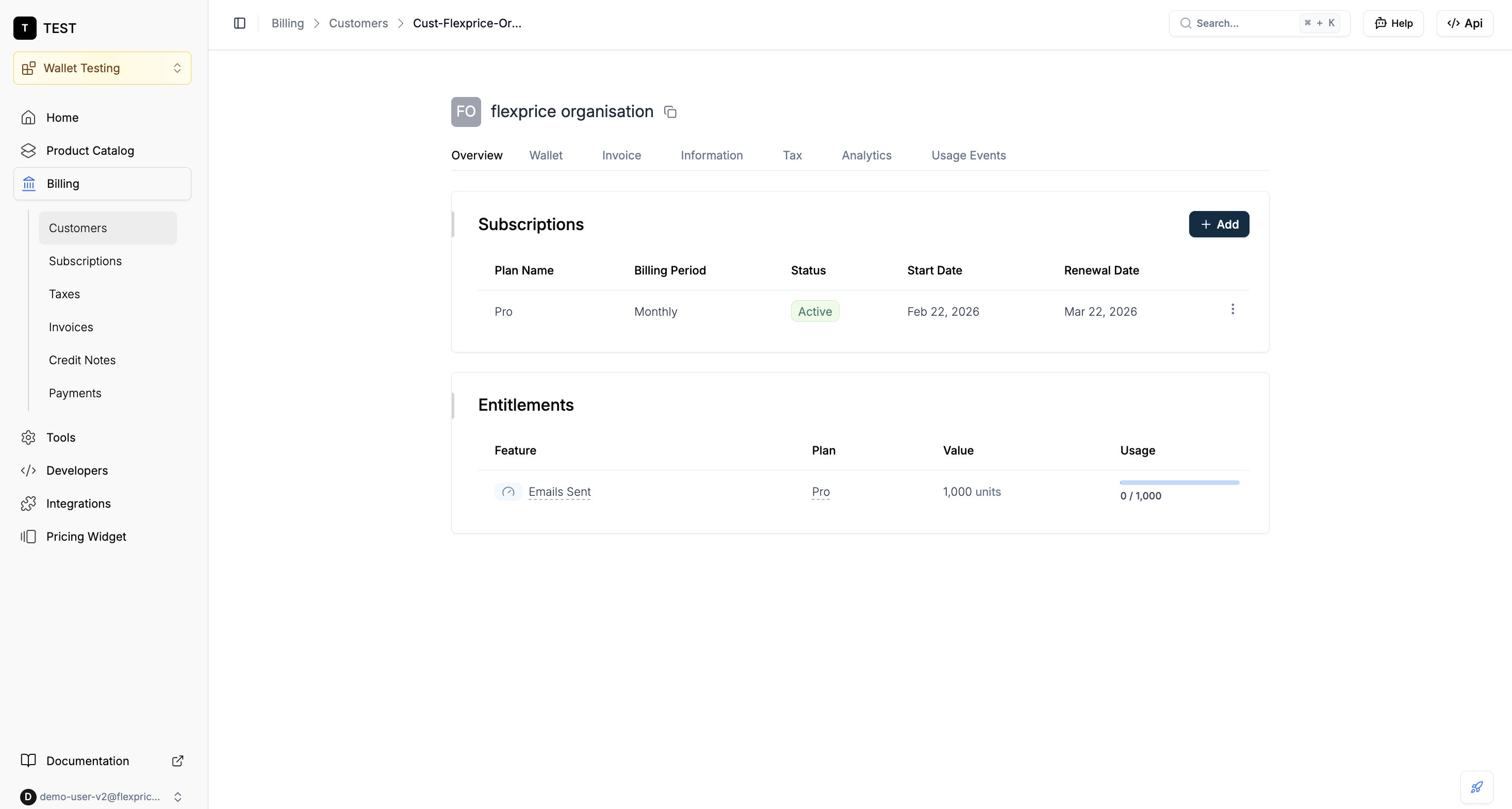 * **Select plan**: Choose **Transactional Pro** (or the plan you created).
* **Start date**: Set subscription start (billing and entitlements apply from this date).
Click **Save** (or **Add Subscription**). The customer now has the plan’s recurring charge and entitlement to the linked features and usage limits. For more, check-out [Create Subscription](/docs/subscriptions/customers-create-subscription).
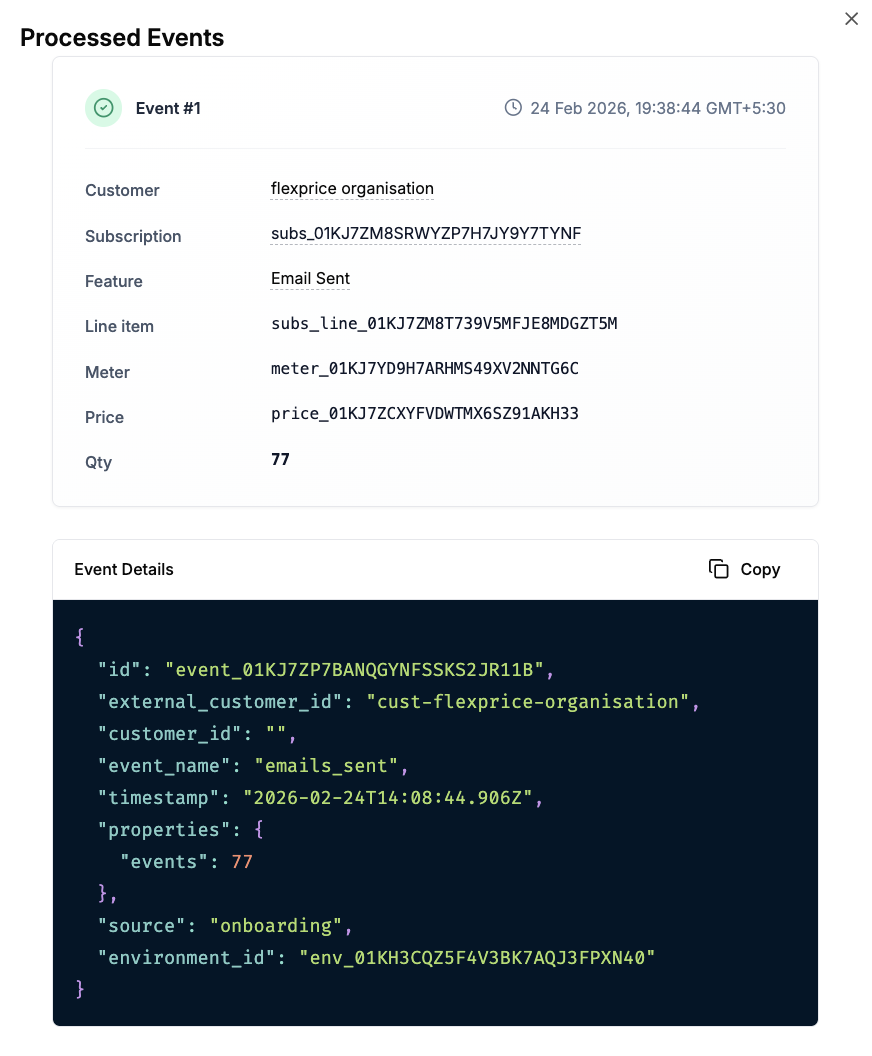
Send **usage events** to Flexprice with the same **event name** as the metered feature (e.g. `emails.sent`). Usage is aggregated and billed according to the plan’s usage-based charges and respects the entitlements (included quantity, soft/hard limit).
* **Verify events:** Use the Event Debugger or usage views to confirm events are received and attributed to the customer.
* **Select plan**: Choose **Transactional Pro** (or the plan you created).
* **Start date**: Set subscription start (billing and entitlements apply from this date).
Click **Save** (or **Add Subscription**). The customer now has the plan’s recurring charge and entitlement to the linked features and usage limits. For more, check-out [Create Subscription](/docs/subscriptions/customers-create-subscription).
Send **usage events** to Flexprice with the same **event name** as the metered feature (e.g. `emails.sent`). Usage is aggregated and billed according to the plan’s usage-based charges and respects the entitlements (included quantity, soft/hard limit).
* **Verify events:** Use the Event Debugger or usage views to confirm events are received and attributed to the customer.
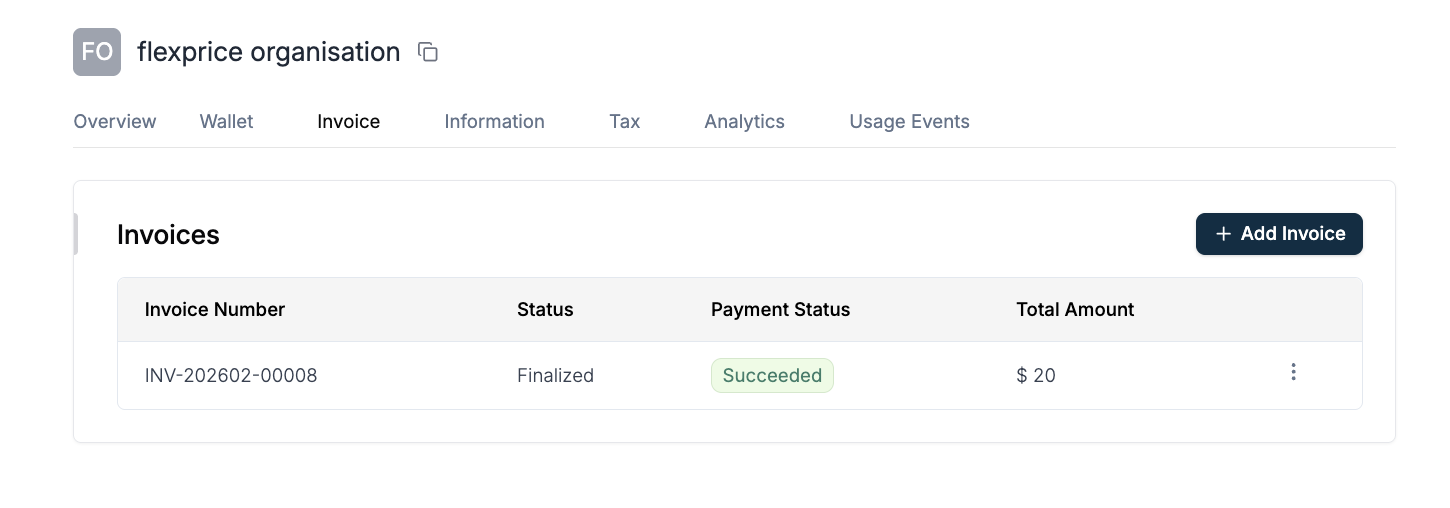
 * **Invoices:** Generated at the end of each billing cycle; they include the recurring fee and usage-based line items.
 For more, check-out [Connecting to Billing](/docs/event-ingestion/connecting-to-billing) and your API reference for sending usage events.
## Next Steps
* **Map your app to Flexprice:** Emit usage events that match the metered feature event names (e.g. `emails.sent`) and associate them with the customer (e.g. via External ID).
* **Configure overage and limits:** Use [Linking features to plans](/docs/product-catalogue/features/linking-to-plans) to set soft vs hard limits and overage pricing per plan.
* **Add more plans:** Create Free, Scale, and Enterprise plans with different recurring fees, usage tiers, and entitlements (e.g. analytics, retention) to mirror Resend’s tiers.
For event ingestion and billing flow, check-out [Connecting to Billing](/docs/event-ingestion/connecting-to-billing). For plan and charge configuration, check-out [Creating a Plan](/docs/product-catalogue/plans/create) and [Linking features to plans](/docs/product-catalogue/features/linking-to-plans).
For more, check-out [Connecting to Billing](/docs/event-ingestion/connecting-to-billing) and your API reference for sending usage events.
## Next Steps
* **Map your app to Flexprice:** Emit usage events that match the metered feature event names (e.g. `emails.sent`) and associate them with the customer (e.g. via External ID).
* **Configure overage and limits:** Use [Linking features to plans](/docs/product-catalogue/features/linking-to-plans) to set soft vs hard limits and overage pricing per plan.
* **Add more plans:** Create Free, Scale, and Enterprise plans with different recurring fees, usage tiers, and entitlements (e.g. analytics, retention) to mirror Resend’s tiers.
For event ingestion and billing flow, check-out [Connecting to Billing](/docs/event-ingestion/connecting-to-billing). For plan and charge configuration, check-out [Creating a Plan](/docs/product-catalogue/plans/create) and [Linking features to plans](/docs/product-catalogue/features/linking-to-plans).