> ## Documentation Index
> Fetch the complete documentation index at: https://docs.flexprice.io/llms.txt
> Use this file to discover all available pages before exploring further.
# Create Plans and Prices
> How a plan carries prices, entitlements, and credit grants to subscriptions, and how to set up and change prices so each subscription bills correctly
A plan is the template you create subscriptions from. Its prices charge for the metered features you defined and for fixed fees, and a new subscription copies the plan's matching prices into its own line items. A price set up wrong bills nothing, blocks subscription creation, or leaves existing subscribers on an old rate.
Create a plan with [Create plan](/api-reference/plans/create-plan), then add prices with [Create price](/api-reference/prices/create-price) or [Create prices in bulk](/api-reference/prices/create-prices-in-bulk), with `entity_type` set to `PLAN` and `entity_id` set to the plan's ID. Add entitlements with [Create entitlement](/api-reference/entitlements/create-entitlement). For step-by-step setup, see [Creating a plan](/docs/product-catalogue/plans/create) and [Updating a Plan Price](/docs/product-catalogue/plans/update-price).
## Packaging prices, entitlements, and credit grants in a plan
A plan holds three kinds of records:
| On the plan | What it does | What a new subscription gets |
| - | - | - |
| **Prices** | Charge for usage or for a fixed fee | A line item for each price that matches the subscription's currency and billing period |
| **Entitlements** | Grant access to a feature, or a usage allowance | The plan's entitlements, plus those of its addons |
| **Credit grants** | Add credits to the customer's prepaid wallet | A copy of each grant, unless you pass `credit_grants` when you create the subscription |
Because a subscription copies prices when you create it, changing a plan's price doesn't change what existing subscribers pay. See [Changing a price on a plan with live subscriptions](#changing-a-price-on-a-plan-with-live-subscriptions).
An addon holds the same three records, but a subscription has exactly one plan. You attach addons when you create the subscription or later with [Add addon to subscription](/api-reference/subscriptions/add-addon-to-subscription). The attach fails unless one of the addon's prices has the subscription's currency and a billing period that equals or divides evenly into the subscription's, or is `ONETIME`.
## Choosing the type, billing model, and cadence of a price
This [Create price](/api-reference/prices/create-price) body adds a usage charge to a plan, billed in graduated tiers at the end of each month:
```json theme={null}
{
"entity_type": "PLAN",
"entity_id": "plan_123", // the plan's ID
"type": "USAGE",
"meter_id": "meter_456", // the metered feature's meter_id
"currency": "usd",
"billing_period": "MONTHLY",
"billing_period_count": 1, // required: there is no default
"invoice_cadence": "ARREAR", // usage is always ARREAR
"billing_model": "TIERED",
"tier_mode": "SLAB", // set it on every TIERED price
"tiers": [
{ "up_to": 1000, "unit_amount": "0.10" },
{ "up_to": 5000, "unit_amount": "0.08" },
{ "up_to": null, "unit_amount": "0.05" }
]
}
```
* **`type`**
`USAGE` charges for a metered feature: set `meter_id` to the feature's `meter_id`. `FIXED` charges a recurring or one-time fee, such as a platform fee or a per-seat fee, priced for the line item's quantity. That quantity starts at 1, or at `min_quantity` when you set one.
* **`billing_model`**
`FLAT_FEE` charges `amount` per unit. `PACKAGE` charges `amount` for each block of `transform_quantity.divide_by` units. `TIERED` charges by `tiers` and `tier_mode`.
* **`currency`, `billing_period`, and `billing_period_count`**
Decide which subscriptions get the price. `billing_period` is `DAILY`, `WEEKLY`, `MONTHLY`, `QUARTERLY`, `HALF_YEARLY`, `ANNUAL`, or `ONETIME`. `billing_period_count` has no default, so send `1` unless the price covers several periods.
* **`invoice_cadence`**
`ADVANCE` bills a fixed charge at the start of the period it covers, and `ARREAR` bills it at the end. Usage is always billed in arrear.
* **`price_unit_type`**
`FIAT` by default. `CUSTOM`, with a `price_unit_config`, prices in your own [pricing unit](/docs/product-catalogue/custom-pricing/pricing-unit), such as credits. Flexprice converts the amount into `currency` at the unit's `conversion_rate` when it creates the price.
### Price combinations that Flexprice rejects
Creating a price with any of these fails with `400` and the `message` shown:
| Request | `message` |
| - | - |
| `type: USAGE` with `invoice_cadence: ADVANCE` | Please use ARREAR invoice cadence for USAGE price type |
| `billing_period: ONETIME` with `invoice_cadence: ARREAR` | One-time charges are always billed in advance |
| `trial_period_days` on a `USAGE` or `ONETIME` price | trial\_period\_days can only be set for recurring fixed prices |
| `billing_model: PACKAGE` without `transform_quantity` | Please provide the number of units to set up package pricing |
| `billing_model: TIERED` without `tiers` | Price tiers are required to set up tiered pricing |
| `billing_period_count` missing or `0` | Billing period count must be greater than 0 |
The first two rules together mean that a `ONETIME` price is always `FIXED`.
## Pricing usage with volume and slab tiers
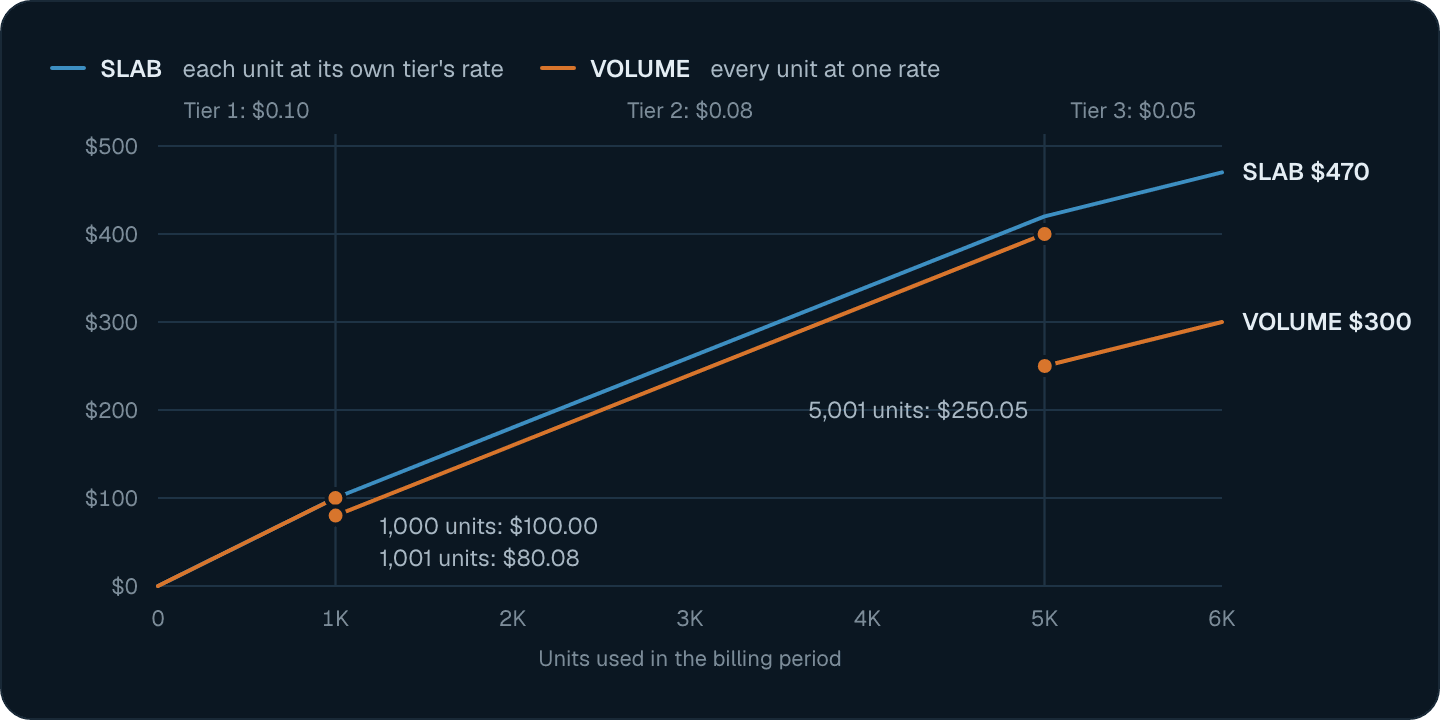
Each tier's `up_to` is inclusive: with `up_to: 1000`, the 1,000th unit is in that tier. `tier_mode` decides how the tiers combine. For the tiers above and 3,000 units in a period:
| `tier_mode` | How it prices | Charge for 3,000 units |
| - | - | - |
| `VOLUME` | Every unit at the rate of the tier the total falls in | 3,000 × \$0.08 = \$240.00 |
| `SLAB` | Each unit at the rate of the tier it falls in | 1,000 × \$0.10 + 2,000 × \$0.08 = \$260.00 |
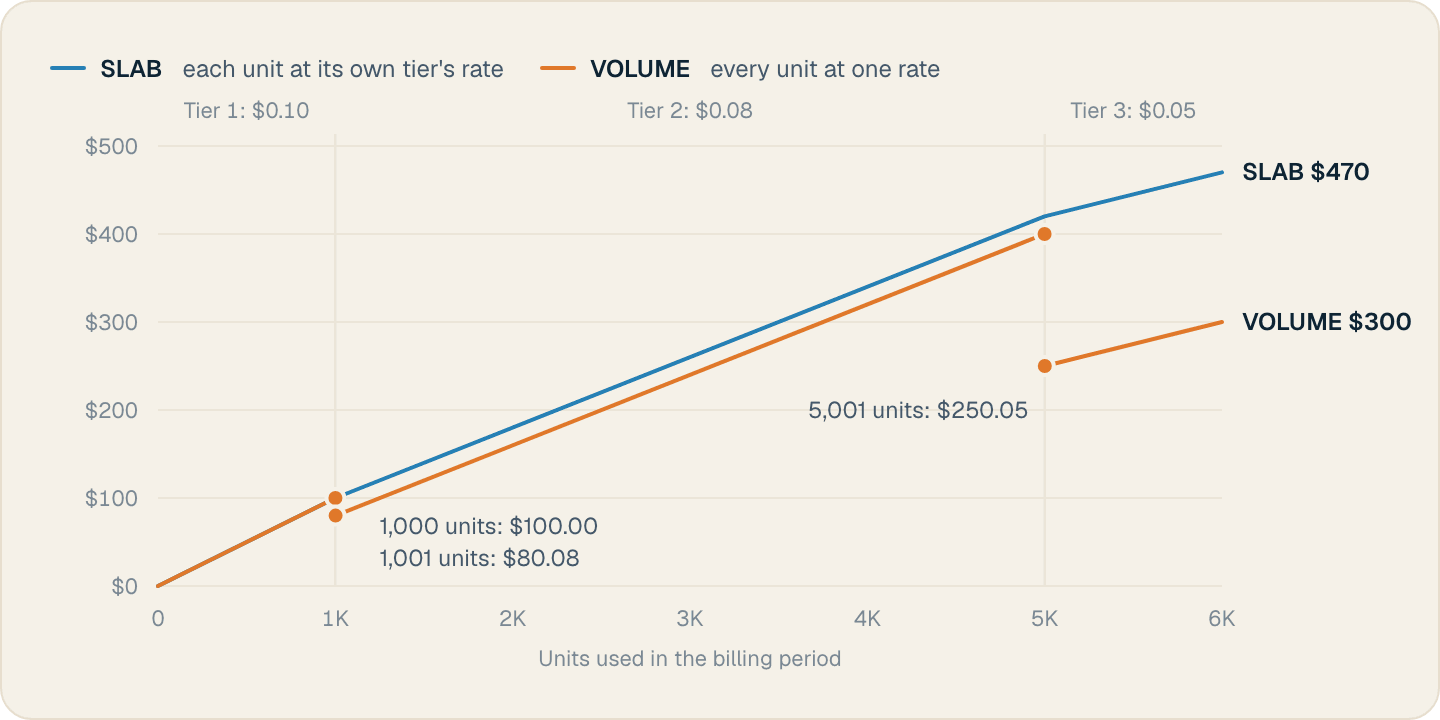
 * **Leave `up_to` null on the last tier.** With `SLAB`, units above the highest `up_to` aren't charged. With `VOLUME`, they're charged at the last tier's rate.
* **Check the `VOLUME` boundaries.** Crossing a boundary reprices every unit, so 1,000 units cost \$100.00 and 1,001 units cost \$80.08. Use `SLAB` when the bill should never drop as usage grows.
* **Use `flat_amount` for a fixed fee per tier.** It's added once for the tier the total falls in with `VOLUME`, and once for each tier that usage reaches with `SLAB`.
Set `tier_mode` on every `TIERED` price. Flexprice accepts a `TIERED` price without one, and that price calculates every charge as 0.
## Rounding usage into packages
A `PACKAGE` price charges `amount` for each block of `transform_quantity.divide_by` units. `transform_quantity.round` handles the last, partial block: `up`, the default, bills it as a full block, and `down` drops it. With `"amount": "10"` and `"divide_by": 1000`:
| Usage | `round: up` | `round: down` |
| - | - | - |
| 2,500 units | 3 packages, \$30 | 2 packages, \$20 |
| 999 units | 1 package, \$10 | 0 packages, \$0 |
With `round: down`, a customer who stays below one block pays nothing for the price.
## Matching plan prices to each subscription by currency and billing period
One plan can hold prices in several currencies and billing periods. When you [create a subscription](/api-reference/subscriptions/create-subscription) with a `currency` and a `billing_period`, Flexprice attaches each plan price that hasn't ended and that:
* has the same `currency`, ignoring case, and
* has the same `billing_period`, or is `ONETIME`.
* **Leave `up_to` null on the last tier.** With `SLAB`, units above the highest `up_to` aren't charged. With `VOLUME`, they're charged at the last tier's rate.
* **Check the `VOLUME` boundaries.** Crossing a boundary reprices every unit, so 1,000 units cost \$100.00 and 1,001 units cost \$80.08. Use `SLAB` when the bill should never drop as usage grows.
* **Use `flat_amount` for a fixed fee per tier.** It's added once for the tier the total falls in with `VOLUME`, and once for each tier that usage reaches with `SLAB`.
Set `tier_mode` on every `TIERED` price. Flexprice accepts a `TIERED` price without one, and that price calculates every charge as 0.
## Rounding usage into packages
A `PACKAGE` price charges `amount` for each block of `transform_quantity.divide_by` units. `transform_quantity.round` handles the last, partial block: `up`, the default, bills it as a full block, and `down` drops it. With `"amount": "10"` and `"divide_by": 1000`:
| Usage | `round: up` | `round: down` |
| - | - | - |
| 2,500 units | 3 packages, \$30 | 2 packages, \$20 |
| 999 units | 1 package, \$10 | 0 packages, \$0 |
With `round: down`, a customer who stays below one block pays nothing for the price.
## Matching plan prices to each subscription by currency and billing period
One plan can hold prices in several currencies and billing periods. When you [create a subscription](/api-reference/subscriptions/create-subscription) with a `currency` and a `billing_period`, Flexprice attaches each plan price that hasn't ended and that:
* has the same `currency`, ignoring case, and
* has the same `billing_period`, or is `ONETIME`.
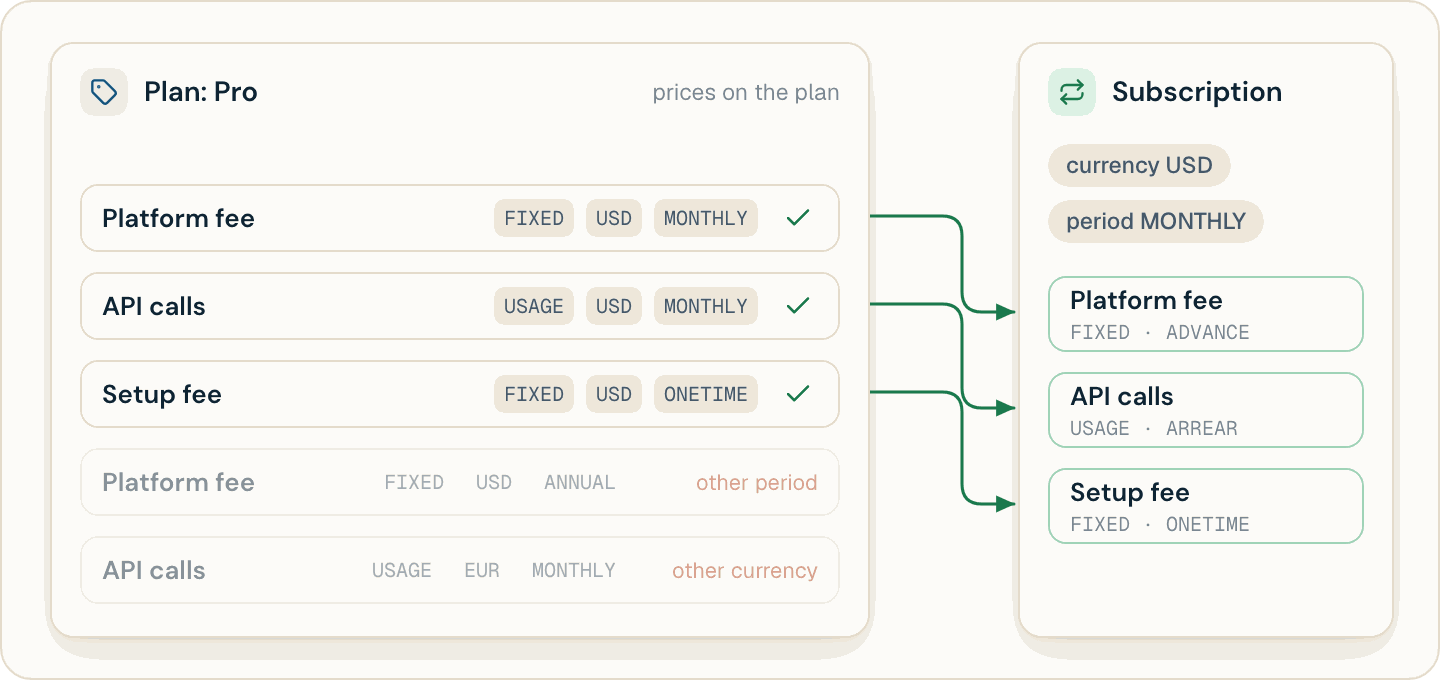
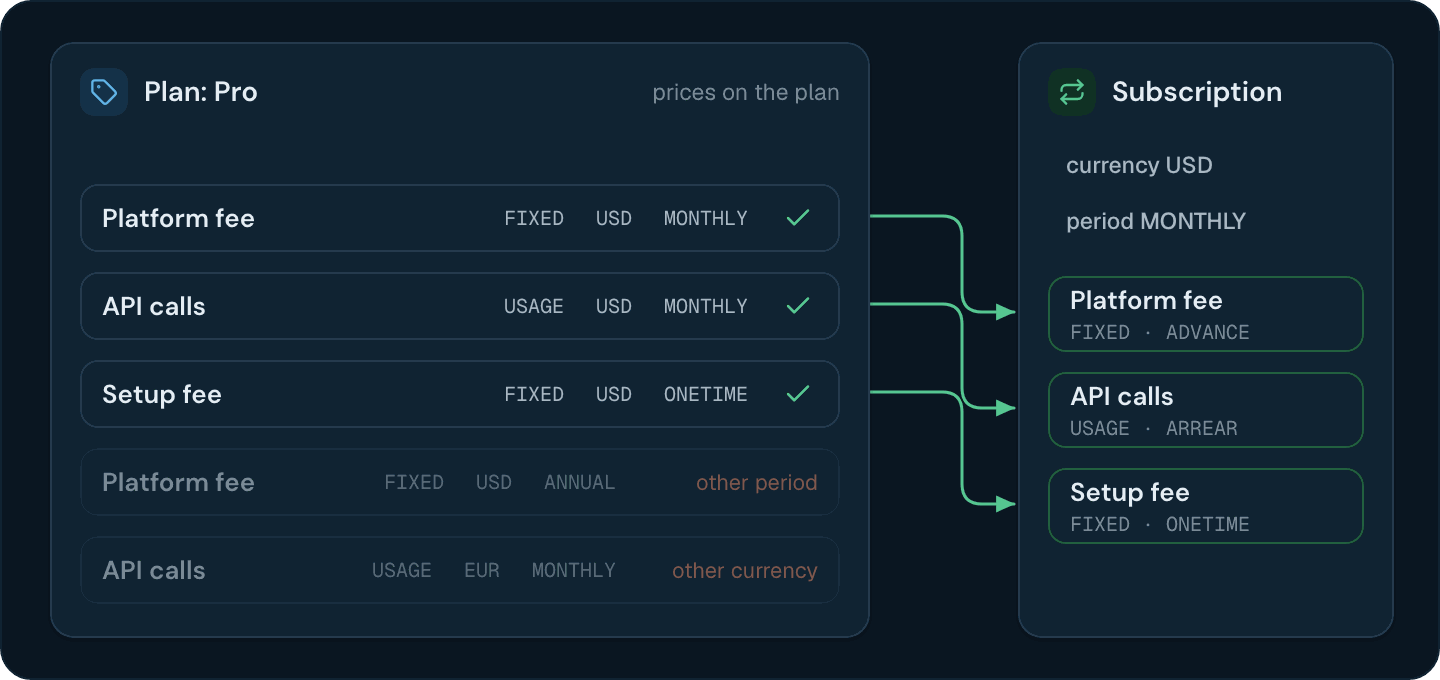 When no price matches, creating the subscription fails with `400` and the message "No prices match the subscription criteria". When the plan has no price with that billing period and no `ONETIME` price, the message is "The entity must have at least one price to create a subscription". Add a price for every currency and billing period you sell before you offer them.
Flexprice compares `billing_period`, not `billing_period_count`. A plan with a `MONTHLY` price and a `MONTHLY` price with `billing_period_count: 3` attaches both to every monthly subscription. Use `QUARTERLY` for a three-month price, or pass `include_price_ids` on the subscription to attach only the prices you list.
## Combining entitlements and prices on a metered feature
An entitlement controls what a customer can use, and a price controls what they pay. Subscription charges come from line items, and every line item comes from a price, so an entitlement alone never charges anything. For a metered feature:
| The plan has | In [Get customer entitlements](/api-reference/customers/get-customer-entitlements) | What the usage price bills |
| - | - | - |
| An entitlement and no price | Listed | Nothing |
| A price and no entitlement | Not listed | Every unit |
| Both, with `usage_limit` set | Listed | Only the usage above `usage_limit` |
| Both, with no `usage_limit` | Listed as unlimited | 0 |
With `usage_limit: 1000` and 1,500 units used in a billing period, the usage price bills 500 units, and its tiers apply to those 500. Set a `usage_limit` only for usage you include for free, and leave it out of a metered entitlement only when you don't charge for that usage. [Features](/docs/core-concepts/features) covers what an entitlement sets for each feature type.
## Changing a price on a plan with live subscriptions
[Update price](/api-reference/prices/update-price) treats two kinds of fields differently:
* **Pricing fields:** `amount`, `billing_model`, `tier_mode`, `tiers`, `transform_quantity`, `bucket_size`, `price_unit_amount`, and `price_unit_tiers`. Flexprice ends the price at `effective_from`, or now when you leave it out, and creates a new price with a new ID that starts at that moment. The response is the new price.
* **Other fields:** `display_name`, `description`, `lookup_key`, `metadata`, and `group_id`. Flexprice edits the price in place.
The new price keeps the old one's `type`, `currency`, billing period, `invoice_cadence`, and meter. `effective_from` needs a pricing field in the same request and can't be earlier than the price's `start_date`.
Existing subscriptions keep billing the old price, because their line items still point to it. Subscriptions you create after `effective_from` get only the new price. A subscription created before a future `effective_from` gets line items for both prices, and the old one doesn't end at `effective_from`. Unless you stop creating subscriptions on the plan until that date, update the price at the moment the change takes effect instead of scheduling it.
To move existing subscribers to new usage prices, call [Synchronize plan prices](/api-reference/plans/synchronize-plan-prices). It starts a background workflow over the plan's active, trialing, draft, and incomplete subscriptions that haven't been synced since its last usage price change, and for each one it:
* adds a line item for each usage price the subscription is missing that matches its currency, billing period, and billing period count, unless you overrode that price on the subscription, and
* ends each line item whose plan price has ended, at that price's end date.
You can run the sync as soon as you schedule a change: the old line item then ends at `effective_from`, and the new one starts there. [Get subscription (V2)](/api-reference/subscriptions/get-subscription-v2) returns `plan_prices_out_of_sync: true` until the sync reaches a subscription.
The sync adds usage prices only, but it ends the line item of any plan price that has ended, fixed prices included. After you change a fixed price, a subscription that the sync processes loses the old fixed charge and doesn't get the new one. Move existing subscribers to a new fixed amount with [Update subscription line item](/api-reference/subscriptions/update-subscription-line-item) first: a line item updated that way points to a price of its own, which the sync leaves alone.
What a plan contains and how you manage plans in Flexprice.
How one unit rate applies to all usage, set by the tier the total reaches.
When a charge is billed relative to the period it covers.
Change a plan price and sync the change to existing subscriptions.
This documentation is built and hosted on [Mintlify](https://mintlify.com), a developer documentation platform.
When no price matches, creating the subscription fails with `400` and the message "No prices match the subscription criteria". When the plan has no price with that billing period and no `ONETIME` price, the message is "The entity must have at least one price to create a subscription". Add a price for every currency and billing period you sell before you offer them.
Flexprice compares `billing_period`, not `billing_period_count`. A plan with a `MONTHLY` price and a `MONTHLY` price with `billing_period_count: 3` attaches both to every monthly subscription. Use `QUARTERLY` for a three-month price, or pass `include_price_ids` on the subscription to attach only the prices you list.
## Combining entitlements and prices on a metered feature
An entitlement controls what a customer can use, and a price controls what they pay. Subscription charges come from line items, and every line item comes from a price, so an entitlement alone never charges anything. For a metered feature:
| The plan has | In [Get customer entitlements](/api-reference/customers/get-customer-entitlements) | What the usage price bills |
| - | - | - |
| An entitlement and no price | Listed | Nothing |
| A price and no entitlement | Not listed | Every unit |
| Both, with `usage_limit` set | Listed | Only the usage above `usage_limit` |
| Both, with no `usage_limit` | Listed as unlimited | 0 |
With `usage_limit: 1000` and 1,500 units used in a billing period, the usage price bills 500 units, and its tiers apply to those 500. Set a `usage_limit` only for usage you include for free, and leave it out of a metered entitlement only when you don't charge for that usage. [Features](/docs/core-concepts/features) covers what an entitlement sets for each feature type.
## Changing a price on a plan with live subscriptions
[Update price](/api-reference/prices/update-price) treats two kinds of fields differently:
* **Pricing fields:** `amount`, `billing_model`, `tier_mode`, `tiers`, `transform_quantity`, `bucket_size`, `price_unit_amount`, and `price_unit_tiers`. Flexprice ends the price at `effective_from`, or now when you leave it out, and creates a new price with a new ID that starts at that moment. The response is the new price.
* **Other fields:** `display_name`, `description`, `lookup_key`, `metadata`, and `group_id`. Flexprice edits the price in place.
The new price keeps the old one's `type`, `currency`, billing period, `invoice_cadence`, and meter. `effective_from` needs a pricing field in the same request and can't be earlier than the price's `start_date`.
Existing subscriptions keep billing the old price, because their line items still point to it. Subscriptions you create after `effective_from` get only the new price. A subscription created before a future `effective_from` gets line items for both prices, and the old one doesn't end at `effective_from`. Unless you stop creating subscriptions on the plan until that date, update the price at the moment the change takes effect instead of scheduling it.
To move existing subscribers to new usage prices, call [Synchronize plan prices](/api-reference/plans/synchronize-plan-prices). It starts a background workflow over the plan's active, trialing, draft, and incomplete subscriptions that haven't been synced since its last usage price change, and for each one it:
* adds a line item for each usage price the subscription is missing that matches its currency, billing period, and billing period count, unless you overrode that price on the subscription, and
* ends each line item whose plan price has ended, at that price's end date.
You can run the sync as soon as you schedule a change: the old line item then ends at `effective_from`, and the new one starts there. [Get subscription (V2)](/api-reference/subscriptions/get-subscription-v2) returns `plan_prices_out_of_sync: true` until the sync reaches a subscription.
The sync adds usage prices only, but it ends the line item of any plan price that has ended, fixed prices included. After you change a fixed price, a subscription that the sync processes loses the old fixed charge and doesn't get the new one. Move existing subscribers to a new fixed amount with [Update subscription line item](/api-reference/subscriptions/update-subscription-line-item) first: a line item updated that way points to a price of its own, which the sync leaves alone.
What a plan contains and how you manage plans in Flexprice.
How one unit rate applies to all usage, set by the tier the total reaches.
When a charge is billed relative to the period it covers.
Change a plan price and sync the change to existing subscriptions.
This documentation is built and hosted on [Mintlify](https://mintlify.com), a developer documentation platform.