> ## Documentation Index
> Fetch the complete documentation index at: https://docs.flexprice.io/llms.txt
> Use this file to discover all available pages before exploring further.
# Subscribe a Customer to a Plan
> How a Flexprice subscription picks up a plan's prices, which usage it bills, and how to change or cancel it without losing or double-billing revenue
A subscription puts one [customer](/docs/core-concepts/customers) on one [plan](/docs/core-concepts/plans-and-prices) from a start date. It copies some of the plan's prices into its own line items, bills the customer's usage against them, and closes each billing period with an [invoice](/docs/core-concepts/invoices). Set up badly, it leaves a price off, so that usage is never billed, or bills usage that another of the customer's subscriptions already bills.
Create subscriptions with [Create subscription](/api-reference/subscriptions/create-subscription), move them to another plan with [Execute a plan change (v2, swap in place)](/api-reference/subscriptions/execute-a-plan-change-v2-swap-in-place), and end them with [Cancel subscription](/api-reference/subscriptions/cancel-subscription). For walkthroughs and every option, see [Create a Subscription](/docs/subscriptions/customers-create-subscription).
## Subscription fields that tie a customer to a plan
A create request names the customer, the plan, and which of the plan's prices to bill:
```json theme={null}
{
"external_customer_id": "cust_123", // or customer_id
"plan_id": "plan_123", // required
"currency": "USD", // required: selects plan prices
"billing_period": "MONTHLY", // required: selects plan prices
"billing_cycle": "anniversary", // default; or "calendar"
"start_date": "2026-11-01T00:00:00Z", // default: the time of the request
"end_date": "2027-11-01T00:00:00Z" // optional: no end by default
}
```
* **`external_customer_id` or `customer_id`**
The customer must exist and be active, and so must the plan. Billing periods follow the customer's [timezone](/docs/customers/timezone-aware-billing), and a `timezone` sent with the subscription is ignored.
* **`end_date`**
The last billing period stops at `end_date`, and the subscription is cancelled once that period is invoiced.
* **`trial_period_days`**
Leave it out to inherit the trial set on the plan's recurring fixed prices, send `0` for no trial, or send a number of days. The trial starts at `start_date`, and the subscription is `trialing` until it ends. See [Trialing](/docs/subscriptions/workflows/trialing).
## Attaching plan prices to a subscription
Flexprice bills only a subscription's line items, and creation copies only some of the plan's prices into them. Without `include_price_ids`, a plan price is copied when:
* its currency matches the subscription's `currency`,
* its `billing_period` equals the subscription's, or it's a one-time price, and
* it hasn't ended.
Every other price is skipped without an error. Only when no price matches does the request fail, with a `400`.
A plan that bills usage monthly and a platform fee annually, subscribed with `"billing_period": "ANNUAL"`, gets the fee and drops the monthly usage price, so that usage is never billed.
To attach a price on a shorter cadence, such as a `MONTHLY` usage price on a `QUARTERLY` subscription, list every price to attach in `include_price_ids`. Flexprice then attaches only the listed prices, and rejects the request if one isn't on the plan, isn't in the subscription's currency, or has a cadence that neither equals nor divides the subscription's. Check what was attached with [Get subscription (V2)](/api-reference/subscriptions/get-subscription-v2) and `expand=subscription_line_items`.
## Choosing a subscription start date
Each line item counts the customer's events from its own start: the subscription's `start_date`, or a later start date on the price. Events timestamped earlier are never billed by the subscription, and `start_date` defaults to the time of the request.
* **A past `start_date`** bills usage you've already sent. Flexprice invoices each elapsed period, usage included, on its next billing run.
* **A future `start_date`** doesn't delay the first invoice: the first period's in-advance charges are invoiced at creation. To sign a deal now and bill it later, create the subscription with `"subscription_status": "draft"`. A draft raises no invoices until you call [Activate draft subscription](/api-reference/subscriptions/activate-draft-subscription), so call it when billing should begin, with that date as `start_date`.
## Choosing anniversary or calendar billing periods
With `"billing_cycle": "anniversary"`, the default, billing periods repeat from `start_date`. `billing_anchor` moves the boundary to another day, on anniversary subscriptions only. With `"billing_cycle": "calendar"`, periods start on calendar boundaries in the customer's timezone, so the first period is short: a monthly subscription that starts on April 15 has a first period from April 15 to May 1.
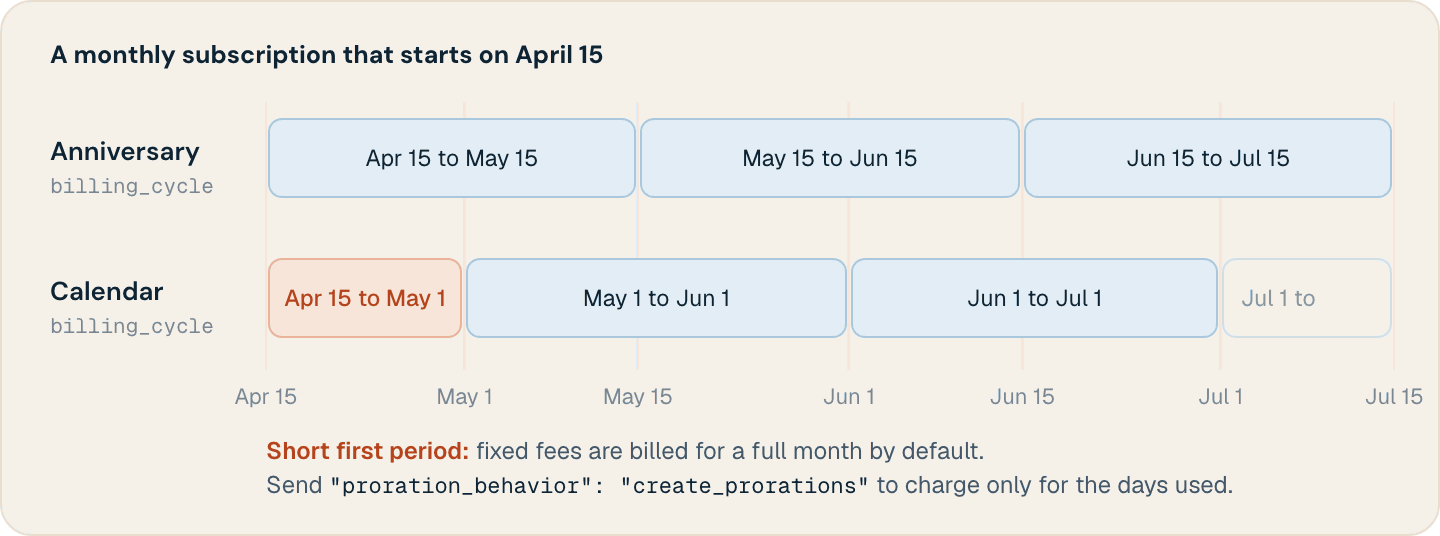
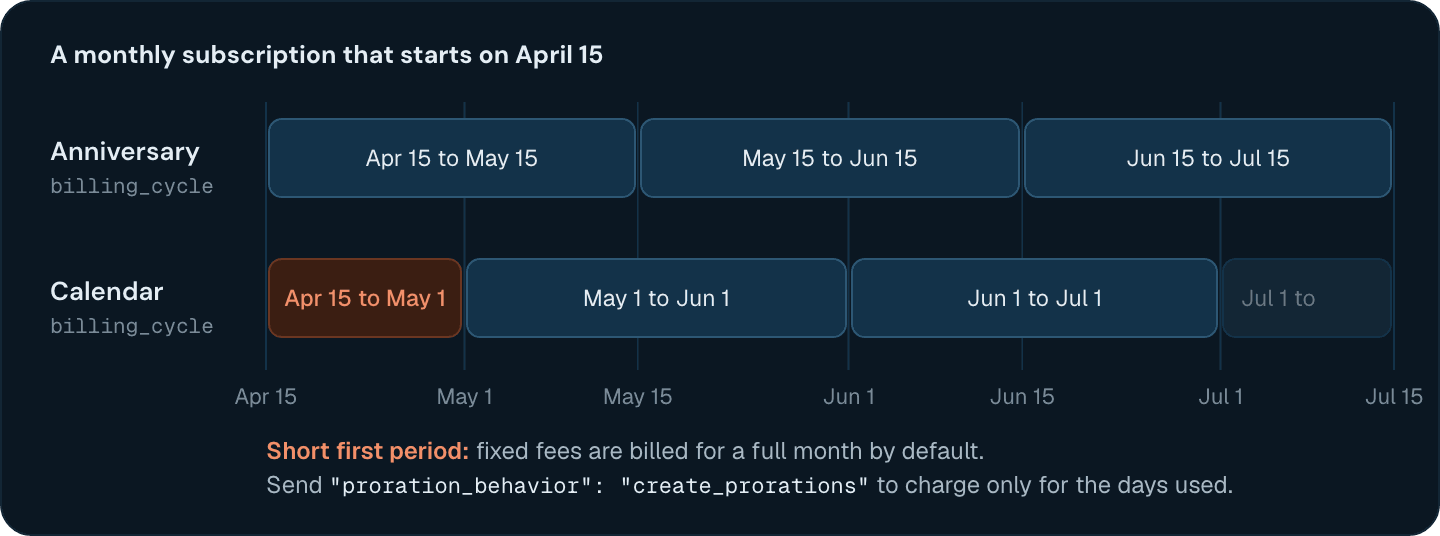 By default, the short first period of a calendar subscription bills fixed charges in full, so a customer who starts on April 15 pays a whole month's fee for half a month. Send `"proration_behavior": "create_prorations"` to charge only for the part of the period the customer gets. Flexprice rejects `create_prorations` with a `start_date` before today (UTC).
## Running several subscriptions for one customer
A customer can hold several subscriptions, each billed on its own schedule. Events aren't assigned to a subscription, though: a usage line item bills every event of the customer that its feature counts, between the line item's start and end dates. If two of a customer's subscriptions price the same metered feature, both bill the same events, and the customer pays for that usage twice.
By default, the short first period of a calendar subscription bills fixed charges in full, so a customer who starts on April 15 pays a whole month's fee for half a month. Send `"proration_behavior": "create_prorations"` to charge only for the part of the period the customer gets. Flexprice rejects `create_prorations` with a `start_date` before today (UTC).
## Running several subscriptions for one customer
A customer can hold several subscriptions, each billed on its own schedule. Events aren't assigned to a subscription, though: a usage line item bills every event of the customer that its feature counts, between the line item's start and end dates. If two of a customer's subscriptions price the same metered feature, both bill the same events, and the customer pays for that usage twice.
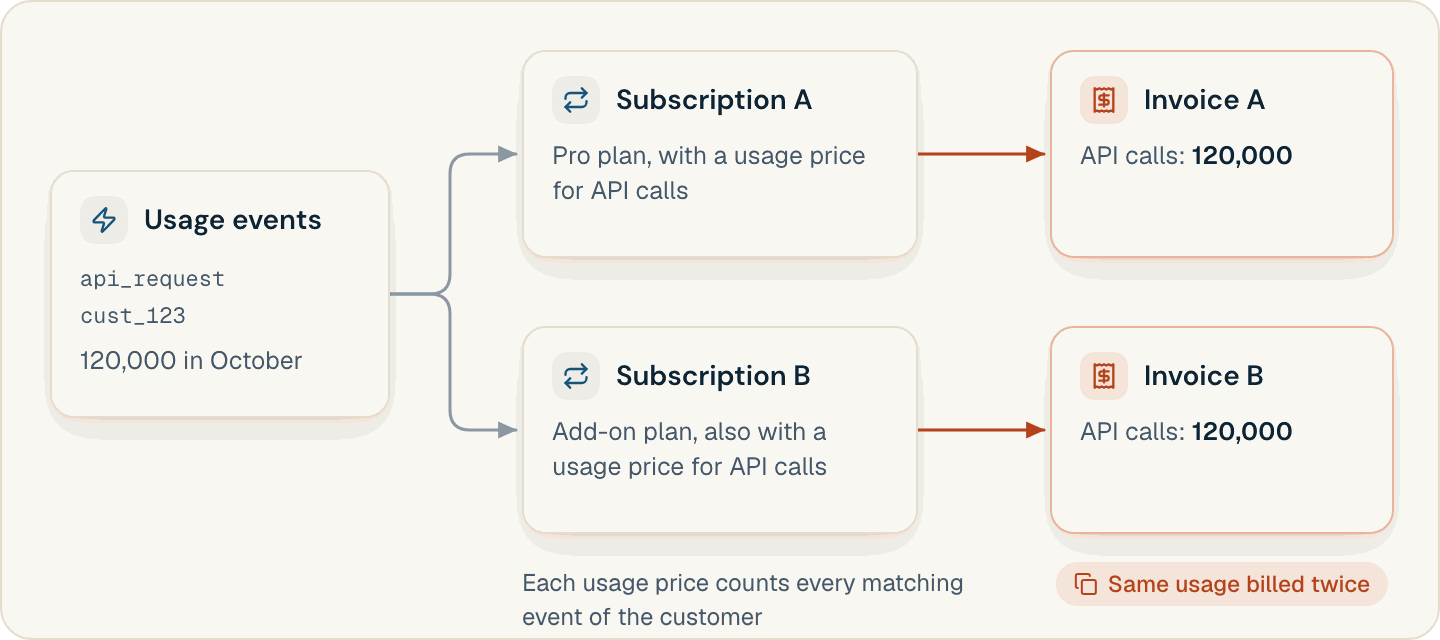
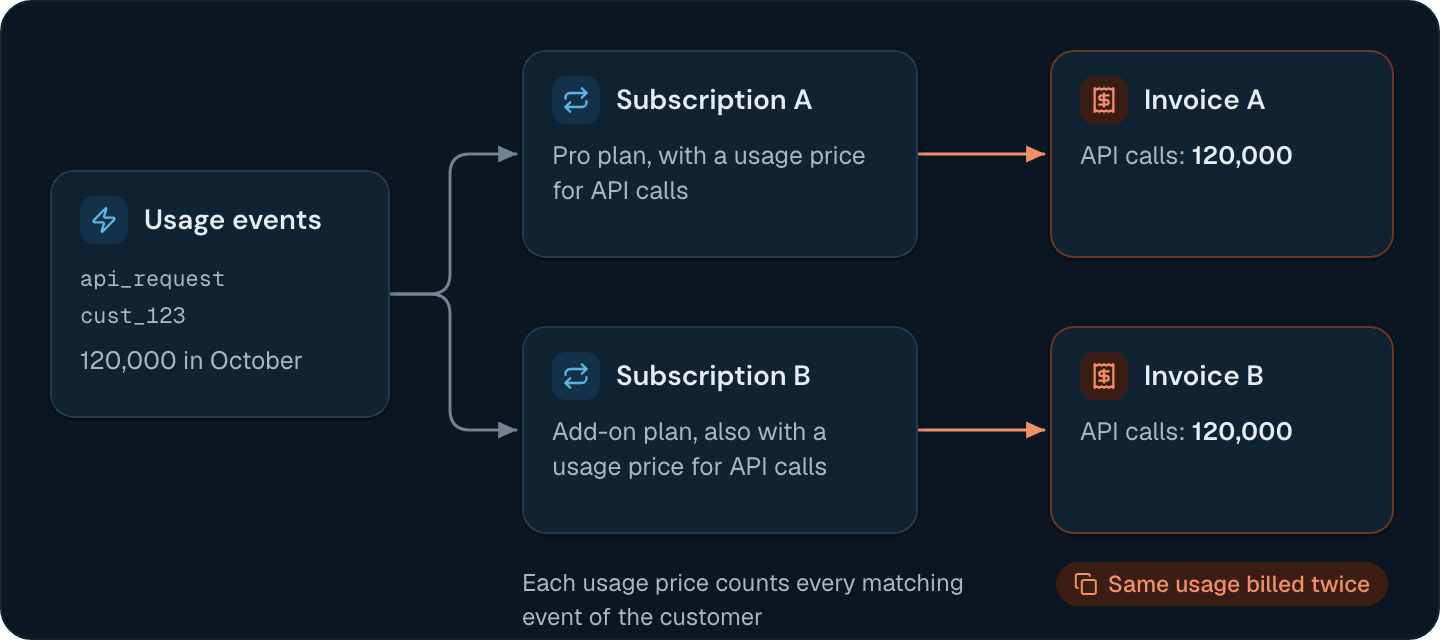 **Price each metered feature on only one of a customer's subscriptions.** Before you create one, check which features the customer's `active` and `trialing` subscriptions price with [Get subscriptions for customer by external ID](/api-reference/customers/get-subscriptions-for-customer-by-external-id). To bill one kind of usage on separate subscriptions, such as one per region, give each subscription its own feature with a [filter](/docs/core-concepts/features#filtering-the-events-a-metered-feature-counts) on an event property like `region`, so that each event counts toward one feature only.
## Customizing a subscription for one customer
Put a customer's negotiated terms on the create request instead of in a copy of the plan:
| Field | What it sets | Details |
| - | - | - |
| `override_line_items` | This subscription's own `amount`, `tiers`, or `quantity` for a plan price, without changing the plan | [Plan Price Overrides](/docs/subscriptions/plan-price-overrides) |
| `commitment_amount`, `line_item_commitments` | A minimum spend for the subscription, or a minimum spend or quantity per price | [Commitment](/docs/subscriptions/commitment/overview) |
| `addons` | Addons, attached from `start_date` unless you give one its own date | [Add Addons to a Subscription](/docs/product-catalogue/addons/add-to-subscription#at-subscription-creation) |
| `subscription_coupons` | Coupons by `coupon_code`, for the whole subscription or for one plan price (`price_id`) | [Apply a Discount on a Subscription](/docs/product-catalogue/coupons/apply-discount-on-subscription) |
`credit_grants` replaces the plan's credit grants instead of adding to them. When you send it, Flexprice applies only the listed grants, each with `"scope": "SUBSCRIPTION"`. To keep the plan's grants, repeat them in the list.
## Subscription statuses that Flexprice bills
A new subscription's status depends on `collection_method` and `payment_behavior`. The defaults, `charge_automatically` and `default_active`, make it `active` at once and keep it active whether or not the first payment succeeds. With `allow_incomplete`, it stays `incomplete` until the first invoice is paid. With `error_if_incomplete`, a failed first payment fails the request, and no subscription is created.
| Status | How Flexprice bills it |
| - | - |
| `active` | Invoices each period when it ends, catching up on periods that have already passed |
| `trialing` | Charges nothing for the trial, then invoices the first paid period when the trial ends |
| `incomplete` | Holds period-end invoicing until the subscription is `active` |
| `draft` | Raises no invoices until you activate it |
| `paused` | Doesn't invoice the subscription or advance its billing periods |
| `cancelled` | Raises no further invoices |
## Changing the plan or prices of a live subscription
Two endpoints move a subscription to another plan. Both require `proration_behavior` (`create_prorations` or `none`) and accept `change_at` (`immediate`, the default, or `end_of_period`). Preview the change first with the matching preview endpoint.
* [Execute a plan change (v2, swap in place)](/api-reference/subscriptions/execute-a-plan-change-v2-swap-in-place) keeps the subscription and its ID, and swaps the plan's line items. It takes `active` or `trialing` standalone subscriptions without phases or a pending cancellation.
* [Execute subscription plan change](/api-reference/subscriptions/execute-subscription-plan-change) cancels the subscription, invoices its accrued usage, and creates a new subscription with a new ID. Neither `override_line_items` nor addons carry over, so reapply them.
Existing subscriptions keep the line items they were created with. When you change the amount of a plan price, they keep billing the old price until you run [Synchronize plan prices](/api-reference/plans/synchronize-plan-prices), which adds the plan's new usage prices and ends line items whose price has ended. See [Changing a price on a plan with live subscriptions](/docs/core-concepts/plans-and-prices#changing-a-price-on-a-plan-with-live-subscriptions).
The sync never adds a fixed price, but it ends fixed line items whose price has ended, so a subscription it processes loses a fixed fee you changed on the plan. Move existing subscribers to the new fee with [Update subscription line item](/api-reference/subscriptions/update-subscription-line-item) before you sync.
## Cancelling a subscription without losing unbilled usage
`cancellation_type` decides when billing stops:
| `cancellation_type` | Billing stops | Usage since `current_period_start` |
| - | - | - |
| `end_of_period` | At `current_period_end` | Invoiced when the period ends, as usual |
| `scheduled_date` | At `cancel_at`, which you must send | Invoiced for the period up to `cancel_at` |
| `immediate` | Now, or at a past `cancel_at` inside the current period | Not invoiced, unless you ask for a final invoice |
**An immediate cancellation drops the current period's usage by default.** `cancel_immediately_inovice_policy` defaults to `skip`: Flexprice voids any open draft invoice for the period and never bills the usage and in-arrear charges since `current_period_start`. Send `generate_invoice` to bill them on a final invoice. Use the field name exactly as shown, `cancel_immediately_inovice_policy`: a field named `cancel_immediately_invoice_policy` is ignored, and the default applies.
```bash theme={null}
curl -X POST "https://us.api.flexprice.io/v1/subscriptions/$SUBSCRIPTION_ID/cancel" \
-H "x-api-key: $FLEXPRICE_API_KEY" \
-H "Content-Type: application/json" \
-d '{
"cancellation_type": "immediate",
"cancel_immediately_inovice_policy": "generate_invoice",
"reason": "customer_request"
}'
```
When a cancellation takes effect, the subscription's line items, addons, and future credit grants end. `proration_behavior` defaults to `none`. With `create_prorations`, an immediate cancellation credits unused time on fixed charges billed in advance to the customer's wallet.
Create a subscription for a customer and set its dates, overrides, and addons.
Choose who owns a subscription and which customer receives its invoices.
Preview and execute a plan change, with or without proration.
Give one customer custom rates without changing the plan for everyone else.
This documentation is built and hosted on [Mintlify](https://mintlify.com), a developer documentation platform.
**Price each metered feature on only one of a customer's subscriptions.** Before you create one, check which features the customer's `active` and `trialing` subscriptions price with [Get subscriptions for customer by external ID](/api-reference/customers/get-subscriptions-for-customer-by-external-id). To bill one kind of usage on separate subscriptions, such as one per region, give each subscription its own feature with a [filter](/docs/core-concepts/features#filtering-the-events-a-metered-feature-counts) on an event property like `region`, so that each event counts toward one feature only.
## Customizing a subscription for one customer
Put a customer's negotiated terms on the create request instead of in a copy of the plan:
| Field | What it sets | Details |
| - | - | - |
| `override_line_items` | This subscription's own `amount`, `tiers`, or `quantity` for a plan price, without changing the plan | [Plan Price Overrides](/docs/subscriptions/plan-price-overrides) |
| `commitment_amount`, `line_item_commitments` | A minimum spend for the subscription, or a minimum spend or quantity per price | [Commitment](/docs/subscriptions/commitment/overview) |
| `addons` | Addons, attached from `start_date` unless you give one its own date | [Add Addons to a Subscription](/docs/product-catalogue/addons/add-to-subscription#at-subscription-creation) |
| `subscription_coupons` | Coupons by `coupon_code`, for the whole subscription or for one plan price (`price_id`) | [Apply a Discount on a Subscription](/docs/product-catalogue/coupons/apply-discount-on-subscription) |
`credit_grants` replaces the plan's credit grants instead of adding to them. When you send it, Flexprice applies only the listed grants, each with `"scope": "SUBSCRIPTION"`. To keep the plan's grants, repeat them in the list.
## Subscription statuses that Flexprice bills
A new subscription's status depends on `collection_method` and `payment_behavior`. The defaults, `charge_automatically` and `default_active`, make it `active` at once and keep it active whether or not the first payment succeeds. With `allow_incomplete`, it stays `incomplete` until the first invoice is paid. With `error_if_incomplete`, a failed first payment fails the request, and no subscription is created.
| Status | How Flexprice bills it |
| - | - |
| `active` | Invoices each period when it ends, catching up on periods that have already passed |
| `trialing` | Charges nothing for the trial, then invoices the first paid period when the trial ends |
| `incomplete` | Holds period-end invoicing until the subscription is `active` |
| `draft` | Raises no invoices until you activate it |
| `paused` | Doesn't invoice the subscription or advance its billing periods |
| `cancelled` | Raises no further invoices |
## Changing the plan or prices of a live subscription
Two endpoints move a subscription to another plan. Both require `proration_behavior` (`create_prorations` or `none`) and accept `change_at` (`immediate`, the default, or `end_of_period`). Preview the change first with the matching preview endpoint.
* [Execute a plan change (v2, swap in place)](/api-reference/subscriptions/execute-a-plan-change-v2-swap-in-place) keeps the subscription and its ID, and swaps the plan's line items. It takes `active` or `trialing` standalone subscriptions without phases or a pending cancellation.
* [Execute subscription plan change](/api-reference/subscriptions/execute-subscription-plan-change) cancels the subscription, invoices its accrued usage, and creates a new subscription with a new ID. Neither `override_line_items` nor addons carry over, so reapply them.
Existing subscriptions keep the line items they were created with. When you change the amount of a plan price, they keep billing the old price until you run [Synchronize plan prices](/api-reference/plans/synchronize-plan-prices), which adds the plan's new usage prices and ends line items whose price has ended. See [Changing a price on a plan with live subscriptions](/docs/core-concepts/plans-and-prices#changing-a-price-on-a-plan-with-live-subscriptions).
The sync never adds a fixed price, but it ends fixed line items whose price has ended, so a subscription it processes loses a fixed fee you changed on the plan. Move existing subscribers to the new fee with [Update subscription line item](/api-reference/subscriptions/update-subscription-line-item) before you sync.
## Cancelling a subscription without losing unbilled usage
`cancellation_type` decides when billing stops:
| `cancellation_type` | Billing stops | Usage since `current_period_start` |
| - | - | - |
| `end_of_period` | At `current_period_end` | Invoiced when the period ends, as usual |
| `scheduled_date` | At `cancel_at`, which you must send | Invoiced for the period up to `cancel_at` |
| `immediate` | Now, or at a past `cancel_at` inside the current period | Not invoiced, unless you ask for a final invoice |
**An immediate cancellation drops the current period's usage by default.** `cancel_immediately_inovice_policy` defaults to `skip`: Flexprice voids any open draft invoice for the period and never bills the usage and in-arrear charges since `current_period_start`. Send `generate_invoice` to bill them on a final invoice. Use the field name exactly as shown, `cancel_immediately_inovice_policy`: a field named `cancel_immediately_invoice_policy` is ignored, and the default applies.
```bash theme={null}
curl -X POST "https://us.api.flexprice.io/v1/subscriptions/$SUBSCRIPTION_ID/cancel" \
-H "x-api-key: $FLEXPRICE_API_KEY" \
-H "Content-Type: application/json" \
-d '{
"cancellation_type": "immediate",
"cancel_immediately_inovice_policy": "generate_invoice",
"reason": "customer_request"
}'
```
When a cancellation takes effect, the subscription's line items, addons, and future credit grants end. `proration_behavior` defaults to `none`. With `create_prorations`, an immediate cancellation credits unused time on fixed charges billed in advance to the customer's wallet.
Create a subscription for a customer and set its dates, overrides, and addons.
Choose who owns a subscription and which customer receives its invoices.
Preview and execute a plan change, with or without proration.
Give one customer custom rates without changing the plan for everyone else.
This documentation is built and hosted on [Mintlify](https://mintlify.com), a developer documentation platform.