> ## Documentation Index
> Fetch the complete documentation index at: https://docs.flexprice.io/llms.txt
> Use this file to discover all available pages before exploring further.
# Idempotency and Deduplication
> How Flexprice recognizes copies of a usage event, and how to set event_id and timestamp so retries, replays, and heartbeats never double count
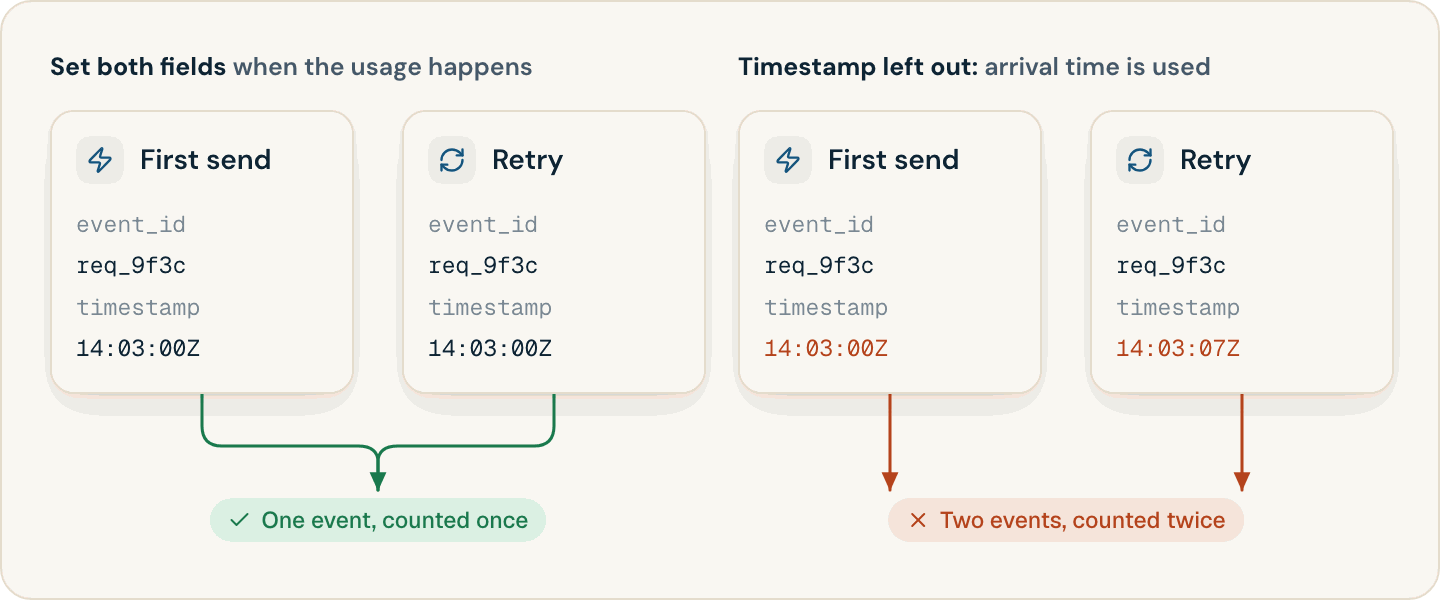
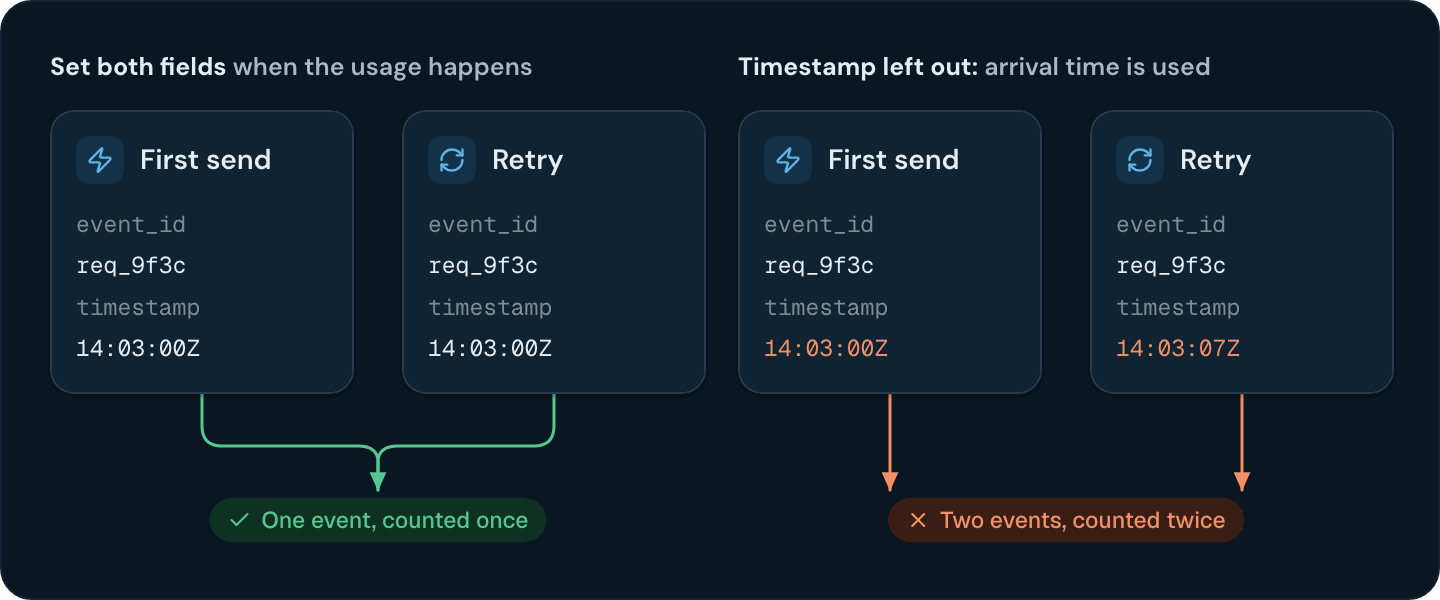
The same usage often reaches Flexprice more than once: a retry after a timeout, a queue that redelivers a message, a heartbeat that fires twice in one minute. Flexprice collapses copies of a usage event into one when they carry the same `event_id` and `timestamp`, so you decide what counts as a copy by how you set those two fields.
 ## How Flexprice deduplicates usage events
* **Copies match on `event_id` and `timestamp`.** Two events for the same customer with the same `event_id` and the same `timestamp` are stored as one event. An event with the same ID and a different timestamp is a different event.
* **Deduplication happens in storage, after ingestion.** The API accepts every copy with `202`. Copies collapse when Flexprice merges stored usage, however far apart they arrive.
* **Invoices are always calculated from deduplicated usage.** Usage analytics, upcoming invoice previews, and wallet balances can include a copy until it collapses.
* **Count features count distinct event IDs.** A resent event with the same `event_id` never adds to a Count feature. Sum, Max, and the other aggregations that read a property depend on the full `event_id` and `timestamp` match.
## Usage event deduplication when event\_id or timestamp is missing
Flexprice fills in whichever field you leave out, and each copy gets a different value:
| Fields you set | What a resent copy does |
| - | - |
| **`event_id` and `timestamp`** | Collapses into the original. Counted once |
| **`event_id` only** | Gets the time Flexprice received it as its timestamp, so it is a separate event. Sum and the other property aggregations count it again. Count features don't |
| **`timestamp` only** | Gets a newly generated `event_id`, so it is a separate event and counts again |
| **Neither** | Counts again |
## Choosing an event\_id for a usage event
Derive the ID from the usage, not from the attempt to send it:
* **API gateway:** the request ID.
* **Batch job:** the job ID plus the step or chunk number.
* **LLM call:** the provider's response ID.
Generate the ID once, when the usage happens, store it with the event in your queue, and never regenerate it on a retry. Keep IDs unique within an environment: two different pieces of usage that share an ID and a timestamp merge into one.
## Choosing a timestamp for a usage event
Capture the time once, when the usage happens, and store it with the event. A timestamp read from the clock at send time changes on every retry, which turns each retry into a new event. Every copy of an event must carry exactly the same `timestamp` value.
## Making heartbeat events idempotent
Some usage events report state on a schedule instead of an action: a node reporting its CPU cores every minute, or a nightly snapshot of storage or seats. Give every heartbeat a deterministic `event_id` and `timestamp` for its measurement period, so that every heartbeat sent in the same period is a copy of the same event:
```python theme={null}
import time
from datetime import datetime, timezone
def heartbeat_event(node_id: str, customer_id: str, cpu_cores: int) -> dict:
# Round down to the start of the minute, so every heartbeat sent
# in the same minute gets the same event_id and timestamp.
period_start = int(time.time()) // 60 * 60
return {
"event_name": "node_heartbeat",
"external_customer_id": customer_id,
"event_id": f"{node_id}_{period_start}",
"timestamp": datetime.fromtimestamp(period_start, tz=timezone.utc).isoformat(),
"properties": {"cpu_cores": cpu_cores},
}
```
A Sum feature over `cpu_cores` then counts core-minutes. Send two or more heartbeats per period: the extra copies collapse, and a delayed timer no longer leaves a minute unbilled.
**Round the timestamp as well as the ID.** If the timestamp comes from the clock at send time, two heartbeats in the same minute have different timestamps, and both count.
## Resending a failed bulk request
When a bulk request fails with a network error or a `5xx`, or with a `400` after some events were accepted, resend the whole batch. Events that Flexprice already accepted collapse with their resent copies, as long as every event in the batch carries its own `event_id` and `timestamp`.
What to put in a usage event, and how to queue, retry, and log events.
Batch events with the bulk endpoint, the SDKs, or the Flexprice Collector.
This documentation is built and hosted on [Mintlify](https://mintlify.com), a developer documentation platform.
## How Flexprice deduplicates usage events
* **Copies match on `event_id` and `timestamp`.** Two events for the same customer with the same `event_id` and the same `timestamp` are stored as one event. An event with the same ID and a different timestamp is a different event.
* **Deduplication happens in storage, after ingestion.** The API accepts every copy with `202`. Copies collapse when Flexprice merges stored usage, however far apart they arrive.
* **Invoices are always calculated from deduplicated usage.** Usage analytics, upcoming invoice previews, and wallet balances can include a copy until it collapses.
* **Count features count distinct event IDs.** A resent event with the same `event_id` never adds to a Count feature. Sum, Max, and the other aggregations that read a property depend on the full `event_id` and `timestamp` match.
## Usage event deduplication when event\_id or timestamp is missing
Flexprice fills in whichever field you leave out, and each copy gets a different value:
| Fields you set | What a resent copy does |
| - | - |
| **`event_id` and `timestamp`** | Collapses into the original. Counted once |
| **`event_id` only** | Gets the time Flexprice received it as its timestamp, so it is a separate event. Sum and the other property aggregations count it again. Count features don't |
| **`timestamp` only** | Gets a newly generated `event_id`, so it is a separate event and counts again |
| **Neither** | Counts again |
## Choosing an event\_id for a usage event
Derive the ID from the usage, not from the attempt to send it:
* **API gateway:** the request ID.
* **Batch job:** the job ID plus the step or chunk number.
* **LLM call:** the provider's response ID.
Generate the ID once, when the usage happens, store it with the event in your queue, and never regenerate it on a retry. Keep IDs unique within an environment: two different pieces of usage that share an ID and a timestamp merge into one.
## Choosing a timestamp for a usage event
Capture the time once, when the usage happens, and store it with the event. A timestamp read from the clock at send time changes on every retry, which turns each retry into a new event. Every copy of an event must carry exactly the same `timestamp` value.
## Making heartbeat events idempotent
Some usage events report state on a schedule instead of an action: a node reporting its CPU cores every minute, or a nightly snapshot of storage or seats. Give every heartbeat a deterministic `event_id` and `timestamp` for its measurement period, so that every heartbeat sent in the same period is a copy of the same event:
```python theme={null}
import time
from datetime import datetime, timezone
def heartbeat_event(node_id: str, customer_id: str, cpu_cores: int) -> dict:
# Round down to the start of the minute, so every heartbeat sent
# in the same minute gets the same event_id and timestamp.
period_start = int(time.time()) // 60 * 60
return {
"event_name": "node_heartbeat",
"external_customer_id": customer_id,
"event_id": f"{node_id}_{period_start}",
"timestamp": datetime.fromtimestamp(period_start, tz=timezone.utc).isoformat(),
"properties": {"cpu_cores": cpu_cores},
}
```
A Sum feature over `cpu_cores` then counts core-minutes. Send two or more heartbeats per period: the extra copies collapse, and a delayed timer no longer leaves a minute unbilled.
**Round the timestamp as well as the ID.** If the timestamp comes from the clock at send time, two heartbeats in the same minute have different timestamps, and both count.
## Resending a failed bulk request
When a bulk request fails with a network error or a `5xx`, or with a `400` after some events were accepted, resend the whole batch. Events that Flexprice already accepted collapse with their resent copies, as long as every event in the batch carries its own `event_id` and `timestamp`.
What to put in a usage event, and how to queue, retry, and log events.
Batch events with the bulk endpoint, the SDKs, or the Flexprice Collector.
This documentation is built and hosted on [Mintlify](https://mintlify.com), a developer documentation platform.