> ## Documentation Index
> Fetch the complete documentation index at: https://docs.flexprice.io/llms.txt
> Use this file to discover all available pages before exploring further.
# Portal Payments
> Let customers pay invoices, top up wallets, save cards and enable automatic top-ups from the Customer Portal
The Customer Portal turns billing from a support conversation into a self-service action. A customer with an outstanding invoice pays it from the invoice row. A customer running low on credits tops up, or turns on auto top-up so it never happens again. Cards are collected on the payment provider's own hosted page, so no card data reaches Flexprice or your servers.
Every payment action follows the same shape: the portal asks the API to start the action, the API returns a `payment_action` describing what to do next, and the portal opens it. Credits and payment records are written by the provider's webhook once the money actually moves, never optimistically on the customer's screen.
 ## Prerequisites
Portal payment actions require a payment provider connection published in the environment the session token was issued in. Without one, the portal renders its read-only surface and hides the payment actions.
Set up a [Chargebee](/integrations/chargebee/connection-setup), [Razorpay](/integrations/razorpay/connection-setup) or [Stripe](/integrations/stripe/connection-setup) connection and publish it.
Not every provider supports every action. See the capability matrix below.
In **Settings**, turn on the sections that carry the actions. See [Portal configuration](/docs/customers/customer-portal/configuration).
## Provider capabilities
Flexprice names each payment operation as a capability and resolves the provider per capability from the connections published in the environment. A capability is what Flexprice implements for that gateway, not everything the gateway's own API can do.
| Capability | Chargebee | Razorpay | Stripe | Nomod |
| ----------------------------------------------------- | :-------: | :------: | :----: | :---: |
| `checkout` (hosted payment page) | Yes | Yes | No | No |
| `payment_link` (invoice payment link) | Yes | Yes | Yes | Yes |
| `auto_charge` (charge a saved card off-session) | Yes | Yes | No | No |
| `payment_method_management` (list, add, remove cards) | Yes | No | No | No |
| `set_default_method` (promote a card to default) | Yes | No | No | No |
| `invoice_sync` (push invoices to the provider) | Yes | No | No | No |
Read the capabilities available to a session from `GET /v1/customer/portal/integrations`:
```json theme={null}
{
"payment_integrations": [
{
"provider": "chargebee",
"capabilities": [
{ "type": "checkout", "is_default": true },
{ "type": "payment_link", "is_default": true },
{ "type": "auto_charge", "is_default": true },
{ "type": "payment_method_management", "is_default": true },
{ "type": "set_default_method", "is_default": true }
]
}
]
}
```
`is_default` marks the provider Flexprice picks for that capability when the caller names none.
When exactly one provider serves a capability, the portal never shows its name to the customer. A provider picker appears only when two or more connected providers can serve the same action.
**A requested provider must be both connected and capable**
Passing `payment_provider` for a gateway that is not connected in the environment returns a validation error. Passing one that is connected but does not implement the capability returns a validation error naming the candidates that do. Omit the field to let Flexprice resolve it.
## Paying an invoice
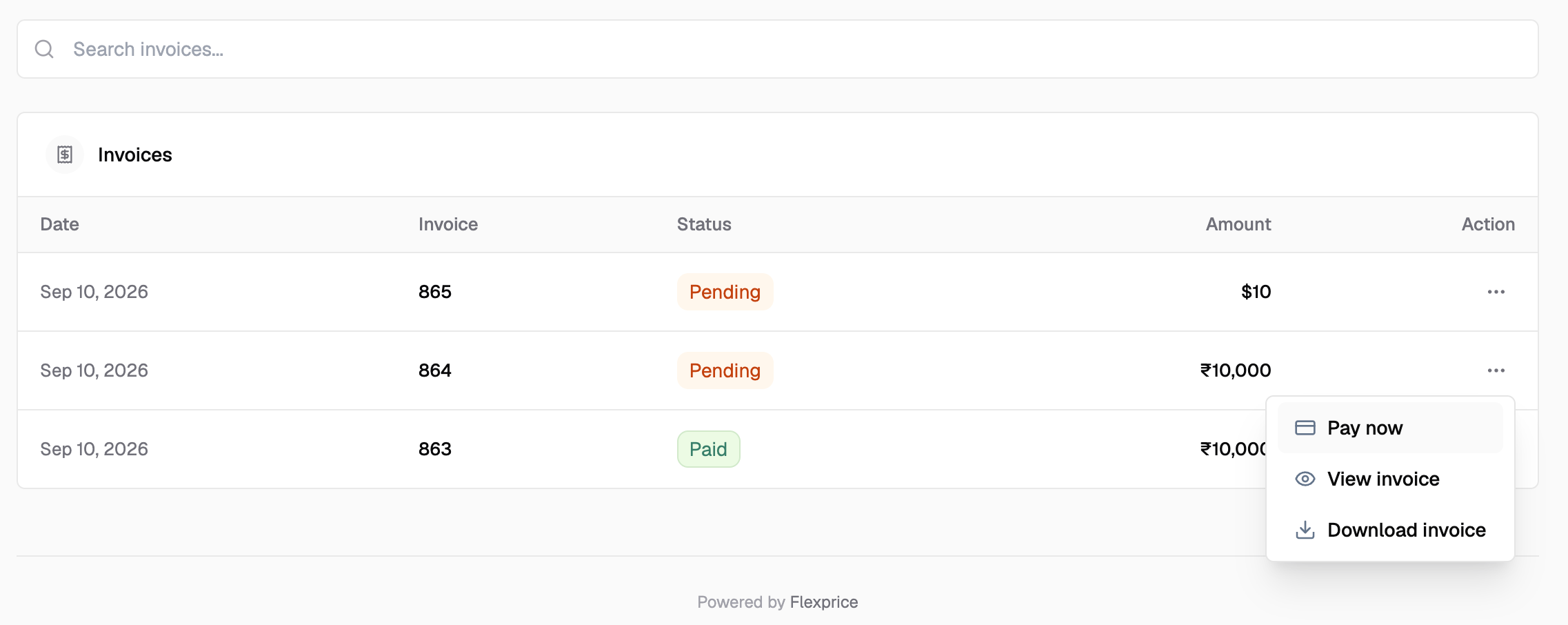
An invoice row in the Invoices section carries a **Pay now** action when the invoice is awaiting payment. The customer clicks it, a hosted checkout opens in a new tab, and the invoice is marked paid by the provider's webhook when the payment settles.
**Endpoint:** `POST /v1/customer/portal/invoices/{id}/pay`
```json theme={null}
{
"payment_provider": "chargebee",
"idempotency_key": "portal-pay-inv_01H...-1736180000",
"success_url": "https://portal.yourapp.com?checkout_return=1",
"cancel_url": "https://portal.yourapp.com?checkout_return=1",
"failure_url": "https://portal.yourapp.com?checkout_return=1"
}
```
| Field | Required | Description |
| ------------------ | -------- | ------------------------------------------------------------------- |
| `payment_provider` | No | Gateway to use. Omit to let Flexprice resolve the capable provider |
| `idempotency_key` | No | Prevents a retry from raising a second payment |
| `success_url` | No | Where the provider returns the customer after a successful payment |
| `cancel_url` | No | Where the provider returns the customer after they abandon the page |
| `failure_url` | No | Where the provider returns the customer after a declined payment |
**Response:**
```json theme={null}
{
"payment_id": "pay_01H...",
"invoice_id": "inv_01H...",
"status": "pending",
"amount": "149.00",
"currency": "USD",
"payment_action": {
"type": "payment_link",
"url": "https://provider.example.com/pay/xyz"
}
}
```
Read `payment_action` rather than reaching for a URL field of your own. Whether a provider hands back a hosted checkout page or a payment link is a property of the provider, and the `type` says which.
**The amount comes from the invoice**
There is no amount field in the request. A customer cannot part-pay an invoice from the portal.
### When Pay now is not available
The API rejects a payment and the portal disables the action when:
* The invoice is still a draft, or is voided
* The invoice payment status is already `succeeded`, or a payment is already in flight
* The invoice belongs to a subscription that is not in a state that allows collection. The portal shows a message asking the customer to contact support
## Prerequisites
Portal payment actions require a payment provider connection published in the environment the session token was issued in. Without one, the portal renders its read-only surface and hides the payment actions.
Set up a [Chargebee](/integrations/chargebee/connection-setup), [Razorpay](/integrations/razorpay/connection-setup) or [Stripe](/integrations/stripe/connection-setup) connection and publish it.
Not every provider supports every action. See the capability matrix below.
In **Settings**, turn on the sections that carry the actions. See [Portal configuration](/docs/customers/customer-portal/configuration).
## Provider capabilities
Flexprice names each payment operation as a capability and resolves the provider per capability from the connections published in the environment. A capability is what Flexprice implements for that gateway, not everything the gateway's own API can do.
| Capability | Chargebee | Razorpay | Stripe | Nomod |
| ----------------------------------------------------- | :-------: | :------: | :----: | :---: |
| `checkout` (hosted payment page) | Yes | Yes | No | No |
| `payment_link` (invoice payment link) | Yes | Yes | Yes | Yes |
| `auto_charge` (charge a saved card off-session) | Yes | Yes | No | No |
| `payment_method_management` (list, add, remove cards) | Yes | No | No | No |
| `set_default_method` (promote a card to default) | Yes | No | No | No |
| `invoice_sync` (push invoices to the provider) | Yes | No | No | No |
Read the capabilities available to a session from `GET /v1/customer/portal/integrations`:
```json theme={null}
{
"payment_integrations": [
{
"provider": "chargebee",
"capabilities": [
{ "type": "checkout", "is_default": true },
{ "type": "payment_link", "is_default": true },
{ "type": "auto_charge", "is_default": true },
{ "type": "payment_method_management", "is_default": true },
{ "type": "set_default_method", "is_default": true }
]
}
]
}
```
`is_default` marks the provider Flexprice picks for that capability when the caller names none.
When exactly one provider serves a capability, the portal never shows its name to the customer. A provider picker appears only when two or more connected providers can serve the same action.
**A requested provider must be both connected and capable**
Passing `payment_provider` for a gateway that is not connected in the environment returns a validation error. Passing one that is connected but does not implement the capability returns a validation error naming the candidates that do. Omit the field to let Flexprice resolve it.
## Paying an invoice
An invoice row in the Invoices section carries a **Pay now** action when the invoice is awaiting payment. The customer clicks it, a hosted checkout opens in a new tab, and the invoice is marked paid by the provider's webhook when the payment settles.
**Endpoint:** `POST /v1/customer/portal/invoices/{id}/pay`
```json theme={null}
{
"payment_provider": "chargebee",
"idempotency_key": "portal-pay-inv_01H...-1736180000",
"success_url": "https://portal.yourapp.com?checkout_return=1",
"cancel_url": "https://portal.yourapp.com?checkout_return=1",
"failure_url": "https://portal.yourapp.com?checkout_return=1"
}
```
| Field | Required | Description |
| ------------------ | -------- | ------------------------------------------------------------------- |
| `payment_provider` | No | Gateway to use. Omit to let Flexprice resolve the capable provider |
| `idempotency_key` | No | Prevents a retry from raising a second payment |
| `success_url` | No | Where the provider returns the customer after a successful payment |
| `cancel_url` | No | Where the provider returns the customer after they abandon the page |
| `failure_url` | No | Where the provider returns the customer after a declined payment |
**Response:**
```json theme={null}
{
"payment_id": "pay_01H...",
"invoice_id": "inv_01H...",
"status": "pending",
"amount": "149.00",
"currency": "USD",
"payment_action": {
"type": "payment_link",
"url": "https://provider.example.com/pay/xyz"
}
}
```
Read `payment_action` rather than reaching for a URL field of your own. Whether a provider hands back a hosted checkout page or a payment link is a property of the provider, and the `type` says which.
**The amount comes from the invoice**
There is no amount field in the request. A customer cannot part-pay an invoice from the portal.
### When Pay now is not available
The API rejects a payment and the portal disables the action when:
* The invoice is still a draft, or is voided
* The invoice payment status is already `succeeded`, or a payment is already in flight
* The invoice belongs to a subscription that is not in a state that allows collection. The portal shows a message asking the customer to contact support
 ## Topping up a wallet
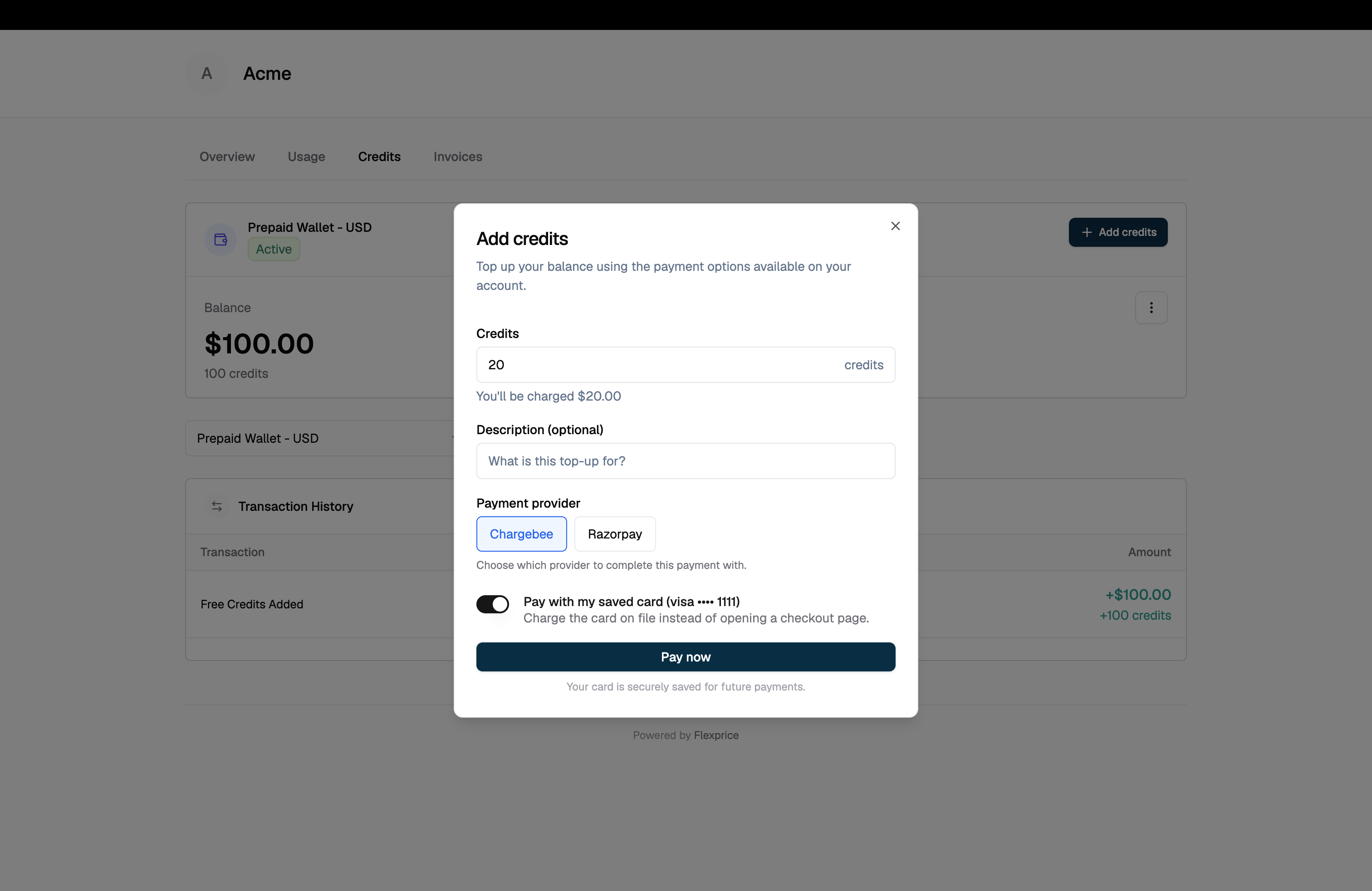
**Add credits** on the wallet card opens a top-up dialog. The customer enters a credit amount, sees the exact charge stated above the confirm button, and continues.
**Endpoint:** `POST /v1/customer/portal/wallets/{id}/top-up`
```json theme={null}
{
"credits_to_add": "100",
"idempotency_key": "portal-topup-wal_01H...-1736180000",
"description": "Monthly credit refill",
"checkout": {
"use_saved_method": false,
"success_url": "https://portal.yourapp.com?checkout_return=1",
"cancel_url": "https://portal.yourapp.com?checkout_return=1"
}
}
```
| Field | Required | Description |
| ----------------------------------------------------- | -------- | ------------------------------------------------------------------------------- |
| `credits_to_add` | Yes | Credits to add. Converted to a charge using the wallet's top-up conversion rate |
| `idempotency_key` | Yes | Without it a retry grants credits twice |
| `description` | No | Free-text note stored on the transaction |
| `checkout` | No | Present to charge now. Omit to raise an invoice the customer settles later |
| `checkout.payment_provider` | No | Gateway to use. Omit to let Flexprice resolve it |
| `checkout.use_saved_method` | No | Charge the saved card directly instead of opening a hosted page |
| `checkout.success_url` / `cancel_url` / `failure_url` | No | Where the provider returns the customer |
**`idempotency_key` is required on portal top-ups**
The server's fallback key is timestamp-derived, so a retried request without an explicit key reads as a fresh top-up and grants the credits a second time.
### Charge now or invoice later
The `checkout` object decides which of the two flows runs.
| `checkout` | Behaviour |
| ----------- | ----------------------------------------------------------------------------------------------------------------------------------------------------------------------------- |
| **Present** | Pay-first. The customer is charged before any credit lands. The response carries a `checkout_session`, and credits are applied by the payment webhook once the charge settles |
| **Omitted** | Invoiced. An invoice is raised for the top-up and the customer settles it later, through the Invoices section or any other channel you offer |
The portal always sends `checkout`. The invoiced path is available to your own integrations calling the portal API directly.
**Credits land after the payment, not on the click**
The portal reports "Top-up requested, your balance will update once payment completes" rather than claiming success. The wallet transaction is written by the provider's webhook. After a return, the portal rechecks the balance on a short schedule (immediately, then at 1.5s and 4s) and stops as soon as the wallet actually changes, so a webhook arriving a moment after the redirect still shows up without a manual refresh.
### Paying with a saved card
When `use_saved_method` is `true`, the charge runs against the card on file with the customer present, and no redirect is involved. The response comes back with `checkout_status: "completed"` and no `payment_action`.
Read `checkout_status`, not the presence of a URL:
| `checkout_status` | Meaning |
| ----------------------- | -------------------------------------------------------------- |
| `completed` | Paid. Credits follow from the webhook |
| `failed` | The gateway declined. `failure_reason` carries its own message |
| `expired` | The session timed out before it was completed |
| `initiated` / `pending` | Still settling. Neither outcome can be claimed yet |
If no usable saved method exists, or the charge declines, the response falls back to a `payment_action` with a link. The portal shows the saved-card option only when the resolved provider supports `auto_charge` and a chargeable card is on file.
### Minimum top-up amount
Top-ups below the tenant's per-currency floor are rejected before the customer is redirected, with a message naming the minimum for that currency. Configure the floor under the `wallet_topup_config` setting key. See [Settings](/docs/settings/settings).
### A top-up already in flight
If the customer already has a pending top-up session on the wallet, the API hands back the session already in flight rather than a conflict. The customer can complete the payment they started instead of being blocked by an abandoned tab.
## Topping up a wallet
**Add credits** on the wallet card opens a top-up dialog. The customer enters a credit amount, sees the exact charge stated above the confirm button, and continues.
**Endpoint:** `POST /v1/customer/portal/wallets/{id}/top-up`
```json theme={null}
{
"credits_to_add": "100",
"idempotency_key": "portal-topup-wal_01H...-1736180000",
"description": "Monthly credit refill",
"checkout": {
"use_saved_method": false,
"success_url": "https://portal.yourapp.com?checkout_return=1",
"cancel_url": "https://portal.yourapp.com?checkout_return=1"
}
}
```
| Field | Required | Description |
| ----------------------------------------------------- | -------- | ------------------------------------------------------------------------------- |
| `credits_to_add` | Yes | Credits to add. Converted to a charge using the wallet's top-up conversion rate |
| `idempotency_key` | Yes | Without it a retry grants credits twice |
| `description` | No | Free-text note stored on the transaction |
| `checkout` | No | Present to charge now. Omit to raise an invoice the customer settles later |
| `checkout.payment_provider` | No | Gateway to use. Omit to let Flexprice resolve it |
| `checkout.use_saved_method` | No | Charge the saved card directly instead of opening a hosted page |
| `checkout.success_url` / `cancel_url` / `failure_url` | No | Where the provider returns the customer |
**`idempotency_key` is required on portal top-ups**
The server's fallback key is timestamp-derived, so a retried request without an explicit key reads as a fresh top-up and grants the credits a second time.
### Charge now or invoice later
The `checkout` object decides which of the two flows runs.
| `checkout` | Behaviour |
| ----------- | ----------------------------------------------------------------------------------------------------------------------------------------------------------------------------- |
| **Present** | Pay-first. The customer is charged before any credit lands. The response carries a `checkout_session`, and credits are applied by the payment webhook once the charge settles |
| **Omitted** | Invoiced. An invoice is raised for the top-up and the customer settles it later, through the Invoices section or any other channel you offer |
The portal always sends `checkout`. The invoiced path is available to your own integrations calling the portal API directly.
**Credits land after the payment, not on the click**
The portal reports "Top-up requested, your balance will update once payment completes" rather than claiming success. The wallet transaction is written by the provider's webhook. After a return, the portal rechecks the balance on a short schedule (immediately, then at 1.5s and 4s) and stops as soon as the wallet actually changes, so a webhook arriving a moment after the redirect still shows up without a manual refresh.
### Paying with a saved card
When `use_saved_method` is `true`, the charge runs against the card on file with the customer present, and no redirect is involved. The response comes back with `checkout_status: "completed"` and no `payment_action`.
Read `checkout_status`, not the presence of a URL:
| `checkout_status` | Meaning |
| ----------------------- | -------------------------------------------------------------- |
| `completed` | Paid. Credits follow from the webhook |
| `failed` | The gateway declined. `failure_reason` carries its own message |
| `expired` | The session timed out before it was completed |
| `initiated` / `pending` | Still settling. Neither outcome can be claimed yet |
If no usable saved method exists, or the charge declines, the response falls back to a `payment_action` with a link. The portal shows the saved-card option only when the resolved provider supports `auto_charge` and a chargeable card is on file.
### Minimum top-up amount
Top-ups below the tenant's per-currency floor are rejected before the customer is redirected, with a message naming the minimum for that currency. Configure the floor under the `wallet_topup_config` setting key. See [Settings](/docs/settings/settings).
### A top-up already in flight
If the customer already has a pending top-up session on the wallet, the API hands back the session already in flight rather than a conflict. The customer can complete the payment they started instead of being blocked by an abandoned tab.
 ## Auto top-up
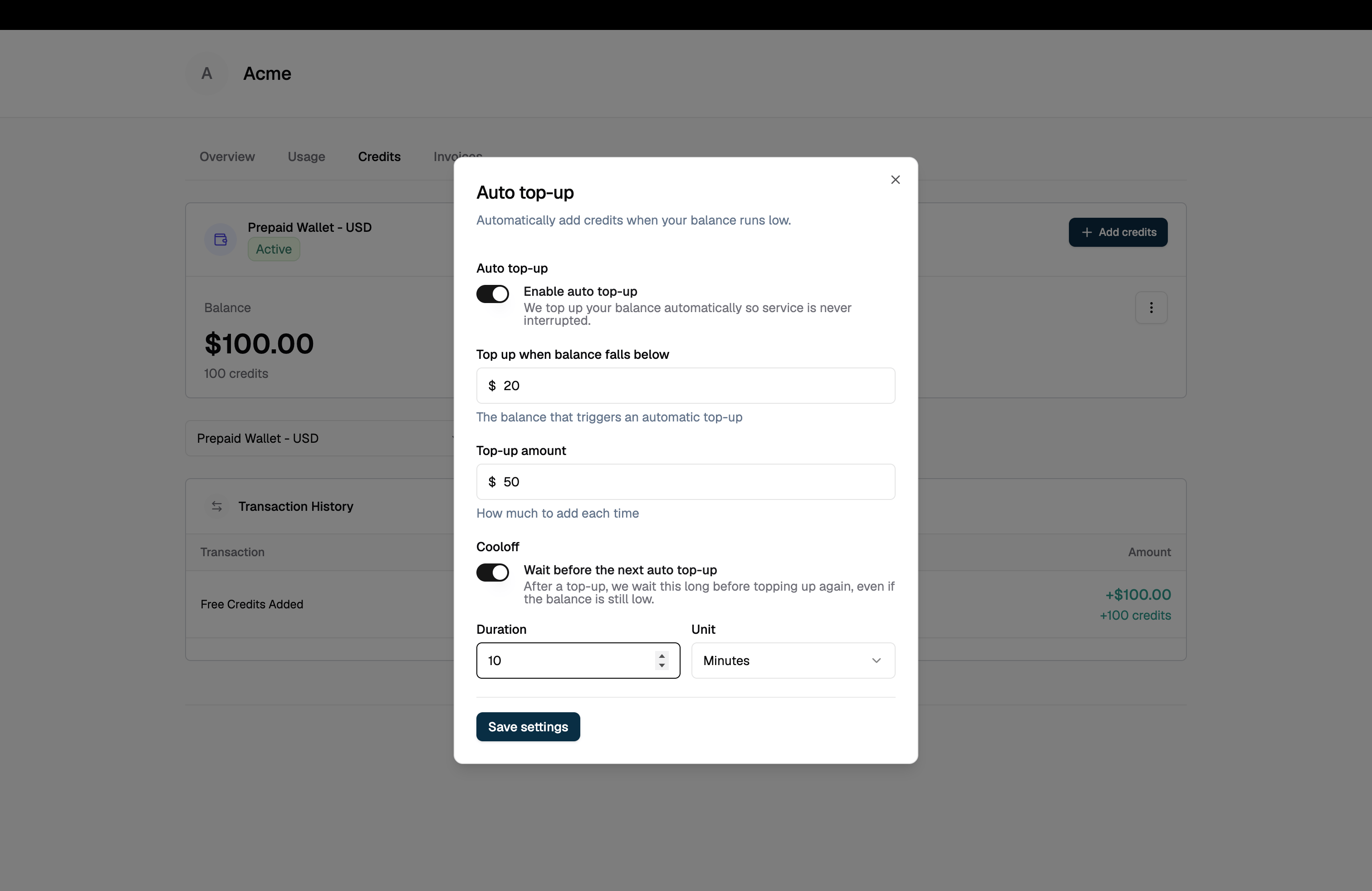
Auto top-up refills the wallet without the customer present. It reads as a plain-language summary in the Credits section: "Automatically add $100.00 when your balance falls below $20.00", with a **Manage** action, or "Auto top-up is off" with **Enable**.
**Endpoint:** `PUT /v1/customer/portal/wallets/{id}/auto-topup`
```json theme={null}
{
"enabled": true,
"threshold": "20",
"amount": "100",
"cooldown": { "value": 6, "unit": "hour" }
}
```
| Field | Required | Description |
| ----------- | -------- | ----------------------------------------------------------------------------------------- |
| `enabled` | Yes | Turns automatic top-ups on or off |
| `threshold` | No | Balance at or below which a top-up runs |
| `amount` | No | Credits added each time |
| `cooldown` | No | Minimum wait between two automatic top-ups. `unit` is `second`, `minute`, `hour` or `day` |
**Clearing a cooldown**
Send `{ "value": 0, "unit": "hour" }` to remove a stored cooldown. Sending `null` reads as an absent field on the server and leaves the existing cooldown in place.
Enabling auto top-up is itself the customer's consent to be charged unattended, so there is no separate auto-charge flag in the portal request. Whether the resulting credits are invoiced is pinned server-side, because it selects the transaction reason and is your decision, not the customer's.
### Requirements
Auto top-up needs a saved card that can be charged off-session. The portal shows "Add a payment method to enable automatic top-ups" and keeps the toggle unavailable until one exists, which means:
* The resolved provider supports the `auto_charge` capability (Chargebee or Razorpay)
* The customer has at least one saved card with `can_auto_charge: true`
For the mandate rules behind unattended charging, see [Autopay mandates](/docs/checkout/autopay-mandates).
## Auto top-up
Auto top-up refills the wallet without the customer present. It reads as a plain-language summary in the Credits section: "Automatically add $100.00 when your balance falls below $20.00", with a **Manage** action, or "Auto top-up is off" with **Enable**.
**Endpoint:** `PUT /v1/customer/portal/wallets/{id}/auto-topup`
```json theme={null}
{
"enabled": true,
"threshold": "20",
"amount": "100",
"cooldown": { "value": 6, "unit": "hour" }
}
```
| Field | Required | Description |
| ----------- | -------- | ----------------------------------------------------------------------------------------- |
| `enabled` | Yes | Turns automatic top-ups on or off |
| `threshold` | No | Balance at or below which a top-up runs |
| `amount` | No | Credits added each time |
| `cooldown` | No | Minimum wait between two automatic top-ups. `unit` is `second`, `minute`, `hour` or `day` |
**Clearing a cooldown**
Send `{ "value": 0, "unit": "hour" }` to remove a stored cooldown. Sending `null` reads as an absent field on the server and leaves the existing cooldown in place.
Enabling auto top-up is itself the customer's consent to be charged unattended, so there is no separate auto-charge flag in the portal request. Whether the resulting credits are invoiced is pinned server-side, because it selects the transaction reason and is your decision, not the customer's.
### Requirements
Auto top-up needs a saved card that can be charged off-session. The portal shows "Add a payment method to enable automatic top-ups" and keeps the toggle unavailable until one exists, which means:
* The resolved provider supports the `auto_charge` capability (Chargebee or Razorpay)
* The customer has at least one saved card with `can_auto_charge: true`
For the mandate rules behind unattended charging, see [Autopay mandates](/docs/checkout/autopay-mandates).
 ## Saved payment methods
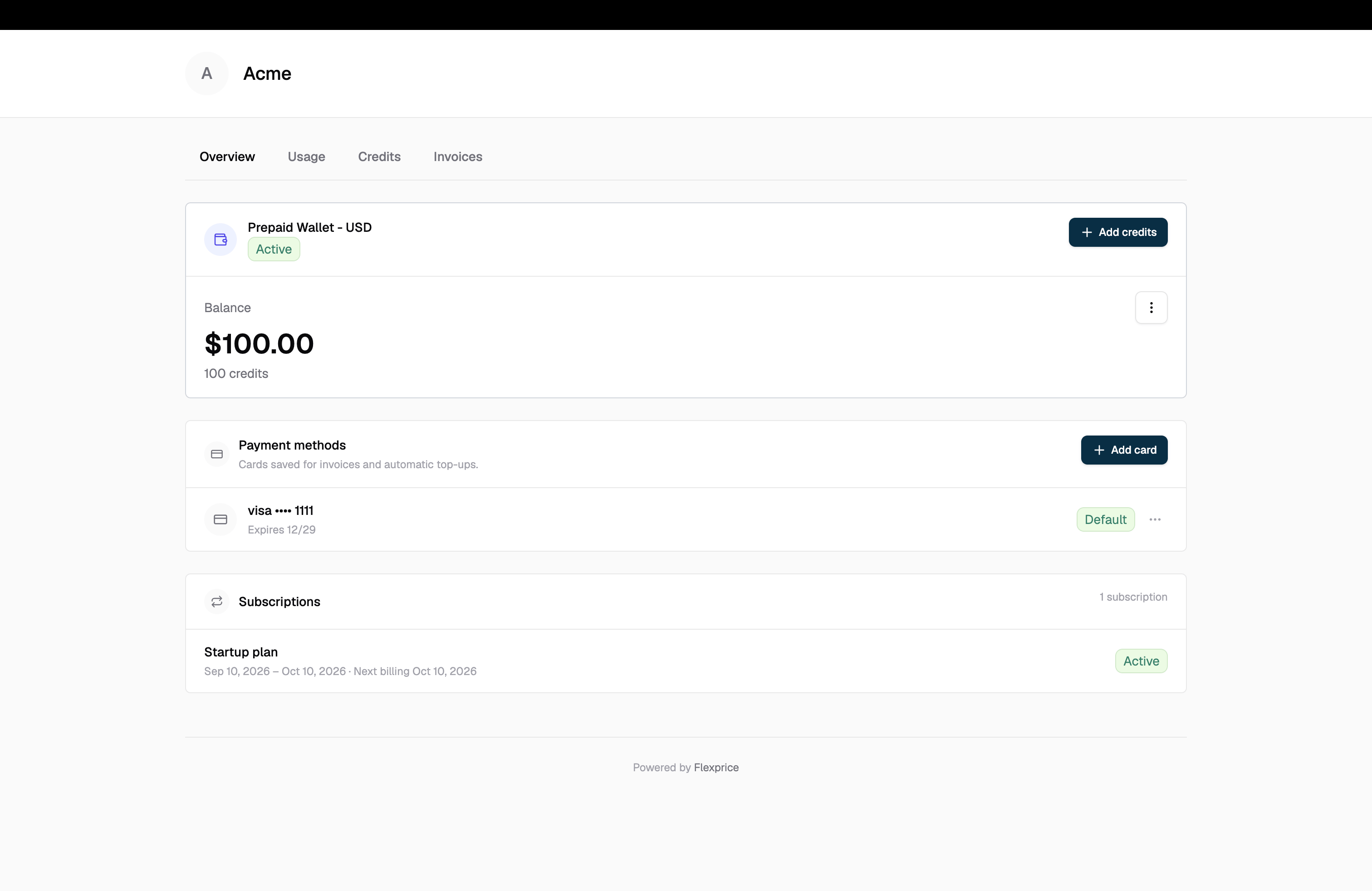
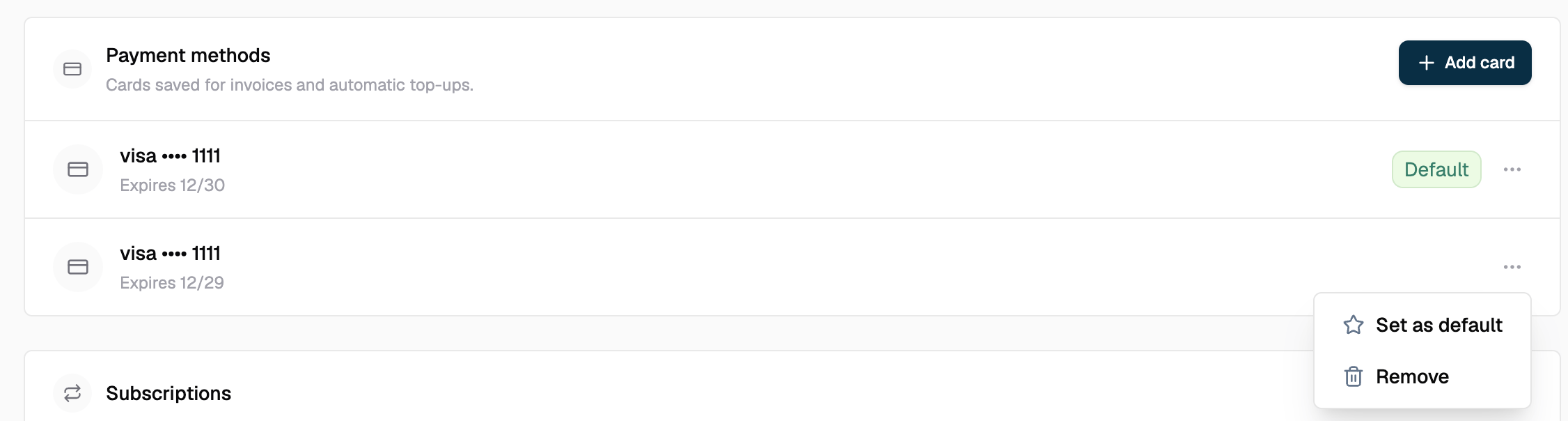
The payment methods list sits on Overview, beside the balance it tops up and the subscriptions it pays for. It shows each saved card as brand and last four digits with its expiry, marks the default, and offers **Add card**, **Set as default** and **Remove**.
**List:** `GET /v1/customer/portal/payment-methods`
```json theme={null}
{
"providers": [
{
"provider": "chargebee",
"items": [
{
"id": "pm_01H...",
"provider": "chargebee",
"type": "card",
"status": "ACTIVE",
"card": { "brand": "visa", "last4": "4242", "exp_month": 4, "exp_year": 2028 },
"is_default": true,
"can_auto_charge": true
}
]
}
]
}
```
| Field | Meaning |
| ----------------- | ------------------------------------------------------------------------------------------------------- |
| `status` | `ACTIVE`, `INACTIVE` or `EXPIRED`. An expired card cannot be made default |
| `is_default` | Which card is used at this provider. Scoped per provider, so two providers means two defaults |
| `can_auto_charge` | Whether this card can be charged with nobody present. A capability, not a permission |
| `error` | Set on a provider entry that could not be read. Keeps "no saved cards" distinct from "we could not ask" |
### Adding a card
**Endpoint:** `POST /v1/customer/portal/payment-methods`
```json theme={null}
{
"payment_provider": "chargebee",
"success_url": "https://portal.yourapp.com?checkout_return=1",
"cancel_url": "https://portal.yourapp.com?checkout_return=1"
}
```
The response returns an action, not a payment method. Nothing is stored until the customer completes the provider's form.
```json theme={null}
{
"provider": "chargebee",
"action": {
"type": "redirect",
"url": "https://provider.example.com/setup/xyz",
"expires_at": "2026-01-06T18:00:00Z"
}
}
```
The portal opens the URL in a new tab and shows the same link on screen, so a customer whose popup blocker stopped the open still has a way through. Card details are entered on the provider's page and never touch Flexprice.
The setup URL is an API string. The portal refuses to open anything that is not `http` or `https`, so a `javascript:` URL cannot be executed. Apply the same check if you build your own portal against these endpoints.
### Setting a default and removing
**Set default:** `POST /v1/customer/portal/payment-methods/default` with `payment_provider` and `payment_method_id`.
**Remove:** `POST /v1/customer/portal/payment-methods/delete` with the same two fields. The portal confirms first, warning that the card will no longer be available for payments or automatic top-ups.
Setting a default requires the `set_default_method` capability. On a provider without it, the portal explains that a default card is not supported rather than offering an action that would fail.
## Saved payment methods
The payment methods list sits on Overview, beside the balance it tops up and the subscriptions it pays for. It shows each saved card as brand and last four digits with its expiry, marks the default, and offers **Add card**, **Set as default** and **Remove**.
**List:** `GET /v1/customer/portal/payment-methods`
```json theme={null}
{
"providers": [
{
"provider": "chargebee",
"items": [
{
"id": "pm_01H...",
"provider": "chargebee",
"type": "card",
"status": "ACTIVE",
"card": { "brand": "visa", "last4": "4242", "exp_month": 4, "exp_year": 2028 },
"is_default": true,
"can_auto_charge": true
}
]
}
]
}
```
| Field | Meaning |
| ----------------- | ------------------------------------------------------------------------------------------------------- |
| `status` | `ACTIVE`, `INACTIVE` or `EXPIRED`. An expired card cannot be made default |
| `is_default` | Which card is used at this provider. Scoped per provider, so two providers means two defaults |
| `can_auto_charge` | Whether this card can be charged with nobody present. A capability, not a permission |
| `error` | Set on a provider entry that could not be read. Keeps "no saved cards" distinct from "we could not ask" |
### Adding a card
**Endpoint:** `POST /v1/customer/portal/payment-methods`
```json theme={null}
{
"payment_provider": "chargebee",
"success_url": "https://portal.yourapp.com?checkout_return=1",
"cancel_url": "https://portal.yourapp.com?checkout_return=1"
}
```
The response returns an action, not a payment method. Nothing is stored until the customer completes the provider's form.
```json theme={null}
{
"provider": "chargebee",
"action": {
"type": "redirect",
"url": "https://provider.example.com/setup/xyz",
"expires_at": "2026-01-06T18:00:00Z"
}
}
```
The portal opens the URL in a new tab and shows the same link on screen, so a customer whose popup blocker stopped the open still has a way through. Card details are entered on the provider's page and never touch Flexprice.
The setup URL is an API string. The portal refuses to open anything that is not `http` or `https`, so a `javascript:` URL cannot be executed. Apply the same check if you build your own portal against these endpoints.
### Setting a default and removing
**Set default:** `POST /v1/customer/portal/payment-methods/default` with `payment_provider` and `payment_method_id`.
**Remove:** `POST /v1/customer/portal/payment-methods/delete` with the same two fields. The portal confirms first, warning that the card will no longer be available for payments or automatic top-ups.
Setting a default requires the `set_default_method` capability. On a provider without it, the portal explains that a default card is not supported rather than offering an action that would fail.
 ## Returning from a hosted checkout
Hosted checkout pages cannot be framed, so the portal opens them in a new tab. That raises a problem worth knowing about if you embed the portal or build your own: the provider redirects the tab it is in, which is the new one, leaving the customer looking at a second copy of their account while the tab they started from still shows pre-payment numbers.
The portal resolves this itself:
1. The return URL is rebuilt from the portal path with the session token removed, so the token never reaches the provider, its redirect logs, or the customer's browser history at the provider. A `checkout_return` marker is added in its place, and only recognised portal parameters such as `section` are carried across.
2. The tab the provider returns to reads the marker, announces itself over a `BroadcastChannel`, and closes. The announcement carries no outcome.
3. The original tab holds the checkout session id and asks the API what happened, so a message from any same-origin page cannot make the portal claim a payment succeeded.
4. A tab that cannot close, which browsers only permit for script-opened windows, strips the marker and renders as a normal portal instead.
5. The session token is held in `localStorage` for 30 minutes so the return trip can restore it. `sessionStorage` would not survive, because the provider tab is opened with `noopener` and inherits none.
**Checking a session directly:** `GET /v1/customer/portal/checkout-sessions/{id}` returns the session with its `checkout_status`, `failure_reason` and linked `checkout_invoice_id` and `checkout_payment_id`. `POST /v1/customer/portal/checkout-sessions/{id}/cancel` abandons one.
Polling gives up after roughly 40 seconds without discarding the session id, so a customer who lingers on the provider's page still has their result resolved when they come back.
## Chargebee as a portal provider
Chargebee is the only connected provider that currently serves every portal capability, including saved-card management and default-card selection. Alongside the portal work, Chargebee invoice sync now pushes Flexprice invoices to Chargebee for collection and reconciles payments back through the Chargebee webhook, so an invoice paid on either side settles on both.
## Troubleshooting
| Symptom | Cause | Resolution |
| --------------------------------------------- | --------------------------------------------------------------- | --------------------------------------------------------------------------------------------------------- |
| Payment actions do not appear | No payment provider connection published in the environment | Publish a connection, then reload the portal |
| Add card is missing | The connected provider lacks `payment_method_management` | Connect Chargebee, or collect cards outside the portal |
| Auto top-up cannot be enabled | No saved card with `can_auto_charge: true` | Add a card at a provider supporting `auto_charge` |
| The checkout page did not open | A popup blocker stopped the new tab | Use the link shown in the dialog. The portal keeps it on screen for this reason |
| The balance is unchanged after paying | The provider's webhook has not landed yet | Wait a moment. The portal rechecks automatically. If it persists, check webhook delivery for the provider |
| "Top-up amount is below the minimum" | The charge is under the tenant's per-currency floor | Raise the credit amount, or lower the floor in `wallet_topup_config` |
| "requested payment provider is not connected" | `payment_provider` names a gateway with no published connection | Omit the field, or name a connected gateway |
## Related resources
Sessions, sections and the security model
Control which sections and actions appear
Every endpoint under /v1/customer/portal
Mandates behind unattended charging
## Returning from a hosted checkout
Hosted checkout pages cannot be framed, so the portal opens them in a new tab. That raises a problem worth knowing about if you embed the portal or build your own: the provider redirects the tab it is in, which is the new one, leaving the customer looking at a second copy of their account while the tab they started from still shows pre-payment numbers.
The portal resolves this itself:
1. The return URL is rebuilt from the portal path with the session token removed, so the token never reaches the provider, its redirect logs, or the customer's browser history at the provider. A `checkout_return` marker is added in its place, and only recognised portal parameters such as `section` are carried across.
2. The tab the provider returns to reads the marker, announces itself over a `BroadcastChannel`, and closes. The announcement carries no outcome.
3. The original tab holds the checkout session id and asks the API what happened, so a message from any same-origin page cannot make the portal claim a payment succeeded.
4. A tab that cannot close, which browsers only permit for script-opened windows, strips the marker and renders as a normal portal instead.
5. The session token is held in `localStorage` for 30 minutes so the return trip can restore it. `sessionStorage` would not survive, because the provider tab is opened with `noopener` and inherits none.
**Checking a session directly:** `GET /v1/customer/portal/checkout-sessions/{id}` returns the session with its `checkout_status`, `failure_reason` and linked `checkout_invoice_id` and `checkout_payment_id`. `POST /v1/customer/portal/checkout-sessions/{id}/cancel` abandons one.
Polling gives up after roughly 40 seconds without discarding the session id, so a customer who lingers on the provider's page still has their result resolved when they come back.
## Chargebee as a portal provider
Chargebee is the only connected provider that currently serves every portal capability, including saved-card management and default-card selection. Alongside the portal work, Chargebee invoice sync now pushes Flexprice invoices to Chargebee for collection and reconciles payments back through the Chargebee webhook, so an invoice paid on either side settles on both.
## Troubleshooting
| Symptom | Cause | Resolution |
| --------------------------------------------- | --------------------------------------------------------------- | --------------------------------------------------------------------------------------------------------- |
| Payment actions do not appear | No payment provider connection published in the environment | Publish a connection, then reload the portal |
| Add card is missing | The connected provider lacks `payment_method_management` | Connect Chargebee, or collect cards outside the portal |
| Auto top-up cannot be enabled | No saved card with `can_auto_charge: true` | Add a card at a provider supporting `auto_charge` |
| The checkout page did not open | A popup blocker stopped the new tab | Use the link shown in the dialog. The portal keeps it on screen for this reason |
| The balance is unchanged after paying | The provider's webhook has not landed yet | Wait a moment. The portal rechecks automatically. If it persists, check webhook delivery for the provider |
| "Top-up amount is below the minimum" | The charge is under the tenant's per-currency floor | Raise the credit amount, or lower the floor in `wallet_topup_config` |
| "requested payment provider is not connected" | `payment_provider` names a gateway with no published connection | Omit the field, or name a connected gateway |
## Related resources
Sessions, sections and the security model
Control which sections and actions appear
Every endpoint under /v1/customer/portal
Mandates behind unattended charging