> ## Documentation Index
> Fetch the complete documentation index at: https://docs.flexprice.io/llms.txt
> Use this file to discover all available pages before exploring further.
# Automated Data Export to Amazon S3
> Automate data exports to Amazon S3 with flexible scheduling and configuration
## Overview
The Amazon S3 Export feature enables automated, scheduled exports of your Flexprice data directly to Amazon S3 buckets. This robust, enterprise-grade solution allows you to configure scheduled tasks to export data at regular intervals, trigger manual exports on-demand, and track all export operations with comprehensive execution history.
**Key Benefits:**
* **Automated Backups**: Schedule regular exports to maintain up-to-date data backups
* **Flexible Scheduling**: Export data hourly or daily based on your business needs
* **Secure Storage**: Data encrypted at rest with multiple encryption options
* **Compression Support**: Reduce storage costs with GZIP compression
* **Execution Tracking**: Monitor all export runs with detailed execution history
* **On-Demand Exports**: Trigger manual exports for immediate data exports
## Supported Data Types
Flexprice currently supports exporting the following data types to S3:
### Invoices
Finalized invoices without line items, taxes, and payment details.
**Example Export (First Row):**
```csv theme={null}
id,tenant_id,environment_id,customer_id,subscription_id,invoice_number,invoice_type,invoice_status,payment_status,currency,amount_due,amount_paid,amount_remaining,subtotal,total,total_discount,total_tax,adjustment_amount,refunded_amount,billing_sequence,description,due_date,paid_at,voided_at,finalized_at,billing_period,period_start,period_end,invoice_pdf_url,billing_reason,metadata,idempotency_key,version,status,created_by,updated_by,created_at,updated_at
inv_01K76TCFSQX6JY5C43WT2G1EE8,tenant_01K0F7AQCZR5THSG9MHEZE8VKR,env_01K0F7AQEQFTV06P178C1KTR6X,cust_01K4CGWJ4493R9V2Y5PZW7CNRZ,subs_01K4M3DVXZNFRN50P9T5EKB9HV,INV-202510-00079,SUBSCRIPTION,FINALIZED,PENDING,usd,10,0,10,10,10,0,0,0,0,2,Invoice for subscription subs_01K4M3DVXZNFRN50P9T5EKB9HV,2025-10-09T05:47:27Z,,,2025-10-10T10:24:09Z,MONTHLY,2025-09-08T05:47:27Z,2025-10-08T05:47:27Z,https://pay.stripe.com/invoice/...,SUBSCRIPTION_CYCLE,"{""stripe_hosted_invoice_url"":""...""}",subscription_invoice-ff29843f8cde4859,3,published,d95842bc-7d6c-4a4e-8dc9-eb9d0780d9f3,d95842bc-7d6c-4a4e-8dc9-eb9d0780d9f3,2025-10-10T10:24:08Z,2025-10-10T10:24:12Z
```
### Events
Feature usage events and billing-related activity data.
**Example Export (First Row):**
```csv theme={null}
id,tenant_id,environment_id,external_customer_id,customer_id,subscription_id,sub_line_item_id,price_id,meter_id,feature_id,event_name,source,timestamp,ingested_at,period_id,qty_total,properties,unique_hash
event_01K8D3HHYJVAC90K3X8R0YZA5N,tenant_01K0F7AQCZR5THSG9MHEZE8VKR,env_01K0F7AQEQFTV06P178C1KTR6X,cus_TIciSJDL8QS8OU,cust_01K8D2PERMJ6TX8ATP9C8WCP1Z,subs_01K8D3BJ78M7F0FCPFBBXJWJPG,subs_line_01K8D2Q72ESN6FPP72RA2SWWQR,price_01K42Q7VQEDETDGSA80A8WRJ2Y,meter_01K42Q6R916Q4KB9MC6S46PWQ2,feat_01K42Q6R941C3QS6Q59CGGSPFB,api_call,onboarding,2025-10-25T07:15:20Z,1970-01-01T00:00:00Z,1761376322000,20,"{""api_calls"":20}",baae5efc04d556dc97407d259169b46390946ec4330c974304e70b037aebadcb
```
### Credit Top-Ups
Completed credit wallet transactions for customers.
**Example Export (First Row):**
```csv theme={null}
topup_id,external_id,name,wallet_id,amount,credit_balance_before,credit_balance_after,reference_id,transaction_reason,created_at
wt_01K9X5HJKM9PQR2ST3UV4WXY6Z,cust_ext_123abc,Acme Corporation,wallet_01K9X5HJKM9PQR2ST3UV4WXY6Z,500.00,1000.00,1500.00,topup_ref_abc123,Manual credit top-up for Q1 usage,2025-10-15T14:30:00Z
```
### Credit Usage
Customer-level aggregated credit balances across all wallets. This export provides a snapshot of each customer's current and real-time credit balances, aggregated from all their wallets.
**Example Export (First Row):**
```csv theme={null}
name,customer_external_id,customer_id,current_balance,real_time_balance,number_of_wallets
Acme Corporation,cust_ext_123abc,cust_01K4CGWJ4493R9V2Y5PZW7CNRZ,146.00,146.00,1
```
**Data Included:**
* **name**: Customer name
* **customer\_external\_id**: Customer external ID
* **customer\_id**: Internal customer ID
* **current\_balance**: Aggregated current credit balance across all wallets (decimal string)
* **real\_time\_balance**: Aggregated real-time credit balance including pending charges (decimal string)
* **number\_of\_wallets**: Total number of wallets for the customer
**Balance Aggregation**: Balances are aggregated at the customer level across all wallets. Customers with no wallets are included with zero balances.
## Setting Up S3 Export
 ### Prerequisites
Before configuring S3 exports, ensure you have:
1. An AWS account with S3 access
2. An S3 bucket created in your desired region
3. AWS credentials (Access Key ID and Secret Access Key)
4. Appropriate IAM permissions for S3 operations
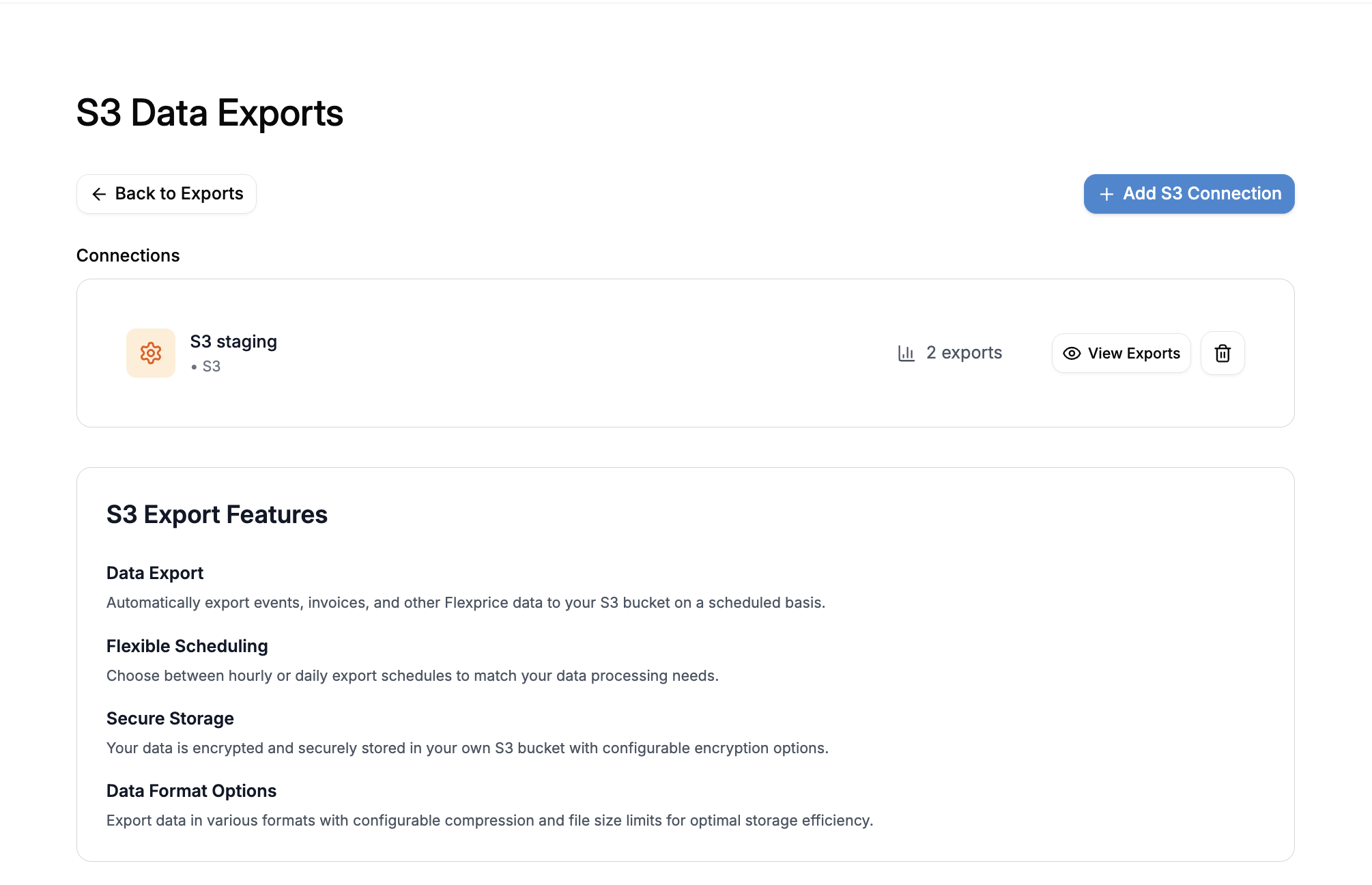
### Step 1: Create an S3 Connection
An S3 connection stores your AWS credentials and serves as the authentication mechanism for all export operations.
### Prerequisites
Before configuring S3 exports, ensure you have:
1. An AWS account with S3 access
2. An S3 bucket created in your desired region
3. AWS credentials (Access Key ID and Secret Access Key)
4. Appropriate IAM permissions for S3 operations
### Step 1: Create an S3 Connection
An S3 connection stores your AWS credentials and serves as the authentication mechanism for all export operations.
 Flexprice offers two connection types:
#### Option 1: Flexprice-Managed S3 Connection
Use Flexprice's managed S3 infrastructure for hassle-free exports:
**Benefits:**
* ✅ No AWS account required
* ✅ Instant setup with zero configuration
* ✅ Managed security and access control
* ✅ Download files directly from Flexprice dashboard
**When to Use:**
* Quick setup without AWS infrastructure
* Don't want to manage S3 buckets and IAM policies
* Need immediate data exports with minimal configuration
**Flexprice-Managed Storage**: Your data will be stored securely in Flexprice-managed S3 buckets. Files are encrypted at rest and accessible via secure download links.
#### Option 2: Your Own S3 Connection
Connect to your own AWS S3 bucket for complete control:
**Required Information:**
1. **Connection Name**: A descriptive name for your S3 connection (e.g., "Production S3 Export")
2. **AWS Access Key ID**: Your AWS access key ID
* Format: Starts with `AKIA` for permanent credentials
* Format: Starts with `ASIA` for temporary/session credentials
* Required for authentication
3. **AWS Secret Access Key**: Your AWS secret access key
* This credential is encrypted and stored securely
* Never exposed in API responses
4. **AWS Session Token** (Optional): Required only for temporary credentials
* Use when working with assumed roles or temporary credentials
* Leave empty for permanent IAM user credentials
**Security Best Practice**: Create a dedicated IAM user with minimal
permissions for S3 exports. Grant only the necessary S3 permissions
(`s3:PutObject`, `s3:GetObject`, `s3:ListBucket`).
#### AWS IAM Policy Example
Create an IAM policy with the following permissions:
```json theme={null}
{
"Version": "2012-10-17",
"Statement": [
{
"Sid": "FlexPriceS3ExportAccess",
"Effect": "Allow",
"Action": ["s3:PutObject", "s3:GetObject", "s3:ListBucket"],
"Resource": [
"arn:aws:s3:::your-bucket-name/*",
"arn:aws:s3:::your-bucket-name"
]
},
{
"Sid": "HeadObject",
"Effect": "Allow",
"Action": "s3:HeadObject",
"Resource": "*"
}
]
}
```
Replace `your-bucket-name` with your actual S3 bucket name. Ensure the IAM
user or role has this policy attached before creating the connection.
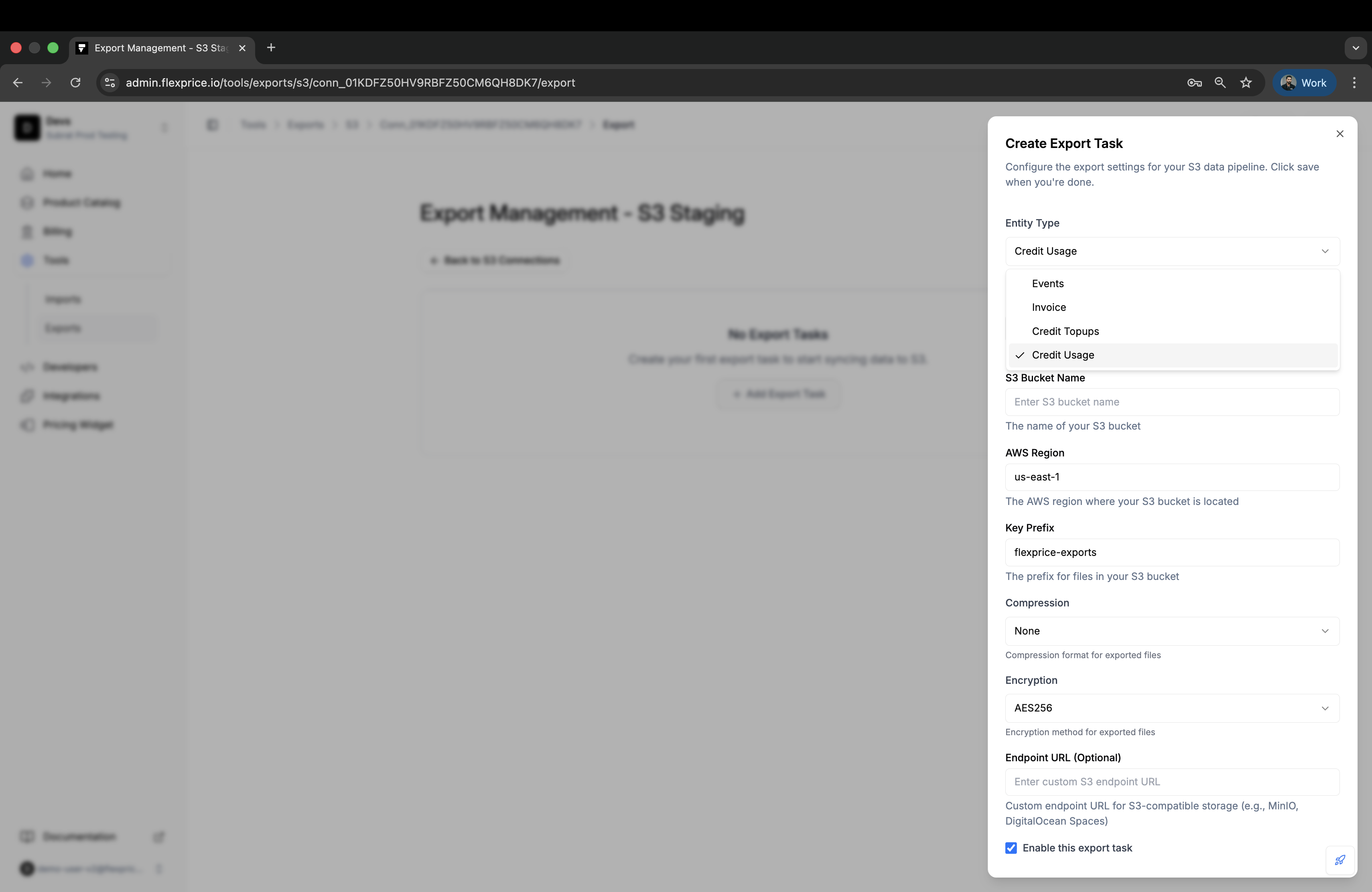
### Step 2: Configure a Scheduled Task
Once your S3 connection is established, create a scheduled task to automate exports.
Flexprice offers two connection types:
#### Option 1: Flexprice-Managed S3 Connection
Use Flexprice's managed S3 infrastructure for hassle-free exports:
**Benefits:**
* ✅ No AWS account required
* ✅ Instant setup with zero configuration
* ✅ Managed security and access control
* ✅ Download files directly from Flexprice dashboard
**When to Use:**
* Quick setup without AWS infrastructure
* Don't want to manage S3 buckets and IAM policies
* Need immediate data exports with minimal configuration
**Flexprice-Managed Storage**: Your data will be stored securely in Flexprice-managed S3 buckets. Files are encrypted at rest and accessible via secure download links.
#### Option 2: Your Own S3 Connection
Connect to your own AWS S3 bucket for complete control:
**Required Information:**
1. **Connection Name**: A descriptive name for your S3 connection (e.g., "Production S3 Export")
2. **AWS Access Key ID**: Your AWS access key ID
* Format: Starts with `AKIA` for permanent credentials
* Format: Starts with `ASIA` for temporary/session credentials
* Required for authentication
3. **AWS Secret Access Key**: Your AWS secret access key
* This credential is encrypted and stored securely
* Never exposed in API responses
4. **AWS Session Token** (Optional): Required only for temporary credentials
* Use when working with assumed roles or temporary credentials
* Leave empty for permanent IAM user credentials
**Security Best Practice**: Create a dedicated IAM user with minimal
permissions for S3 exports. Grant only the necessary S3 permissions
(`s3:PutObject`, `s3:GetObject`, `s3:ListBucket`).
#### AWS IAM Policy Example
Create an IAM policy with the following permissions:
```json theme={null}
{
"Version": "2012-10-17",
"Statement": [
{
"Sid": "FlexPriceS3ExportAccess",
"Effect": "Allow",
"Action": ["s3:PutObject", "s3:GetObject", "s3:ListBucket"],
"Resource": [
"arn:aws:s3:::your-bucket-name/*",
"arn:aws:s3:::your-bucket-name"
]
},
{
"Sid": "HeadObject",
"Effect": "Allow",
"Action": "s3:HeadObject",
"Resource": "*"
}
]
}
```
Replace `your-bucket-name` with your actual S3 bucket name. Ensure the IAM
user or role has this policy attached before creating the connection.
### Step 2: Configure a Scheduled Task
Once your S3 connection is established, create a scheduled task to automate exports.
 #### Configuration Options
**1. Connection**
* Select the S3 connection created in Step 1
* Each scheduled task can use different connections if needed
**2. Entity Type** (Required)
Choose what data to export:
| Entity Type | Description | Data Included |
| ------------------ | -------------------------- | -------------------------------------------------------------------------------- |
| **invoice** | Finalized invoices | All invoice data, without line items, taxes, payments |
| **events** | Feature usage events | Event data, usage metrics, customer activity |
| **credit\_topups** | Credit wallet transactions | Completed credit top-ups with wallet balance details |
| **credit\_usage** | Customer credit balances | Aggregated current and real-time credit balances across all wallets per customer |
**3. Schedule Interval** (Required)
Select how frequently exports should run:
| Interval | Frequency | Cron Schedule | Best For |
| ---------- | ------------------------------ | ------------- | -------------------------------------------- |
| **hourly** | Every hour at :15 minutes past | `15 * * * *` | Real-time data needs, high-frequency updates |
| **daily** | Every day at 00:15 AM | `15 0 * * *` | Standard backups, daily reporting |
**Why the 15-minute buffer?**
Scheduled exports include a 15-minute buffer after the interval boundary to ensure all data has been ingested and processed. For example, an hourly export scheduled at 10:15 AM will export data from 9:00 AM to 10:00 AM.
**4. S3 Configuration** (Required)
Configure S3-specific settings for your exports:
##### Bucket (Required)
* The name of your S3 bucket where files will be stored
* Example: `flexprice-exports-prod`
* Must exist before creating the scheduled task
##### Region (Required)
* AWS region where your bucket is located
* Example: `us-west-2`, `eu-central-1`, `ap-south-1`
* Must match your bucket's region
##### Key Prefix (Optional)
* Directory path prefix for organizing files in your bucket
* Example: `flexprice-exports/invoices/`
* Example: `production/events/2024/`
* Files will be stored as: `{key_prefix}/{filename}.csv`
Use key prefixes to organize exports by environment, data type, or date. This
makes it easier to manage and query exported data.
##### Endpoint URL (Optional)
Custom endpoint URL for S3-compatible storage services:
* **Use Case**: Connect to S3-compatible storage providers other than AWS S3
* **Examples**:
* MinIO: `https://minio.example.com`
* DigitalOcean Spaces: `https://nyc3.digitaloceanspaces.com`
* Backblaze B2: `https://s3.us-west-002.backblazeb2.com`
* **Default**: Leave empty to use AWS S3 (default)
When using a custom endpoint, ensure your credentials and bucket configuration
are compatible with that provider's S3 API implementation.
##### Compression (Optional)
Control file compression to reduce storage costs:
| Option | Description | File Extension | Compression Ratio |
| -------- | ------------------------ | -------------- | ----------------------- |
| **none** | No compression (default) | `.csv` | N/A (original size) |
| **gzip** | GZIP compression | `.csv.gz` | \~70-80% size reduction |
**When to use compression:**
* Large datasets with many records
* Storage cost optimization
* Bandwidth-limited environments
**When to skip compression:**
* Small datasets (\< 1MB)
* Files need to be immediately readable
* Downstream systems don't support GZIP
##### Encryption (Optional)
Secure your data at rest with server-side encryption:
| Option | Description | Key Management | Best For |
| ---------------- | --------------------------------------- | ------------------------ | ----------------------- |
| **AES256** | S3-managed AES-256 encryption (default) | AWS manages keys | Standard security needs |
| **aws:kms** | AWS KMS encryption | You control keys via KMS | Compliance requirements |
| **aws:kms:dsse** | KMS with dual-layer encryption | Enhanced KMS security | Maximum security needs |
All encryption options are server-side encryption (SSE). Data is encrypted at
rest in S3. AES256 is the default and recommended for most use cases.
**5. Enable/Disable Toggle**
* Enable the scheduled task to start automatic exports
* Disable to pause exports without deleting the configuration
* Can be toggled at any time
### Step 3: Verify Configuration
After creating a scheduled task:
1. **Verify Connection**: Ensure your S3 connection is validated and active
2. **Check Schedule**: Confirm the interval matches your requirements
3. **Review S3 Settings**: Double-check bucket name, region, and paths
4. **Test with Manual Export**: Trigger a manual export to verify the setup
#### Configuration Options
**1. Connection**
* Select the S3 connection created in Step 1
* Each scheduled task can use different connections if needed
**2. Entity Type** (Required)
Choose what data to export:
| Entity Type | Description | Data Included |
| ------------------ | -------------------------- | -------------------------------------------------------------------------------- |
| **invoice** | Finalized invoices | All invoice data, without line items, taxes, payments |
| **events** | Feature usage events | Event data, usage metrics, customer activity |
| **credit\_topups** | Credit wallet transactions | Completed credit top-ups with wallet balance details |
| **credit\_usage** | Customer credit balances | Aggregated current and real-time credit balances across all wallets per customer |
**3. Schedule Interval** (Required)
Select how frequently exports should run:
| Interval | Frequency | Cron Schedule | Best For |
| ---------- | ------------------------------ | ------------- | -------------------------------------------- |
| **hourly** | Every hour at :15 minutes past | `15 * * * *` | Real-time data needs, high-frequency updates |
| **daily** | Every day at 00:15 AM | `15 0 * * *` | Standard backups, daily reporting |
**Why the 15-minute buffer?**
Scheduled exports include a 15-minute buffer after the interval boundary to ensure all data has been ingested and processed. For example, an hourly export scheduled at 10:15 AM will export data from 9:00 AM to 10:00 AM.
**4. S3 Configuration** (Required)
Configure S3-specific settings for your exports:
##### Bucket (Required)
* The name of your S3 bucket where files will be stored
* Example: `flexprice-exports-prod`
* Must exist before creating the scheduled task
##### Region (Required)
* AWS region where your bucket is located
* Example: `us-west-2`, `eu-central-1`, `ap-south-1`
* Must match your bucket's region
##### Key Prefix (Optional)
* Directory path prefix for organizing files in your bucket
* Example: `flexprice-exports/invoices/`
* Example: `production/events/2024/`
* Files will be stored as: `{key_prefix}/{filename}.csv`
Use key prefixes to organize exports by environment, data type, or date. This
makes it easier to manage and query exported data.
##### Endpoint URL (Optional)
Custom endpoint URL for S3-compatible storage services:
* **Use Case**: Connect to S3-compatible storage providers other than AWS S3
* **Examples**:
* MinIO: `https://minio.example.com`
* DigitalOcean Spaces: `https://nyc3.digitaloceanspaces.com`
* Backblaze B2: `https://s3.us-west-002.backblazeb2.com`
* **Default**: Leave empty to use AWS S3 (default)
When using a custom endpoint, ensure your credentials and bucket configuration
are compatible with that provider's S3 API implementation.
##### Compression (Optional)
Control file compression to reduce storage costs:
| Option | Description | File Extension | Compression Ratio |
| -------- | ------------------------ | -------------- | ----------------------- |
| **none** | No compression (default) | `.csv` | N/A (original size) |
| **gzip** | GZIP compression | `.csv.gz` | \~70-80% size reduction |
**When to use compression:**
* Large datasets with many records
* Storage cost optimization
* Bandwidth-limited environments
**When to skip compression:**
* Small datasets (\< 1MB)
* Files need to be immediately readable
* Downstream systems don't support GZIP
##### Encryption (Optional)
Secure your data at rest with server-side encryption:
| Option | Description | Key Management | Best For |
| ---------------- | --------------------------------------- | ------------------------ | ----------------------- |
| **AES256** | S3-managed AES-256 encryption (default) | AWS manages keys | Standard security needs |
| **aws:kms** | AWS KMS encryption | You control keys via KMS | Compliance requirements |
| **aws:kms:dsse** | KMS with dual-layer encryption | Enhanced KMS security | Maximum security needs |
All encryption options are server-side encryption (SSE). Data is encrypted at
rest in S3. AES256 is the default and recommended for most use cases.
**5. Enable/Disable Toggle**
* Enable the scheduled task to start automatic exports
* Disable to pause exports without deleting the configuration
* Can be toggled at any time
### Step 3: Verify Configuration
After creating a scheduled task:
1. **Verify Connection**: Ensure your S3 connection is validated and active
2. **Check Schedule**: Confirm the interval matches your requirements
3. **Review S3 Settings**: Double-check bucket name, region, and paths
4. **Test with Manual Export**: Trigger a manual export to verify the setup
 ### Viewing Export Details
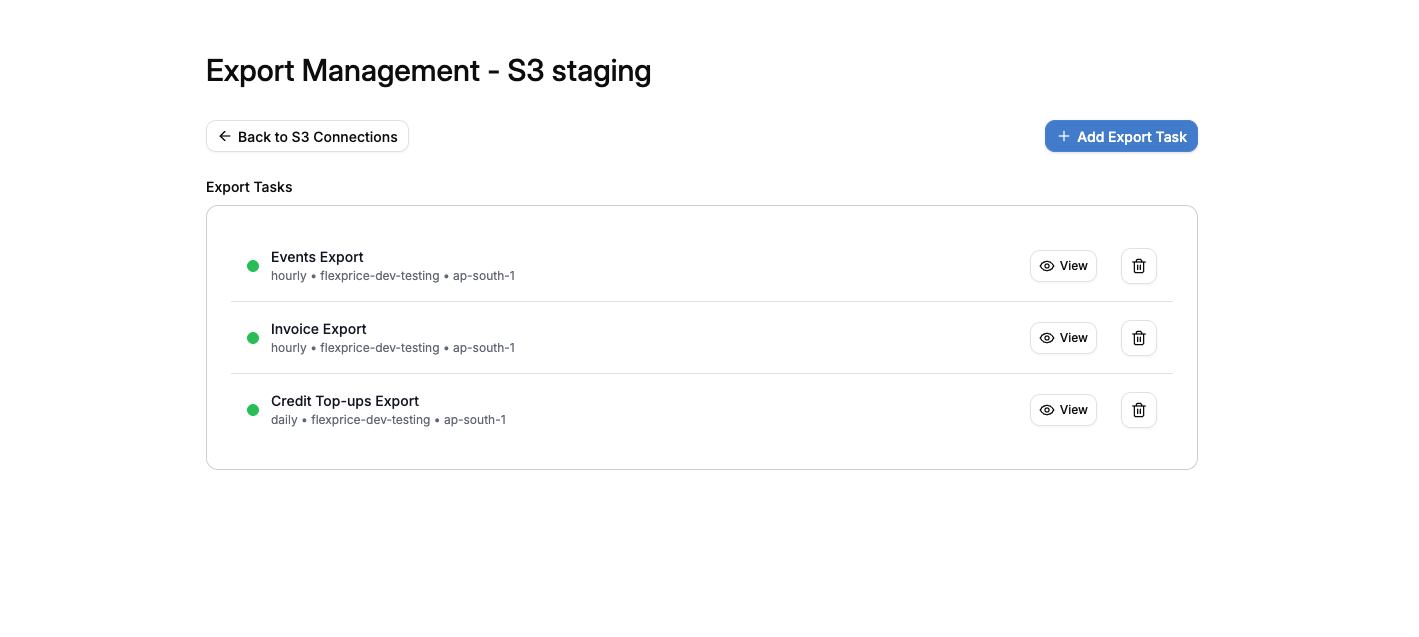
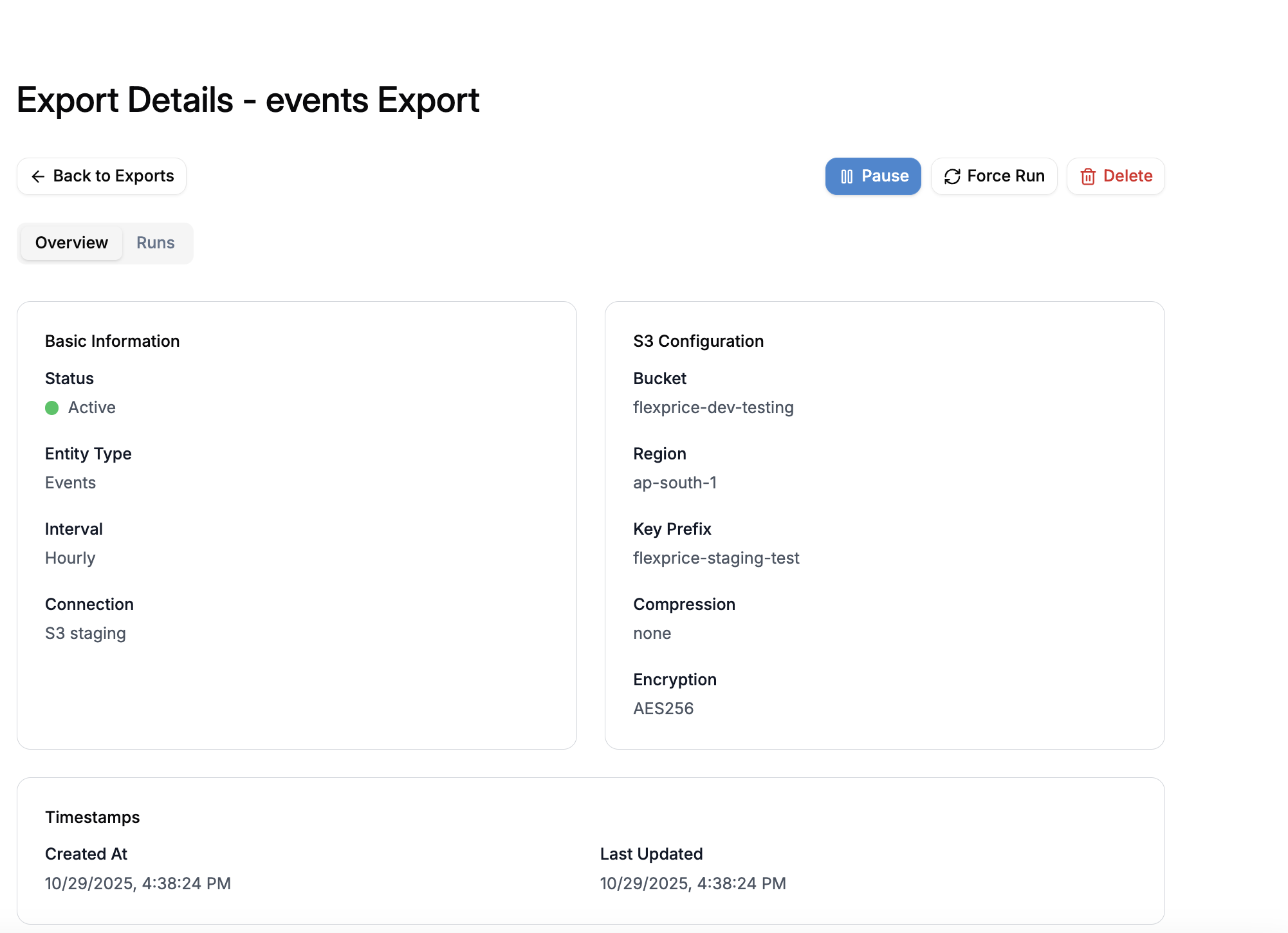
Once you've created an export task, you can view its configuration and status by clicking on the task. The export details page shows:
* **Basic Information**: Status, entity type, interval, and connection
* **S3 Configuration**: Bucket, region, key prefix, compression, and encryption settings
* **Timestamps**: Creation date and last update time
### Viewing Export Details
Once you've created an export task, you can view its configuration and status by clicking on the task. The export details page shows:
* **Basic Information**: Status, entity type, interval, and connection
* **S3 Configuration**: Bucket, region, key prefix, compression, and encryption settings
* **Timestamps**: Creation date and last update time
 ## Manual Export
Manual Export allows you to trigger an immediate export without waiting for the next scheduled execution. This is useful for:
* Testing your export configuration
* Backfilling historical data
* Responding to urgent data requests
* Exporting specific time ranges
### How to Trigger a Manual Export
Navigate to the export details page and click the "Manual Export" button to trigger a manual export.
## Manual Export
Manual Export allows you to trigger an immediate export without waiting for the next scheduled execution. This is useful for:
* Testing your export configuration
* Backfilling historical data
* Responding to urgent data requests
* Exporting specific time ranges
### How to Trigger a Manual Export
Navigate to the export details page and click the "Manual Export" button to trigger a manual export.
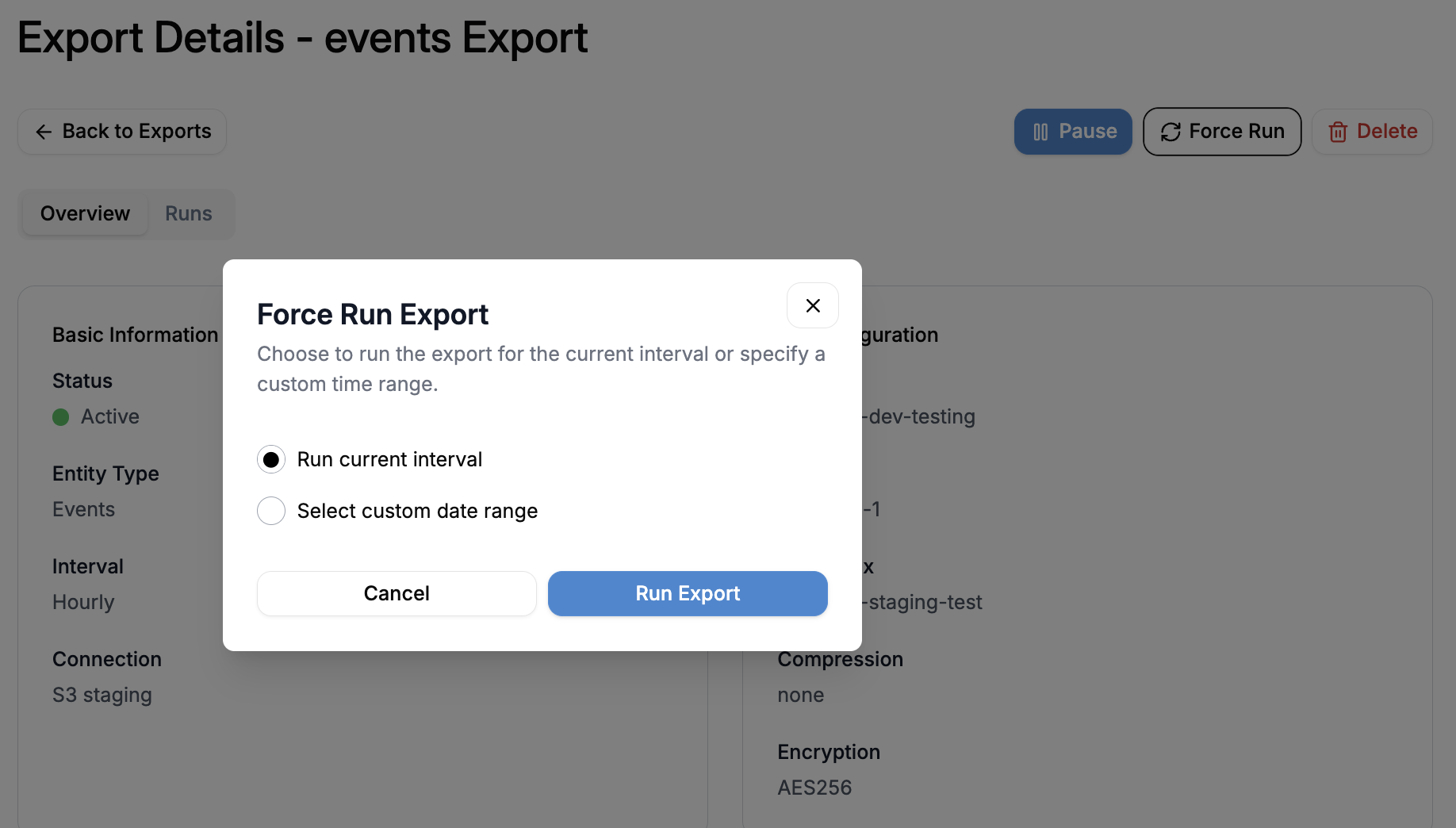 #### Option 1: Automatic Time Range (Default)
Trigger a manual export without specifying time ranges. The system automatically calculates the export window based on the task's interval:
**Example - Hourly Task:**
* Current time: 10:30 AM
* Export window: 10:00 AM to 11:00 AM (current hour)
**Example - Daily Task:**
* Current date: October 16, 2025
* Export window: October 16, 00:00 to October 17, 00:00 (current day)
**API Request:**
```bash theme={null}
POST /api/v1/tasks/scheduled/{task_id}/run
```
**Response:**
```json theme={null}
{
"workflow_id": "task_export_01HK8DBMBN87CY36DEFY62PEXBT",
"message": "Manual export triggered successfully",
"start_time": "2025-10-16T10:00:00Z",
"end_time": "2025-10-16T11:00:00Z",
"mode": "manual"
}
```
#### Option 2: Custom Time Range
Specify exact start and end times for the export:
**API Request:**
```bash theme={null}
POST /api/v1/tasks/scheduled/{task_id}/run
Content-Type: application/json
{
"start_time": "2025-10-01T00:00:00Z",
"end_time": "2025-10-15T23:59:59Z"
}
```
**Response:**
```json theme={null}
{
"workflow_id": "task_export_01HK8DBMBN87CY36DEFY62PEXBT",
"message": "Manual export triggered successfully",
"start_time": "2025-10-01T00:00:00Z",
"end_time": "2025-10-15T23:59:59Z",
"mode": "custom"
}
```
Custom time ranges must be valid timestamps in RFC3339 format (ISO 8601). The
end time must be after the start time.
### Manual Export Behavior
* **Independent Execution**: Manual exports don't affect the regular schedule
* **Parallel Execution**: Can run alongside scheduled exports
* **Tracked Separately**: Appears in the Runs tab with "manual" or "custom" mode
* **Same Configuration**: Uses the same S3 settings as the scheduled task
* **Immediate Processing**: Starts execution within seconds
## Runs Tab - Execution History
The Runs tab displays a comprehensive history of all export executions for a scheduled task, including both automatic scheduled runs and manual exports.
#### Option 1: Automatic Time Range (Default)
Trigger a manual export without specifying time ranges. The system automatically calculates the export window based on the task's interval:
**Example - Hourly Task:**
* Current time: 10:30 AM
* Export window: 10:00 AM to 11:00 AM (current hour)
**Example - Daily Task:**
* Current date: October 16, 2025
* Export window: October 16, 00:00 to October 17, 00:00 (current day)
**API Request:**
```bash theme={null}
POST /api/v1/tasks/scheduled/{task_id}/run
```
**Response:**
```json theme={null}
{
"workflow_id": "task_export_01HK8DBMBN87CY36DEFY62PEXBT",
"message": "Manual export triggered successfully",
"start_time": "2025-10-16T10:00:00Z",
"end_time": "2025-10-16T11:00:00Z",
"mode": "manual"
}
```
#### Option 2: Custom Time Range
Specify exact start and end times for the export:
**API Request:**
```bash theme={null}
POST /api/v1/tasks/scheduled/{task_id}/run
Content-Type: application/json
{
"start_time": "2025-10-01T00:00:00Z",
"end_time": "2025-10-15T23:59:59Z"
}
```
**Response:**
```json theme={null}
{
"workflow_id": "task_export_01HK8DBMBN87CY36DEFY62PEXBT",
"message": "Manual export triggered successfully",
"start_time": "2025-10-01T00:00:00Z",
"end_time": "2025-10-15T23:59:59Z",
"mode": "custom"
}
```
Custom time ranges must be valid timestamps in RFC3339 format (ISO 8601). The
end time must be after the start time.
### Manual Export Behavior
* **Independent Execution**: Manual exports don't affect the regular schedule
* **Parallel Execution**: Can run alongside scheduled exports
* **Tracked Separately**: Appears in the Runs tab with "manual" or "custom" mode
* **Same Configuration**: Uses the same S3 settings as the scheduled task
* **Immediate Processing**: Starts execution within seconds
## Runs Tab - Execution History
The Runs tab displays a comprehensive history of all export executions for a scheduled task, including both automatic scheduled runs and manual exports.
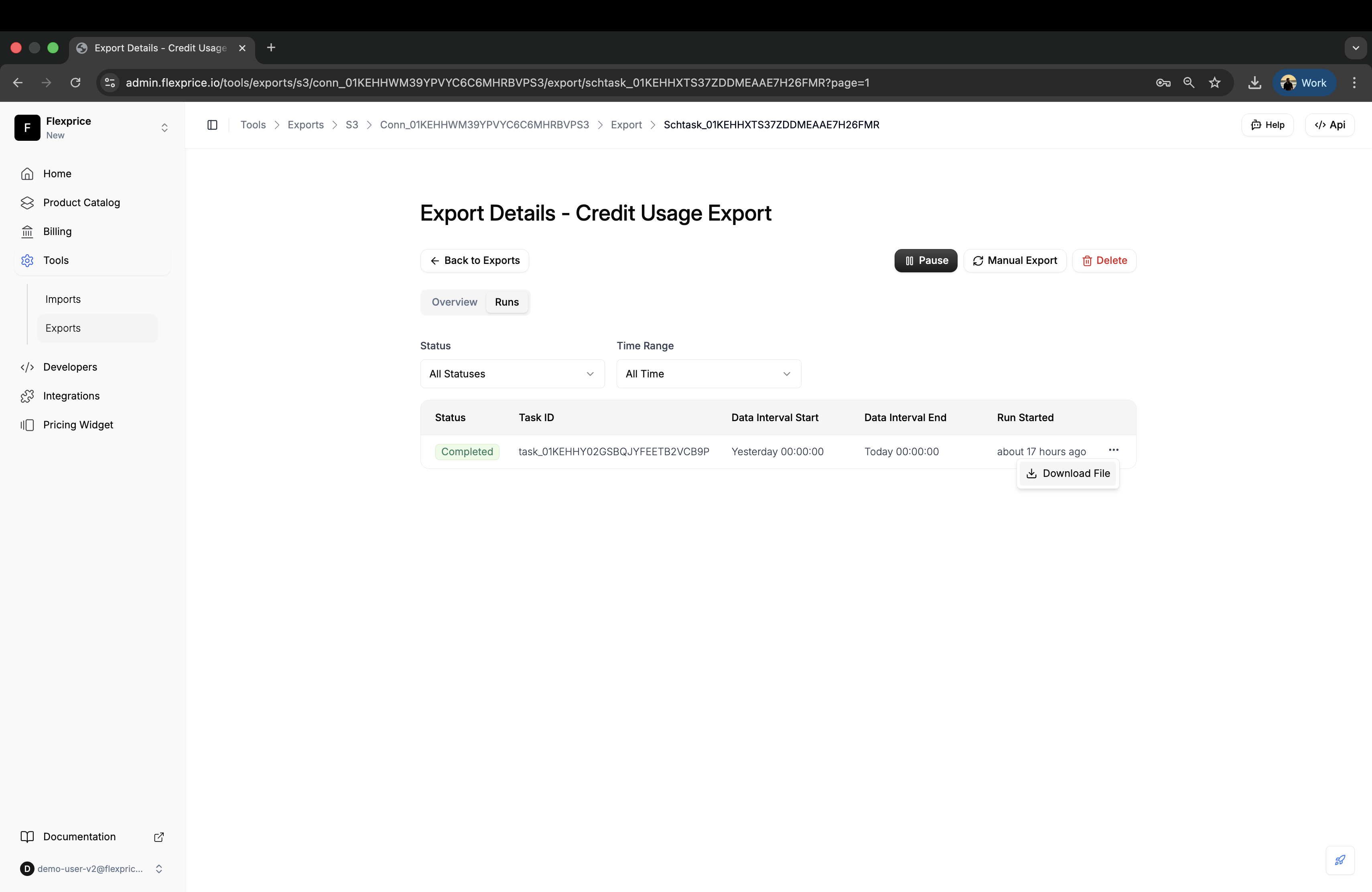 Each run record shows the execution status, time range, file details, and any errors that occurred. Use this to monitor export health and access exported files.
### Downloading Exported Files
You can download exported files directly from the Runs tab for any connection type:
Go to your scheduled task and click the **Runs** tab to view execution history
Find the completed export run you want to download from the list
Click the **Download** button next to the run record to download the CSV file.
**Benefits:**
* ✅ Works with both Flexprice-managed and your own S3 connections
* ✅ No S3 console access required
* ✅ Download files directly
### Accessing Exported Files
Each completed run provides a direct S3 file URL:
**File Naming Convention:**
```
{entity_type}-{start_time}-{end_time}.csv
```
**Examples:**
```
invoice-251016100000-251016110000.csv
events-251016000000-251017000000.csv.gz
credit_usage-251223110000-251223120000.csv
```
**Time Format in Filename:**
* `YYMMDDHHMMSS` (Year, Month, Day, Hour, Minute, Second)
* Example: `251016100000` = October 16, 2025, 10:00:00
### Troubleshooting Failed Runs
When a run fails, the error summary provides details about what went wrong:
**Common Failure Reasons:**
| Error | Cause | Solution |
| --------------------- | --------------------------------------- | -------------------------------------------------- |
| **Connection Failed** | Invalid AWS credentials | Verify and update S3 connection credentials |
| **Bucket Not Found** | S3 bucket doesn't exist or wrong region | Check bucket name and region in task configuration |
| **Permission Denied** | Insufficient IAM permissions | Review and update IAM policy |
| **No Data Found** | No records in the specified time range | Verify the time range or check data availability |
| **Timeout** | Export took longer than 15 minutes | Contact support or split into smaller time ranges |
## Best Practices
**Use Descriptive Connection Names**
Name your S3 connections based on environment and purpose (e.g., "Production Invoice Exports", "Staging Events Backup").
**Organize with Key Prefixes**
Use key prefixes to organize exports by environment, data type, and date:
* `production/invoices/2025/`
* `staging/events/`
**Enable Compression for Large Datasets**
Use GZIP compression for exports with thousands of records to reduce storage costs by 70-80%.
**Choose the Right Interval**
* **Hourly**: Real-time analytics, high-frequency reporting
* **Daily**: Standard backups, daily batch processing
**Test with Manual Export**
Always test a new scheduled task with a manual export before relying on automatic execution.
**Monitor Execution History**
Regularly review the Runs tab to ensure exports are completing successfully and adjust configuration if needed.
**Use IAM Best Practices**
* Create dedicated IAM users for exports
* Grant minimal required permissions
* Rotate credentials regularly
* Enable CloudTrail for audit logging
**Plan for S3 Lifecycle Policies**
Configure S3 lifecycle policies to automatically archive or delete old exports:
* Transition to S3 Glacier after 90 days
* Delete files older than 1 year
## Troubleshooting
### Scheduled Task Not Running
**Possible causes:**
* Task is disabled
* S3 connection is invalid
* Temporal workflow service is down
**Solution:**
1. Verify the task is enabled in the dashboard
2. Check the S3 connection status
3. Test with a manual export to isolate the issue
4. Review Temporal workflow logs
### Files Not Appearing in S3
**Possible causes:**
* Incorrect bucket name or region
* Missing IAM permissions
* Key prefix typo
**Solution:**
1. Verify bucket name matches exactly (case-sensitive)
2. Confirm region matches the bucket's region
3. Review IAM policy and ensure `s3:PutObject` permission
4. Check key prefix for typos or trailing slashes
### Export Timeout Errors
**Possible causes:**
* Very large time range (months of data)
* Thousands of records in a single export
* S3 upload speed issues
**Solution:**
1. Reduce the time range for custom exports
2. Use hourly intervals instead of daily for high-volume data
3. Enable GZIP compression to reduce upload time
4. Contact support if issue persists
### Invalid Credentials Error
**Possible causes:**
* AWS credentials expired or rotated
* Incorrect Access Key ID or Secret Key
* Session token expired (for temporary credentials)
**Solution:**
1. Verify credentials in AWS IAM console
2. Update the S3 connection with new credentials
3. For temporary credentials, refresh the session token
4. Ensure the IAM user/role still exists
## API Reference
### Create Scheduled Task
```bash theme={null}
POST /api/v1/tasks/scheduled
Content-Type: application/json
Authorization: Bearer {token}
{
"connection_id": "conn_01HK8DBMBN87CY36DEFY62PEXBT",
"entity_type": "invoice", // Options: "invoice", "events", "credit_topups", "credit_usage"
"interval": "daily",
"enabled": true,
"job_config": {
"bucket": "flexprice-exports",
"region": "us-west-2",
"key_prefix": "invoices/",
"endpoint_url": "", // Optional: Custom S3-compatible endpoint
"compression": "gzip",
"encryption": "AES256"
}
}
```
### Update Scheduled Task
```bash theme={null}
PATCH /api/v1/tasks/scheduled/{task_id}
Content-Type: application/json
Authorization: Bearer {token}
{
"enabled": false
}
```
### Trigger Manual Export
```bash theme={null}
POST /api/v1/tasks/scheduled/{task_id}/run
Content-Type: application/json
Authorization: Bearer {token}
{
"start_time": "2025-10-01T00:00:00Z",
"end_time": "2025-10-15T23:59:59Z"
}
```
### List Scheduled Tasks
```bash theme={null}
GET /api/v1/tasks/scheduled?entity_type=invoice&status=published
Authorization: Bearer {token}
```
### Get Task Execution History
```bash theme={null}
GET /api/v1/tasks?scheduled_task_id={task_id}&task_type=EXPORT
Authorization: Bearer {token}
```
## Summary
S3 Export provides a comprehensive solution for automated data exports to Amazon S3. Key takeaways:
* **Four Data Types**: Export invoices, events, credit top-ups, and credit usage data
* **Flexible Scheduling**: Hourly or daily automated exports
* **Secure Storage**: Multiple encryption options for data at rest
* **Manual Export Capability**: Trigger manual exports anytime
* **Execution Tracking**: Comprehensive run history and monitoring
* **Enterprise-Ready**: Compression, encryption, and scalable architecture
* **Easy Integration**: Standard CSV format for downstream processing
By implementing S3 Export, you can automate data backups, feed data warehouses, meet compliance requirements, and integrate Flexprice data with your broader data infrastructure.
Each run record shows the execution status, time range, file details, and any errors that occurred. Use this to monitor export health and access exported files.
### Downloading Exported Files
You can download exported files directly from the Runs tab for any connection type:
Go to your scheduled task and click the **Runs** tab to view execution history
Find the completed export run you want to download from the list
Click the **Download** button next to the run record to download the CSV file.
**Benefits:**
* ✅ Works with both Flexprice-managed and your own S3 connections
* ✅ No S3 console access required
* ✅ Download files directly
### Accessing Exported Files
Each completed run provides a direct S3 file URL:
**File Naming Convention:**
```
{entity_type}-{start_time}-{end_time}.csv
```
**Examples:**
```
invoice-251016100000-251016110000.csv
events-251016000000-251017000000.csv.gz
credit_usage-251223110000-251223120000.csv
```
**Time Format in Filename:**
* `YYMMDDHHMMSS` (Year, Month, Day, Hour, Minute, Second)
* Example: `251016100000` = October 16, 2025, 10:00:00
### Troubleshooting Failed Runs
When a run fails, the error summary provides details about what went wrong:
**Common Failure Reasons:**
| Error | Cause | Solution |
| --------------------- | --------------------------------------- | -------------------------------------------------- |
| **Connection Failed** | Invalid AWS credentials | Verify and update S3 connection credentials |
| **Bucket Not Found** | S3 bucket doesn't exist or wrong region | Check bucket name and region in task configuration |
| **Permission Denied** | Insufficient IAM permissions | Review and update IAM policy |
| **No Data Found** | No records in the specified time range | Verify the time range or check data availability |
| **Timeout** | Export took longer than 15 minutes | Contact support or split into smaller time ranges |
## Best Practices
**Use Descriptive Connection Names**
Name your S3 connections based on environment and purpose (e.g., "Production Invoice Exports", "Staging Events Backup").
**Organize with Key Prefixes**
Use key prefixes to organize exports by environment, data type, and date:
* `production/invoices/2025/`
* `staging/events/`
**Enable Compression for Large Datasets**
Use GZIP compression for exports with thousands of records to reduce storage costs by 70-80%.
**Choose the Right Interval**
* **Hourly**: Real-time analytics, high-frequency reporting
* **Daily**: Standard backups, daily batch processing
**Test with Manual Export**
Always test a new scheduled task with a manual export before relying on automatic execution.
**Monitor Execution History**
Regularly review the Runs tab to ensure exports are completing successfully and adjust configuration if needed.
**Use IAM Best Practices**
* Create dedicated IAM users for exports
* Grant minimal required permissions
* Rotate credentials regularly
* Enable CloudTrail for audit logging
**Plan for S3 Lifecycle Policies**
Configure S3 lifecycle policies to automatically archive or delete old exports:
* Transition to S3 Glacier after 90 days
* Delete files older than 1 year
## Troubleshooting
### Scheduled Task Not Running
**Possible causes:**
* Task is disabled
* S3 connection is invalid
* Temporal workflow service is down
**Solution:**
1. Verify the task is enabled in the dashboard
2. Check the S3 connection status
3. Test with a manual export to isolate the issue
4. Review Temporal workflow logs
### Files Not Appearing in S3
**Possible causes:**
* Incorrect bucket name or region
* Missing IAM permissions
* Key prefix typo
**Solution:**
1. Verify bucket name matches exactly (case-sensitive)
2. Confirm region matches the bucket's region
3. Review IAM policy and ensure `s3:PutObject` permission
4. Check key prefix for typos or trailing slashes
### Export Timeout Errors
**Possible causes:**
* Very large time range (months of data)
* Thousands of records in a single export
* S3 upload speed issues
**Solution:**
1. Reduce the time range for custom exports
2. Use hourly intervals instead of daily for high-volume data
3. Enable GZIP compression to reduce upload time
4. Contact support if issue persists
### Invalid Credentials Error
**Possible causes:**
* AWS credentials expired or rotated
* Incorrect Access Key ID or Secret Key
* Session token expired (for temporary credentials)
**Solution:**
1. Verify credentials in AWS IAM console
2. Update the S3 connection with new credentials
3. For temporary credentials, refresh the session token
4. Ensure the IAM user/role still exists
## API Reference
### Create Scheduled Task
```bash theme={null}
POST /api/v1/tasks/scheduled
Content-Type: application/json
Authorization: Bearer {token}
{
"connection_id": "conn_01HK8DBMBN87CY36DEFY62PEXBT",
"entity_type": "invoice", // Options: "invoice", "events", "credit_topups", "credit_usage"
"interval": "daily",
"enabled": true,
"job_config": {
"bucket": "flexprice-exports",
"region": "us-west-2",
"key_prefix": "invoices/",
"endpoint_url": "", // Optional: Custom S3-compatible endpoint
"compression": "gzip",
"encryption": "AES256"
}
}
```
### Update Scheduled Task
```bash theme={null}
PATCH /api/v1/tasks/scheduled/{task_id}
Content-Type: application/json
Authorization: Bearer {token}
{
"enabled": false
}
```
### Trigger Manual Export
```bash theme={null}
POST /api/v1/tasks/scheduled/{task_id}/run
Content-Type: application/json
Authorization: Bearer {token}
{
"start_time": "2025-10-01T00:00:00Z",
"end_time": "2025-10-15T23:59:59Z"
}
```
### List Scheduled Tasks
```bash theme={null}
GET /api/v1/tasks/scheduled?entity_type=invoice&status=published
Authorization: Bearer {token}
```
### Get Task Execution History
```bash theme={null}
GET /api/v1/tasks?scheduled_task_id={task_id}&task_type=EXPORT
Authorization: Bearer {token}
```
## Summary
S3 Export provides a comprehensive solution for automated data exports to Amazon S3. Key takeaways:
* **Four Data Types**: Export invoices, events, credit top-ups, and credit usage data
* **Flexible Scheduling**: Hourly or daily automated exports
* **Secure Storage**: Multiple encryption options for data at rest
* **Manual Export Capability**: Trigger manual exports anytime
* **Execution Tracking**: Comprehensive run history and monitoring
* **Enterprise-Ready**: Compression, encryption, and scalable architecture
* **Easy Integration**: Standard CSV format for downstream processing
By implementing S3 Export, you can automate data backups, feed data warehouses, meet compliance requirements, and integrate Flexprice data with your broader data infrastructure.