> ## Documentation Index
> Fetch the complete documentation index at: https://docs.flexprice.io/llms.txt
> Use this file to discover all available pages before exploring further.
# Connecting to Billing
> Learn how to connect events to billing and see usage in invoices
Events alone don't generate revenue - they need to be connected to pricing plans and customer subscriptions to create billable charges. This guide shows you how to transform your ingested events into actual invoices.
## How Events Flow to Billing
The complete flow from events to invoices:
1. **Events** → Usage data transmitted to Flexprice
2. **Features** → Define what you're tracking and how to aggregate
3. **Plans** → Set pricing for features
4. **Subscriptions** → Connect customers to plans
5. **Invoices** → Automatic billing based on usage
## Prerequisites
* A metered feature created and configured
* Events being transmitted and validated
* A customer created in Flexprice
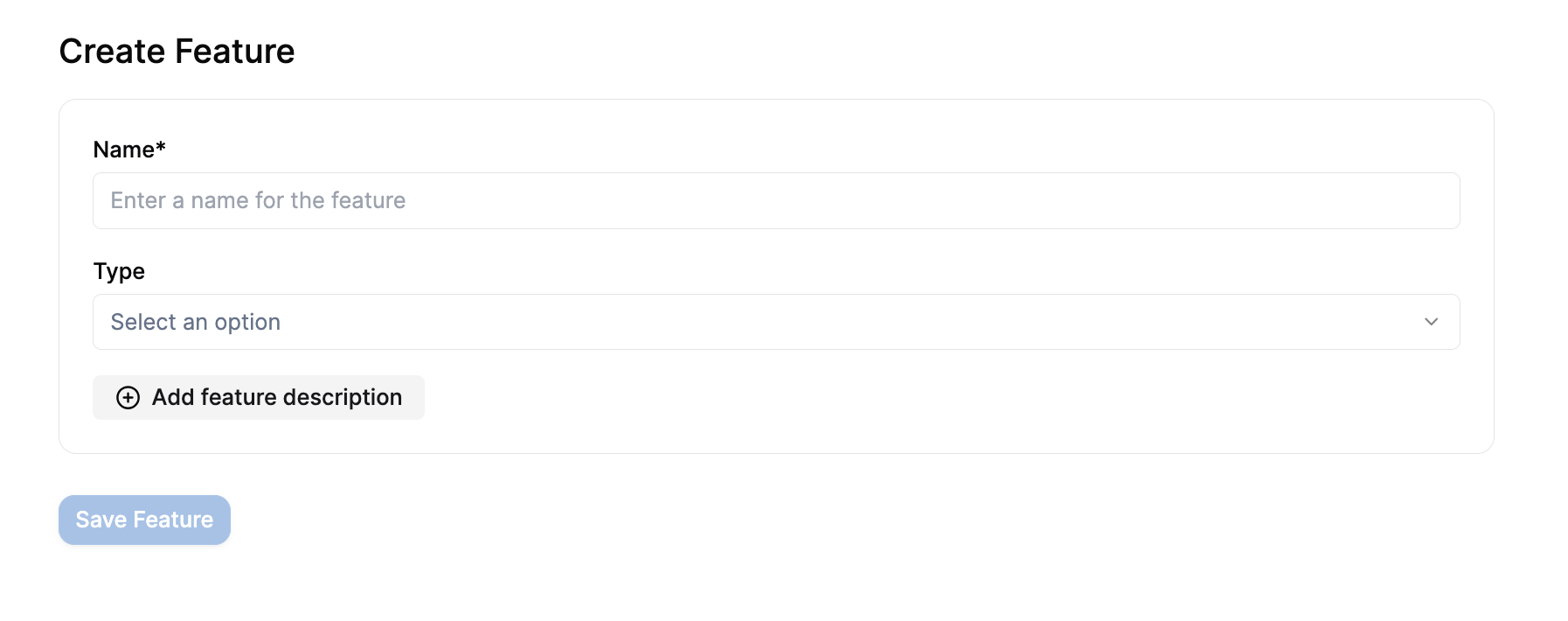
## Step 1: Create a Pricing Plan
### Navigate to Plans
1. Log into your Flexprice Admin Dashboard
2. In the left sidebar, click on **Product Catalog**
3. Click on **Plans**
4. Click **"Create Plan"**
### Configure the Plan
1. **Plan Name**: Give your plan a descriptive name (e.g., "Basic Plan", "Pro Plan")
2. **Description**: Optional description of what the plan includes
3. **Billing Cycle**: Choose how often customers are billed (monthly, annually, etc.)
### Add Your Feature
1. Click **"Add Feature"** or **"Add Charge"**
2. Select your metered feature from the list
3. Configure the pricing:
**For Usage-Based Pricing:**
* **Price Model**: Choose "Usage Based"
* **Price**: Set the price per unit (e.g., \$1 per credit)
* **Free Tier**: Optional free usage before billing starts
**Example Configuration:**
* Feature: Model Usage
* Price: \$1.00 per credit
* Free Tier: 100 credits per month
 ### Advanced Pricing Options
**Tiered Pricing:**
* First 1000 credits: \$1.00 each
* Next 1000 credits: \$0.80 each
* Additional credits: \$0.60 each
**Package Pricing:**
* 1000 credits for $800 (effective $0.80 per credit)
**Volume Discounts:**
* Set percentage discounts based on usage volume
### Save the Plan
Click **"Save Plan"** to create your pricing plan.
## Step 2: Assign Plan to Customer
### Create Subscription
1. Go to **Customers** in the left sidebar
2. Find and click on your customer
3. Click **"Create Subscription"**
4. Select the plan you just created
5. Set the subscription start date
6. Click **"Create Subscription"**
### Advanced Pricing Options
**Tiered Pricing:**
* First 1000 credits: \$1.00 each
* Next 1000 credits: \$0.80 each
* Additional credits: \$0.60 each
**Package Pricing:**
* 1000 credits for $800 (effective $0.80 per credit)
**Volume Discounts:**
* Set percentage discounts based on usage volume
### Save the Plan
Click **"Save Plan"** to create your pricing plan.
## Step 2: Assign Plan to Customer
### Create Subscription
1. Go to **Customers** in the left sidebar
2. Find and click on your customer
3. Click **"Create Subscription"**
4. Select the plan you just created
5. Set the subscription start date
6. Click **"Create Subscription"**
 ### Verify Subscription
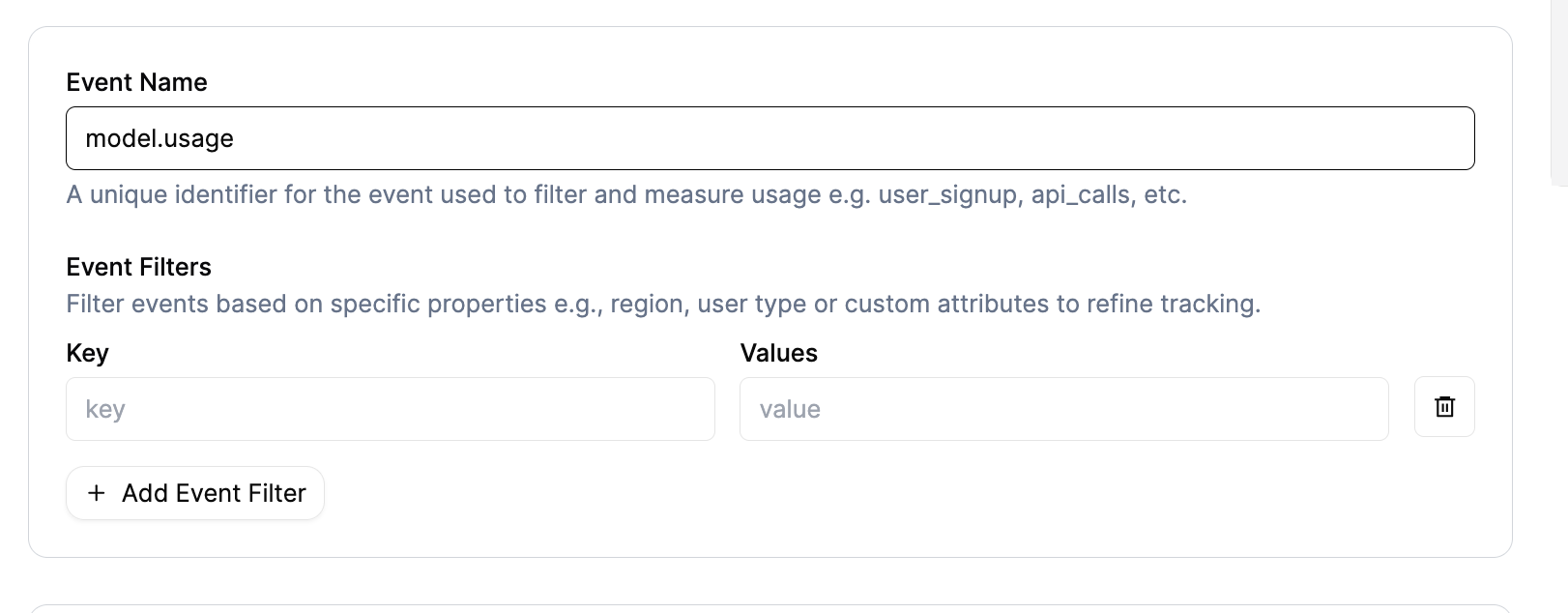
After creating the subscription, you should see:
* Subscription status: Active
* Plan name and billing cycle
* Next billing date
## Step 3: Monitor Usage and Billing
### Check Upcoming Invoices
1. Go to the customer's subscription page
2. Click on **"Upcoming Invoices"** tab
3. You'll view a preview of the next invoice with:
* Usage quantities from your events
* Calculated amounts based on your pricing
* Billing period information
### Verify Subscription
After creating the subscription, you should see:
* Subscription status: Active
* Plan name and billing cycle
* Next billing date
## Step 3: Monitor Usage and Billing
### Check Upcoming Invoices
1. Go to the customer's subscription page
2. Click on **"Upcoming Invoices"** tab
3. You'll view a preview of the next invoice with:
* Usage quantities from your events
* Calculated amounts based on your pricing
* Billing period information
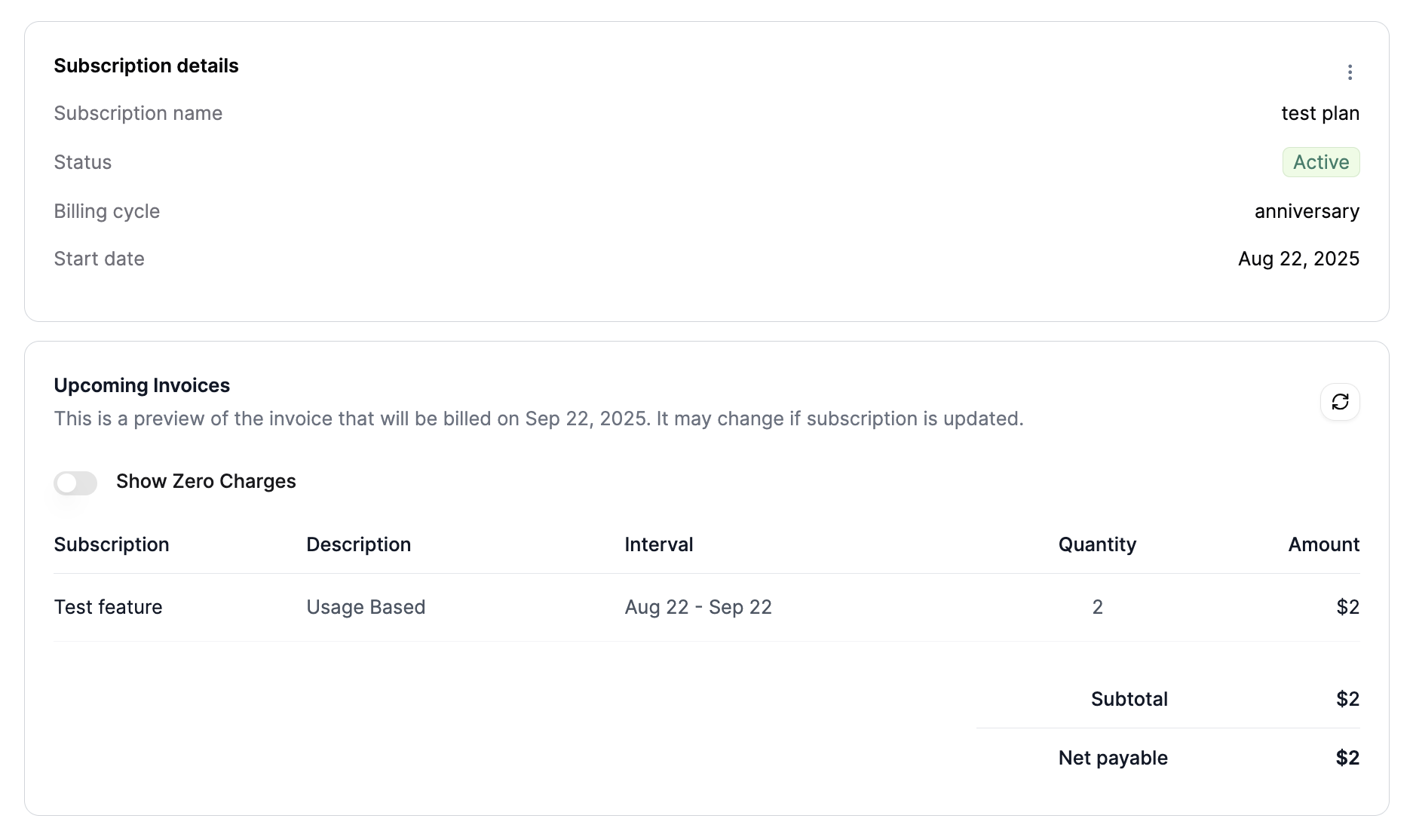 **Example Invoice Preview:**
```
Subscription Description Interval Quantity Amount
Test Feature Usage Based Aug 22 - Sep 22 2 $2
```
### Understanding the Billing
* **Quantity**: Total usage aggregated from your events
* **Amount**: Calculated based on your pricing plan
* **Interval**: Current billing period
* **Description**: Shows "Usage Based" for metered features
## Real-World Example
Let's walk through a complete example:
### 1. Feature Configuration
* **Feature Name**: Model Usage
* **Event Name**: `model.usage`
* **Aggregation**: Sum of `credits`
* **Usage Reset**: Periodic (monthly)
### 2. Events Transmitted
```json theme={null}
[
{
"event_name": "model.usage",
"external_customer_id": "cust_123",
"properties": { "credits": 5 }
},
{
"event_name": "model.usage",
"external_customer_id": "cust_123",
"properties": { "credits": 3 }
}
]
```
### 3. Plan Configuration
* **Plan Name**: Basic Plan
* **Feature**: Model Usage
* **Pricing**: \$1.00 per credit
* **Free Tier**: 10 credits per month
### 4. Billing Calculation
* **Total Usage**: 5 + 3 = 8 credits
* **Free Credits**: 10 (no charge for first 10)
* **Billable Credits**: 0 (8 \< 10, so no charge)
* **Amount**: \$0.00
### 5. If More Usage Occurs
If the customer uses 15 credits total:
* **Total Usage**: 15 credits
* **Free Credits**: 10
* **Billable Credits**: 5
* **Amount**: \$5.00
## Advanced Billing Scenarios
### Multiple Features
You can add multiple metered features to a single plan:
**Plan: Pro Plan**
* Model Usage: \$1.00 per credit
* API Calls: \$0.01 per call
* Storage: \$0.10 per GB
**Customer Usage:**
* 50 credits consumed
* 1000 API calls
* 5 GB storage
**Invoice:**
```
Model Usage Usage Based Aug 22 - Sep 22 50 $50
API Calls Usage Based Aug 22 - Sep 22 1000 $10
Storage Usage Based Aug 22 - Sep 22 5 $0.50
Total: $60.50
```
### Tiered Pricing
**Plan: Enterprise Plan**
* Model Usage:
* First 1000 credits: \$0.80 each
* Next 1000 credits: \$0.60 each
* Additional: \$0.40 each
**Customer Usage: 2500 credits**
* First 1000: \$800
* Next 1000: \$600
* Additional 500: \$200
* **Total: \$1600**
## Monitoring and Analytics
### Usage Trends
1. Go to **Usage Tracking** → **Query**
2. Select your feature and customer
3. View usage over time to identify patterns
### Billing Analytics
1. Go to **Invoices** section
2. View historical invoices and revenue
3. Analyze customer usage patterns
## Common Billing Issues
### 1. No Charges Appearing
**Possible Causes:**
* Feature not added to plan
* Customer not subscribed to plan
* Usage below free tier
* Wrong billing period
**Solutions:**
* Verify feature is in the plan
* Check subscription status
* Review free tier settings
* Confirm billing cycle dates
### 2. Wrong Amounts
**Possible Causes:**
* Incorrect pricing configuration
* Wrong aggregation values
* Billing period mismatch
**Solutions:**
* Review plan pricing settings
* Check event aggregation
* Verify billing cycle alignment
### 3. Unexpected Charges
**Possible Causes:**
* Events transmitted to wrong customer
* Incorrect usage reset setting
* Duplicate events
**Solutions:**
* Verify external\_customer\_id
* Check Usage Reset configuration
* Review event history for duplicates
## Best Practices
### 1. Test Billing Setup
Before going live:
1. Create a test customer
2. Transmit a few test events
3. Verify charges appear correctly
4. Check invoice calculations
### 2. Monitor Usage Patterns
Regularly check:
* Usage trends and spikes
* Customer behavior patterns
* Revenue impact of pricing changes
### 3. Set Up Alerts
Consider alerts for:
* Unusual usage spikes
* Failed billing attempts
* Revenue thresholds
### 4. Document Pricing
Keep clear documentation of:
* Feature pricing structure
* Free tier limits
* Billing cycle details
* Customer-specific overrides
## Pricing Strategies
### Usage-Based Pricing
**Pros:**
* Aligns cost with value
* Scales automatically
* Fair for customers
**Cons:**
* Revenue can be unpredictable
* Complex to forecast
### Tiered Pricing
**Pros:**
* Encourages higher usage
* Predictable revenue at scale
* Rewards loyal customers
**Cons:**
* More complex to configure
* Can be confusing for customers
### Hybrid Models
Combine multiple pricing approaches:
* Base subscription fee
* Usage-based charges
* Volume discounts
## Next Steps
After setting up billing:
1. **Monitor Performance** - Track usage and revenue
2. **Optimize Pricing** - Adjust based on customer behavior
3. **Scale Operations** - Add more features and customers
4. **Automate Processes** - Set up webhooks and integrations
## Troubleshooting
### "No charges in upcoming invoice"
* Check that events are being transmitted
* Verify feature is in the plan
* Confirm customer subscription is active
* Review free tier settings
### "Wrong billing amounts"
* Verify pricing configuration
* Check event aggregation values
* Review billing period dates
* Confirm usage reset settings
### "Unexpected charges"
* Review recent events for the customer
* Check for duplicate events
* Verify external\_customer\_id mapping
* Review plan configuration changes
## Getting Help
If you're experiencing billing issues:
1. Check the **[Event Debugger](/docs/event-ingestion/event-debugger)** for event processing status
2. Review your plan configuration carefully
3. Verify customer subscription status
4. Contact support with specific examples and error messages
**Example Invoice Preview:**
```
Subscription Description Interval Quantity Amount
Test Feature Usage Based Aug 22 - Sep 22 2 $2
```
### Understanding the Billing
* **Quantity**: Total usage aggregated from your events
* **Amount**: Calculated based on your pricing plan
* **Interval**: Current billing period
* **Description**: Shows "Usage Based" for metered features
## Real-World Example
Let's walk through a complete example:
### 1. Feature Configuration
* **Feature Name**: Model Usage
* **Event Name**: `model.usage`
* **Aggregation**: Sum of `credits`
* **Usage Reset**: Periodic (monthly)
### 2. Events Transmitted
```json theme={null}
[
{
"event_name": "model.usage",
"external_customer_id": "cust_123",
"properties": { "credits": 5 }
},
{
"event_name": "model.usage",
"external_customer_id": "cust_123",
"properties": { "credits": 3 }
}
]
```
### 3. Plan Configuration
* **Plan Name**: Basic Plan
* **Feature**: Model Usage
* **Pricing**: \$1.00 per credit
* **Free Tier**: 10 credits per month
### 4. Billing Calculation
* **Total Usage**: 5 + 3 = 8 credits
* **Free Credits**: 10 (no charge for first 10)
* **Billable Credits**: 0 (8 \< 10, so no charge)
* **Amount**: \$0.00
### 5. If More Usage Occurs
If the customer uses 15 credits total:
* **Total Usage**: 15 credits
* **Free Credits**: 10
* **Billable Credits**: 5
* **Amount**: \$5.00
## Advanced Billing Scenarios
### Multiple Features
You can add multiple metered features to a single plan:
**Plan: Pro Plan**
* Model Usage: \$1.00 per credit
* API Calls: \$0.01 per call
* Storage: \$0.10 per GB
**Customer Usage:**
* 50 credits consumed
* 1000 API calls
* 5 GB storage
**Invoice:**
```
Model Usage Usage Based Aug 22 - Sep 22 50 $50
API Calls Usage Based Aug 22 - Sep 22 1000 $10
Storage Usage Based Aug 22 - Sep 22 5 $0.50
Total: $60.50
```
### Tiered Pricing
**Plan: Enterprise Plan**
* Model Usage:
* First 1000 credits: \$0.80 each
* Next 1000 credits: \$0.60 each
* Additional: \$0.40 each
**Customer Usage: 2500 credits**
* First 1000: \$800
* Next 1000: \$600
* Additional 500: \$200
* **Total: \$1600**
## Monitoring and Analytics
### Usage Trends
1. Go to **Usage Tracking** → **Query**
2. Select your feature and customer
3. View usage over time to identify patterns
### Billing Analytics
1. Go to **Invoices** section
2. View historical invoices and revenue
3. Analyze customer usage patterns
## Common Billing Issues
### 1. No Charges Appearing
**Possible Causes:**
* Feature not added to plan
* Customer not subscribed to plan
* Usage below free tier
* Wrong billing period
**Solutions:**
* Verify feature is in the plan
* Check subscription status
* Review free tier settings
* Confirm billing cycle dates
### 2. Wrong Amounts
**Possible Causes:**
* Incorrect pricing configuration
* Wrong aggregation values
* Billing period mismatch
**Solutions:**
* Review plan pricing settings
* Check event aggregation
* Verify billing cycle alignment
### 3. Unexpected Charges
**Possible Causes:**
* Events transmitted to wrong customer
* Incorrect usage reset setting
* Duplicate events
**Solutions:**
* Verify external\_customer\_id
* Check Usage Reset configuration
* Review event history for duplicates
## Best Practices
### 1. Test Billing Setup
Before going live:
1. Create a test customer
2. Transmit a few test events
3. Verify charges appear correctly
4. Check invoice calculations
### 2. Monitor Usage Patterns
Regularly check:
* Usage trends and spikes
* Customer behavior patterns
* Revenue impact of pricing changes
### 3. Set Up Alerts
Consider alerts for:
* Unusual usage spikes
* Failed billing attempts
* Revenue thresholds
### 4. Document Pricing
Keep clear documentation of:
* Feature pricing structure
* Free tier limits
* Billing cycle details
* Customer-specific overrides
## Pricing Strategies
### Usage-Based Pricing
**Pros:**
* Aligns cost with value
* Scales automatically
* Fair for customers
**Cons:**
* Revenue can be unpredictable
* Complex to forecast
### Tiered Pricing
**Pros:**
* Encourages higher usage
* Predictable revenue at scale
* Rewards loyal customers
**Cons:**
* More complex to configure
* Can be confusing for customers
### Hybrid Models
Combine multiple pricing approaches:
* Base subscription fee
* Usage-based charges
* Volume discounts
## Next Steps
After setting up billing:
1. **Monitor Performance** - Track usage and revenue
2. **Optimize Pricing** - Adjust based on customer behavior
3. **Scale Operations** - Add more features and customers
4. **Automate Processes** - Set up webhooks and integrations
## Troubleshooting
### "No charges in upcoming invoice"
* Check that events are being transmitted
* Verify feature is in the plan
* Confirm customer subscription is active
* Review free tier settings
### "Wrong billing amounts"
* Verify pricing configuration
* Check event aggregation values
* Review billing period dates
* Confirm usage reset settings
### "Unexpected charges"
* Review recent events for the customer
* Check for duplicate events
* Verify external\_customer\_id mapping
* Review plan configuration changes
## Getting Help
If you're experiencing billing issues:
1. Check the **[Event Debugger](/docs/event-ingestion/event-debugger)** for event processing status
2. Review your plan configuration carefully
3. Verify customer subscription status
4. Contact support with specific examples and error messages