> ## Documentation Index
> Fetch the complete documentation index at: https://docs.flexprice.io/llms.txt
> Use this file to discover all available pages before exploring further.
# Creating a Metered Feature
> Step-by-step guide to create a metered feature for event ingestion
## Prerequisites
* Access to the Flexprice Admin Dashboard
* A clear understanding of what you want to meter (e.g., API calls, storage usage, credits consumed)
## Step-by-Step Guide
### 1. Navigate to Features
1. Log into your Flexprice Admin Dashboard
2. In the left sidebar, click on **Product Catalog**
3. Click on **Features**
4. Click the **"Add Feature"** button
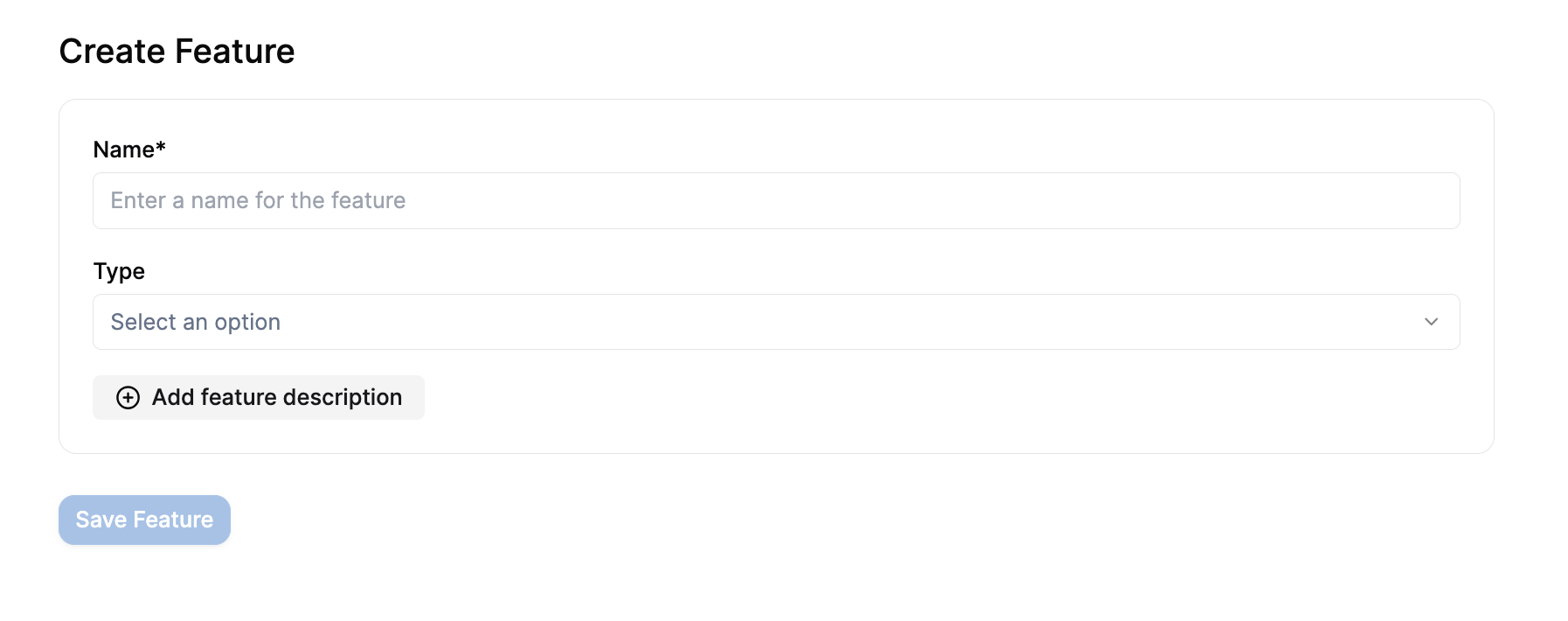
### 2. Basic Feature Information
Fill in the basic details:
* **Name**: Give your feature a clear, descriptive name (e.g., "Model Usage", "API Calls", "Storage Usage")
* **Type**: Select **"Metered"** from the dropdown
 ### 3. Configure Event Name
**⚠️ CRITICAL: This is the most important setting**
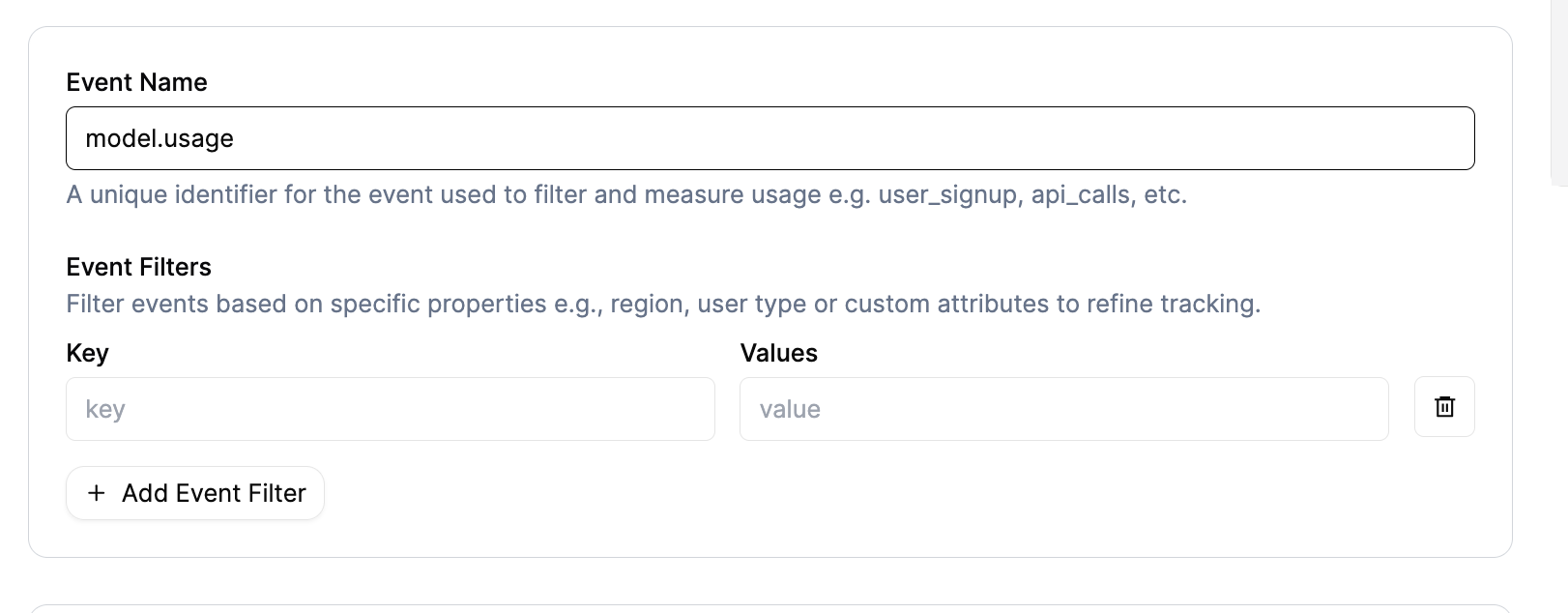
The **Event Name** is the unique identifier that connects your events to this feature:
* **Must be unique** across all features in your account
* **Cannot be changed** after creation
* **Must match exactly** what you send in your events
* Use lowercase with dots (e.g., `model.usage`, `api.calls`, `storage.gb`)
**Example**: If you set Event Name to `model.usage`, every event you transmit must have `"event_name": "model.usage"`.
### 3. Configure Event Name
**⚠️ CRITICAL: This is the most important setting**
The **Event Name** is the unique identifier that connects your events to this feature:
* **Must be unique** across all features in your account
* **Cannot be changed** after creation
* **Must match exactly** what you send in your events
* Use lowercase with dots (e.g., `model.usage`, `api.calls`, `storage.gb`)
**Example**: If you set Event Name to `model.usage`, every event you transmit must have `"event_name": "model.usage"`.
 ### 4. Choose Aggregation Function
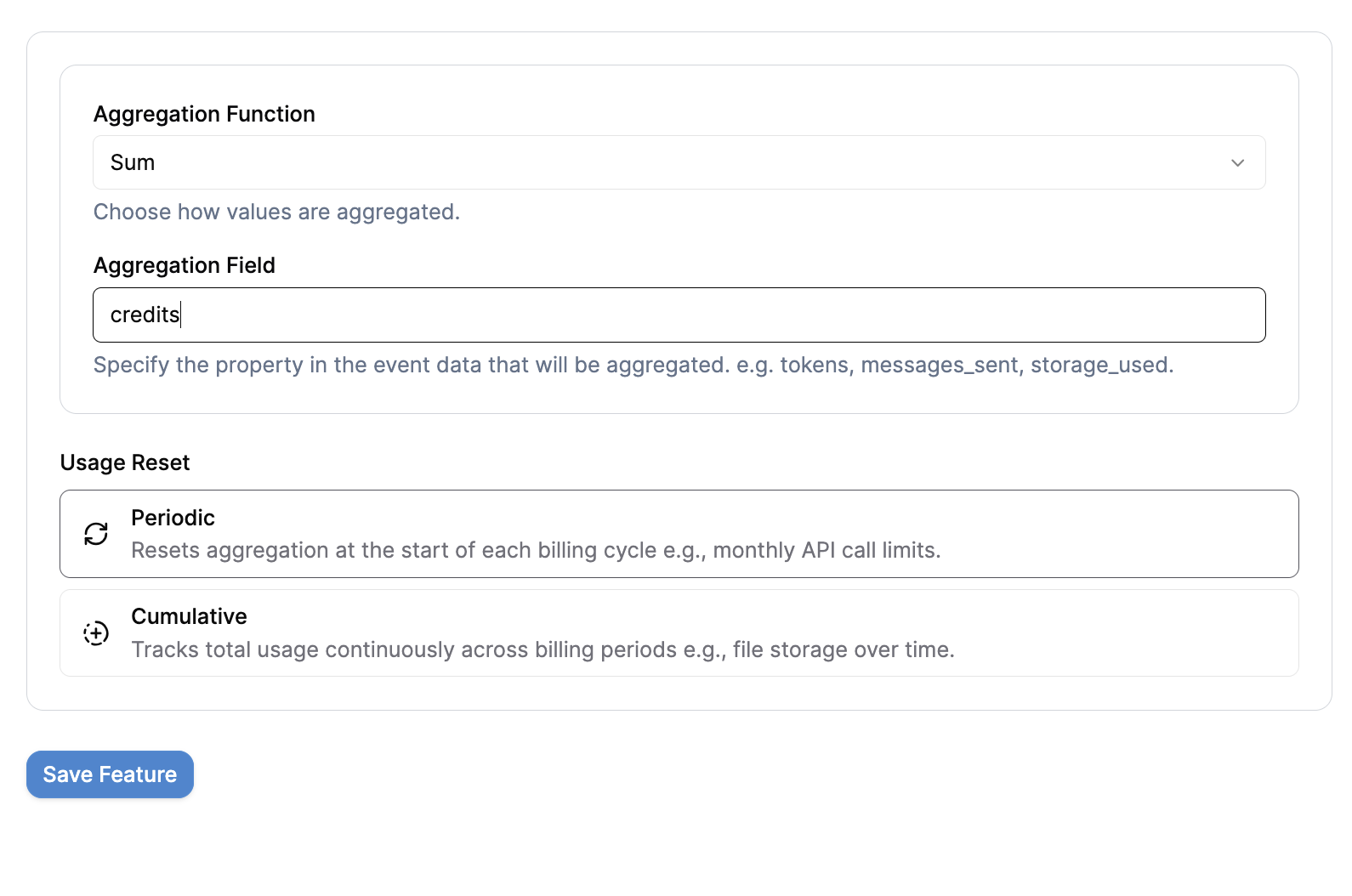
Select how you want to measure usage (see [Aggregation Overview](/docs/product-catalogue/features/aggregation/overview) for detailed explanations):
* **Count** — Counts the number of events (no property required)
* **Sum** — Adds up values from a specific property
* **Average** — Calculates the mean value of a specific property
* **Count Unique** — Counts unique values of a property
* **Latest** — Takes the most recent value sent
* **Sum with Multiplier** — Sums values and applies a rate multiplier
* **Max** — Takes the highest value seen in the billing period (supports bucketing)
* **Weighted Sum** — Time-weighted sum for capacity-based billing
**Example**: If you want to track total credits consumed, choose **Sum**.
### 4. Choose Aggregation Function
Select how you want to measure usage (see [Aggregation Overview](/docs/product-catalogue/features/aggregation/overview) for detailed explanations):
* **Count** — Counts the number of events (no property required)
* **Sum** — Adds up values from a specific property
* **Average** — Calculates the mean value of a specific property
* **Count Unique** — Counts unique values of a property
* **Latest** — Takes the most recent value sent
* **Sum with Multiplier** — Sums values and applies a rate multiplier
* **Max** — Takes the highest value seen in the billing period (supports bucketing)
* **Weighted Sum** — Time-weighted sum for capacity-based billing
**Example**: If you want to track total credits consumed, choose **Sum**.
 ### 5. Set Aggregation Field (if required)
**⚠️ CRITICAL: This must match your event properties exactly**
If you selected Sum, Max, Latest, or Unique Count, you must specify which property to aggregate:
* **Field Name**: The exact property key from your events
* **Must match case**: `credits` ≠ `Credits` ≠ `CREDITS`
* **Must exist**: Every event must include this property
**Example**: If you set Aggregation Field to `credits`, every event must include:
```json theme={null}
{
"properties": {
"credits": 2
}
}
```
### 6. Configure Usage Reset
Choose how usage accumulates over time:
* **Periodic** — Usage resets at the start of each billing cycle
* Good for: API calls, monthly limits, recurring usage
* Example: Customer gets 1000 API calls per month
* **Cumulative** — Usage keeps growing across billing cycles
* Good for: Storage usage, lifetime metrics
* Example: Total storage used since account creation
### 7. Set Unit Name (Optional)
Define how the quantity appears on invoices:
* **Singular**: `credit`, `API call`, `GB`
* **Plural**: `credits`, `API calls`, `GBs`
* Flexprice will automatically choose the correct form
**Example**: `credit / credits` will show as "1 credit" or "5 credits" on invoices.
### 8. Add Event Filters (Optional)
If you only want to count certain events, add filters:
* **Key**: Property name to filter on
* **Values**: Allowed values for that property
**Example**: Only count events where `region = "EU"` or `model = "gpt-4"`.
### 9. Save the Feature
Click **"Save Feature"** to create your metered feature.
## After Creation
Once saved, you'll see:
* **Feature ID**: A unique identifier for this feature
* **Event Name**: The exact string to use in your events
* **Aggregation Details**: How the feature processes events
**Important**: Note down the **Event Name** and **Aggregation Field** - you'll need these when transmitting events.
## Common Configuration Examples
### API Calls (Count)
* **Event Name**: `api.calls`
* **Aggregation Function**: Count
* **Usage Reset**: Periodic
* **Unit Name**: `API call / API calls`
### Credits Consumed (Sum)
* **Event Name**: `model.usage`
* **Aggregation Function**: Sum
* **Aggregation Field**: `credits`
* **Usage Reset**: Periodic
* **Unit Name**: `credit / credits`
### Storage Usage (Sum)
* **Event Name**: `storage.usage`
* **Aggregation Function**: Sum
* **Aggregation Field**: `gb`
* **Usage Reset**: Cumulative
* **Unit Name**: `GB`
### Peak Concurrent Users (Max)
* **Event Name**: `concurrent.users`
* **Aggregation Function**: Max
* **Aggregation Field**: `count`
* **Usage Reset**: Periodic
* **Unit Name**: `user / users`
## ⚠️ Critical Warnings
### Event Name
* **Cannot be changed** after creation
* Must be **unique** across all features
* **Case sensitive** — `api.calls` ≠ `API.calls`
### Aggregation Field
* **Must match exactly** the property name in your events
* **Case sensitive** — `credits` ≠ `Credits`
* **Required** for Sum, Max, Latest, and Unique Count functions
### Testing
* Always test your feature configuration before transmitting production events
* Use the **[Event Debugger](/docs/event-ingestion/event-debugger)** to validate your setup
## Related Documentation
* **[Features Overview](/docs/product-catalogue/features/overview)** — Learn about different feature types
* **[Aggregation Functions](/docs/product-catalogue/features/aggregation/overview)** — Understand how data is processed
## Next Steps
Now that you have a metered feature, you're ready to:
1. **[Send Events](/docs/event-ingestion/sending-events)** - Learn how to transmit usage data
2. **[Validate Events](/docs/event-ingestion/validating-events)** - Ensure events are being processed correctly
3. **[Connect to Billing](/docs/event-ingestion/connecting-to-billing)** - Set up pricing and subscriptions
## Troubleshooting
### "Events not showing up"
* Check that Event Name matches exactly
* Verify Aggregation Field exists in your event properties
* Ensure the customer exists with the correct `external_customer_id`
### "Wrong aggregation values"
* Verify Aggregation Field name matches your event properties
* Check that property values are the correct data type (numbers for Sum/Max)
* Confirm Usage Reset setting matches your expectations
### "Cannot change Event Name"
* Event Name is immutable after creation
* Create a new feature with the correct name
* Update your application to transmit events with the new name
For more detailed troubleshooting, see our **[Troubleshooting Guide](/docs/event-ingestion/troubleshooting)**.
### 5. Set Aggregation Field (if required)
**⚠️ CRITICAL: This must match your event properties exactly**
If you selected Sum, Max, Latest, or Unique Count, you must specify which property to aggregate:
* **Field Name**: The exact property key from your events
* **Must match case**: `credits` ≠ `Credits` ≠ `CREDITS`
* **Must exist**: Every event must include this property
**Example**: If you set Aggregation Field to `credits`, every event must include:
```json theme={null}
{
"properties": {
"credits": 2
}
}
```
### 6. Configure Usage Reset
Choose how usage accumulates over time:
* **Periodic** — Usage resets at the start of each billing cycle
* Good for: API calls, monthly limits, recurring usage
* Example: Customer gets 1000 API calls per month
* **Cumulative** — Usage keeps growing across billing cycles
* Good for: Storage usage, lifetime metrics
* Example: Total storage used since account creation
### 7. Set Unit Name (Optional)
Define how the quantity appears on invoices:
* **Singular**: `credit`, `API call`, `GB`
* **Plural**: `credits`, `API calls`, `GBs`
* Flexprice will automatically choose the correct form
**Example**: `credit / credits` will show as "1 credit" or "5 credits" on invoices.
### 8. Add Event Filters (Optional)
If you only want to count certain events, add filters:
* **Key**: Property name to filter on
* **Values**: Allowed values for that property
**Example**: Only count events where `region = "EU"` or `model = "gpt-4"`.
### 9. Save the Feature
Click **"Save Feature"** to create your metered feature.
## After Creation
Once saved, you'll see:
* **Feature ID**: A unique identifier for this feature
* **Event Name**: The exact string to use in your events
* **Aggregation Details**: How the feature processes events
**Important**: Note down the **Event Name** and **Aggregation Field** - you'll need these when transmitting events.
## Common Configuration Examples
### API Calls (Count)
* **Event Name**: `api.calls`
* **Aggregation Function**: Count
* **Usage Reset**: Periodic
* **Unit Name**: `API call / API calls`
### Credits Consumed (Sum)
* **Event Name**: `model.usage`
* **Aggregation Function**: Sum
* **Aggregation Field**: `credits`
* **Usage Reset**: Periodic
* **Unit Name**: `credit / credits`
### Storage Usage (Sum)
* **Event Name**: `storage.usage`
* **Aggregation Function**: Sum
* **Aggregation Field**: `gb`
* **Usage Reset**: Cumulative
* **Unit Name**: `GB`
### Peak Concurrent Users (Max)
* **Event Name**: `concurrent.users`
* **Aggregation Function**: Max
* **Aggregation Field**: `count`
* **Usage Reset**: Periodic
* **Unit Name**: `user / users`
## ⚠️ Critical Warnings
### Event Name
* **Cannot be changed** after creation
* Must be **unique** across all features
* **Case sensitive** — `api.calls` ≠ `API.calls`
### Aggregation Field
* **Must match exactly** the property name in your events
* **Case sensitive** — `credits` ≠ `Credits`
* **Required** for Sum, Max, Latest, and Unique Count functions
### Testing
* Always test your feature configuration before transmitting production events
* Use the **[Event Debugger](/docs/event-ingestion/event-debugger)** to validate your setup
## Related Documentation
* **[Features Overview](/docs/product-catalogue/features/overview)** — Learn about different feature types
* **[Aggregation Functions](/docs/product-catalogue/features/aggregation/overview)** — Understand how data is processed
## Next Steps
Now that you have a metered feature, you're ready to:
1. **[Send Events](/docs/event-ingestion/sending-events)** - Learn how to transmit usage data
2. **[Validate Events](/docs/event-ingestion/validating-events)** - Ensure events are being processed correctly
3. **[Connect to Billing](/docs/event-ingestion/connecting-to-billing)** - Set up pricing and subscriptions
## Troubleshooting
### "Events not showing up"
* Check that Event Name matches exactly
* Verify Aggregation Field exists in your event properties
* Ensure the customer exists with the correct `external_customer_id`
### "Wrong aggregation values"
* Verify Aggregation Field name matches your event properties
* Check that property values are the correct data type (numbers for Sum/Max)
* Confirm Usage Reset setting matches your expectations
### "Cannot change Event Name"
* Event Name is immutable after creation
* Create a new feature with the correct name
* Update your application to transmit events with the new name
For more detailed troubleshooting, see our **[Troubleshooting Guide](/docs/event-ingestion/troubleshooting)**.