> ## Documentation Index
> Fetch the complete documentation index at: https://docs.flexprice.io/llms.txt
> Use this file to discover all available pages before exploring further.
# Pricing unit
> This feature allows you to create and use your own currency in Flexprice. With create Price Units, add them to plans and wallets in custom currency.
**Custom pricing** allows you to price features using your own unit (such as credits) instead of only standard currencies like USD or EUR.
### What is custom currency?
**Custom currency** is pricing in your own unit (such as credits) instead of a standard money currency like USD or EUR. You set and show prices in that unit-for example, "10 credits per month"-and **Flexprice converts those amounts to your base currency (e.g. USD) for billing**, This ensures a consistent currency for accounting, even though the feature is shown in credits.
***
## How it works internally
All billing calculations are performed using the pricing unit’s base currency (for example, USD). Amounts are defined and displayed in the **pricing unit** (e.g. credits), Conversion happens only at price or wallet creation; Flexprice uses the base currency for all calculations. In other words: input and display use the pricing unit; computation, persistence, and invoicing use base currency.
Conversion uses the formula **amount in your unit × conversion\_rate = amount in base currency**. Rounding and precision (e.g. two decimals for USD, zero for JPY) are applied only when **invoice charges are computed**, not at conversion or when creating prices or price units.
Wallet balance is always shown in **base currency and credits**, whether the wallet was created with fiat or a custom price unit. Flexprice **stores and bills** everything in the base currency (e.g. USD).
***
## Using custom currency
1. **Create** a Price Unit (dashboard or API, below).
2. **Use in plans** — add charges or create prices in your unit; see [Use cases](/docs/product-catalogue/custom-pricing/use-cases#use-custom-currency-in-plans-and-prices).
3. **Use in wallets** — create a wallet in your unit; see [Use cases](/docs/product-catalogue/custom-pricing/use-cases).
***
## Use cases
* **Credits or tokens** - Sell in credits or tokens; show balance and charges in that unit while billing and storing in base currency (e.g. USD).
* **Multi-currency display, single-currency billing** - Present prices in a custom unit per region or product while retaining one base currency for accounting and payouts.
***
## Concepts and terminology
**Custom currency / Price Unit** - Your own pricing unit (e.g. credits) used instead of fiat currency. Defined once as a Price Unit and reused across plans, prices, and wallets, with automatic conversion to the base currency for billing.
| Field | Description |
| -------------------- | ------------------------------------------------------------------------------------------------------------------------------------------------------ |
| **code** | **3-character** identifier (e.g. `CRD`, `TOK`, `fpc`) used when referencing the unit in a price or wallet. Must be unique per environment when Active. |
| **symbol** | Display symbol shown in the UI and on invoices (e.g. ¢, ==). |
| **base\_currency** | The standard currency the unit is pegged to (e.g. `usd`). All billing and storage use this currency. |
| **conversion\_rate** | Multiplier from the custom unit to base currency. |
**Conversion formula**
```text theme={null}
amount in your unit × conversion_rate = amount in base currency
```
**Example:** If 1 credit = 0.01 USD, set `conversion_rate = "0.01"`. Then 100 credits = 1.00 USD.
**Price unit types: FIAT vs CUSTOM**
* **FIAT** - Amounts are in a standard currency (USD, EUR, etc.). No conversion is applied.
* **CUSTOM** - Amounts are in a Price Unit. Flexprice converts to base currency for billing; you configure and display values in the custom unit.
***
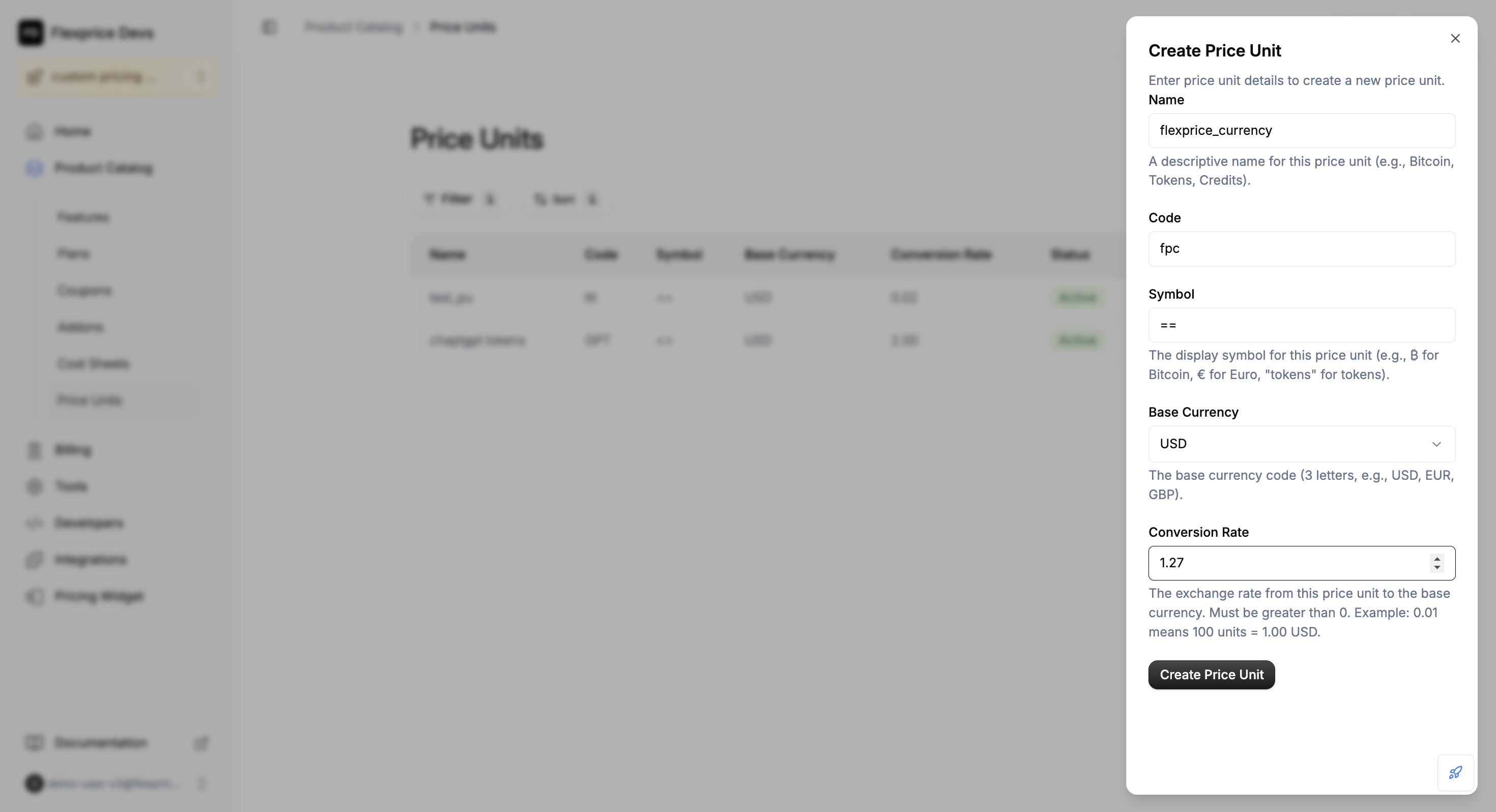
## Create a Price Unit (dashboard)
Go to **Product Catalog** → **Price Units** → **Add** (or **Create Price Unit**).
Enter **Name**, **Code**, **Symbol**, **Base currency**, and **Conversion rate**.\
Example: 100 units = 1 USD → use conversion rate **0.01**.
 ***
## Create a Price Unit (API)
Send `POST /v1/prices/units` with a JSON body (you can see example below).
Include **name**, **code**, **symbol**, **base\_currency**, and **conversion\_rate**. Optionally **metadata**.
**Example request**
```json theme={null}
{
"name": "Credits",
"code": "CRD",
"symbol": "¢",
"base_currency": "usd",
"conversion_rate": "0.01",
"metadata": {}
}
```
Conversion, 100 CRD = 1.00 USD. Base URL options: `https://us.api.flexprice.io/v1` or `https://api.cloud.flexprice.io/v1` (check out the [Create a price unit](/api-reference/price-units/create-price-unit)).
***
## Use custom currency in plans and prices
You can add charges or create prices in your custom unit from the **dashboard** or via the **API**. In both cases you choose your Price Unit and enter amounts in that unit; Flexprice converts to base currency for billing.
### Dashboard
Go to **Product Catalog** → **Plans** → open the plan you want to edit.
In **Charges**, click **+ Add** (or **Edit** then add). In the **Currency** dropdown choose **Custom** and select your Price Unit. Add recurring or usage-based charges and enter amounts in your unit (e.g. 15 credits/month). Click **Save**.
For more detail and screenshots, see [Use cases: add charges and wallet](/docs/product-catalogue/custom-pricing/use-cases).
### API
In the create-price request (`POST /v1/prices`), set **price\_unit\_type** to **CUSTOM** and include **price\_unit\_config**.
In **price\_unit\_config** set **price\_unit** (your unit’s code, e.g. `CRD`). For a fixed amount use **amount**; for tiered pricing use **price\_unit\_tiers** only (not the top-level **tiers** field).
**Example: fixed monthly price in credits**
The request must also include **type** (e.g. `FIXED`), **billing\_cadence** (e.g. `RECURRING`), and **invoice\_cadence** (e.g. `ADVANCE` or `ARREAR`). Below shows the custom-pricing–relevant fields:
```json theme={null}
{
"currency": "usd",
"price_unit_type": "CUSTOM",
"type": "FIXED",
"billing_model": "FLAT_FEE",
"billing_period": "MONTHLY",
"billing_cadence": "RECURRING",
"invoice_cadence": "ADVANCE",
"entity_type": "PLAN",
"entity_id": "your-plan-id",
"price_unit_config": {
"price_unit": "CRD",
"amount": "100.00"
}
}
```
With `conversion_rate = "0.01"`, 100 CRD = 1.00 USD. Flexprice stores both the custom amount and the base-currency amount and uses base currency for billing.
**Billing models**
| Model | In price\_unit\_config | Notes |
| --------- | --------------------------------------- | -------------------------------------------------------------------------------------- |
| FLAT\_FEE | **price\_unit**, **amount** | Fixed price in your unit. |
| PACKAGE | **price\_unit**, **amount** | **transform\_quantity** is required; for usage add **meter\_id**. |
| TIERED | **price\_unit**, **price\_unit\_tiers** | Use **price\_unit\_tiers** only, not top-level **tiers**. For usage add **meter\_id**. |
***
Refer to the API Reference and Price Unit documentation. check out the [API Reference](/api-reference/introduction) and the [Price Unit](/api-reference/price-units/list-price-units).
***
## Create a Price Unit (API)
Send `POST /v1/prices/units` with a JSON body (you can see example below).
Include **name**, **code**, **symbol**, **base\_currency**, and **conversion\_rate**. Optionally **metadata**.
**Example request**
```json theme={null}
{
"name": "Credits",
"code": "CRD",
"symbol": "¢",
"base_currency": "usd",
"conversion_rate": "0.01",
"metadata": {}
}
```
Conversion, 100 CRD = 1.00 USD. Base URL options: `https://us.api.flexprice.io/v1` or `https://api.cloud.flexprice.io/v1` (check out the [Create a price unit](/api-reference/price-units/create-price-unit)).
***
## Use custom currency in plans and prices
You can add charges or create prices in your custom unit from the **dashboard** or via the **API**. In both cases you choose your Price Unit and enter amounts in that unit; Flexprice converts to base currency for billing.
### Dashboard
Go to **Product Catalog** → **Plans** → open the plan you want to edit.
In **Charges**, click **+ Add** (or **Edit** then add). In the **Currency** dropdown choose **Custom** and select your Price Unit. Add recurring or usage-based charges and enter amounts in your unit (e.g. 15 credits/month). Click **Save**.
For more detail and screenshots, see [Use cases: add charges and wallet](/docs/product-catalogue/custom-pricing/use-cases).
### API
In the create-price request (`POST /v1/prices`), set **price\_unit\_type** to **CUSTOM** and include **price\_unit\_config**.
In **price\_unit\_config** set **price\_unit** (your unit’s code, e.g. `CRD`). For a fixed amount use **amount**; for tiered pricing use **price\_unit\_tiers** only (not the top-level **tiers** field).
**Example: fixed monthly price in credits**
The request must also include **type** (e.g. `FIXED`), **billing\_cadence** (e.g. `RECURRING`), and **invoice\_cadence** (e.g. `ADVANCE` or `ARREAR`). Below shows the custom-pricing–relevant fields:
```json theme={null}
{
"currency": "usd",
"price_unit_type": "CUSTOM",
"type": "FIXED",
"billing_model": "FLAT_FEE",
"billing_period": "MONTHLY",
"billing_cadence": "RECURRING",
"invoice_cadence": "ADVANCE",
"entity_type": "PLAN",
"entity_id": "your-plan-id",
"price_unit_config": {
"price_unit": "CRD",
"amount": "100.00"
}
}
```
With `conversion_rate = "0.01"`, 100 CRD = 1.00 USD. Flexprice stores both the custom amount and the base-currency amount and uses base currency for billing.
**Billing models**
| Model | In price\_unit\_config | Notes |
| --------- | --------------------------------------- | -------------------------------------------------------------------------------------- |
| FLAT\_FEE | **price\_unit**, **amount** | Fixed price in your unit. |
| PACKAGE | **price\_unit**, **amount** | **transform\_quantity** is required; for usage add **meter\_id**. |
| TIERED | **price\_unit**, **price\_unit\_tiers** | Use **price\_unit\_tiers** only, not top-level **tiers**. For usage add **meter\_id**. |
***
Refer to the API Reference and Price Unit documentation. check out the [API Reference](/api-reference/introduction) and the [Price Unit](/api-reference/price-units/list-price-units).