> ## Documentation Index
> Fetch the complete documentation index at: https://docs.flexprice.io/llms.txt
> Use this file to discover all available pages before exploring further.
# Use cases
> Add charges and create wallets using custom price units. All billing calculations use base currency.
## Add charges in custom currency
**Product Catalog** → **Plans** → select a plan (e.g. Pro).
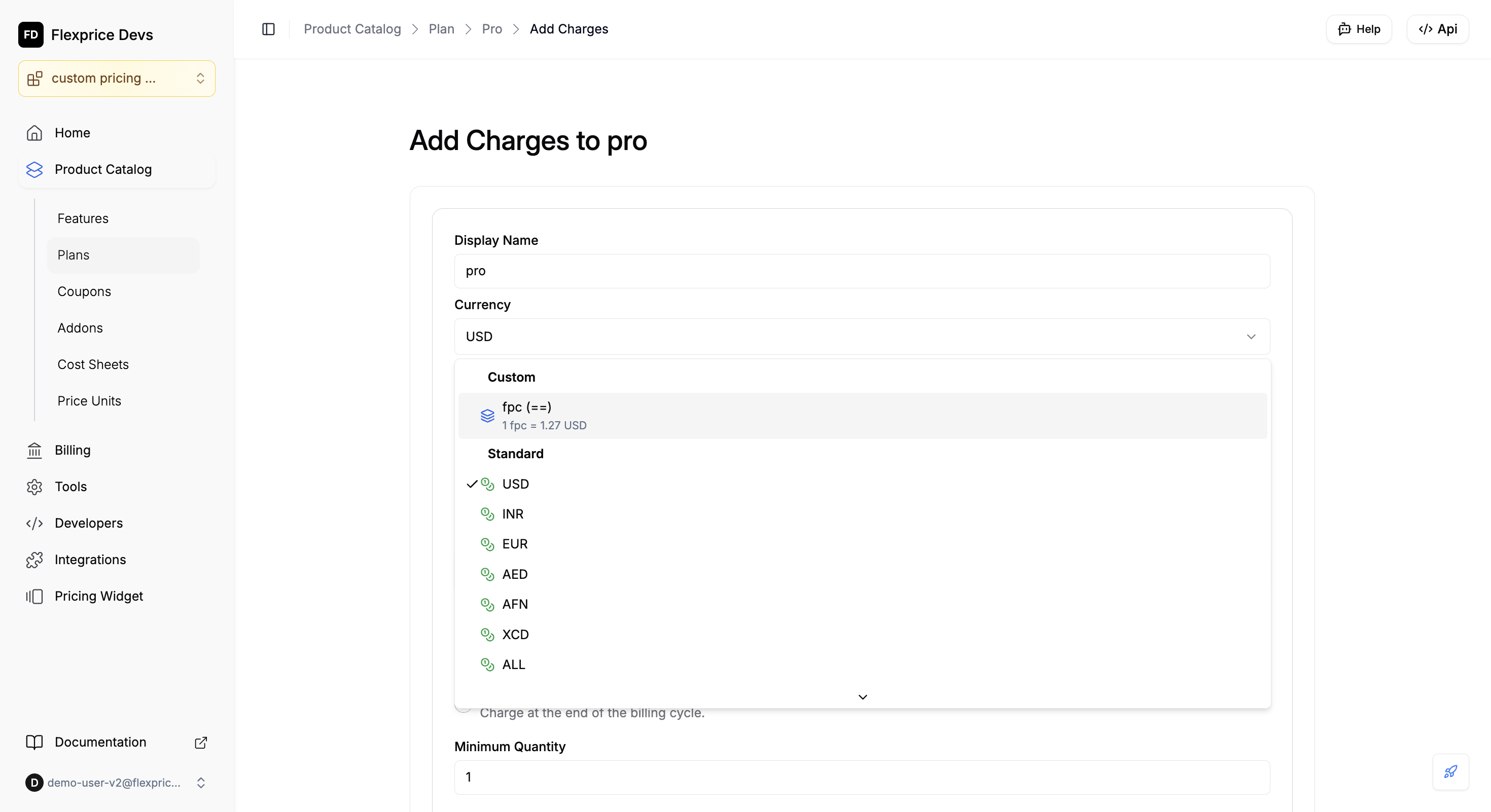
In the **Charges** section click **+ Add** (or **Edit** then add charges). You’ll see **Add Charges to \[plan]**.
In the **Currency** dropdown choose **Custom**, then select your price unit (e.g. **fpc (==)** — 1 fpc = 1.27 USD). Standard options (USD, INR, etc.) stay under **Standard**.
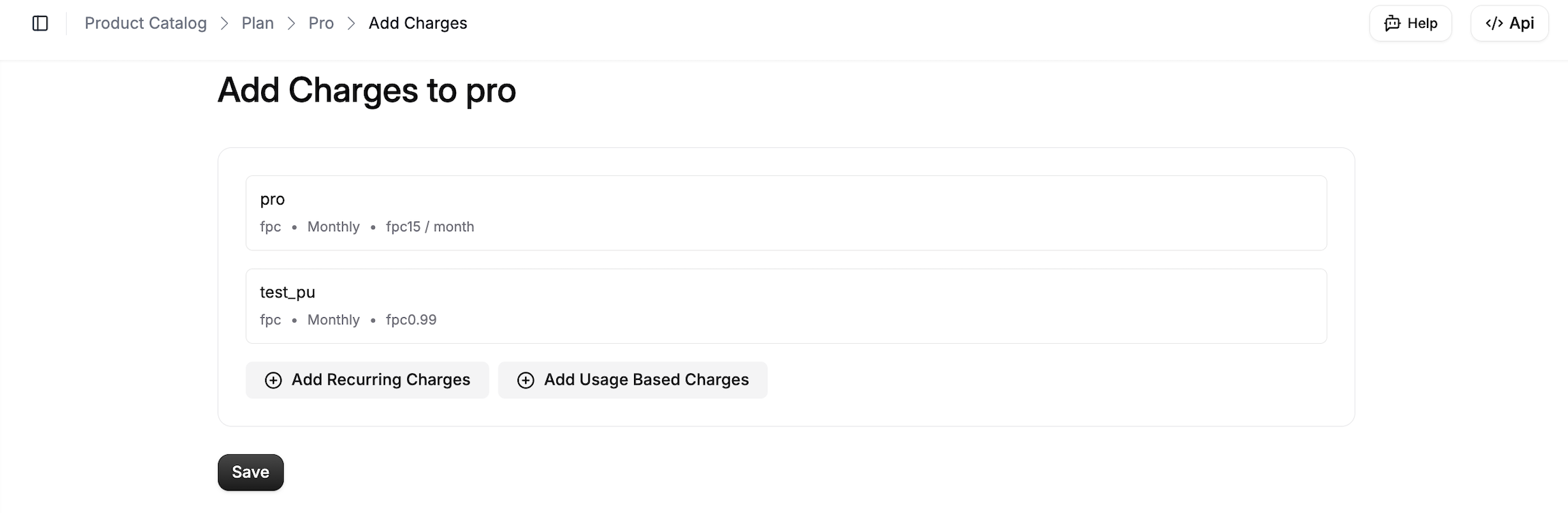
**Add Recurring Charges** — fixed amount per period (e.g. 15 fpc/month). **Add Usage Based Charges** — charge by usage in the custom unit. Set **Display Name** for the charge (e.g. feature name). Enter the **value** in the custom unit.
 ***
## Use custom currency in plans and prices
You can add charges from the **dashboard** (see above) or create prices via the **API** below. In both cases you choose your Price Unit and enter amounts in that unit; Flexprice converts to base currency for billing.
### API
In the create-price request (`POST /v1/prices`), set **price\_unit\_type** to **CUSTOM** and include **price\_unit\_config**.
In **price\_unit\_config** set **price\_unit** (your unit's code, e.g. `CRD`). For a fixed amount use **amount**; for tiered pricing use **price\_unit\_tiers** only (not the top-level **tiers** field).
**Example: fixed monthly price in credits**
The request must also include **type** (e.g. `FIXED`), **billing\_cadence** (e.g. `RECURRING`), and **invoice\_cadence** (e.g. `ADVANCE` or `ARREAR`). Below shows the custom-pricing–relevant fields:
```json theme={null}
{
"currency": "usd",
"price_unit_type": "CUSTOM",
"type": "FIXED",
"billing_model": "FLAT_FEE",
"billing_period": "MONTHLY",
"billing_cadence": "RECURRING",
"invoice_cadence": "ADVANCE",
"entity_type": "PLAN",
"entity_id": "your-plan-id",
"price_unit_config": {
"price_unit": "CRD",
"amount": "100.00"
}
}
```
With `conversion_rate = "0.01"`, 100 CRD = 1.00 USD. Flexprice stores both the custom amount and the base-currency amount and uses base currency for billing.
**Billing models**
| Model | In price\_unit\_config | Notes |
| --------- | --------------------------------------- | -------------------------------------------------------------------------------------- |
| FLAT\_FEE | **price\_unit**, **amount** | Fixed price in your unit. |
| PACKAGE | **price\_unit**, **amount** | **transform\_quantity** is required; for usage add **meter\_id**. |
| TIERED | **price\_unit**, **price\_unit\_tiers** | Use **price\_unit\_tiers** only, not top-level **tiers**. For usage add **meter\_id**. |
For more on fields and endpoints, see the [API Reference](/api-reference/introduction) and [Price Unit](/api-reference/price-units/list-price-units).
***
## Create Wallet using custom pricing unit
For a wallet that uses a **custom price unit**, Flexprice does not perform any conversion at wallet creation: it uses the **price unit’s conversion rate** as-is. If you pass **conversion\_rate** in the create-wallet API request, it is **ignored** when **price\_unit** is provided; the price unit’s conversion rate is always used. The wallet’s currency and conversion rate come only from the selected price unit.
Go to **Customers** → select the customer → open the **Wallets** tab (or the section where you manage wallets).
Click **+ Add** or **Create Wallet** to open the Create Wallet dialog.
In the **Currency** dropdown, choose **Custom** (not Standard), then select your price unit (e.g. **fpc (==)** or **CRD (¢)**). Standard options (USD, INR, etc.) are listed under **Standard**.
When you select a custom price unit, **Currency** and **Conversion rate** are set automatically from that unit’s base currency and conversion rate. You don’t need to enter them manually. Optional: set **Initial credits to load**, **Wallet type** (Pre-Paid / Post-Paid), or **Alert** settings.
***
## Use custom currency in plans and prices
You can add charges from the **dashboard** (see above) or create prices via the **API** below. In both cases you choose your Price Unit and enter amounts in that unit; Flexprice converts to base currency for billing.
### API
In the create-price request (`POST /v1/prices`), set **price\_unit\_type** to **CUSTOM** and include **price\_unit\_config**.
In **price\_unit\_config** set **price\_unit** (your unit's code, e.g. `CRD`). For a fixed amount use **amount**; for tiered pricing use **price\_unit\_tiers** only (not the top-level **tiers** field).
**Example: fixed monthly price in credits**
The request must also include **type** (e.g. `FIXED`), **billing\_cadence** (e.g. `RECURRING`), and **invoice\_cadence** (e.g. `ADVANCE` or `ARREAR`). Below shows the custom-pricing–relevant fields:
```json theme={null}
{
"currency": "usd",
"price_unit_type": "CUSTOM",
"type": "FIXED",
"billing_model": "FLAT_FEE",
"billing_period": "MONTHLY",
"billing_cadence": "RECURRING",
"invoice_cadence": "ADVANCE",
"entity_type": "PLAN",
"entity_id": "your-plan-id",
"price_unit_config": {
"price_unit": "CRD",
"amount": "100.00"
}
}
```
With `conversion_rate = "0.01"`, 100 CRD = 1.00 USD. Flexprice stores both the custom amount and the base-currency amount and uses base currency for billing.
**Billing models**
| Model | In price\_unit\_config | Notes |
| --------- | --------------------------------------- | -------------------------------------------------------------------------------------- |
| FLAT\_FEE | **price\_unit**, **amount** | Fixed price in your unit. |
| PACKAGE | **price\_unit**, **amount** | **transform\_quantity** is required; for usage add **meter\_id**. |
| TIERED | **price\_unit**, **price\_unit\_tiers** | Use **price\_unit\_tiers** only, not top-level **tiers**. For usage add **meter\_id**. |
For more on fields and endpoints, see the [API Reference](/api-reference/introduction) and [Price Unit](/api-reference/price-units/list-price-units).
***
## Create Wallet using custom pricing unit
For a wallet that uses a **custom price unit**, Flexprice does not perform any conversion at wallet creation: it uses the **price unit’s conversion rate** as-is. If you pass **conversion\_rate** in the create-wallet API request, it is **ignored** when **price\_unit** is provided; the price unit’s conversion rate is always used. The wallet’s currency and conversion rate come only from the selected price unit.
Go to **Customers** → select the customer → open the **Wallets** tab (or the section where you manage wallets).
Click **+ Add** or **Create Wallet** to open the Create Wallet dialog.
In the **Currency** dropdown, choose **Custom** (not Standard), then select your price unit (e.g. **fpc (==)** or **CRD (¢)**). Standard options (USD, INR, etc.) are listed under **Standard**.
When you select a custom price unit, **Currency** and **Conversion rate** are set automatically from that unit’s base currency and conversion rate. You don’t need to enter them manually. Optional: set **Initial credits to load**, **Wallet type** (Pre-Paid / Post-Paid), or **Alert** settings.
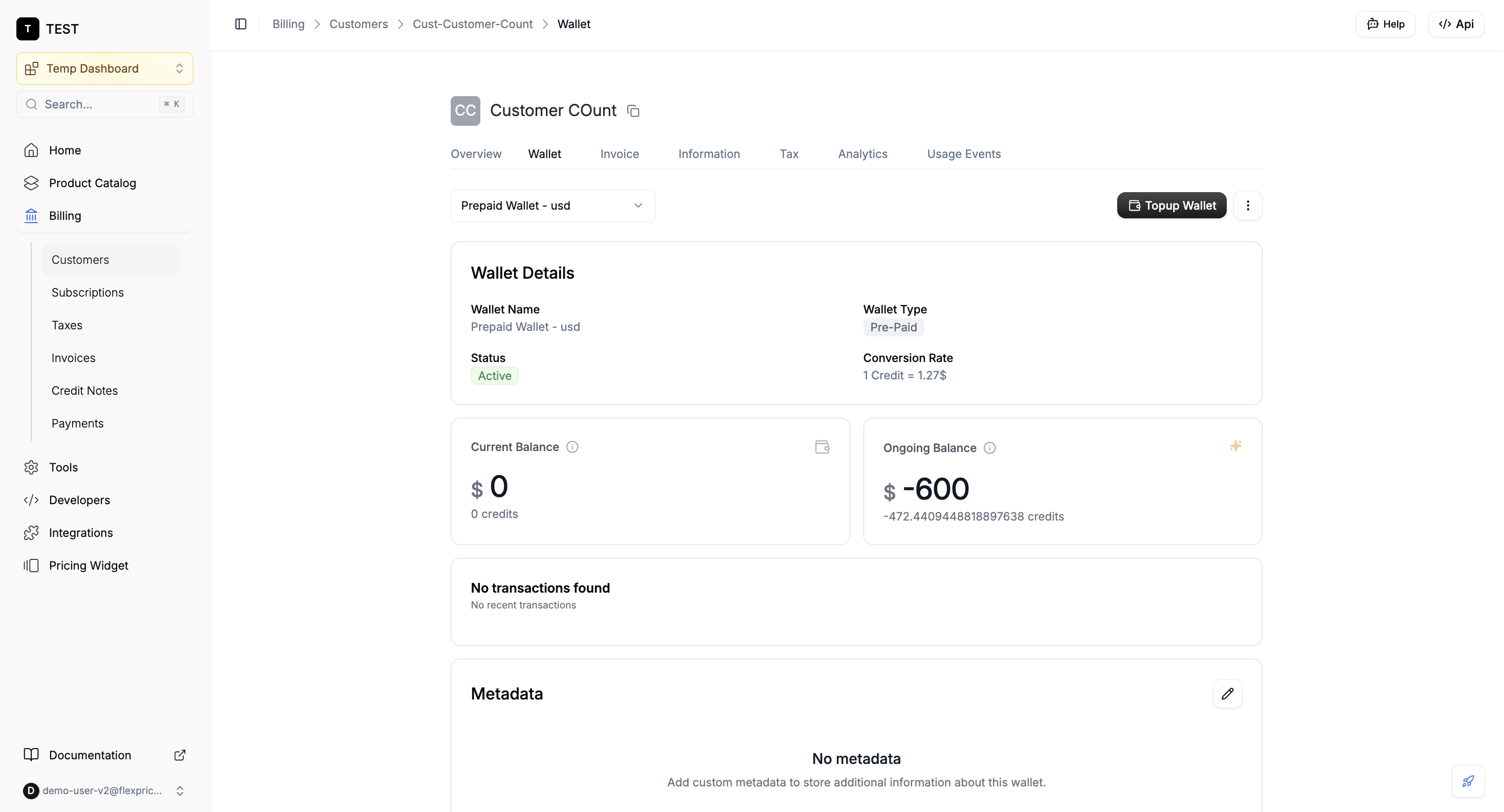 **API:** To create a wallet in custom currency via the API, include **price\_unit** (the unit’s **code**, e.g. `fpc` or `CRD`) in the request body. Flexprice sets the wallet’s currency to the price unit’s base currency and its conversion rate from the price unit. The price unit must be **Active**; otherwise the request fails validation.
***
## Summary
* **Create** a price unit first (Product Catalog → Price Units) with a conversion rate to base currency, and ensure it’s **Active**.
* **Use** it in a plan: open the plan → **Charges** → **+ Add** → **Currency** → **Custom** → select your unit → add recurring or usage-based charges → **Save**.
* **Use** it in a wallet: open the customer → **Wallets** → **Create Wallet** → **Currency** → **Custom** → select your unit → create. Balance is always shown in **base currency and credits** only, irrespective of whether the wallet was created with fiat currency or a price unit.
**API:** To create a wallet in custom currency via the API, include **price\_unit** (the unit’s **code**, e.g. `fpc` or `CRD`) in the request body. Flexprice sets the wallet’s currency to the price unit’s base currency and its conversion rate from the price unit. The price unit must be **Active**; otherwise the request fails validation.
***
## Summary
* **Create** a price unit first (Product Catalog → Price Units) with a conversion rate to base currency, and ensure it’s **Active**.
* **Use** it in a plan: open the plan → **Charges** → **+ Add** → **Currency** → **Custom** → select your unit → add recurring or usage-based charges → **Save**.
* **Use** it in a wallet: open the customer → **Wallets** → **Create Wallet** → **Currency** → **Custom** → select your unit → create. Balance is always shown in **base currency and credits** only, irrespective of whether the wallet was created with fiat currency or a price unit.