> ## Documentation Index
> Fetch the complete documentation index at: https://docs.flexprice.io/llms.txt
> Use this file to discover all available pages before exploring further.
# MAX
> Get the maximum value of a property with optional bucketed or group-by calculations.
Step-by-Step Setup when creating a MAX-based metered feature:
1. **Navigate to Features**
* Go to Product Catalog → Features
* Click "Add Feature"
2. **Basic Information**
* **Name**: "Peak Concurrent Users" (or descriptive name)
* **Type**: Select "Metered"
3. **Event Configuration**
* **Event Name**: `concurrent.users` (must match your event data)
* **Aggregation Function**: Max
* **Aggregation Field**: `user_count` (the property to find maximum for)
* **Bucket Size**: Optional - Leave empty for standard MAX, or select (HOUR, DAY, etc.) for bucketed MAX
* **Group By**: Optional - Only used with bucketed MAX. When Bucket Size is set, specify a single property name (e.g. `resource_id`) to compute MAX per group within each time bucket, then sum (per bucket and across buckets)
4. **Usage Settings**
* **Usage Reset**: Periodic (for peak tracking per period)
* **Unit Name**: `user / users`
5. **Save Feature**
## MAX - Modes
MAX aggregation can operate in two modes depending on whether `bucket_size` is specified. **`group_by` is only applied when using bucketed MAX** (i.e. when `bucket_size` is set).
### Mode 1: Standard MAX (Non-Bucketed)
**When:** `bucket_size` is NOT specified (group\_by is not used)\
**Returns:** Overall maximum value across all events\
**Use for:** Simple peak detection
### Mode 2: Bucketed MAX (Windowed)
**When:** `bucket_size` IS specified\
**Returns:** Sum of maximum values from each time bucket (see formula below)\
**Use for:** Cumulative peak billing, tiered capacity models
**Optional: Bucketed MAX with group\_by**\
When **Group By** is also set (a single property name string), within **each time bucket** events are grouped by that property. For each bucket: MAX is computed per group, then those group maximums are summed. The final result is the sum of these per-bucket totals. Use this for per-resource or per-entity peak billing within time windows (e.g. per resource, per project, per region). **group\_by has no effect without bucket\_size.**
## Calculation Examples
### Standard MAX Example
#### Event Data
```json theme={null}
[
{
"event_id": "evt_001",
"event_name": "concurrent.users",
"external_customer_id": "customer_123",
"timestamp": "2024-01-15T10:00:00Z",
"properties": {
"user_count": 25
}
},
{
"event_id": "evt_002",
"event_name": "concurrent.users",
"external_customer_id": "customer_123",
"timestamp": "2024-01-15T11:30:00Z",
"properties": {
"user_count": 40
}
},
{
"event_id": "evt_003",
"event_name": "concurrent.users",
"external_customer_id": "customer_123",
"timestamp": "2024-01-15T14:00:00Z",
"properties": {
"user_count": 35
}
}
]
```
#### Standard MAX Calculation
**Process:** Find the highest value across all events\
**Result:** `40 users` (maximum from all events)
***
### Bucketed MAX Example
#### Configuration
* **Bucket Size:** HOUR
* **Slab Pricing:**
* **0-5 GB:** 0 Rs (free tier)
* **5-10 GB:** 2 Rs per GB
* **10+ GB:** 3 Rs per GB
#### Event Data
```json theme={null}
[
{
"event_id": "evt_001",
"event_name": "storage.usage",
"external_customer_id": "customer_123",
"timestamp": "2024-01-15T07:30:00Z",
"properties": {
"gb_used": 8
}
},
{
"event_id": "evt_002",
"event_name": "storage.usage",
"external_customer_id": "customer_123",
"timestamp": "2024-01-15T07:45:00Z",
"properties": {
"gb_used": 4
}
},
{
"event_id": "evt_003",
"event_name": "storage.usage",
"external_customer_id": "customer_123",
"timestamp": "2024-01-15T08:15:00Z",
"properties": {
"gb_used": 10
}
},
{
"event_id": "evt_004",
"event_name": "storage.usage",
"external_customer_id": "customer_123",
"timestamp": "2024-01-15T08:30:00Z",
"properties": {
"gb_used": 5
}
},
{
"event_id": "evt_005",
"event_name": "storage.usage",
"external_customer_id": "customer_123",
"timestamp": "2024-01-15T08:45:00Z",
"properties": {
"gb_used": 9
}
}
]
```
### Bucketed MAX Formula
```
total_result = MAX(bucket_1) + MAX(bucket_2) + ... + MAX(bucket_n)
```
Where each bucket represents a time window defined by `bucket_size`.
#### Calculation Process
**Hour 1 (7:00-8:00 UTC):**
* Events: 8 GB, 4 GB
* **Bucket Maximum:** 8 GB
**Hour 2 (8:00-9:00 UTC):**
* Events: 10 GB, 5 GB, 9 GB
* **Bucket Maximum:** 10 GB
**Total Bucketed MAX:** 8 GB + 10 GB = **18 GB**
#### Tiered Billing Calculation
**Billing Calculation for 18 GB total:**
* First 5 GB: 0 Rs
* Next 5 GB (5-10): 5 × 2 = 10 Rs
* Remaining 8 GB (10-18): 8 × 3 = 24 Rs
* **Total: 34 Rs**
***
### Bucketed MAX with group\_by Example
**Group By** is only available with bucketed MAX. When set, within **each time bucket** events are grouped by the chosen property; MAX is computed per group in that bucket, then those group maximums are summed. The final result is the sum of these per-bucket totals. Useful for per-resource or per-entity peak billing within time windows.
#### Configuration
* **Aggregation Field:** `data`
* **Bucket Size:** HOUR (required for group\_by to apply)
* **Group By:** `resource_id` (single property name; must exist on event properties)
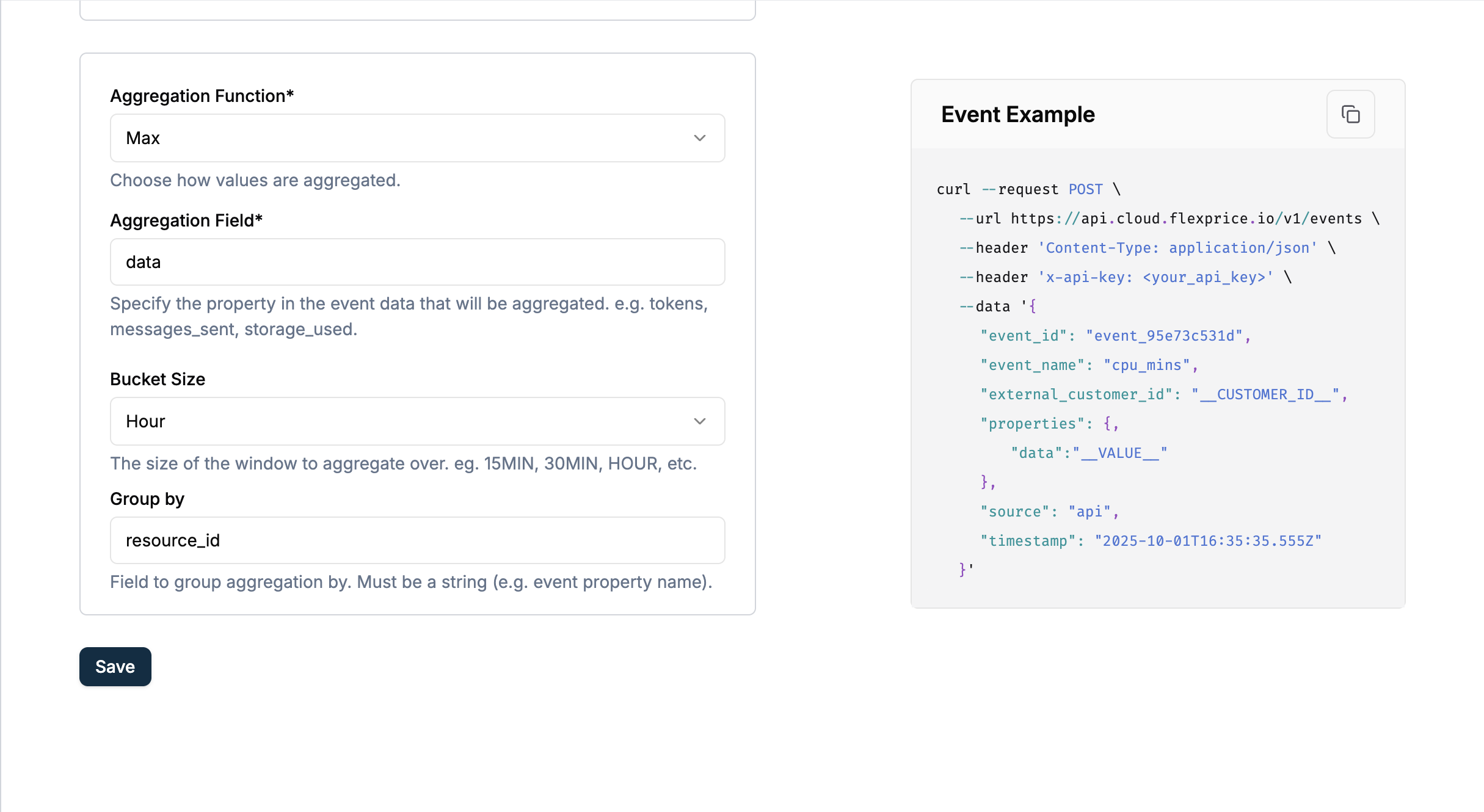 *Screenshot: Metered feature with Aggregation Function = Max, Aggregation Field = data, Bucket Size = HOUR, and Group By = resource\_id.*
#### Event Data
```json theme={null}
[
{
"event_id": "evt_A",
"event_name": "resource.usage",
"external_customer_id": "customer_123",
"timestamp": "2024-01-15T10:00:00Z",
"properties": {
"data": 10,
"resource_id": "resource_a"
}
},
{
"event_id": "evt_B",
"event_name": "resource.usage",
"external_customer_id": "customer_123",
"timestamp": "2024-01-15T10:30:00Z",
"properties": {
"data": 20,
"resource_id": "resource_b"
}
},
{
"event_id": "evt_C",
"event_name": "resource.usage",
"external_customer_id": "customer_123",
"timestamp": "2024-01-15T11:15:00Z",
"properties": {
"data": 15,
"resource_id": "resource_a"
}
}
]
```
#### Bucketed MAX with group\_by Formula
```
total_result = sum over buckets of ( MAX(group_1 in bucket) + MAX(group_2 in bucket) + ... + MAX(group_n in bucket) )
```
Within each time bucket, events are grouped by the `group_by` property; each group’s maximum is taken, then summed. Those per-bucket sums are then added together.
#### Calculation Process
**Hour 1 (10:00–11:00 UTC):**
* **resource\_a:** 10 → MAX = 10
* **resource\_b:** 20 → MAX = 20
* **Bucket 1 total:** 10 + 20 = **30**
**Hour 2 (11:00–12:00 UTC):**
* **resource\_a:** 15 → MAX = 15
* **Bucket 2 total:** **15**
**Total (Bucketed MAX with group\_by):** 30 + 15 = **45**
Without `group_by`, bucketed MAX would give 20 + 15 = 35 (max per hour). With `group_by: "resource_id"`, within each hour we sum the max per resource, then sum across hours: **45**.
## Use Cases
### Standard MAX Use Cases
#### Peak Concurrent Users
**Perfect for**: Maximum simultaneous users, peak connections
```json theme={null}
{
"event_name": "concurrent.users",
"external_customer_id": "acme_corp",
"properties": {
"active_users": 150
}
}
```
#### Peak Resource Usage
**Perfect for**: Maximum CPU, peak memory, highest bandwidth
```json theme={null}
{
"event_name": "resource.peak",
"external_customer_id": "user_456",
"properties": {
"cpu_percent": 85
}
}
```
### Bucketed MAX Use Cases
#### Cumulative Peak Billing
**Perfect for**: Pay-per-peak hour models, capacity-based pricing
```json theme={null}
{
"event_name": "capacity.usage",
"external_customer_id": "merchant_789",
"properties": {
"gb_capacity": 50
}
}
```
#### Infrastructure Peak Tracking
**Perfect for**: Peak detection across time windows for billing
```json theme={null}
{
"event_name": "server.load",
"external_customer_id": "customer_101",
"properties": {
"peak_instances": 12
}
}
```
### Bucketed MAX with group\_by Use Cases
*Requires Bucket Size to be set; group\_by is only applied with bucketed MAX.*
#### Per-Resource or Per-Entity Peak Billing
**Perfect for**: Billing on the sum of peak usage per resource within each time window (e.g. per resource ID, per project ID, per region)
```json theme={null}
{
"event_name": "resource.usage",
"external_customer_id": "customer_123",
"properties": {
"data": 50,
"resource_id": "res_abc"
}
}
```
#### Multi-Tenant or Multi-Project Peak
**Perfect for**: Sum of each tenant’s or project’s maximum usage
```json theme={null}
{
"event_name": "capacity.usage",
"external_customer_id": "platform_customer",
"properties": {
"gb_used": 100,
"project_id": "proj_xyz"
}
}
```
### When to Use Each Mode
✅ **Use Standard MAX when:**
* Need simple peak detection
* Billing based on overall maximum
* Single highest value matters
✅ **Use Bucketed MAX when:**
* Cumulative peak billing models
* Time-series peak analysis
* Tiered capacity pricing
* Sum of peaks across time windows
✅ **Use Bucketed MAX with group\_by when:**
* You already use bucketed MAX (Bucket Size is set) and want per-resource or per-entity breakdown
* Billing per resource, per project, or per entity **within each time bucket**
* `group_by` is a single property name string on your events
* **Note:** group\_by is only applied when bucket\_size is set
### Key Differences
| Aspect | Standard MAX | Bucketed MAX | Bucketed MAX + group\_by |
| ----------------- | ---------------------- | ------------------------ | ---------------------------------------------------------- |
| **Configuration** | No bucket\_size | Requires bucket\_size | Requires bucket\_size + group\_by (single field) |
| **Calculation** | Single maximum value | Sum of bucket maximums | Per bucket: sum of group maximums; then sum across buckets |
| **Use Case** | Overall peak detection | Cumulative peak billing | Per-resource / per-entity peak within time windows |
| **Result** | Simple max value | Sum of time-window peaks | Sum of (per-bucket sum of each group’s max) |
### ⚠️ Critical Notes
* **bucket\_size can ONLY be used with MAX aggregation** - No other aggregation supports this
* **Bucketed MAX sums the maximums** - Does NOT return max of maximums
* **group\_by is only applied with bucketed MAX** - You must set Bucket Size for group\_by to take effect. Within each time bucket, events are grouped by the `group_by` property; MAX is computed per group, then those group maximums are summed (per bucket), and bucket results are summed
## Next Steps
* **[Creating a Metered Feature](/docs/event-ingestion/creating-a-metered-feature)** - Complete setup guide
* **[Sending Events](/docs/event-ingestion/sending-events)** - How to transmit MAX events
*Screenshot: Metered feature with Aggregation Function = Max, Aggregation Field = data, Bucket Size = HOUR, and Group By = resource\_id.*
#### Event Data
```json theme={null}
[
{
"event_id": "evt_A",
"event_name": "resource.usage",
"external_customer_id": "customer_123",
"timestamp": "2024-01-15T10:00:00Z",
"properties": {
"data": 10,
"resource_id": "resource_a"
}
},
{
"event_id": "evt_B",
"event_name": "resource.usage",
"external_customer_id": "customer_123",
"timestamp": "2024-01-15T10:30:00Z",
"properties": {
"data": 20,
"resource_id": "resource_b"
}
},
{
"event_id": "evt_C",
"event_name": "resource.usage",
"external_customer_id": "customer_123",
"timestamp": "2024-01-15T11:15:00Z",
"properties": {
"data": 15,
"resource_id": "resource_a"
}
}
]
```
#### Bucketed MAX with group\_by Formula
```
total_result = sum over buckets of ( MAX(group_1 in bucket) + MAX(group_2 in bucket) + ... + MAX(group_n in bucket) )
```
Within each time bucket, events are grouped by the `group_by` property; each group’s maximum is taken, then summed. Those per-bucket sums are then added together.
#### Calculation Process
**Hour 1 (10:00–11:00 UTC):**
* **resource\_a:** 10 → MAX = 10
* **resource\_b:** 20 → MAX = 20
* **Bucket 1 total:** 10 + 20 = **30**
**Hour 2 (11:00–12:00 UTC):**
* **resource\_a:** 15 → MAX = 15
* **Bucket 2 total:** **15**
**Total (Bucketed MAX with group\_by):** 30 + 15 = **45**
Without `group_by`, bucketed MAX would give 20 + 15 = 35 (max per hour). With `group_by: "resource_id"`, within each hour we sum the max per resource, then sum across hours: **45**.
## Use Cases
### Standard MAX Use Cases
#### Peak Concurrent Users
**Perfect for**: Maximum simultaneous users, peak connections
```json theme={null}
{
"event_name": "concurrent.users",
"external_customer_id": "acme_corp",
"properties": {
"active_users": 150
}
}
```
#### Peak Resource Usage
**Perfect for**: Maximum CPU, peak memory, highest bandwidth
```json theme={null}
{
"event_name": "resource.peak",
"external_customer_id": "user_456",
"properties": {
"cpu_percent": 85
}
}
```
### Bucketed MAX Use Cases
#### Cumulative Peak Billing
**Perfect for**: Pay-per-peak hour models, capacity-based pricing
```json theme={null}
{
"event_name": "capacity.usage",
"external_customer_id": "merchant_789",
"properties": {
"gb_capacity": 50
}
}
```
#### Infrastructure Peak Tracking
**Perfect for**: Peak detection across time windows for billing
```json theme={null}
{
"event_name": "server.load",
"external_customer_id": "customer_101",
"properties": {
"peak_instances": 12
}
}
```
### Bucketed MAX with group\_by Use Cases
*Requires Bucket Size to be set; group\_by is only applied with bucketed MAX.*
#### Per-Resource or Per-Entity Peak Billing
**Perfect for**: Billing on the sum of peak usage per resource within each time window (e.g. per resource ID, per project ID, per region)
```json theme={null}
{
"event_name": "resource.usage",
"external_customer_id": "customer_123",
"properties": {
"data": 50,
"resource_id": "res_abc"
}
}
```
#### Multi-Tenant or Multi-Project Peak
**Perfect for**: Sum of each tenant’s or project’s maximum usage
```json theme={null}
{
"event_name": "capacity.usage",
"external_customer_id": "platform_customer",
"properties": {
"gb_used": 100,
"project_id": "proj_xyz"
}
}
```
### When to Use Each Mode
✅ **Use Standard MAX when:**
* Need simple peak detection
* Billing based on overall maximum
* Single highest value matters
✅ **Use Bucketed MAX when:**
* Cumulative peak billing models
* Time-series peak analysis
* Tiered capacity pricing
* Sum of peaks across time windows
✅ **Use Bucketed MAX with group\_by when:**
* You already use bucketed MAX (Bucket Size is set) and want per-resource or per-entity breakdown
* Billing per resource, per project, or per entity **within each time bucket**
* `group_by` is a single property name string on your events
* **Note:** group\_by is only applied when bucket\_size is set
### Key Differences
| Aspect | Standard MAX | Bucketed MAX | Bucketed MAX + group\_by |
| ----------------- | ---------------------- | ------------------------ | ---------------------------------------------------------- |
| **Configuration** | No bucket\_size | Requires bucket\_size | Requires bucket\_size + group\_by (single field) |
| **Calculation** | Single maximum value | Sum of bucket maximums | Per bucket: sum of group maximums; then sum across buckets |
| **Use Case** | Overall peak detection | Cumulative peak billing | Per-resource / per-entity peak within time windows |
| **Result** | Simple max value | Sum of time-window peaks | Sum of (per-bucket sum of each group’s max) |
### ⚠️ Critical Notes
* **bucket\_size can ONLY be used with MAX aggregation** - No other aggregation supports this
* **Bucketed MAX sums the maximums** - Does NOT return max of maximums
* **group\_by is only applied with bucketed MAX** - You must set Bucket Size for group\_by to take effect. Within each time bucket, events are grouped by the `group_by` property; MAX is computed per group, then those group maximums are summed (per bucket), and bucket results are summed
## Next Steps
* **[Creating a Metered Feature](/docs/event-ingestion/creating-a-metered-feature)** - Complete setup guide
* **[Sending Events](/docs/event-ingestion/sending-events)** - How to transmit MAX events