> ## Documentation Index
> Fetch the complete documentation index at: https://docs.flexprice.io/llms.txt
> Use this file to discover all available pages before exploring further.
# Creating a feature
Follow the steps below to create a feature in Flexprice:
1. In the main navigation menu, select **Features** from **Product Catalog**.
2. At the top-right of the Feature dashboard, select **Add Feature** to create a new feature.
3. Fill in the feature details:
* **Feature Name:** Enter a unique and descriptive name for the feature (e.g., "Premium API Access").
* **Feature Type:** Select the type of feature:
* **Metered:** Tracks quantifiable usage (e.g., number of API calls)
* **Boolean:** Indicates a simple on/off state (e.g., access to a premium dashboard)
* **Static:** Represents fixed attributes or entitlements (e.g., priority support)
* **Config:** Delivers a custom JSON configuration to your application through the customer's entitlements (e.g., feature flags, rate limits, tenant settings)
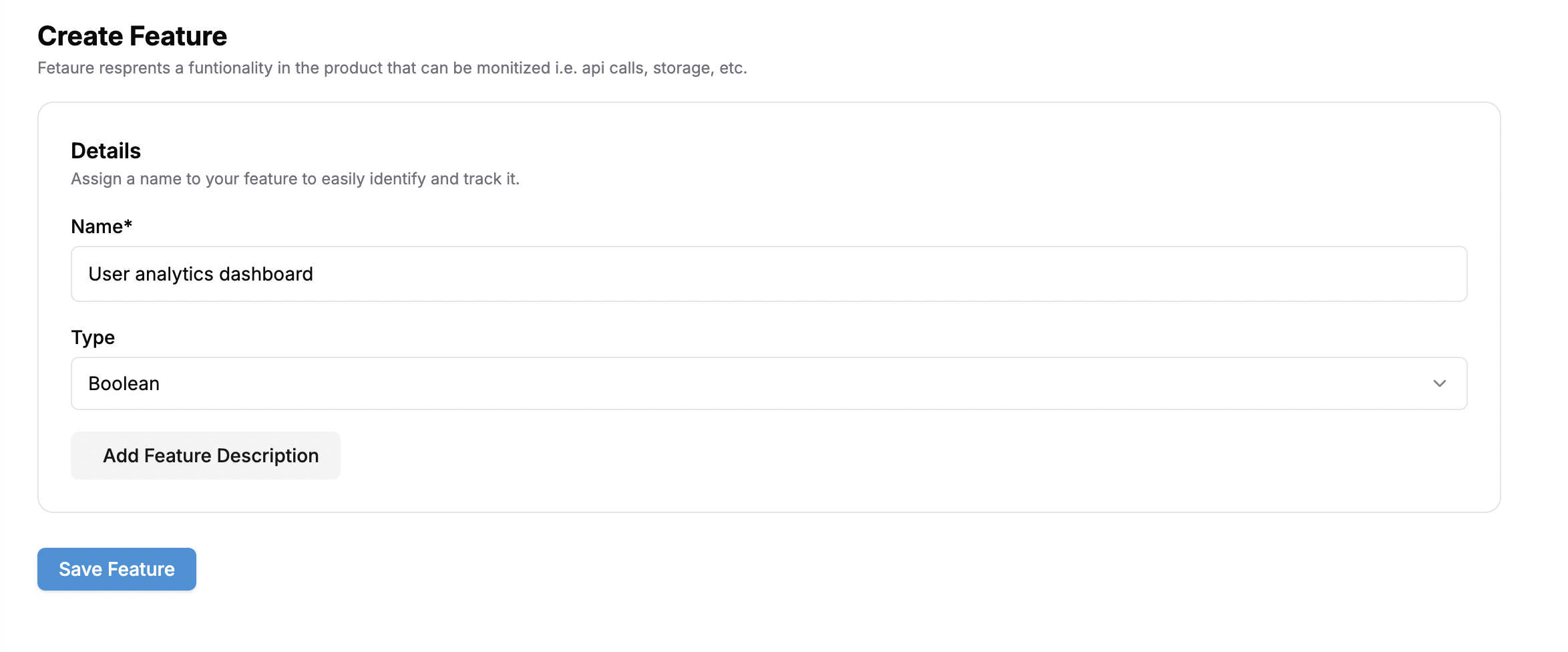
## How to create a Boolean feature
Select **Boolean** as Type which indicates a simple on/off state (e.g., access to a premium dashboard).
 ## How to create a Static feature
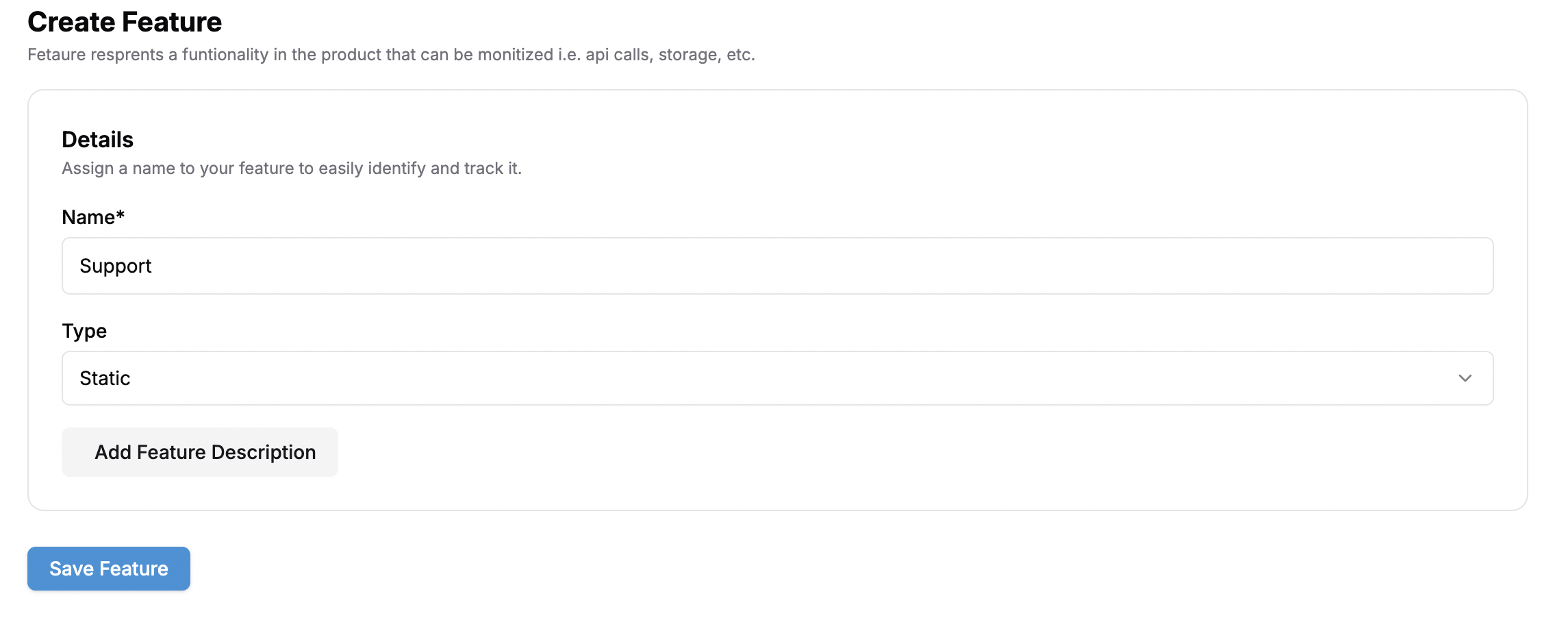
Select **Static** as feature type which represents fixed attributes or entitlements (e.g., priority support)
## How to create a Static feature
Select **Static** as feature type which represents fixed attributes or entitlements (e.g., priority support)
 ## How to create a Config feature
A Config feature lets you attach a JSON object to an entitlement as a `config_value`. Flexprice stores and delivers this payload through plans and subscriptions, giving your application full control over how the configuration is applied.
In the **Add Feature** form, choose **Config** as the Feature Type.
The `config_value` is set at the entitlement level, not on the feature itself. You define it when attaching this feature to a plan.
Navigate to the target plan, open the **Entitlements** tab, and select **Add Entitlement**. Choose the Config feature you created.
A JSON editor appears. Enter a valid JSON object as the `config_value`. The editor validates the input and blocks submission if the value is not valid JSON.
## How to create a Config feature
A Config feature lets you attach a JSON object to an entitlement as a `config_value`. Flexprice stores and delivers this payload through plans and subscriptions, giving your application full control over how the configuration is applied.
In the **Add Feature** form, choose **Config** as the Feature Type.
The `config_value` is set at the entitlement level, not on the feature itself. You define it when attaching this feature to a plan.
Navigate to the target plan, open the **Entitlements** tab, and select **Add Entitlement**. Choose the Config feature you created.
A JSON editor appears. Enter a valid JSON object as the `config_value`. The editor validates the input and blocks submission if the value is not valid JSON.
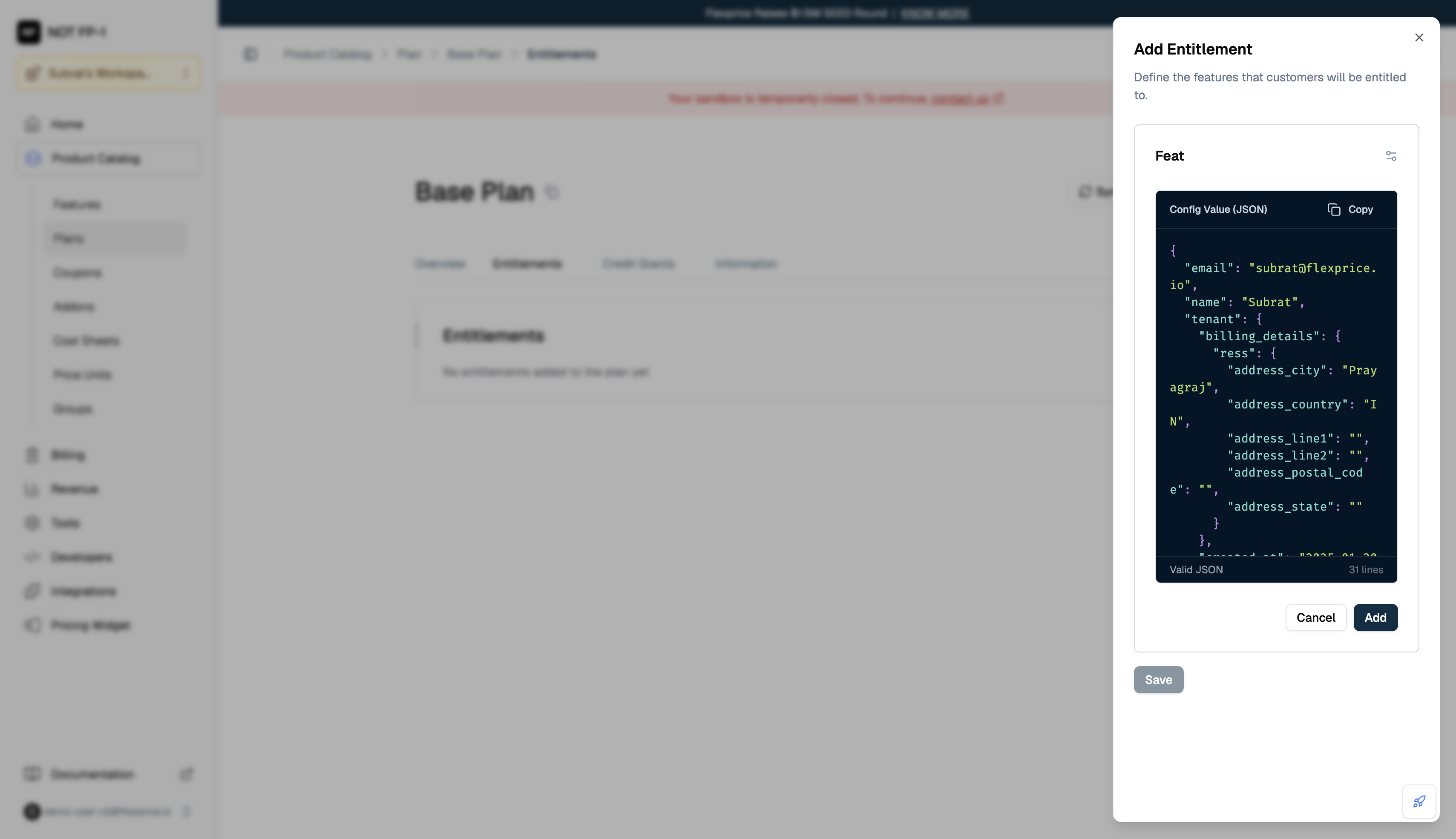 Click **Add** to save the entitlement. The plan's Entitlements tab displays a truncated JSON preview in the **Value** column. Click the preview to open the full stored config payload.
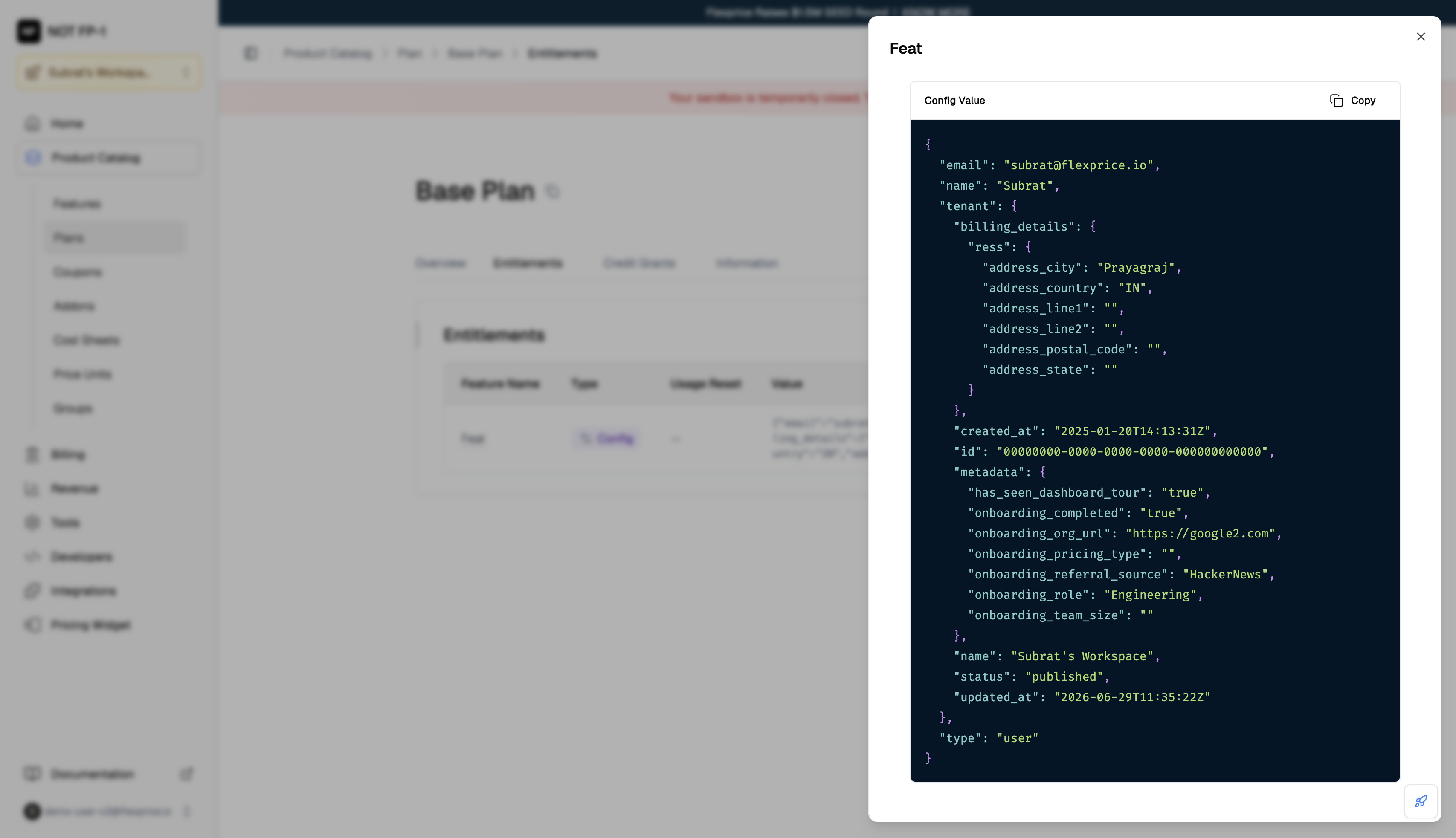 The `config_value` is available on the customer's entitlements as soon as they subscribe to a plan that includes this feature. Use the [Get Customer Entitlements](/api-reference/customers/get-customer-entitlements) endpoint to retrieve it.
## How to create a Metered feature
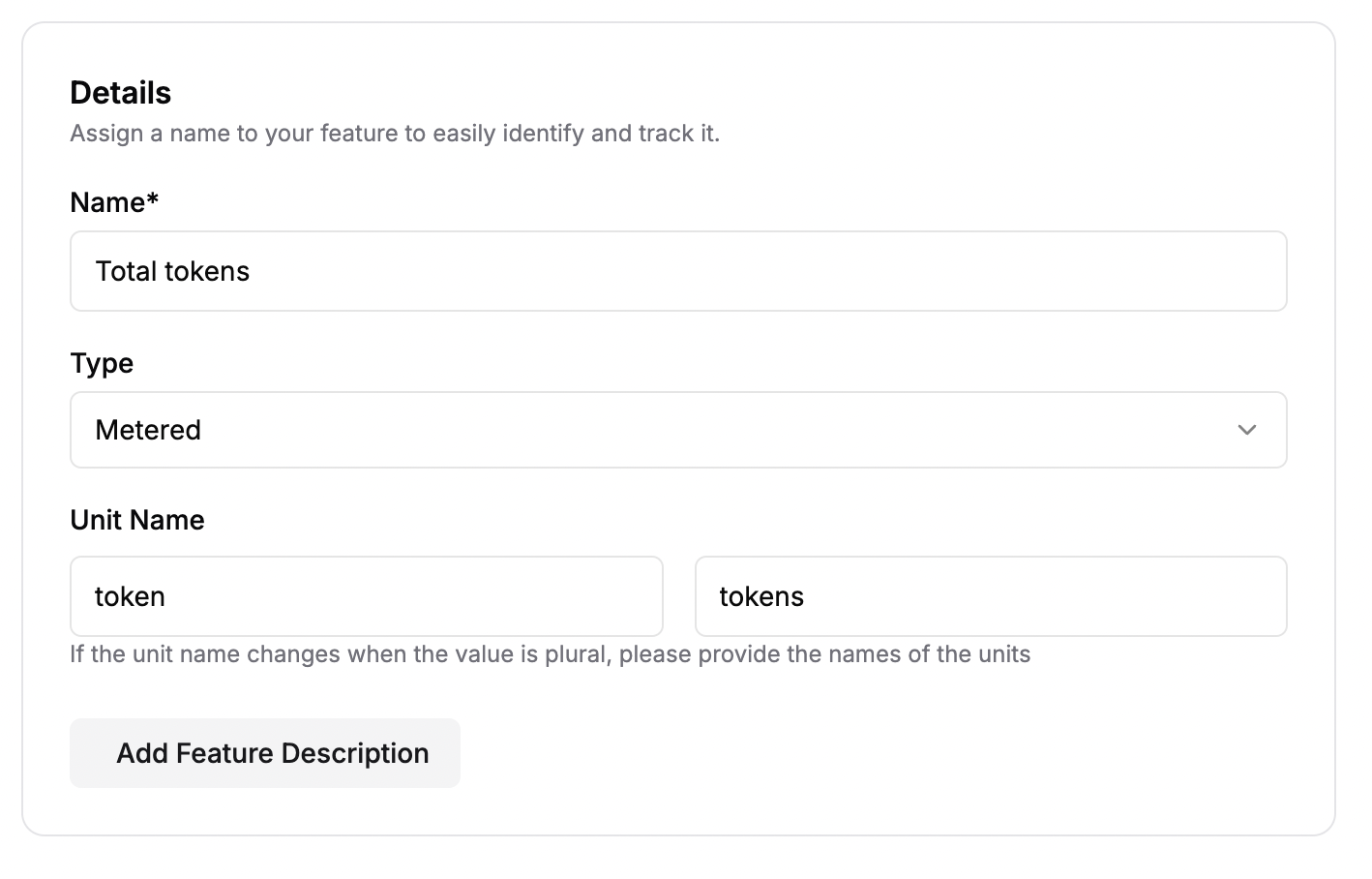
1. Select **Metered** as Type which tracks quantifiable usage (e.g., number of API calls).
2. Optionally edit the singular and plural unit names, for example: "token" and "tokens".
The `config_value` is available on the customer's entitlements as soon as they subscribe to a plan that includes this feature. Use the [Get Customer Entitlements](/api-reference/customers/get-customer-entitlements) endpoint to retrieve it.
## How to create a Metered feature
1. Select **Metered** as Type which tracks quantifiable usage (e.g., number of API calls).
2. Optionally edit the singular and plural unit names, for example: "token" and "tokens".
 ### Define Event Details
 #### Event Name
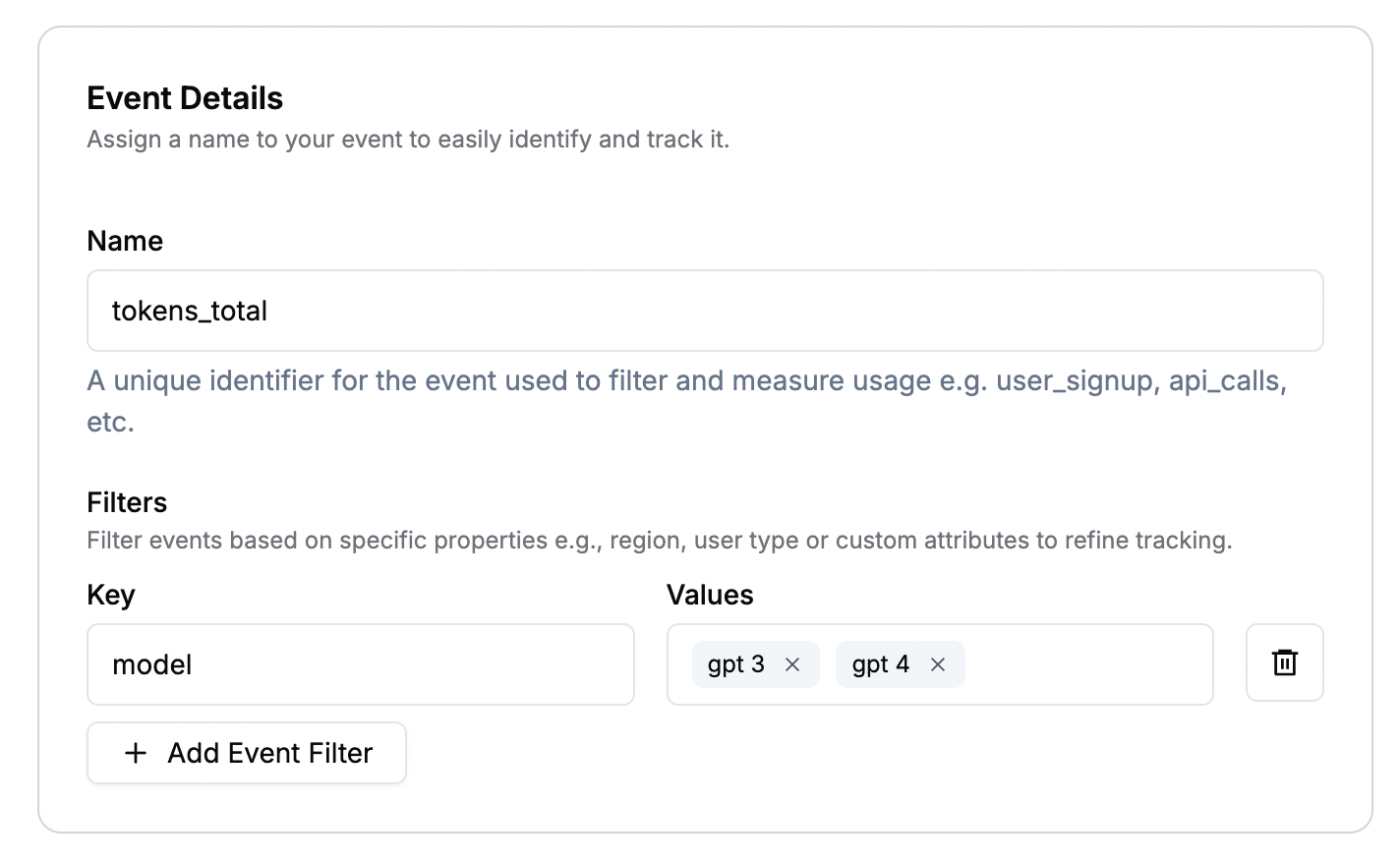
For example, suppose you want to track how many tokens users consume while calling your AI model:
* **Event Name**: `tokens_total`
* This is the unique identifier you'll use to send events that match the metric
* Must be unique across your Flexprice account to avoid confusion with other metrics
#### Filters (Optional)
It is important to note that filters cannot be edited later, so decide up front if you'll need them for billing or reporting.
Filters let you **narrow down** which events get counted or summed in this metric. You do not have to add filters if you want to aggregate all events of a given type. However, filters become crucial if you need more granular control, such as billing for only certain AI models or distinguishing usage by environment.
**Example**: If your system supports multiple AI models (`gpt 3`, `llama3.2`, `gpt 4`), and you only want to track usage from GPT models for specialized billing, you can add a filter:
* **Key**: `model`
* **Values**: `gpt 3`, `gpt 4`
This means Flexprice will only aggregate token usage events where `model` is either `gpt 3` or `gpt 4`.
### Define Aggregation
The aggregation settings tell Flexprice how to measure your events.
#### Event Name
For example, suppose you want to track how many tokens users consume while calling your AI model:
* **Event Name**: `tokens_total`
* This is the unique identifier you'll use to send events that match the metric
* Must be unique across your Flexprice account to avoid confusion with other metrics
#### Filters (Optional)
It is important to note that filters cannot be edited later, so decide up front if you'll need them for billing or reporting.
Filters let you **narrow down** which events get counted or summed in this metric. You do not have to add filters if you want to aggregate all events of a given type. However, filters become crucial if you need more granular control, such as billing for only certain AI models or distinguishing usage by environment.
**Example**: If your system supports multiple AI models (`gpt 3`, `llama3.2`, `gpt 4`), and you only want to track usage from GPT models for specialized billing, you can add a filter:
* **Key**: `model`
* **Values**: `gpt 3`, `gpt 4`
This means Flexprice will only aggregate token usage events where `model` is either `gpt 3` or `gpt 4`.
### Define Aggregation
The aggregation settings tell Flexprice how to measure your events.
 #### Function
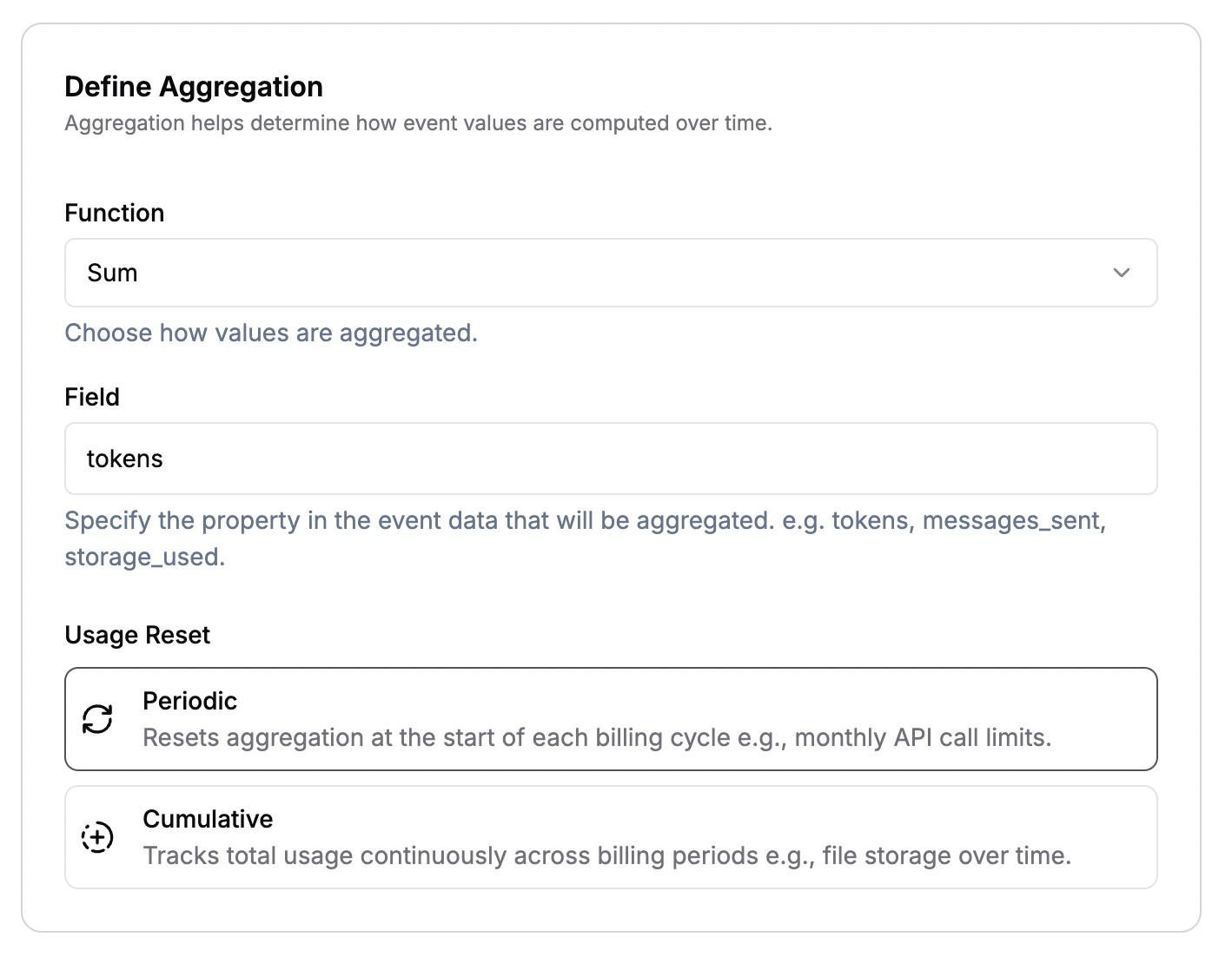
Choose one of these aggregation functions (see [Aggregation Overview](/docs/product-catalogue/features/aggregation/overview) for detailed explanations):
* **COUNT**: Counts the total number of matching events, regardless of any numeric value in the event data
* **SUM**: Adds a numeric property (like tokens, price, etc.) across all matching events
* **AVERAGE**: Calculates the mean value of a specified property across all matching events
* **COUNT UNIQUE**: Counts only the unique values of a specified event property
* **LATEST**: Returns the most recent value of a specified property based on event timestamp
* **SUM WITH MULTIPLIER**: Sums a property and applies a configurable multiplier for rate conversions
* **MAX**: Returns the maximum value of a specified property (supports bucketed calculations)
* **WEIGHTED SUM**: Time-weighted sum for capacity-based billing where values are prorated by duration
#### Field
* The property that Flexprice aggregates. Required for all aggregation functions except `COUNT`
* For numeric aggregations (`SUM`, `AVERAGE`, `SUM WITH MULTIPLIER`, `MAX`, `WEIGHTED SUM`): specify a numeric property (e.g., `tokens`, `gb`, `response_time`)
* For `COUNT UNIQUE`: specify any property whose distinct values you want to count (e.g., `user_id`, `session_id`)
* For `LATEST`: specify the property whose most recent value you want to track (e.g., `tier_level`, `status`)
* For `COUNT`: no field required (counts event occurrences only)
#### Usage Reset
* **Cumulative**: The meter never resets. Usage keeps accumulating across billing cycles, providing a running total. This is useful for features like storage.
* **Periodic**: Usage resets at each billing period (e.g., monthly). This is ideal for most subscription-based models where usage resets for every billing period
**Example Configuration**:
* **Aggregation** = `SUM`
* **Aggregation Value** = `tokens`
* **Aggregation Type** = `Periodic` (if you invoice monthly and want usage to reset each month)
#### Function
Choose one of these aggregation functions (see [Aggregation Overview](/docs/product-catalogue/features/aggregation/overview) for detailed explanations):
* **COUNT**: Counts the total number of matching events, regardless of any numeric value in the event data
* **SUM**: Adds a numeric property (like tokens, price, etc.) across all matching events
* **AVERAGE**: Calculates the mean value of a specified property across all matching events
* **COUNT UNIQUE**: Counts only the unique values of a specified event property
* **LATEST**: Returns the most recent value of a specified property based on event timestamp
* **SUM WITH MULTIPLIER**: Sums a property and applies a configurable multiplier for rate conversions
* **MAX**: Returns the maximum value of a specified property (supports bucketed calculations)
* **WEIGHTED SUM**: Time-weighted sum for capacity-based billing where values are prorated by duration
#### Field
* The property that Flexprice aggregates. Required for all aggregation functions except `COUNT`
* For numeric aggregations (`SUM`, `AVERAGE`, `SUM WITH MULTIPLIER`, `MAX`, `WEIGHTED SUM`): specify a numeric property (e.g., `tokens`, `gb`, `response_time`)
* For `COUNT UNIQUE`: specify any property whose distinct values you want to count (e.g., `user_id`, `session_id`)
* For `LATEST`: specify the property whose most recent value you want to track (e.g., `tier_level`, `status`)
* For `COUNT`: no field required (counts event occurrences only)
#### Usage Reset
* **Cumulative**: The meter never resets. Usage keeps accumulating across billing cycles, providing a running total. This is useful for features like storage.
* **Periodic**: Usage resets at each billing period (e.g., monthly). This is ideal for most subscription-based models where usage resets for every billing period
**Example Configuration**:
* **Aggregation** = `SUM`
* **Aggregation Value** = `tokens`
* **Aggregation Type** = `Periodic` (if you invoice monthly and want usage to reset each month)