> ## Documentation Index
> Fetch the complete documentation index at: https://docs.flexprice.io/llms.txt
> Use this file to discover all available pages before exploring further.
# Custom Expression
> Compute a per-event quantity from event properties using a CEL formula, then aggregate the result.
Custom Expression lets you write a small formula that runs on every event to compute the quantity that gets aggregated. Instead of aggregating a single property field directly, the aggregation runs on the result of the expression. Use it when the billable quantity is derived from multiple properties (e.g. `input_tokens + output_tokens`), needs a unit conversion (e.g. `duration_ms / 1000`), or needs to be rounded, clamped, or floored per event.
Expressions are written in **CEL** (Common Expression Language). They are validated when the feature is saved, so syntax and type errors surface up front rather than at ingestion time.
**Benefits:**
* **Multi-property quantities** — Combine several event fields into one billable number (`input_tokens + output_tokens`, `cores * hours`)
* **Per-event transforms** — Round, floor, ceil, or clamp before aggregation (`ceil(duration_ms / 1000)`, `min(usage, quota)`)
* **Unit conversions** — Convert between units per event (`bytes / 1024`, `duration_ms / 1000`)
* **Validated at save time** — Syntax errors, missing operators, and non-numeric expressions are rejected when the feature is created, not per event
* **No code deploys** — Change the pricing formula from the dashboard when your metering model evolves
Custom Expression is only available for **SUM**, **AVG**, **MAX**, and **LATEST** aggregations. It is not supported for COUNT, COUNT UNIQUE, SUM WITH MULTIPLIER, or WEIGHTED SUM.
## How It Works
For each event, Flexprice reads the top-level properties in `event.properties`, evaluates your expression against them, and treats the result as that event's quantity. The chosen aggregation (SUM / AVG / MAX / LATEST) then runs over those per-event quantities.
```
per_event_quantity = evaluate(expression, event.properties)
feature_value = aggregate(per_event_quantity across events)
```
* **Variables** are top-level property names on your events (e.g. `tokens`, `duration_ms`, `input_tokens`). Nested paths are not supported — flatten the value to a top-level property.
* **Missing properties** are treated as `0`.
* **Numeric strings** (e.g. `"2"`, `"5.5"`) are coerced to numbers so events don't fail just because a field was serialized as a string.
* **Non-numeric strings**, `NaN`, and `±Inf` are rejected — the event's quantity fails to compute and the error is surfaced.
* **All arithmetic is real-valued.** Integer literals are promoted to doubles, so `total / 4` with `total = 10` evaluates to `2.5`, not `2`.
## Step-by-Step Setup
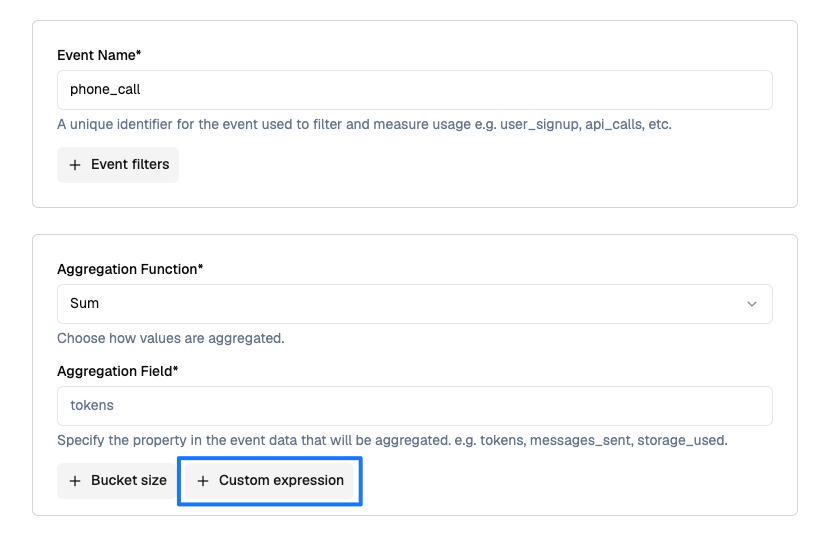
Go to **Product Catalog → Features** and click **Add Feature**.
* **Name**: descriptive name (e.g. `Phone Call Seconds`)
* **Type**: Select **Metered**
* **Event Name**: the event you send (e.g. `phone_call`)
* **Aggregation Function**: pick **Sum**, **Average**, **Max**, or **Latest**
* **Aggregation Field**: the property that would be used if no expression is set (e.g. `tokens`). This is still required as a fallback / label.
Click **+ Custom expression** below the aggregation section.
 Enter a CEL formula in the **Custom Expression** field. Variables are the top-level property names on your events.
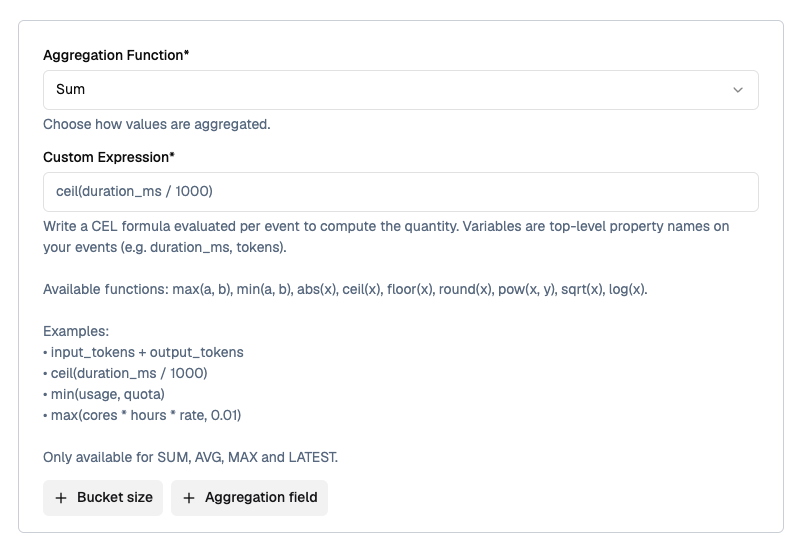 On save, the expression is compiled and validated. If it has a syntax error, references no variables, or evaluates to a non-numeric type, saving fails with the error.
## Supported Functions
The following math helpers are available inside expressions. All take and return numbers.
| Function | Signature | Description |
| ----------- | --------------------------- | ------------------------------------ |
| `max(a, b)` | `(number, number) → number` | Returns the larger of `a` and `b` |
| `min(a, b)` | `(number, number) → number` | Returns the smaller of `a` and `b` |
| `pow(x, y)` | `(number, number) → number` | Raises `x` to the power `y` |
| `abs(x)` | `(number) → number` | Absolute value |
| `ceil(x)` | `(number) → number` | Rounds up to the nearest integer |
| `floor(x)` | `(number) → number` | Rounds down to the nearest integer |
| `round(x)` | `(number) → number` | Rounds half away from zero |
| `sqrt(x)` | `(number) → number` | Square root; errors if `x < 0` |
| `log(x)` | `(number) → number` | Natural logarithm; errors if `x ≤ 0` |
Standard CEL operators are also available: `+`, `-`, `*`, `/`, `<`, `<=`, `>`, `>=`, `==`, `!=`, `&&`, `||`, `!`, and the ternary `cond ? a : b`.
Modulo (`%`) is not available because all values are typed as doubles. Use `x - floor(x / y) * y` if you need a remainder.
## Calculation Example
### Configuration
* **Event Name**: `phone_call`
* **Aggregation Function**: Sum
* **Custom Expression**: `ceil(duration_ms / 1000)`
* **Unit Name**: `second / seconds`
### Event Data
```json theme={null}
[
{
"event_id": "evt_001",
"event_name": "phone_call",
"external_customer_id": "customer_123",
"timestamp": "2026-07-09T10:00:00Z",
"properties": {
"duration_ms": 4200
}
},
{
"event_id": "evt_002",
"event_name": "phone_call",
"external_customer_id": "customer_123",
"timestamp": "2026-07-09T10:05:00Z",
"properties": {
"duration_ms": 8100
}
},
{
"event_id": "evt_003",
"event_name": "phone_call",
"external_customer_id": "customer_123",
"timestamp": "2026-07-09T10:10:00Z",
"properties": {
"duration_ms": 500
}
}
]
```
### Calculation Process
1. **Per-event quantity** — Evaluate `ceil(duration_ms / 1000)` on each event
* `evt_001` → `ceil(4200 / 1000)` = `5`
* `evt_002` → `ceil(8100 / 1000)` = `9`
* `evt_003` → `ceil(500 / 1000)` = `1`
2. **Aggregation** — SUM across events: `5 + 9 + 1 = 15`
**Result**: `15 seconds`
Without the expression, a plain `SUM(duration_ms)` would have produced `12,800` — the expression bills whole seconds with per-call rounding, which is what the pricing model requires.
## Use Cases
### Token-based AI billing
**Perfect for**: LLM APIs that charge different rates for input vs. output tokens.
**Expression**: `input_tokens + output_tokens * 3`
```json theme={null}
{
"event_name": "llm.completion",
"external_customer_id": "acme_corp",
"properties": {
"input_tokens": 500,
"output_tokens": 120,
"model": "gpt-4"
}
}
```
*Aggregation: SUM. Each output token is billed as 3 units to reflect the higher output cost.*
### Rounded call duration (telephony)
**Perfect for**: Voice APIs billed by the whole second or whole minute, with per-call rounding.
**Expression**: `ceil(duration_ms / 1000)`
```json theme={null}
{
"event_name": "phone_call",
"external_customer_id": "customer_123",
"properties": {
"duration_ms": 8100
}
}
```
*Aggregation: SUM. A 8.1s call is billed as 9 seconds; the sum reflects total billable seconds.*
### Compute cost per event
**Perfect for**: Infrastructure billing where quantity depends on multiple dimensions per job.
**Expression**: `cores * hours * rate`
```json theme={null}
{
"event_name": "compute.job",
"external_customer_id": "user_456",
"properties": {
"cores": 8,
"hours": 2.5,
"rate": 0.05
}
}
```
*Aggregation: SUM. Each job contributes its own cost; the feature value is total spend.*
### Quota-clamped usage
**Perfect for**: Fair-use plans that cap what a single event can contribute.
**Expression**: `min(api_calls, 1000)`
```json theme={null}
{
"event_name": "api.batch",
"external_customer_id": "merchant_789",
"properties": {
"api_calls": 4200
}
}
```
*Aggregation: SUM. A batch of 4,200 calls contributes at most 1,000 to the metered total.*
### Pulse pricing (minimum billable unit)
**Perfect for**: Charging in fixed pulses (e.g. 15-second SMS pulses, 6-second call pulses).
**Expression**: `duration <= 10 ? 0 : ceil(duration / 15) * 15`
```json theme={null}
{
"event_name": "sms.send",
"external_customer_id": "customer_101",
"properties": {
"duration": 18
}
}
```
*Aggregation: SUM. Short pulses under 10 units are free; longer pulses round up to the next 15-unit block.*
### Data transfer with unit conversion
**Perfect for**: Events emitted in bytes but billed in GB.
**Expression**: `bytes / 1073741824`
```json theme={null}
{
"event_name": "data.transfer",
"external_customer_id": "acme_corp",
"properties": {
"bytes": 5368709120
}
}
```
*Aggregation: SUM. Each event converts bytes to GB; the feature value is total GB transferred.*
## Error Handling
Expressions can fail either at **save time** (compile) or **event time** (evaluate). Compile errors block feature creation; evaluate errors cause the specific event's quantity to fail.
### Compile-time errors
Surfaced when you save the feature. Fix the expression before saving.
| Error | Cause | Example |
| ------------------ | ----------------------------------------- | ------------- |
| Syntax error | Malformed CEL | `a + b +` |
| No variables | Expression has only literals | `1 + 2` |
| Non-numeric result | Result is not a number | `a + "hello"` |
| Unknown function | Function is not in the supported list | `tan(theta)` |
| Wrong arity | Function called with wrong number of args | `max(tokens)` |
### Event-time errors
Surfaced per event during ingestion.
| Error | Cause |
| ----------------------- | ---------------------------------------------------------------------------------- |
| Property is not numeric | An identifier resolves to a non-numeric string (e.g. `"abc"`) |
| Non-finite property | Property value is `NaN`, `+Inf`, or `-Inf` |
| Non-finite result | Expression produced `NaN` or `±Inf` (division by zero, `sqrt(-1)`, `pow` overflow) |
Test your expression against a few real payloads in a scratch event before switching production traffic. A quick way is to enable the feature on a test plan and confirm the aggregated value matches what you expect.
## Critical Notes
* **Only SUM, AVG, MAX, and LATEST** support custom expressions today.
* **Top-level properties only** — nested fields (e.g. `payload.tokens`) are not addressable; flatten them at ingestion.
* **Missing properties default to `0`**, not an error. If a required property is missing on the event, the expression will still evaluate but the quantity will reflect that zero.
* **CEL reserved keywords** cannot be property names inside expressions: `as`, `break`, `const`, `continue`, `else`, `false`, `for`, `function`, `if`, `import`, `in`, `let`, `loop`, `package`, `namespace`, `null`, `return`, `true`, `var`, `void`, `while`. Rename the property on your event if it clashes.
* **Real division** — Integer literals are promoted to doubles, so `total / 1000` returns a real number, not a truncated integer.
* **Expression changes apply to new events only** — Historical events are not re-evaluated when you edit the expression.
## Next Steps
* **[SUM Aggregation](/docs/product-catalogue/features/aggregation/sum)** — The most common aggregation used with custom expressions
* **[Creating a Metered Feature](/docs/event-ingestion/creating-a-metered-feature)** — Full feature setup walkthrough
* **[Sending Events](/docs/event-ingestion/sending-events)** — How to structure `event.properties` for expression variables
On save, the expression is compiled and validated. If it has a syntax error, references no variables, or evaluates to a non-numeric type, saving fails with the error.
## Supported Functions
The following math helpers are available inside expressions. All take and return numbers.
| Function | Signature | Description |
| ----------- | --------------------------- | ------------------------------------ |
| `max(a, b)` | `(number, number) → number` | Returns the larger of `a` and `b` |
| `min(a, b)` | `(number, number) → number` | Returns the smaller of `a` and `b` |
| `pow(x, y)` | `(number, number) → number` | Raises `x` to the power `y` |
| `abs(x)` | `(number) → number` | Absolute value |
| `ceil(x)` | `(number) → number` | Rounds up to the nearest integer |
| `floor(x)` | `(number) → number` | Rounds down to the nearest integer |
| `round(x)` | `(number) → number` | Rounds half away from zero |
| `sqrt(x)` | `(number) → number` | Square root; errors if `x < 0` |
| `log(x)` | `(number) → number` | Natural logarithm; errors if `x ≤ 0` |
Standard CEL operators are also available: `+`, `-`, `*`, `/`, `<`, `<=`, `>`, `>=`, `==`, `!=`, `&&`, `||`, `!`, and the ternary `cond ? a : b`.
Modulo (`%`) is not available because all values are typed as doubles. Use `x - floor(x / y) * y` if you need a remainder.
## Calculation Example
### Configuration
* **Event Name**: `phone_call`
* **Aggregation Function**: Sum
* **Custom Expression**: `ceil(duration_ms / 1000)`
* **Unit Name**: `second / seconds`
### Event Data
```json theme={null}
[
{
"event_id": "evt_001",
"event_name": "phone_call",
"external_customer_id": "customer_123",
"timestamp": "2026-07-09T10:00:00Z",
"properties": {
"duration_ms": 4200
}
},
{
"event_id": "evt_002",
"event_name": "phone_call",
"external_customer_id": "customer_123",
"timestamp": "2026-07-09T10:05:00Z",
"properties": {
"duration_ms": 8100
}
},
{
"event_id": "evt_003",
"event_name": "phone_call",
"external_customer_id": "customer_123",
"timestamp": "2026-07-09T10:10:00Z",
"properties": {
"duration_ms": 500
}
}
]
```
### Calculation Process
1. **Per-event quantity** — Evaluate `ceil(duration_ms / 1000)` on each event
* `evt_001` → `ceil(4200 / 1000)` = `5`
* `evt_002` → `ceil(8100 / 1000)` = `9`
* `evt_003` → `ceil(500 / 1000)` = `1`
2. **Aggregation** — SUM across events: `5 + 9 + 1 = 15`
**Result**: `15 seconds`
Without the expression, a plain `SUM(duration_ms)` would have produced `12,800` — the expression bills whole seconds with per-call rounding, which is what the pricing model requires.
## Use Cases
### Token-based AI billing
**Perfect for**: LLM APIs that charge different rates for input vs. output tokens.
**Expression**: `input_tokens + output_tokens * 3`
```json theme={null}
{
"event_name": "llm.completion",
"external_customer_id": "acme_corp",
"properties": {
"input_tokens": 500,
"output_tokens": 120,
"model": "gpt-4"
}
}
```
*Aggregation: SUM. Each output token is billed as 3 units to reflect the higher output cost.*
### Rounded call duration (telephony)
**Perfect for**: Voice APIs billed by the whole second or whole minute, with per-call rounding.
**Expression**: `ceil(duration_ms / 1000)`
```json theme={null}
{
"event_name": "phone_call",
"external_customer_id": "customer_123",
"properties": {
"duration_ms": 8100
}
}
```
*Aggregation: SUM. A 8.1s call is billed as 9 seconds; the sum reflects total billable seconds.*
### Compute cost per event
**Perfect for**: Infrastructure billing where quantity depends on multiple dimensions per job.
**Expression**: `cores * hours * rate`
```json theme={null}
{
"event_name": "compute.job",
"external_customer_id": "user_456",
"properties": {
"cores": 8,
"hours": 2.5,
"rate": 0.05
}
}
```
*Aggregation: SUM. Each job contributes its own cost; the feature value is total spend.*
### Quota-clamped usage
**Perfect for**: Fair-use plans that cap what a single event can contribute.
**Expression**: `min(api_calls, 1000)`
```json theme={null}
{
"event_name": "api.batch",
"external_customer_id": "merchant_789",
"properties": {
"api_calls": 4200
}
}
```
*Aggregation: SUM. A batch of 4,200 calls contributes at most 1,000 to the metered total.*
### Pulse pricing (minimum billable unit)
**Perfect for**: Charging in fixed pulses (e.g. 15-second SMS pulses, 6-second call pulses).
**Expression**: `duration <= 10 ? 0 : ceil(duration / 15) * 15`
```json theme={null}
{
"event_name": "sms.send",
"external_customer_id": "customer_101",
"properties": {
"duration": 18
}
}
```
*Aggregation: SUM. Short pulses under 10 units are free; longer pulses round up to the next 15-unit block.*
### Data transfer with unit conversion
**Perfect for**: Events emitted in bytes but billed in GB.
**Expression**: `bytes / 1073741824`
```json theme={null}
{
"event_name": "data.transfer",
"external_customer_id": "acme_corp",
"properties": {
"bytes": 5368709120
}
}
```
*Aggregation: SUM. Each event converts bytes to GB; the feature value is total GB transferred.*
## Error Handling
Expressions can fail either at **save time** (compile) or **event time** (evaluate). Compile errors block feature creation; evaluate errors cause the specific event's quantity to fail.
### Compile-time errors
Surfaced when you save the feature. Fix the expression before saving.
| Error | Cause | Example |
| ------------------ | ----------------------------------------- | ------------- |
| Syntax error | Malformed CEL | `a + b +` |
| No variables | Expression has only literals | `1 + 2` |
| Non-numeric result | Result is not a number | `a + "hello"` |
| Unknown function | Function is not in the supported list | `tan(theta)` |
| Wrong arity | Function called with wrong number of args | `max(tokens)` |
### Event-time errors
Surfaced per event during ingestion.
| Error | Cause |
| ----------------------- | ---------------------------------------------------------------------------------- |
| Property is not numeric | An identifier resolves to a non-numeric string (e.g. `"abc"`) |
| Non-finite property | Property value is `NaN`, `+Inf`, or `-Inf` |
| Non-finite result | Expression produced `NaN` or `±Inf` (division by zero, `sqrt(-1)`, `pow` overflow) |
Test your expression against a few real payloads in a scratch event before switching production traffic. A quick way is to enable the feature on a test plan and confirm the aggregated value matches what you expect.
## Critical Notes
* **Only SUM, AVG, MAX, and LATEST** support custom expressions today.
* **Top-level properties only** — nested fields (e.g. `payload.tokens`) are not addressable; flatten them at ingestion.
* **Missing properties default to `0`**, not an error. If a required property is missing on the event, the expression will still evaluate but the quantity will reflect that zero.
* **CEL reserved keywords** cannot be property names inside expressions: `as`, `break`, `const`, `continue`, `else`, `false`, `for`, `function`, `if`, `import`, `in`, `let`, `loop`, `package`, `namespace`, `null`, `return`, `true`, `var`, `void`, `while`. Rename the property on your event if it clashes.
* **Real division** — Integer literals are promoted to doubles, so `total / 1000` returns a real number, not a truncated integer.
* **Expression changes apply to new events only** — Historical events are not re-evaluated when you edit the expression.
## Next Steps
* **[SUM Aggregation](/docs/product-catalogue/features/aggregation/sum)** — The most common aggregation used with custom expressions
* **[Creating a Metered Feature](/docs/event-ingestion/creating-a-metered-feature)** — Full feature setup walkthrough
* **[Sending Events](/docs/event-ingestion/sending-events)** — How to structure `event.properties` for expression variables