> ## Documentation Index
> Fetch the complete documentation index at: https://docs.flexprice.io/llms.txt
> Use this file to discover all available pages before exploring further.
# Groups
> Create named groups (e.g. product line, region, tier), assign prices to them, and see usage and cost broken down by group in analytics and the customer portal.
Groups in Flexprice let you organize **prices** into named buckets—e.g. by product line, region, or tier. You can then filter and display prices by group in catalogs, analytics, and the [customer portal](/docs/customers/customer-portal#usage-tab) Usage tab.
Flexprice currently supports grouping for **prices** only (`entity_type: "price"`).
**Benefits:**
* **Organize prices** — Bucket by product line, region, tier, or any dimension
* **Filter** — Search groups by `lookup_key`, `name`, `entity_type`
* **List** — Group Prices in a plan
* **Analytics and Customer Portal** — Group appears in usage breakdown in analytics and customer portal
## Steps to Configure Groups
* Go to **Product Catalog** → **Groups**
* Use **Filter** and **Sort** as needed; **+ Add** creates a new group
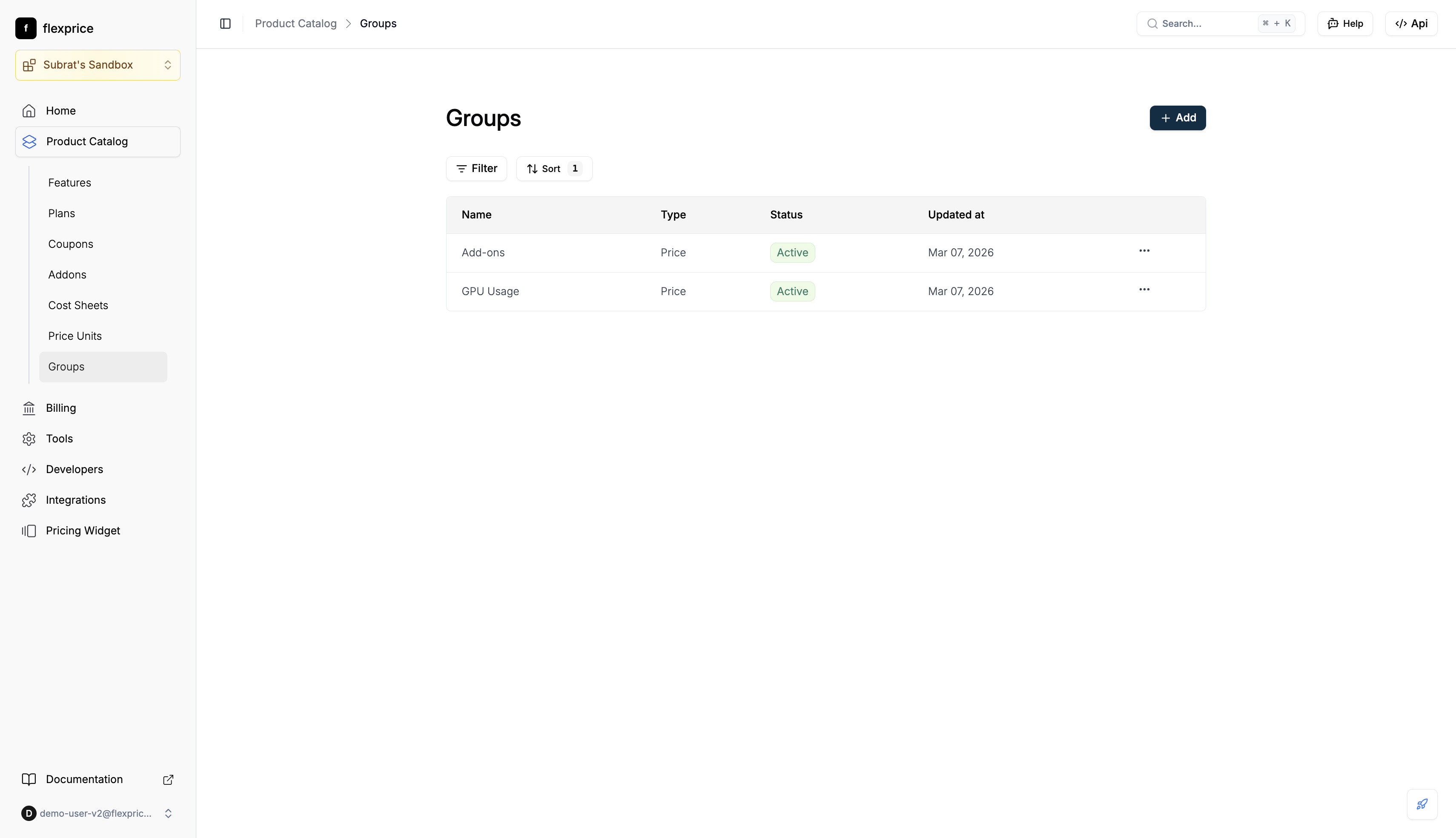 * Click **+ Add**
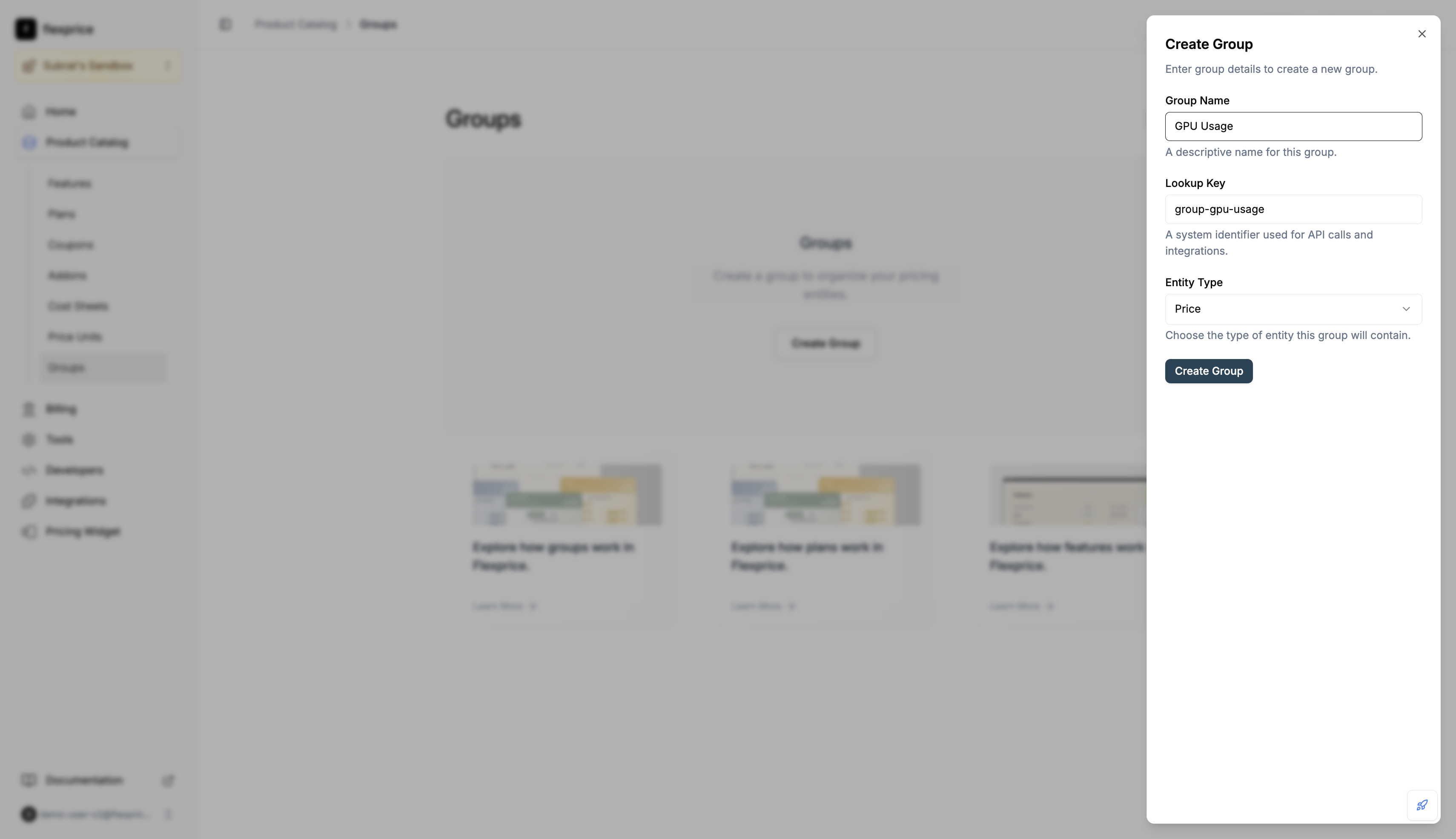
* In the **Create Group** dialog, enter **Group Name**, **Lookup Key** (unique per tenant/environment), and select **Entity Type**
* Click **Create Group**
* Click **+ Add**
* In the **Create Group** dialog, enter **Group Name**, **Lookup Key** (unique per tenant/environment), and select **Entity Type**
* Click **Create Group**
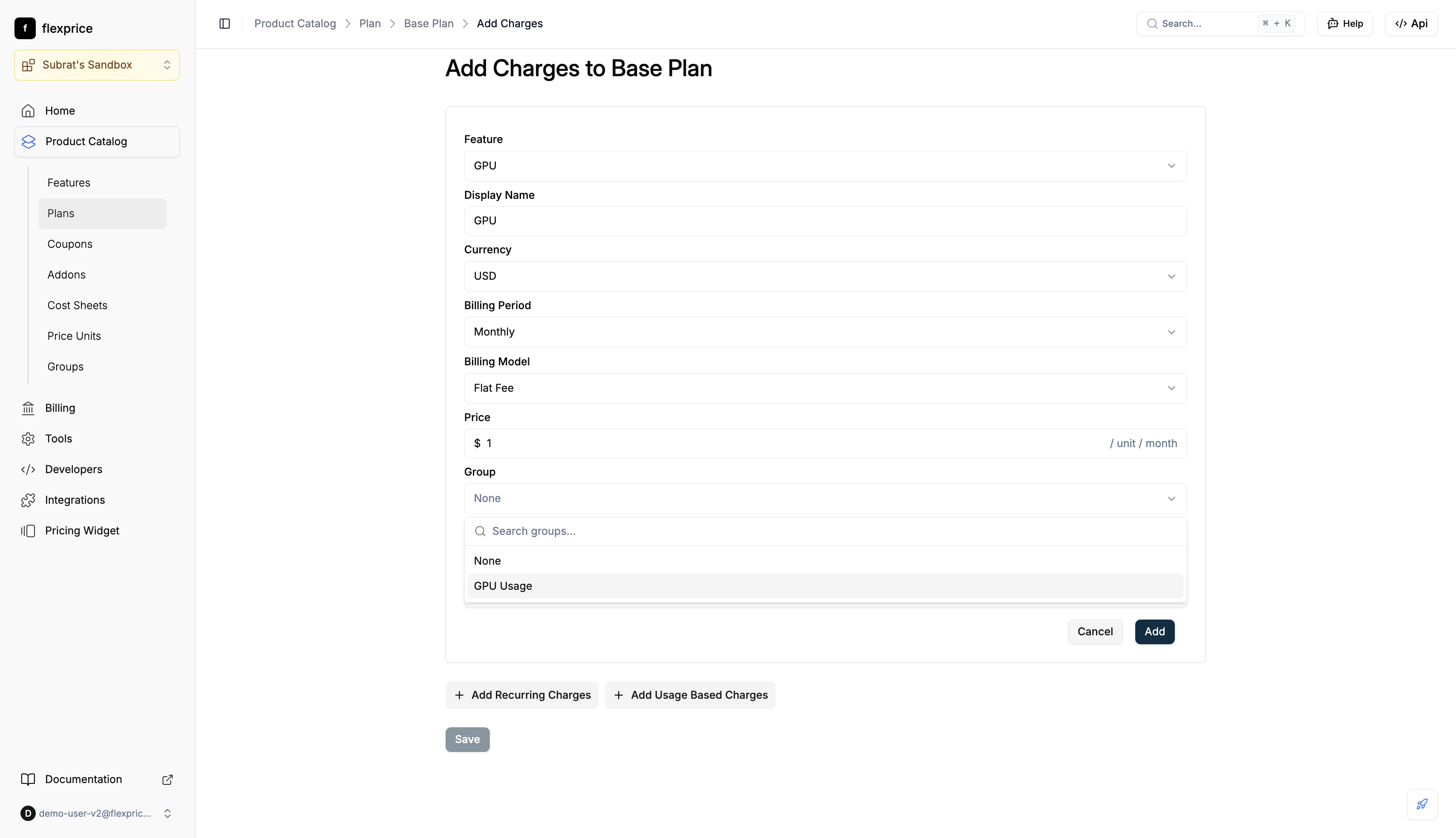
 * When adding a charge to a plan, use the **Group** field: search or select a group (e.g. "GPU Usage")
* Save the charge; it is stored with that group
* When adding a charge to a plan, use the **Group** field: search or select a group (e.g. "GPU Usage")
* Save the charge; it is stored with that group
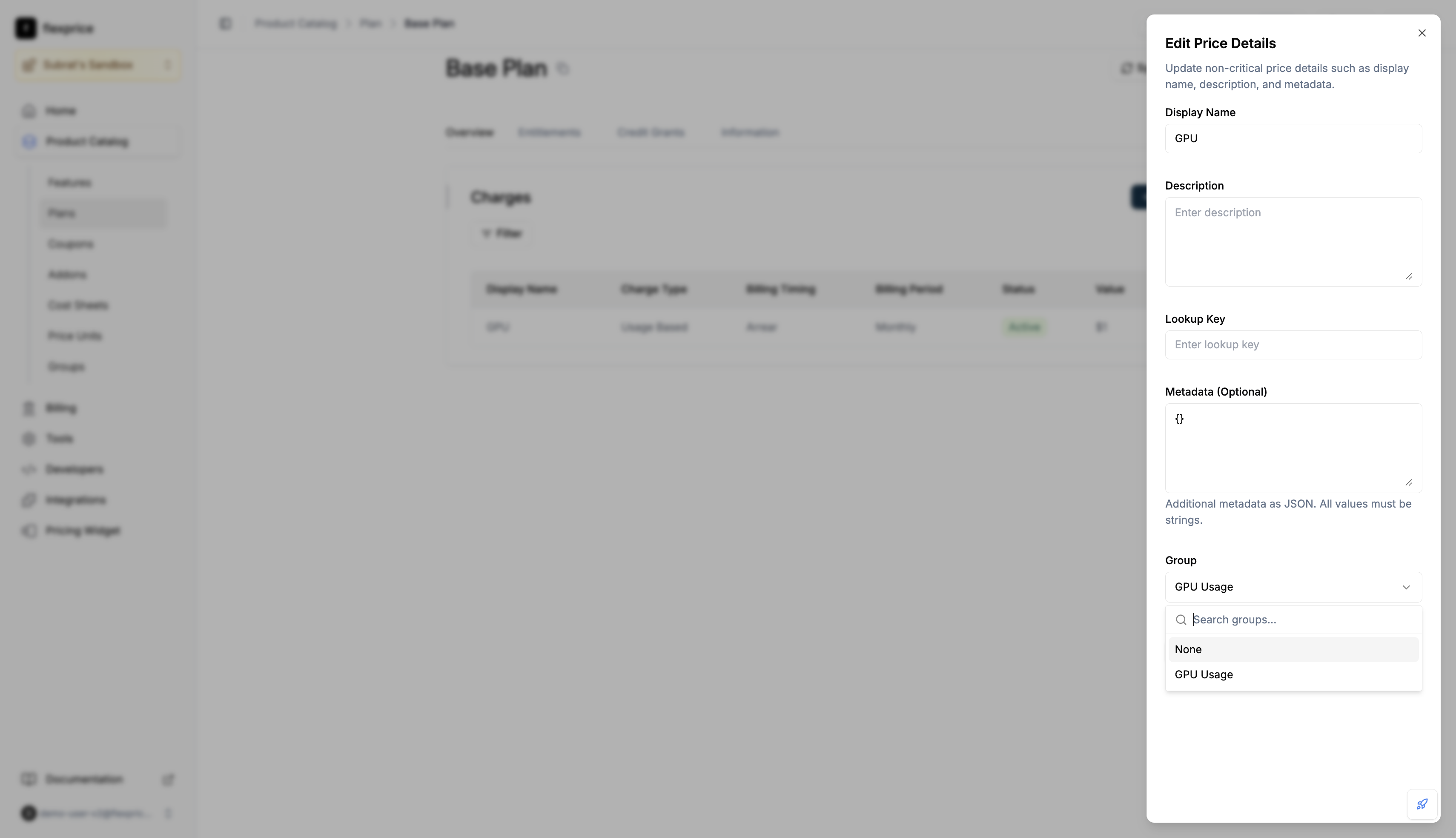
 * Open the plan → **Charges** → **Edit Details**
* In **Edit Price Details**, set **Group** to the desired group or **None** to ungroup
* Save
* Open the plan → **Charges** → **Edit Details**
* In **Edit Price Details**, set **Group** to the desired group or **None** to ungroup
* Save
 ## Assigning a price to a group (API)
* **On create:** `POST /v1/prices` — include `group_id` (value = group `id` from `POST /v1/groups`).
* **On update:** `PUT /v1/prices/:id` — send `group_id: "grp_..."` to assign, or `group_id: ""` to ungroup. Omit to leave unchanged.
* **Viewing on prices:** `GET /v1/prices/:id?expand=groups` or `POST /v1/prices/search` with `expand: "groups"` in the body to get full `group` object on each price.
* **Analytics:** `POST /v1/events/analytics` with `expand: ["price"]` — group is nested under each item’s `price.group` when the price has a `group_id` (no separate `"group"` in expand).
### Where groups are reflected
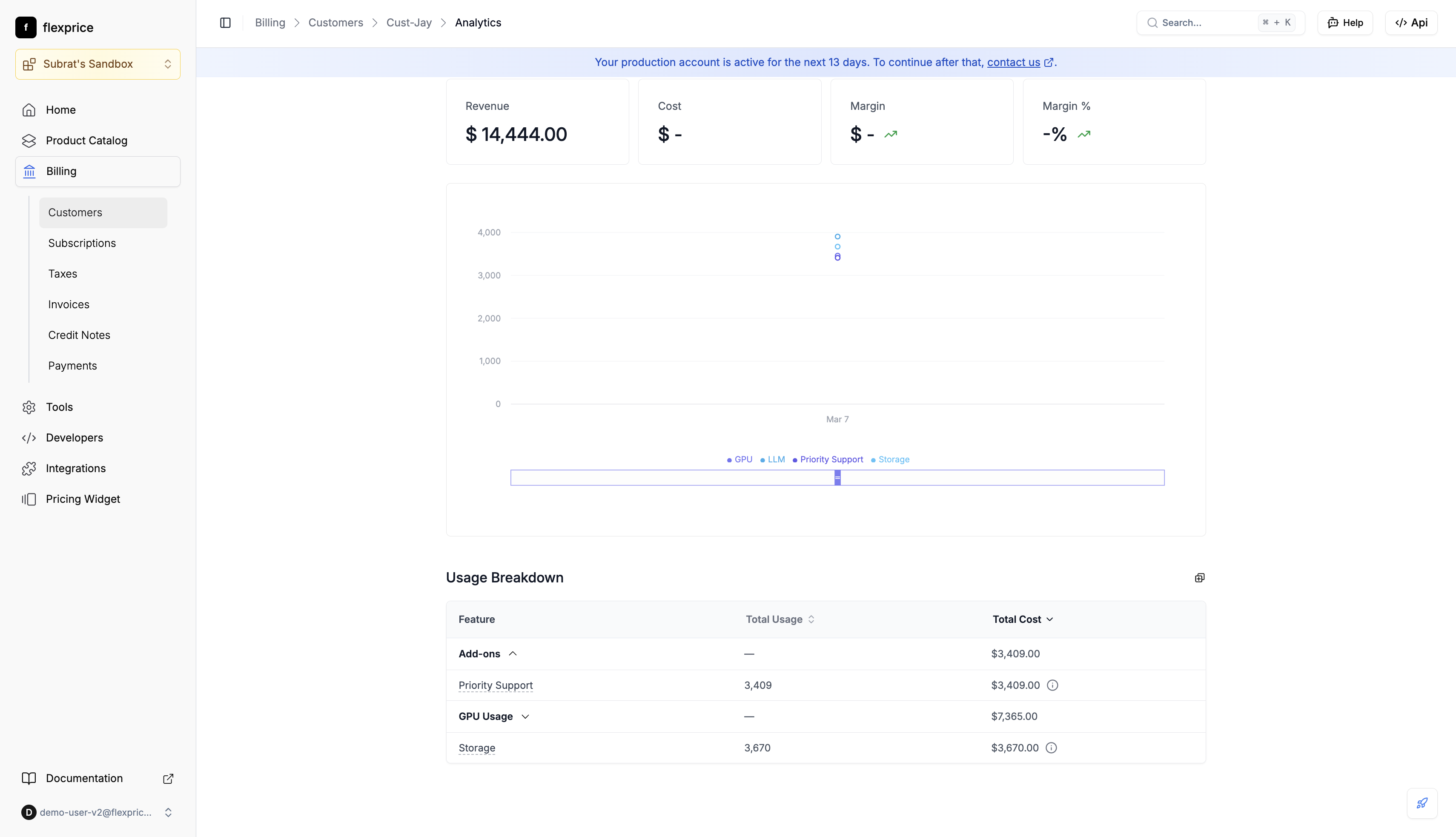
In the **analytics dashboard**, **Usage Breakdown** shows usage and cost by group (e.g. GPU Usage, Add-ons). The same grouped view appears in the [Customer Portal](/docs/customers/customer-portal#usage-tab) **Usage** tab.
## Assigning a price to a group (API)
* **On create:** `POST /v1/prices` — include `group_id` (value = group `id` from `POST /v1/groups`).
* **On update:** `PUT /v1/prices/:id` — send `group_id: "grp_..."` to assign, or `group_id: ""` to ungroup. Omit to leave unchanged.
* **Viewing on prices:** `GET /v1/prices/:id?expand=groups` or `POST /v1/prices/search` with `expand: "groups"` in the body to get full `group` object on each price.
* **Analytics:** `POST /v1/events/analytics` with `expand: ["price"]` — group is nested under each item’s `price.group` when the price has a `group_id` (no separate `"group"` in expand).
### Where groups are reflected
In the **analytics dashboard**, **Usage Breakdown** shows usage and cost by group (e.g. GPU Usage, Add-ons). The same grouped view appears in the [Customer Portal](/docs/customers/customer-portal#usage-tab) **Usage** tab.
 ## Groups API reference
| Action | Method | Endpoint |
| ------------------------------ | ------ | ------------------- |
| Create group | POST | `/v1/groups` |
| Get group | GET | `/v1/groups/:id` |
| Query groups | POST | `/v1/groups/search` |
| Delete group | DELETE | `/v1/groups/:id` |
| Create price (with group) | POST | `/v1/prices` |
| Update price (set/clear group) | PUT | `/v1/prices/:id` |
**Create group:** Request body must include `name`, `entity_type` (`"price"`), `lookup_key`. Response returns `id` — use it as `group_id` on prices.
**Delete group:** Soft-delete.
When you delete a group, every price in that group has its `group_id` cleared (no orphaned references).
## Validation
| Scope | Rule |
| --------- | --------------------------------------------------------------------------------------------------------------------------- |
| **Group** | `entity_type` must be `"price"`. `lookup_key` is required and must be unique per tenant and environment (published groups). |
| **Price** | If `group_id` is set, the group must exist, be published, and have `entity_type` `"price"`. |
**Plan cloning** preserves groups: when you clone a plan, the cloned plan's prices keep the same group assignments as the source.
## Groups API reference
| Action | Method | Endpoint |
| ------------------------------ | ------ | ------------------- |
| Create group | POST | `/v1/groups` |
| Get group | GET | `/v1/groups/:id` |
| Query groups | POST | `/v1/groups/search` |
| Delete group | DELETE | `/v1/groups/:id` |
| Create price (with group) | POST | `/v1/prices` |
| Update price (set/clear group) | PUT | `/v1/prices/:id` |
**Create group:** Request body must include `name`, `entity_type` (`"price"`), `lookup_key`. Response returns `id` — use it as `group_id` on prices.
**Delete group:** Soft-delete.
When you delete a group, every price in that group has its `group_id` cleared (no orphaned references).
## Validation
| Scope | Rule |
| --------- | --------------------------------------------------------------------------------------------------------------------------- |
| **Group** | `entity_type` must be `"price"`. `lookup_key` is required and must be unique per tenant and environment (published groups). |
| **Price** | If `group_id` is set, the group must exist, be published, and have `entity_type` `"price"`. |
**Plan cloning** preserves groups: when you clone a plan, the cloned plan's prices keep the same group assignments as the source.