> ## Documentation Index
> Fetch the complete documentation index at: https://docs.flexprice.io/llms.txt
> Use this file to discover all available pages before exploring further.
# Charges grouping
> Assign prices (charges) to a group when adding or editing a charge.
Create a group with **Entity type** **Price** first ([Creating a group](/docs/product-catalogue/groups/create)). Then assign charges to that group using the steps below.
## Workflow
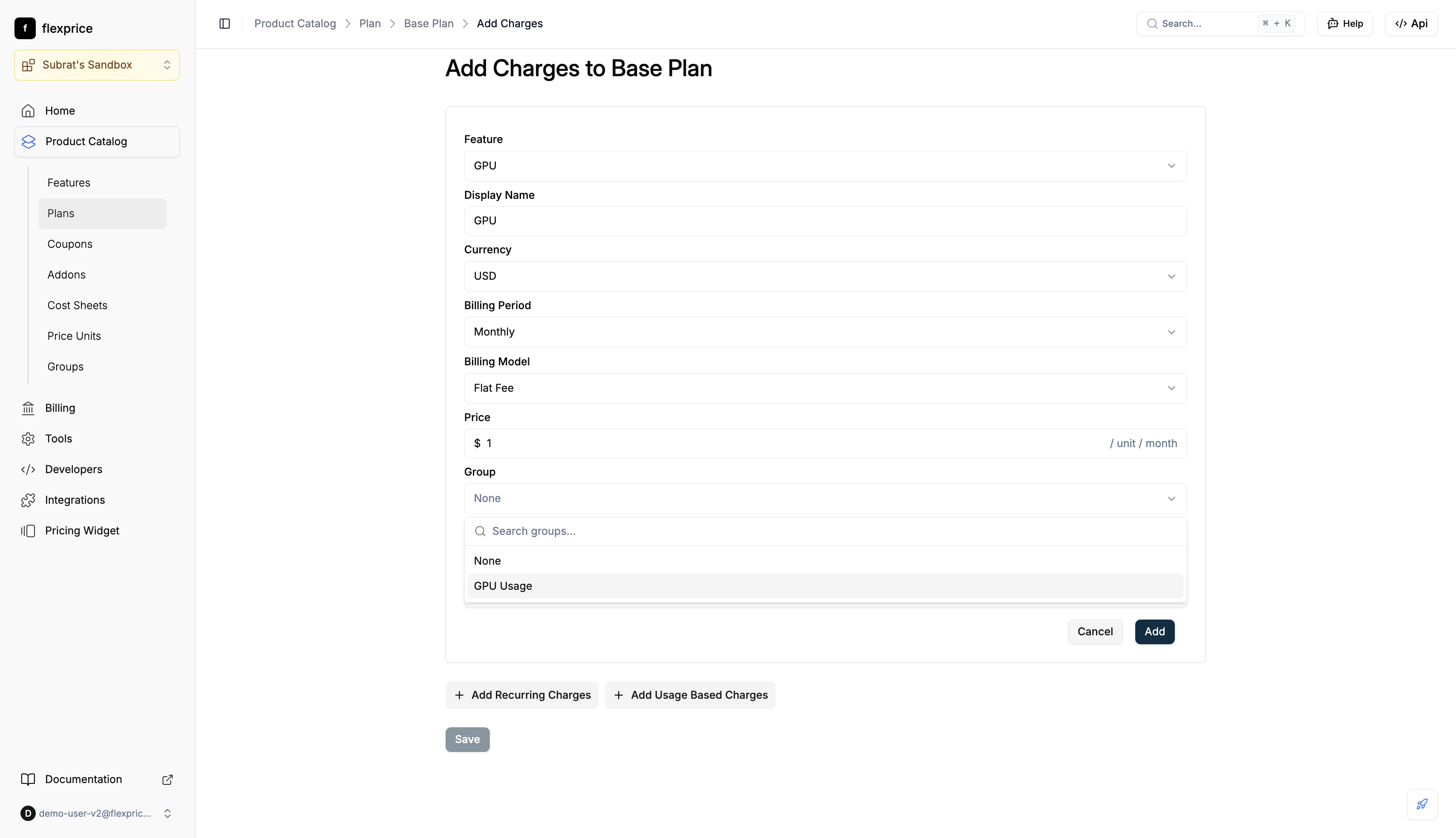
* When adding a charge to a plan, use the **Group** field: search or select a group (e.g. "GPU Usage")
* Save the charge; it is stored with that group
 * Open the plan → **Charges** → **Edit Details**
* In **Edit Price Details**, set **Group** to the desired group or **None** to ungroup
* Save
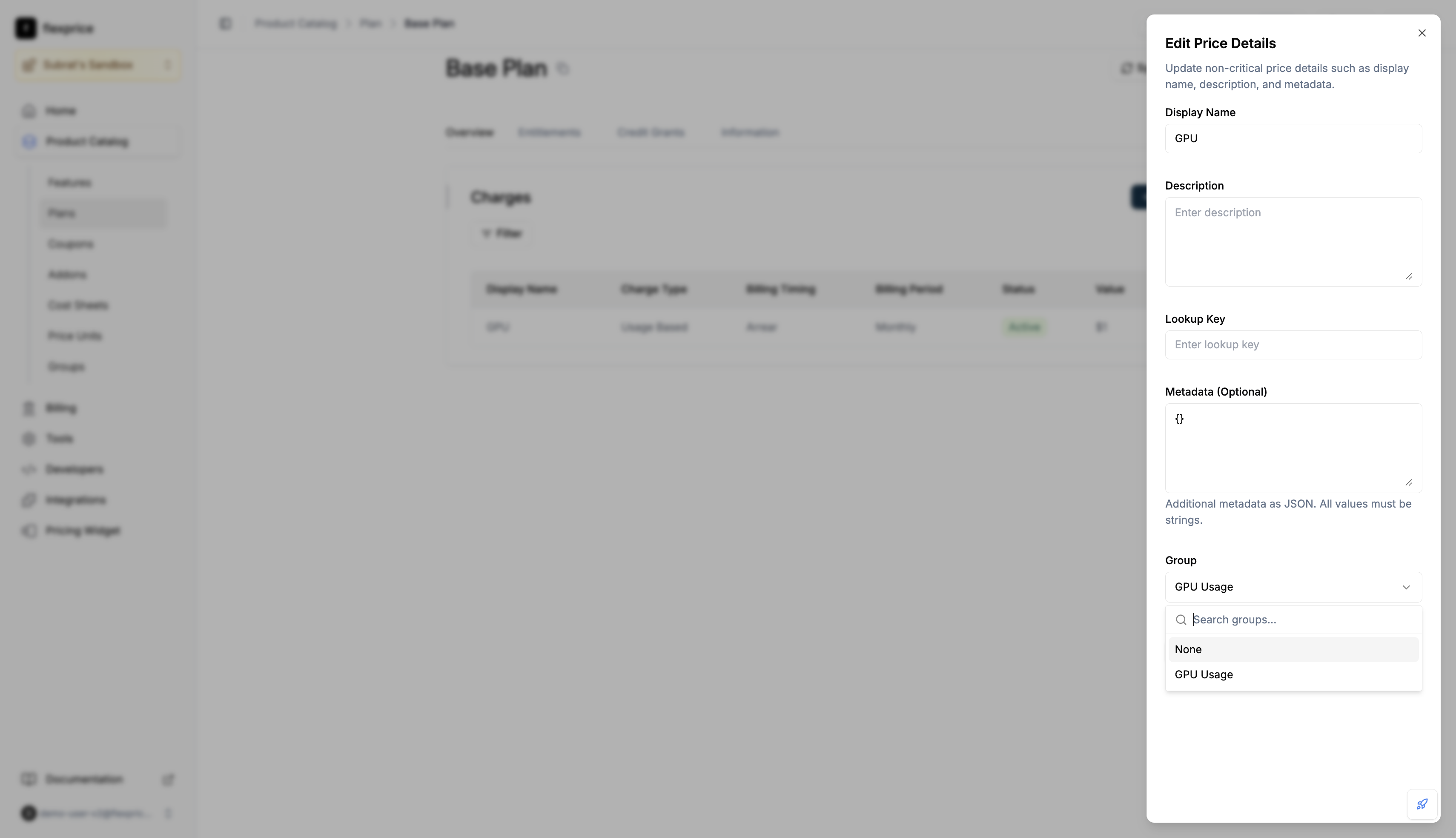
* Open the plan → **Charges** → **Edit Details**
* In **Edit Price Details**, set **Group** to the desired group or **None** to ungroup
* Save
 ## API (prices)
| Action | Method | Endpoint |
| --------- | ------ | ------------------- |
| Create | POST | `/v1/prices` |
| Update | PUT | `/v1/prices/:id` |
| Get price | GET | `/v1/prices/:id` |
| Search | POST | `/v1/prices/search` |
**Create:** Include `group_id` (group `id` from `POST /v1/groups`).
**Update:** Send `group_id: "grp_..."` to assign, `group_id: ""` to ungroup. Omit to leave unchanged.
**View:** `GET /v1/prices/:id?expand=groups` or `POST /v1/prices/search` with `expand: "groups"` for full `group` on each price.
**Analytics:** `POST /v1/events/analytics` with `expand: ["price"]`. Group appears under each item's `price.group` when set.
**Invoices:** Line items use the price's `group_id` to fetch group names.
**Plan cloning** preserves groups. Cloned plan's prices keep the same group assignments as the source.
## API (prices)
| Action | Method | Endpoint |
| --------- | ------ | ------------------- |
| Create | POST | `/v1/prices` |
| Update | PUT | `/v1/prices/:id` |
| Get price | GET | `/v1/prices/:id` |
| Search | POST | `/v1/prices/search` |
**Create:** Include `group_id` (group `id` from `POST /v1/groups`).
**Update:** Send `group_id: "grp_..."` to assign, `group_id: ""` to ungroup. Omit to leave unchanged.
**View:** `GET /v1/prices/:id?expand=groups` or `POST /v1/prices/search` with `expand: "groups"` for full `group` on each price.
**Analytics:** `POST /v1/events/analytics` with `expand: ["price"]`. Group appears under each item's `price.group` when set.
**Invoices:** Line items use the price's `group_id` to fetch group names.
**Plan cloning** preserves groups. Cloned plan's prices keep the same group assignments as the source.