> ## Documentation Index
> Fetch the complete documentation index at: https://docs.flexprice.io/llms.txt
> Use this file to discover all available pages before exploring further.
# Cloning a plan
> Create a duplicate of an existing plan with a new name and lookup key, including its active prices, published entitlements, and plan-scoped credit grants.
Cloning creates a new plan that is a duplicate of an existing plan. Use it to version a plan (e.g. "Pro 2024" → "Pro 2025"), or experiment with a duplicate before changing the original. The new plan has a **distinct name**, and a **unique lookup key**; subscriptions and historical data are not copied.
## What gets copied
* **Plan** — New plan in the same environment with the name and lookup key you provide; description, display order, and metadata can be overridden or copied from the source.
* **Prices** — Only **active** (published and non-expired) plan prices.
* **Entitlements** — Only **published** plan entitlements.
* **Credit grants** — Only **published**, **plan-scoped** credit grants.
## What does not get copied
* Subscriptions or line items
* Expired prices
* Draft or archived prices, entitlements, or grants
Plan cloning is supported **within the same environment** only. The cloned plan is created in the same environment as the source plan.
## Steps to clone a plan
* Go to **Product Catalog** → **Plans**
* Open the plan you want to duplicate
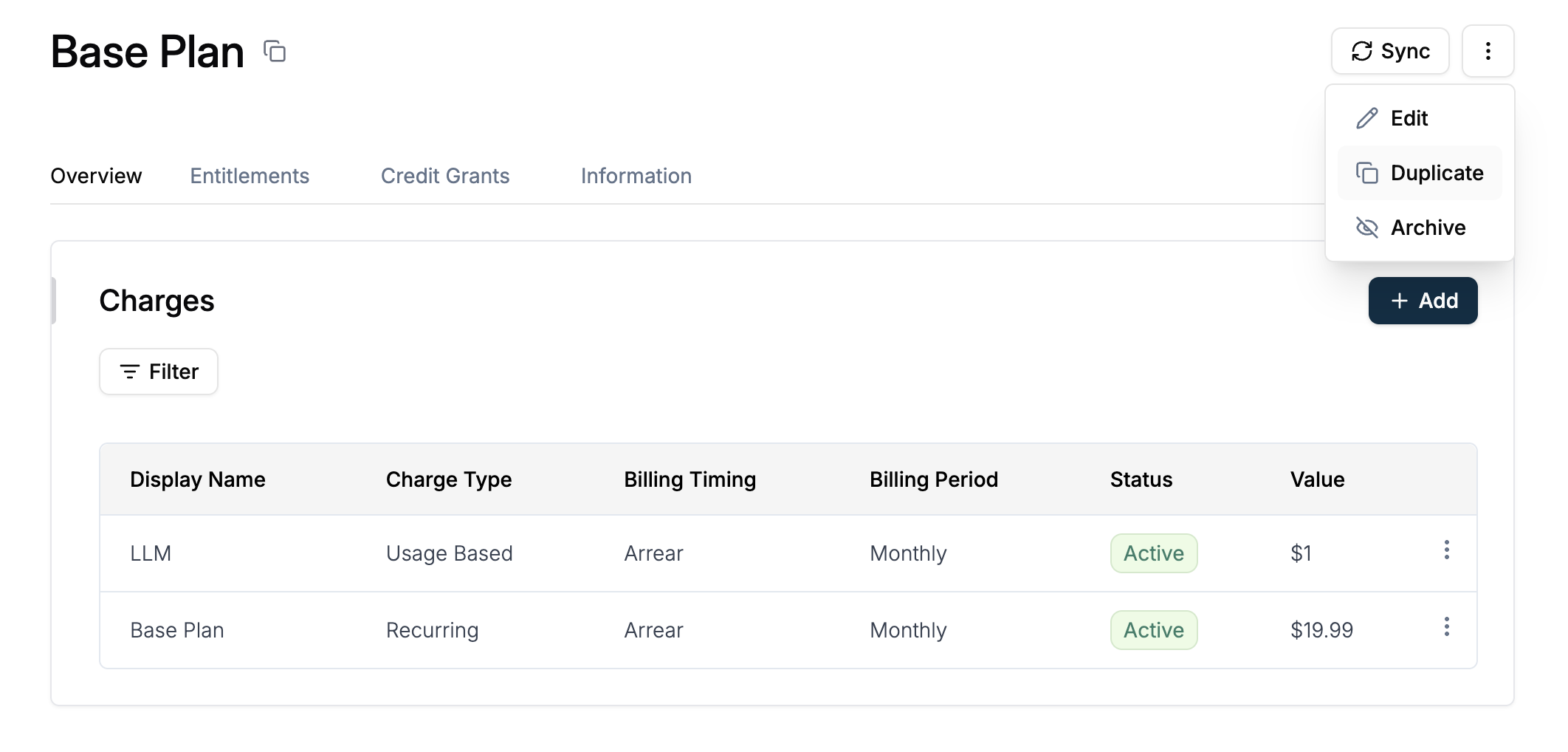
* Click the **three-dot menu (⋮)** in the top right corner
* Select **Duplicate** from the dropdown menu
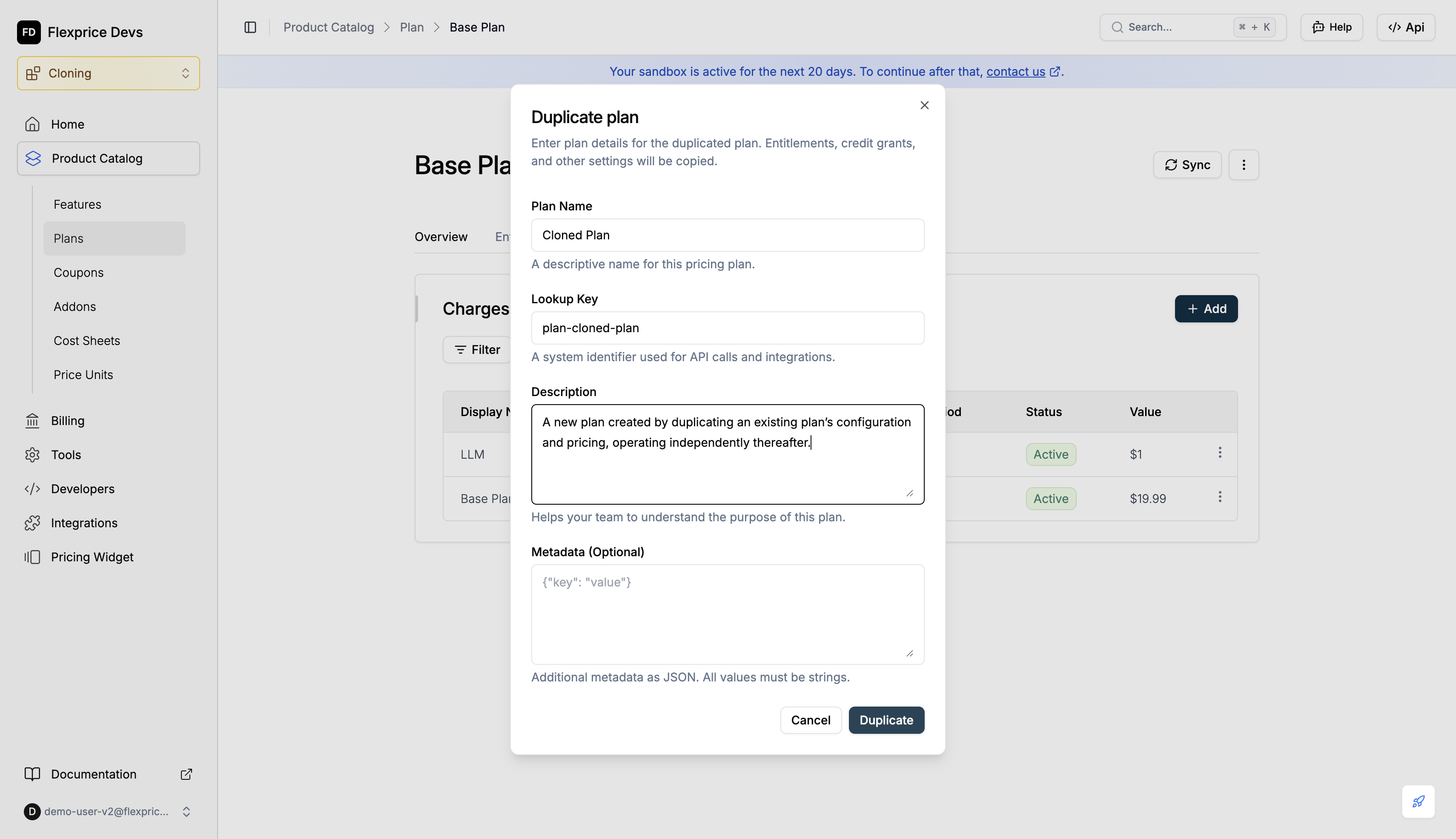
 * Enter **Plan Name** (required)
* Enter **Lookup Key** (required, must be unique). It is auto-generated by default.
* Optionally enter **Description** and **Metadata**
* Click **Duplicate**
* Enter **Plan Name** (required)
* Enter **Lookup Key** (required, must be unique). It is auto-generated by default.
* Optionally enter **Description** and **Metadata**
* Click **Duplicate**
 If a published plan already exists with the lookup key you entered, the system will return an error and ask you to choose a different lookup key.
A new plan is created with the same charges, entitlements, and credit grants as the source.
You are directed to the cloned plan after plan cloning is successful.
If a published plan already exists with the lookup key you entered, the system will return an error and ask you to choose a different lookup key.
A new plan is created with the same charges, entitlements, and credit grants as the source.
You are directed to the cloned plan after plan cloning is successful.
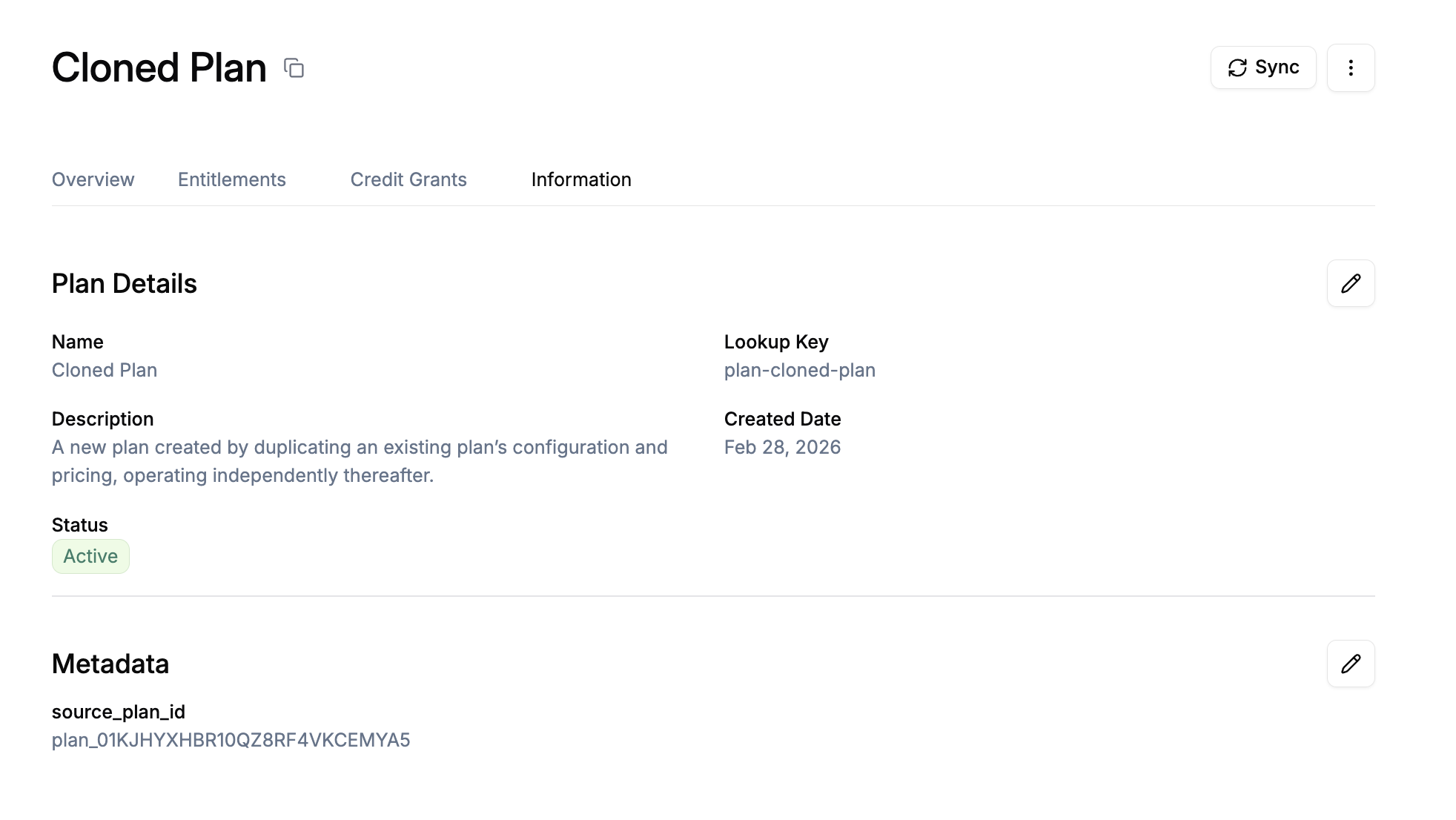 Flexprice always adds **`source_plan_id`** to the cloned plan's metadata set to the source plan ID, so you can tell which plan it was duplicated from.
## Use cases
### Plan versioning
* **Annual updates**: Clone "Pro 2024" to "Pro 2025" and adjust prices or features on the new plan while keeping the same structure.
* **Product evolution**: Duplicate a plan before changing entitlements or credit grants so existing subscribers stay on the original.
### Experimentation and rollback
* **Safe experimentation**: Clone a plan, change the duplicate, and only move customers over when ready. The source plan stays unchanged.
* **Rollback**: Keep a copy of a plan before major changes so you can reference or re-use the previous configuration.
## Best practices
💡 **Use a unique lookup key**: Every cloned plan must have a lookup key that does not match any existing published plan. Use a naming pattern (e.g. `pro_2025`, `pro_plan_v2`) to avoid conflicts.
💡 **Set a clear name and description**: Give the cloned plan a descriptive name and, if needed, a description so your team can tell it apart from the source (e.g. "Pro 2024 v2 – cloned from Pro 2024").
💡 **Use `source_plan_id` in metadata**: The cloned plan’s metadata always includes **`source_plan_id`**. Use it in reporting or automation to track plan lineage and which plans were duplicated from which.
💡 **Clone instead of editing live plans**: When you want to change structure (prices, entitlements, credit grants), clone the plan and edit the copy. Existing subscribers stay on the original; new sign-ups can use the new plan.
💡 **Review what gets copied**: Only active (non-expired) prices and published entitlements and plan-scoped credit grants are copied. Draft or archived items and subscriptions are not. Confirm the source plan has everything published before cloning.
Flexprice always adds **`source_plan_id`** to the cloned plan's metadata set to the source plan ID, so you can tell which plan it was duplicated from.
## Use cases
### Plan versioning
* **Annual updates**: Clone "Pro 2024" to "Pro 2025" and adjust prices or features on the new plan while keeping the same structure.
* **Product evolution**: Duplicate a plan before changing entitlements or credit grants so existing subscribers stay on the original.
### Experimentation and rollback
* **Safe experimentation**: Clone a plan, change the duplicate, and only move customers over when ready. The source plan stays unchanged.
* **Rollback**: Keep a copy of a plan before major changes so you can reference or re-use the previous configuration.
## Best practices
💡 **Use a unique lookup key**: Every cloned plan must have a lookup key that does not match any existing published plan. Use a naming pattern (e.g. `pro_2025`, `pro_plan_v2`) to avoid conflicts.
💡 **Set a clear name and description**: Give the cloned plan a descriptive name and, if needed, a description so your team can tell it apart from the source (e.g. "Pro 2024 v2 – cloned from Pro 2024").
💡 **Use `source_plan_id` in metadata**: The cloned plan’s metadata always includes **`source_plan_id`**. Use it in reporting or automation to track plan lineage and which plans were duplicated from which.
💡 **Clone instead of editing live plans**: When you want to change structure (prices, entitlements, credit grants), clone the plan and edit the copy. Existing subscribers stay on the original; new sign-ups can use the new plan.
💡 **Review what gets copied**: Only active (non-expired) prices and published entitlements and plan-scoped credit grants are copied. Draft or archived items and subscriptions are not. Confirm the source plan has everything published before cloning.