> ## Documentation Index
> Fetch the complete documentation index at: https://docs.flexprice.io/llms.txt
> Use this file to discover all available pages before exploring further.
# Creating a plan
> Follow the steps below to create a pricing plan in Flexprice:
* In the main navigation menu, select **Plans** from *Product Catalog.*
* Click **“Add”** at the top-right of the screen.
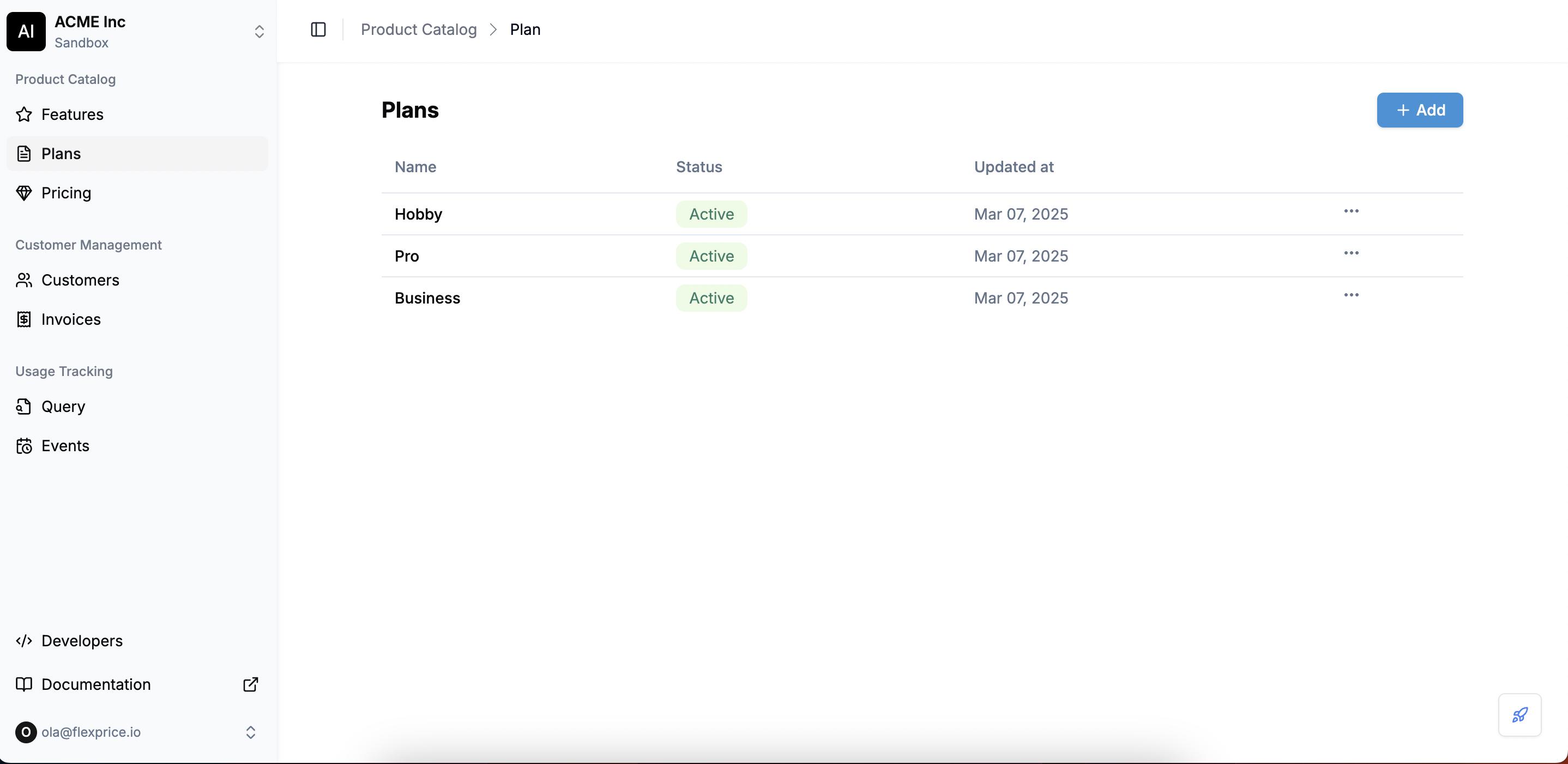 This opens a **two-step form** to configure your plan.
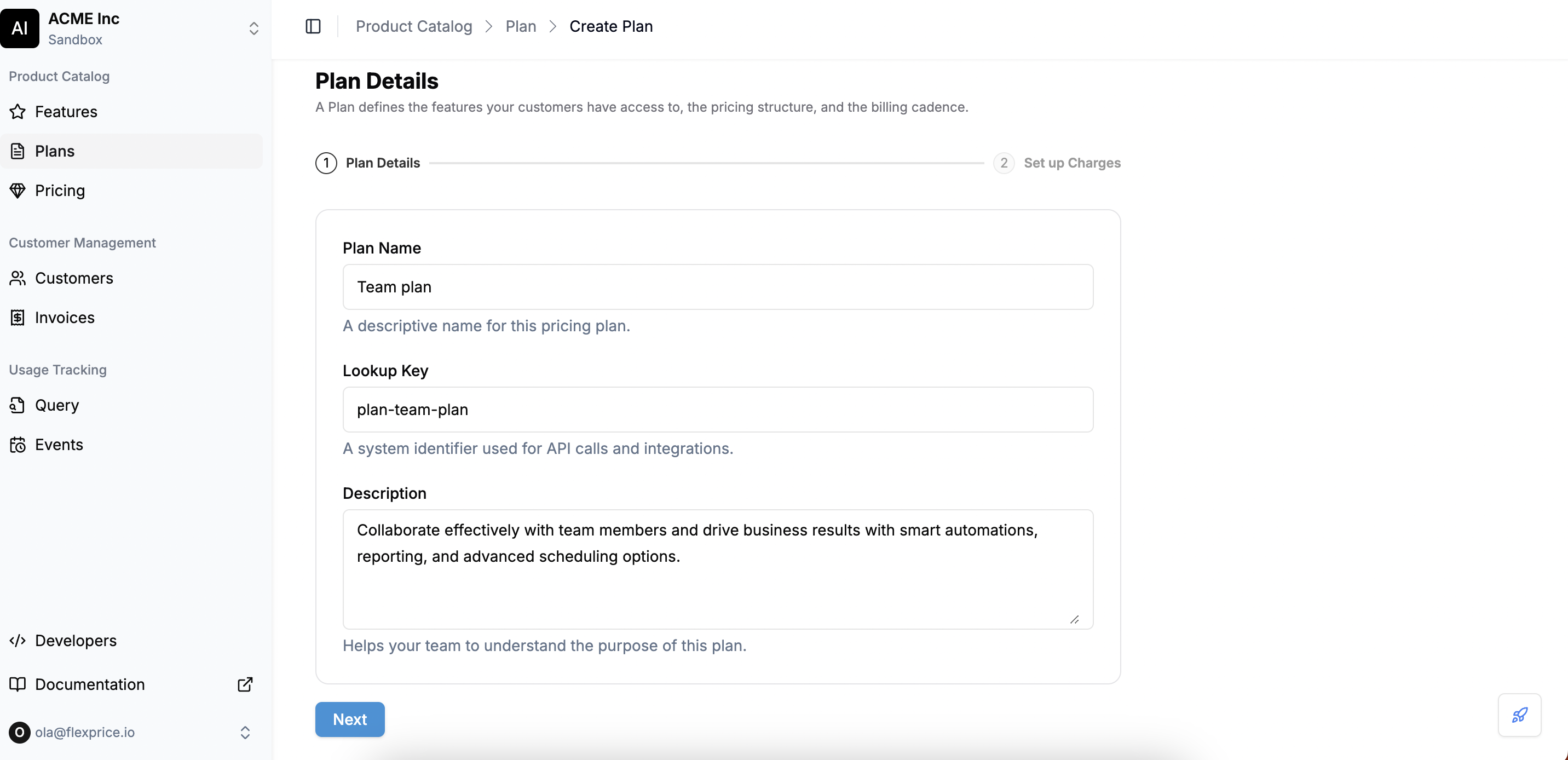
**Step 1: Enter plan details**
This step captures key identifiers for your pricing plan.
* **Plan Name**: A descriptive name for the plan. This name will be visible to users.
* **Lookup Key**: A unique identifier used in API calls and system integrations.
* **Plan Description** *(Optional)*: Provides internal context about the plan.
This opens a **two-step form** to configure your plan.
**Step 1: Enter plan details**
This step captures key identifiers for your pricing plan.
* **Plan Name**: A descriptive name for the plan. This name will be visible to users.
* **Lookup Key**: A unique identifier used in API calls and system integrations.
* **Plan Description** *(Optional)*: Provides internal context about the plan.
 **Step 2: Define plan charges**
It defines how customers will be charged under this plan. You can add **one or multiple** charges while creating a plan.
**Step 2: Define plan charges**
It defines how customers will be charged under this plan. You can add **one or multiple** charges while creating a plan.
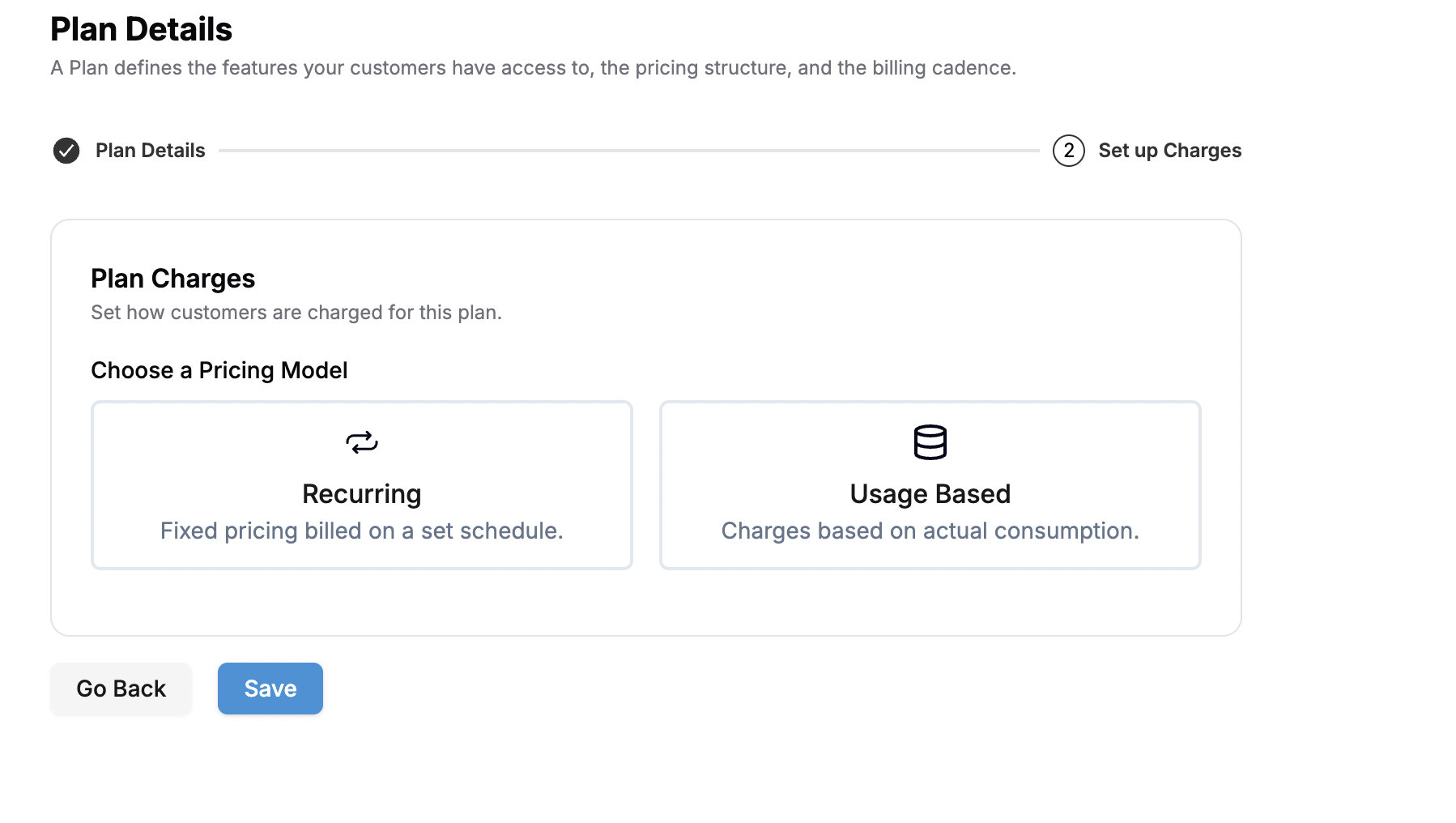 * **Setting-up a recurring charge:**
Recurring charges are fixed charges that your customers are billed at regular intervals (e.g., \$10/month subscription fee).
* **Setting-up a recurring charge:**
Recurring charges are fixed charges that your customers are billed at regular intervals (e.g., \$10/month subscription fee).
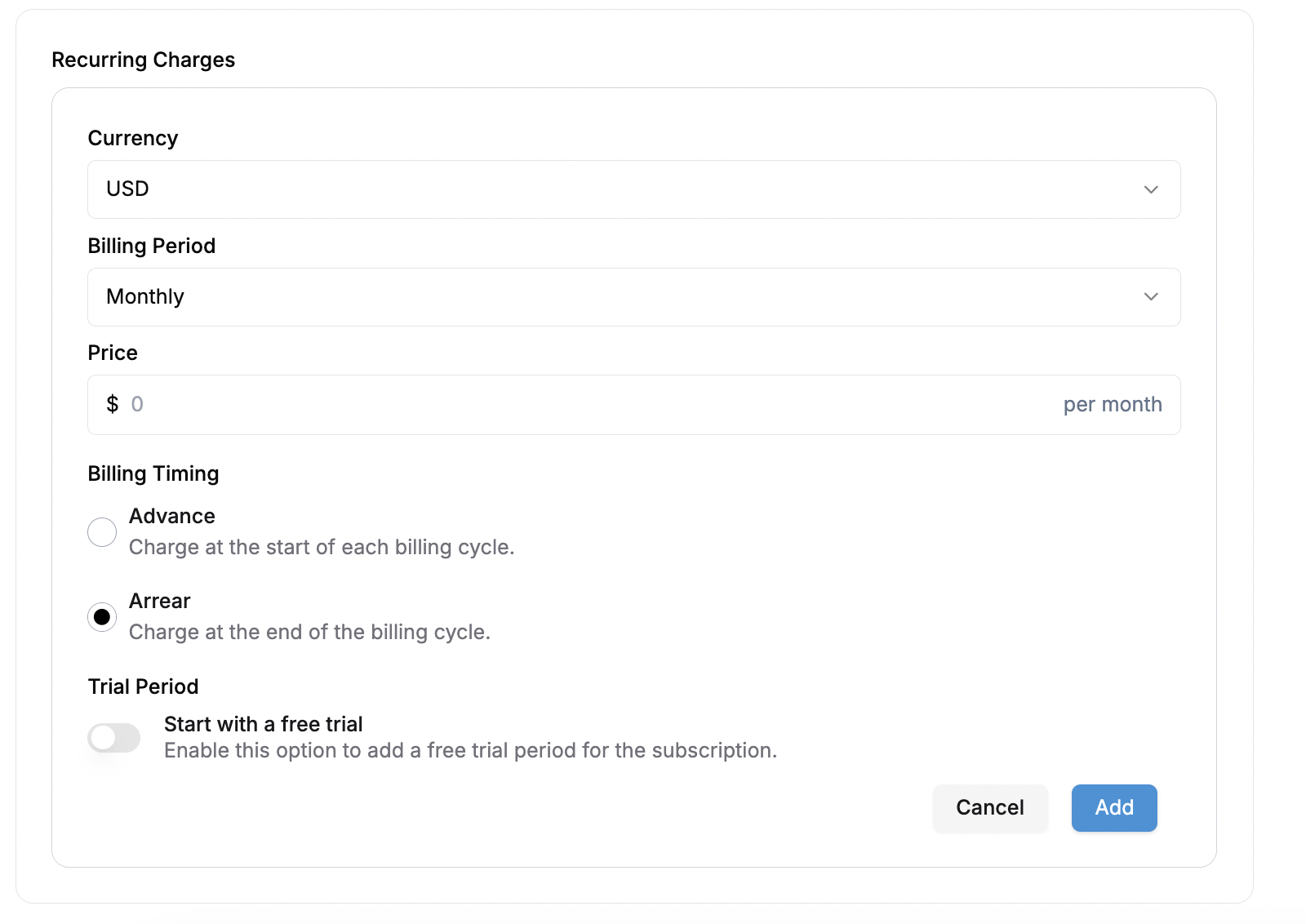 * **Select billing currency**
Choose the currency in which you want to bill your customers. **Flexprice supports all currencies**, enabling businesses to charge customers globally.
* **Choose a billable period**
The **billing period** determines when invoices are generated. The **billing period impacts invoice generation, feature limits, and renewals**. You can select from the following plan intervals:
* **Weekly** → Customers are billed once every week.
* **Monthly** → The most common cycle, where customers are charged every month.
* **Quarterly** → Charges occur every 3 months.
* **Half-Yearly** → Customers are billed twice a year (every 6 months).
* **Yearly** → Customers are billed once per year.
* **Set the Price**
Define the **amount** customers will be charged per billing period. The price is set based on the **selected currency and interval**.
* **Choose billing timing**:Decide when the charge is applied within the billing cycle:
* **Advance Billing** → Customers are charged **at the start** of each billing period.
* **Arrears Billing** → Customers are charged **at the end** of each billing period.
* **Adding trial period** *(Optional)*:
* Toggle **on** to enable a **free trial** before billing starts.
* Enter the **trial period duration** (in days).
* After the trial ends, the first charge is applied based on the **billing timing** selected.
* Click **Add** to save the recurring charge settings and apply them to the pricing plan.
* **Setting-up a usage-based charge:**
To incorporate usage-based charges into a plan, you can utilize existing metered features. For instance, you can create charges based on the number of API calls, the number of active users, transactions, compute time, etc.
* **Select billing currency**
Choose the currency in which you want to bill your customers. **Flexprice supports all currencies**, enabling businesses to charge customers globally.
* **Choose a billable period**
The **billing period** determines when invoices are generated. The **billing period impacts invoice generation, feature limits, and renewals**. You can select from the following plan intervals:
* **Weekly** → Customers are billed once every week.
* **Monthly** → The most common cycle, where customers are charged every month.
* **Quarterly** → Charges occur every 3 months.
* **Half-Yearly** → Customers are billed twice a year (every 6 months).
* **Yearly** → Customers are billed once per year.
* **Set the Price**
Define the **amount** customers will be charged per billing period. The price is set based on the **selected currency and interval**.
* **Choose billing timing**:Decide when the charge is applied within the billing cycle:
* **Advance Billing** → Customers are charged **at the start** of each billing period.
* **Arrears Billing** → Customers are charged **at the end** of each billing period.
* **Adding trial period** *(Optional)*:
* Toggle **on** to enable a **free trial** before billing starts.
* Enter the **trial period duration** (in days).
* After the trial ends, the first charge is applied based on the **billing timing** selected.
* Click **Add** to save the recurring charge settings and apply them to the pricing plan.
* **Setting-up a usage-based charge:**
To incorporate usage-based charges into a plan, you can utilize existing metered features. For instance, you can create charges based on the number of API calls, the number of active users, transactions, compute time, etc.
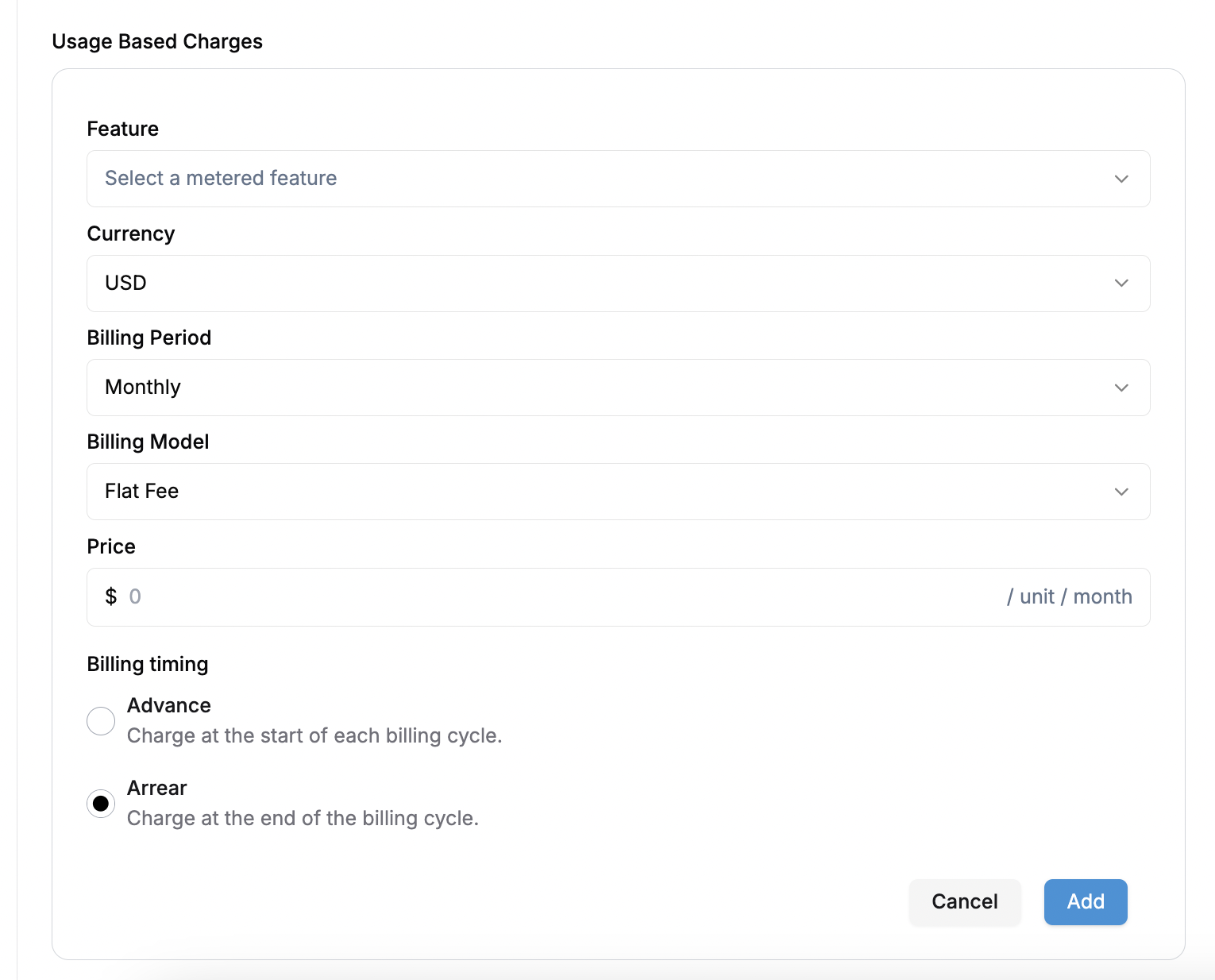 * **Select a Metered Feature**
Choose a metered feature that will determine how usage is measured and billed. Features must be pre-configured in your product catalog
💡 *Only metered features can be linked to usage-based charges.*
* **Choose Billing Currency**
Select the currency in which you want to bill your customers. **Flexprice supports all currencies**, enabling businesses to charge customers globally.
* **Define the Billing Period**
The **billing period** determines how frequently usage is calculated and charged. Available intervals include:💡 *The billing period must align with the subscription plan to ensure accurate invoicing.*
* **Weekly** → Usage is tracked and billed every week.
* **Monthly** → The most common cycle, where customers are charged based on monthly usage.
* **Quarterly** → Charges occur every 3 months based on accumulated usage.
* **Half-Yearly** → Customers are billed twice a year (every 6 months).
* **Yearly** → Customers are billed once per year for total usage over the year.
* **Select a Billing Model**
Flexprice allows different pricing models for usage-based billing:💡 *The correct billing model ensures flexibility in pricing strategy and revenue optimization. To read more about different types of charges read in the [Billing Models](/docs/product-catalogue/plans/billing-models/flat-fee) section.*
* **Flat Fee** → A fixed price per unit of usage (e.g., \$0.01 per API call).
* **Volume-Based Pricing** → Price changes depending on the volume of usage (e.g., $0.01 per API call for the first 100K calls, then $0.008 for additional calls).
* **Package-Based Pricing** → Customers purchase usage in predefined bundles (e.g., \$50 for 100K API calls).
* **Set the Price per Unit**
Define how much you want to charge **per unit of usage**. The unit is determined by the **metered feature selected** (e.g., per API call, per GB stored, per transaction).
* **Choose Billing Timing**
Select when the customer should be charged for usage:💡 *Arrears billing is common for metered services like cloud computing and APIs*
* **Advance Billing** → Customers will be invoiced as soon as they use a particular feature
* **Arrears Billing** → Customers are billed at the end of the cycle based on actual consumption.
* Once all configurations are set, click **Add** to apply the usage-based charge to the pricing plan.
* Click **Save** to finalize the pricing plan.
* **Select a Metered Feature**
Choose a metered feature that will determine how usage is measured and billed. Features must be pre-configured in your product catalog
💡 *Only metered features can be linked to usage-based charges.*
* **Choose Billing Currency**
Select the currency in which you want to bill your customers. **Flexprice supports all currencies**, enabling businesses to charge customers globally.
* **Define the Billing Period**
The **billing period** determines how frequently usage is calculated and charged. Available intervals include:💡 *The billing period must align with the subscription plan to ensure accurate invoicing.*
* **Weekly** → Usage is tracked and billed every week.
* **Monthly** → The most common cycle, where customers are charged based on monthly usage.
* **Quarterly** → Charges occur every 3 months based on accumulated usage.
* **Half-Yearly** → Customers are billed twice a year (every 6 months).
* **Yearly** → Customers are billed once per year for total usage over the year.
* **Select a Billing Model**
Flexprice allows different pricing models for usage-based billing:💡 *The correct billing model ensures flexibility in pricing strategy and revenue optimization. To read more about different types of charges read in the [Billing Models](/docs/product-catalogue/plans/billing-models/flat-fee) section.*
* **Flat Fee** → A fixed price per unit of usage (e.g., \$0.01 per API call).
* **Volume-Based Pricing** → Price changes depending on the volume of usage (e.g., $0.01 per API call for the first 100K calls, then $0.008 for additional calls).
* **Package-Based Pricing** → Customers purchase usage in predefined bundles (e.g., \$50 for 100K API calls).
* **Set the Price per Unit**
Define how much you want to charge **per unit of usage**. The unit is determined by the **metered feature selected** (e.g., per API call, per GB stored, per transaction).
* **Choose Billing Timing**
Select when the customer should be charged for usage:💡 *Arrears billing is common for metered services like cloud computing and APIs*
* **Advance Billing** → Customers will be invoiced as soon as they use a particular feature
* **Arrears Billing** → Customers are billed at the end of the cycle based on actual consumption.
* Once all configurations are set, click **Add** to apply the usage-based charge to the pricing plan.
* Click **Save** to finalize the pricing plan.