> ## Documentation Index
> Fetch the complete documentation index at: https://docs.flexprice.io/llms.txt
> Use this file to discover all available pages before exploring further.
# Price Overrides
> Learn how to customize pricing for individual customers by overriding plan charges during subscription creation.
**Price Overrides** in Flexprice allow you to **customize pricing for specific customers** by modifying individual charges within a plan during subscription creation. This feature is particularly useful for offering special pricing, discounts, or custom rates for enterprise customers, early adopters, or promotional campaigns.
## When to Use Price Overrides
Price overrides are ideal for scenarios such as:
* **Enterprise deals** with custom pricing arrangements
* **Promotional pricing** for specific customers or campaigns
* **Volume discounts** applied at the customer level
* **Trial or beta pricing** for early adopters
* **Negotiated rates** for strategic partnerships
## How to Override Plan Prices
### Step 1: Navigate to Customer Subscription Creation
* Go to **Billing** in the main navigation
* Select **Customers** from the billing section
* Select the customer you want to create a subscription for
* Click **Add** to create a new subscription
### Step 2: Select a Plan
* Choose the pricing plan from the dropdown menu
* The system will display the subscription preview with all charges
### Step 3: Access the Charges Table
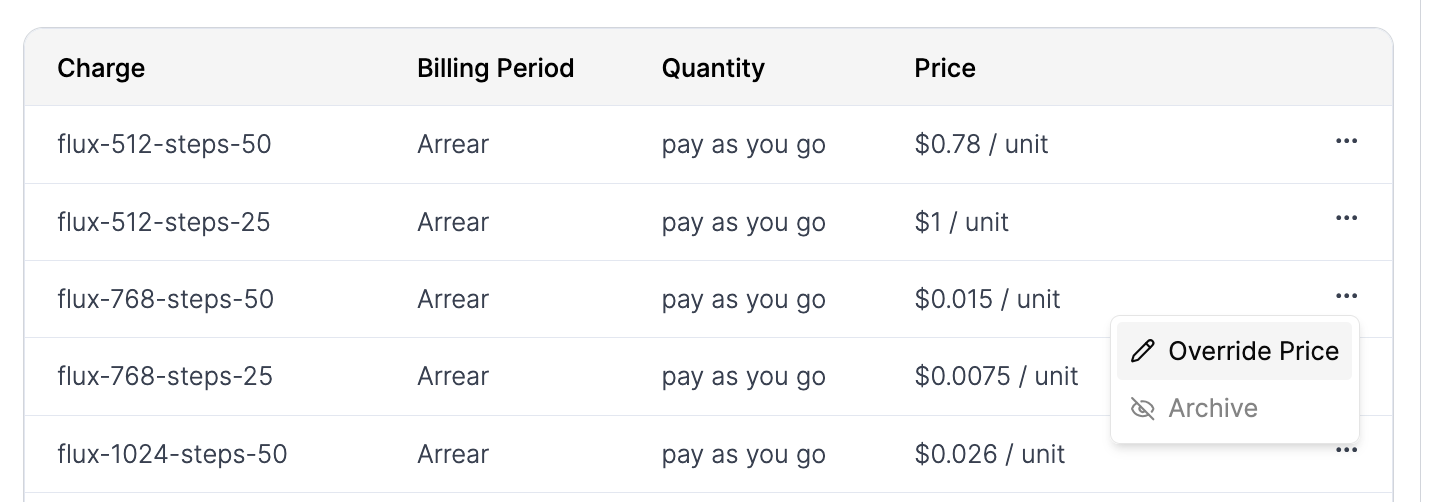
* In the subscription preview, you'll see a **table of charges** showing all recurring and usage-based charges for the selected plan
* Each charge row displays the original pricing from the plan
### Step 4: Override Individual Charges
* Click the **three dots (⋮)** menu on any charge row
* Select **"Override Charge"** from the dropdown menu
 ### Step 5: Set the Override Amount
* A dialog titled **"Override Price"** will open
* The dialog shows:
* **Original Price**: The default price from the plan (read-only)
* **Override Amount (USD)**: Input field where you can enter the new price
* **Cancel** and **Override Price** buttons
### Step 5: Set the Override Amount
* A dialog titled **"Override Price"** will open
* The dialog shows:
* **Original Price**: The default price from the plan (read-only)
* **Override Amount (USD)**: Input field where you can enter the new price
* **Cancel** and **Override Price** buttons
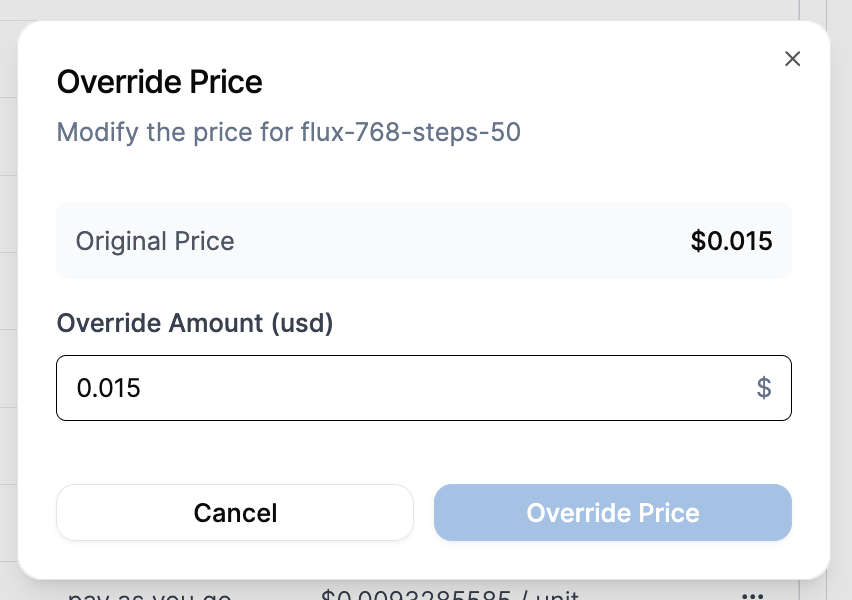 * Enter the **new price** in the Override Amount field
* Click **"Override Price"** to save the change
### Step 6: Review and Save
* The charges table will update to show the **overridden prices**
* You can override multiple charges within the same subscription
* Review the **total subscription cost** with all overrides applied
* Click **"Add Subscription"** to finalize the subscription with custom pricing
* Enter the **new price** in the Override Amount field
* Click **"Override Price"** to save the change
### Step 6: Review and Save
* The charges table will update to show the **overridden prices**
* You can override multiple charges within the same subscription
* Review the **total subscription cost** with all overrides applied
* Click **"Add Subscription"** to finalize the subscription with custom pricing
 ## Important Notes
* **Plan Integrity**: Price overrides only affect the specific subscription being created. The original plan pricing remains unchanged for other customers.
* **Billing Consistency**: Overridden prices will be used for all future billing cycles unless the subscription is modified.
* **Audit Trail**: All price overrides are tracked and can be reviewed in the subscription history.
* **Currency Support**: Price overrides work with all supported currencies in your Flexprice account.
## Best Practices
* **Document Overrides**: Keep records of why specific overrides were applied for business continuity.
* **Regular Reviews**: Periodically review overridden subscriptions to ensure pricing remains appropriate.
* **Clear Communication**: Ensure your team understands when and how to use price overrides.
* **Validation**: Double-check override amounts before saving to avoid billing errors.
Price overrides provide the flexibility needed for complex pricing scenarios while maintaining the structure and consistency of your pricing plans.
## Important Notes
* **Plan Integrity**: Price overrides only affect the specific subscription being created. The original plan pricing remains unchanged for other customers.
* **Billing Consistency**: Overridden prices will be used for all future billing cycles unless the subscription is modified.
* **Audit Trail**: All price overrides are tracked and can be reviewed in the subscription history.
* **Currency Support**: Price overrides work with all supported currencies in your Flexprice account.
## Best Practices
* **Document Overrides**: Keep records of why specific overrides were applied for business continuity.
* **Regular Reviews**: Periodically review overridden subscriptions to ensure pricing remains appropriate.
* **Clear Communication**: Ensure your team understands when and how to use price overrides.
* **Validation**: Double-check override amounts before saving to avoid billing errors.
Price overrides provide the flexibility needed for complex pricing scenarios while maintaining the structure and consistency of your pricing plans.