> ## Documentation Index
> Fetch the complete documentation index at: https://docs.flexprice.io/llms.txt
> Use this file to discover all available pages before exploring further.
# Pricing Plans
> Learn how to create and manage pricing plans in Flexprice, including step-by-step creation, billing models, and price termination management.
# Pricing Plans
A **pricing plan** defines how customers are billed for using your product or service. Flexprice provides a **comprehensive and customizable** pricing system that enables businesses to design billing structures that fit their monetization strategies. With **recurring, usage-based, and hybrid** pricing models, companies can launch new pricing plans seamlessly and iterate quickly.
## **Key Features of the Pricing System**
* **Flexible Pricing Models**: Supports recurring subscriptions, metered billing, and hybrid plans.
* **Multiple Billing Periods**: Options for daily, weekly, monthly, or yearly cycles.
* **Multi-Currency Support**: Currently supports INR and USD.
* **Automated Trial Management**: Enables businesses to offer trial periods before converting to paid plans.
* **Advanced Charge Configurations**: Supports flat fees, package-based pricing, and volume-based pricing.
* **Scalable & API-Driven**: Seamless integration with business operations and customer billing workflows.
* **Granular Control Over Plans**: Edit, duplicate, and manage pricing plans with ease.
## **Use Cases**
Flexprice is designed for a wide range of SaaS businesses, AI infrastructure providers, and digital platforms that need:
* **Subscription-based billing** for SaaS products.
* **Usage-based billing** for AI services, cloud resources, or API metering.
* **Hybrid billing models** combining subscriptions with consumption-based charges.
***
## **Creating a Pricing Plan**
Follow the steps below to create a pricing plan in Flexprice:
### **Navigate to Pricing Plans**
1. Log in to your **Flexprice Dashboard**.
2. In the left sidebar, go to **Customer Management > Pricing Plan**.
3. Click **"Add Pricing Plan"** at the top-right of the screen.
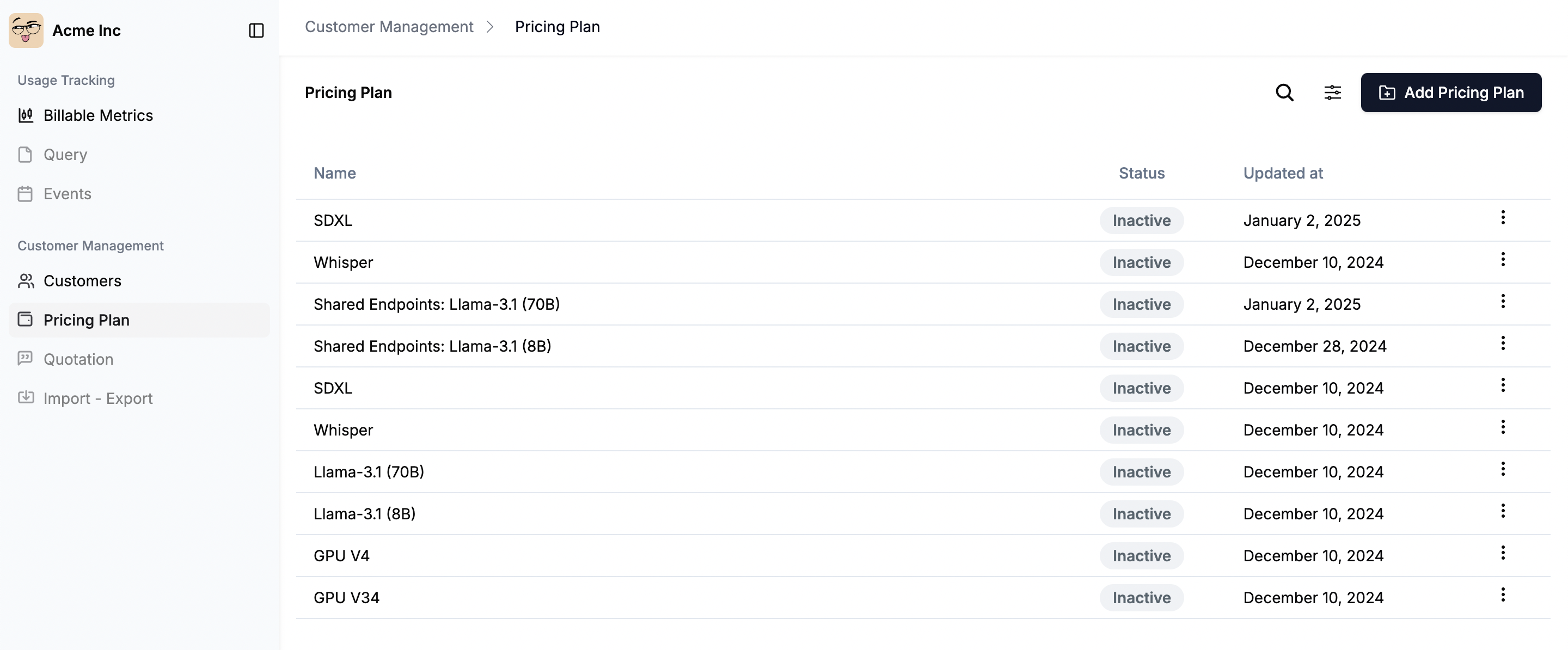 This opens a **three-step form** to configure your plan.
***
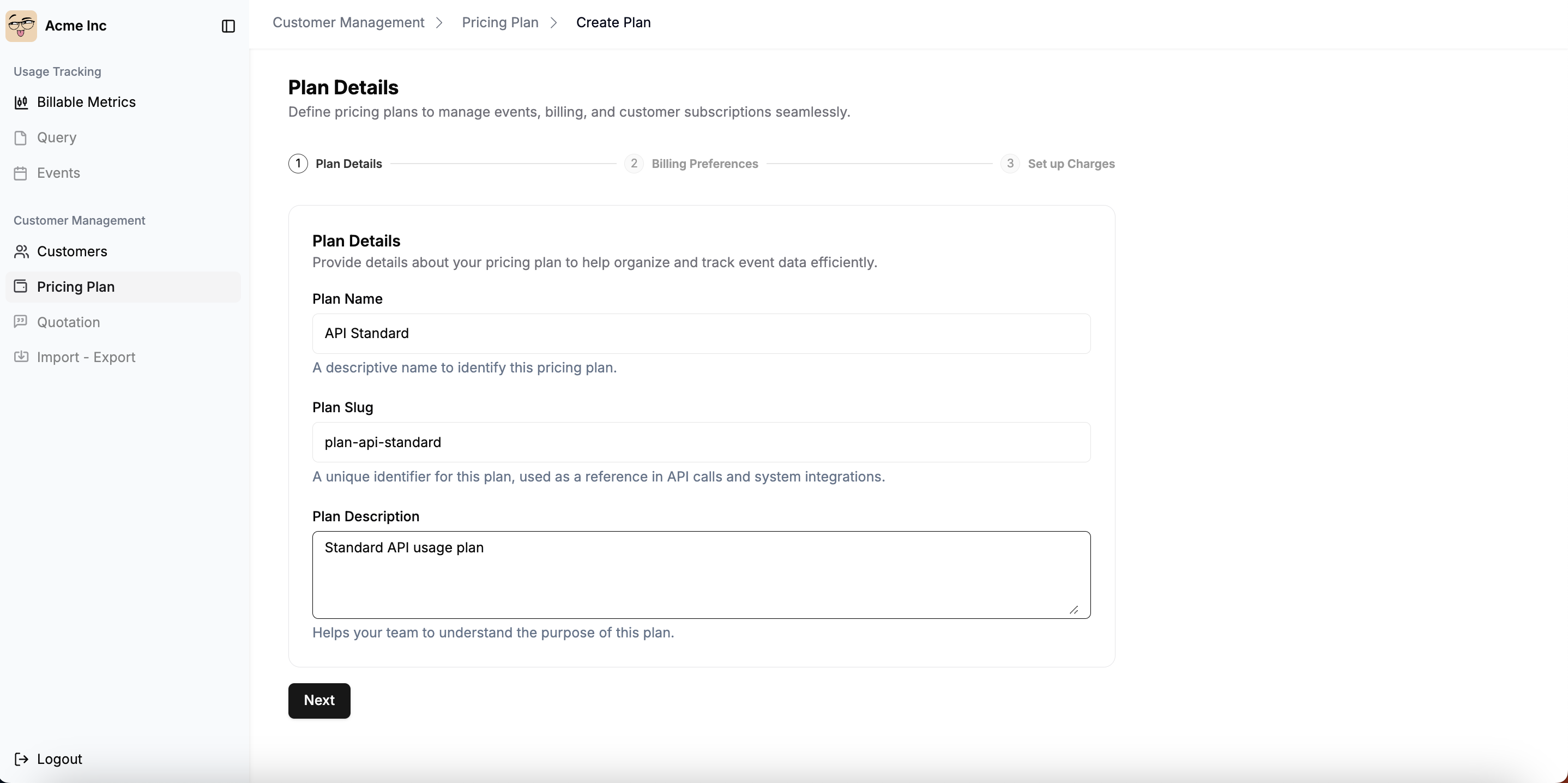
## **Step 1: Enter plan details**
This step captures key identifiers for your pricing plan.
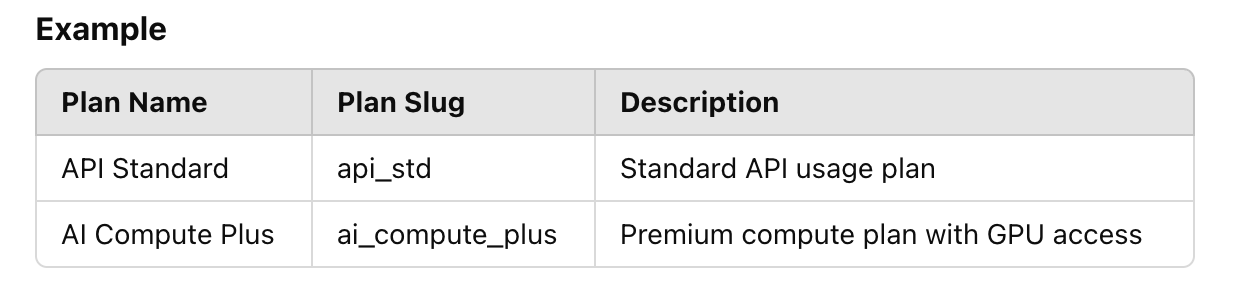
* **Plan Name**: A descriptive name for the plan. This name will be visible to users.
* **Plan Slug**: A unique identifier used in API calls and system integrations.
* **Plan Description** *(Optional)*: Provides internal context about the plan.
This opens a **three-step form** to configure your plan.
***
## **Step 1: Enter plan details**
This step captures key identifiers for your pricing plan.
* **Plan Name**: A descriptive name for the plan. This name will be visible to users.
* **Plan Slug**: A unique identifier used in API calls and system integrations.
* **Plan Description** *(Optional)*: Provides internal context about the plan.
 ## **Step 2: Configure Billing Preferences**
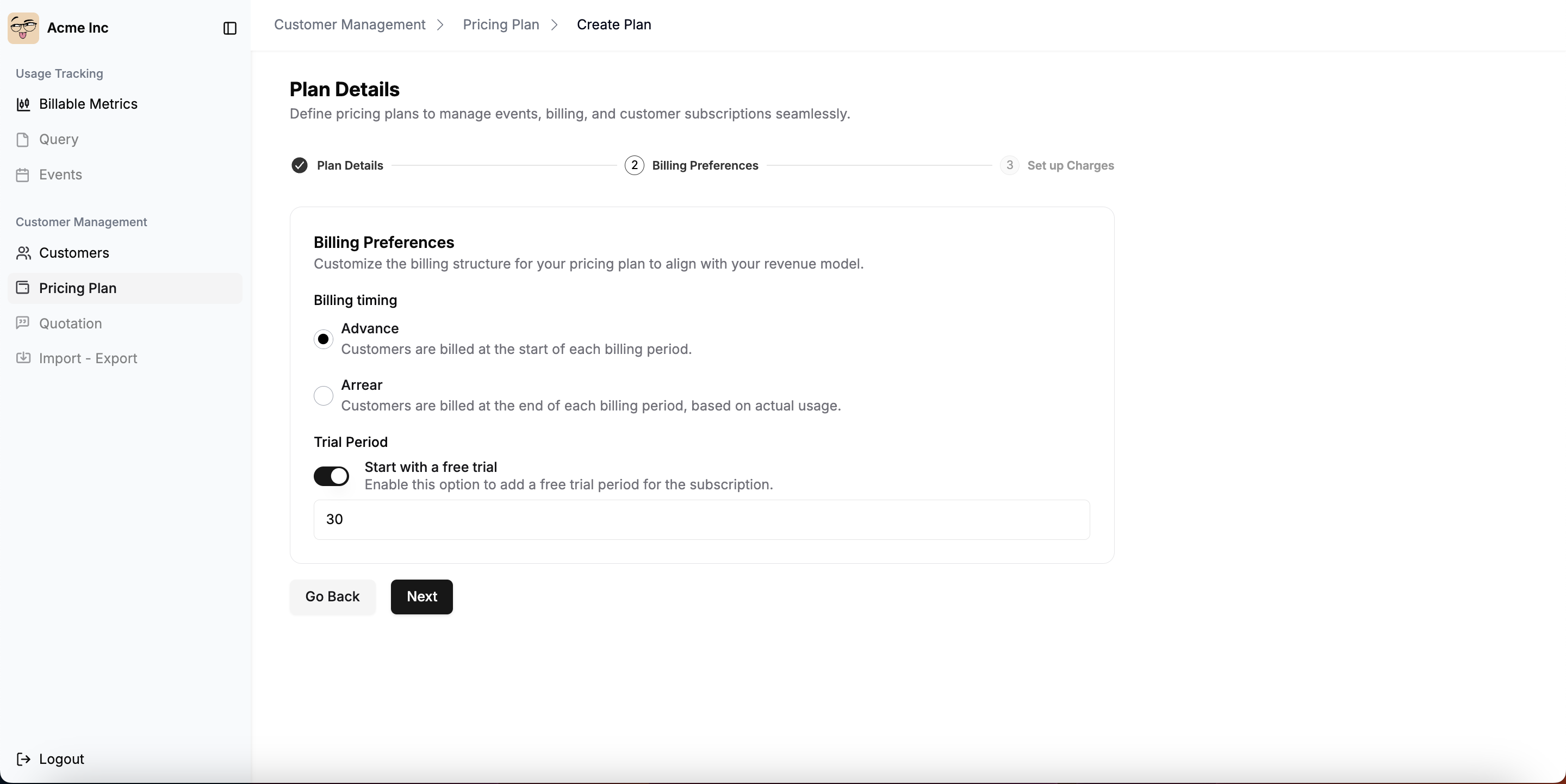
Billing preferences define when and how the customer will be billed. It includes:
* **Choose billing timing**:
* **Advance:** Customers are billed at the beginning of the billing period.
* **Arrears:** Customers are billed at the end of the billing period based on actual usage.
* **Adding trial period** *(Optional)*:
* Toggle **on** to enable a free trial.
* Enter the **trial period duration** in days.
* Click **Next** to continue.
## **Step 2: Configure Billing Preferences**
Billing preferences define when and how the customer will be billed. It includes:
* **Choose billing timing**:
* **Advance:** Customers are billed at the beginning of the billing period.
* **Arrears:** Customers are billed at the end of the billing period based on actual usage.
* **Adding trial period** *(Optional)*:
* Toggle **on** to enable a free trial.
* Enter the **trial period duration** in days.
* Click **Next** to continue.
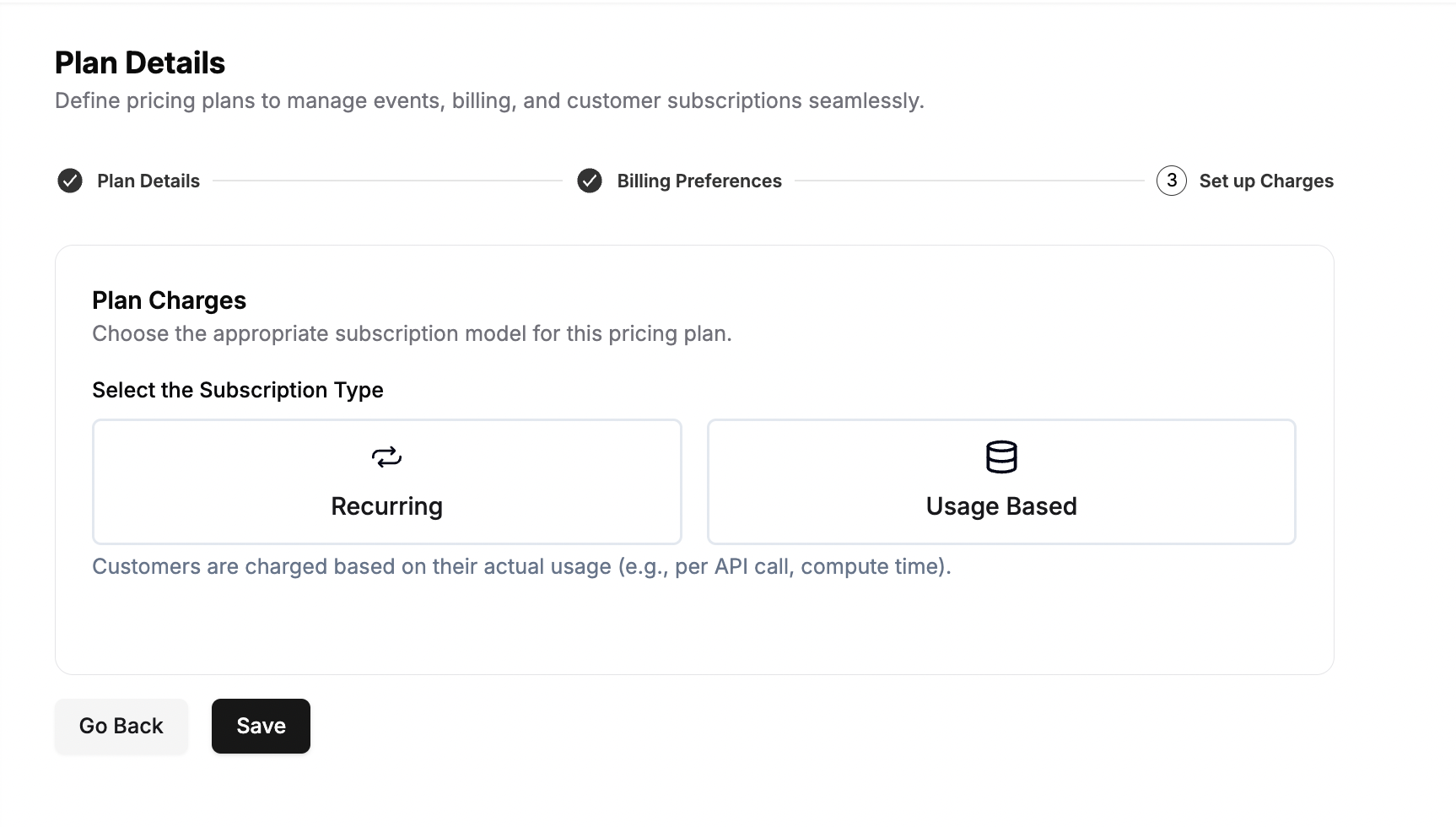
 ## **Step 3: Define plan charges**
It defines how customers will be charged under this plan. You can add **one or multiple** charges while creating a plan.
* **Select Subscription Type:**
* **Recurring Charges**: Fixed charges billed at regular intervals (e.g., \$10/month subscription fee).
* **Usage-Based Charges**: Charges based on actual consumption (e.g., $0.01 per API call, $5 per 1,000 tokens).
You can create a plan by adding multiple usage-based charges in the same plan as well
## **Step 3: Define plan charges**
It defines how customers will be charged under this plan. You can add **one or multiple** charges while creating a plan.
* **Select Subscription Type:**
* **Recurring Charges**: Fixed charges billed at regular intervals (e.g., \$10/month subscription fee).
* **Usage-Based Charges**: Charges based on actual consumption (e.g., $0.01 per API call, $5 per 1,000 tokens).
You can create a plan by adding multiple usage-based charges in the same plan as well
 ### Setting-up a recurring-based charge:
Select subscription type as Recurring to charge your customers a recurring fee based on the defined billing period. Whenever user purchases this plan, it will be charged a flat fee and given access to the features that will be part of that plan.
### Setting-up a recurring-based charge:
Select subscription type as Recurring to charge your customers a recurring fee based on the defined billing period. Whenever user purchases this plan, it will be charged a flat fee and given access to the features that will be part of that plan.
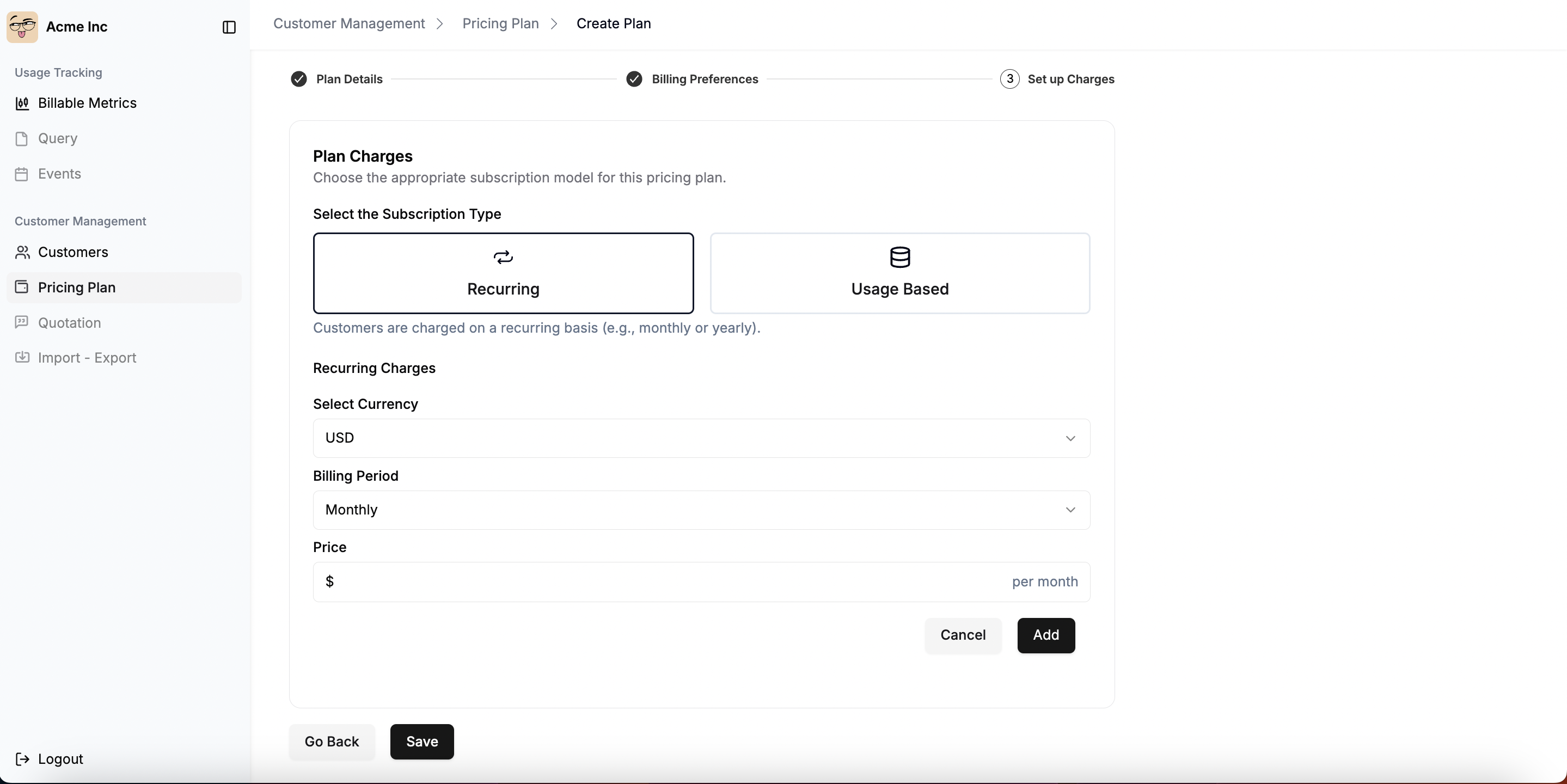 * **Select billing currency**
We currently support 2 currencies which includes:
* INR (Indian Rupees)
* USD (United States Dollars)
* **Choose a billable period**
The plan interval corresponds to the billing period and defines when invoices are generated. There are several plan intervals:
* **Weekly**: subscription fees and charges are billed on a weekly basis (Monday to Sunday);
* **Monthly**: subscription fees and charges are billed on a monthly basis;
* **Quarterly**: subscription fees and charges are billed on a quarterly basis (every 3 months); and
* **Yearly**: subscription fees are billed on a yearly basis and charges can be billed monthly or annually.
* Add relevant price you want to charge your customer based on the selected billing period and then click on **Add** button.
### Setting-up a usage-based charge:
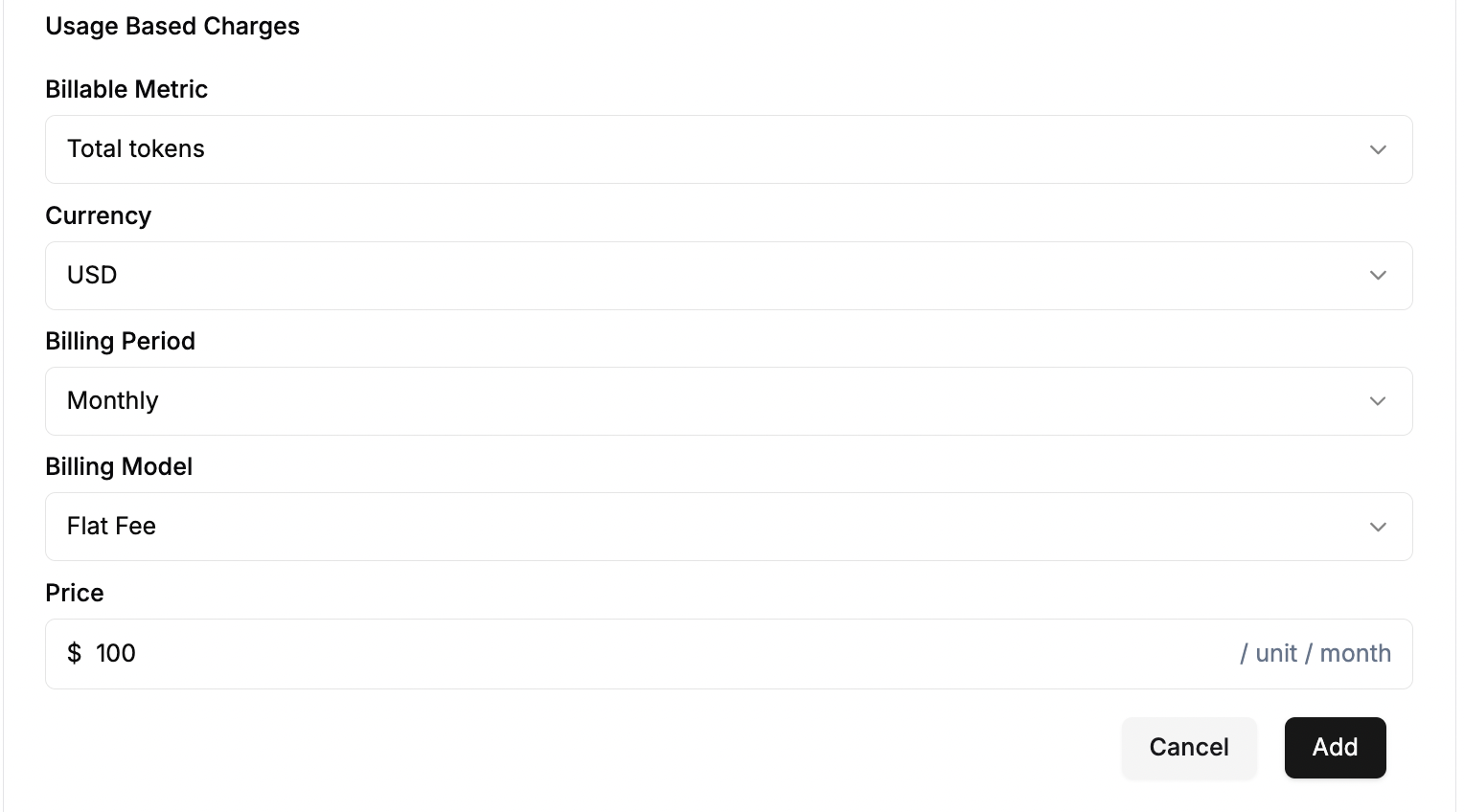
To incorporate usage-based charges into a plan, you can utilize existing billable metrics. This enables you to offer "pay-as-you-go" features. For instance, you can create charges based on the number of API calls, the number of active users, transactions, compute time, etc.
* Select the billable metric on which you've created earlier.
* Define relevant currency and billing period for your plan
* Select the pricing model.
Flexprice currently support 3 types of pricing models:
* **Flat fee**
Select the Flat fee pricing model if you want to charge the **same price for each unit** consumed.
**Example:** \$0.01 per API call.
* **Select billing currency**
We currently support 2 currencies which includes:
* INR (Indian Rupees)
* USD (United States Dollars)
* **Choose a billable period**
The plan interval corresponds to the billing period and defines when invoices are generated. There are several plan intervals:
* **Weekly**: subscription fees and charges are billed on a weekly basis (Monday to Sunday);
* **Monthly**: subscription fees and charges are billed on a monthly basis;
* **Quarterly**: subscription fees and charges are billed on a quarterly basis (every 3 months); and
* **Yearly**: subscription fees are billed on a yearly basis and charges can be billed monthly or annually.
* Add relevant price you want to charge your customer based on the selected billing period and then click on **Add** button.
### Setting-up a usage-based charge:
To incorporate usage-based charges into a plan, you can utilize existing billable metrics. This enables you to offer "pay-as-you-go" features. For instance, you can create charges based on the number of API calls, the number of active users, transactions, compute time, etc.
* Select the billable metric on which you've created earlier.
* Define relevant currency and billing period for your plan
* Select the pricing model.
Flexprice currently support 3 types of pricing models:
* **Flat fee**
Select the Flat fee pricing model if you want to charge the **same price for each unit** consumed.
**Example:** \$0.01 per API call.
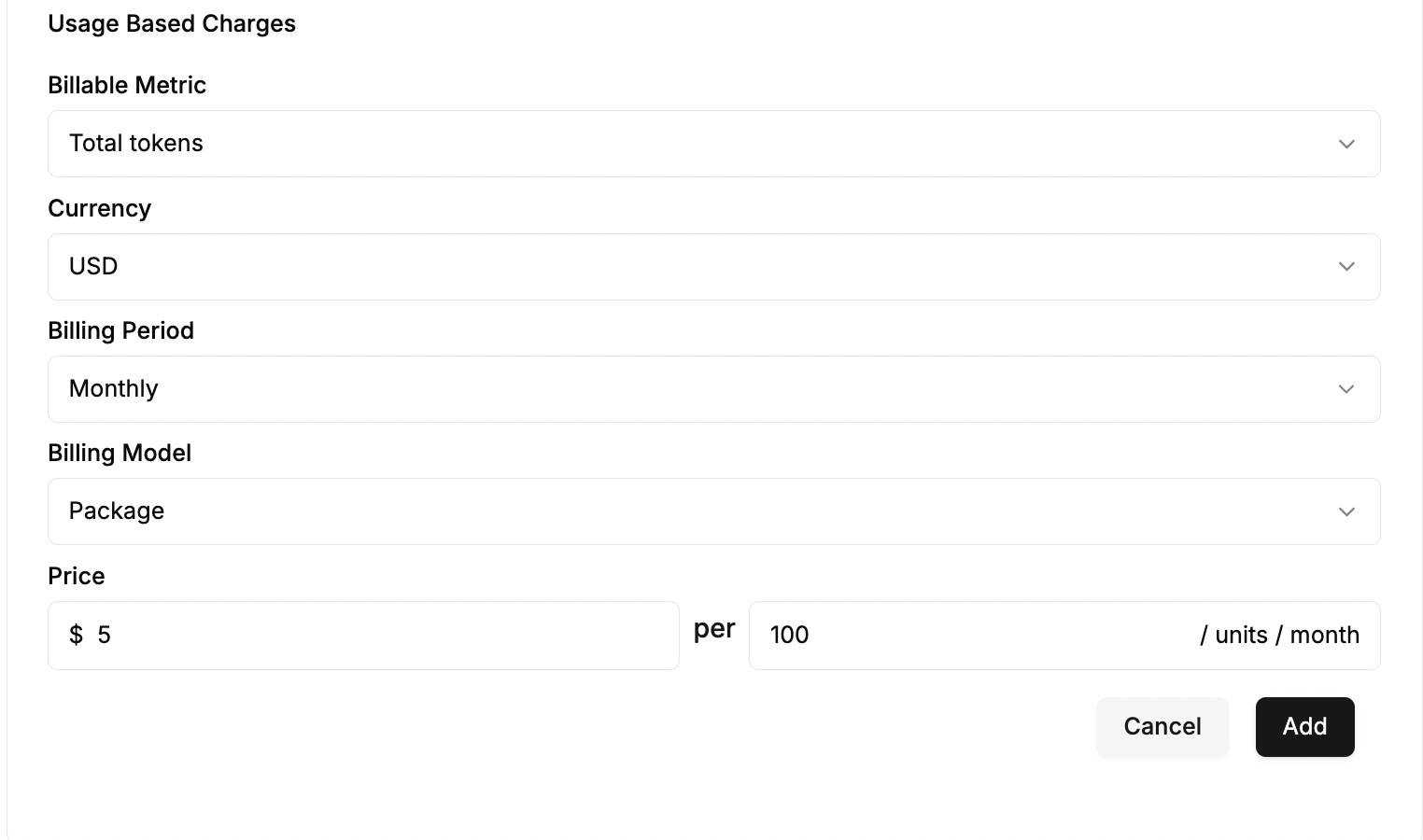
 * **Package pricing**
Select the package charge model if you want to apply a **fixed price to a range of units**.
**Example:** \$5 per 100 API calls.
* **Package pricing**
Select the package charge model if you want to apply a **fixed price to a range of units**.
**Example:** \$5 per 100 API calls.
 * **Volume tiered based pricing**
Select the volume charge model if you want to define several price tiers but want to apply a **single unit price based on the total volume**. You can also apply a **flat fee** in addition to the unit price.
**Example:**- 0 – 10,000 calls → \$0.001 per call
* 10,001 – ∞ calls → \$0.0008 per call
* **Volume tiered based pricing**
Select the volume charge model if you want to define several price tiers but want to apply a **single unit price based on the total volume**. You can also apply a **flat fee** in addition to the unit price.
**Example:**- 0 – 10,000 calls → \$0.001 per call
* 10,001 – ∞ calls → \$0.0008 per call
 * Click on **Add** to save the charges
### Setting-up hybrid charges:
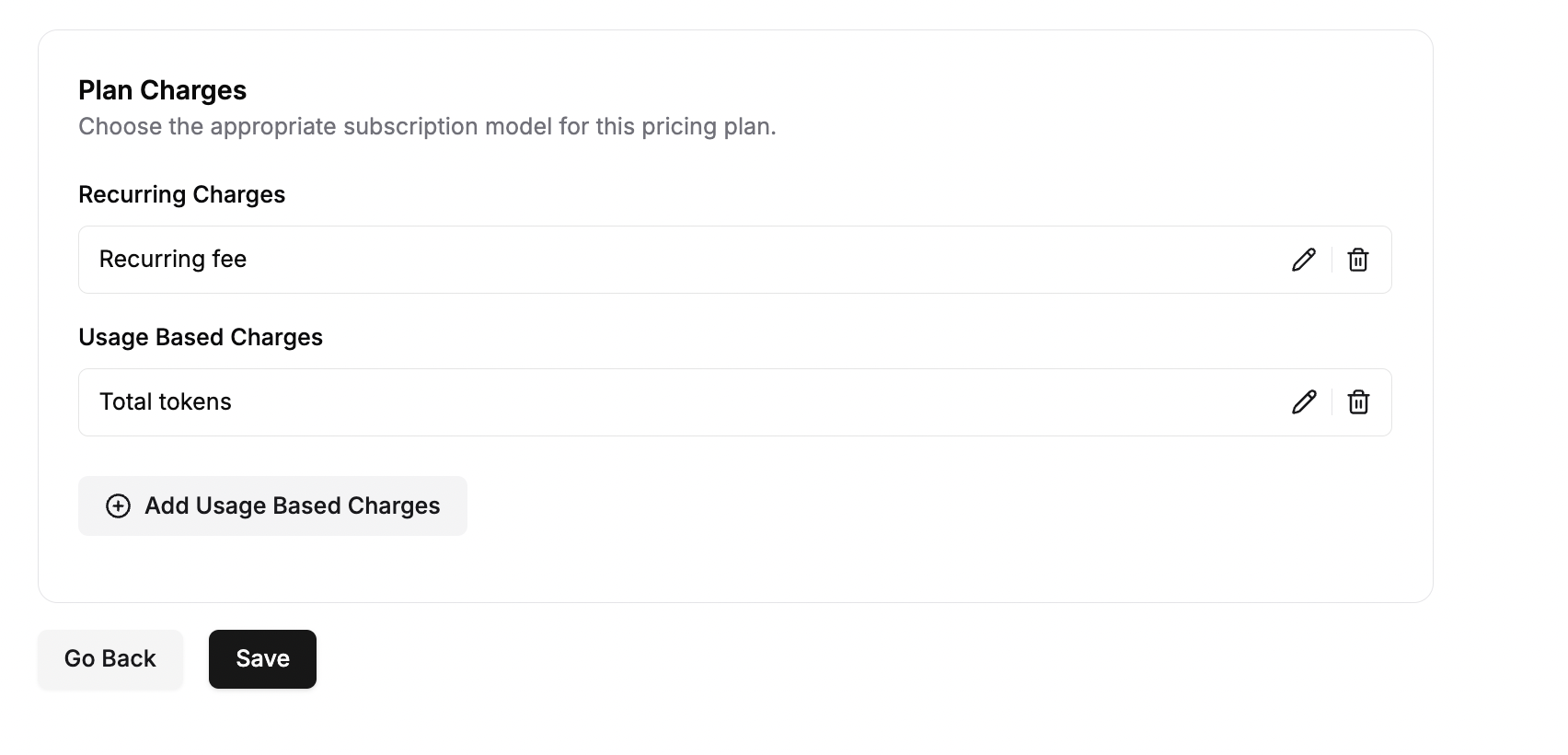
You can create a single pricing plan which includes multiple charges - Recurring as well usage-based charges.
* Click on **Add** to save the charges
### Setting-up hybrid charges:
You can create a single pricing plan which includes multiple charges - Recurring as well usage-based charges.
 ### **Review & Save**
* Double-check all entered details.
* Click **Save** to finalize the pricing plan.
***
## **Managing Plan Prices After Creation**
### **Terminating Plan Prices**
Once a pricing plan is created and has active subscriptions, you may need to terminate specific prices for various business reasons such as:
* **Price increases or decreases**
* **Feature deprecation**
* **Plan restructuring**
* **Regulatory compliance**
* **Business model changes**
#### **Immediate Price Termination**
To immediately terminate a price:
1. **Navigate to the specific price** in your plan
2. **Use the DELETE API endpoint**: `DELETE /prices/{price_id}`
3. **The price will be terminated immediately** and marked with the current timestamp as the end date
**API Example:**
```bash theme={null}
curl -X DELETE "https://api.flexprice.io/v1/prices/{price_id}" \
-H "Authorization: Bearer YOUR_API_KEY"
```
#### **Scheduled Price Termination**
For better business continuity, you can schedule price termination in the future:
1. **Use the DELETE API endpoint** with an `end_date` parameter
2. **Set the end\_date to a future date** when you want the price to terminate
3. **Existing subscriptions will continue to use the price** until the specified end date
**API Example with Future End Date:**
```bash theme={null}
curl -X DELETE "https://api.flexprice.io/v1/prices/{price_id}" \
-H "Authorization: Bearer YOUR_API_KEY" \
-H "Content-Type: application/json" \
-d '{
"end_date": "2025-12-31T23:59:59Z"
}'
```
**Benefits of Scheduled Termination:**
* **Customer notification time** - Gives customers advance notice of price changes
* **Billing continuity** - Prevents disruption to existing subscriptions
* **Compliance** - Meets regulatory requirements for price change notifications
* **Customer experience** - Allows customers to plan for changes
#### **Price Termination Behavior**
When a price is terminated:
* **Active subscriptions** continue to use the terminated price until the end date
* **New subscriptions** cannot be created with the terminated price
* **Billing continues normally** until the termination date
* **Line items are automatically ended** when the price expires
### **Synchronizing Plan Prices with Existing Subscriptions**
**⚠️ Important: After terminating prices, you must run the Plan Price Sync API to ensure existing subscriptions reflect the changes.**
#### **Why Plan Price Sync is Required**
When you terminate a price in a plan:
1. **Existing subscriptions still reference the old price**
2. **Line items need to be updated** to reflect the termination
3. **Billing calculations must be adjusted** for the new pricing structure
4. **Override prices and customizations** need to be preserved
#### **Running Plan Price Sync**
Use the Plan Price Sync API to synchronize terminated prices across all existing subscriptions:
**API Endpoint:** `POST /plans/{plan_id}/sync/subscriptions`
**Example:**
```bash theme={null}
curl -X POST "https://api.flexprice.io/v1/plans/{plan_id}/sync/subscriptions" \
-H "Authorization: Bearer YOUR_API_KEY"
```
#### **What Plan Price Sync Does**
The sync process:
1. **Identifies all active subscriptions** using the plan
2. **Processes each subscription** to update line items
3. **Ends line items for terminated prices** (unless overridden)
4. **Creates line items for new active prices** (if applicable)
5. **Preserves subscription-specific overrides** and customizations
6. **Maintains billing continuity** throughout the transition
#### **Best Practices for Price Termination**
1. **Plan Ahead**
* Schedule terminations well in advance
* Consider customer notification periods
* Plan for business continuity
2. **Use Scheduled Termination**
* Avoid immediate termination when possible
* Give customers time to adjust
* Maintain billing stability
3. **Always Run Plan Price Sync**
* Run sync after any price changes
* Ensure existing subscriptions are updated
* Verify billing accuracy
4. **Monitor the Process**
* Check sync results and statistics
* Verify line item updates
* Test billing calculations
5. **Preserve Customer Relationships**
* Communicate changes clearly
* Honor existing commitments
* Provide migration paths
#### **Monitoring Sync Results**
The Plan Price Sync API returns detailed statistics:
```json theme={null}
{
"message": "Plan prices synchronized successfully",
"plan_id": "plan_123",
"plan_name": "Premium Plan",
"synchronization_summary": {
"subscriptions_processed": 150,
"prices_added": 25,
"prices_removed": 10,
"prices_skipped": 115
}
}
```
**Key Metrics:**
* **Subscriptions Processed**: Total number of subscriptions updated
* **Prices Added**: New line items created for active prices
* **Prices Removed**: Line items ended for terminated prices
* **Prices Skipped**: Line items that didn't require changes
#### **Common Scenarios**
**Scenario 1: Price Increase**
1. Terminate old price with future end date
2. Create new price with higher amount
3. Run plan price sync to update subscriptions
4. Customers continue with old price until end date
5. New billing period uses new price
**Scenario 2: Feature Deprecation**
1. Terminate price for deprecated feature
2. Run plan price sync to end related line items
3. Existing subscriptions lose access to feature
4. New subscriptions cannot include deprecated feature
**Scenario 3: Plan Restructuring**
1. Terminate multiple prices simultaneously
2. Create new pricing structure
3. Run plan price sync to update all subscriptions
4. Ensure billing continuity during transition
### **Troubleshooting Price Termination**
#### **Common Issues**
1. **Sync Failures**
* Check plan ID validity
* Verify API permissions
* Review error logs for specific issues
2. **Incomplete Updates**
* Verify all prices are properly terminated
* Check for override prices that may interfere
* Ensure sync completed successfully
3. **Billing Discrepancies**
* Review sync statistics
* Check individual subscription line items
* Verify price end dates are set correctly
#### **Validation Rules**
* **End date must be in the future** for scheduled termination
* **Price must exist** and be accessible
* **Plan must have active subscriptions** for sync to be meaningful
* **API key must have appropriate permissions**
### **API Reference**
**Delete Price:**
* **Endpoint:** `DELETE /prices/{price_id}`
* **Body:** `{"end_date": "2025-12-31T23:59:59Z"}` (optional)
* **Response:** `{"message": "price deleted successfully"}`
**Plan Price Sync:**
* **Endpoint:** `POST /plans/{plan_id}/sync/subscriptions`
* **Response:** Detailed synchronization summary with statistics
**Get Plan:**
* **Endpoint:** `GET /plans/{plan_id}`
* **Use:** To verify plan structure before and after changes
***
*For technical implementation details and advanced use cases, refer to the [API Reference](/api-reference//plans/create-plan).*
### **Review & Save**
* Double-check all entered details.
* Click **Save** to finalize the pricing plan.
***
## **Managing Plan Prices After Creation**
### **Terminating Plan Prices**
Once a pricing plan is created and has active subscriptions, you may need to terminate specific prices for various business reasons such as:
* **Price increases or decreases**
* **Feature deprecation**
* **Plan restructuring**
* **Regulatory compliance**
* **Business model changes**
#### **Immediate Price Termination**
To immediately terminate a price:
1. **Navigate to the specific price** in your plan
2. **Use the DELETE API endpoint**: `DELETE /prices/{price_id}`
3. **The price will be terminated immediately** and marked with the current timestamp as the end date
**API Example:**
```bash theme={null}
curl -X DELETE "https://api.flexprice.io/v1/prices/{price_id}" \
-H "Authorization: Bearer YOUR_API_KEY"
```
#### **Scheduled Price Termination**
For better business continuity, you can schedule price termination in the future:
1. **Use the DELETE API endpoint** with an `end_date` parameter
2. **Set the end\_date to a future date** when you want the price to terminate
3. **Existing subscriptions will continue to use the price** until the specified end date
**API Example with Future End Date:**
```bash theme={null}
curl -X DELETE "https://api.flexprice.io/v1/prices/{price_id}" \
-H "Authorization: Bearer YOUR_API_KEY" \
-H "Content-Type: application/json" \
-d '{
"end_date": "2025-12-31T23:59:59Z"
}'
```
**Benefits of Scheduled Termination:**
* **Customer notification time** - Gives customers advance notice of price changes
* **Billing continuity** - Prevents disruption to existing subscriptions
* **Compliance** - Meets regulatory requirements for price change notifications
* **Customer experience** - Allows customers to plan for changes
#### **Price Termination Behavior**
When a price is terminated:
* **Active subscriptions** continue to use the terminated price until the end date
* **New subscriptions** cannot be created with the terminated price
* **Billing continues normally** until the termination date
* **Line items are automatically ended** when the price expires
### **Synchronizing Plan Prices with Existing Subscriptions**
**⚠️ Important: After terminating prices, you must run the Plan Price Sync API to ensure existing subscriptions reflect the changes.**
#### **Why Plan Price Sync is Required**
When you terminate a price in a plan:
1. **Existing subscriptions still reference the old price**
2. **Line items need to be updated** to reflect the termination
3. **Billing calculations must be adjusted** for the new pricing structure
4. **Override prices and customizations** need to be preserved
#### **Running Plan Price Sync**
Use the Plan Price Sync API to synchronize terminated prices across all existing subscriptions:
**API Endpoint:** `POST /plans/{plan_id}/sync/subscriptions`
**Example:**
```bash theme={null}
curl -X POST "https://api.flexprice.io/v1/plans/{plan_id}/sync/subscriptions" \
-H "Authorization: Bearer YOUR_API_KEY"
```
#### **What Plan Price Sync Does**
The sync process:
1. **Identifies all active subscriptions** using the plan
2. **Processes each subscription** to update line items
3. **Ends line items for terminated prices** (unless overridden)
4. **Creates line items for new active prices** (if applicable)
5. **Preserves subscription-specific overrides** and customizations
6. **Maintains billing continuity** throughout the transition
#### **Best Practices for Price Termination**
1. **Plan Ahead**
* Schedule terminations well in advance
* Consider customer notification periods
* Plan for business continuity
2. **Use Scheduled Termination**
* Avoid immediate termination when possible
* Give customers time to adjust
* Maintain billing stability
3. **Always Run Plan Price Sync**
* Run sync after any price changes
* Ensure existing subscriptions are updated
* Verify billing accuracy
4. **Monitor the Process**
* Check sync results and statistics
* Verify line item updates
* Test billing calculations
5. **Preserve Customer Relationships**
* Communicate changes clearly
* Honor existing commitments
* Provide migration paths
#### **Monitoring Sync Results**
The Plan Price Sync API returns detailed statistics:
```json theme={null}
{
"message": "Plan prices synchronized successfully",
"plan_id": "plan_123",
"plan_name": "Premium Plan",
"synchronization_summary": {
"subscriptions_processed": 150,
"prices_added": 25,
"prices_removed": 10,
"prices_skipped": 115
}
}
```
**Key Metrics:**
* **Subscriptions Processed**: Total number of subscriptions updated
* **Prices Added**: New line items created for active prices
* **Prices Removed**: Line items ended for terminated prices
* **Prices Skipped**: Line items that didn't require changes
#### **Common Scenarios**
**Scenario 1: Price Increase**
1. Terminate old price with future end date
2. Create new price with higher amount
3. Run plan price sync to update subscriptions
4. Customers continue with old price until end date
5. New billing period uses new price
**Scenario 2: Feature Deprecation**
1. Terminate price for deprecated feature
2. Run plan price sync to end related line items
3. Existing subscriptions lose access to feature
4. New subscriptions cannot include deprecated feature
**Scenario 3: Plan Restructuring**
1. Terminate multiple prices simultaneously
2. Create new pricing structure
3. Run plan price sync to update all subscriptions
4. Ensure billing continuity during transition
### **Troubleshooting Price Termination**
#### **Common Issues**
1. **Sync Failures**
* Check plan ID validity
* Verify API permissions
* Review error logs for specific issues
2. **Incomplete Updates**
* Verify all prices are properly terminated
* Check for override prices that may interfere
* Ensure sync completed successfully
3. **Billing Discrepancies**
* Review sync statistics
* Check individual subscription line items
* Verify price end dates are set correctly
#### **Validation Rules**
* **End date must be in the future** for scheduled termination
* **Price must exist** and be accessible
* **Plan must have active subscriptions** for sync to be meaningful
* **API key must have appropriate permissions**
### **API Reference**
**Delete Price:**
* **Endpoint:** `DELETE /prices/{price_id}`
* **Body:** `{"end_date": "2025-12-31T23:59:59Z"}` (optional)
* **Response:** `{"message": "price deleted successfully"}`
**Plan Price Sync:**
* **Endpoint:** `POST /plans/{plan_id}/sync/subscriptions`
* **Response:** Detailed synchronization summary with statistics
**Get Plan:**
* **Endpoint:** `GET /plans/{plan_id}`
* **Use:** To verify plan structure before and after changes
***
*For technical implementation details and advanced use cases, refer to the [API Reference](/api-reference//plans/create-plan).*