> ## Documentation Index
> Fetch the complete documentation index at: https://docs.flexprice.io/llms.txt
> Use this file to discover all available pages before exploring further.
# Line Item Spend Alerts
> Monitor spend on a single subscription line item and get notified by webhook when it crosses a configured threshold
Line item spend alerts monitor the **usage-based spend of a single line item** on a subscription, independently of the subscription's total. Use this when one specific charge (for example, a particular metered API) needs its own budget, separate from the rest of the subscription.
## Configuring via the Dashboard
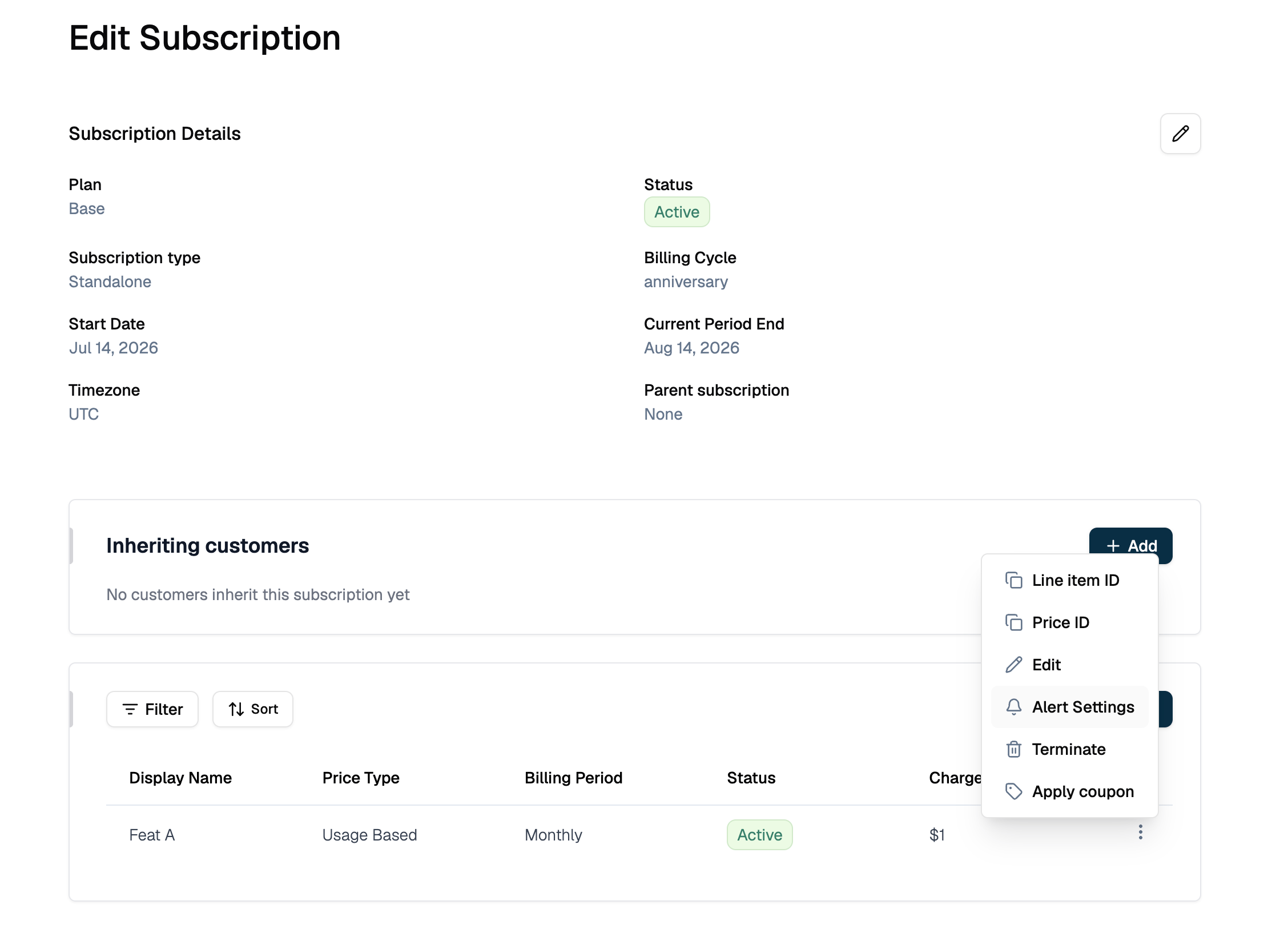
Go to **Billing** → **Subscriptions**, open the subscription, and go to **Edit Subscription**.
Find the line item to monitor, click its **three-dot menu (⋮)**, and select **Alert Settings**. It appears alongside **Edit** and **Terminate** for that line item.
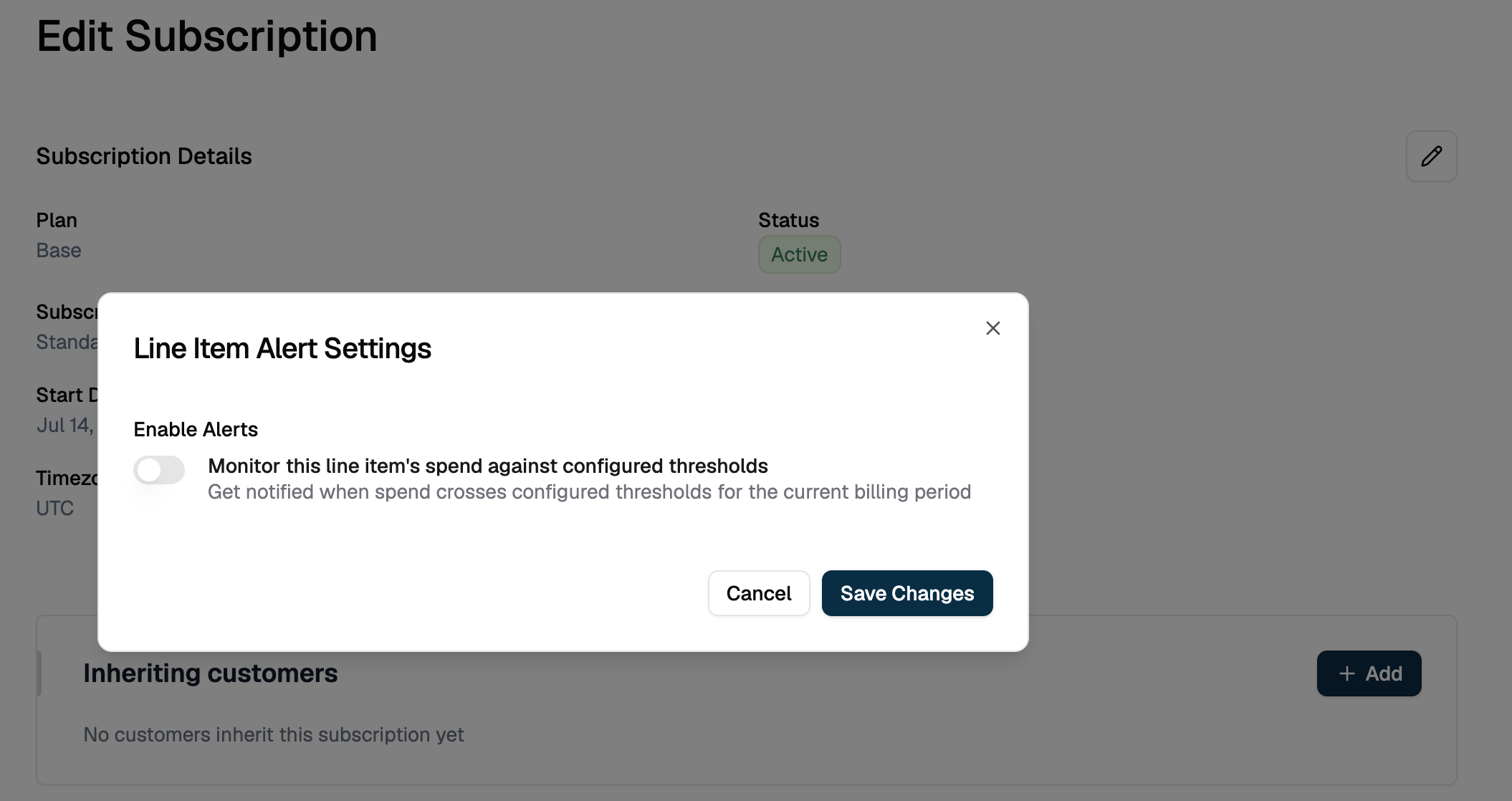
 Turn **Enable Alerts** on.
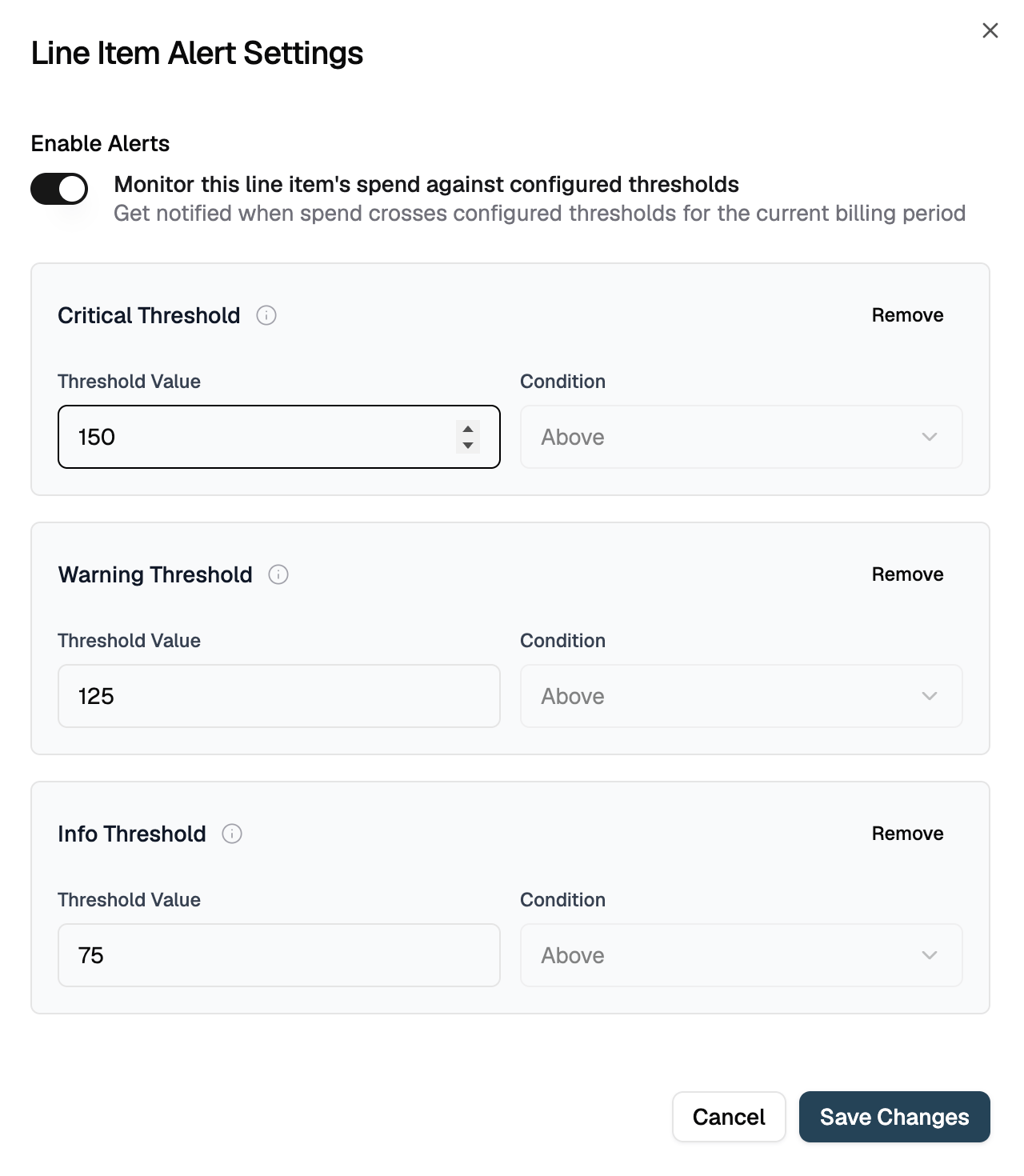
 Set **Threshold Value** for the levels you want (Critical, Warning, Info). Condition is fixed to **Above**. Use **Remove** to drop a level you don't need, then click **Save Changes**.
 ## Configuring via API
```json theme={null}
{
"entity_type": "subscription_line_item",
"entity_id": "subs_line_01K7YQ0000LINEITEM00001",
"parent_entity_type": "subscription",
"parent_entity_id": "subs_01K7YQ8ZR4M3V2N1XA9C6D0EFG",
"config": {
"alert_enabled": true,
"warning": { "threshold": "150", "condition": "above" },
"critical": { "threshold": "300", "condition": "above" }
}
}
```
```bash cURL theme={null}
curl -X POST 'https://api.cloud.flexprice.io/v1/alerts/setting' \
-H 'x-api-key: ' \
-H 'Content-Type: application/json' \
-d '{
"entity_type": "subscription_line_item",
"entity_id": "subs_line_01K7YQ0000LINEITEM00001",
"parent_entity_type": "subscription",
"parent_entity_id": "subs_01K7YQ8ZR4M3V2N1XA9C6D0EFG",
"config": {
"alert_enabled": true,
"warning": { "threshold": "150", "condition": "above" },
"critical": { "threshold": "300", "condition": "above" }
}
}'
```
`entity_id` must be a line item that belongs to the subscription identified by `parent_entity_id`. The API rejects a line item ID from a different subscription.
## Alert Behavior
Flexprice recalculates this line item's usage-based spend on every usage event affecting the subscription and sends a webhook only when the alert state changes.
Usage on a different line item in the same subscription does not affect this alert. It only tracks the one line item it's configured on.
## Managing Alert Settings
### Viewing current configuration
Open **Edit Subscription**, find the line item, and click its **three-dot menu (⋮)**.
Select **Alert Settings**. The dialog shows **Enable Alerts** and all configured threshold levels with their values.
### Changing thresholds
Open **Edit Subscription**, find the line item, click its **three-dot menu (⋮)** → **Alert Settings**.
Change **Enable Alerts** or any threshold value in the dialog.
Click **Save Changes**.
### Removing a threshold
Open **Edit Subscription**, find the line item, click its **three-dot menu (⋮)** → **Alert Settings**.
Click **Remove** on the threshold level you want to drop.
Click **Save Changes**. Removed thresholds are cleared, not just hidden, so send the complete remaining configuration.
### Disabling alerts
Open **Edit Subscription**, find the line item, click its **three-dot menu (⋮)** → **Alert Settings**.
Set **Enable Alerts** to off (or set `alert_enabled` to `false` via API).
Click **Save Changes**.
## Webhooks
| Event | Fires when |
| -------------------------------------------------- | ------------------------- |
| `subscription.line_item_spend.threshold_reached` | Spend crosses a threshold |
| `subscription.line_item_spend.threshold_recovered` | Spend recovers to `ok` |
## Use Cases
* **Per-charge budgets**: Alert on a specific metered charge (e.g. a particular API or compute meter) without noise from the rest of the subscription
* **High-cost line items**: Set tighter thresholds on line items with the highest per-unit cost or the most usage variance
* **Customer-specific overrides**: Combine with per-subscription price overrides to alert on a customer's negotiated rate independently
## Related
* [What Are Spend Alerts?](/docs/subscriptions/how-to-configure-spend-alerts/what-are-spend-alerts): all three alert scopes, shared validation, and the full API reference
* [Subscription spend alerts](/docs/subscriptions/how-to-configure-spend-alerts/how-to-configure-subscription-spend-alerts): monitor the whole subscription instead of one line item
* [Group spend alerts](/docs/subscriptions/how-to-configure-spend-alerts/how-to-configure-group-spend-alerts): monitor spend across a feature group
* [Webhooks](/docs/webhook/webhooks): endpoint setup, payload signatures, and retry behavior
## Configuring via API
```json theme={null}
{
"entity_type": "subscription_line_item",
"entity_id": "subs_line_01K7YQ0000LINEITEM00001",
"parent_entity_type": "subscription",
"parent_entity_id": "subs_01K7YQ8ZR4M3V2N1XA9C6D0EFG",
"config": {
"alert_enabled": true,
"warning": { "threshold": "150", "condition": "above" },
"critical": { "threshold": "300", "condition": "above" }
}
}
```
```bash cURL theme={null}
curl -X POST 'https://api.cloud.flexprice.io/v1/alerts/setting' \
-H 'x-api-key: ' \
-H 'Content-Type: application/json' \
-d '{
"entity_type": "subscription_line_item",
"entity_id": "subs_line_01K7YQ0000LINEITEM00001",
"parent_entity_type": "subscription",
"parent_entity_id": "subs_01K7YQ8ZR4M3V2N1XA9C6D0EFG",
"config": {
"alert_enabled": true,
"warning": { "threshold": "150", "condition": "above" },
"critical": { "threshold": "300", "condition": "above" }
}
}'
```
`entity_id` must be a line item that belongs to the subscription identified by `parent_entity_id`. The API rejects a line item ID from a different subscription.
## Alert Behavior
Flexprice recalculates this line item's usage-based spend on every usage event affecting the subscription and sends a webhook only when the alert state changes.
Usage on a different line item in the same subscription does not affect this alert. It only tracks the one line item it's configured on.
## Managing Alert Settings
### Viewing current configuration
Open **Edit Subscription**, find the line item, and click its **three-dot menu (⋮)**.
Select **Alert Settings**. The dialog shows **Enable Alerts** and all configured threshold levels with their values.
### Changing thresholds
Open **Edit Subscription**, find the line item, click its **three-dot menu (⋮)** → **Alert Settings**.
Change **Enable Alerts** or any threshold value in the dialog.
Click **Save Changes**.
### Removing a threshold
Open **Edit Subscription**, find the line item, click its **three-dot menu (⋮)** → **Alert Settings**.
Click **Remove** on the threshold level you want to drop.
Click **Save Changes**. Removed thresholds are cleared, not just hidden, so send the complete remaining configuration.
### Disabling alerts
Open **Edit Subscription**, find the line item, click its **three-dot menu (⋮)** → **Alert Settings**.
Set **Enable Alerts** to off (or set `alert_enabled` to `false` via API).
Click **Save Changes**.
## Webhooks
| Event | Fires when |
| -------------------------------------------------- | ------------------------- |
| `subscription.line_item_spend.threshold_reached` | Spend crosses a threshold |
| `subscription.line_item_spend.threshold_recovered` | Spend recovers to `ok` |
## Use Cases
* **Per-charge budgets**: Alert on a specific metered charge (e.g. a particular API or compute meter) without noise from the rest of the subscription
* **High-cost line items**: Set tighter thresholds on line items with the highest per-unit cost or the most usage variance
* **Customer-specific overrides**: Combine with per-subscription price overrides to alert on a customer's negotiated rate independently
## Related
* [What Are Spend Alerts?](/docs/subscriptions/how-to-configure-spend-alerts/what-are-spend-alerts): all three alert scopes, shared validation, and the full API reference
* [Subscription spend alerts](/docs/subscriptions/how-to-configure-spend-alerts/how-to-configure-subscription-spend-alerts): monitor the whole subscription instead of one line item
* [Group spend alerts](/docs/subscriptions/how-to-configure-spend-alerts/how-to-configure-group-spend-alerts): monitor spend across a feature group
* [Webhooks](/docs/webhook/webhooks): endpoint setup, payload signatures, and retry behavior