> ## Documentation Index
> Fetch the complete documentation index at: https://docs.flexprice.io/llms.txt
> Use this file to discover all available pages before exploring further.
# Progressive Billing
> Progressive billing automatically triggers mid-period invoices when a subscription's current-period usage crosses a defined threshold
## Overview
Progressive billing lets you set a usage amount threshold on a subscription. When the customer's billed usage for the current period reaches that amount, FlexPrice automatically creates and finalizes a mid-period invoice without waiting for the period to end. This is useful for high-volume customers where waiting until period end creates cash flow or fraud risk.
## How It Works
1. You set `auto_invoice_threshold` on a subscription (e.g. \$500).
2. FlexPrice evaluates usage every **5 minutes** against the current window (`current_period_start` → now).
3. When usage ≥ threshold, a mid-period invoice is created and finalized immediately.
4. `current_period_start` advances to the moment the invoice was issued; `current_period_end` remains unchanged. Usage resets for the new sub-window and the threshold applies fresh.
5. At period end, a normal invoice is issued for remaining usage.
Only **arrear usage charges** count toward the threshold. Fixed or advance charges are excluded. The invoice amount may slightly exceed the threshold since evaluation happens on a 5-minute interval, not in real time.
## Configuring Progressive Billing
1. Navigate to the **Subscriptions** section and open or create a subscription.
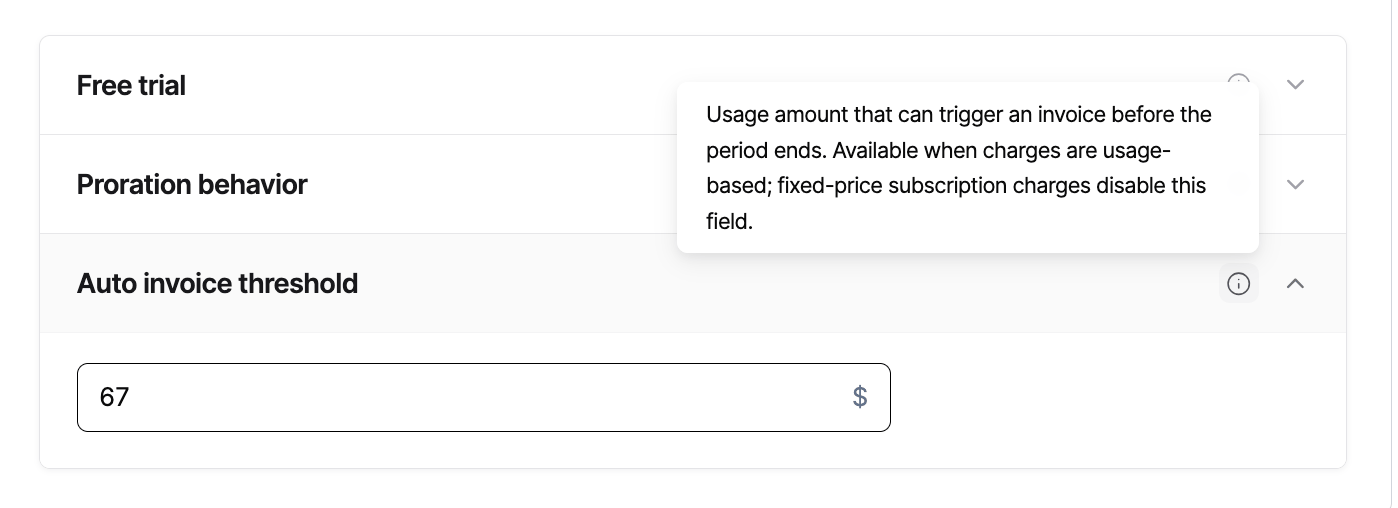
2. Locate the **Auto invoice threshold** section (progressive billing).
3. Enter your threshold amount.
4. Save the subscription.
 Pass `auto_invoice_threshold` when creating a subscription:
```bash theme={null}
curl -X POST https://api.flexprice.io/v1/subscriptions \
-H "Authorization: Bearer YOUR_API_KEY" \
-H "Content-Type: application/json" \
-d '{
"customer_id": "cust_01xyz",
"plan_id": "plan_01abc",
"currency": "USD",
"billing_cadence": "RECURRING",
"billing_period": "MONTHLY",
"billing_period_count": 1,
"start_date": "2025-05-01T00:00:00Z",
"auto_invoice_threshold": "500.00"
}'
```
Response (abbreviated):
```json theme={null}
{
"id": "sub_01def456",
"status": "active",
"auto_invoice_threshold": "500.00",
"current_period_start": "2025-05-01T00:00:00Z",
"current_period_end": "2025-06-01T00:00:00Z"
}
```
`auto_invoice_threshold` is set at the subscription level, not the plan level. Each subscription can have its own threshold.
## Invoicing Behavior
| Scenario | Behavior |
| ----------------------------------- | ------------------------------------------------------ |
| Usage reaches threshold | Mid-period invoice created and finalized immediately |
| Usage below threshold at period end | Normal period-end invoice covers all remaining usage |
| Threshold not set (`null`) | Progressive billing disabled; standard billing applies |
## API Reference
### Subscription create fields
| Field | Type | Required | Description |
| ------------------------ | ---------------- | -------- | -------------------------------------------------------------------------------------------------- |
| `auto_invoice_threshold` | string (decimal) | No | Usage amount that triggers a mid-period invoice. Must be > 0. `null` disables progressive billing. |
### Subscription response fields
| Field | Type | Description |
| ------------------------ | -------------------------- | ------------------------------------------------------------------ |
| `auto_invoice_threshold` | string (decimal), nullable | The configured threshold for this subscription. `null` if not set. |
## Webhooks & Events
No new webhook event type is introduced for progressive billing. Standard invoice events fire when a threshold invoice is created and finalized. Use the `billing_reason` field on the invoice object to identify threshold-triggered invoices:
| Event | When it fires |
| ------------------- | ---------------------------------------------------------------------- |
| `invoice.created` | When usage crosses the threshold and a mid-period invoice is generated |
| `invoice.finalized` | When the threshold invoice is finalized and ready for payment |
The `billing_reason` on threshold invoices is `AUTO_INVOICE_THRESHOLD`.
## Best Practices
**Set thresholds proportional to expected spend.** A threshold at 50 to 80% of expected monthly spend avoids too-frequent invoices while still providing early billing signals.
**Ensure your payment method handles mid-period invoices.** Invoices created via progressive billing are finalized immediately. Make sure your payment collection flow can process charges outside the normal billing cycle.
**Monitor via invoice webhooks.** No new webhook event type is introduced for progressive billing. Listen to standard invoice creation and finalization events; the invoice billing reason is `AUTO_INVOICE_THRESHOLD`, which you can use to distinguish these from regular period-end invoices.
**Do not rely on real-time triggering.** There is up to a 5-minute delay between crossing the threshold and invoice creation. Do not use progressive billing for hard real-time spend caps.
Pass `auto_invoice_threshold` when creating a subscription:
```bash theme={null}
curl -X POST https://api.flexprice.io/v1/subscriptions \
-H "Authorization: Bearer YOUR_API_KEY" \
-H "Content-Type: application/json" \
-d '{
"customer_id": "cust_01xyz",
"plan_id": "plan_01abc",
"currency": "USD",
"billing_cadence": "RECURRING",
"billing_period": "MONTHLY",
"billing_period_count": 1,
"start_date": "2025-05-01T00:00:00Z",
"auto_invoice_threshold": "500.00"
}'
```
Response (abbreviated):
```json theme={null}
{
"id": "sub_01def456",
"status": "active",
"auto_invoice_threshold": "500.00",
"current_period_start": "2025-05-01T00:00:00Z",
"current_period_end": "2025-06-01T00:00:00Z"
}
```
`auto_invoice_threshold` is set at the subscription level, not the plan level. Each subscription can have its own threshold.
## Invoicing Behavior
| Scenario | Behavior |
| ----------------------------------- | ------------------------------------------------------ |
| Usage reaches threshold | Mid-period invoice created and finalized immediately |
| Usage below threshold at period end | Normal period-end invoice covers all remaining usage |
| Threshold not set (`null`) | Progressive billing disabled; standard billing applies |
## API Reference
### Subscription create fields
| Field | Type | Required | Description |
| ------------------------ | ---------------- | -------- | -------------------------------------------------------------------------------------------------- |
| `auto_invoice_threshold` | string (decimal) | No | Usage amount that triggers a mid-period invoice. Must be > 0. `null` disables progressive billing. |
### Subscription response fields
| Field | Type | Description |
| ------------------------ | -------------------------- | ------------------------------------------------------------------ |
| `auto_invoice_threshold` | string (decimal), nullable | The configured threshold for this subscription. `null` if not set. |
## Webhooks & Events
No new webhook event type is introduced for progressive billing. Standard invoice events fire when a threshold invoice is created and finalized. Use the `billing_reason` field on the invoice object to identify threshold-triggered invoices:
| Event | When it fires |
| ------------------- | ---------------------------------------------------------------------- |
| `invoice.created` | When usage crosses the threshold and a mid-period invoice is generated |
| `invoice.finalized` | When the threshold invoice is finalized and ready for payment |
The `billing_reason` on threshold invoices is `AUTO_INVOICE_THRESHOLD`.
## Best Practices
**Set thresholds proportional to expected spend.** A threshold at 50 to 80% of expected monthly spend avoids too-frequent invoices while still providing early billing signals.
**Ensure your payment method handles mid-period invoices.** Invoices created via progressive billing are finalized immediately. Make sure your payment collection flow can process charges outside the normal billing cycle.
**Monitor via invoice webhooks.** No new webhook event type is introduced for progressive billing. Listen to standard invoice creation and finalization events; the invoice billing reason is `AUTO_INVOICE_THRESHOLD`, which you can use to distinguish these from regular period-end invoices.
**Do not rely on real-time triggering.** There is up to a 5-minute delay between crossing the threshold and invoice creation. Do not use progressive billing for hard real-time spend caps.