> ## Documentation Index
> Fetch the complete documentation index at: https://docs.flexprice.io/llms.txt
> Use this file to discover all available pages before exploring further.
# Seat-Based Pricing
> Bill customers per user, seat, or license. Set quantity at subscription creation and adjust it at any time with optional future-dating.
Seat-based pricing lets you charge customers based on the number of seats (users, licenses, or any countable unit) they provision. Set the initial seat count when creating a subscription, then increase or decrease it at any time - immediately or on a future date - using the modification API.
## When to Use
* SaaS products that charge per user (e.g. \$20/user/month)
* License-based billing (editor seats, API keys, agent instances)
* Hybrid plans: a fixed base fee plus per-seat charges
* Enterprise contracts with minimum seat commitments
If charges are driven by events (API calls, compute time, etc.), use [Event Ingestion](/docs/event-ingestion/overview) instead. Seat-based billing is for known, provisioned quantities, not metered consumption.
## How It Works
Seat-based billing has three stages:
1. **Configure a per-seat price** on a plan - a fixed price with `billing_model: FLAT_FEE` and a per-unit `amount`.
2. **Create a subscription** and set the initial seat count via `line_items[].quantity` (or `override_line_items[].quantity` for a customer-specific count).
3. **Adjust seat count** mid-subscription using the modification API with an optional `effective_date`.
The billing engine multiplies `amount x quantity` when generating invoice line items each billing period.
## Step 1: Configure a Per-Seat Price on Your Plan
A per-seat price is a fixed price with `FLAT_FEE` billing model. The `amount` is the cost per seat per billing period.
```json theme={null}
POST /prices
{
"entity_type": "plan",
"entity_id": "plan_01JVKM3P9YQRS5GHTU0MCXA4T",
"type": "FIXED",
"currency": "usd",
"amount": "20.00",
"billing_model": "FLAT_FEE",
"billing_period": "MONTHLY",
"billing_period_count": 1,
"invoice_cadence": "ADVANCE",
"description": "Per seat, billed monthly",
"lookup_key": "seat_monthly"
}
```
| Field | Value | Notes |
| ---------------------- | ----------------------------- | ------------------------------------------------------------------------ |
| `entity_type` | `"plan"` | Attaches this price to a plan |
| `entity_id` | plan ID | The plan this price belongs to |
| `type` | `"FIXED"` | Fixed charge (not metered). Use `"USAGE"` for metered prices |
| `amount` | `"20.00"` | Cost per seat per billing period |
| `billing_model` | `"FLAT_FEE"` | Multiplies amount x quantity |
| `billing_period` | `"MONTHLY"` / `"ANNUAL"` etc. | How often the seat charge recurs |
| `billing_period_count` | `1` | Number of periods per cycle. `1` with `MONTHLY` means charge every month |
| `invoice_cadence` | `"ADVANCE"` | Bill at the start of each period (typical for seats) |
**Package pricing for seat buckets:** If you charge per block of seats (e.g. \$100 per 5 seats), use `billing_model: PACKAGE` and set `transform_quantity.divide_by: 5`. The billing engine divides the raw quantity by 5 before applying the price.
## Step 2: Create a Subscription with an Initial Seat Count
Set the seat count in `line_items` when creating the subscription. Reference the price by its `price_id` and pass the initial quantity.
```json theme={null}
POST /subscriptions
{
"customer_id": "cust_01JVKM2N8XPQR4FGHT9LBWZ3S",
"plan_id": "plan_01JVKM3P9YQRS5GHTU0MCXA4T",
"currency": "usd",
"billing_cadence": "RECURRING",
"billing_period": "MONTHLY",
"billing_cycle": "anniversary",
"line_items": [
{
"price_id": "price_01JVKM4Q0ZRST6HITUV1NDYB5",
"quantity": "25"
}
]
}
```
The response includes the created subscription with `line_items[].id`. Save this ID - you will need it in Step 3 to modify seat count.
```json theme={null}
{
"id": "sub_01JVKM6S2BTUV8JKVWX3PFAD7",
"status": "ACTIVE",
"customer_id": "cust_01JVKM2N8XPQR4FGHT9LBWZ3S",
"plan_id": "plan_01JVKM3P9YQRS5GHTU0MCXA4T",
"line_items": [
{
"id": "li_01JVKM5R1ASTU7IJUVW2OEZC6",
"price_id": "price_01JVKM4Q0ZRST6HITUV1NDYB5",
"quantity": "25",
"price_type": "FIXED",
"start_date": "2026-06-01T00:00:00Z",
"end_date": null
}
]
}
```
This creates a subscription where 25 seats x $20 = **$500/month\*\* is charged at the start of each period.
### Customer-Specific Seat Count (Override)
For enterprise customers with a negotiated seat count, use `override_line_items` instead. The plan stays unchanged - only this subscription uses the overridden quantity.
```json theme={null}
POST /subscriptions
{
"customer_id": "cust_01JVKN3P0ZRST7IJUVW3OEZD7",
"plan_id": "plan_01JVKM3P9YQRS5GHTU0MCXA4T",
"currency": "usd",
"billing_cadence": "RECURRING",
"billing_period": "ANNUAL",
"billing_cycle": "anniversary",
"override_line_items": [
{
"price_id": "price_01JVKM4Q0ZRST6HITUV1NDYB5",
"quantity": "500"
}
]
}
```
`quantity` cannot be set on usage-based (metered) prices. It is only valid on fixed prices with `FLAT_FEE`, `PACKAGE`, or `TIERED` billing models.
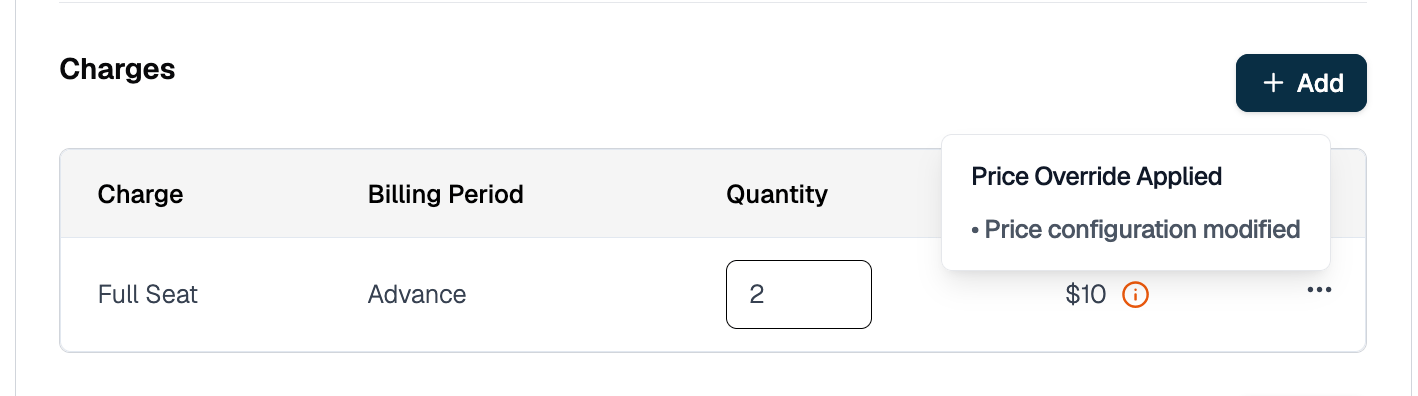 ## Step 3: Adjust Seat Count on a Live Subscription
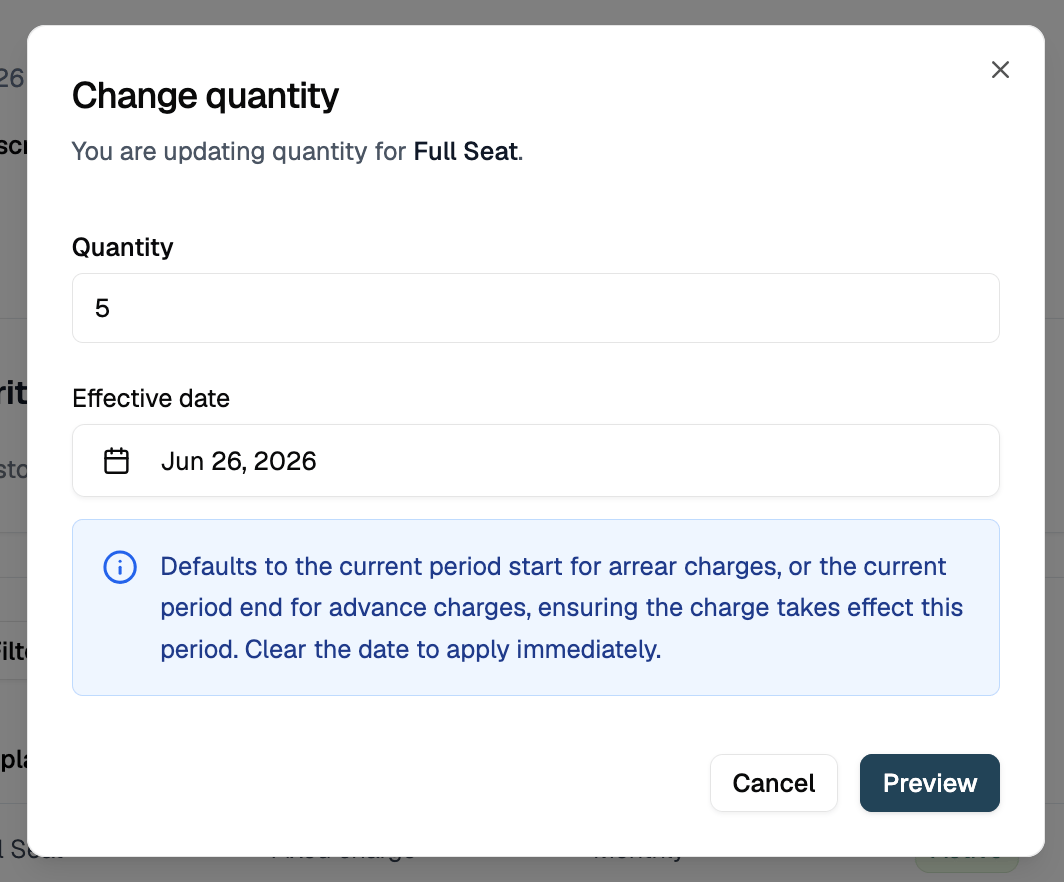
Use the subscription modification API to change the seat count after the subscription is active. You can apply the change immediately or schedule it for a future date.
### 3a. Find the Line Item ID
The modification API takes a line item ID (`li_...`), not a price ID. The `line_items[].id` is returned when you create the subscription (see Step 2) or when you fetch it:
```
GET /subscriptions/sub_01JVKM6S2BTUV8JKVWX3PFAD7
```
Match the line item to the right price via `line_items[].price_id`.
### 3b. Preview the Change (Recommended)
Before executing, preview the billing impact:
```json theme={null}
POST /subscriptions/sub_01JVKM6S2BTUV8JKVWX3PFAD7/modify/preview
{
"type": "quantity_change",
"quantity_change_params": {
"line_items": [
{
"id": "li_01JVKM5R1ASTU7IJUVW2OEZC6",
"quantity": "40"
}
]
}
}
```
## Step 3: Adjust Seat Count on a Live Subscription
Use the subscription modification API to change the seat count after the subscription is active. You can apply the change immediately or schedule it for a future date.
### 3a. Find the Line Item ID
The modification API takes a line item ID (`li_...`), not a price ID. The `line_items[].id` is returned when you create the subscription (see Step 2) or when you fetch it:
```
GET /subscriptions/sub_01JVKM6S2BTUV8JKVWX3PFAD7
```
Match the line item to the right price via `line_items[].price_id`.
### 3b. Preview the Change (Recommended)
Before executing, preview the billing impact:
```json theme={null}
POST /subscriptions/sub_01JVKM6S2BTUV8JKVWX3PFAD7/modify/preview
{
"type": "quantity_change",
"quantity_change_params": {
"line_items": [
{
"id": "li_01JVKM5R1ASTU7IJUVW2OEZC6",
"quantity": "40"
}
]
}
}
```
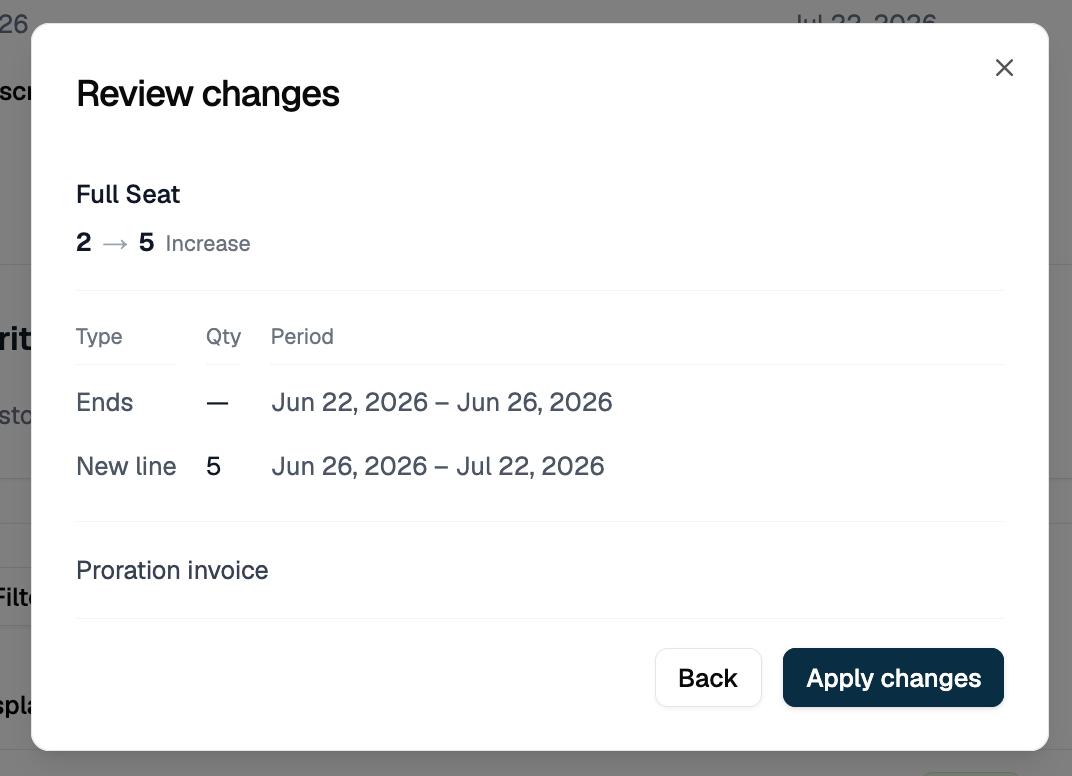 The UI preview shows the old and new line item periods and confirms a proration invoice will be generated. The API returns the same information in `changed_resources`:
```json theme={null}
{
"subscription": { "id": "sub_01JVKM6S2BTUV8JKVWX3PFAD7", "..." : "..." },
"changed_resources": {
"line_items": [
{
"id": "li_01JVKM5R1ASTU7IJUVW2OEZC6",
"price_id": "price_01JVKM4Q0ZRST6HITUV1NDYB5",
"quantity": "25",
"start_date": "2026-06-01T00:00:00Z",
"end_date": "2026-06-10T14:32:00Z",
"change_action": "ended"
},
{
"id": "li_01JVKN7T3CUVW9KLVWX4QGBE8",
"price_id": "price_01JVKM4Q0ZRST6HITUV1NDYB5",
"quantity": "40",
"start_date": "2026-06-10T14:32:00Z",
"end_date": null,
"change_action": "created"
}
],
"invoices": [
{
"id": "inv_01JVKN8U4DVWX0LMWXY5RHCF9",
"action": "created",
"status": "preview",
"invoice": {
"amount_due": "203.23",
"currency": "usd"
}
}
]
}
}
```
Nothing is billed until you call the execute endpoint. The `status: "preview"` on the invoice confirms this is a dry run.
### 3c. Execute an Immediate Seat Change
Omit `effective_date` to apply the change right now:
```json theme={null}
POST /subscriptions/sub_01JVKM6S2BTUV8JKVWX3PFAD7/modify/execute
{
"type": "quantity_change",
"quantity_change_params": {
"line_items": [
{
"id": "li_01JVKM5R1ASTU7IJUVW2OEZC6",
"quantity": "40"
}
]
}
}
```
The current line item is terminated immediately and a new one starts with `quantity: 40`. The response has the same shape as the preview but with `status: "issued"` on the invoice, confirming the charge was generated:
```json theme={null}
{
"subscription": { "id": "sub_01JVKM6S2BTUV8JKVWX3PFAD7", "..." : "..." },
"changed_resources": {
"line_items": [
{
"id": "li_01JVKM5R1ASTU7IJUVW2OEZC6",
"price_id": "price_01JVKM4Q0ZRST6HITUV1NDYB5",
"quantity": "25",
"start_date": "2026-06-01T00:00:00Z",
"end_date": "2026-06-10T14:32:00Z",
"change_action": "ended"
},
{
"id": "li_01JVKN7T3CUVW9KLVWX4QGBE8",
"price_id": "price_01JVKM4Q0ZRST6HITUV1NDYB5",
"quantity": "40",
"start_date": "2026-06-10T14:32:00Z",
"end_date": null,
"change_action": "created"
}
],
"invoices": [
{
"id": "inv_01JVKN8U4DVWX0LMWXY5RHCF9",
"action": "created",
"status": "issued",
"invoice": {
"amount_due": "203.23",
"currency": "usd"
}
}
]
}
}
```
### 3d. Schedule a Future-Dated Seat Change
Pass an `effective_date` to defer the change:
```json theme={null}
POST /subscriptions/sub_01JVKM6S2BTUV8JKVWX3PFAD7/modify/execute
{
"type": "quantity_change",
"quantity_change_params": {
"line_items": [
{
"id": "li_01JVKM5R1ASTU7IJUVW2OEZC6",
"quantity": "40",
"effective_date": "2026-07-01T00:00:00Z"
}
]
}
}
```
What happens internally:
1. The current line item's `end_date` is set to `2026-07-01T00:00:00Z`
2. A new line item is created with `start_date: 2026-07-01T00:00:00Z` and `quantity: 40`
3. Billing continues at the old quantity until July 1, then switches to 40 seats
Use this when a customer confirms they'll add seats at the start of next month and you don't want a mid-period invoice now.
The UI preview shows the old and new line item periods and confirms a proration invoice will be generated. The API returns the same information in `changed_resources`:
```json theme={null}
{
"subscription": { "id": "sub_01JVKM6S2BTUV8JKVWX3PFAD7", "..." : "..." },
"changed_resources": {
"line_items": [
{
"id": "li_01JVKM5R1ASTU7IJUVW2OEZC6",
"price_id": "price_01JVKM4Q0ZRST6HITUV1NDYB5",
"quantity": "25",
"start_date": "2026-06-01T00:00:00Z",
"end_date": "2026-06-10T14:32:00Z",
"change_action": "ended"
},
{
"id": "li_01JVKN7T3CUVW9KLVWX4QGBE8",
"price_id": "price_01JVKM4Q0ZRST6HITUV1NDYB5",
"quantity": "40",
"start_date": "2026-06-10T14:32:00Z",
"end_date": null,
"change_action": "created"
}
],
"invoices": [
{
"id": "inv_01JVKN8U4DVWX0LMWXY5RHCF9",
"action": "created",
"status": "preview",
"invoice": {
"amount_due": "203.23",
"currency": "usd"
}
}
]
}
}
```
Nothing is billed until you call the execute endpoint. The `status: "preview"` on the invoice confirms this is a dry run.
### 3c. Execute an Immediate Seat Change
Omit `effective_date` to apply the change right now:
```json theme={null}
POST /subscriptions/sub_01JVKM6S2BTUV8JKVWX3PFAD7/modify/execute
{
"type": "quantity_change",
"quantity_change_params": {
"line_items": [
{
"id": "li_01JVKM5R1ASTU7IJUVW2OEZC6",
"quantity": "40"
}
]
}
}
```
The current line item is terminated immediately and a new one starts with `quantity: 40`. The response has the same shape as the preview but with `status: "issued"` on the invoice, confirming the charge was generated:
```json theme={null}
{
"subscription": { "id": "sub_01JVKM6S2BTUV8JKVWX3PFAD7", "..." : "..." },
"changed_resources": {
"line_items": [
{
"id": "li_01JVKM5R1ASTU7IJUVW2OEZC6",
"price_id": "price_01JVKM4Q0ZRST6HITUV1NDYB5",
"quantity": "25",
"start_date": "2026-06-01T00:00:00Z",
"end_date": "2026-06-10T14:32:00Z",
"change_action": "ended"
},
{
"id": "li_01JVKN7T3CUVW9KLVWX4QGBE8",
"price_id": "price_01JVKM4Q0ZRST6HITUV1NDYB5",
"quantity": "40",
"start_date": "2026-06-10T14:32:00Z",
"end_date": null,
"change_action": "created"
}
],
"invoices": [
{
"id": "inv_01JVKN8U4DVWX0LMWXY5RHCF9",
"action": "created",
"status": "issued",
"invoice": {
"amount_due": "203.23",
"currency": "usd"
}
}
]
}
}
```
### 3d. Schedule a Future-Dated Seat Change
Pass an `effective_date` to defer the change:
```json theme={null}
POST /subscriptions/sub_01JVKM6S2BTUV8JKVWX3PFAD7/modify/execute
{
"type": "quantity_change",
"quantity_change_params": {
"line_items": [
{
"id": "li_01JVKM5R1ASTU7IJUVW2OEZC6",
"quantity": "40",
"effective_date": "2026-07-01T00:00:00Z"
}
]
}
}
```
What happens internally:
1. The current line item's `end_date` is set to `2026-07-01T00:00:00Z`
2. A new line item is created with `start_date: 2026-07-01T00:00:00Z` and `quantity: 40`
3. Billing continues at the old quantity until July 1, then switches to 40 seats
Use this when a customer confirms they'll add seats at the start of next month and you don't want a mid-period invoice now.
 ## Proration on Seat Changes
When you change seat count mid-period, Flexprice prorates based on days remaining in the current billing period.
### Upgrade (Adding Seats): Mid-Month Example
**Before change:** 25 seats x $20 = $500/month, billed on the 1st.
**Change on day 10:** Increase to 40 seats.
**Days remaining:** 21 of 31.
| Line item | Calculation | Amount |
| ------------------------------------- | --------------- | ------------ |
| Credit for unused days at 25 seats | (21/31) x \$500 | -\$338.71 |
| Charge for remaining days at 40 seats | (21/31) x \$800 | +\$541.94 |
| **Net invoice** | | **\$203.23** |
### Downgrade (Removing Seats): Mid-Month Example
**Before change:** 40 seats x $20 = $800/month, billed on the 1st.
**Change on day 10:** Decrease to 25 seats.
**Days remaining:** 21 of 31.
| Line item | Calculation | Amount |
| ------------------------------------- | --------------- | ------------- |
| Credit for unused days at 40 seats | (21/31) x \$800 | -\$541.94 |
| Charge for remaining days at 25 seats | (21/31) x \$500 | +\$338.71 |
| **Net** | | **-\$203.23** |
What gets issued depends on the price's `invoice_cadence`:
* **`ADVANCE`** (billed at period start): the customer was already charged for the full period, so a **refund** of \$203.23 is issued.
* **`ARREAR`** (billed at period end): nothing has been charged yet, so a **one-off invoice** for $338.71 (the remaining days at 25 seats) is generated immediately and the $541.94 credit offsets the end-of-period invoice.
### Skip Proration: Change at Period End
To avoid a mid-period invoice entirely, set `effective_date` to the start of the next billing period. The old seat count bills through the end of the current period and the new count takes effect at renewal.
## Seat-Based Billing in the UI
You can manage seat counts from the Subscription detail page in the Flexprice dashboard without touching the API.
**Viewing seat history:** The subscription timeline shows every quantity change with its effective date and the invoice it triggered.
## Proration on Seat Changes
When you change seat count mid-period, Flexprice prorates based on days remaining in the current billing period.
### Upgrade (Adding Seats): Mid-Month Example
**Before change:** 25 seats x $20 = $500/month, billed on the 1st.
**Change on day 10:** Increase to 40 seats.
**Days remaining:** 21 of 31.
| Line item | Calculation | Amount |
| ------------------------------------- | --------------- | ------------ |
| Credit for unused days at 25 seats | (21/31) x \$500 | -\$338.71 |
| Charge for remaining days at 40 seats | (21/31) x \$800 | +\$541.94 |
| **Net invoice** | | **\$203.23** |
### Downgrade (Removing Seats): Mid-Month Example
**Before change:** 40 seats x $20 = $800/month, billed on the 1st.
**Change on day 10:** Decrease to 25 seats.
**Days remaining:** 21 of 31.
| Line item | Calculation | Amount |
| ------------------------------------- | --------------- | ------------- |
| Credit for unused days at 40 seats | (21/31) x \$800 | -\$541.94 |
| Charge for remaining days at 25 seats | (21/31) x \$500 | +\$338.71 |
| **Net** | | **-\$203.23** |
What gets issued depends on the price's `invoice_cadence`:
* **`ADVANCE`** (billed at period start): the customer was already charged for the full period, so a **refund** of \$203.23 is issued.
* **`ARREAR`** (billed at period end): nothing has been charged yet, so a **one-off invoice** for $338.71 (the remaining days at 25 seats) is generated immediately and the $541.94 credit offsets the end-of-period invoice.
### Skip Proration: Change at Period End
To avoid a mid-period invoice entirely, set `effective_date` to the start of the next billing period. The old seat count bills through the end of the current period and the new count takes effect at renewal.
## Seat-Based Billing in the UI
You can manage seat counts from the Subscription detail page in the Flexprice dashboard without touching the API.
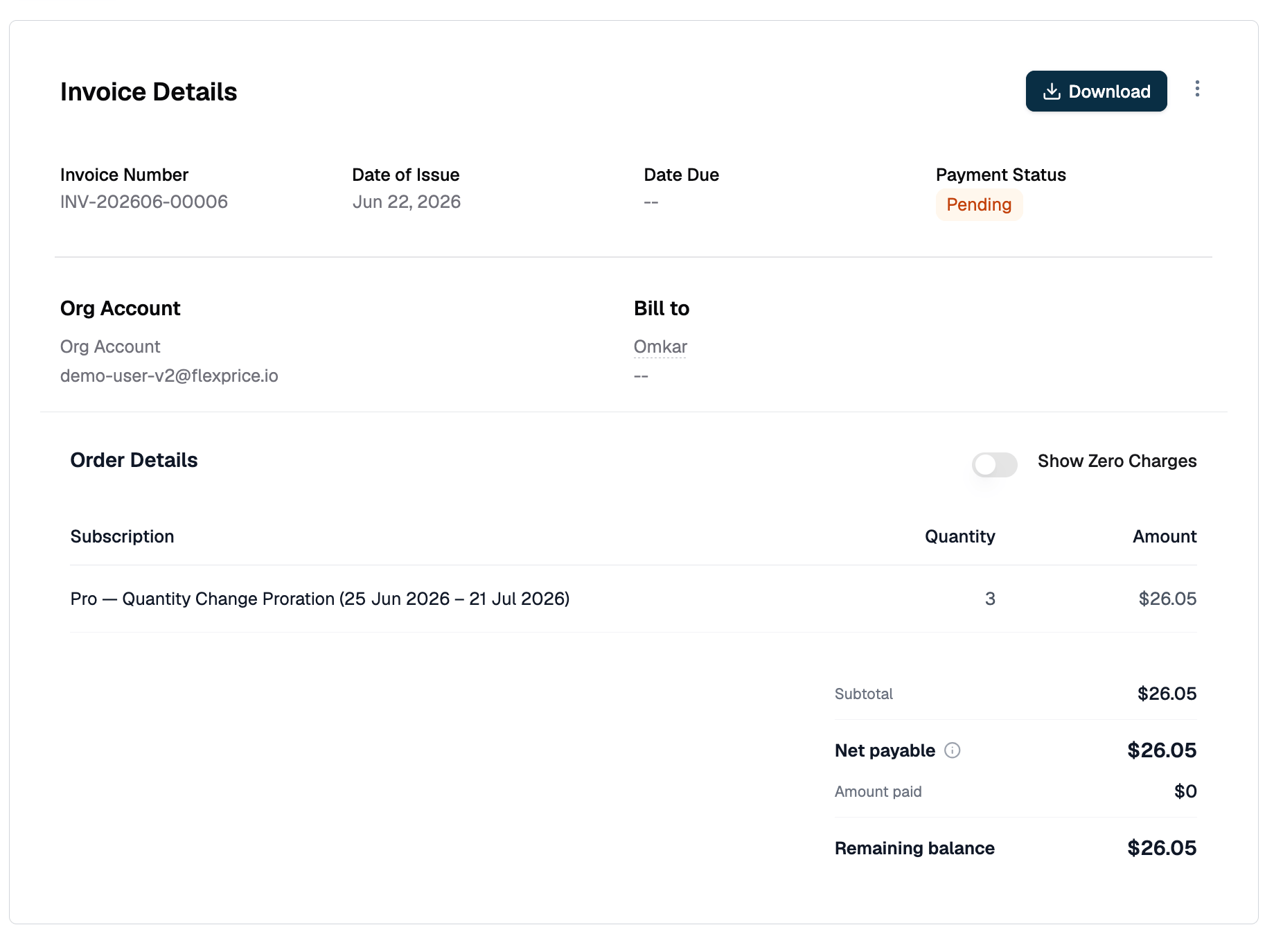
**Viewing seat history:** The subscription timeline shows every quantity change with its effective date and the invoice it triggered.
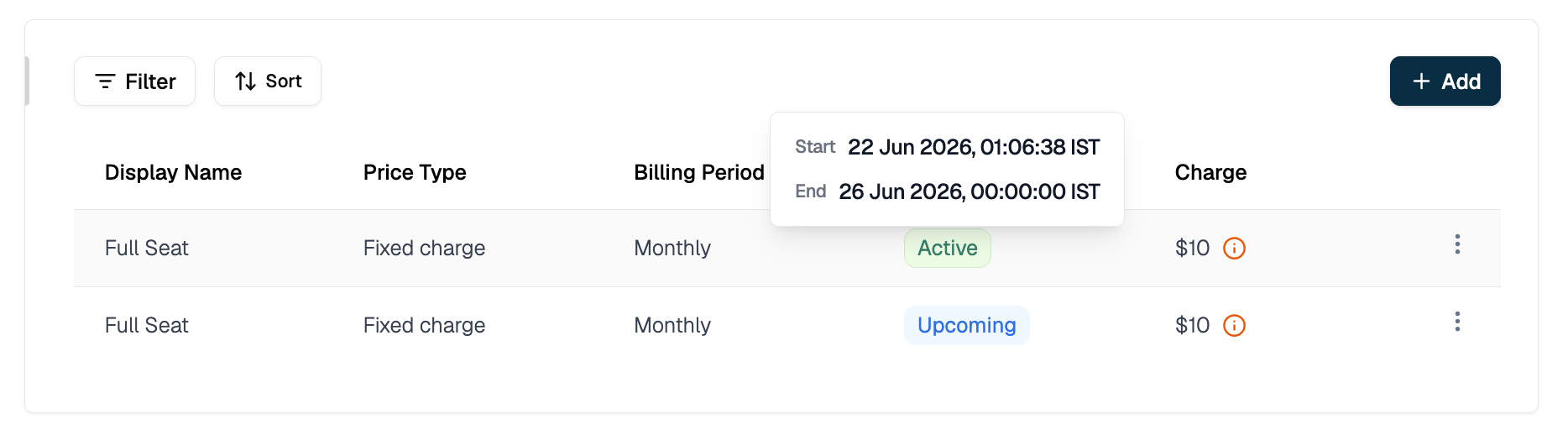 **Viewing the prorated invoice:** When a mid-period seat change generates an invoice, the invoice detail shows two line items: the credit for the old quantity and the charge for the new quantity.
 ## Common Patterns
| Situation | Approach |
| ----------------------------------------------- | ----------------------------------------------------------------------------------------------------------------- |
| Set initial seat count at subscription creation | `line_items[].quantity` in `POST /subscriptions` |
| Override seat count for one enterprise customer | `override_line_items[].quantity` in `POST /subscriptions` |
| Increase seats immediately with proration | `POST /subscriptions/{id}/modify/execute` without `effective_date` |
| Decrease seats at the end of the current period | `POST /subscriptions/{id}/modify/execute` with `effective_date` = start of next period |
| Preview billing impact before changing seats | `POST /subscriptions/{id}/modify/preview` |
| Change seats and also change the plan tier | Use [Upgrade & Downgrade](/docs/subscriptions/upgrade-and-downgrade) |
| Give one customer a different per-seat rate | Use [Plan Price Overrides](/docs/subscriptions/plan-price-overrides) with an `amount` override |
| Track seat usage via events (identity-linked) | Use a metered feature with `COUNT_UNIQUE` aggregation - see [Features](/docs/product-catalogue/features/overview) |
## Edge Cases & Gotchas
**`quantity` lives on the line item, not the subscription.**
There is no top-level `quantity` field on a subscription object. It lives at `subscription.line_items[].quantity`. If your plan has multiple prices (e.g. a base fee plus a per-seat charge), only the seat price's line item needs a custom quantity. Leave the base fee line item at `quantity: 1`.
**You need the line item ID, not the price ID.**
The modification API takes `line_items[].id` (format: `li_01...`), not `price_id`. Fetch the subscription first with `GET /subscriptions/{id}` to find it.
**Usage-based prices reject quantity.**
Setting `quantity` on a metered price line item returns an error. Usage is computed from ingested events, not a quantity field.
**Future-dated changes produce two line item records.**
Between the request and `effective_date`, two records exist for the same price: the old one ending at `effective_date` and the new one starting at it. Only one is active at any point in time. Do not delete or modify the old record before the effective date fires.
**Multiple seat changes in one period are fine.**
Each change prorates against the state at the time of the call. The billing engine generates a separate invoice per change.
**Setting quantity to zero stops billing for that line item.**
The remaining period's charge is credited in full. Use with care.
## Related Topics
* [Creating Subscriptions](/docs/subscriptions/customers-create-subscription)
* [Plan Price Overrides](/docs/subscriptions/plan-price-overrides)
* [Subscription Line Item Overrides](/docs/subscriptions/subscription-line-item-overrides)
* [Understanding Proration](/docs/subscriptions/understanding-proration)
* [Upgrade & Downgrade](/docs/subscriptions/upgrade-and-downgrade)
* [Plan Pricing Models](/docs/product-catalogue/plans/pricing)
## Common Patterns
| Situation | Approach |
| ----------------------------------------------- | ----------------------------------------------------------------------------------------------------------------- |
| Set initial seat count at subscription creation | `line_items[].quantity` in `POST /subscriptions` |
| Override seat count for one enterprise customer | `override_line_items[].quantity` in `POST /subscriptions` |
| Increase seats immediately with proration | `POST /subscriptions/{id}/modify/execute` without `effective_date` |
| Decrease seats at the end of the current period | `POST /subscriptions/{id}/modify/execute` with `effective_date` = start of next period |
| Preview billing impact before changing seats | `POST /subscriptions/{id}/modify/preview` |
| Change seats and also change the plan tier | Use [Upgrade & Downgrade](/docs/subscriptions/upgrade-and-downgrade) |
| Give one customer a different per-seat rate | Use [Plan Price Overrides](/docs/subscriptions/plan-price-overrides) with an `amount` override |
| Track seat usage via events (identity-linked) | Use a metered feature with `COUNT_UNIQUE` aggregation - see [Features](/docs/product-catalogue/features/overview) |
## Edge Cases & Gotchas
**`quantity` lives on the line item, not the subscription.**
There is no top-level `quantity` field on a subscription object. It lives at `subscription.line_items[].quantity`. If your plan has multiple prices (e.g. a base fee plus a per-seat charge), only the seat price's line item needs a custom quantity. Leave the base fee line item at `quantity: 1`.
**You need the line item ID, not the price ID.**
The modification API takes `line_items[].id` (format: `li_01...`), not `price_id`. Fetch the subscription first with `GET /subscriptions/{id}` to find it.
**Usage-based prices reject quantity.**
Setting `quantity` on a metered price line item returns an error. Usage is computed from ingested events, not a quantity field.
**Future-dated changes produce two line item records.**
Between the request and `effective_date`, two records exist for the same price: the old one ending at `effective_date` and the new one starting at it. Only one is active at any point in time. Do not delete or modify the old record before the effective date fires.
**Multiple seat changes in one period are fine.**
Each change prorates against the state at the time of the call. The billing engine generates a separate invoice per change.
**Setting quantity to zero stops billing for that line item.**
The remaining period's charge is credited in full. Use with care.
## Related Topics
* [Creating Subscriptions](/docs/subscriptions/customers-create-subscription)
* [Plan Price Overrides](/docs/subscriptions/plan-price-overrides)
* [Subscription Line Item Overrides](/docs/subscriptions/subscription-line-item-overrides)
* [Understanding Proration](/docs/subscriptions/understanding-proration)
* [Upgrade & Downgrade](/docs/subscriptions/upgrade-and-downgrade)
* [Plan Pricing Models](/docs/product-catalogue/plans/pricing)