> ## Documentation Index
> Fetch the complete documentation index at: https://docs.flexprice.io/llms.txt
> Use this file to discover all available pages before exploring further.
# Conversion rate
> Conversion rate links your unit (e.g. credits) to base currency (e.g. USD). Billing stays in one currency.
## Overview
### What is wallet conversion rate?
**Wallet conversion rate** tells you how much money one credit is worth in your wallet's currency.
* The wallet **stores** balance in **credits** only. Currency is used only for **calculation and display**. Formula: **amount in currency = credits × conversion rate**.
* **Example:** Conversion rate **0.01**, wallet in USD. Then 1 credit = 0.01 USD. So 100 credits = 1 USD, and 1000 credits show as a 10 USD balance.
* You can set **two** rates on a wallet:
* **Conversion rate** — used when you **spend** (debit) and when balance is shown in currency.
* **Top-up conversion rate** — used only when you **add** credits (top-up). If you don’t set it, top-ups use conversion rate.
***
### What is conversion rate?
It is the number that links your unit to base currency. It appears in **two** places:
| Field | Purpose |
| ----------------------- | ----------------------------------------------------------------------------------------------------------------------------------------------------------------------------------------------------------------------- |
| `conversion_rate` | Links stored credits to currency (for display and when user spends). Wallet stores balance in **credits**; currency is worked out from this. Formula: `amount in currency = credits × conversion_rate`. Default: `"1"`. |
| `topup_conversion_rate` | Same formula; used **only for top-ups**. If you do not set it, the wallet uses `conversion_rate` for top-ups. |
So: **1 credit = conversion\_rate in currency.** Examples: rate 1 → 1 USD = 1 credit; rate 2 → 1 USD = 0.5 credits; rate 0.5 → 1 USD = 2 credits.
***
## How it works internally
* **Price unit:** Has `base_currency` and `conversion_rate`. Billing converts price unit amounts into that base currency for invoicing.
* **Wallet:** Balance is stored in **credits**. To show it in currency: amount = credits × conversion rate.
### When conversion is used
Uses `topup_conversion_rate` (or `conversion_rate` if not set). If you send `amount` and not `credits_to_add`, credits = amount ÷ rate. If both are sent, **credits\_to\_add** wins and amount is ignored.
Uses `conversion_rate` (e.g. invoice payment). Manual debit uses `credits` directly; no conversion.
Uses conversion\_rate: currency = credits × rate; credits = currency ÷ rate.
***
## Conversion during credit
Top-up uses **topup\_conversion\_rate**. If not set, it uses **conversion\_rate**.
Send `amount` (in wallet currency). System works out `credits_to_add = amount ÷ topup_conversion_rate` and adds that many credits to the wallet.
Send `credits_to_add`. That many credits are added to the wallet.
Wallet in USD, conversion rate (1 credit = 2 USD). Top-up with amount 10 USD → credits added = 10 ÷ 2 = 5. Wallet balance goes up by 5 credits.
***
## Conversion during debit
Debits use **conversion\_rate**. Not the top-up rate.
Amount in currency is turned into credits: `credits = amount ÷ conversion_rate`. That many credits are taken out.
Send `credits`. No conversion. That many credits are taken out.
Same wallet (rate 2). Debit 5 credits → 10 USD worth taken out (5 × 2 = 10).
***
## Configuration
### Set conversion rate on a wallet
Go to **Customers** → select the customer → **Wallets** tab.
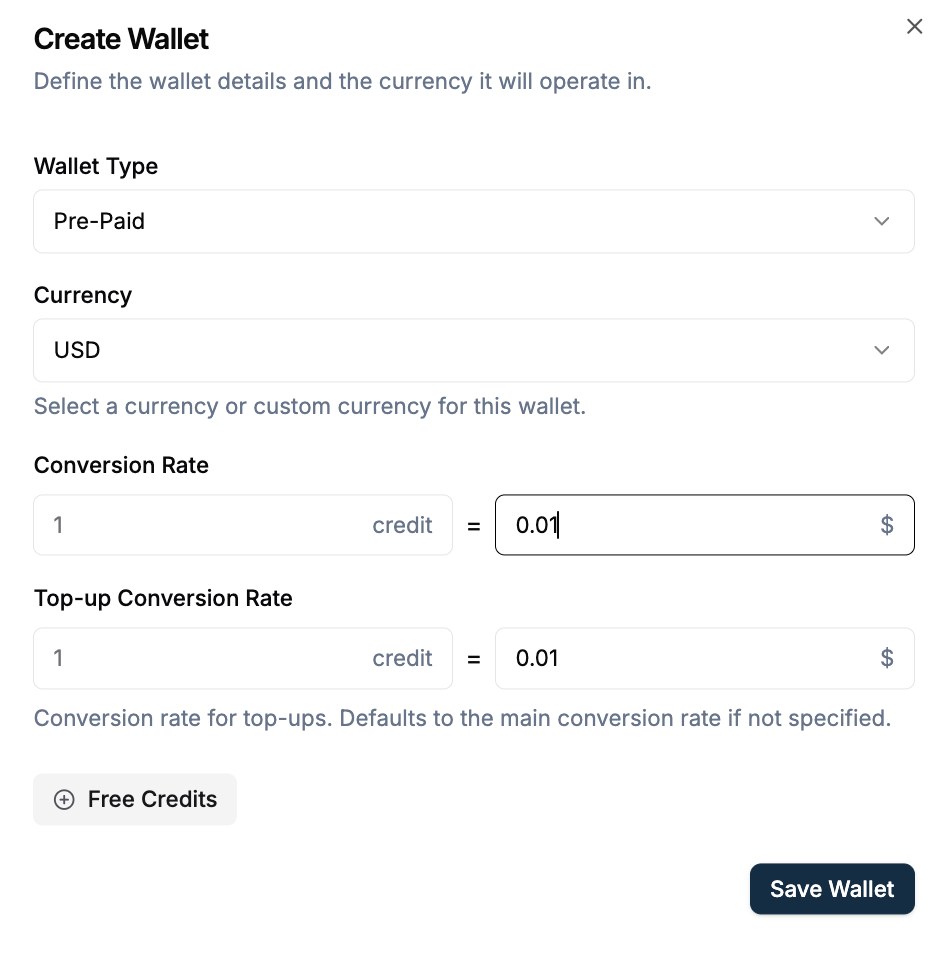 Click **Create Wallet** (or **+ Add**). For **Custom** currency, select a price unit — **Currency** and **Conversion rate** are set from that unit. For fiat, enter **Conversion rate** and optionally **Top-up conversion rate**.
 ### Set conversion rate via API
`POST /v1/wallets` — send `currency` (required), `conversion_rate` (optional, default `"1"`), `topup_conversion_rate` (optional), or `price_unit` (then currency and conversion\_rate come from the price unit).
**Create wallet with explicit rates:**
```json theme={null}
{
"customer_id": "cust_xxx",
"currency": "usd",
"conversion_rate": "0.01",
"topup_conversion_rate": "0.01"
}
```
`POST /v1/wallets/{id}/top-up` — send `amount` (converted with top-up rate) or `credits_to_add`; if both, credits are used.
**Top-up by amount** (uses top-up rate):
```json theme={null}
{
"amount": "10.00",
"transaction_reason": "PURCHASED_CREDIT",
"idempotency_key": "topup-uniq-123"
}
```
### Validation
* **Wallet:** `conversion_rate` defaults to `"1"`. If you set it, it must be > 0. `topup_conversion_rate` must be > 0 if you set it. When you use `price_unit`, that price unit must be Active.
***
## Use cases
Show and charge in credits. Invoice in one currency (e.g. USD).
Set `topup_conversion_rate` so users get more credits per 1 USD. `conversion_rate` is still used for spending and for showing balance.
Set **Top-up conversion rate** lower than **Conversion rate** so 1 USD buys more credits when users top up. Spending and balance still use **Conversion rate**. Example: conversion rate 0.01, top-up rate 0.008 → 1 USD = 125 credits on top-up.
***
## Edge cases
| Case | What happens |
| ---------------------------------------- | ----------------------------------------------------------------------------------------------------------------------- |
| **Missing or zero rate** | Price unit: request fails. Wallet: `conversion_rate` can default to `"1"`. Best: send a valid rate or use `price_unit`. |
| **Invalid or negative rate** | Request fails. Rate must be > 0. |
| **Top-up: amount and credits both sent** | **credits\_to\_add** is used. **amount** is ignored. |
| **Wallet with price\_unit** | `conversion_rate` in the request is ignored. Currency and rate come from the price unit. |
***
## Examples
`conversion_rate = "0.01"`. So 1 credit = 0.01 USD. Top-up 10 USD (same top-up rate) adds 1000 credits. Manual debit 500 credits takes out 5 USD worth.
`conversion_rate = "0.01"`, `topup_conversion_rate = "0.008"`. Normal spend: 1 credit = 0.01 USD. Top-up: 1 USD = 125 credits.
***
### Set conversion rate via API
`POST /v1/wallets` — send `currency` (required), `conversion_rate` (optional, default `"1"`), `topup_conversion_rate` (optional), or `price_unit` (then currency and conversion\_rate come from the price unit).
**Create wallet with explicit rates:**
```json theme={null}
{
"customer_id": "cust_xxx",
"currency": "usd",
"conversion_rate": "0.01",
"topup_conversion_rate": "0.01"
}
```
`POST /v1/wallets/{id}/top-up` — send `amount` (converted with top-up rate) or `credits_to_add`; if both, credits are used.
**Top-up by amount** (uses top-up rate):
```json theme={null}
{
"amount": "10.00",
"transaction_reason": "PURCHASED_CREDIT",
"idempotency_key": "topup-uniq-123"
}
```
### Validation
* **Wallet:** `conversion_rate` defaults to `"1"`. If you set it, it must be > 0. `topup_conversion_rate` must be > 0 if you set it. When you use `price_unit`, that price unit must be Active.
***
## Use cases
Show and charge in credits. Invoice in one currency (e.g. USD).
Set `topup_conversion_rate` so users get more credits per 1 USD. `conversion_rate` is still used for spending and for showing balance.
Set **Top-up conversion rate** lower than **Conversion rate** so 1 USD buys more credits when users top up. Spending and balance still use **Conversion rate**. Example: conversion rate 0.01, top-up rate 0.008 → 1 USD = 125 credits on top-up.
***
## Edge cases
| Case | What happens |
| ---------------------------------------- | ----------------------------------------------------------------------------------------------------------------------- |
| **Missing or zero rate** | Price unit: request fails. Wallet: `conversion_rate` can default to `"1"`. Best: send a valid rate or use `price_unit`. |
| **Invalid or negative rate** | Request fails. Rate must be > 0. |
| **Top-up: amount and credits both sent** | **credits\_to\_add** is used. **amount** is ignored. |
| **Wallet with price\_unit** | `conversion_rate` in the request is ignored. Currency and rate come from the price unit. |
***
## Examples
`conversion_rate = "0.01"`. So 1 credit = 0.01 USD. Top-up 10 USD (same top-up rate) adds 1000 credits. Manual debit 500 credits takes out 5 USD worth.
`conversion_rate = "0.01"`, `topup_conversion_rate = "0.008"`. Normal spend: 1 credit = 0.01 USD. Top-up: 1 USD = 125 credits.
***