> ## Documentation Index
> Fetch the complete documentation index at: https://docs.flexprice.io/llms.txt
> Use this file to discover all available pages before exploring further.
# Manual Debit
> Manually deduct credits from customer wallets for refunds, adjustments, or administrative corrections.
The Manual Wallet Debit feature allows you to manually deduct credits from a customer's wallet. This is essential for handling refunds, billing corrections, chargebacks, and other administrative adjustments.
**Common Use Cases:**
* **Refunds**: Process customer refunds for overcharges or billing errors
* **Billing Adjustments**: Correct incorrect credit allocations
* **Chargebacks**: Handle payment disputes and chargebacks
* **Administrative Corrections**: Fix manual entry errors or system issues
* **Wallet Termination**: Deduct remaining balance when closing a wallet
## How Manual Debit Works
When you debit a wallet, Flexprice automatically:
1. **Validates Balance**: Ensures sufficient credits are available before processing
2. **Consumes Credits**: Deducts credits using a priority-based algorithm (see below)
3. **Updates Balance**: Reduces the wallet balance by the debited amount
4. **Creates Transaction Record**: Maintains a complete audit trail
5. **Triggers Alerts**: Notifies you if the balance falls below configured thresholds
## Credit Consumption Algorithm
Flexprice uses a smart **Priority-Based FIFO** algorithm to determine which credits to consume when processing a debit:
### Consumption Order
Credits are consumed in the following order:
1. **Priority** (Lower number = Higher priority)
* Credits with priority 1 are consumed before priority 2
* Credits without priority are consumed last
2. **Expiry Date** (Earlier expiry first)
* Credits expiring sooner are consumed first to prevent waste
* Credits without expiry dates are consumed last
3. **Credit Amount** (Larger amounts first)
* Among credits with the same priority and expiry, larger amounts are consumed first
* This optimizes the number of transaction updates required
### Example Scenario
Suppose a wallet has the following credits:
| Credits | Priority | Expiry Date | Status |
| ------- | -------- | ----------- | --------- |
| 50 | 1 | 2024-03-01 | Available |
| 30 | 1 | 2024-03-01 | Available |
| 100 | 1 | 2024-03-15 | Available |
| 75 | 2 | 2024-02-20 | Available |
| 200 | None | None | Available |
**If you debit 150 credits**, they will be consumed in this order:
1. **50 credits** from priority 1, expiring 2024-03-01
2. **30 credits** from priority 1, expiring 2024-03-01
3. **70 credits** from priority 1, expiring 2024-03-15 (partial)
The wallet will have 30 credits remaining from the third transaction, plus the untouched 75 and 200 credits.
## Making a Manual Debit via Dashboard
You can easily debit credits from a customer's wallet through the Flexprice dashboard:
### Step 1: Navigate to the Wallet
* Go to **Billing** in the main navigation
* Select **Customers** from the billing section
* Select the customer whose wallet you want to debit
* Navigate to the **Wallet** tab
### Step 2: Access Manual Debit
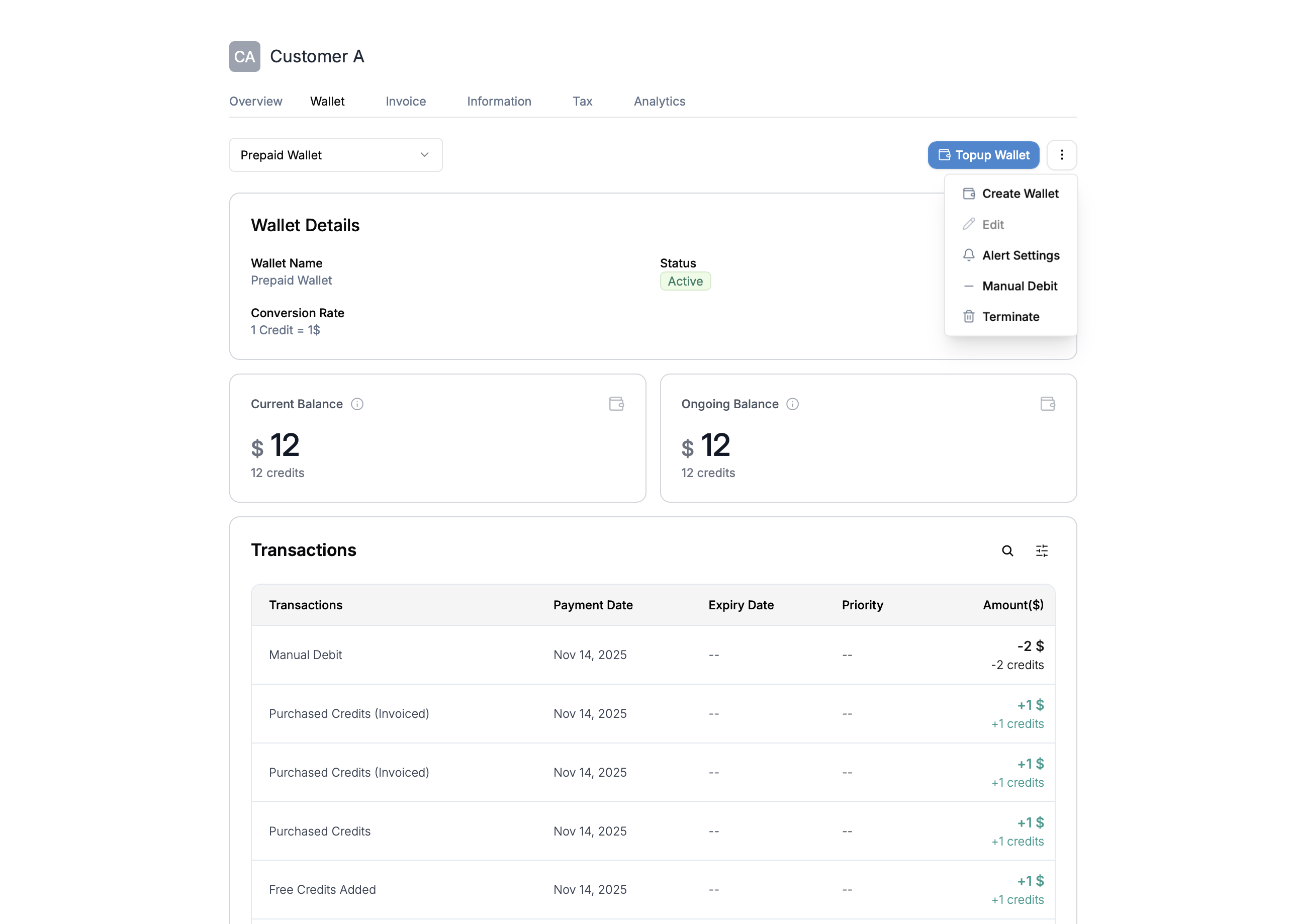
* Click the **three-dot menu (⋮)** in the top right corner of the wallet section
* Select **Manual Debit** from the dropdown menu
 ### Step 3: Enter Debit Details
A "Manual Debit" dialog will appear with the following fields:
### Step 3: Enter Debit Details
A "Manual Debit" dialog will appear with the following fields:
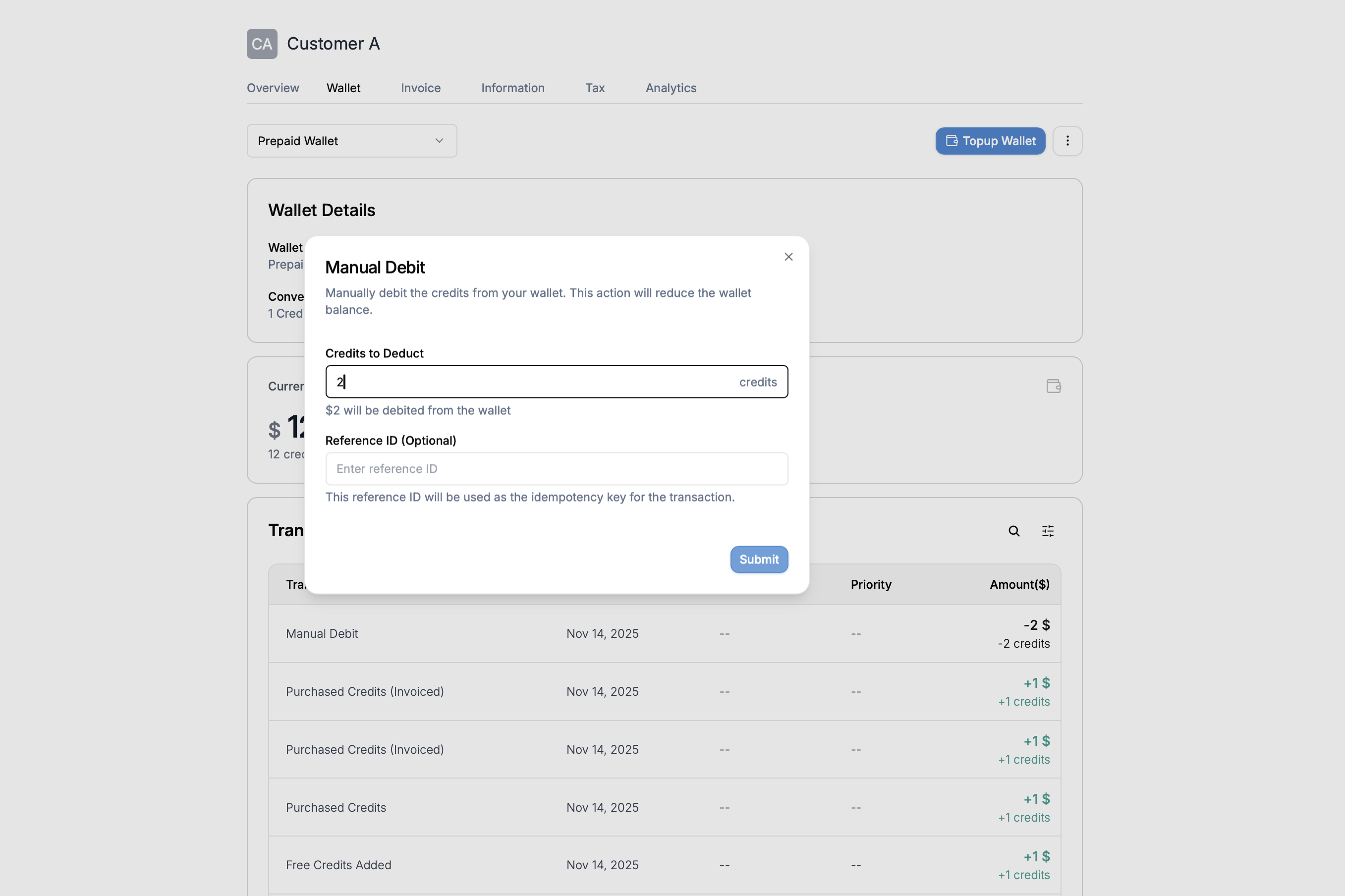 * **Credits to Deduct**: Enter the number of credits you want to debit from the wallet
* The system will show a preview: "\$X will be debited from the wallet"
* **Reference ID (Optional)**: Enter a unique reference ID for this transaction
* This serves as the idempotency key to prevent duplicate debits
* Useful for linking to invoices, tickets, or other reference systems
* Click **Submit** to process the debit
### Step 4: Verify the Transaction
After submitting:
* The wallet balance will be updated immediately
* The debit transaction will appear in the Transactions list
* You'll see "-X credits" in the transaction history
## Making a Manual Debit via API
### Endpoint
```http theme={null}
POST https://api.cloud.flexprice.io/v1/wallets/{wallet_id}/debit
```
### Request Parameters
| Parameter | Type | Required | Description |
| -------------------- | ------ | -------- | ----------------------------------------------------------- |
| `credits` | string | Yes | Amount of credits to debit (decimal format, e.g., "100.50") |
| `transaction_reason` | string | Yes | Reason code for the debit (see Transaction Reasons below) |
| `idempotency_key` | string | Yes | Unique key to prevent duplicate debits |
| `description` | string | No | Human-readable description of the debit |
| `metadata` | object | No | Custom key-value pairs for additional context |
### Transaction Reasons
Use appropriate transaction reason codes to categorize debits:
| Reason Code | Use Case |
| ---------------------- | ------------------------------------------------- |
| `MANUAL_BALANCE_DEBIT` | Administrative corrections and manual adjustments |
### Example Request
```bash theme={null}
curl --request POST \
--url https://api.cloud.flexprice.io/v1/wallets/{id}/debit \
--header 'Content-Type: application/json' \
--header 'x-api-key: ' \
--data '{
"credits": 123,
"description": "",
"idempotency_key": "",
"metadata": {},
"transaction_reason": "MANUAL_BALANCE_DEBIT"
}'
```
### Success Response
```json theme={null}
{
"id": "wallet_0123",
"customer_id": "cust_0123",
"name": "Prepaid Wallet",
"currency": "usd",
"balance": "1587",
"credit_balance": "1587",
"wallet_status": "active",
"auto_topup_trigger": "disabled",
"auto_topup_min_balance": "0",
"auto_topup_amount": "0",
"wallet_type": "PRE_PAID",
"config": {
"allowed_price_types": [
"ALL"
]
},
"conversion_rate": "1",
"alert_enabled": true,
"alert_state": "ok",
"created_at": "2025-11-05T13:41:59.256406Z",
"updated_at": "2025-11-14T15:55:38.19095Z"
}
```
### Error Responses
| Error Code | HTTP Status | Description |
| ------------------------- | ----------- | ---------------------------------- |
| `INSUFFICIENT_BALANCE` | 400 | Wallet doesn't have enough credits |
| `INVALID_CREDITS` | 400 | Credits amount must be positive |
| `MISSING_IDEMPOTENCY_KEY` | 400 | Idempotency key is required |
| `WALLET_NOT_FOUND` | 404 | Wallet doesn't exist |
| `WALLET_NOT_ACTIVE` | 400 | Wallet is not in active status |
### Example Error Response
```json theme={null}
{
"error": {
"code": "INSUFFICIENT_BALANCE",
"message": "insufficient balance",
"hint": "Insufficient balance to process debit operation",
"details": {
"wallet_id": "wallet_abc123",
"amount": "150.50",
"available_balance": "100.00"
}
}
}
```
## Idempotency
The `idempotency_key` parameter is **required** and ensures that duplicate API requests (e.g., due to network timeouts) don't result in multiple debits.
### Best Practices for Idempotency Keys
* Use a **unique identifier** for each logical debit operation
* Include context in the key, e.g., `refund_invoice_123_20240115`
* **Never reuse** idempotency keys across different operations
## Use Case Examples
### Example: Administrative Correction
```bash theme={null}
curl --location 'https://api.cloud.flexprice.io/v1/wallets/{id}/debit' \
--header 'Content-Type: application/json' \
--header 'Accept: application/json' \
--header 'x-api-key: sk_xxxxxxxxxxxx' \
--data '{
"idempotency_key": "Manual-adjustment-123",
"transaction_reason": "MANUAL_BALANCE_DEBIT",
"credits": 1
}'
```
## Important Considerations
### Balance Validation
Before processing a debit, Flexprice:
* Checks that the wallet has sufficient **available credits**
* Excludes expired credits from the calculation
* Returns an error if insufficient balance is found
### Transaction Atomicity
All debit operations are **atomic**:
* Credits are consumed and wallet balance is updated in a single database transaction
* If any step fails, all changes are rolled back
* This ensures data consistency and prevents partial debits
### Audit Trail
Every manual debit creates a complete audit trail:
* Transaction record with type `DEBIT`
* Before and after balances
* Description and metadata
* Transaction reason
* Idempotency key for tracking
* Timestamp and user information
### Alert Integration
After a debit, Flexprice automatically:
* Checks the wallet's low balance alert threshold
* Triggers an alert if the new balance is below the threshold
* Notifies you through configured alert channels
## Best Practices
💡 **Always Use Idempotency Keys**: Protect against duplicate debits by using unique idempotency keys for each operation
💡 **Provide Clear Descriptions**: Include descriptive text and metadata to make audit trails meaningful
💡 **Choose Appropriate Reasons**: Use the correct transaction reason code to categorize debits properly
💡 **Validate Before Debiting**: Check wallet balance before attempting large debits to avoid errors
💡 **Handle Errors Gracefully**: Implement proper error handling, especially for `INSUFFICIENT_BALANCE` errors
💡 **Monitor Alert Notifications**: Watch for low balance alerts after processing debits
## Troubleshooting
### Insufficient Balance Error
**Problem**: API returns `INSUFFICIENT_BALANCE` error
**Solution**:
* Check the wallet's current balance before attempting the debit
* Verify that you're not including expired credits in your calculation
* Consider splitting large debits across multiple operations if needed
### Duplicate Idempotency Key Error
**Problem**: API rejects request due to duplicate idempotency key
**Solution**:
* Ensure each unique debit operation has a unique idempotency key
* Check if the previous operation with the same key completed successfully
* Generate new idempotency keys for each distinct operation
### Wallet Not Active Error
**Problem**: API returns `WALLET_NOT_ACTIVE` error
**Solution**:
* Verify the wallet status is `ACTIVE`
* Check if the wallet has been closed or suspended
* Reactivate the wallet if necessary before debiting
## Related Features
* [Creating a Wallet](/docs/wallet/create) - Learn how to create wallets for customers
* [Top-up Wallet](/docs/wallet/top-up) - Add credits to customer wallets
* [Low Balance Alert](/docs/wallet/low-balance-alert) - Configure balance threshold alerts
* [Prepaid and Promotional Credits](/docs/wallet/prepaid-and-promotional) - Understand credit types
* [Wallet Transactions](/docs/wallet/transactions) - Track and monitor all wallet transactions
* **Credits to Deduct**: Enter the number of credits you want to debit from the wallet
* The system will show a preview: "\$X will be debited from the wallet"
* **Reference ID (Optional)**: Enter a unique reference ID for this transaction
* This serves as the idempotency key to prevent duplicate debits
* Useful for linking to invoices, tickets, or other reference systems
* Click **Submit** to process the debit
### Step 4: Verify the Transaction
After submitting:
* The wallet balance will be updated immediately
* The debit transaction will appear in the Transactions list
* You'll see "-X credits" in the transaction history
## Making a Manual Debit via API
### Endpoint
```http theme={null}
POST https://api.cloud.flexprice.io/v1/wallets/{wallet_id}/debit
```
### Request Parameters
| Parameter | Type | Required | Description |
| -------------------- | ------ | -------- | ----------------------------------------------------------- |
| `credits` | string | Yes | Amount of credits to debit (decimal format, e.g., "100.50") |
| `transaction_reason` | string | Yes | Reason code for the debit (see Transaction Reasons below) |
| `idempotency_key` | string | Yes | Unique key to prevent duplicate debits |
| `description` | string | No | Human-readable description of the debit |
| `metadata` | object | No | Custom key-value pairs for additional context |
### Transaction Reasons
Use appropriate transaction reason codes to categorize debits:
| Reason Code | Use Case |
| ---------------------- | ------------------------------------------------- |
| `MANUAL_BALANCE_DEBIT` | Administrative corrections and manual adjustments |
### Example Request
```bash theme={null}
curl --request POST \
--url https://api.cloud.flexprice.io/v1/wallets/{id}/debit \
--header 'Content-Type: application/json' \
--header 'x-api-key: ' \
--data '{
"credits": 123,
"description": "",
"idempotency_key": "",
"metadata": {},
"transaction_reason": "MANUAL_BALANCE_DEBIT"
}'
```
### Success Response
```json theme={null}
{
"id": "wallet_0123",
"customer_id": "cust_0123",
"name": "Prepaid Wallet",
"currency": "usd",
"balance": "1587",
"credit_balance": "1587",
"wallet_status": "active",
"auto_topup_trigger": "disabled",
"auto_topup_min_balance": "0",
"auto_topup_amount": "0",
"wallet_type": "PRE_PAID",
"config": {
"allowed_price_types": [
"ALL"
]
},
"conversion_rate": "1",
"alert_enabled": true,
"alert_state": "ok",
"created_at": "2025-11-05T13:41:59.256406Z",
"updated_at": "2025-11-14T15:55:38.19095Z"
}
```
### Error Responses
| Error Code | HTTP Status | Description |
| ------------------------- | ----------- | ---------------------------------- |
| `INSUFFICIENT_BALANCE` | 400 | Wallet doesn't have enough credits |
| `INVALID_CREDITS` | 400 | Credits amount must be positive |
| `MISSING_IDEMPOTENCY_KEY` | 400 | Idempotency key is required |
| `WALLET_NOT_FOUND` | 404 | Wallet doesn't exist |
| `WALLET_NOT_ACTIVE` | 400 | Wallet is not in active status |
### Example Error Response
```json theme={null}
{
"error": {
"code": "INSUFFICIENT_BALANCE",
"message": "insufficient balance",
"hint": "Insufficient balance to process debit operation",
"details": {
"wallet_id": "wallet_abc123",
"amount": "150.50",
"available_balance": "100.00"
}
}
}
```
## Idempotency
The `idempotency_key` parameter is **required** and ensures that duplicate API requests (e.g., due to network timeouts) don't result in multiple debits.
### Best Practices for Idempotency Keys
* Use a **unique identifier** for each logical debit operation
* Include context in the key, e.g., `refund_invoice_123_20240115`
* **Never reuse** idempotency keys across different operations
## Use Case Examples
### Example: Administrative Correction
```bash theme={null}
curl --location 'https://api.cloud.flexprice.io/v1/wallets/{id}/debit' \
--header 'Content-Type: application/json' \
--header 'Accept: application/json' \
--header 'x-api-key: sk_xxxxxxxxxxxx' \
--data '{
"idempotency_key": "Manual-adjustment-123",
"transaction_reason": "MANUAL_BALANCE_DEBIT",
"credits": 1
}'
```
## Important Considerations
### Balance Validation
Before processing a debit, Flexprice:
* Checks that the wallet has sufficient **available credits**
* Excludes expired credits from the calculation
* Returns an error if insufficient balance is found
### Transaction Atomicity
All debit operations are **atomic**:
* Credits are consumed and wallet balance is updated in a single database transaction
* If any step fails, all changes are rolled back
* This ensures data consistency and prevents partial debits
### Audit Trail
Every manual debit creates a complete audit trail:
* Transaction record with type `DEBIT`
* Before and after balances
* Description and metadata
* Transaction reason
* Idempotency key for tracking
* Timestamp and user information
### Alert Integration
After a debit, Flexprice automatically:
* Checks the wallet's low balance alert threshold
* Triggers an alert if the new balance is below the threshold
* Notifies you through configured alert channels
## Best Practices
💡 **Always Use Idempotency Keys**: Protect against duplicate debits by using unique idempotency keys for each operation
💡 **Provide Clear Descriptions**: Include descriptive text and metadata to make audit trails meaningful
💡 **Choose Appropriate Reasons**: Use the correct transaction reason code to categorize debits properly
💡 **Validate Before Debiting**: Check wallet balance before attempting large debits to avoid errors
💡 **Handle Errors Gracefully**: Implement proper error handling, especially for `INSUFFICIENT_BALANCE` errors
💡 **Monitor Alert Notifications**: Watch for low balance alerts after processing debits
## Troubleshooting
### Insufficient Balance Error
**Problem**: API returns `INSUFFICIENT_BALANCE` error
**Solution**:
* Check the wallet's current balance before attempting the debit
* Verify that you're not including expired credits in your calculation
* Consider splitting large debits across multiple operations if needed
### Duplicate Idempotency Key Error
**Problem**: API rejects request due to duplicate idempotency key
**Solution**:
* Ensure each unique debit operation has a unique idempotency key
* Check if the previous operation with the same key completed successfully
* Generate new idempotency keys for each distinct operation
### Wallet Not Active Error
**Problem**: API returns `WALLET_NOT_ACTIVE` error
**Solution**:
* Verify the wallet status is `ACTIVE`
* Check if the wallet has been closed or suspended
* Reactivate the wallet if necessary before debiting
## Related Features
* [Creating a Wallet](/docs/wallet/create) - Learn how to create wallets for customers
* [Top-up Wallet](/docs/wallet/top-up) - Add credits to customer wallets
* [Low Balance Alert](/docs/wallet/low-balance-alert) - Configure balance threshold alerts
* [Prepaid and Promotional Credits](/docs/wallet/prepaid-and-promotional) - Understand credit types
* [Wallet Transactions](/docs/wallet/transactions) - Track and monitor all wallet transactions