> ## Documentation Index
> Fetch the complete documentation index at: https://docs.flexprice.io/llms.txt
> Use this file to discover all available pages before exploring further.
# HubSpot Connection Setup
> Connect HubSpot to Flexprice with a legacy private app, choose what Flexprice pushes to HubSpot, and subscribe HubSpot to deal events
The HubSpot connection links Flexprice to your HubSpot account through a HubSpot legacy private app. Flexprice uses the app's access token to read deals and contacts and to create invoices, quotes, and line items in HubSpot. It uses the app's client secret to verify the deal events that HubSpot sends to Flexprice.
## What the HubSpot integration syncs
| Sync | Direction | Runs when | Turned on by |
| ---------------------------------------------------- | -------------------- | -------------------------------------------------------------- | -------------------------------------------------- |
| [Customer sync](/integrations/hubspot/customer-sync) | HubSpot to Flexprice | A deal moves to Closed won, or a deal is created | The deal webhook subscriptions in your HubSpot app |
| [Quote sync](/integrations/hubspot/quote-sync) | Flexprice to HubSpot | A subscription is created as a draft | The **Quotes** toggle |
| [Deal sync](/integrations/hubspot/deal-sync) | Flexprice to HubSpot | A subscription is created, or its quantities or add-ons change | The **Deals** toggle |
| [Invoice sync](/integrations/hubspot/invoice-sync) | Flexprice to HubSpot | An invoice is finalized | The **Invoices** toggle |
Flexprice does not sync payments, plans, or prices with HubSpot, and it does not read invoices back from HubSpot.
## Before you connect HubSpot
* **HubSpot super admin access.** HubSpot only lets super admins create private apps.
* **The Flexprice environment for the connection.** The webhook URL that HubSpot calls contains the tenant and environment IDs of that environment, so create the connection in the environment you want customers to land in.
* **A HubSpot quote template**, if you plan to use quote sync. HubSpot only publishes quotes that have a template, and Flexprice attaches the first template in your account.
## Step 1: Create a HubSpot legacy private app
In your HubSpot account, go to **Development**, then click **Legacy apps** in the left sidebar.
The page encourages you to build new apps on HubSpot's newer developer platform instead. Create a legacy app anyway: the Flexprice connection uses a legacy private app's access token and client secret.
Click **Create legacy app**, then select **Private**. On the **Basic info** tab, enter a name such as `Flexprice`.
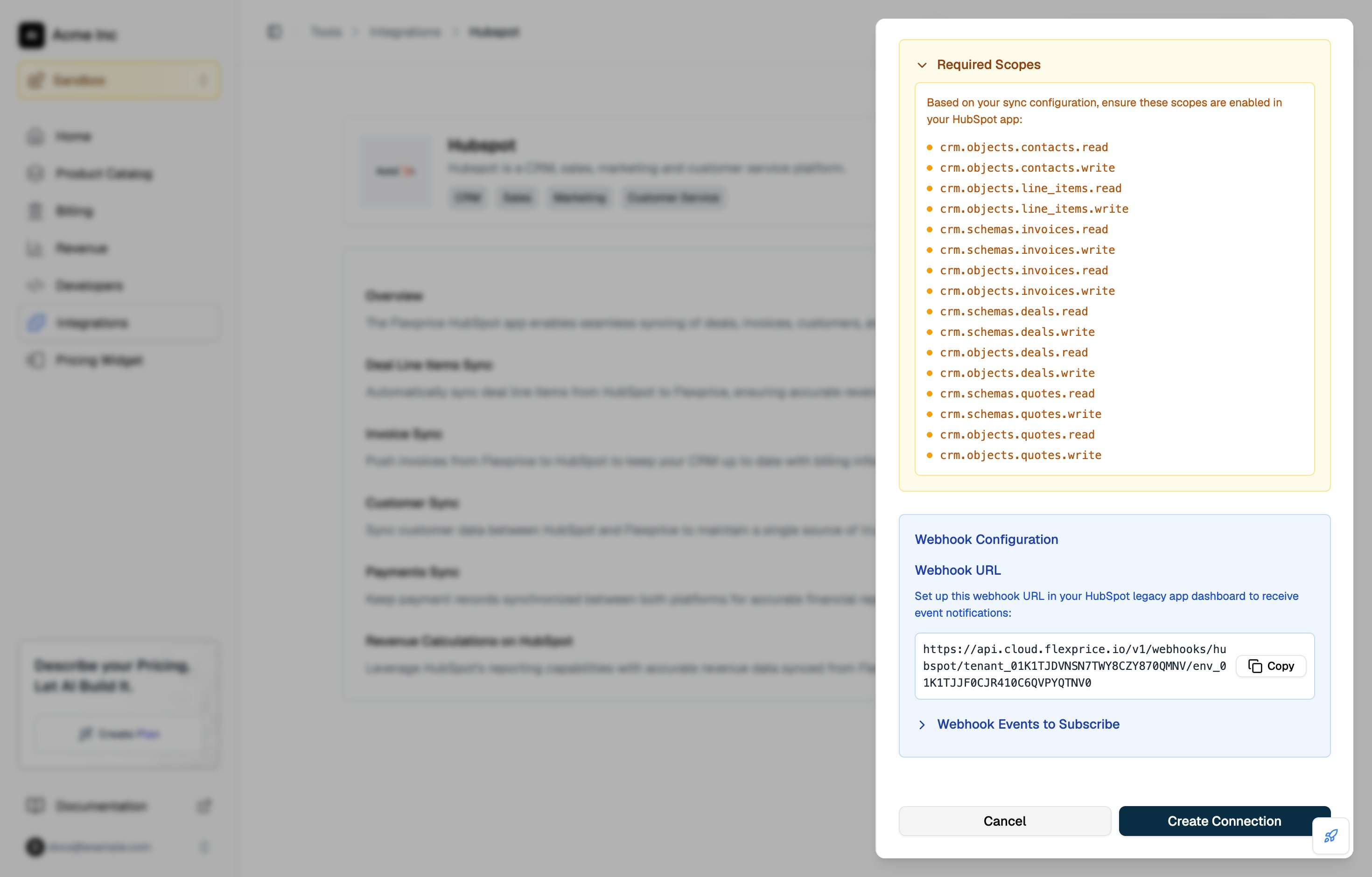
On the **Scopes** tab, click **Add new scope** and select the scopes for the syncs you plan to use, listed in the table below. Click **Update**.
Click **Create app**, review the notice about the access token, then click **Continue creating**.
### HubSpot scopes for each Flexprice sync
| Sync | Scopes |
| ---------------- | ----------------------------------------------------------------------------------------------------------------------------------------------------------------------------------- |
| Every connection | `crm.objects.contacts.read`, `crm.objects.contacts.write` |
| Customer sync | `crm.objects.deals.read` |
| Invoice sync | `crm.objects.invoices.read`, `crm.objects.invoices.write`, `crm.schemas.invoices.read`, `crm.schemas.invoices.write`, `crm.objects.line_items.read`, `crm.objects.line_items.write` |
| Deal sync | `crm.objects.deals.read`, `crm.objects.deals.write`, `crm.schemas.deals.read`, `crm.schemas.deals.write`, `crm.objects.line_items.read`, `crm.objects.line_items.write` |
| Quote sync | `crm.objects.quotes.read`, `crm.objects.quotes.write`, `crm.schemas.quotes.read`, `crm.schemas.quotes.write`, `crm.objects.line_items.read`, `crm.objects.line_items.write` |
The **Required Scopes** panel in the Flexprice connection drawer lists the scopes for the syncs you turn on. It lists `crm.objects.deals.read` only when deal sync is on, but customer sync also needs it to read each deal and its contacts. HubSpot prompts you to add it when you subscribe to deal events in Step 4.
 ## Step 2: Copy the HubSpot access token and client secret
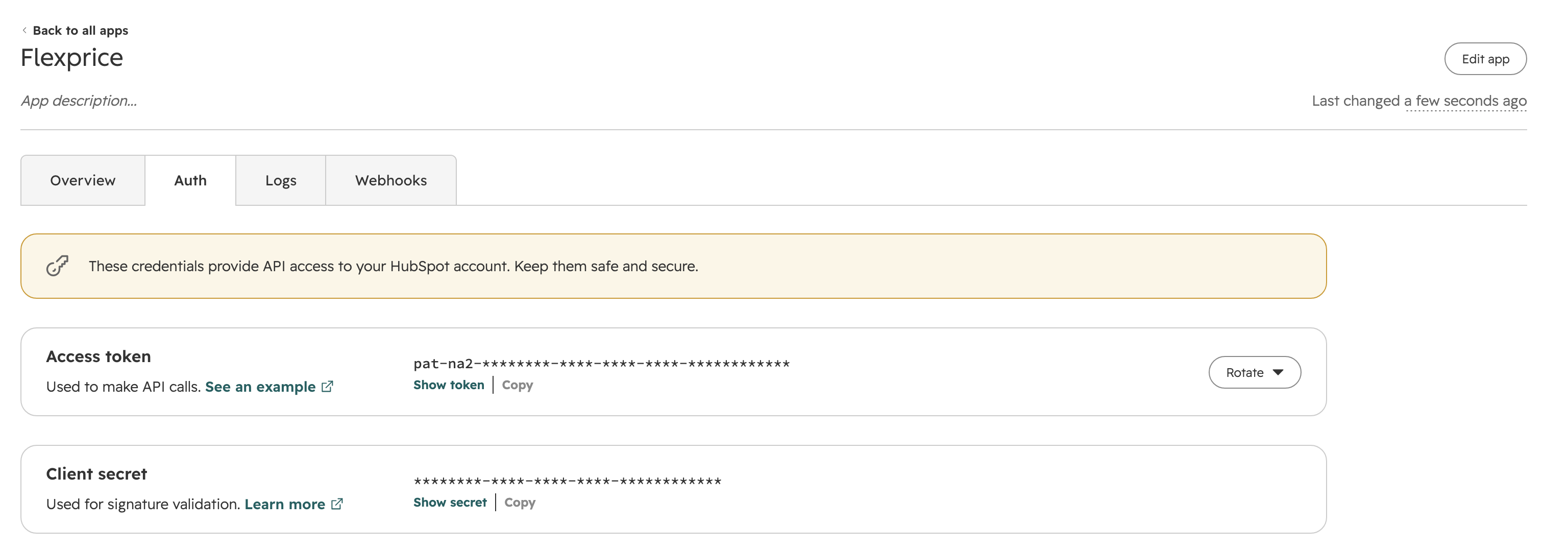
Open your app from **Development** → **Legacy apps**, then click the **Auth** tab.
| Credential | Where to find it | What Flexprice uses it for |
| ----------------- | ------------------------------------------------------------------ | ------------------------------------------------------------------------------ |
| **Access token** | Click **Show token**, then **Copy**. The token starts with `pat-`. | Every API call Flexprice makes to HubSpot |
| **Client secret** | Click **Show secret**. | Verifying the `X-HubSpot-Signature-v3` header on the deal events HubSpot sends |
## Step 2: Copy the HubSpot access token and client secret
Open your app from **Development** → **Legacy apps**, then click the **Auth** tab.
| Credential | Where to find it | What Flexprice uses it for |
| ----------------- | ------------------------------------------------------------------ | ------------------------------------------------------------------------------ |
| **Access token** | Click **Show token**, then **Copy**. The token starts with `pat-`. | Every API call Flexprice makes to HubSpot |
| **Client secret** | Click **Show secret**. | Verifying the `X-HubSpot-Signature-v3` header on the deal events HubSpot sends |
 ## Step 3: Create the HubSpot connection in Flexprice
### Connecting HubSpot from the Flexprice dashboard
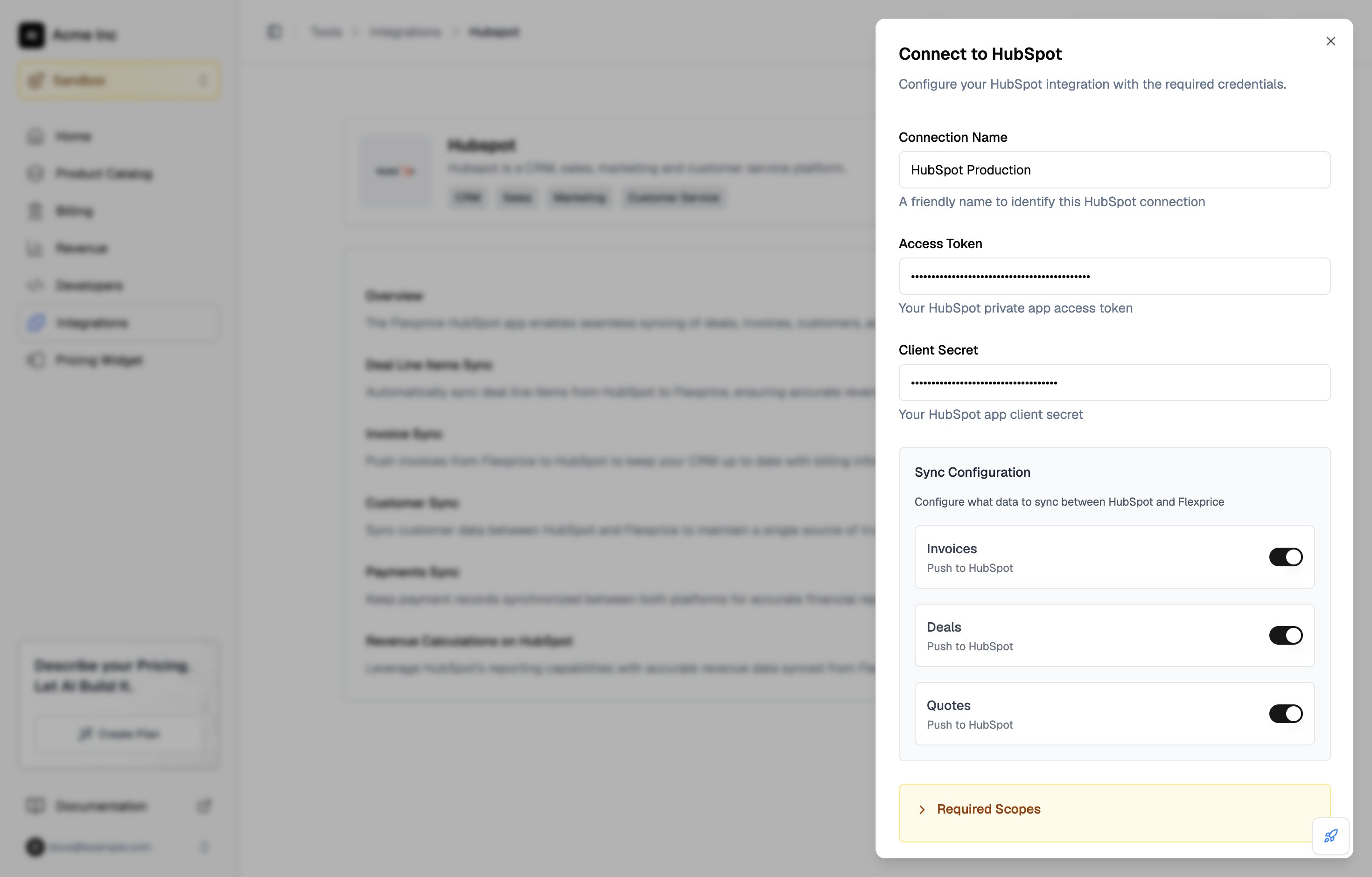
In the Flexprice dashboard, open **Integrations**, select **HubSpot**, and click **Add a connection**.
Fill in **Connection Name**, then paste the **Access Token** and **Client Secret** from Step 2.
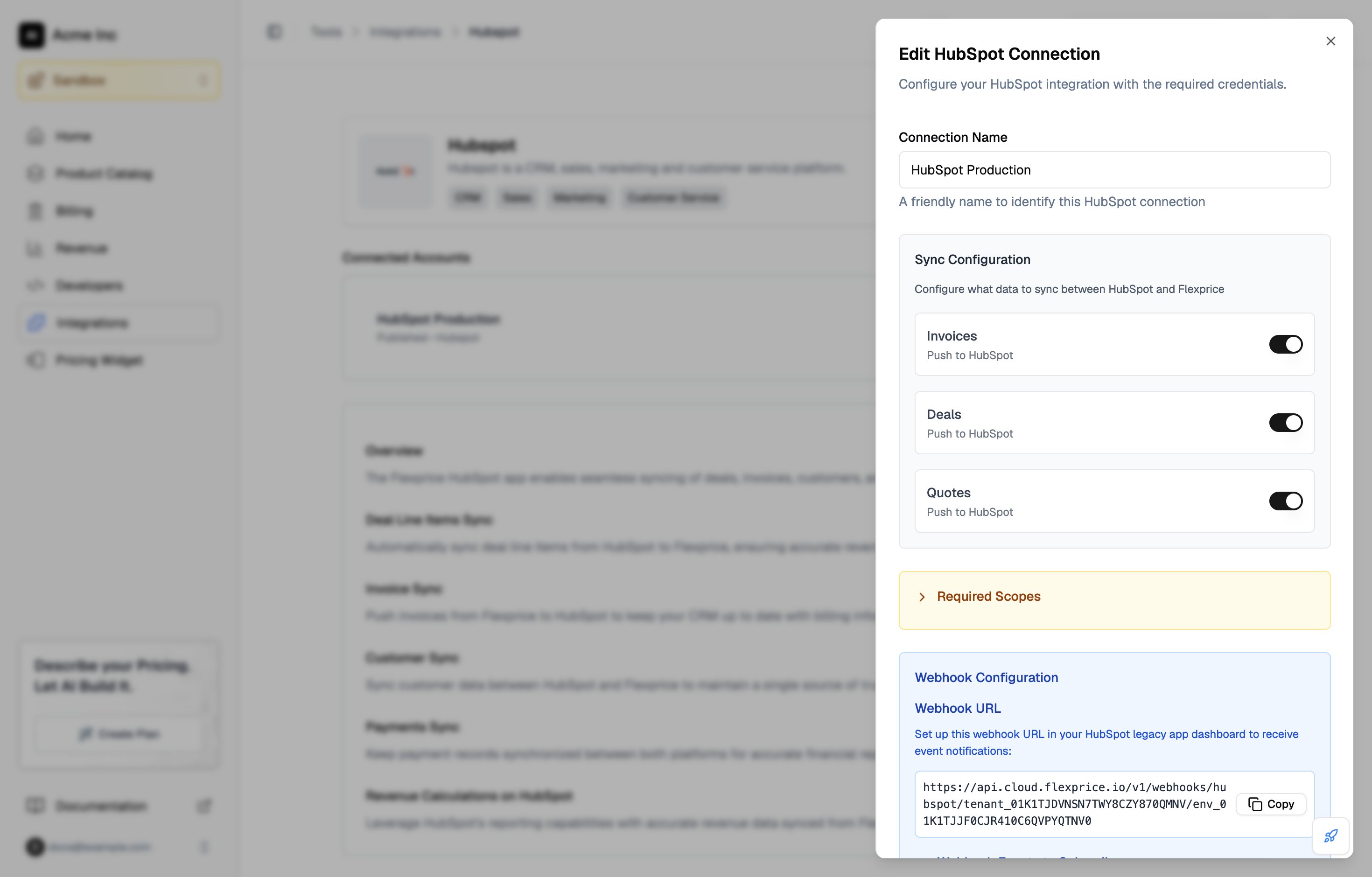
Under **Sync Configuration**, turn on **Invoices**, **Deals**, and **Quotes** for the syncs you want. All three are off by default.
## Step 3: Create the HubSpot connection in Flexprice
### Connecting HubSpot from the Flexprice dashboard
In the Flexprice dashboard, open **Integrations**, select **HubSpot**, and click **Add a connection**.
Fill in **Connection Name**, then paste the **Access Token** and **Client Secret** from Step 2.
Under **Sync Configuration**, turn on **Invoices**, **Deals**, and **Quotes** for the syncs you want. All three are off by default.
 Under **Webhook Configuration**, click **Copy** next to the webhook URL. You paste it into HubSpot in Step 4. Expand **Webhook Events to Subscribe** to see the deal event HubSpot needs to send.
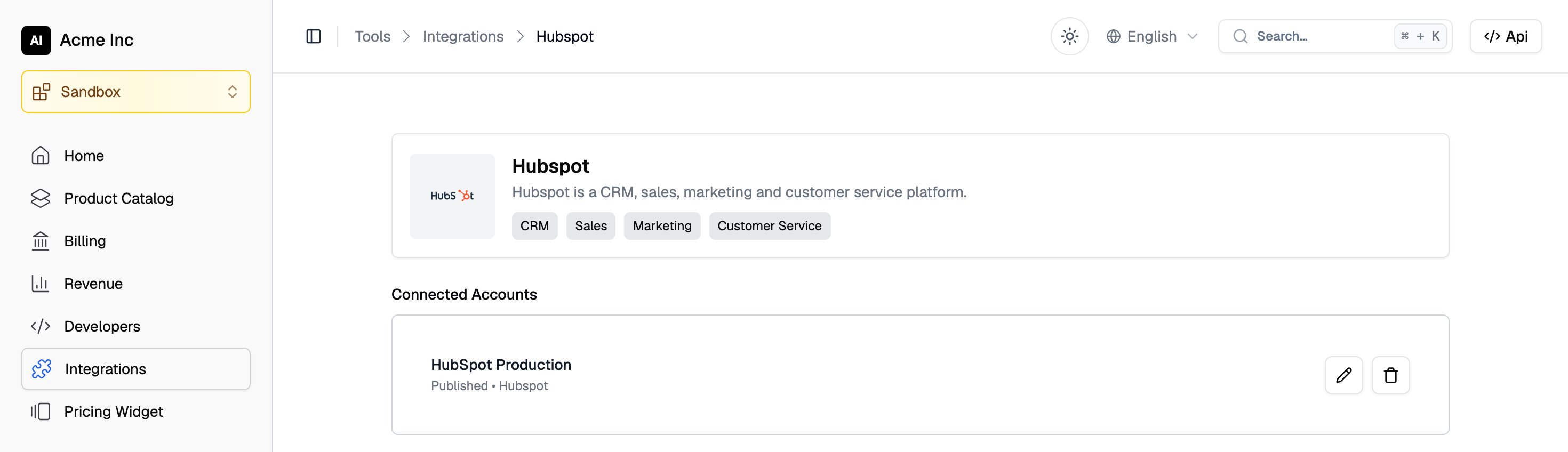
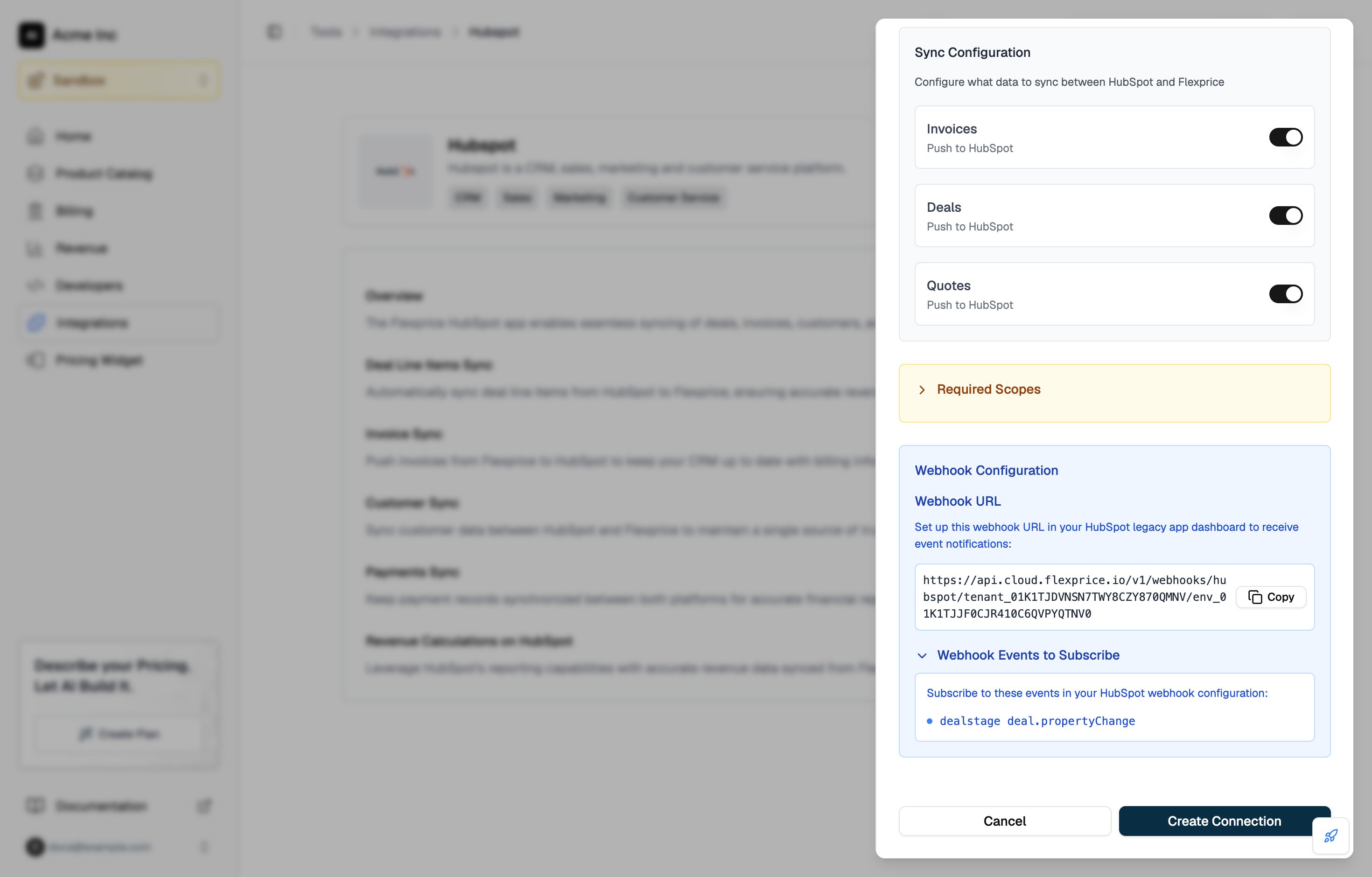 Click **Create Connection**. The connection appears under **Connected Accounts** on the HubSpot integration page.
 ### Creating the HubSpot connection with the API
```bash theme={null}
curl -X POST https://api.cloud.flexprice.io/v1/connections \
-H "x-api-key: " \
-H "X-Environment-ID: " \
-H "Content-Type: application/json" \
-d '{
"name": "HubSpot Production",
"provider_type": "hubspot",
"encrypted_secret_data": {
"access_token": "pat-na1-...",
"client_secret": ""
},
"sync_config": {
"invoice": { "inbound": false, "outbound": true },
"deal": { "inbound": false, "outbound": true },
"quote": { "inbound": false, "outbound": true }
}
}'
```
| Field | Required | Description |
| ------------------------------------- | -------- | --------------------------------------------------------------- |
| `provider_type` | Yes | Always `hubspot` |
| `encrypted_secret_data.access_token` | Yes | The private app's access token. Flexprice encrypts it at rest. |
| `encrypted_secret_data.client_secret` | Yes | The private app's client secret. Flexprice encrypts it at rest. |
| `sync_config.invoice.outbound` | No | Push finalized invoices to HubSpot |
| `sync_config.deal.outbound` | No | Push subscription line items to the customer's HubSpot deal |
| `sync_config.quote.outbound` | No | Create a HubSpot quote for each draft subscription |
If you leave out `sync_config`, every sync is off. Deals and quotes only sync outbound, so Flexprice rejects `inbound: true` for either of them.
## Step 4: Subscribe HubSpot to deal events
Customer sync starts when HubSpot sends a deal event to Flexprice. Set this up in the same private app:
In HubSpot, open your app, click **Edit app** in the top right, then open the **Webhooks** tab.
Under **Target URL**, paste the webhook URL you copied in Step 3. It has this format:
```
https://api.cloud.flexprice.io/v1/webhooks/hubspot//
```
Copy it from the connection drawer rather than typing it, because the host depends on your Flexprice region. HubSpot already shows `https://` in front of the field, so paste the rest of the URL after it.
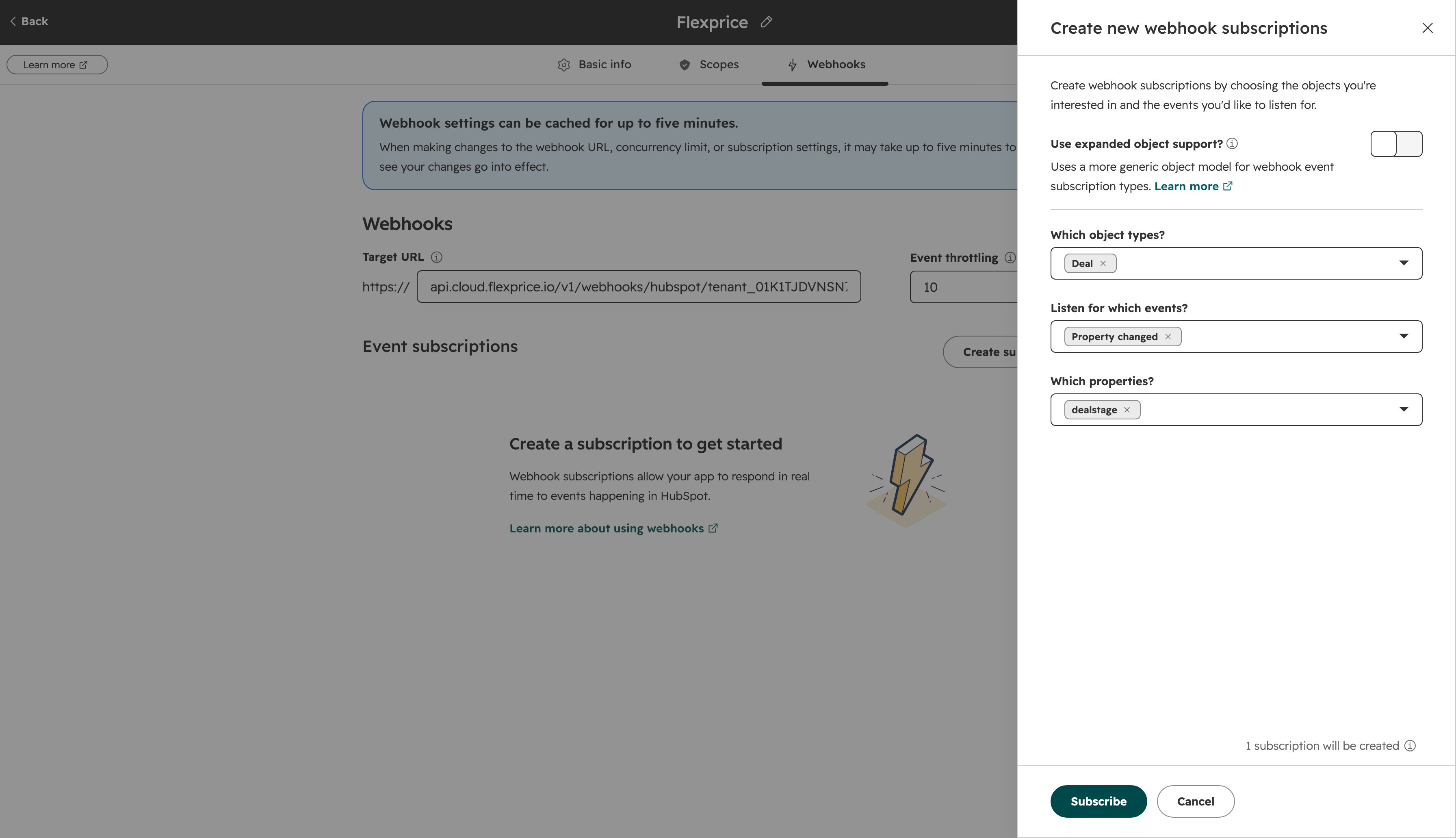
Click **Create subscription**. In the panel, choose **Deal** under **Which object types?**, **Property changed** under **Listen for which events?**, and **dealstage** under **Which properties?**. Click **Subscribe**.
Leave **Use expanded object support?** off. It switches HubSpot to generic event types, and Flexprice only reads `deal.propertyChange` and `deal.creation`.
### Creating the HubSpot connection with the API
```bash theme={null}
curl -X POST https://api.cloud.flexprice.io/v1/connections \
-H "x-api-key: " \
-H "X-Environment-ID: " \
-H "Content-Type: application/json" \
-d '{
"name": "HubSpot Production",
"provider_type": "hubspot",
"encrypted_secret_data": {
"access_token": "pat-na1-...",
"client_secret": ""
},
"sync_config": {
"invoice": { "inbound": false, "outbound": true },
"deal": { "inbound": false, "outbound": true },
"quote": { "inbound": false, "outbound": true }
}
}'
```
| Field | Required | Description |
| ------------------------------------- | -------- | --------------------------------------------------------------- |
| `provider_type` | Yes | Always `hubspot` |
| `encrypted_secret_data.access_token` | Yes | The private app's access token. Flexprice encrypts it at rest. |
| `encrypted_secret_data.client_secret` | Yes | The private app's client secret. Flexprice encrypts it at rest. |
| `sync_config.invoice.outbound` | No | Push finalized invoices to HubSpot |
| `sync_config.deal.outbound` | No | Push subscription line items to the customer's HubSpot deal |
| `sync_config.quote.outbound` | No | Create a HubSpot quote for each draft subscription |
If you leave out `sync_config`, every sync is off. Deals and quotes only sync outbound, so Flexprice rejects `inbound: true` for either of them.
## Step 4: Subscribe HubSpot to deal events
Customer sync starts when HubSpot sends a deal event to Flexprice. Set this up in the same private app:
In HubSpot, open your app, click **Edit app** in the top right, then open the **Webhooks** tab.
Under **Target URL**, paste the webhook URL you copied in Step 3. It has this format:
```
https://api.cloud.flexprice.io/v1/webhooks/hubspot//
```
Copy it from the connection drawer rather than typing it, because the host depends on your Flexprice region. HubSpot already shows `https://` in front of the field, so paste the rest of the URL after it.
Click **Create subscription**. In the panel, choose **Deal** under **Which object types?**, **Property changed** under **Listen for which events?**, and **dealstage** under **Which properties?**. Click **Subscribe**.
Leave **Use expanded object support?** off. It switches HubSpot to generic event types, and Flexprice only reads `deal.propertyChange` and `deal.creation`.
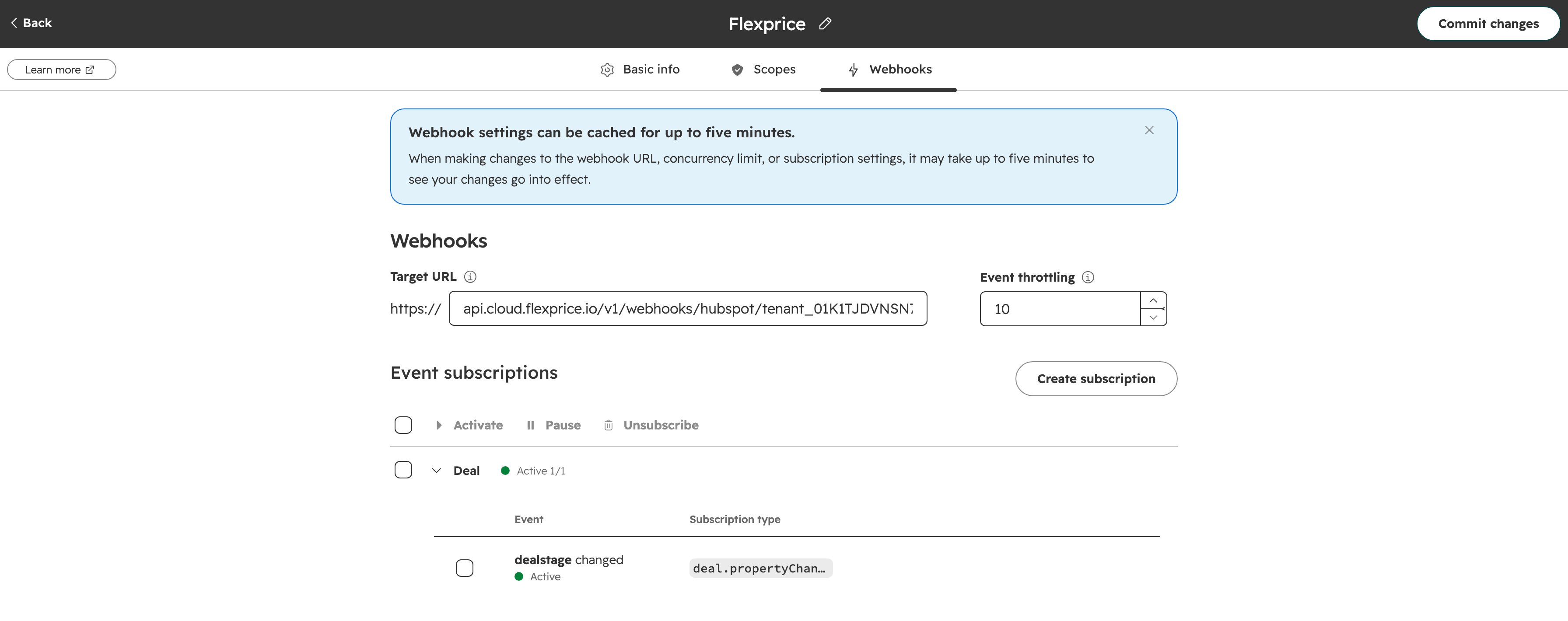
 The subscription appears under **Event subscriptions** as **dealstage changed**, with the subscription type `deal.propertyChange`. Click **Commit changes** in the top right.
 ### HubSpot deal events Flexprice handles
| HubSpot subscription | Event type | What Flexprice does |
| --------------------------------------------- | ------------------------------------ | ---------------------------------------------------------------------------------------------------------------- |
| **Deal**, **Property changed**, **dealstage** | `deal.propertyChange` on `dealstage` | Imports the deal's contacts as customers when the stage changes to `closedwon`. Other stage changes are ignored. |
| **Deal**, **Created** (optional) | `deal.creation` | Imports the deal's contacts as soon as the deal is created, before it is won. |
The connection drawer asks for the deal stage subscription only. Add the **Created** subscription if you want customers in Flexprice for every new deal, not only for won deals.
Flexprice matches the stage whose internal value is `closedwon`, which is the **Closed won** stage of HubSpot's default sales pipeline. Deals that close in other pipelines have different stage IDs, so Flexprice does not import their contacts.
Flexprice answers every request from HubSpot with `200 OK`, including requests it ignores or rejects, so HubSpot never retries them. A passing **Test** in HubSpot's webhook panel only shows that the URL is reachable. To confirm that deal events are processed, close a test deal and check that its contacts appear as customers in Flexprice.
## Changing HubSpot connection settings and credentials
To change the connection name or turn syncs on or off, open **Integrations** → **HubSpot** in the Flexprice dashboard and click the pencil icon next to the connection under **Connected Accounts**. The edit drawer does not show the access token or client secret fields.
### HubSpot deal events Flexprice handles
| HubSpot subscription | Event type | What Flexprice does |
| --------------------------------------------- | ------------------------------------ | ---------------------------------------------------------------------------------------------------------------- |
| **Deal**, **Property changed**, **dealstage** | `deal.propertyChange` on `dealstage` | Imports the deal's contacts as customers when the stage changes to `closedwon`. Other stage changes are ignored. |
| **Deal**, **Created** (optional) | `deal.creation` | Imports the deal's contacts as soon as the deal is created, before it is won. |
The connection drawer asks for the deal stage subscription only. Add the **Created** subscription if you want customers in Flexprice for every new deal, not only for won deals.
Flexprice matches the stage whose internal value is `closedwon`, which is the **Closed won** stage of HubSpot's default sales pipeline. Deals that close in other pipelines have different stage IDs, so Flexprice does not import their contacts.
Flexprice answers every request from HubSpot with `200 OK`, including requests it ignores or rejects, so HubSpot never retries them. A passing **Test** in HubSpot's webhook panel only shows that the URL is reachable. To confirm that deal events are processed, close a test deal and check that its contacts appear as customers in Flexprice.
## Changing HubSpot connection settings and credentials
To change the connection name or turn syncs on or off, open **Integrations** → **HubSpot** in the Flexprice dashboard and click the pencil icon next to the connection under **Connected Accounts**. The edit drawer does not show the access token or client secret fields.
 To use a new access token or client secret, delete the HubSpot connection and create it again with the new values. Links between Flexprice customers and HubSpot contacts, invoices, and line items are stored separately from the connection, so they are kept.
When you rotate the access token in HubSpot, choose **Rotate and expire later**. The old token keeps working for 7 days, which gives you time to recreate the connection before it expires.
## Troubleshooting the HubSpot connection
| Issue | Cause | Solution |
| ------------------------------------------------------------ | --------------------------------------------------------------------------------------------------------- | --------------------------------------------------------------------------------------------------------------------------------------------------------------------------- |
| No customers appear after a deal is won | The webhook subscription is missing or paused, or its target URL points at another environment | On the app's **Webhooks** tab, check the subscription and the target URL. The tenant and environment IDs in the URL must belong to the environment that has the connection. |
| HubSpot shows successful deliveries, but no customers appear | The client secret in Flexprice does not match the app's client secret, so Flexprice discards the requests | Recreate the connection with the secret from the app's **Auth** tab |
| Contacts of deals won in a custom pipeline are not imported | Flexprice only recognises the `closedwon` stage of the default sales pipeline | Use the default sales pipeline for these deals, or add the **Created** deal subscription |
| Invoices, deals, or quotes do not appear in HubSpot | The sync toggle is off, or the app is missing scopes | Turn on the toggle on the connection and add the scopes from Step 1 |
| Every HubSpot call starts failing | The access token was rotated or expired | Recreate the connection with the current token |
To see what HubSpot sent and how Flexprice responded, open your app in HubSpot, click the **Logs** tab, then click **Webhooks**.
## HubSpot sync guides
How contacts on HubSpot deals become Flexprice customers.
How draft subscriptions become draft HubSpot quotes.
How subscription line items and the deal amount reach the HubSpot deal.
How finalized invoices are pushed to HubSpot.
To use a new access token or client secret, delete the HubSpot connection and create it again with the new values. Links between Flexprice customers and HubSpot contacts, invoices, and line items are stored separately from the connection, so they are kept.
When you rotate the access token in HubSpot, choose **Rotate and expire later**. The old token keeps working for 7 days, which gives you time to recreate the connection before it expires.
## Troubleshooting the HubSpot connection
| Issue | Cause | Solution |
| ------------------------------------------------------------ | --------------------------------------------------------------------------------------------------------- | --------------------------------------------------------------------------------------------------------------------------------------------------------------------------- |
| No customers appear after a deal is won | The webhook subscription is missing or paused, or its target URL points at another environment | On the app's **Webhooks** tab, check the subscription and the target URL. The tenant and environment IDs in the URL must belong to the environment that has the connection. |
| HubSpot shows successful deliveries, but no customers appear | The client secret in Flexprice does not match the app's client secret, so Flexprice discards the requests | Recreate the connection with the secret from the app's **Auth** tab |
| Contacts of deals won in a custom pipeline are not imported | Flexprice only recognises the `closedwon` stage of the default sales pipeline | Use the default sales pipeline for these deals, or add the **Created** deal subscription |
| Invoices, deals, or quotes do not appear in HubSpot | The sync toggle is off, or the app is missing scopes | Turn on the toggle on the connection and add the scopes from Step 1 |
| Every HubSpot call starts failing | The access token was rotated or expired | Recreate the connection with the current token |
To see what HubSpot sent and how Flexprice responded, open your app in HubSpot, click the **Logs** tab, then click **Webhooks**.
## HubSpot sync guides
How contacts on HubSpot deals become Flexprice customers.
How draft subscriptions become draft HubSpot quotes.
How subscription line items and the deal amount reach the HubSpot deal.
How finalized invoices are pushed to HubSpot.