> ## Documentation Index
> Fetch the complete documentation index at: https://docs.flexprice.io/llms.txt
> Use this file to discover all available pages before exploring further.
# How to Set Up Azure Marketplace
> Complete guide to creating your Azure Marketplace offer and giving Flexprice your Microsoft Entra app credentials
## Overview
The Azure Marketplace integration reports a subscription's Flexprice-computed usage to your Azure Marketplace offer, going forward from when it is set up. You sell and manage your offer on Azure Marketplace yourself; Flexprice's role is to compute usage and report it, so Azure can bill the buyer and pay you out.
Setting this up is a one-time job with three parts:
* **Your Azure offer**: a transactable SaaS offer with a single metered dimension, priced so Azure bills exactly what Flexprice computes
* **Entra app credentials**: let Flexprice authenticate as the app registered on your offer and report usage into your Azure account
* **A Flexprice connection**: stores those credentials so reporting can run
Once this is done, you link each buyer's Azure subscription to a Flexprice subscription. That is covered in [Azure Marketplace Agreement Registration](/integrations/marketplace-integration/azure/agreement-registration).
## Prerequisites
Before setting up your Azure Marketplace connection, ensure you have:
1. **A Partner Center account** - Enrolled to publish transactable SaaS offers on Azure Marketplace
2. **Access to your Microsoft Entra ID tenant** - To register an app and generate a client secret
## Step 1: Create Your Azure Marketplace Offer
Create your transactable SaaS offer in Partner Center. The integration supports plans priced with **exactly one metered dimension**.
On the plan's **Pricing and availability** tab, select **Flat rate**, and for every contract duration and billing term you configure, set the **price per charge** to **`$0`**. All revenue flows through the metered dimension you add next, not the recurring charge.
A custom meter dimension is only available on the flat rate model. The per user model does not support it.
Add **one** custom meter dimension to the plan (**Add a Custom Meter Dimension**). Azure makes every field immutable once the offer is published.
| Field | Value |
| ----------------------------- | ------------------------------------------------------------------------------------------------------------------------------- |
| **Dimension count** | Exactly one |
| **ID** | Your choice, for example `usage_fee`. This is what Flexprice reports against — copy it, you need it when registering agreements |
| **Display Name** | Your choice, shown to the buyer, for example "Usage Fee" |
| **Unit of Measure** | Your choice, a free-text description of the billing unit, for example "per cent of usage" |
| **Price per unit in USD** | `0.01` |
| **Quantity included in base** | `0`, for every contract duration you enable on the plan |
The price per unit must be exactly `0.01`, and the price per charge must be `0` for every contract duration and billing term. Any other value scales what Azure bills your buyers by that factor.
Billing dimensions are shared across all plans on an offer. If your offer has several plans, each one carries its own plan ID, so register each as a separate Flexprice plan. See [Agreement Registration](/integrations/marketplace-integration/azure/agreement-registration).
## Step 2: Set Up Authentication for Flexprice to Meter on Your Behalf
Flexprice reports usage by authenticating as an app registered in your own Microsoft Entra ID tenant. You register the app, generate a client secret, make the Marketplace metering API addressable from your tenant, and enter the app on your offer.
Flexprice creates nothing in your Azure tenant and never touches Partner Center. It receives three strings you generate and uses them to request access tokens.
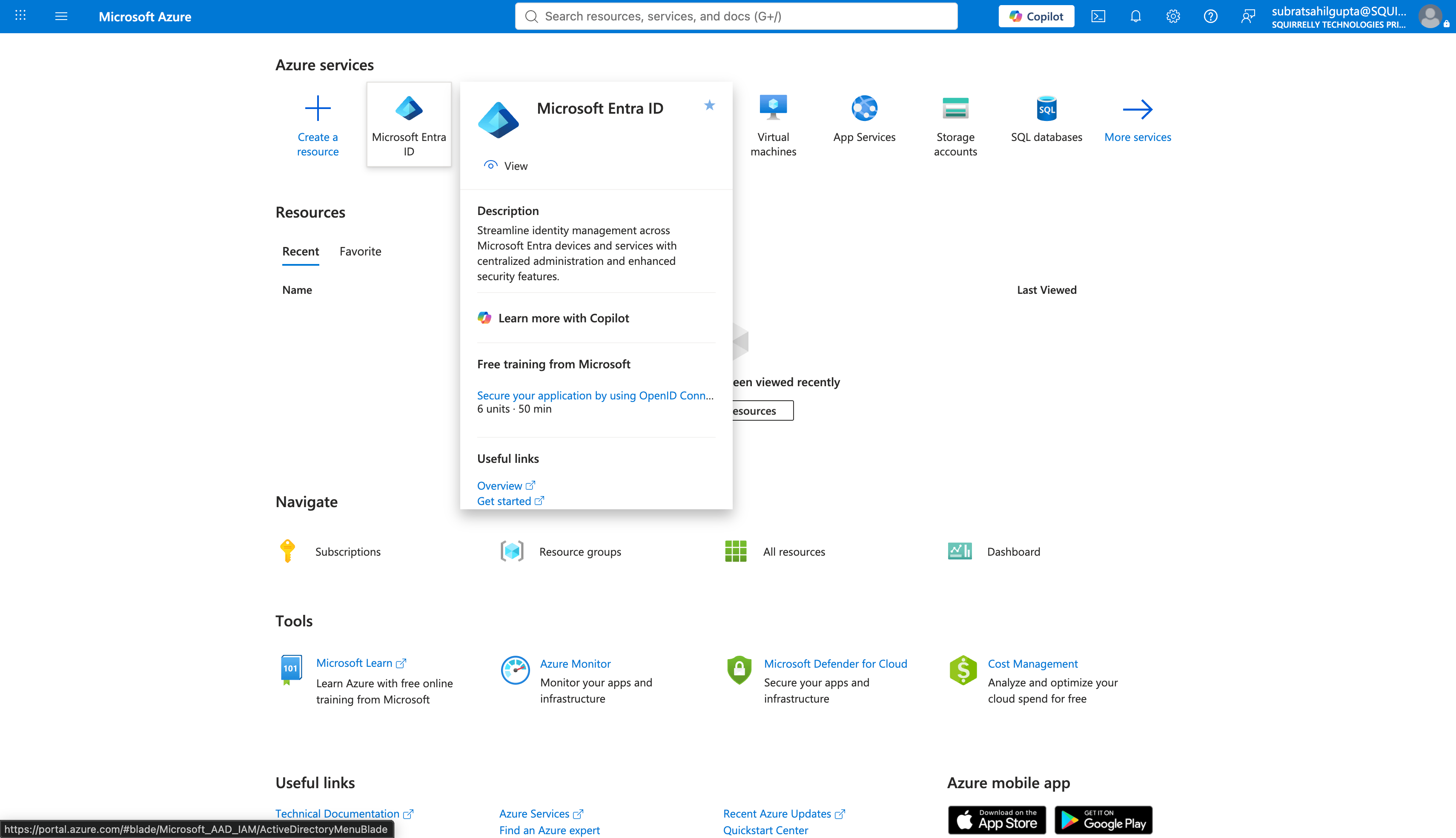
In the Azure portal, go to **Microsoft Entra ID**.
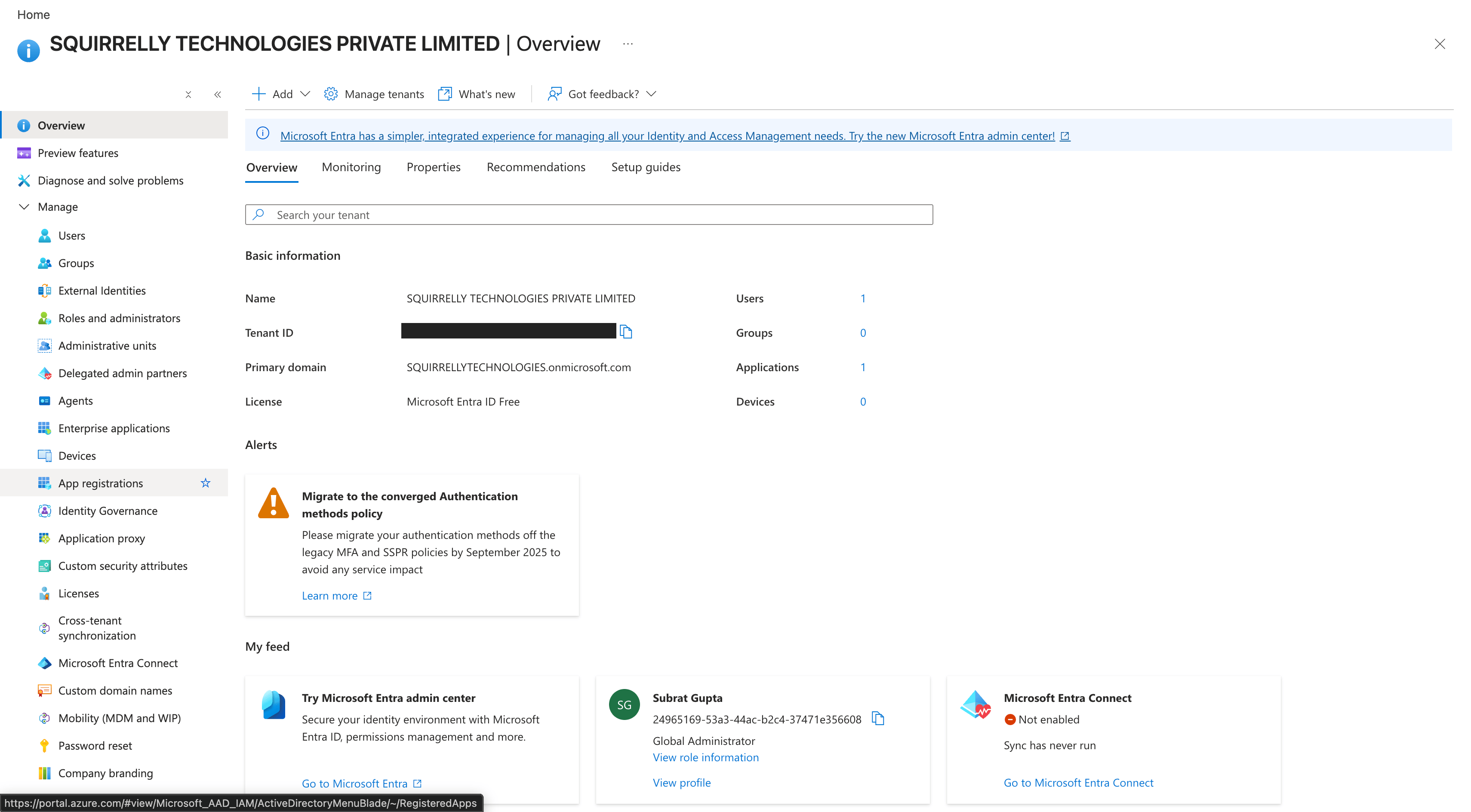
 In the left navigation, select **App registrations**.
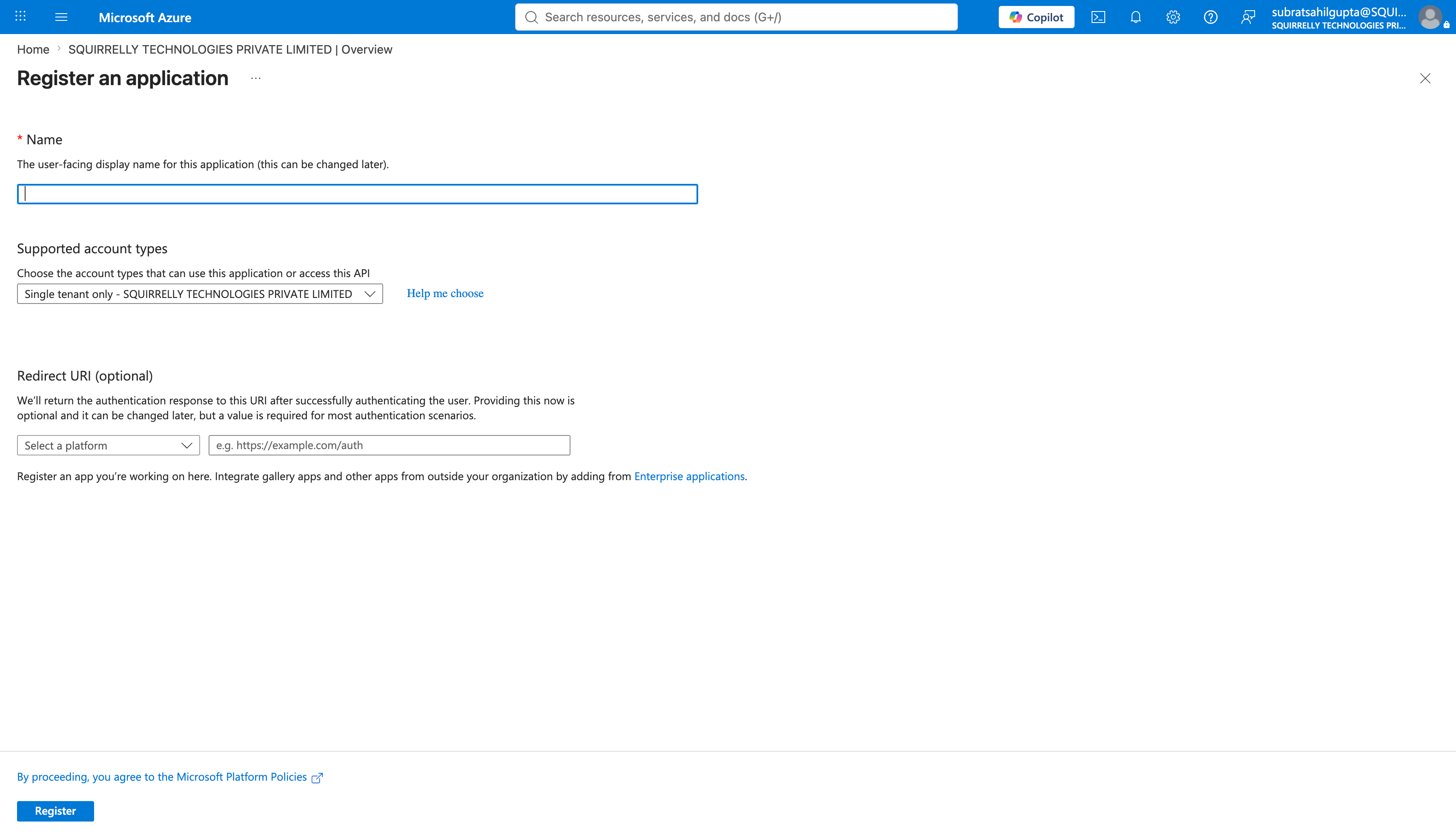
 Select **New registration**. Give it a name, choose **Single tenant**, and register it.
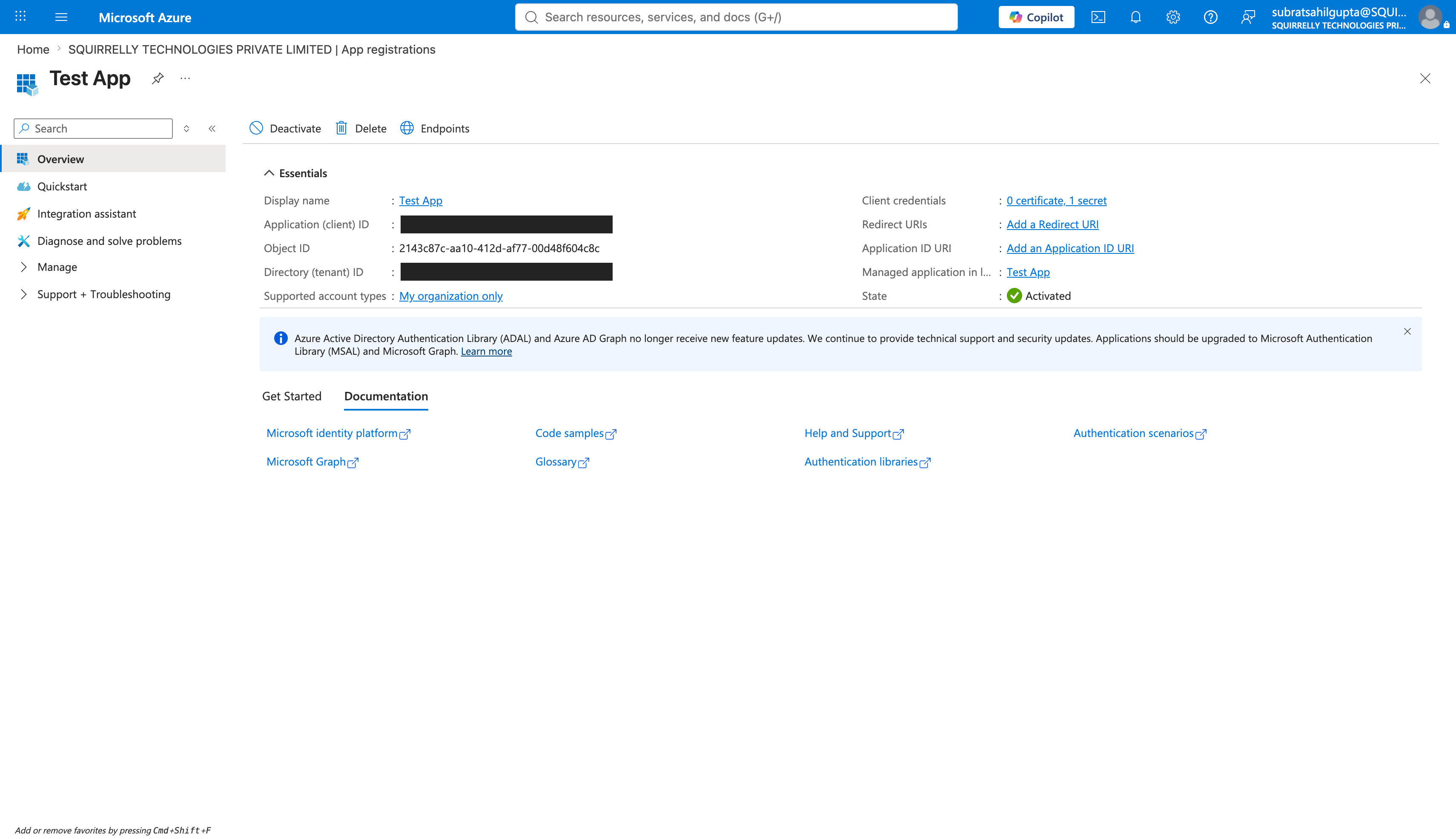
 From the app's **Overview** page, copy two values:
| Value | Where to find it |
| --------------------------- | -------------------------------------------------------- |
| **Directory (tenant) ID** | App registration overview page. This is your `tenant_id` |
| **Application (client) ID** | App registration overview page. This is your `client_id` |
From the app's **Overview** page, copy two values:
| Value | Where to find it |
| --------------------------- | -------------------------------------------------------- |
| **Directory (tenant) ID** | App registration overview page. This is your `tenant_id` |
| **Application (client) ID** | App registration overview page. This is your `client_id` |
 On that app registration, go to **Certificates & secrets → Client secrets → New client secret**. Copy the secret **Value** immediately: Azure shows it only once. This is your `client_secret`.
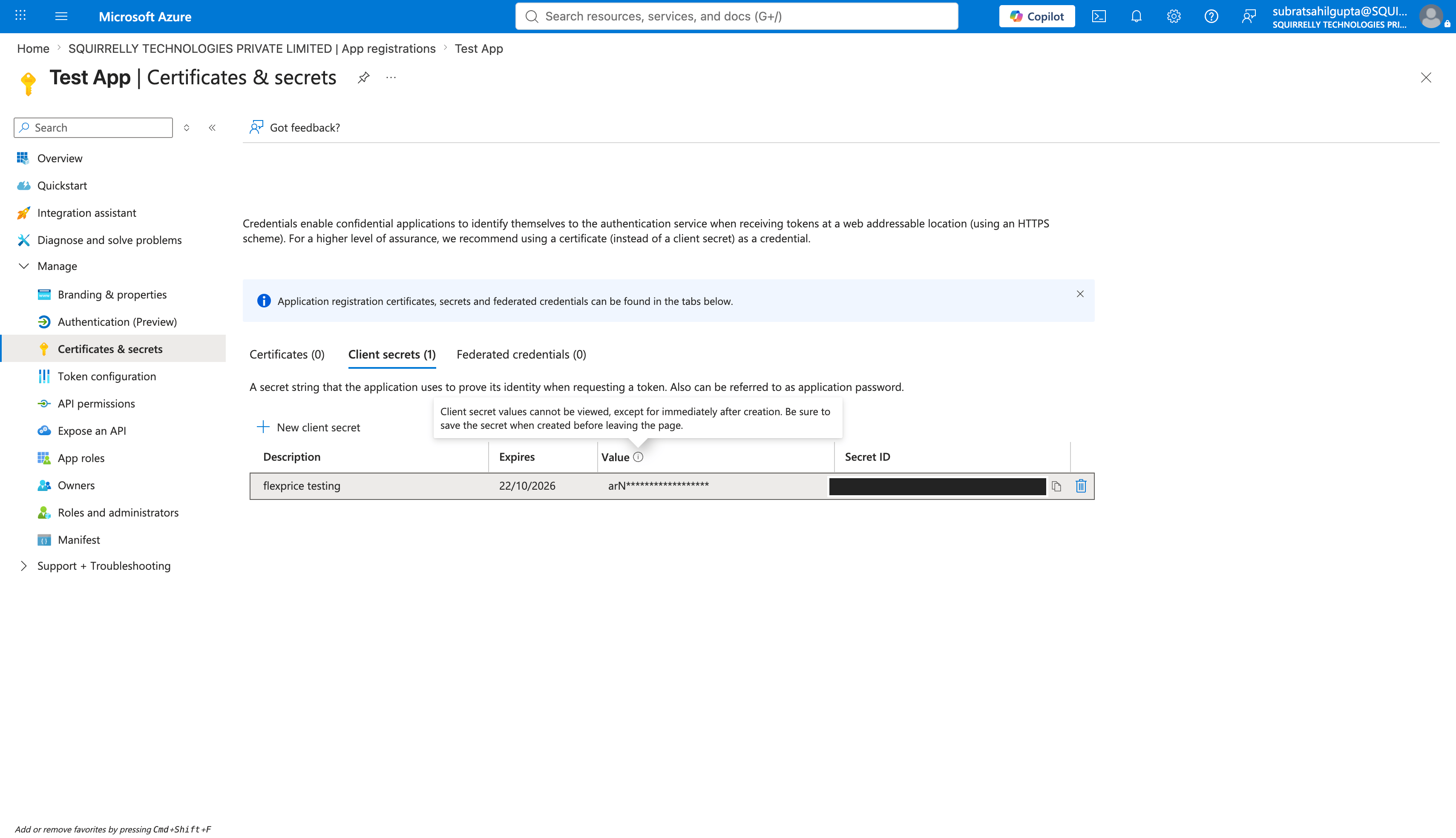 Client secrets expire. Note the expiry you choose. When the secret expires, reporting fails until you generate a new one and update your Flexprice connection.
Before the app can request a token for the Marketplace metering API, your tenant needs a service principal for it. `20e940b3-4c77-4b0b-9a53-9e16a1b010a7` is Microsoft's fixed application ID for the Marketplace SaaS API, the same value for every publisher. In Azure Cloud Shell, or any terminal signed in with `az login`, run:
```bash theme={null}
az ad sp create --id 20e940b3-4c77-4b0b-9a53-9e16a1b010a7
```
This creates no secret and grants no access on its own. It only makes that Microsoft API addressable from your directory, so the app from the first step can request tokens for it. See step 7 of [Register a SaaS application](https://learn.microsoft.com/en-us/partner-center/marketplace-offers/pc-saas-registration) for Microsoft's own instructions.
In Partner Center, open your offer's **Technical Configuration** page and enter this app's **Microsoft Entra tenant ID** and **Microsoft Entra application ID**.
Use the same Entra tenant ID and application ID that you specified in the Partner Center Technical Configuration page of each offer you want usage reported for. Azure checks the token's app against the offer on every report, so a mismatch here surfaces later as a failed usage report, not a failed connection.
## Step 3: Create the Azure Marketplace Connection
### Using Flexprice Dashboard
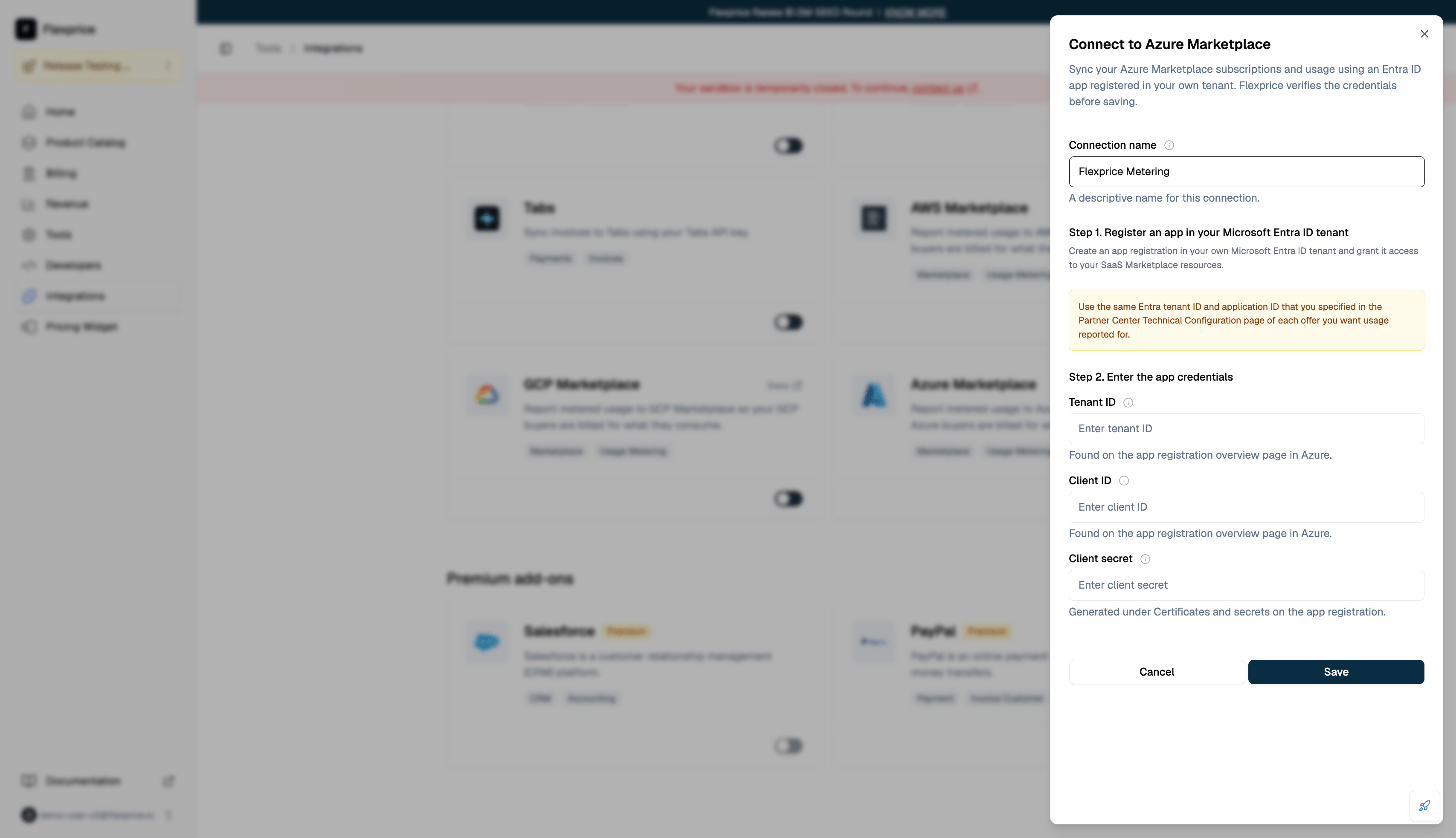
You can create an Azure Marketplace connection directly from the Flexprice dashboard under **Integrations → Azure Marketplace**. Paste the tenant ID, client ID, and client secret from Step 2.
Client secrets expire. Note the expiry you choose. When the secret expires, reporting fails until you generate a new one and update your Flexprice connection.
Before the app can request a token for the Marketplace metering API, your tenant needs a service principal for it. `20e940b3-4c77-4b0b-9a53-9e16a1b010a7` is Microsoft's fixed application ID for the Marketplace SaaS API, the same value for every publisher. In Azure Cloud Shell, or any terminal signed in with `az login`, run:
```bash theme={null}
az ad sp create --id 20e940b3-4c77-4b0b-9a53-9e16a1b010a7
```
This creates no secret and grants no access on its own. It only makes that Microsoft API addressable from your directory, so the app from the first step can request tokens for it. See step 7 of [Register a SaaS application](https://learn.microsoft.com/en-us/partner-center/marketplace-offers/pc-saas-registration) for Microsoft's own instructions.
In Partner Center, open your offer's **Technical Configuration** page and enter this app's **Microsoft Entra tenant ID** and **Microsoft Entra application ID**.
Use the same Entra tenant ID and application ID that you specified in the Partner Center Technical Configuration page of each offer you want usage reported for. Azure checks the token's app against the offer on every report, so a mismatch here surfaces later as a failed usage report, not a failed connection.
## Step 3: Create the Azure Marketplace Connection
### Using Flexprice Dashboard
You can create an Azure Marketplace connection directly from the Flexprice dashboard under **Integrations → Azure Marketplace**. Paste the tenant ID, client ID, and client secret from Step 2.
 ### API Request
**Endpoint:** `POST /api/v1/connections`
**Headers:**
```http theme={null}
Content-Type: application/json
Authorization: Bearer your_api_key
X-Environment-ID: your_environment_id
```
**Request Body:**
```json theme={null}
{
"name": "Azure Marketplace",
"provider_type": "azure_marketplace",
"encrypted_secret_data": {
"tenant_id": "",
"client_id": "",
"client_secret": ""
}
}
```
| Field | Description | Required |
| --------------- | --------------------------------------- | -------- |
| `name` | A friendly name for the connection | ✅ |
| `provider_type` | Must be `azure_marketplace` | ✅ |
| `tenant_id` | The directory (tenant) ID from Step 2 | ✅ |
| `client_id` | The application (client) ID from Step 2 | ✅ |
| `client_secret` | The client secret value from Step 2 | ✅ |
### Response
```json theme={null}
{
"id": "conn_01KYAKZJWKTMATYXXF4ME2W128",
"name": "Azure Marketplace",
"provider_type": "azure_marketplace",
"status": "published",
"created_at": "2026-07-24T17:16:01Z",
"updated_at": "2026-07-24T17:16:01Z"
}
```
All three credentials are stored encrypted.
### Connection Verification
Creating the connection immediately requests an access token with your credentials. The connection is only saved if that succeeds, so a successful response confirms your tenant ID, client ID, and client secret actually work rather than failing silently later.
If it fails, nothing is saved and you get a validation error. Fix the cause and create the connection again.
| Cause | Fix |
| ------------------------------------------------ | ------------------------------------------------------------------------------------- |
| Wrong tenant ID, client ID, or client secret | Re-copy all three from the app registration overview and Certificates & secrets pages |
| Client secret expired | Generate a new client secret and use its value |
| Marketplace API not addressable from your tenant | Run `az ad sp create --id 20e940b3-4c77-4b0b-9a53-9e16a1b010a7` in your tenant |
Whether the app is entered on your offer's Technical Configuration is not checked here. Flexprice has no offer to check it against at connection time, so a mismatch there surfaces later as a failed usage report. See [Usage Reporting](/integrations/marketplace-integration/azure/usage-reporting).
## Next Steps
Link each buyer's Azure subscription to a Flexprice subscription.
Understand what gets metered to Azure and when.
### API Request
**Endpoint:** `POST /api/v1/connections`
**Headers:**
```http theme={null}
Content-Type: application/json
Authorization: Bearer your_api_key
X-Environment-ID: your_environment_id
```
**Request Body:**
```json theme={null}
{
"name": "Azure Marketplace",
"provider_type": "azure_marketplace",
"encrypted_secret_data": {
"tenant_id": "",
"client_id": "",
"client_secret": ""
}
}
```
| Field | Description | Required |
| --------------- | --------------------------------------- | -------- |
| `name` | A friendly name for the connection | ✅ |
| `provider_type` | Must be `azure_marketplace` | ✅ |
| `tenant_id` | The directory (tenant) ID from Step 2 | ✅ |
| `client_id` | The application (client) ID from Step 2 | ✅ |
| `client_secret` | The client secret value from Step 2 | ✅ |
### Response
```json theme={null}
{
"id": "conn_01KYAKZJWKTMATYXXF4ME2W128",
"name": "Azure Marketplace",
"provider_type": "azure_marketplace",
"status": "published",
"created_at": "2026-07-24T17:16:01Z",
"updated_at": "2026-07-24T17:16:01Z"
}
```
All three credentials are stored encrypted.
### Connection Verification
Creating the connection immediately requests an access token with your credentials. The connection is only saved if that succeeds, so a successful response confirms your tenant ID, client ID, and client secret actually work rather than failing silently later.
If it fails, nothing is saved and you get a validation error. Fix the cause and create the connection again.
| Cause | Fix |
| ------------------------------------------------ | ------------------------------------------------------------------------------------- |
| Wrong tenant ID, client ID, or client secret | Re-copy all three from the app registration overview and Certificates & secrets pages |
| Client secret expired | Generate a new client secret and use its value |
| Marketplace API not addressable from your tenant | Run `az ad sp create --id 20e940b3-4c77-4b0b-9a53-9e16a1b010a7` in your tenant |
Whether the app is entered on your offer's Technical Configuration is not checked here. Flexprice has no offer to check it against at connection time, so a mismatch there surfaces later as a failed usage report. See [Usage Reporting](/integrations/marketplace-integration/azure/usage-reporting).
## Next Steps
Link each buyer's Azure subscription to a Flexprice subscription.
Understand what gets metered to Azure and when.