> ## Documentation Index
> Fetch the complete documentation index at: https://docs.flexprice.io/llms.txt
> Use this file to discover all available pages before exploring further.
# How to Set Up Charge Automatically
> Save a customer card via Flexprice checkout and charge invoices automatically
Autopay lets Flexprice charge a customer's saved card whenever a new invoice is due, without any action from the customer. The card is captured once through the Flexprice checkout page, stored as a payment method, and reused for all subsequent invoice payments.
Autopay requires an active Moyasar connection with a valid Secret Key, Publishable Key, and Webhook Secret. See [Moyasar Connection Setup](/integrations/moyasar/connection-setup) before proceeding.
## How it Works
Flexprice creates a payment record to track the card save attempt and returns a secure checkout URL.
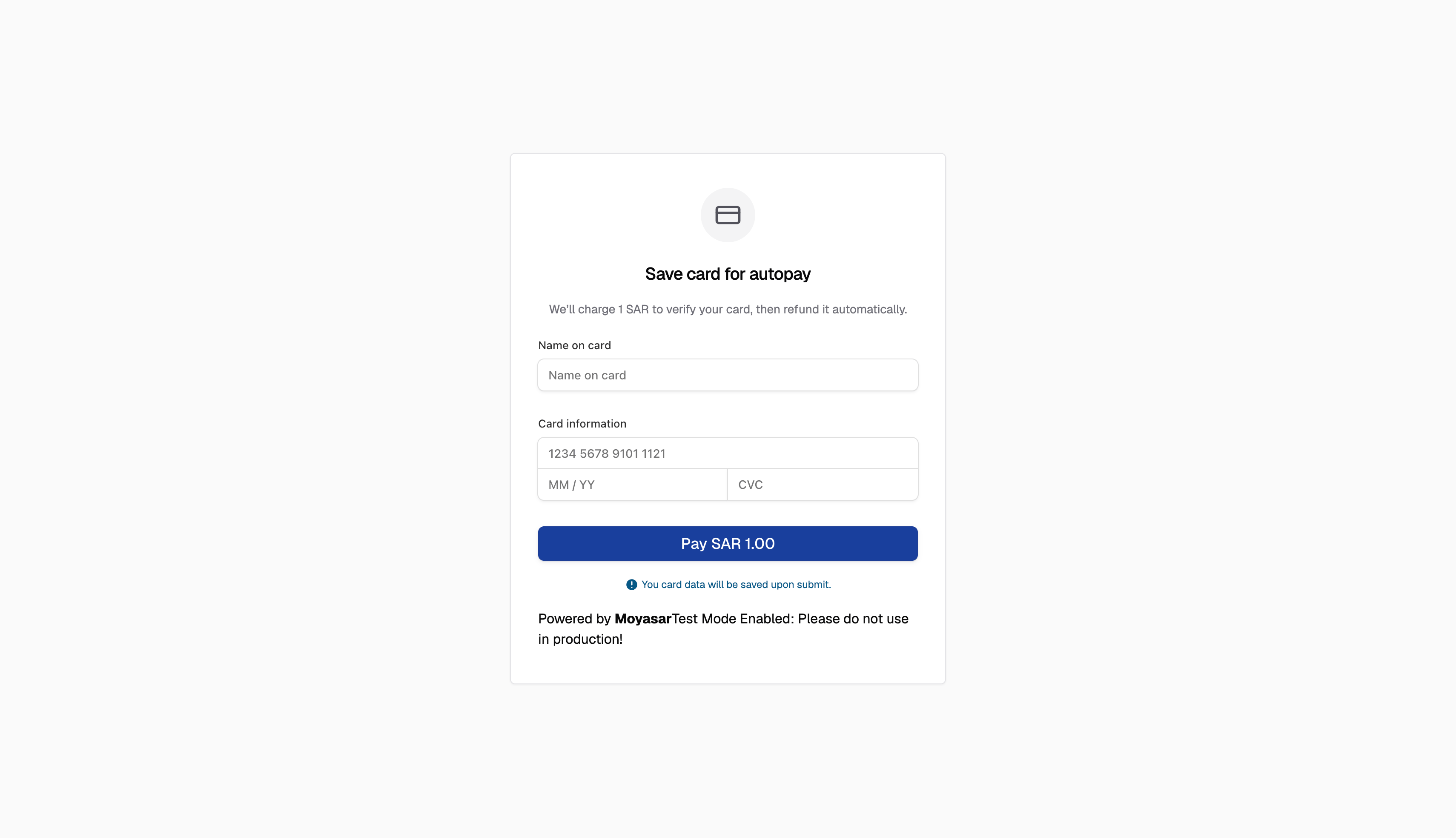
The customer is redirected to the Flexprice checkout page and enters their card number, expiry, and CVC.
Flexprice runs a 1 SAR verification charge to confirm the card is valid. Once confirmed, the charge is voided immediately. If the void fails, Flexprice issues a refund automatically. The customer is not charged.
Flexprice receives confirmation, extracts the reusable card token, and saves it as an active payment method linked to the customer.
When a new invoice is generated for the customer, Flexprice charges the saved card directly. No redirect or manual payment step is required.
***
## Setting Up Autopay for a Customer
### Using the Flexprice Dashboard
Go to **Billing** → **Customers** and select the customer.
In the **Integrations** section, locate the Moyasar entry and click **Setup Autopay**.
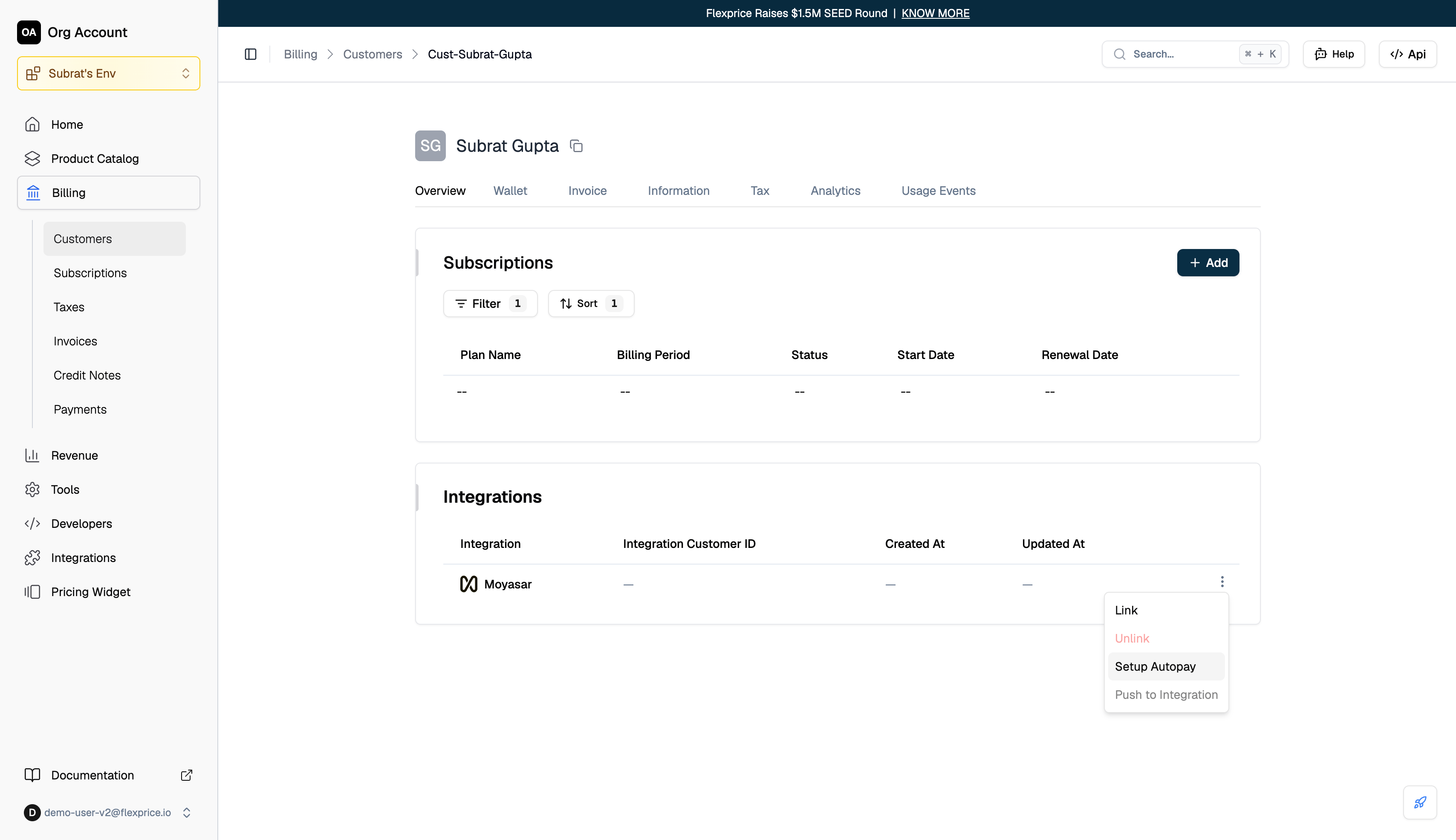 Flexprice opens the checkout page in the current tab. The customer sees a card entry form.
### Using the API
```bash theme={null}
POST /v1/payments/customers/{customer_id}/setup/intent
```
**Request body:**
```json theme={null}
{
"provider": "moyasar",
"success_url": "https://yourapp.com/customers/cust_01KVZ9HE6XC2AH7CXE6WK8SXK8"
}
```
| Field | Type | Required | Description |
| ------------- | ------ | -------- | ---------------------------------------------------------------------------------------------------------- |
| `provider` | string | Yes | Must be `moyasar` |
| `success_url` | string | No | URL the customer is redirected to after the card is saved. Must be on the same origin as your application. |
**Response:**
```json theme={null}
{
"status": "pending_card_entry",
"customer_id": "cust_01KVZ9HE6XC2AH7CXE6WK8SXK8",
"checkout_url": "https://admin.flexprice.io/checkout?provider=moyasar&token=eyJhbGci..."
}
```
Redirect the customer to `checkout_url`. The JWT embedded in the URL expires after 2 hours.
***
## Card Entry
The customer is taken to the Flexprice checkout page where they enter their card details.
Flexprice opens the checkout page in the current tab. The customer sees a card entry form.
### Using the API
```bash theme={null}
POST /v1/payments/customers/{customer_id}/setup/intent
```
**Request body:**
```json theme={null}
{
"provider": "moyasar",
"success_url": "https://yourapp.com/customers/cust_01KVZ9HE6XC2AH7CXE6WK8SXK8"
}
```
| Field | Type | Required | Description |
| ------------- | ------ | -------- | ---------------------------------------------------------------------------------------------------------- |
| `provider` | string | Yes | Must be `moyasar` |
| `success_url` | string | No | URL the customer is redirected to after the card is saved. Must be on the same origin as your application. |
**Response:**
```json theme={null}
{
"status": "pending_card_entry",
"customer_id": "cust_01KVZ9HE6XC2AH7CXE6WK8SXK8",
"checkout_url": "https://admin.flexprice.io/checkout?provider=moyasar&token=eyJhbGci..."
}
```
Redirect the customer to `checkout_url`. The JWT embedded in the URL expires after 2 hours.
***
## Card Entry
The customer is taken to the Flexprice checkout page where they enter their card details.
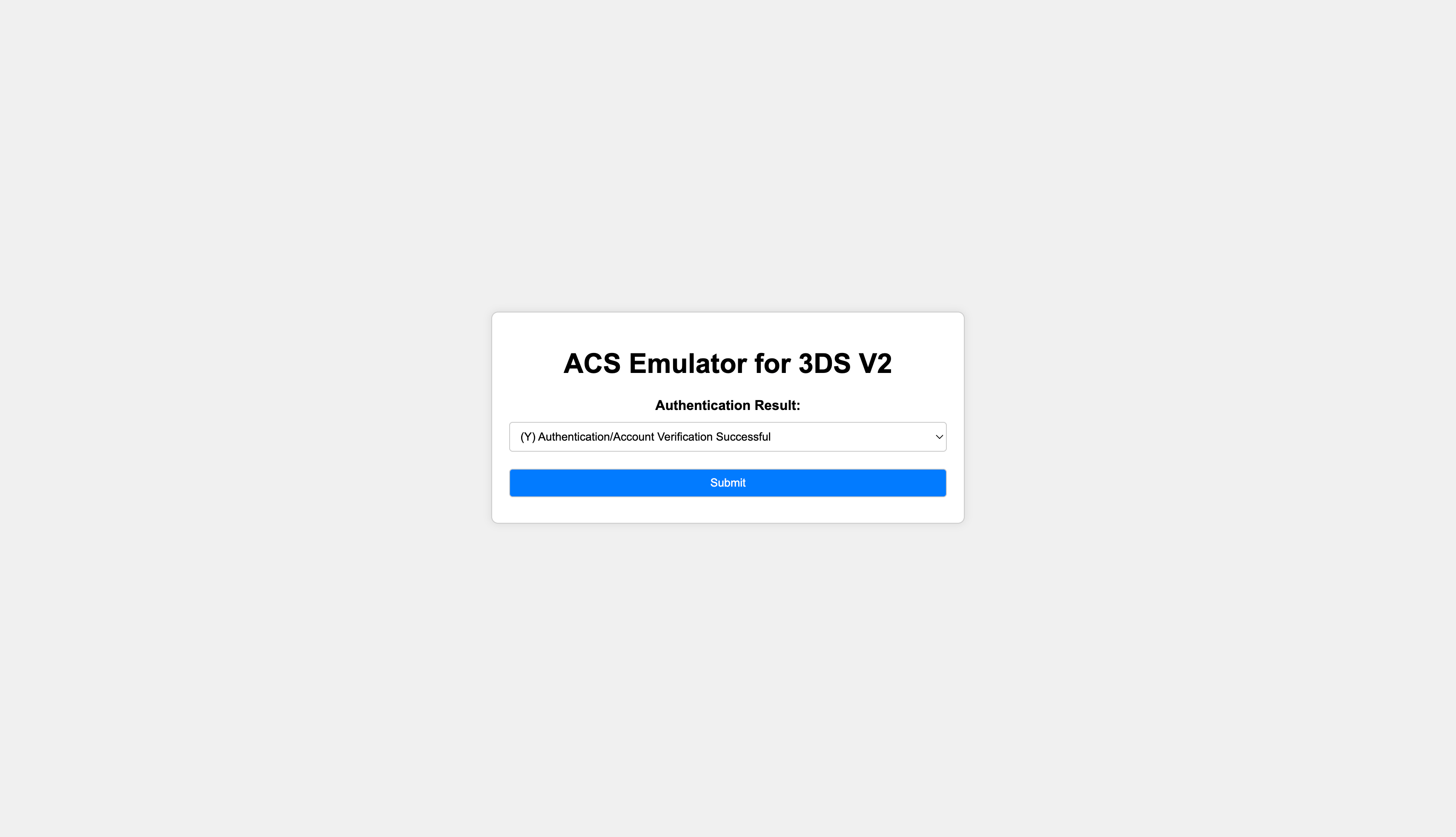
 If the card issuer requires 3DS authentication, the customer is redirected to their bank's verification page and returned automatically after completing it.
 ***
## Payment Tracking
Every autopay attempt is tracked as a payment record in Flexprice from the moment the setup intent is created. Each invoice charge attempt also creates its own record, so you can see exactly which invoices were collected automatically.
### Payment Status
| Status | When it occurs |
| ----------- | ---------------------------------------------------------------------------- |
| `INITIATED` | Setup intent is created. Waiting for the customer to complete the card form. |
| `SUCCEEDED` | Card confirmed. Token saved. |
| `VOIDED` | The 1 SAR verification charge was voided successfully. |
| `REFUNDED` | The 1 SAR charge could not be voided and was refunded instead. |
| `FAILED` | Card authentication or the verification charge failed. |
***
## Automatic Invoice Charging
Once a customer has a saved payment method, Flexprice charges it automatically when a new invoice is generated.
A new invoice is created for the customer.
Flexprice looks for the customer's default saved payment method. If no default is set, the most recently added active payment method is used.
If a valid saved method is found, Flexprice creates a charge request using the stored token. The customer does not need to take any action.
If no active saved payment method exists, Flexprice falls back to the invoice-link flow. See [Moyasar Invoice Synchronization](/integrations/moyasar/invoice-sync).
When the charge is confirmed, Flexprice marks the invoice as `PAID`.
***
## Troubleshooting
| Issue | Likely Cause | Resolution |
| --------------------------------------------------------------------------------------- | ------------------------------------------------------------------------------------------------------------------- | -------------------------------------------------------------------------------------------------------- |
| Customer completed the card form but invoices are still not being charged automatically | The card save did not complete successfully | Run the setup autopay flow again for the customer |
| A 1 SAR charge appeared on the customer's card but was not returned | The reversal is processed automatically and typically settles within 1-5 business days depending on the card issuer | No action needed. If it does not settle, contact Moyasar support with the payment reference |
| Autopay is charging the wrong card | The customer has more than one saved card | Make sure the correct card is set as the default payment method |
| A card was saved but automatic charging has stopped working | The Moyasar connection credentials may have changed or the connection is inactive | Go to **Integrations** → **Moyasar** and verify the connection is active. Re-enter credentials if needed |
| The checkout URL expired before the customer completed the form | The link is valid for 2 hours from the time it was created | Run the setup autopay flow again to generate a new link |
***
## Payment Tracking
Every autopay attempt is tracked as a payment record in Flexprice from the moment the setup intent is created. Each invoice charge attempt also creates its own record, so you can see exactly which invoices were collected automatically.
### Payment Status
| Status | When it occurs |
| ----------- | ---------------------------------------------------------------------------- |
| `INITIATED` | Setup intent is created. Waiting for the customer to complete the card form. |
| `SUCCEEDED` | Card confirmed. Token saved. |
| `VOIDED` | The 1 SAR verification charge was voided successfully. |
| `REFUNDED` | The 1 SAR charge could not be voided and was refunded instead. |
| `FAILED` | Card authentication or the verification charge failed. |
***
## Automatic Invoice Charging
Once a customer has a saved payment method, Flexprice charges it automatically when a new invoice is generated.
A new invoice is created for the customer.
Flexprice looks for the customer's default saved payment method. If no default is set, the most recently added active payment method is used.
If a valid saved method is found, Flexprice creates a charge request using the stored token. The customer does not need to take any action.
If no active saved payment method exists, Flexprice falls back to the invoice-link flow. See [Moyasar Invoice Synchronization](/integrations/moyasar/invoice-sync).
When the charge is confirmed, Flexprice marks the invoice as `PAID`.
***
## Troubleshooting
| Issue | Likely Cause | Resolution |
| --------------------------------------------------------------------------------------- | ------------------------------------------------------------------------------------------------------------------- | -------------------------------------------------------------------------------------------------------- |
| Customer completed the card form but invoices are still not being charged automatically | The card save did not complete successfully | Run the setup autopay flow again for the customer |
| A 1 SAR charge appeared on the customer's card but was not returned | The reversal is processed automatically and typically settles within 1-5 business days depending on the card issuer | No action needed. If it does not settle, contact Moyasar support with the payment reference |
| Autopay is charging the wrong card | The customer has more than one saved card | Make sure the correct card is set as the default payment method |
| A card was saved but automatic charging has stopped working | The Moyasar connection credentials may have changed or the connection is inactive | Go to **Integrations** → **Moyasar** and verify the connection is active. Re-enter credentials if needed |
| The checkout URL expired before the customer completed the form | The link is valid for 2 hours from the time it was created | Run the setup autopay flow again to generate a new link |