> ## Documentation Index
> Fetch the complete documentation index at: https://docs.flexprice.io/llms.txt
> Use this file to discover all available pages before exploring further.
# Nomod Payment Links & Invoice Sync
> Complete guide to creating payment links and handling the Nomod checkout flow
## Overview
Payment links in Flexprice provide a secure, hosted checkout experience powered by Nomod. Customers click a payment URL and are redirected to Nomod's secure checkout page to complete their payment.
### Key Features
* **Secure checkout**: Hosted by Nomod with PCI compliance.
* **Multiple Payment Methods**: Supports various payment methods available in Nomod
* **Real-time Updates**: Webhook-driven status updates
* **Auto-generated Links**: Nomod automatically generates payment link URLs
## Payment Link Lifecycle
```mermaid theme={null}
graph TD
A[Create Payment Request] --> B[Validate Invoice
& Customer]
B --> C[Create Payment Record
INITIATED]
C --> D[Generate Nomod
Payment Link]
D --> E{Link Created?}
E -->|Success| F[Update Status
PENDING]
E -->|Failure| G[Keep Status
INITIATED]
F --> H[Return Payment URL]
H --> I[Customer Clicks Link]
I --> J[Nomod Checkout]
J --> K[Enter Payment Details]
K --> L{Payment
Successful?}
L -->|Yes| M[Webhook:
payment_link.paid]
L -->|No| N[Webhook:
payment_link.unpaid]
M --> O[Status: SUCCEEDED]
O --> Q[Reconcile Invoice]
```
## Payment Status Flow
### Status Transitions
```
INITIATED → PENDING → SUCCEEDED
```
### Status Definitions
| Status | Description | Triggers |
| ----------- | -------------------------------------------------- | ---------------------------------- |
| `INITIATED` | Payment record created, Nomod link not yet created | Initial payment creation |
| `PENDING` | Nomod payment link created successfully | Successful Nomod API call |
| `SUCCEEDED` | Payment completed successfully | Nomod webhook: `payment_link.paid` |
## Creating Payment Links
### Prerequisites
1. **Nomod Connection**: Active Nomod connection configured
2. **Invoice Status**: Invoice must be finalized and unpaid
3. **Valid Amount**: Payment amount must match invoice outstanding
4. **Connection Status**: Connection must be in "Published" status
### Recording Payments with Nomod
You can use Nomod to generate payment links when recording payments:
Navigate to the invoice or customer page, click **"Record Payment"**, and enter the payment amount.
In the **Payment Method** dropdown, select **"Payment Link"**. In the **Payment Provider** dropdown, select your Nomod connection. Optionally add a description.
Click **"Record"** to create the payment. A payment link will be generated via Nomod and a success dialog will display the payment URL. You can copy the URL to share with the customer, open the link in a new tab, or close the dialog.
Share the payment link with your customer. The customer clicks the link and completes payment through Nomod. Payment status updates automatically via webhooks.
### API Request
**Endpoint:** `POST /api/v1/payments`
**Headers:**
```http theme={null}
Content-Type: application/json
Authorization: Bearer your_api_key
X-Environment-ID: your_environment_id
```
**Request Body:**
```json theme={null}
{
"amount": 100.00,
"currency": "USD",
"destination_id": "inv_123",
"destination_type": "invoice",
"payment_method_type": "payment_link",
"payment_gateway": "nomod",
"metadata": {
"connection_id": "conn_123",
"connection_name": "Nomod Production",
"success_url": "https://app.flexprice.com/billing/invoices/inv_123",
"cancel_url": "https://app.flexprice.com/billing/invoices/inv_123"
}
}
```
### Response
```json theme={null}
{
"id": "pay_1234567890abcdef",
"payment_status": "pending",
"payment_url": "https://nomod.com/pay/abc123",
"amount": "100.00",
"currency": "USD",
"gateway_tracking_id": "plink_1234567890abcdef",
"created_at": "2024-01-20T10:30:00Z",
"metadata": {
"nomod_payment_link_id": "plink_1234567890abcdef"
}
}
```
**Note**: The `payment_url` is automatically generated by Nomod and returned as a URL.
### Payment Link Configuration
### Required Fields
| Field | Type | Required | Description |
| --------------------- | ------ | -------- | ------------------------------------------ |
| `destination_type` | string | ✅ | Must be `"invoice"` |
| `destination_id` | string | ✅ | Valid invoice ID |
| `payment_method_type` | string | ✅ | Must be `"payment_link"` |
| `payment_gateway` | string | ✅ | Must be `"nomod"` |
| `amount` | string | ✅ | Payment amount (must match invoice) |
| `currency` | string | ✅ | Valid currency code (USD, etc.) |
| `success_url` | string | ❌ | Callback URL after payment (optional) |
| `cancel_url` | string | ❌ | Callback URL after cancellation (optional) |
## Payment Link Features
* **Secure**: All payments processed through Nomod's secure infrastructure
* **Multiple Payment Methods**: Supports various payment methods available in Nomod
* **Automatic Updates**: Payment status updates automatically when customer pays
* **Success/Cancel URLs**: Automatically configured to redirect back to Flexprice
### API reference
**Payment Link:** [Create a new payment](https://docs.flexprice.io/api-reference/payments/create-payment#create-a-new-payment)
### Invoice Sync
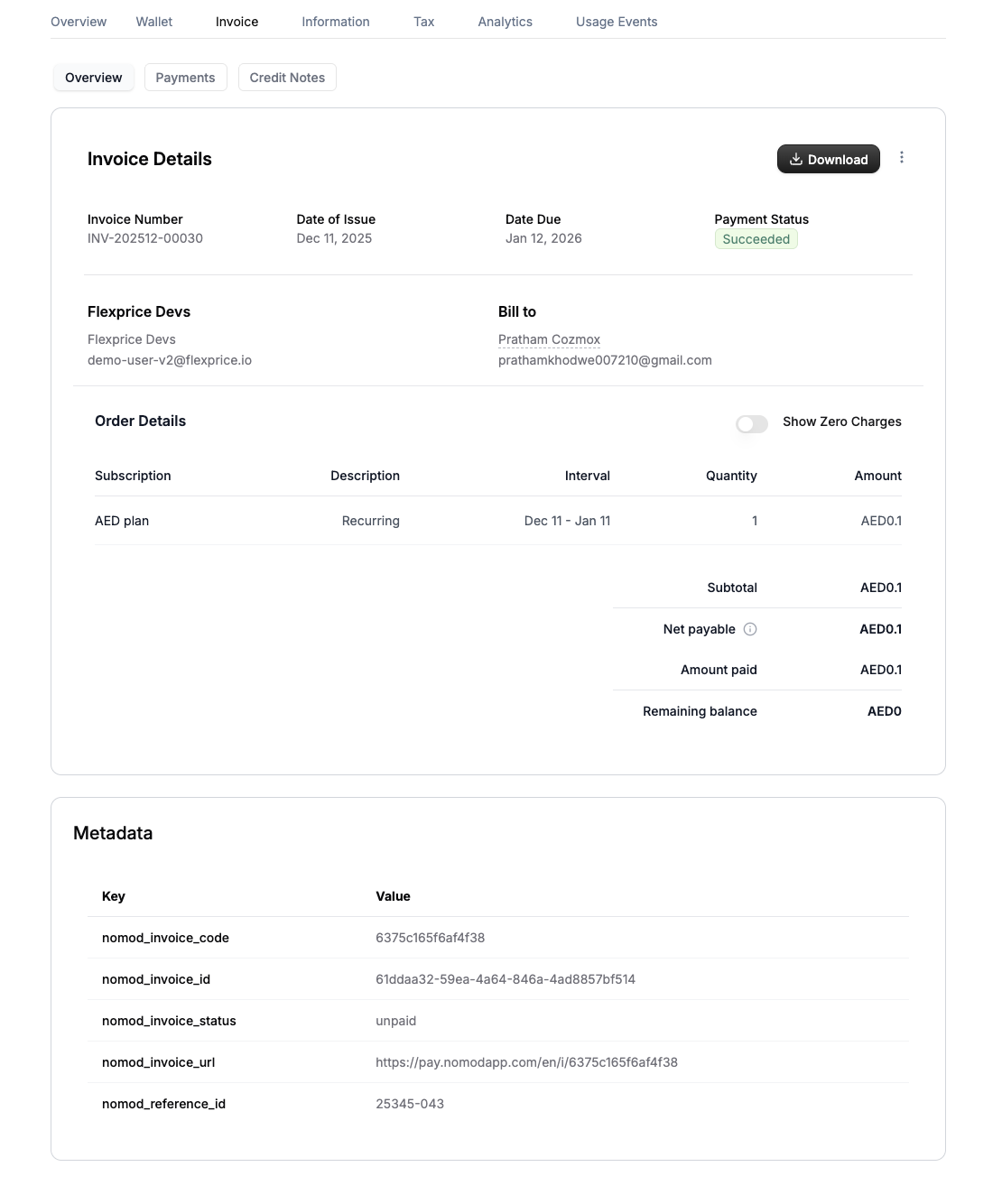
Whenever an invoice is generated in Flexprice it's synced to Nomod in realtime and Nomod generates a payment link for the invoice.
1. **Payment Link Reuse**: If a payment link is requested for a synced invoice, the existing Nomod invoice payment URL is returned
2. **Automatic Association**: Payments made through the URL are automatically associated with the invoice
3. **Metadata**: Once synced, you get the Nomod invoice details and payment URL in the Flexprice invoice metadata
### Invoices are automatically synced to Nomod when:
* Invoice is finalized (status changes from `DRAFT` to `FINALIZED`)
* Invoice outbound sync is enabled in the Nomod connection
* Customer is successfully synced to Nomod (if applicable)
 **API reference:** [Get an invoice by ID](https://docs.flexprice.io/api-reference/invoices/get-invoice)
## Error Handling
### Common Payment Errors
| Error | Cause | Resolution |
| ------------------------------ | ------------------------ | --------------------------------------- |
| "Payment links not generating" | Connection not published | Verify connection status is "Published" |
| "Invalid invoice amount" | Amount mismatch | Ensure amount matches invoice |
| "Invoice already paid" | Invoice status issue | Check invoice payment status |
| "Nomod link creation failed" | API error | Check Nomod connection |
## Security Considerations
### Payment Link Security
* **HTTPS Required**: All payment links use HTTPS
* **Link Expiry**: Links expire based on Nomod settings
* **One-time Use**: Each link can only be used once
* **Signature Verification**: All webhooks verified
### Data Protection
* **PCI Compliance**: Nomod handles sensitive payment data
* **No Card Storage**: Card details never stored in Flexprice
* **Encrypted Storage**: All payment data encrypted at rest
## Webhook Endpoints
* `POST /api/v1/webhooks/nomod/{tenant_id}/{environment_id}` - Nomod webhook handler
For complete API documentation, see the [API Reference](/api-reference/payments/create-payment).
**API reference:** [Get an invoice by ID](https://docs.flexprice.io/api-reference/invoices/get-invoice)
## Error Handling
### Common Payment Errors
| Error | Cause | Resolution |
| ------------------------------ | ------------------------ | --------------------------------------- |
| "Payment links not generating" | Connection not published | Verify connection status is "Published" |
| "Invalid invoice amount" | Amount mismatch | Ensure amount matches invoice |
| "Invoice already paid" | Invoice status issue | Check invoice payment status |
| "Nomod link creation failed" | API error | Check Nomod connection |
## Security Considerations
### Payment Link Security
* **HTTPS Required**: All payment links use HTTPS
* **Link Expiry**: Links expire based on Nomod settings
* **One-time Use**: Each link can only be used once
* **Signature Verification**: All webhooks verified
### Data Protection
* **PCI Compliance**: Nomod handles sensitive payment data
* **No Card Storage**: Card details never stored in Flexprice
* **Encrypted Storage**: All payment data encrypted at rest
## Webhook Endpoints
* `POST /api/v1/webhooks/nomod/{tenant_id}/{environment_id}` - Nomod webhook handler
For complete API documentation, see the [API Reference](/api-reference/payments/create-payment).