> ## Documentation Index
> Fetch the complete documentation index at: https://docs.flexprice.io/llms.txt
> Use this file to discover all available pages before exploring further.
# Stripe Payment Links & Checkout Flow
> Complete guide to creating payment links and handling the Stripe checkout flow
## Overview
Payment links in Flexprice provide a secure, hosted checkout experience powered by Stripe. Customers click a payment URL and are redirected to Stripe's secure checkout page to complete their payment.
### Key Features
* **Secure Checkout**: Hosted by Stripe with PCI compliance
* **Multiple Payment Methods**: Cards, bank transfers, digital wallets
* **Mobile Optimized**: Responsive checkout experience
* **Real-time Updates**: Webhook-driven status updates
* **Invoice Integration**: Automatic invoice reconciliation
* **Card Saving**: Optional card storage for future payments
## Payment Link Lifecycle
```mermaid theme={null}
graph TD
A[Create Payment Request] --> B[Validate Invoice & Customer]
B --> C[Create Payment Record: INITIATED]
C --> D[Generate Stripe Checkout Session]
D --> E{Session Created?}
E -->|Success| F[Update Status: PENDING]
E -->|Failure| G[Keep Status: INITIATED]
F --> H[Return Payment URL]
H --> I[Customer Clicks Link]
I --> J[Stripe Checkout Page]
J --> K[Customer Enters Payment Details]
K --> L{Payment Successful?}
L -->|Yes| M[Stripe Webhook: completed]
L -->|No| N[Stripe Webhook: failed]
M --> O[Update Status: SUCCEEDED]
N --> P[Update Status: FAILED]
O --> Q[Reconcile Invoice]
P --> R[Log Payment Failure]
```
## Payment Status Flow
### Status Transitions
```
INITIATED → PENDING → SUCCEEDED
↓ ↓ ↓
FAILED FAILED REFUNDED
```
### Status Definitions
| Status | Description | Triggers |
| ------------ | ------------------------------------------------------ | ---------------------------------------------------------------------------- |
| `INITIATED` | Payment record created, Stripe session not yet created | Initial payment creation |
| `PENDING` | Stripe checkout session created successfully | Successful Stripe API call |
| `PROCESSING` | Payment is being processed | Temporary status during updates |
| `SUCCEEDED` | Payment completed successfully | Stripe webhook: `checkout.session.completed` |
| `FAILED` | Payment attempt failed | Stripe webhooks: `checkout.session.expired`, `payment_intent.payment_failed` |
| `REFUNDED` | Payment was refunded | Manual refund processing |
## Creating Payment Links
### Prerequisites
1. **Stripe Connection**: Active Stripe connection configured
2. **Customer Sync**: Customer must have Stripe customer ID
3. **Invoice Status**: Invoice must be finalized and unpaid
4. **Valid Amount**: Payment amount must match invoice outstanding
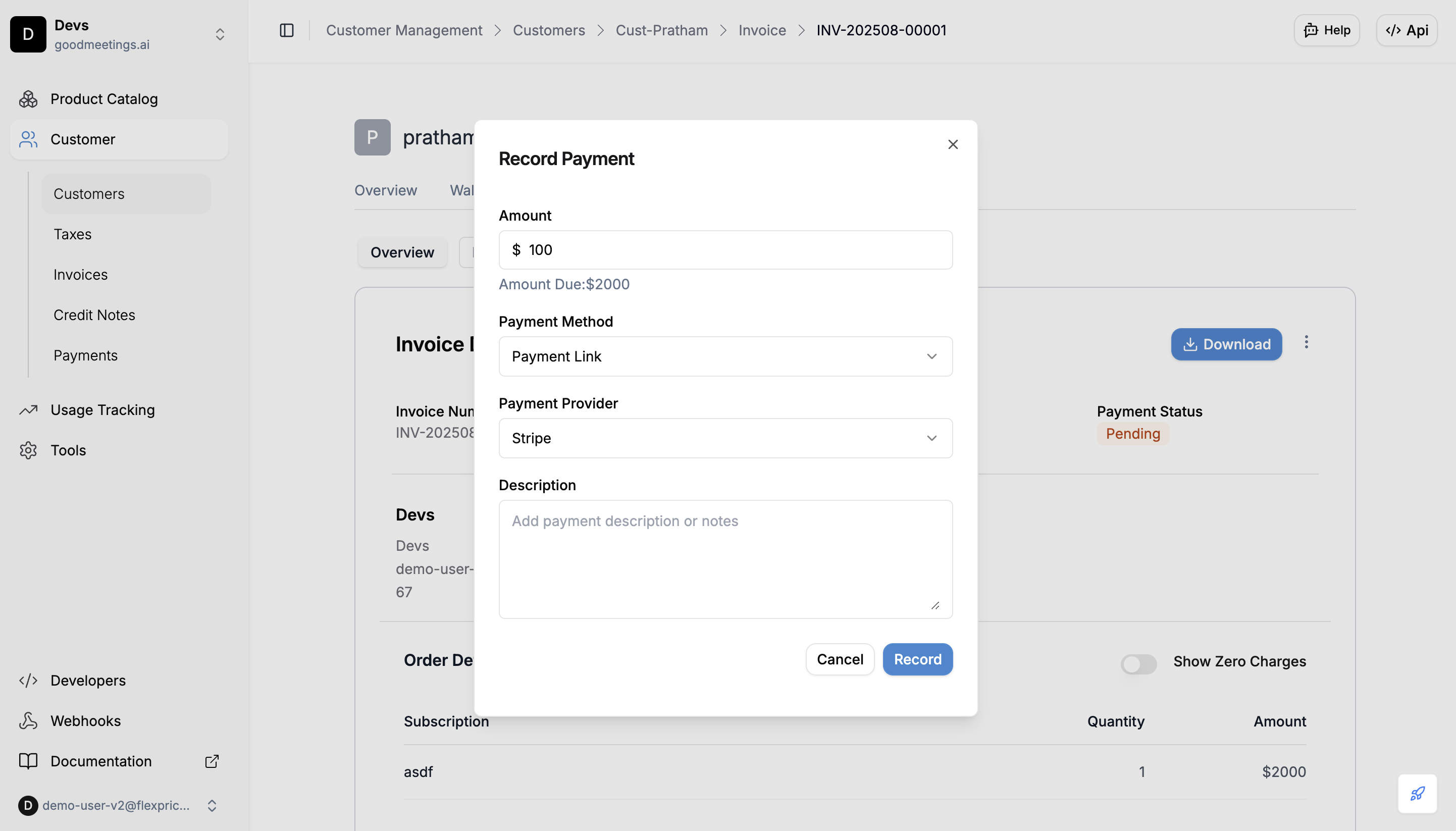
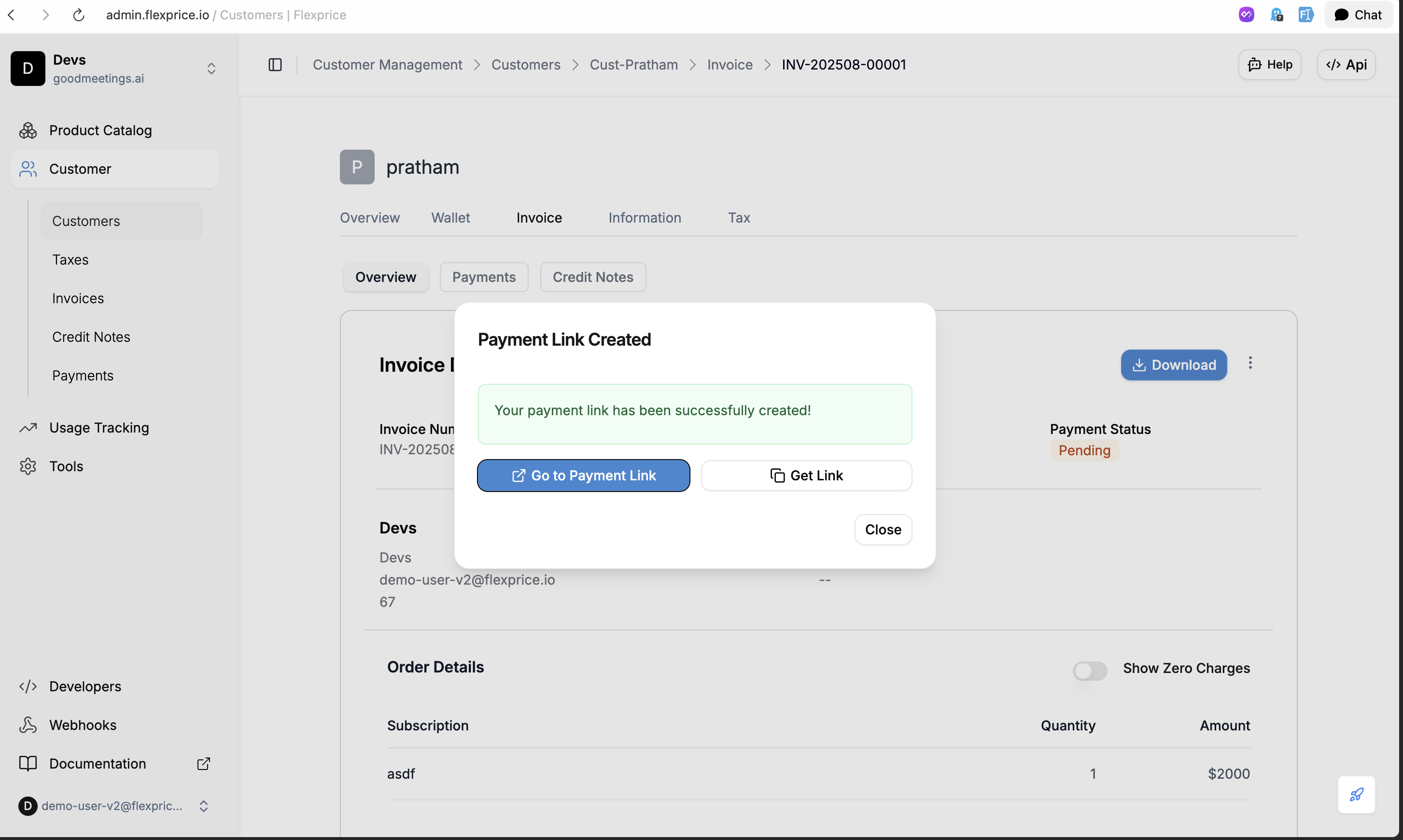
### Creating Payment Links via Dashboard
You can create payment links directly from the Flexprice dashboard:
 ### API Request
**Endpoint:** `POST /api/v1/payments`
**Headers:**
```http theme={null}
Content-Type: application/json
Authorization: Bearer your_api_key
X-Environment-ID: your_environment_id
```
**Request Body (Save Card for Future Use):**
```json theme={null}
{
"amount": 10,
"currency": "usd",
"destination_id": "inv_01K34HYZN03V6X8Q6V3T8X6G4F",
"destination_type": "INVOICE",
"payment_method_type": "PAYMENT_LINK",
"process_payment": true,
"payment_gateway": "stripe",
"success_url": "https://admin-dev.flexprice.io/customer-management/invoices/inv_01K34HYZN03V6X8Q6V3T8X6G4F?page=1",
"cancel_url": "https://admin-dev.flexprice.io/customer-management/invoices/inv_01K34HYZN03V6X8Q6V3T8X6G4F?page=1",
"save_card_and_make_default": true
}
```
**Request Body (One-time Payment Only):**
```json theme={null}
{
"amount": 10,
"currency": "usd",
"destination_id": "inv_01K34HYZN03V6X8Q6V3T8X6G4F",
"destination_type": "INVOICE",
"payment_method_type": "PAYMENT_LINK",
"process_payment": true,
"payment_gateway": "stripe",
"success_url": "https://admin-dev.flexprice.io/customer-management/invoices/inv_01K34HYZN03V6X8Q6V3T8X6G4F?page=1",
"cancel_url": "https://admin-dev.flexprice.io/customer-management/invoices/inv_01K34HYZN03V6X8Q6V3T8X6G4F?page=1"
}
```
### Response
```json theme={null}
{
"id": "pay_1234567890abcdef",
"payment_status": "pending",
"payment_url": "https://checkout.stripe.com/c/pay/cs_test_...",
"amount": "150.00",
"currency": "usd",
"gateway_tracking_id": "cs_test_1234567890abcdef",
"created_at": "2024-01-20T10:30:00Z",
"metadata": {
"stripe_session_id": "cs_test_1234567890abcdef"
}
}
```
## Payment Link Configuration
### Required Fields
| Field | Type | Required | Description |
| ---------------------------- | ------- | -------- | ---------------------------------------------- |
| `destination_type` | string | ✅ | Must be `"invoice"` |
| `destination_id` | string | ✅ | Valid invoice ID |
| `payment_method_type` | string | ✅ | Must be `"payment_link"` |
| `payment_gateway` | string | ✅ | Must be `"stripe"` |
| `amount` | string | ✅ | Payment amount (must match invoice) |
| `currency` | string | ✅ | Valid currency code |
| `process_payment` | boolean | ✅ | Set to `true` to create Stripe session |
| `save_card_and_make_default` | boolean | ❌ | Save card for future payments (default: false) |
## Stripe Checkout Configuration
### Default Checkout Settings
When creating payment links, Flexprice automatically configures Stripe Checkout with:
* **Payment Methods**: Cards, bank transfers, digital wallets
* **Currency**: Matches the payment currency
* **Amount**: Exact payment amount
* **Customer**: Pre-filled with customer data
* **Invoice Details**: Line items from the invoice
### Card Saving Configuration
When `save_card_and_make_default` is set to `true`:
* **Setup Future Usage**: Stripe session configured with `setup_future_usage: "off_session"`
* **Card Storage**: Payment method automatically saved to customer
* **Default Assignment**: Saved card becomes the customer's default payment method
* **Future Payments**: Enables subsequent card payments without re-entering details
**Important Notes:**
* Card saving requires customer consent and should comply with local regulations
* Saved cards can be used for future `CARD` payment method type payments
* Only one default payment method per customer is supported
## Webhook Processing
### Payment Completion Webhook
When a payment is completed, Stripe sends a `checkout.session.completed` webhook:
```json theme={null}
{
"id": "evt_1234567890abcdef",
"type": "checkout.session.completed",
"data": {
"object": {
"id": "cs_test_1234567890abcdef",
"payment_status": "paid",
"amount_total": 15000,
"currency": "usd",
"customer": "cus_stripe123abc",
"metadata": {
"flexprice_payment_id": "pay_1234567890abcdef"
}
}
}
}
```
### Webhook Processing Flow
1. **Receive Webhook**: Flexprice receives the webhook from Stripe
2. **Verify Signature**: Validate webhook signature for security
3. **Find Payment**: Locate payment record using session ID
4. **Check Card Saving**: Read `save_card_and_make_default` from payment metadata
5. **Set Default Card**: If flag is true, set payment method as default in Stripe
6. **Update Status**: Change payment status to `SUCCEEDED`
7. **Reconcile Invoice**: Update invoice payment status and amounts
8. **Trigger Events**: Send payment completion events
## Error Handling
### Common Payment Errors
| Error | Cause | Resolution |
| -------------------------------- | -------------------- | ----------------------------- |
| "Customer not found in Stripe" | Customer not synced | Sync customer to Stripe first |
| "Invalid invoice amount" | Amount mismatch | Ensure amount matches invoice |
| "Invoice already paid" | Invoice status issue | Check invoice payment status |
| "Stripe session creation failed" | API error | Check Stripe connection |
### Payment Failure Handling
When payments fail:
1. **Webhook Received**: Stripe sends failure webhook
2. **Status Updated**: Payment status changed to `FAILED`
3. **Error Logged**: Failure reason recorded
4. **Customer Notified**: Optional failure notification
5. **Retry Available**: Customer can create new payment link
## Testing Payment Links
### Test Environment Setup
1. **Use Test Keys**: Configure Stripe test mode
2. **Test Cards**: Use Stripe's test card numbers
3. **Test Webhooks**: Use ngrok for local webhook testing
### Test Card Numbers
| Card Number | Description |
| ------------------ | ------------------ |
| `4242424242424242` | Successful payment |
| `4000000000000002` | Card declined |
| `4000000000009995` | Insufficient funds |
| `4000000000009987` | Expired card |
### Testing Flow
1. **Create Test Payment**: Use test invoice and customer
2. **Generate Payment Link**: Create payment with test data
3. **Complete Payment**: Use test card in Stripe checkout
4. **Verify Webhook**: Check webhook processing
5. **Confirm Status**: Verify payment and invoice updates
## Relationship with Card Payments
### Enabling Future Card Payments
Payment links with `save_card_and_make_default: true` enable future card payments:
1. **First Payment**: Customer uses payment link to pay and save card
2. **Card Storage**: Payment method saved and set as default in Stripe
3. **Future Payments**: Customer can use `CARD` payment method type
4. **Seamless Experience**: No redirect required for subsequent payments
### Payment Method Hierarchy
```mermaid theme={null}
graph TD
A[Customer First Payment] --> B[Payment Link with save_card_and_make_default: true]
B --> C[Card Saved as Default]
C --> D[Future Payments Available]
D --> E[CARD Payment Method Type]
D --> F[PAYMENT_LINK Payment Method Type]
E --> G[Uses Saved Default Card]
F --> H[Creates New Payment Session]
```
### Integration Strategy
**Recommended Flow:**
1. **New Customers**: Always use payment links for first payment
2. **Set Save Flag**: Include `save_card_and_make_default: true` for returning customers
3. **Future Payments**: Use card payment method for faster checkout
4. **Fallback**: Provide payment link option if card payment fails
For detailed information about card payments, see [Card Payment Documentation](/integrations/stripe/card-payment).
## Security Considerations
### Payment Link Security
* **HTTPS Required**: All payment links use HTTPS
* **Session Expiry**: Links expire after 24 hours
* **One-time Use**: Each link can only be used once
* **Signature Verification**: All webhooks verified
### Data Protection
* **PCI Compliance**: Stripe handles sensitive payment data
* **No Card Storage**: Card details never stored in Flexprice
* **Encrypted Storage**: All payment data encrypted at rest
* **Access Controls**: Role-based access to payment data
### Webhook Endpoints
* `POST /api/v1/webhooks/stripe/{tenant_id}/{environment_id}` - Stripe webhook handler
For complete API documentation, see the [API Reference](/api-reference/payments/create-payment).
### API Request
**Endpoint:** `POST /api/v1/payments`
**Headers:**
```http theme={null}
Content-Type: application/json
Authorization: Bearer your_api_key
X-Environment-ID: your_environment_id
```
**Request Body (Save Card for Future Use):**
```json theme={null}
{
"amount": 10,
"currency": "usd",
"destination_id": "inv_01K34HYZN03V6X8Q6V3T8X6G4F",
"destination_type": "INVOICE",
"payment_method_type": "PAYMENT_LINK",
"process_payment": true,
"payment_gateway": "stripe",
"success_url": "https://admin-dev.flexprice.io/customer-management/invoices/inv_01K34HYZN03V6X8Q6V3T8X6G4F?page=1",
"cancel_url": "https://admin-dev.flexprice.io/customer-management/invoices/inv_01K34HYZN03V6X8Q6V3T8X6G4F?page=1",
"save_card_and_make_default": true
}
```
**Request Body (One-time Payment Only):**
```json theme={null}
{
"amount": 10,
"currency": "usd",
"destination_id": "inv_01K34HYZN03V6X8Q6V3T8X6G4F",
"destination_type": "INVOICE",
"payment_method_type": "PAYMENT_LINK",
"process_payment": true,
"payment_gateway": "stripe",
"success_url": "https://admin-dev.flexprice.io/customer-management/invoices/inv_01K34HYZN03V6X8Q6V3T8X6G4F?page=1",
"cancel_url": "https://admin-dev.flexprice.io/customer-management/invoices/inv_01K34HYZN03V6X8Q6V3T8X6G4F?page=1"
}
```
### Response
```json theme={null}
{
"id": "pay_1234567890abcdef",
"payment_status": "pending",
"payment_url": "https://checkout.stripe.com/c/pay/cs_test_...",
"amount": "150.00",
"currency": "usd",
"gateway_tracking_id": "cs_test_1234567890abcdef",
"created_at": "2024-01-20T10:30:00Z",
"metadata": {
"stripe_session_id": "cs_test_1234567890abcdef"
}
}
```
## Payment Link Configuration
### Required Fields
| Field | Type | Required | Description |
| ---------------------------- | ------- | -------- | ---------------------------------------------- |
| `destination_type` | string | ✅ | Must be `"invoice"` |
| `destination_id` | string | ✅ | Valid invoice ID |
| `payment_method_type` | string | ✅ | Must be `"payment_link"` |
| `payment_gateway` | string | ✅ | Must be `"stripe"` |
| `amount` | string | ✅ | Payment amount (must match invoice) |
| `currency` | string | ✅ | Valid currency code |
| `process_payment` | boolean | ✅ | Set to `true` to create Stripe session |
| `save_card_and_make_default` | boolean | ❌ | Save card for future payments (default: false) |
## Stripe Checkout Configuration
### Default Checkout Settings
When creating payment links, Flexprice automatically configures Stripe Checkout with:
* **Payment Methods**: Cards, bank transfers, digital wallets
* **Currency**: Matches the payment currency
* **Amount**: Exact payment amount
* **Customer**: Pre-filled with customer data
* **Invoice Details**: Line items from the invoice
### Card Saving Configuration
When `save_card_and_make_default` is set to `true`:
* **Setup Future Usage**: Stripe session configured with `setup_future_usage: "off_session"`
* **Card Storage**: Payment method automatically saved to customer
* **Default Assignment**: Saved card becomes the customer's default payment method
* **Future Payments**: Enables subsequent card payments without re-entering details
**Important Notes:**
* Card saving requires customer consent and should comply with local regulations
* Saved cards can be used for future `CARD` payment method type payments
* Only one default payment method per customer is supported
## Webhook Processing
### Payment Completion Webhook
When a payment is completed, Stripe sends a `checkout.session.completed` webhook:
```json theme={null}
{
"id": "evt_1234567890abcdef",
"type": "checkout.session.completed",
"data": {
"object": {
"id": "cs_test_1234567890abcdef",
"payment_status": "paid",
"amount_total": 15000,
"currency": "usd",
"customer": "cus_stripe123abc",
"metadata": {
"flexprice_payment_id": "pay_1234567890abcdef"
}
}
}
}
```
### Webhook Processing Flow
1. **Receive Webhook**: Flexprice receives the webhook from Stripe
2. **Verify Signature**: Validate webhook signature for security
3. **Find Payment**: Locate payment record using session ID
4. **Check Card Saving**: Read `save_card_and_make_default` from payment metadata
5. **Set Default Card**: If flag is true, set payment method as default in Stripe
6. **Update Status**: Change payment status to `SUCCEEDED`
7. **Reconcile Invoice**: Update invoice payment status and amounts
8. **Trigger Events**: Send payment completion events
## Error Handling
### Common Payment Errors
| Error | Cause | Resolution |
| -------------------------------- | -------------------- | ----------------------------- |
| "Customer not found in Stripe" | Customer not synced | Sync customer to Stripe first |
| "Invalid invoice amount" | Amount mismatch | Ensure amount matches invoice |
| "Invoice already paid" | Invoice status issue | Check invoice payment status |
| "Stripe session creation failed" | API error | Check Stripe connection |
### Payment Failure Handling
When payments fail:
1. **Webhook Received**: Stripe sends failure webhook
2. **Status Updated**: Payment status changed to `FAILED`
3. **Error Logged**: Failure reason recorded
4. **Customer Notified**: Optional failure notification
5. **Retry Available**: Customer can create new payment link
## Testing Payment Links
### Test Environment Setup
1. **Use Test Keys**: Configure Stripe test mode
2. **Test Cards**: Use Stripe's test card numbers
3. **Test Webhooks**: Use ngrok for local webhook testing
### Test Card Numbers
| Card Number | Description |
| ------------------ | ------------------ |
| `4242424242424242` | Successful payment |
| `4000000000000002` | Card declined |
| `4000000000009995` | Insufficient funds |
| `4000000000009987` | Expired card |
### Testing Flow
1. **Create Test Payment**: Use test invoice and customer
2. **Generate Payment Link**: Create payment with test data
3. **Complete Payment**: Use test card in Stripe checkout
4. **Verify Webhook**: Check webhook processing
5. **Confirm Status**: Verify payment and invoice updates
## Relationship with Card Payments
### Enabling Future Card Payments
Payment links with `save_card_and_make_default: true` enable future card payments:
1. **First Payment**: Customer uses payment link to pay and save card
2. **Card Storage**: Payment method saved and set as default in Stripe
3. **Future Payments**: Customer can use `CARD` payment method type
4. **Seamless Experience**: No redirect required for subsequent payments
### Payment Method Hierarchy
```mermaid theme={null}
graph TD
A[Customer First Payment] --> B[Payment Link with save_card_and_make_default: true]
B --> C[Card Saved as Default]
C --> D[Future Payments Available]
D --> E[CARD Payment Method Type]
D --> F[PAYMENT_LINK Payment Method Type]
E --> G[Uses Saved Default Card]
F --> H[Creates New Payment Session]
```
### Integration Strategy
**Recommended Flow:**
1. **New Customers**: Always use payment links for first payment
2. **Set Save Flag**: Include `save_card_and_make_default: true` for returning customers
3. **Future Payments**: Use card payment method for faster checkout
4. **Fallback**: Provide payment link option if card payment fails
For detailed information about card payments, see [Card Payment Documentation](/integrations/stripe/card-payment).
## Security Considerations
### Payment Link Security
* **HTTPS Required**: All payment links use HTTPS
* **Session Expiry**: Links expire after 24 hours
* **One-time Use**: Each link can only be used once
* **Signature Verification**: All webhooks verified
### Data Protection
* **PCI Compliance**: Stripe handles sensitive payment data
* **No Card Storage**: Card details never stored in Flexprice
* **Encrypted Storage**: All payment data encrypted at rest
* **Access Controls**: Role-based access to payment data
### Webhook Endpoints
* `POST /api/v1/webhooks/stripe/{tenant_id}/{environment_id}` - Stripe webhook handler
For complete API documentation, see the [API Reference](/api-reference/payments/create-payment).