> ## Documentation Index
> Fetch the complete documentation index at: https://docs.flexprice.io/llms.txt
> Use this file to discover all available pages before exploring further.
# Tabs Connection Setup
> Connect Flexprice to Tabs to automatically sync invoices
## Overview
A Tabs connection in Flexprice enables you to:
* **Sync invoices** - Flexprice pushes invoices to Tabs automatically as they are generated
* **Create customers and contracts** - Flexprice provisions the matching customer and contract in Tabs whenever they are needed
* **Centralize collection** - invoices are created in Tabs as editable drafts, ready for review before collection
Flexprice pushes invoices to Tabs. This integration does not require any webhook configuration.
## Prerequisites
Before you start, have:
* **Tabs account** - [tabsplatform.com](https://app.tabsplatform.com)
* **Flexprice account** - [flexprice.io](https://flexprice.io)
## Keys you need
| Key | Where to get it | What it's for |
| ----------- | -------------------------------------------------------------------------------------- | ------------------------------------------------ |
| **API Key** | Tabs → **Developers** → **Add API key** → set access level to **Editor (full access)** | Authenticating all Tabs API calls from Flexprice |
Flexprice creates customers, contracts, and invoices in Tabs, so the API key must have write access. Select **Editor (full access)** when creating the key. A **Reporter (read-only)** key cannot sync invoices.
In Tabs, go to **Developers** ([app.tabsplatform.com/merchant/developers](https://app.tabsplatform.com/merchant/developers)) and click **Add API key**.
Enter a name (e.g. `FlexpriceKey`), set **Access Level** to **Editor (full access)**, and create the key.
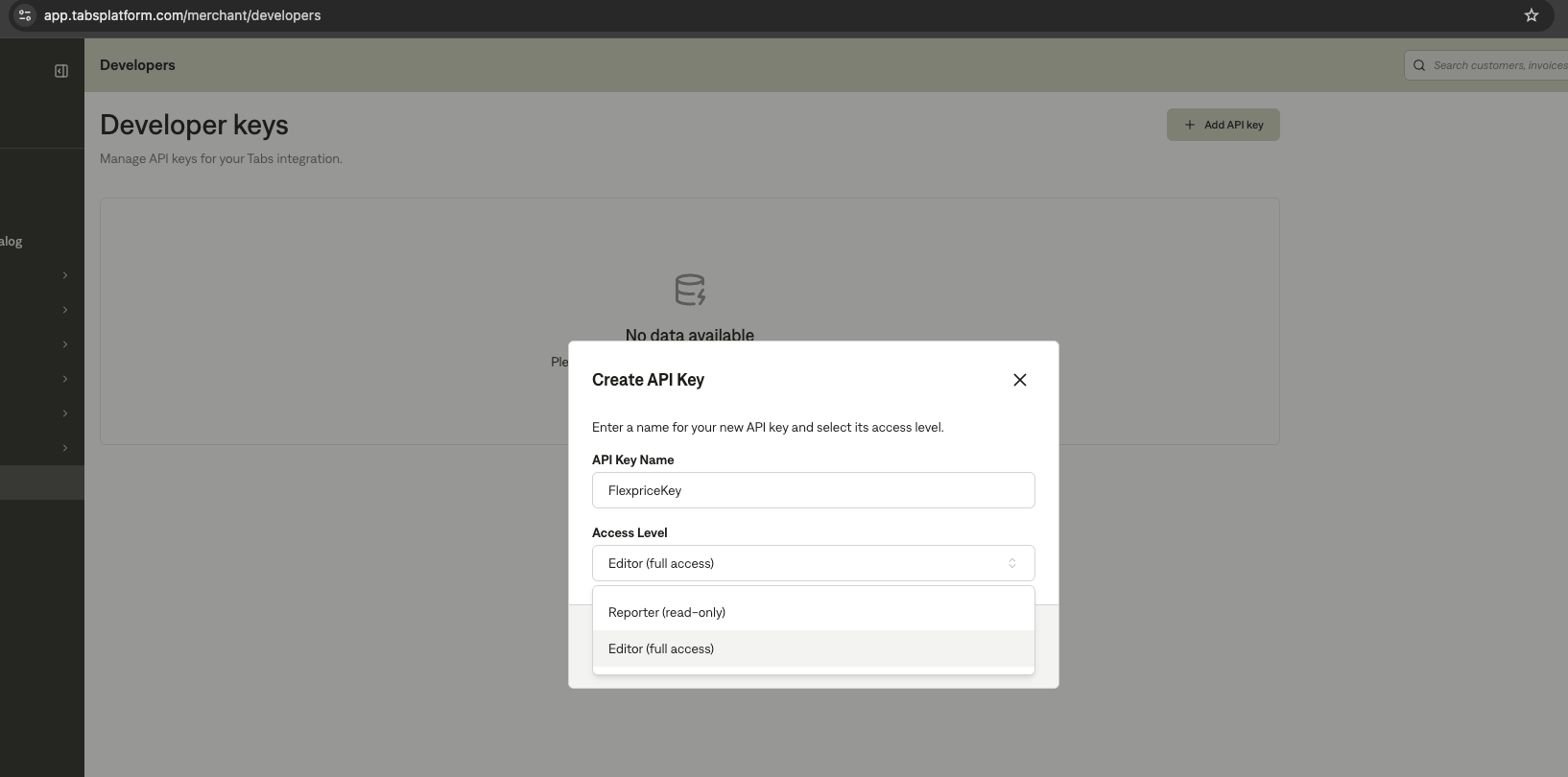 Copy the generated API key. You will paste it into Flexprice in the next step.
## Connect your Tabs account
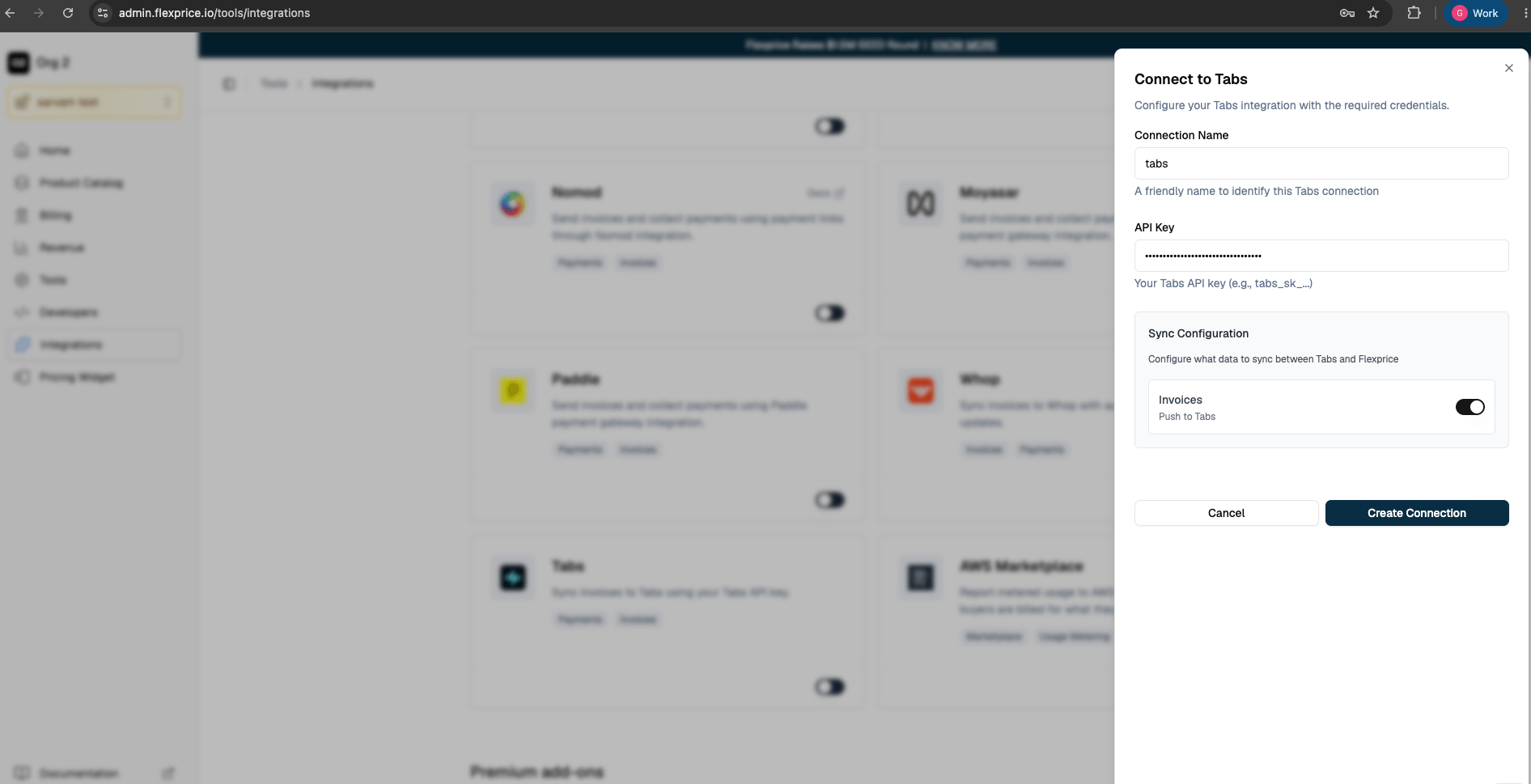
Go to **Flexprice Dashboard** → **Integrations** → **Tabs** → **Connect**.
Enter a name to identify this connection, e.g. `tabs`.
Paste the API key copied from Tabs.
Under **Sync Configuration**, toggle **Invoices** on to push invoices to Tabs. With this off, invoices stay only in Flexprice.
Click **Create Connection**.
Copy the generated API key. You will paste it into Flexprice in the next step.
## Connect your Tabs account
Go to **Flexprice Dashboard** → **Integrations** → **Tabs** → **Connect**.
Enter a name to identify this connection, e.g. `tabs`.
Paste the API key copied from Tabs.
Under **Sync Configuration**, toggle **Invoices** on to push invoices to Tabs. With this off, invoices stay only in Flexprice.
Click **Create Connection**.
 ### Create the connection via API
You can also create the connection through the API instead of the dashboard:
```bash cURL theme={null}
curl --location 'https://api.cloud.flexprice.io/v1/connections' \
--header 'x-api-key: your_flexprice_api_key' \
--header 'Content-Type: application/json' \
--data '{
"name": "My Tabs Connection",
"provider_type": "tabs",
"encrypted_secret_data": {
"api_key": "api_key_from_tabs"
},
"sync_config": {
"invoice": {
"outbound": true
}
}
}'
```
| Field | Description |
| ------------------------------- | ------------------------------------------- |
| `name` | A friendly name to identify this connection |
| `provider_type` | Always `tabs` |
| `encrypted_secret_data.api_key` | The API key generated in Tabs |
| `sync_config.invoice.outbound` | Set to `true` to push invoices to Tabs |
## Troubleshooting
| Issue | Cause | Solution |
| --------------------------- | ------------------------------------ | ---------------------------------------------------------------- |
| Invoice not syncing to Tabs | Invoice sync toggle is off | Enable **Invoices** sync in the connection settings |
| Authentication fails | Read-only API key | Recreate the key in Tabs with **Editor (full access)** |
| Sync fails - customer error | Customer is missing required details | Add the missing details to the customer in Flexprice and re-sync |
## Next Steps
* Finalize a test invoice in Flexprice and verify it appears in your Tabs dashboard
* Confirm the invoice is created in Tabs as a **draft** for review
* Read [Invoice Sync](/integrations/tabs/invoice-sync) to understand how Flexprice syncs invoices to Tabs
### Create the connection via API
You can also create the connection through the API instead of the dashboard:
```bash cURL theme={null}
curl --location 'https://api.cloud.flexprice.io/v1/connections' \
--header 'x-api-key: your_flexprice_api_key' \
--header 'Content-Type: application/json' \
--data '{
"name": "My Tabs Connection",
"provider_type": "tabs",
"encrypted_secret_data": {
"api_key": "api_key_from_tabs"
},
"sync_config": {
"invoice": {
"outbound": true
}
}
}'
```
| Field | Description |
| ------------------------------- | ------------------------------------------- |
| `name` | A friendly name to identify this connection |
| `provider_type` | Always `tabs` |
| `encrypted_secret_data.api_key` | The API key generated in Tabs |
| `sync_config.invoice.outbound` | Set to `true` to push invoices to Tabs |
## Troubleshooting
| Issue | Cause | Solution |
| --------------------------- | ------------------------------------ | ---------------------------------------------------------------- |
| Invoice not syncing to Tabs | Invoice sync toggle is off | Enable **Invoices** sync in the connection settings |
| Authentication fails | Read-only API key | Recreate the key in Tabs with **Editor (full access)** |
| Sync fails - customer error | Customer is missing required details | Add the missing details to the customer in Flexprice and re-sync |
## Next Steps
* Finalize a test invoice in Flexprice and verify it appears in your Tabs dashboard
* Confirm the invoice is created in Tabs as a **draft** for review
* Read [Invoice Sync](/integrations/tabs/invoice-sync) to understand how Flexprice syncs invoices to Tabs