

How Stripe decides the tax
Stripe calculates tax on a transaction taking into account some or all of the following factors:- The location of the seller
- The location of the customer
- The location where the activity is performed
- The type of the product sold
- Whether the transaction involves a reverse charge
- The status of the customer, for example whether they are a VAT-registered business, a private person, or an exempt organisation
Prerequisites
- Stripe Tax set up in your Stripe account, with your business address and an active registration for every jurisdiction you collect in. See Set up Stripe Tax and Manage your registrations.
- A Stripe connection in Flexprice. Tax uses the same connection as payments and invoice sync, so if Stripe is already connected there is nothing more to add. See Stripe Connection Setup. A restricted key must allow write access to the Tax resource.
- Every customer you bill must already exist in Stripe. Stripe reads the customer’s address, tax identification numbers, and exemption status from its own Customer object, so a customer Flexprice has never pushed to Stripe cannot be taxed. Customer Sync is what creates them.
Store your customers’ VAT and GST numbers on the Stripe Customer. Stripe uses them to determine whether a transaction is a reverse charge. Flexprice does not hold tax identification numbers and does not sync them to Stripe.
Enable Stripe Tax
Set thetax_config setting on the environment you want Stripe to tax.
{"value": {"enabled": false}} to stop using Stripe Tax. Flexprice goes back to the Flexprice-native tax engine. See Tax Configuration for the full schema.
While Stripe Tax is enabled, the tax rates and tax associations you configure in Flexprice are not applied, and creating a new tax association is rejected. Configure your tax in Stripe instead.
Your prices must match the tax behavior set in Stripe. Flexprice does not send a tax behavior, so Stripe resolves it from the default in your Stripe Tax Settings. If that default is inclusive, your Flexprice prices must already contain the tax. If it is exclusive, they must be pre-tax. A mismatch produces a wrong total that Flexprice cannot detect. See Specify product tax codes and tax behavior.
How Flexprice applies the tax
Flexprice asks Stripe for the tax, adds it to the document, and records the transaction back in Stripe. The tax Stripe returned is stored on the document intaxes[], one entry per jurisdiction that assessed it.
Invoices
Tax is calculated when the invoice is drafted and again when it is finalized, on the invoice total after discounts, so a change in your Stripe setup between the two is picked up. Once the invoice is finalized, Flexprice records the tax as a transaction in Stripe.Voiding an invoice reverses its tax transaction in Stripe in full.
Invoice response
total_tax is 180.
Credit notes
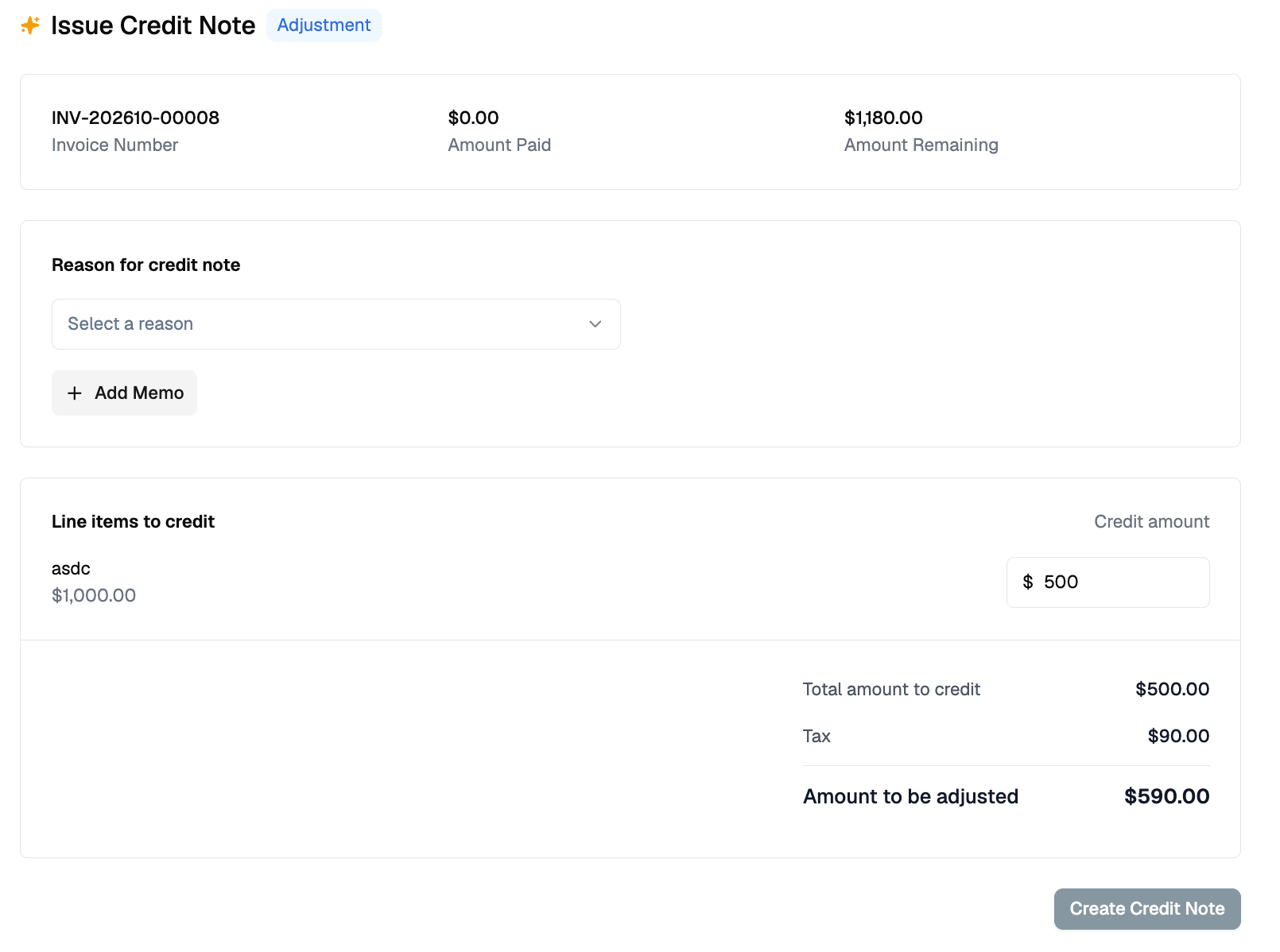
A credit note returns what the customer paid, so the tax comes back with the price. Stripe prices the credited amount and Flexprice adds that tax to the credit note.Finalizing a credit note reverses that part of the invoice’s tax transaction in Stripe. If Stripe refuses the reversal the credit note is not issued, so a credit note never exists while the tax it credits is still recorded in full.
Credit note response
total_amount is gross. Crediting 500.00 of a line taxed at 18% returns 590.00, and 90.00 of tax is reversed in Stripe.
Which engine taxes a credit note is decided by the invoice it credits, not by the current setting:
- An invoice taxed by Stripe is always credited by Stripe, even after you disable the setting on that environment.
- An invoice that carries no Stripe tax is credited untaxed. An invoice finalized before you enabled Stripe Tax has no Stripe transaction to reverse, so its credit note returns the net amount. No tax was charged on that invoice, so there is none to return.
Where to see the tax
In Flexprice.taxes[] on the invoice or credit note, and tax_summary for the totals. When no tax was charged, tax_summary.exemption.reason_code states why.
In Stripe. Every finalized invoice’s tax is recorded as a Stripe tax transaction and appears in your Stripe Tax reports, where you can export it in itemised form. Filing and remitting the tax you collect remains yours to do, in every location you are registered in. See Report, file, and remit.
Troubleshooting
A missing registration does not fail. Stripe returns a valid calculation with zero tax, and the invoice finalizes and bills the customer without tax. Add every registration in Stripe before you enable Stripe Tax.