

How It Works
- An invoice is finalized in Flexprice. Flexprice creates the matching invoice in Zoho Books within moments. Draft invoices never sync.
- The customer is matched or created as a Zoho contact. See Contacts.
- Each price becomes a Zoho item. See Items.
- Flexprice adopts the Zoho invoice number. The Flexprice invoice’s number is replaced with the number Zoho assigned, and
metadata.zoho_invoice_idstores the Zoho invoice ID. Both systems then show the same invoice number on PDFs and statements. - The payment follows. When the Flexprice invoice is fully paid, Flexprice records a customer payment against the Zoho invoice. If the invoice was already paid when it synced, the payment is recorded straight away. See Payments.
What Zoho Receives
Invoice header
Zoho creates the invoice with its default status, normally Draft. Flexprice does not send or email the invoice from Zoho.
Line items
Each Flexprice line item becomes one Zoho line:- Quantity is 1 and rate is the line amount, so line totals match exactly. Usage quantities and unit prices are not sent.
- Name is the line’s display name. Description is the service period, for example
(2026-10-01 - 2026-10-31). For parent and child billing, the child customer’s name appears above the period. - Discounts (line discounts plus invoice-level coupons) are sent as an item-level amount, applied before tax.
- HSN or SAC comes from the price. See GST, HSN and SAC.
- Lines with a zero amount are left out. If every line is zero, the invoice is not synced.
normalize_fixed_to in the invoice sync settings. A quarterly fixed price of 3,000 normalized to MONTHLY appears as quantity 3 at a rate of 1,000. The supported targets are MONTHLY, QUARTERLY, HALF_YEARLY and ANNUAL.
Taxes
Flexprice does not send its own tax amounts. Zoho Books calculates tax from its own tax settings, the contact’s place of supply and the item’s HSN or SAC code. Items are created as taxable.Contacts
For each invoice, Flexprice finds the Zoho contact for the customer in this order:- The contact already linked to this customer.
- The first Zoho contact with the same email address. It is linked and left unchanged.
- Otherwise a new Customer contact (sub-type Business) is created.
Updating a Flexprice customer updates its linked Zoho contact with the same fields. Contact persons added directly in Zoho are kept. GST treatment is not sent; set it on the contact in Zoho Books.
Items
Each Flexprice price is linked to one Zoho Books item, created the first time an invoice uses that price:- Type Service, taxable.
- Name is the line’s display name; SKU and description are the Flexprice price ID.
- HSN or SAC is the price’s code at the time the item is created.
GST, HSN and SAC
For Indian organizations, set these on Flexprice records before the first sync:
Flexprice rejects invalid values when the customer or price is saved. A price override without its own
hsn_sac uses the code of the plan price it overrides.
Currency
If the invoice currency is your Zoho organization’s base currency, the exchange rate is 1. For any other currency, add it in Zoho Books under Settings > Currencies with a positive exchange rate. Otherwise the sync fails withcurrency XXX is not enabled in Zoho Books.
Custom Fields
Flexprice can fill Zoho invoice custom fields in three ways:
Create the fields in Zoho Books first: open Settings > Sales > Invoices, go to the Fields tab and click New Field. Refer to a field by its API Field Name (starting with
cf_) or its numeric field ID. You can map up to 50 fields in total, and each Zoho field only once.
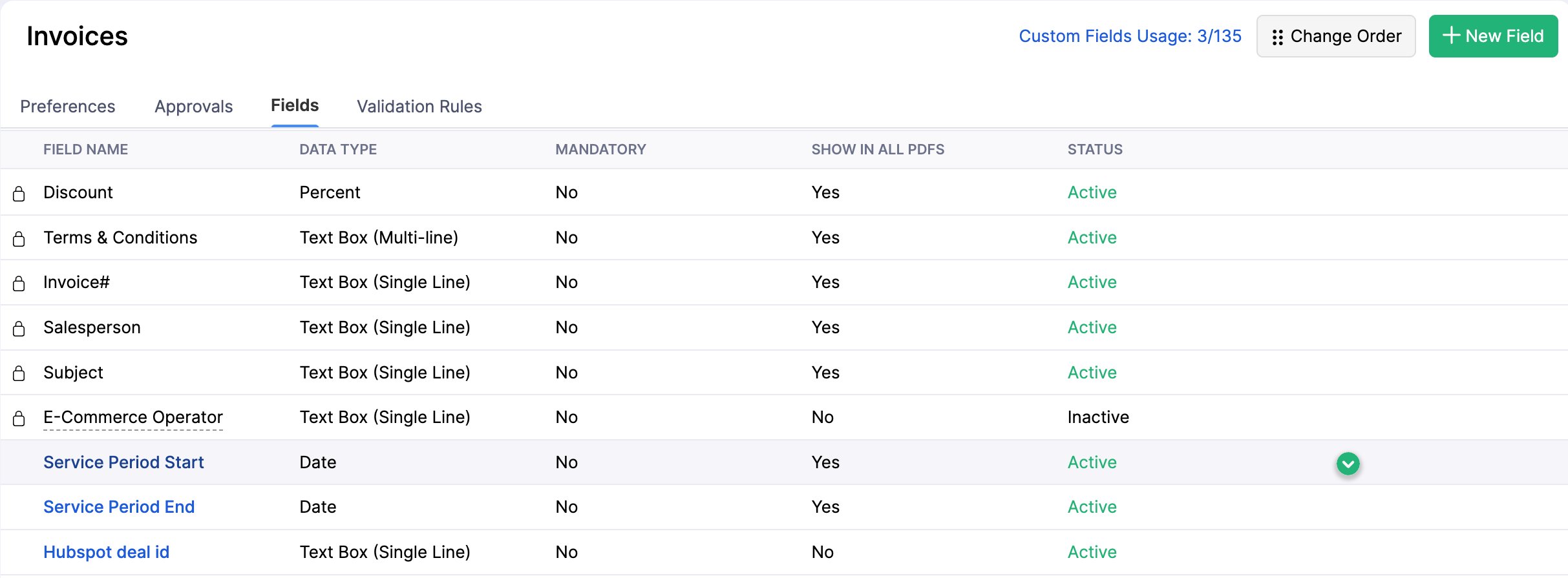
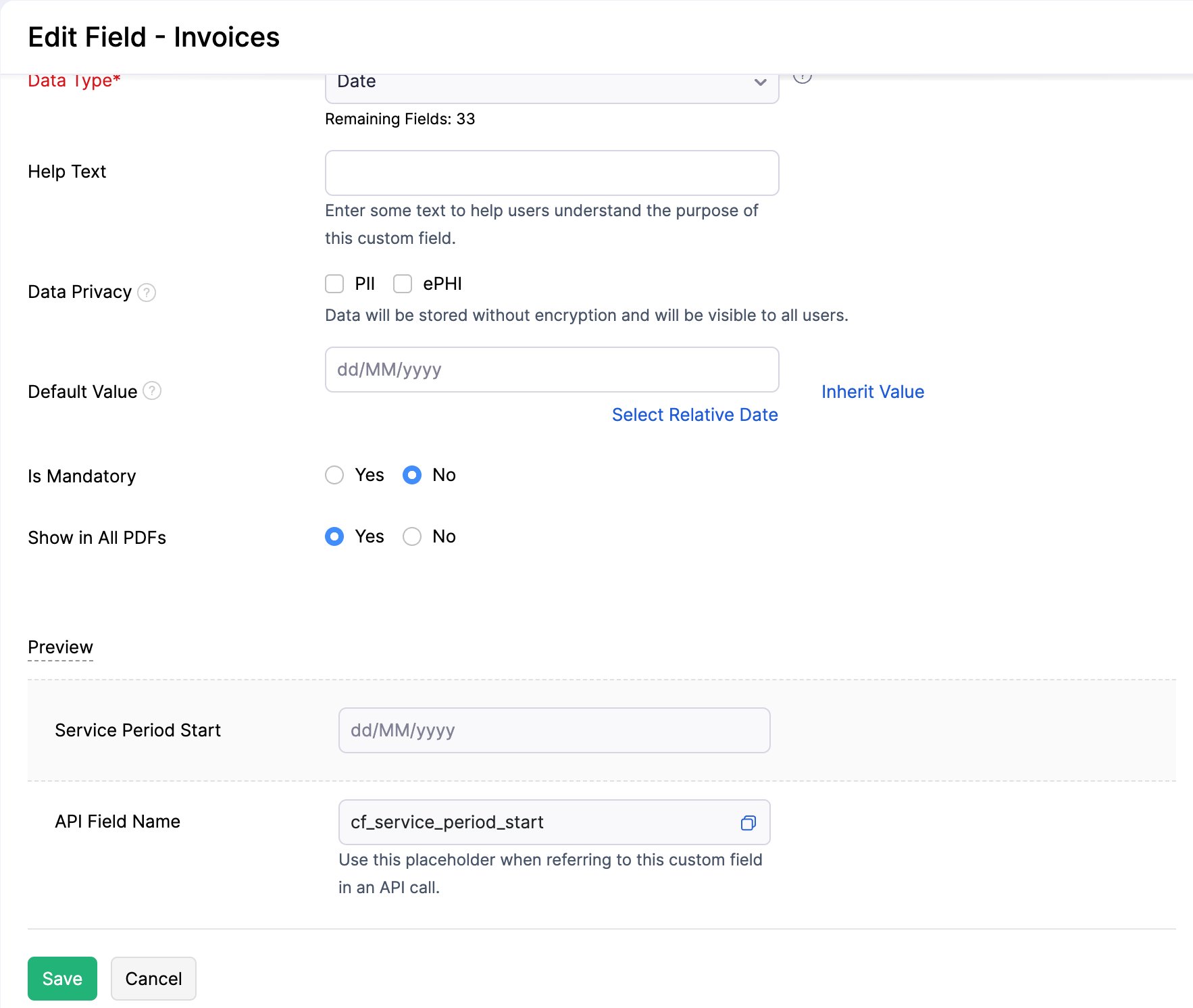
Example: service period and PO number on the invoice PDF
A common setup shows the billing period and the customer’s PO number in the invoice header:2026-02-01 as the start and 2026-02-28 as the end: the end date is the last day of service, not the first day of the next period.
Metadata values are copied as they are. A metadata key that is missing or empty on an invoice or customer is skipped, so the Zoho field stays blank.
Payment Gateways
With Enable payment gateways on, synced invoices carry the selected Zoho online payment options, so customers can pay from the Zoho invoice. Flexprice sends only gateway names, never gateway credentials. To choose the gateways, see Connection Setup.Payments
When a Flexprice invoice becomes fully paid, by any gateway, a manual payment or credits, Flexprice records a customer payment in Zoho Books:
Partial payments are not recorded in Zoho; only the fully paid invoice is. If the Zoho invoice has no balance left, nothing is recorded, so an invoice paid in Zoho is never paid twice.
Invoice approval
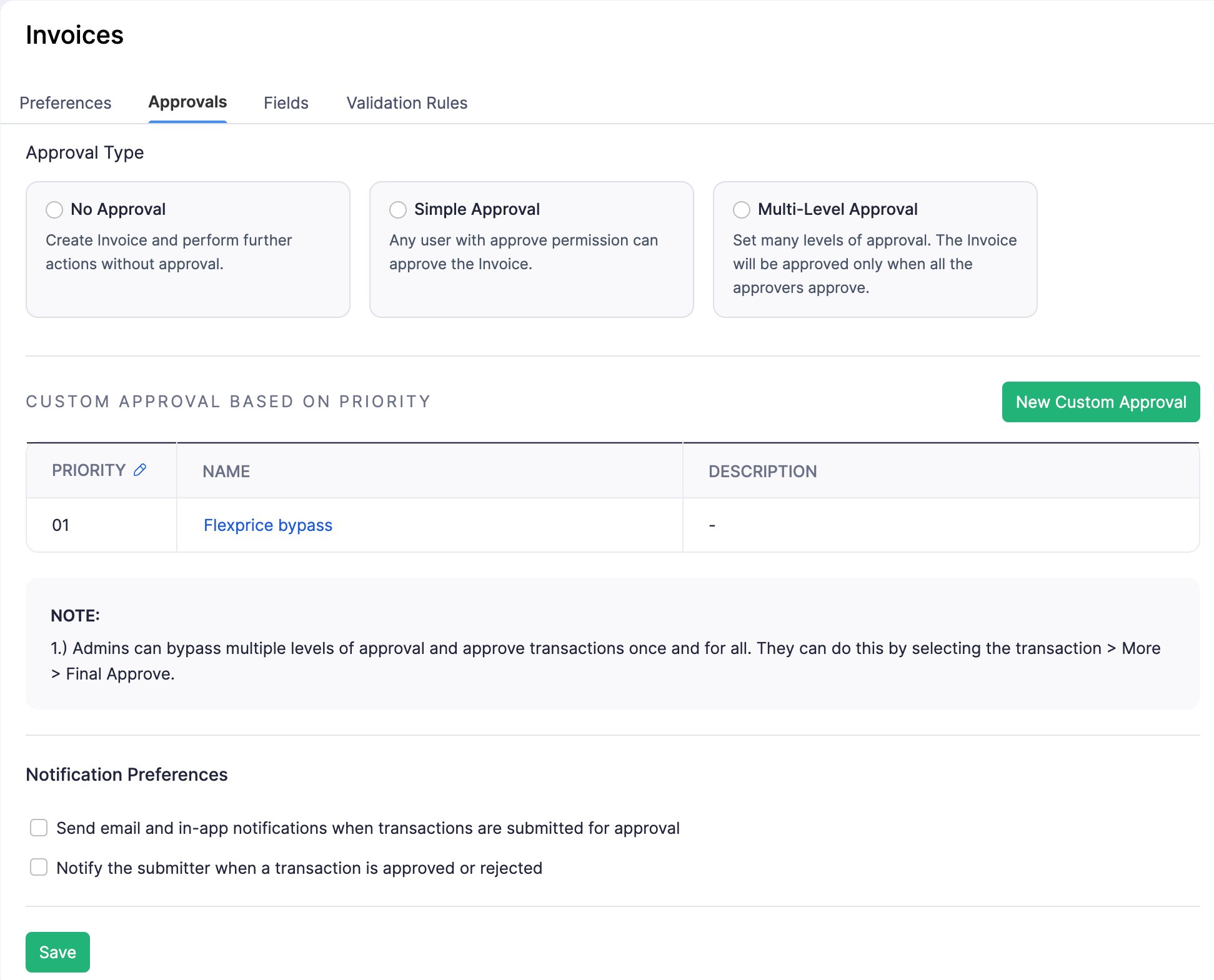
If your Zoho organization requires invoice approval, setsubmit_for_approval to true. Before recording a payment, Flexprice submits a draft Zoho invoice for approval and records the payment once Zoho approves it.
Approval is configured in Zoho Books under Settings > Sales > Invoices > Approvals. Use New Custom Approval to add a rule that approves invoices created by Flexprice without manual review.
Invoice Sync Settings
Settings beyond the sync switches and payment gateways are set through the API, insync_config.invoice_sync_settings:
PUT /v1/connections/{id} replaces the whole sync_config, so send every field you want to keep:
Re-syncing an Invoice
To push an invoice by hand, or to update a Zoho invoice after its Flexprice invoice or customer changed:- Without
resync, an invoice that is already in Zoho is left as it is. - With
resync: true, Flexprice updates the Zoho contact, then rebuilds the Zoho invoice. Invoices that are paid, partially paid or void in Zoho are not changed. - The call returns once the sync is queued. Subscribe to the
invoice.sync.successandinvoice.sync.failedwebhook events to learn the outcome; failures carry Zoho’s error message.
Limitations
- Voiding an invoice in Flexprice does not void it in Zoho Books. Void it in Zoho too.
- Credit notes, refunds and payment reversals are not synced in either direction.
- Plans, prices and subscriptions are not synced on their own; items are created only for invoice lines.
- Zero-amount lines and Flexprice tax amounts are not sent.
- If Zoho Books rejects an invoice (for example for a missing currency or an unknown custom field), fix the cause in Zoho, then re-sync the invoice.
Troubleshooting
Related Articles
Connection Setup
Connect Zoho Books over OAuth and register the webhooks.
Webhooks and Customer Sync
Paid and voided invoices and new customers from Zoho.