

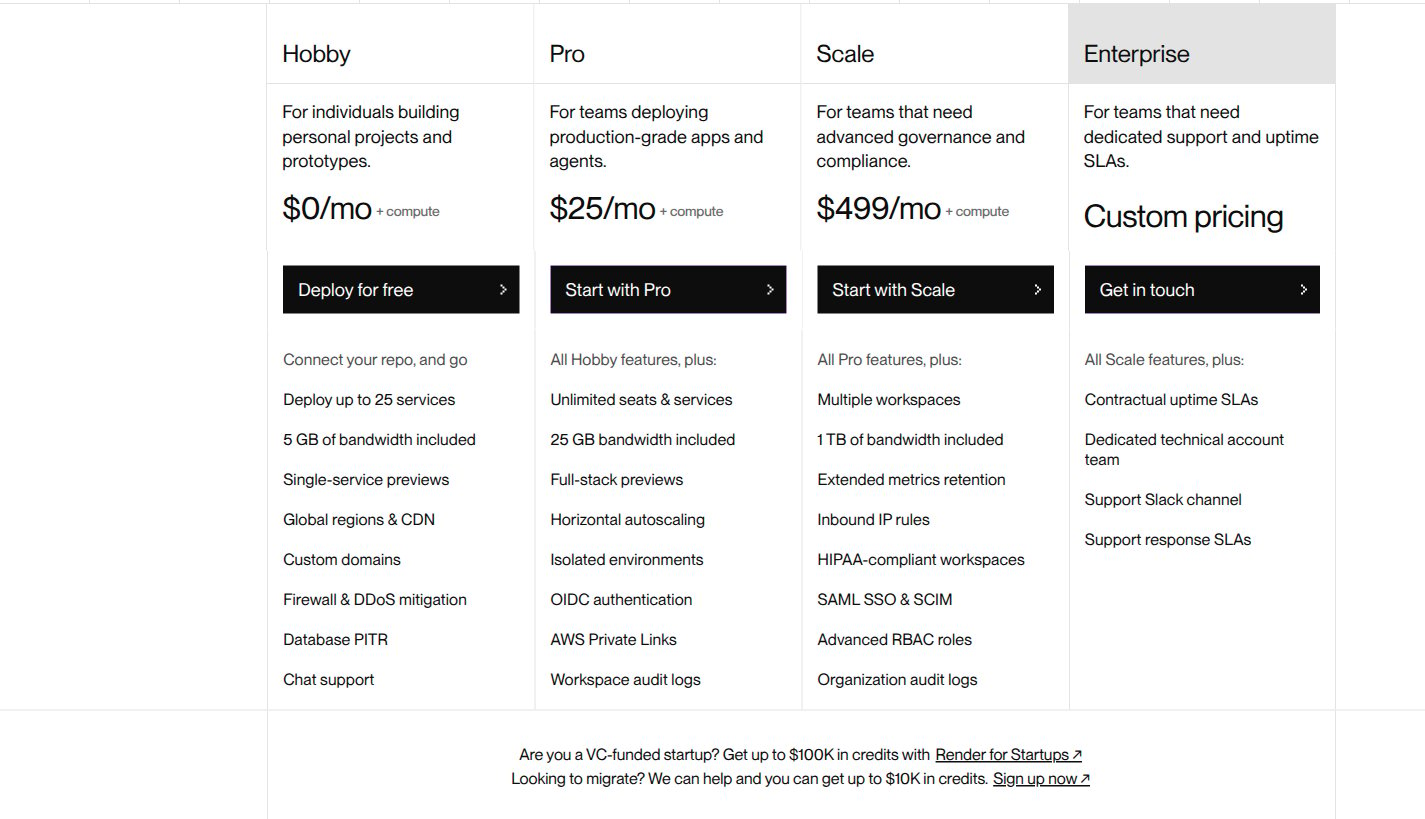
Render workspace plans, captured from its official pricing page on November 4, 2026. This teardown models Pro's $25 monthly workspace fee and pooled 25 GB bandwidth allowance only; other plans and promotional credits are excluded.
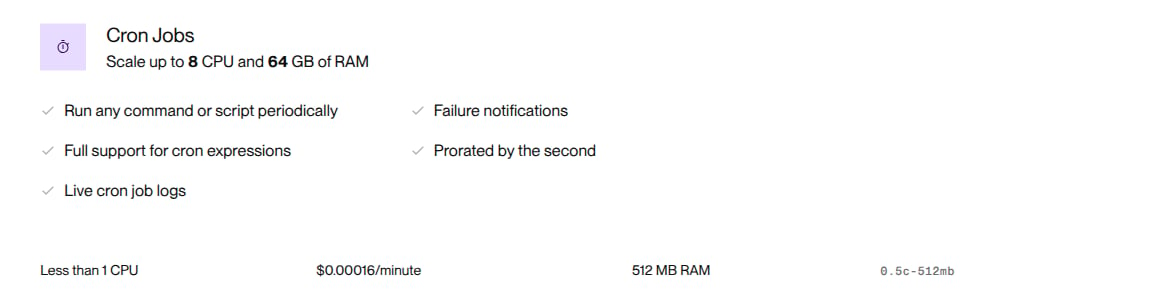
Render's cron-job section and the modeled 512 MB instance row, captured on November 4, 2026. The rate is $0.00016 per minute, prorated by the second; other instance sizes and compute products are excluded. The per-service minimum is documented in the text below.
Pricing profile
These labels describe the offering modeled here, not Render’s entire catalog or sales process.Published pricing used here
The current Pro fee is flat, not per seat. Render’s workspace plan update replaces the legacy per-member plan and moves bandwidth overage from 100 GB increments to per-GB billing. Do not recreate the retired seat fee or package rounding.
Design takeaways
- The customer boundary and the resource boundary are different. Render pools bandwidth across the workspace, but applies a minimum to each cron job service. Model the workspace as one customer and keep each job’s runtime on its own usage line. Combining both jobs into one minimum would let a busy job hide an idle job’s shortfall.
- A monthly subscription is not an included compute wallet. The Pro price is explicitly plus compute. Keep the $25 workspace charge separate from runtime and bandwidth; do not turn it into credits that offset those charges. Unlimited team members also means the workspace fee should not multiply with headcount.
- A rate’s display unit does not determine its billing increment. Render publishes cron prices per minute but bills by the second. Preserve fractional minutes instead of rounding each run up. Likewise, apply the workspace’s per-GB bandwidth overage without 100 GB packages.
How Render’s pricing maps to Flexprice
Set up Render Pro in Flexprice
1. Keep one customer per workspace
Create a customer for the workspace and a USD plan calledRender Pro Cron Example. Add a monthly recurring charge of $25, quantity 1. Use monthly calendar billing for this example and align usage windows to the same month.
This example assumes a full month with no service additions, deletions, instance-size changes or plan changes. Validate those lifecycle and proration cases separately before extending the model.
2. Create the runtime and bandwidth meters
In Product Catalog > Features, create these metered features. All three use SUM aggregation and the same workspace customer identifier.
Your collector measures actual running seconds and converts them to fractional minutes using decimal arithmetic:
runtime_minutes = runtime_seconds / 60. Preserve precision through aggregation; do not round each run up to a whole minute. For example, 90 seconds contributes 1.5 minutes. Reporting-unit conversion alone does not change the billable quantity.
Emit incremental usage with stable, unique event IDs. Do not repeatedly send a month-to-date total into a SUM meter. Split intervals at the month boundary so usage lands in the correct period.
Example runtime event
3. Price each meter without duplicating allowances
Add the following monthly usage charges to the plan, billed in arrears:
Attach usage entitlements that allow continued usage. Keep the bandwidth billing allowance only in its graduated price. Adding a second 25 GB deduction through an entitlement would make the first 50 GB free. The free tier is shared across both jobs because they belong to one customer and one bandwidth meter.
4. Apply the minimum to each cron line item
When creating the workspace subscription, configure line-item commitments keyed by the two actual runtime price IDs. Setcommitment_amount to "1", overage_factor to "1.0" and enable_true_up to true for each. The minimum applies once per month per service, not once per run.
This is a configuration fragment, not a complete subscription request. Replace the placeholder keys with the price IDs created in the previous step.
Per-job commitment fragment
, not $1 + runtime cost`. For more jobs, create distinct filtered runtime prices and commitments so each service retains its own floor.
5. Check boundaries before using the model
Verify that a full-month job with zero runtime still bills $1. Test both sides of the minimum: 6,250 minutes costs exactly $1; 6,251 minutes costs $1.00016 before invoice currency rounding. The overage factor of 1.0 must preserve the published runtime rate above the floor. For bandwidth, verify that 25 GB costs $0 and 26 GB costs $0.15. A new calendar month starts with a fresh 25 GB allowance, not last month’s unused balance. Check that increasing the workspace’s member count does not change the $25 fee.Worked monthly invoice
Assume both cron services use the selected instance type for the full month. Job A records 12,000 runtime minutes and job B records 500 runtime minutes. Together, the workspace’s services emit 80 GB of billable public-internet outbound traffic. All excluded charges are zero.
Job B’s $0.08 runtime cost leaves a $0.92 true-up to reach its $1 floor. Job A’s higher usage does not absorb that shortfall. The 25 GB bandwidth allowance is deducted once for the workspace, not once for each job.
Pricing sources
- Render pricing: current Pro workspace fee and selected cron compute rate
- Render cron jobs: second-level runtime proration and per-service monthly minimum
- Render outbound bandwidth: included Pro bandwidth, public-internet overage, exclusions and no rollover
- Render FAQ: workspace billing scope and shared bandwidth usage
- Updated plans for Render workspaces: flat workspace fees, unlimited team members and per-GB overage