

us-east-1 to Flexprice using reconciled monthly usage and one organization-wide minimum adjustment.
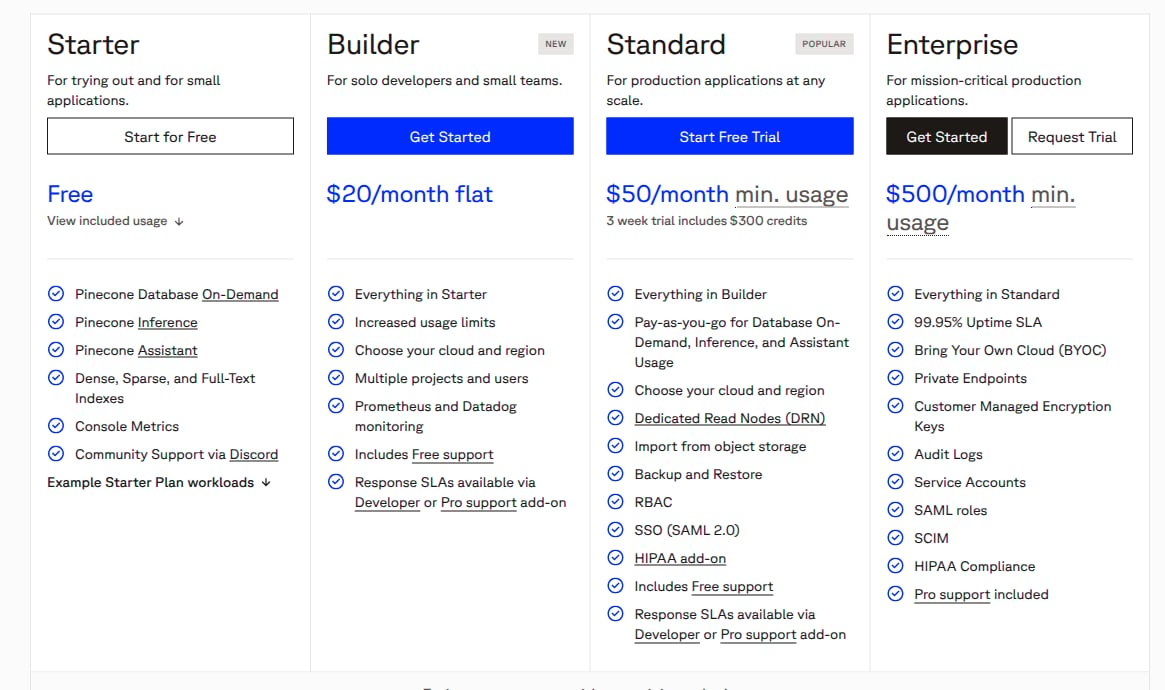
Pinecone plan cards, captured from its official pricing page on November 4, 2026. This teardown models Standard's $50 monthly minimum for eligible on-demand database usage only; trial credits, other plans and other products are excluded.
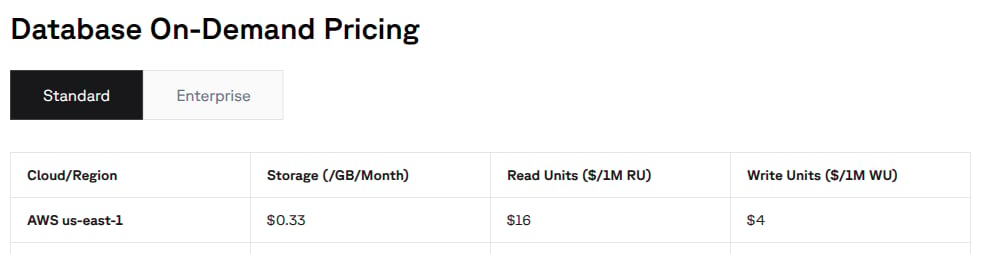
Pinecone Standard Database On-Demand rates, captured on November 4, 2026. The modeled AWS us-east-1 row lists storage, read units and write units; other regions, products and charge types are outside this example.
The example covers one organization for a full monthly billing period in USD, with only on-demand database reads, writes and index storage. Assume egress stays within Standard’s included 100 GB per month. It excludes other regions and plans, dedicated read nodes, pod-based indexes, imports, backups and restores, Inference, Assistant, Nexus, paid support, compliance add-ons, prepaid credits, trial credits, discounts and taxes. It is a configuration recipe, not a live setup or an invoice quote.
Pricing profile
These labels describe only the Standard on-demand database offering modeled here in AWS us-east-1, using the self-serve console upgrade path. They do not classify every Pinecone product or purchasing route.Pinecone Standard database prices
The official pricing page lists these Standard, AWS us-east-1, Database On-Demand rates:
The cost documentation explains that the minimum is a commitment you grow into. With $20 of eligible usage, the shortfall is $30 and the total is $50. With $100 of usage, the total is $100, not $150. The minimum is not a $50 subscription fee or a free $50 usage allowance.
What the units measure
- Reads: A query consumes 1 RU per GB of namespace size, with a minimum of 0.25 RU per query. Fetch consumes 1 RU per 10 records fetched, rounded up, with a minimum of 1 RU. A list request costs 1 RU. A request count alone cannot reproduce these charges.
- Writes: An upsert consumes 1 WU per KB of request data, with a minimum of 5 WUs per request. Replacing a record also counts the existing record’s size. Updates count new and existing record data; deletes count deleted record data, each with a 5 WU request minimum. Deleting an entire namespace or using
deleteAllcosts 5 WUs. Preserve Pinecone’s request-level rules instead of dividing all monthly bytes by a KB and applying one monthly minimum. - Storage: An index’s size includes its records across all namespaces, including IDs, vector data and metadata. Storage has a duration component: Pinecone’s official worked example prorates storage for a four-hour workload. A namespace’s query size is not the organization’s total stored size.
How Pinecone’s pricing maps to Flexprice
This recipe deliberately calculates the cross-meter minimum upstream. It does not attach a $50 commitment to each usage price, add a fixed fee, or configure an additional subscription commitment. The fourth meter records only the already-calculated shortfall. No entitlement allowance or recurring credit grant reduces the three usage charges.
Design takeaways
The following are modeling interpretations of the documented mechanics, not claims about Pinecone’s intent:- Apply the floor after combining eligible charges. Pinecone’s minimum-usage examples show one shortfall line for the organization. Keep read, write and storage charges separate for explainability, but calculate their shared shortfall once. Independent $50 floors would introduce a $150 minimum that this offering does not have.
- Treat region as part of a price’s identity. The on-demand rate table varies by cloud and region. Filtering all four meters to the selected scope prevents usage from another region from silently receiving the AWS us-east-1 prices. A region field without a matching meter filter is only a label, not a pricing boundary.
- Normalize before using SUM. Rounded API read counts lose fractional consumption, while Pinecone’s storage example depends on elapsed time. SUM is appropriate here because the event carries reconciled RUs, WUs and GB-months, not rounded request responses or repeated storage snapshots. The normalization contract matters as much as the meter’s aggregation type.
Set up the monthly usage plan
1. Reconcile the billing quantities
Use Pinecone’s Usage dashboard and CSV download for the Standard organization. Reports use UTC dates, can break usage down by SKU, project and index, and cost data can lag usage by up to three days. Standard supports console downloads; the Admin API export described on that page is Enterprise-only. For each full monthly period:- Select only the Standard AWS
us-east-1on-demand database SKUs. Aggregate all indexes and projects in the organization once. Verify that excluded services have no charges and egress remains within the included 100 GB. - Obtain precise billed RU and WU quantities, retaining fractions and Pinecone’s operation-level minima. Do not use request counts or rounded response usage.
- Normalize reconciled storage to GB-months. Respect the report’s actual billing unit and duration. If you only have the final pre-tax storage charge for this one SKU, dividing that charge by
0.33gives its billed GB-month equivalent. This imports Pinecone’s storage calculation rather than inventing a sampling rule. The worked example below assumes a constant 100 GB for the entire month, equivalent to 100 GB-months. - Calculate the eligible usage subtotal from these three charges, then calculate
max(50 - subtotal, 0)once for the organization. Emit one finalized monthly event after reconciling the report. Do not ingest Pinecone’s minimum line as usage and also calculate your own shortfall.
2. Create four metered features
In Product Catalog > Features, create the following features. Set Event Name topinecone_monthly_usage, Aggregation to SUM, and Usage Reset to periodic (BILLING_PERIOD). Apply both filters to every meter: pricing_scope = standard_on_demand and region = aws_us_east_1.
These event names, properties and lookup keys are examples for your Flexprice account, not Pinecone API fields. Leave reporting conversion unset. If you choose to display millions of RUs, a
conversion_rate of 1000000 displays raw RUs divided by 1,000,000. Reporting conversion does not change the billed quantity or rate.
3. Add the plan and usage charges
Create a plan named Pinecone Standard On-Demand, AWS us-east-1. Add four usage charges with currencyusd, price unit type FIAT, billing period MONTHLY, billing period count 1, billing model FLAT_FEE, type USAGE and invoice cadence ARREAR.
Use each feature’s meter ID, not its feature ID, when creating prices through the API. Send
amount as a decimal string. Do not use million-unit packages that round usage up, and do not round the small per-RU or per-WU rates to cents.
Create one customer subscription to this plan for the organization, aligned to the full month you are importing. Keep the billing period open for reconciliation before generating and finalizing its invoice. Do not price the same usage on another subscription. This example does not configure partial-month minimum proration.
Send the reconciled usage and check the arithmetic
The following illustrative Flexprice event represents a reconciled October period. Use the actual usage period’s timestamp, not the report download date. Keep bothevent_id and timestamp stable for retries, and emit the finalized totals only once. Resolve report corrections before invoicing rather than submitting a second full set of totals.
Use exact decimal arithmetic in the normalization job. This copyable calculation also checks a below-minimum month:
500000 RUs, 500000 WUs, 10 GB-months and 36.70 USD of shortfall. The usage charges are $8 + $2 + $3.30. The fourth charge adds only $36.70, making $50 rather than $63.30. Preserve the provider’s reconciled billing precision when normalizing quantities; these examples have exact cent-valued charges and need no fractional-cent rounding assumption.
Pricing sources
- Pinecone Database overview: database infrastructure for application retrieval
- Pinecone quickstart: application integration through API keys and developer tooling
- Upgrade your billing plan: the self-serve Standard console upgrade path used by this profile
- Pinecone pricing, Standard Database On-Demand regional table: AWS us-east-1 rates, monthly minimum and included egress
- Understand Pinecone cost: RU and WU definitions, storage composition and minimum usage examples
- Check usage per request: fractional consumption versus rounded API response counts
- Monitor performance: counter and gauge semantics and example scrape cadence
- Download a usage report: Standard console CSV, UTC dates and reporting delay
- Test Pinecone at scale: storage duration example