


Deepgram plan cards, captured from its official pricing page on November 4, 2026. This teardown uses Pay as you go base usage pricing only; the visible promotional credit, Growth commitments and Enterprise agreements are excluded.
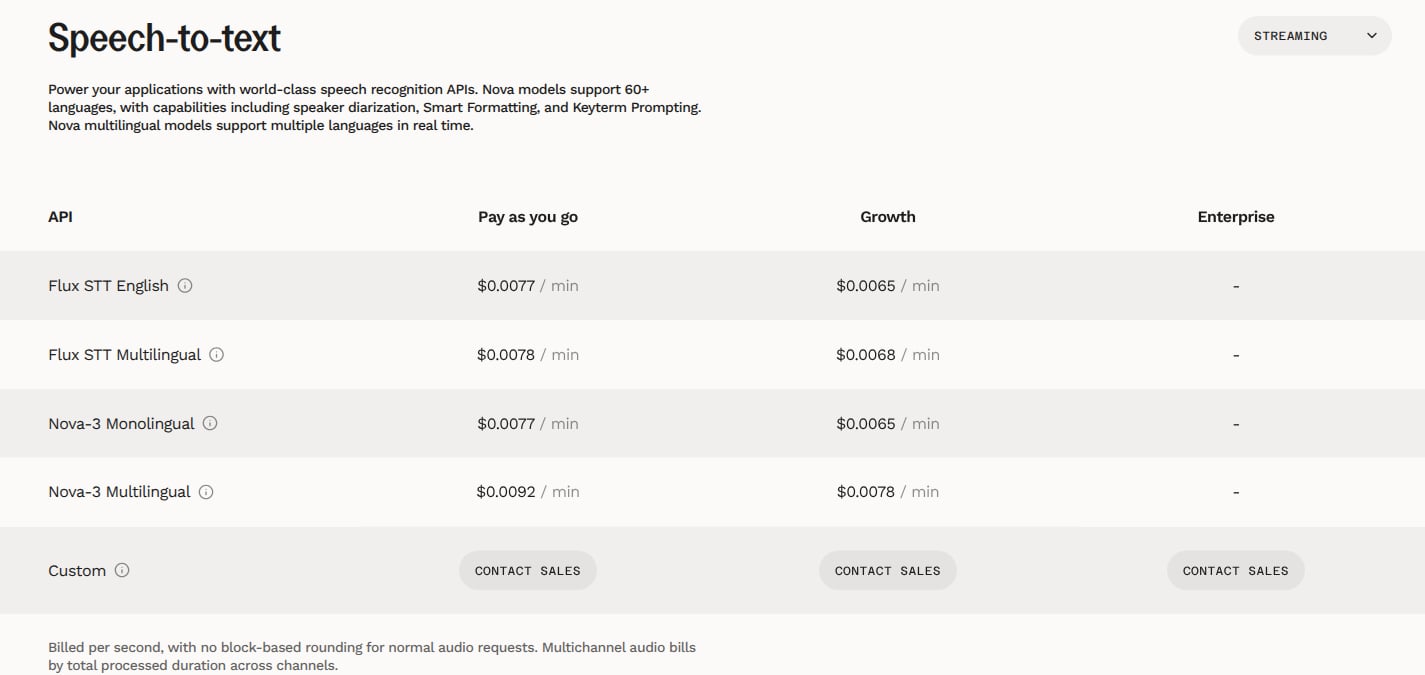
Deepgram streaming speech-to-text rates, captured on November 4, 2026. Only Flux STT Multilingual on Pay as you go at $0.0078 per minute is modeled, billed per second; other models, plans and multichannel audio are excluded.
This example covers hosted, mono audio using
flux-general-multi, with English and Spanish language hints, in USD. It excludes pre-recorded or batch transcription, the English-only Flux model, Nova models, multichannel audio, paid add-ons, Audio Intelligence, text-to-speech, Voice Agent bundles, self-hosting, promotional credits, Growth commitments and Enterprise agreements. It also excludes request options that change the published base rate. The configuration names below are examples, not Deepgram product identifiers.Pricing profile
These labels describe only the mono Flux Multilingual Pay as you go streaming offering modeled here, not Deepgram as a whole.Flux Multilingual streaming prices
On the official pricing page, select Speech-to-text, then Streaming. Use the Flux STT Multilingual row and the Pay as you go column, not a pre-recorded or English-only rate.
The price is for the multilingual model, not the detected language of each turn. Supplying only an English hint does not select the separately priced English-only model. The Flux language guide documents
flux-general-multi, its ten supported languages and optional language hints.
For this example, your application connects to the hosted streaming endpoint documented in the Flux quickstart:
/v1/listen pre-recorded endpoint. Language hints bias recognition; they do not restrict all speech to those languages.
How Deepgram’s pricing maps to Flexprice
The example uses monthly usage billing in arrears in Flexprice. That is an implementation choice, not Deepgram’s payment cadence: Deepgram says Pay as you go usage draws down credits. Its advertised $200 starting credit is outside this example and must not become a recurring monthly free-minute allowance. Model any prepaid funding separately with wallet credits.
Set up the seconds meter
In Product Catalog → Features → Add Feature, create a metered feature named Flux Multilingual streaming seconds. Use these settings, or the equivalent feature configuration through the API:mono_base label are your integration’s conventions. Only label a request mono_base after verifying that it matches the mono base-rate scope, without paid extras. Route other models, modes and options to their own meters and prices.
The optional reporting unit displays raw seconds ÷ 60 as minutes. For example, 6,000 seconds displays as 100 minutes. It does not change the SUM meter or the per-second price. Do not divide usage by 60 again before applying that price.
Configure the usage-only plan
Create a plan named Flux Multilingual PAYG Example. Add the feature as a usage-based flat-fee charge with the following configuration:
When using the prices API, set
entity_type to PLAN, entity_id to the created plan’s ID and meter_id to the returned meter ID. Use billing_period, not a differently named interval field. Preserve the decimal amount rather than rounding the per-second rate to cents.
In the plan’s Entitlements tab, add the feature with unlimited metered access (Set to Infinite). This permits access without a usage cap; it does not make usage free. Do not add a free-usage tier, recurring credit grant or minimum-spend commitment to this scoped example.
Send usage and verify the arithmetic
Subscribe a customer to the plan and send usage events from your server. Normalize each completed streaming request into one event, such as this illustrative 14-second request:billable_seconds is a normalized application property, not a claimed Flux response field. Supply the processed-audio duration from your integration and reconcile it with Deepgram’s request usage information before billing. Do not infer billable duration from transcript word timestamps or use WebSocket connection time, which the pricing page specifies for the separate Voice Agent product. This example assumes the durations below are already verified billable seconds; it does not define an additional duration-rounding rule.
Keep a stable event_id derived from the provider request identifier when retrying event delivery. Emit the final usage once per request, not once per interim transcript, final turn and session total. A new upstream request is distinct from retrying delivery of the same usage event.
Use decimal arithmetic to check both a short request and a monthly aggregate of 1,000 requests at 14 seconds plus 500 requests at 92 seconds:
Do not round the $0.00182 short-request charge to cents before aggregation. A 14-second request is not a full-minute package. Compare the meter’s raw seconds, displayed minutes and usage charge against these values before enabling live billing. This guide describes a configuration; no live resources or invoices have been created.
Design takeaways
These are modeling interpretations of the sourced mechanics, not claims about Deepgram’s intent.- Keep display units out of the billing calculation. The pricing page presents minute rates but bills normal audio requests per second without block rounding. Here that means summing raw seconds and applying an exact per-second charge; reporting minutes should not introduce a package boundary.
- Route usage by requested model, not detected language. Language hints operate within the multilingual model, while the rate table prices Flux English and Multilingual separately. Filter the Flexprice meter by requested model and streaming scope so English speech processed by
flux-general-multicannot accidentally receive the English-only rate.
Pricing sources
Pricing checked on 2026-11-04.- Deepgram pricing: Speech-to-text → Streaming → Flux STT Multilingual → Pay as you go rate; per-second billing, no duration minimum or block rounding, credit-based payment and starting credit.
- Flux quickstart: hosted
/v2/listenendpoint, model selection and raw audio format requirements. - Flux Multilingual and Language Prompting: supported languages and English/Spanish hint configuration.
- Get a Project Request: request-level usage information for reconciliation.
- Deepgram speech-to-text product guide: conversational AI use cases, Flux model positioning and the developer audience for the API.