

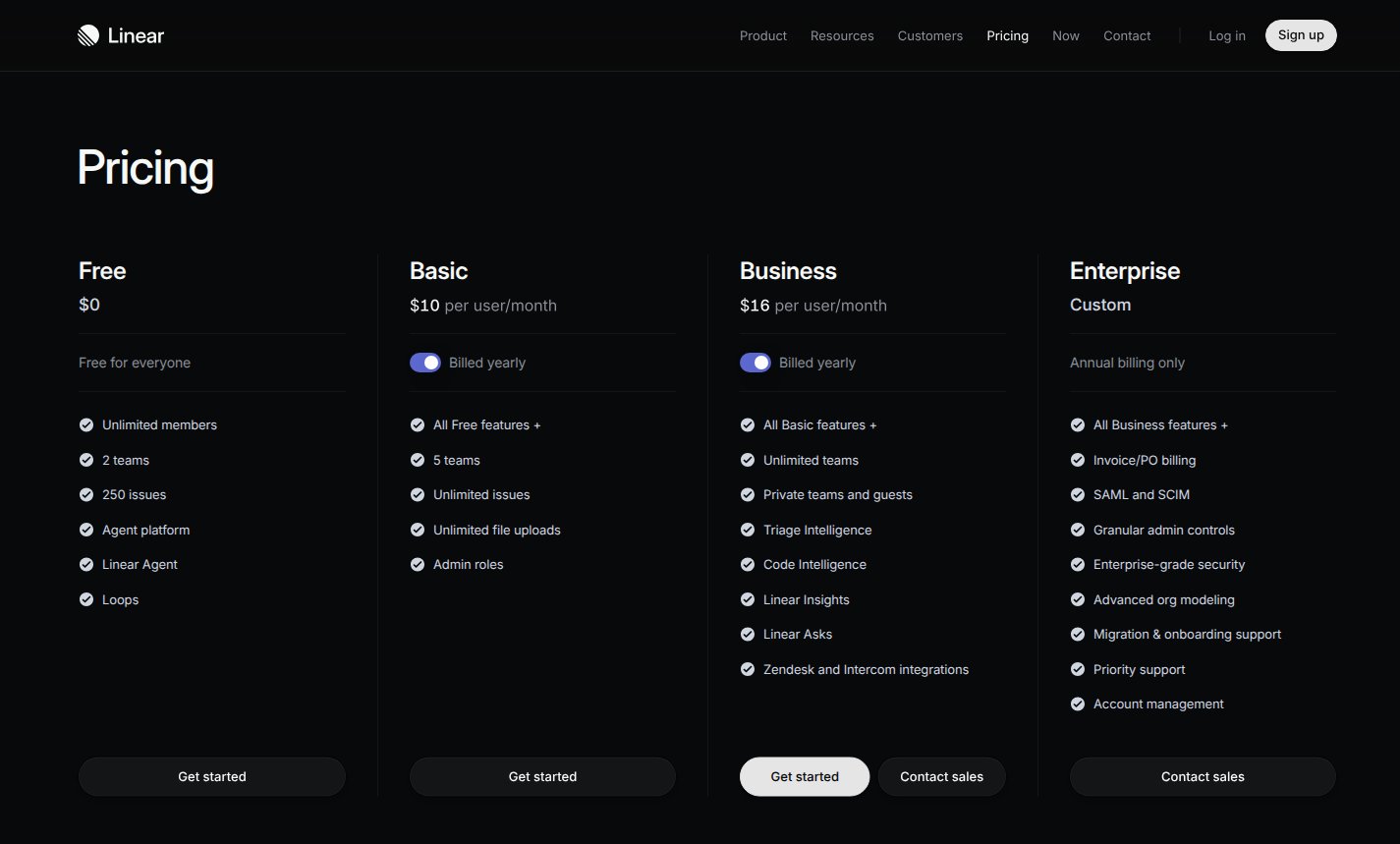
Linear's complete pricing cards, captured from its official pricing page on November 7, 2026 with Billed yearly selected for Basic and Business. This guide models only Basic's annual base charge; Free, Business and Enterprise are shown for comparison. The $10 Basic rate is a per-user monthly equivalent, not a monthly invoice.
This example uses USD and covers only Basic’s full-year base charge at signup or renewal with a stable user count. It excludes the monthly plan option, Free, Business, Enterprise, optional AI credits, taxes, special-program discounts, cancellations, and midyear additions or suspensions. Linear supports prorated annual-seat changes with monthly true-up invoices or credits. The configuration below does not implement that adjustment workflow and is not a complete reproduction of Linear’s billing lifecycle.
Pricing profile
These labels describe the self-serve Basic annual subscription modeled here, not every Linear plan or purchasing path.Basic annual pricing
Linear’s pricing page and billing documentation establish the following facts:
The five-team limit is not a five-user limit. Likewise, unlimited issues do not make the paid subscription free for additional users.
Design takeaways
- Convert the display period before configuring the charge. Basic’s card expresses a monthly equivalent while selecting annual billing. A $10 annual price would undercharge; a $120 monthly price would overcharge. Keep the amount and billing period together: $120 per user, once per year. The premise is visible on the Basic card.
- Keep membership pricing separate from product limits. Users determine the charge, while Basic’s team cap and included capabilities describe access. Store the billable user count as a fixed-price quantity; enforce the team limit in the application rather than adding a second priced meter. These are distinct dimensions in the pricing comparison and billing rules.
- An annual base fee does not imply annual-only adjustments. Linear reconciles annual-seat changes on a monthly anniversary cycle. Reproducing that behavior requires timing, proration and credit handling in addition to the base price. The billing documentation makes that boundary explicit; changing a quantity alone should not be presented as the complete workflow.
How Linear pricing maps to Flexprice
FIXED identifies the charge type. FLAT_FEE identifies its pricing model: one constant annual unit amount multiplied by the line-item quantity. No usage meter or usage events are needed for the base subscription.
Set up the annual base charge
The following are illustrative API request bodies. Use your Flexprice environment’s API base URL and authentication, and replace example IDs with returned IDs. No requests were executed for this guide.1. Create the plan
Create a plan withPOST /plans:
2. Add one fixed annual price
Multiply the advertised monthly equivalent by twelve before creating the price:POST /prices, replacing plan_linear_basic_example with the plan ID:
meter_id, package transformation or included usage allowance. See plan pricing.
3. Set the workspace’s user quantity
Create or select a Flexprice customer representing the workspace. Count its unsuspended users before starting the subscription. For a workspace with 12 users, create the subscription withPOST /subscriptions:
price_basic_annual_user must reference the fixed annual price created in the previous step. Keep this plan limited to that one price so no unrelated charges attach.
The quantity override applies to fixed prices, not metered usage prices. Each workspace can use the same catalogue price with its own quantity. Do not emit daily user-count snapshots into a SUM meter: that would count the same users repeatedly instead of setting the subscription quantity.
4. Verify the annual invoice
Before collecting payment, inspect the subscription line item and invoice through your normal invoice workflow:
Keep the user count unchanged for this scoped example. If users are added or suspended during the year, implementing Linear’s monthly reconciliation requires a separate verified workflow for effective dates, remaining-term prorations and credits. Do not assume a live line-item quantity update alone reproduces those rules.
Worked bill
Assume 12 unsuspended workspace users at signup, with no changes during the year, discounts, taxes or optional AI-credit purchases:Pricing sources
- Linear pricing: Basic’s yearly-selected rate and included capabilities.
- Linear billing and plans: unsuspended workspace users, annual base charges, prorated seat changes, monthly reconciliation and optional AI credits.
- Linear product overview: product-development positioning and product-team audience.