

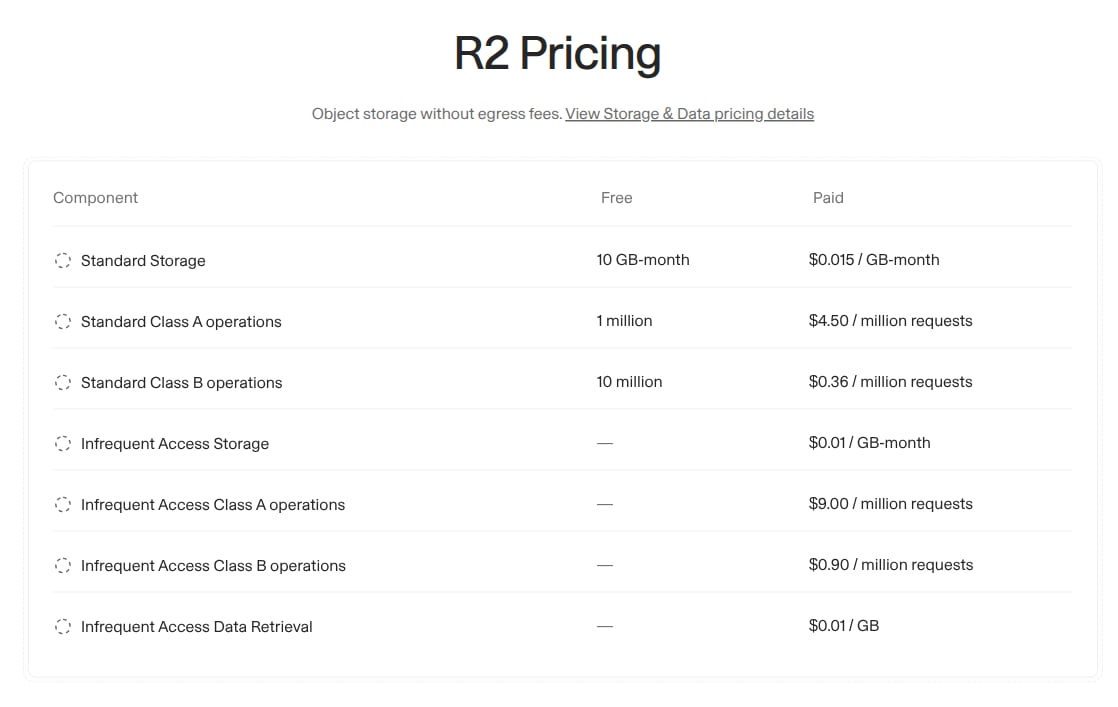
Cloudflare pricing as shown on the official pricing page, 2026-11-19.
Pricing profile
What Cloudflare charges
Design takeaways
- Round after aggregation. The billable unit is a unit of monthly usage. Rounding each event would make the invoice depend on how the same activity was batched. Published terms.
- Model each allowance independently. Storage, Class A and Class B have separate thresholds. Keep one meter per dimension and preserve the account scope so the free unit is not repeated for every bucket. Published terms.
How Cloudflare’s pricing maps to Flexprice
Configure the plan and subscription
These requests are illustrative. Use your own test environment and replace all example IDs with the IDs returned by your setup. Create a plan withPOST /plans:
PutObject that returns HTTP 412 is still a Class A operation. Divide each class total by 1,000,000 and round up.
For storage, use the account’s unrounded GB-month total from the upstream rating process, then round up to a whole unit. The example below uses Cloudflare’s documented 30-day case: add the 30 daily peaks of aggregate Standard storage in GB and divide by 30. For other windows, supply the verified GB-month total rather than assuming the same divisor. Do not round operations or storage per bucket, or subtract the free amounts upstream.
Create these metered features and usage prices. Replace each example meter ID with the meter ID from the corresponding feature. In Flexprice’s API, the graduated tier mode is SLAB. These prices allow the first quantity band at zero and rate only the excess.
Standard storage
POST /features:
POST /prices:
Standard Class A
POST /features:
POST /prices:
Standard Class B
POST /features:
POST /prices:
POST /subscriptions, with a period boundary aligned to how you measure usage:
POST /events early enough for all three meters to reflect them before the first invoice computation, which can happen one hour after period end. Use the customer’s external ID and a timestamp inside the period being billed. Keep the event ID and timestamp stable for retries. Do not bill both the summary and the individual events.
"billing_reason": "SUBSCRIPTION_CYCLE", and "invoice_status": ["DRAFT", "SKIPPED", "FINALIZED"]. Match the billing period’s start and end dates. The billing reason distinguishes the period-end invoice from the opening invoice, which can be skipped for the same dates. Confirm the period-end invoice still lacks the usage before choosing a recovery step:
DRAFT: Call Recalculate draft invoice withPOST /v1/invoices/{id}/recalculate-v2?finalize=false. Passfinalize=falseexplicitly so you can check the returned line items before callingPOST /v1/invoices/{id}/finalize. If the invoice is no longer a draft when you recalculate or finalize it, fetch it again, verify whether usage is still missing, and follow the branch for its current status.SKIPPED: If your dashboard offers in-place recalculation for this skipped subscription invoice, use it and verify that the invoice now includes the usage. The draft-only API above does not accept skipped invoices. If the dashboard option is unavailable, use the replacement procedure below.FINALIZED: Check payment status and collected amounts before replacing it. If a payment is in flight, wait for it to settle and recheck. To leave a paid or partially paid invoice intact, bill only the missing amount on a one-off invoice instead. Replacement voids the original and returns collected amounts and applied prepaid credits to the customer’s prepaid wallet, not to the original payment method.
POST /v1/invoices/{id}/recalculate. A 202 Accepted response means the workflow started, not that a replacement exists yet. After the workflow completes, fetch the original invoice, then fetch the replacement using the original’s recalculated_invoice_id. Verify the replacement’s billing period and usage lines. An empty ID while the workflow is running is not a reason to start another replacement.
Worked bill
Over 30 days, 27 daily peaks of 109 GB and three of 110 GB produce(27 × 109 + 3 × 110) / 30 = 109.1 GB-month.
The base usage total is **$6.36** before exclusions. Exactly 1 million Class A requests costs $0; one more request moves that month’s Class A charge to $4.50.
Pricing sources
- Cloudflare pricing: R2 Standard and Infrequent Access pricing comparison.
- Cloudflare product documentation: Monthly allowances, daily storage peaks and round-up rules for billable units.