

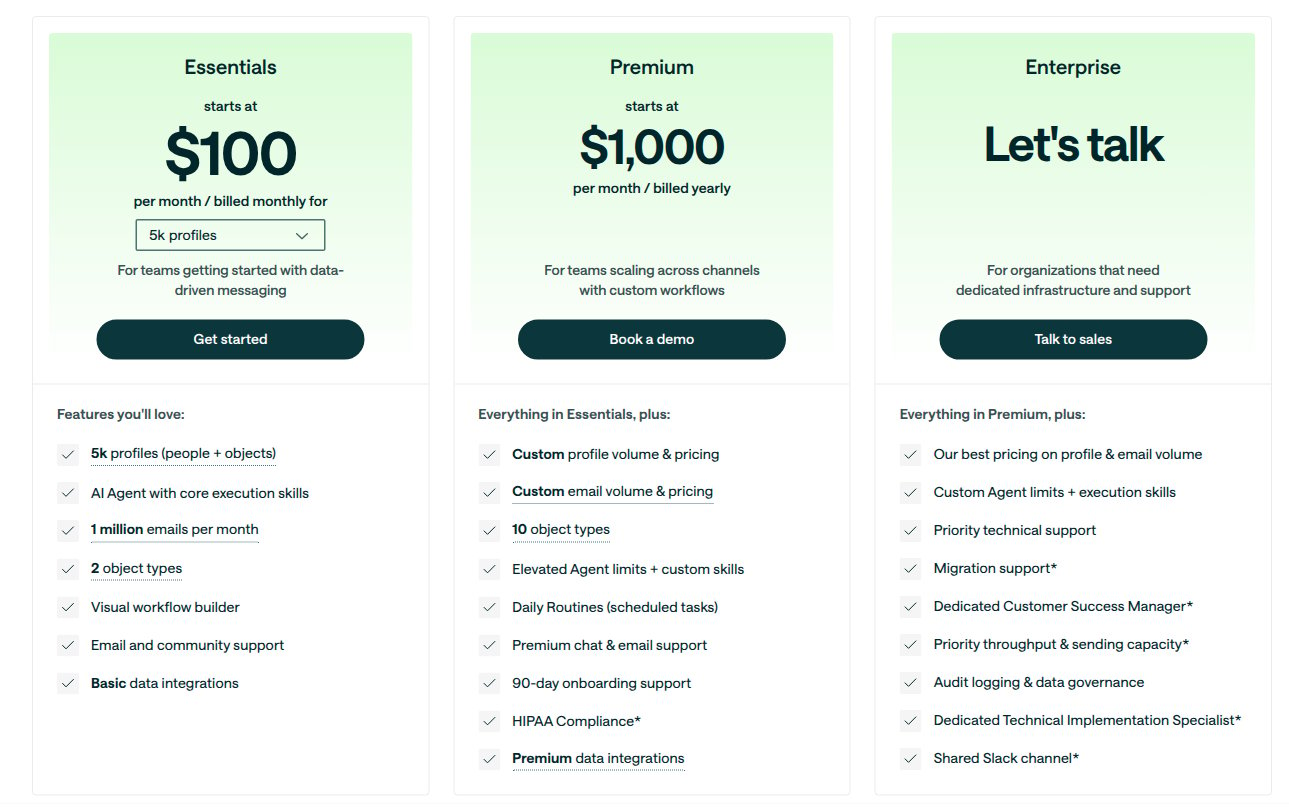
Customer.io plan comparison from the official site, 2026-11-26. This guide models only Essentials at 5,000 profiles.

Customer.io profile and email overage rates from the official site, 2026-11-26. This guide models only Essentials at 5,000 profiles.
Pricing profile
What Customer.io charges
Design takeaways
- Bill the period’s profile population. A month-end snapshot drops deleted records that still count. Calculate the billable population across workspaces and track each delete-and-recreate as a separate profile occurrence Published terms.
- Keep each renewal line tied to its service period. On the same renewal, the new base opens a fresh allowance while the two usage lines settle the prior allowance. Derive both usage quantities from the same closed window so neither uses the new cycle’s counters Published terms.
How Customer.io’s pricing maps to Flexprice
Configure the plan and subscription
These requests are illustrative. Use your test environment and replace example IDs with the IDs returned by your setup. Create a plan withPOST /plans:
POST /prices to add the fixed subscription fee.
POST /features. Use each returned meter ID in its corresponding POST /prices request. Graduated tiers (SLAB) charge only for units above each allowance.
Billable profiles
POST /features
POST /prices
Billable email blocks
POST /features
POST /prices
Subscription and usage
UsePOST /subscriptions when paid billing begins. The example uses a customer with UTC billing and a December 1 start, so the first period ends at midnight UTC on January 1. For a different start date or customer timezone, check the actual period boundaries on the subscription. Count usage within those boundaries and adjust the summary event ID and timestamp for that period.
An active subscription with a future start date raises its opening advance invoice at creation. To prepare it earlier and defer the invoice, create a draft and activate it when billing begins.
POST /events and the customer’s external ID. Use a timestamp inside the period you are settling and ensure the meters reflect the summary before the first invoice computation. Keep the event ID and timestamp stable on retries. If usage arrives late, follow the invoice recovery flow.
Worked bill
The opening invoice includes only the $100.00 base for the first month. Start the period with 4,970 profiles, add 230, and delete 60. The ending count is 5,140, but 5,200 profiles existed during the period. Email volume is 1,010,000 sends, or 1,010 whole blocks.
The renewal invoice totals **$103.00** before taxes. Usage at or below either allowance adds $0 for that dimension.
Pricing sources
- Customer.io pricing: Essentials base price, allowances and overage rates.
- Customer.io billing guide: Billable profile and send definitions and monthly invoice timing.