

Create subscriptions with Create subscription, move them to another plan with Execute a plan change (v2, swap in place), and end them with Cancel subscription. For walkthroughs and every option, see Create a Subscription.
Subscription fields that tie a customer to a plan
A create request names the customer, the plan, and which of the plan’s prices to bill:-
external_customer_idorcustomer_idThe customer must exist and be active, and so must the plan. Billing periods follow the customer’s timezone, and atimezonesent with the subscription is ignored. -
end_dateThe last billing period stops atend_date, and the subscription is cancelled once that period is invoiced. -
trial_period_daysLeave it out to inherit the trial set on the plan’s recurring fixed prices, send0for no trial, or send a number of days. The trial starts atstart_date, and the subscription istrialinguntil it ends. See Trialing.
Attaching plan prices to a subscription
Flexprice bills only a subscription’s line items, and creation copies only some of the plan’s prices into them. Withoutinclude_price_ids, a plan price is copied when:
- its currency matches the subscription’s
currency, - its
billing_periodequals the subscription’s, or it’s a one-time price, and - it hasn’t ended.
400.
To attach a price on a shorter cadence, such as a MONTHLY usage price on a QUARTERLY subscription, list every price to attach in include_price_ids. Flexprice then attaches only the listed prices, and rejects the request if one isn’t on the plan, isn’t in the subscription’s currency, or has a cadence that neither equals nor divides the subscription’s. Check what was attached with Get subscription (V2) and expand=subscription_line_items.
Choosing a subscription start date
Each line item counts the customer’s events from its own start: the subscription’sstart_date, or a later start date on the price. Events timestamped earlier are never billed by the subscription, and start_date defaults to the time of the request.
- A past
start_datebills usage you’ve already sent. Flexprice invoices each elapsed period, usage included, on its next billing run. - A future
start_datedoesn’t delay the first invoice: the first period’s in-advance charges are invoiced at creation. To sign a deal now and bill it later, create the subscription with"subscription_status": "draft". A draft raises no invoices until you call Activate draft subscription, so call it when billing should begin, with that date asstart_date.
Choosing anniversary or calendar billing periods
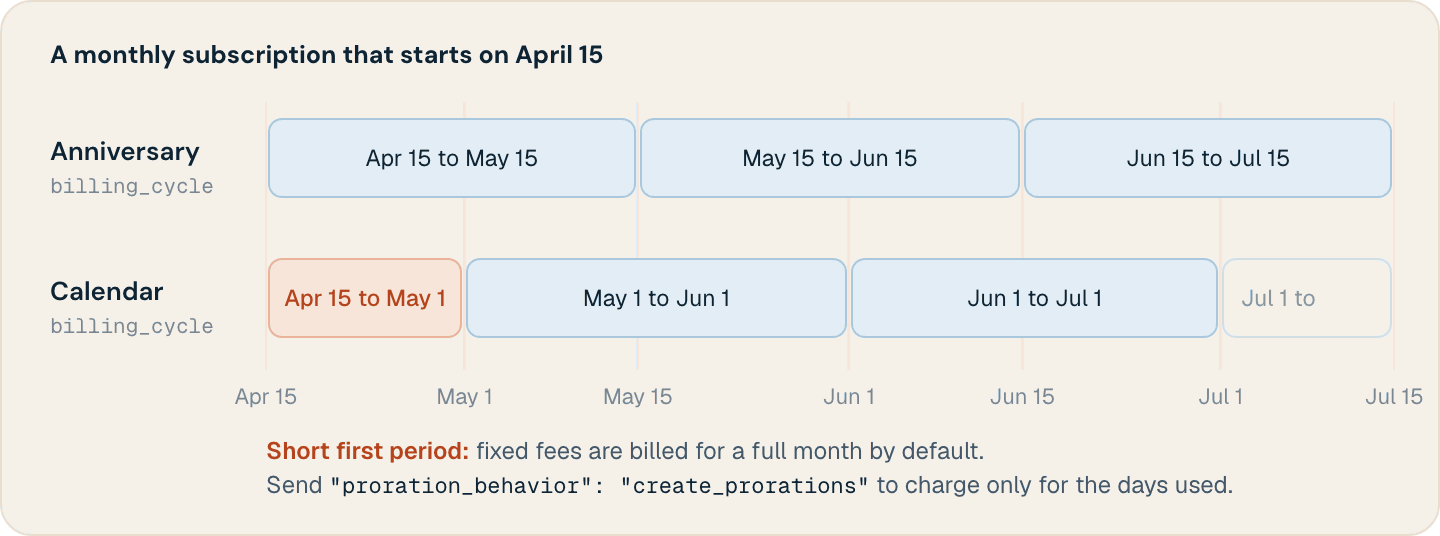
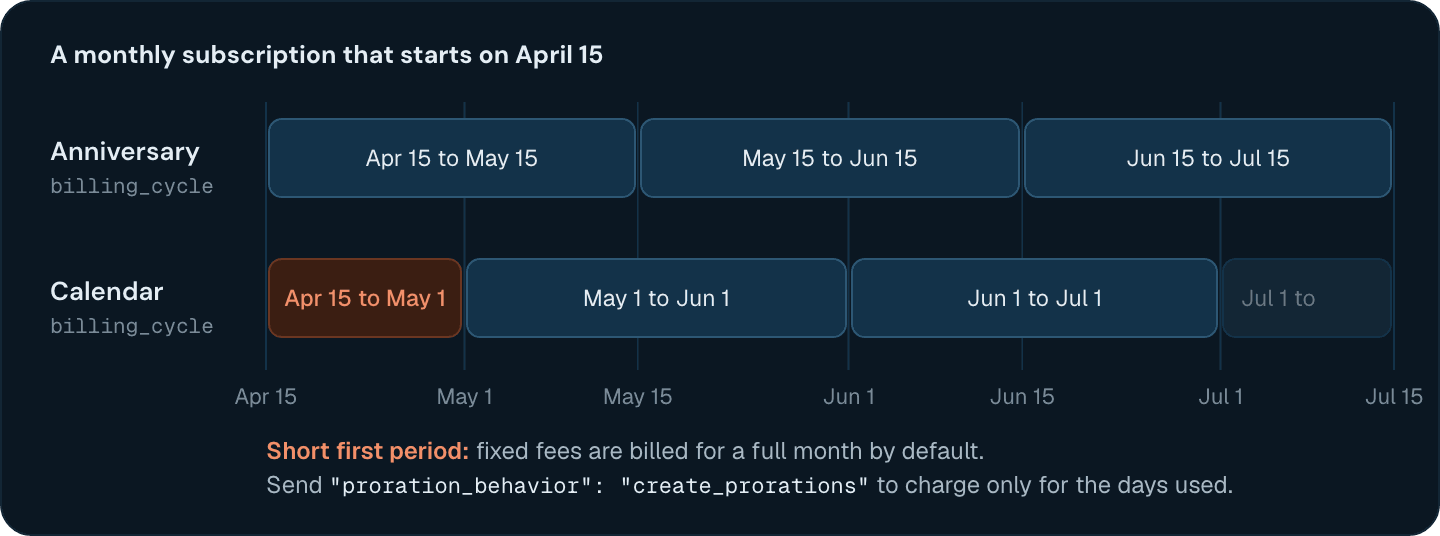
With"billing_cycle": "anniversary", the default, billing periods repeat from start_date. billing_anchor moves the boundary to another day, on anniversary subscriptions only. With "billing_cycle": "calendar", periods start on calendar boundaries in the customer’s timezone, so the first period is short: a monthly subscription that starts on April 15 has a first period from April 15 to May 1.
Running several subscriptions for one customer
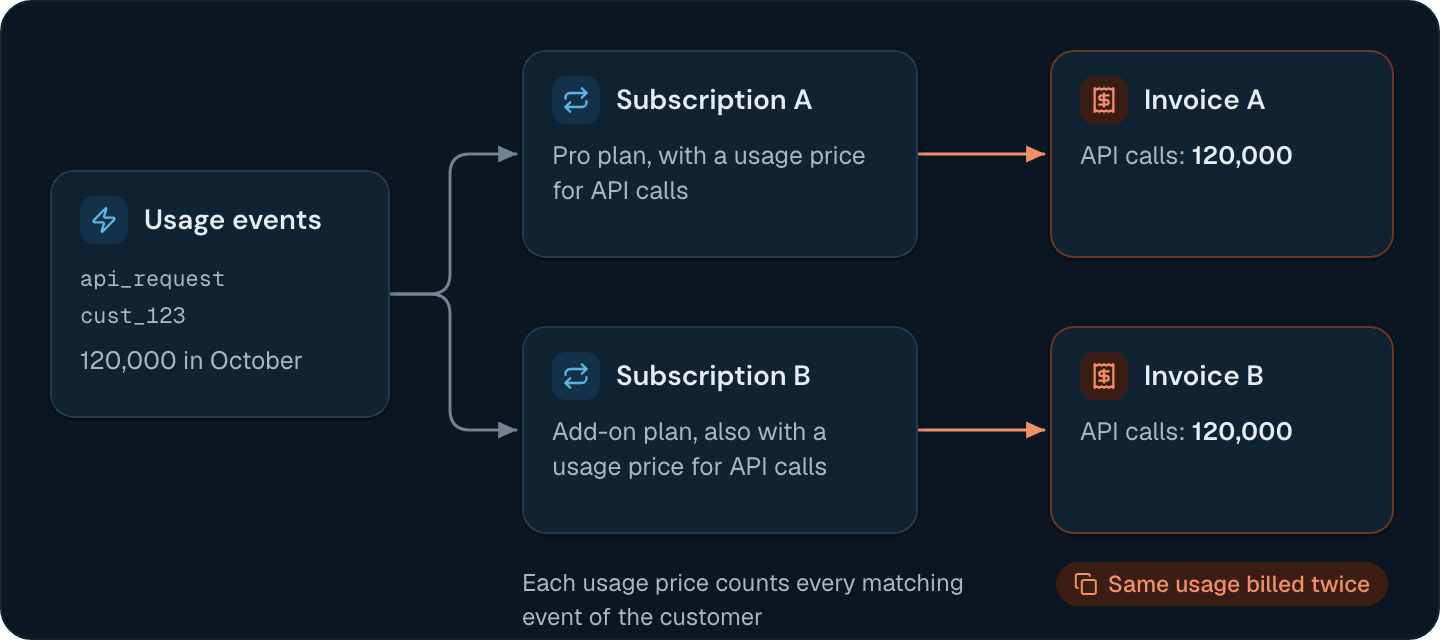
A customer can hold several subscriptions, each billed on its own schedule. Events aren’t assigned to a subscription, though: a usage line item bills every event of the customer that its feature counts, between the line item’s start and end dates. If two of a customer’s subscriptions price the same metered feature, both bill the same events, and the customer pays for that usage twice.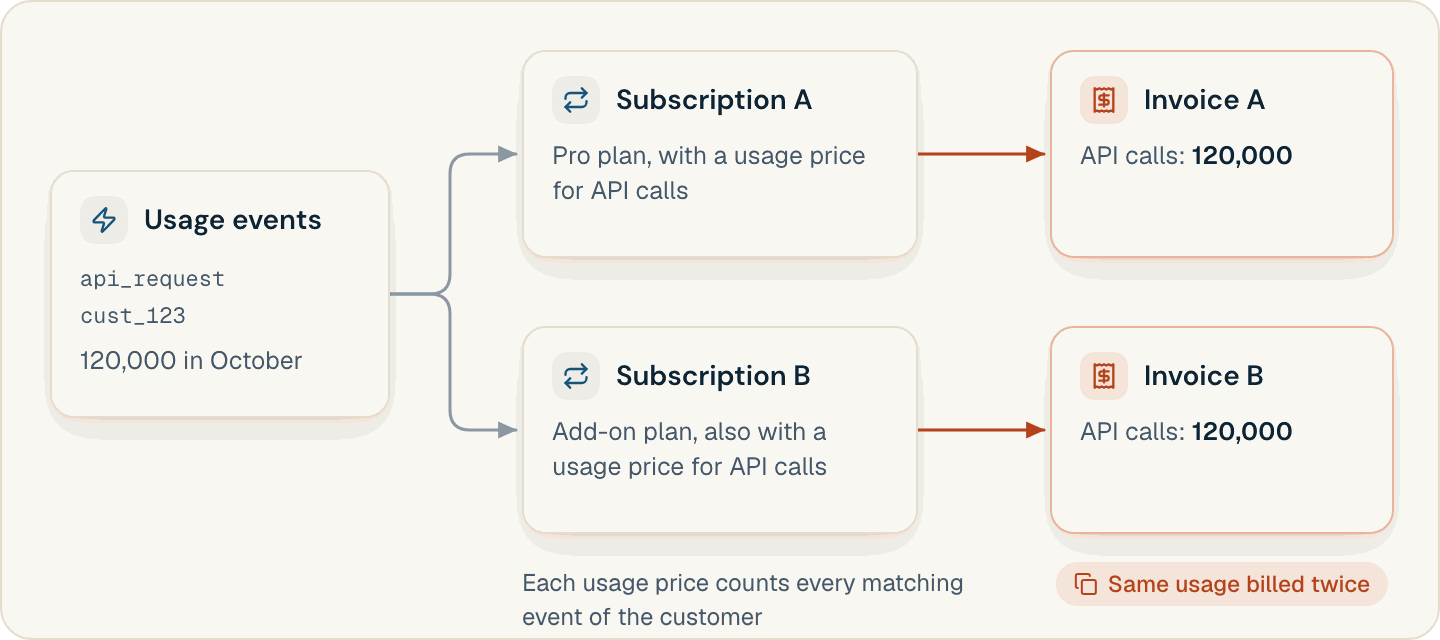
Customizing a subscription for one customer
Put a customer’s negotiated terms on the create request instead of in a copy of the plan:credit_grants replaces the plan’s credit grants instead of adding to them. When you send it, Flexprice applies only the listed grants, each with "scope": "SUBSCRIPTION". To keep the plan’s grants, repeat them in the list.Subscription statuses that Flexprice bills
A new subscription’s status depends oncollection_method and payment_behavior. The defaults, charge_automatically and default_active, make it active at once and keep it active whether or not the first payment succeeds. With allow_incomplete, it stays incomplete until the first invoice is paid. With error_if_incomplete, a failed first payment fails the request, and no subscription is created.
Changing the plan or prices of a live subscription
Two endpoints move a subscription to another plan. Both requireproration_behavior (create_prorations or none) and accept change_at (immediate, the default, or end_of_period). Preview the change first with the matching preview endpoint.
- Execute a plan change (v2, swap in place) keeps the subscription and its ID, and swaps the plan’s line items. It takes
activeortrialingstandalone subscriptions without phases or a pending cancellation. - Execute subscription plan change cancels the subscription, invoices its accrued usage, and creates a new subscription with a new ID. Neither
override_line_itemsnor addons carry over, so reapply them.
Cancelling a subscription without losing unbilled usage
cancellation_type decides when billing stops:
proration_behavior defaults to none. With create_prorations, an immediate cancellation credits unused time on fixed charges billed in advance to the customer’s wallet.
Create a Subscription
Create a subscription for a customer and set its dates, overrides, and addons.
Subscription Billing Workflows
Choose who owns a subscription and which customer receives its invoices.
Upgrade and Downgrade
Preview and execute a plan change, with or without proration.
Plan Price Overrides
Give one customer custom rates without changing the plan for everyone else.