

type: "addon" and addon_bulk_params. One request can carry any mix of attaches and removals. They apply as a single transaction and settle as one netted charge or credit, which you can preview before applying. The dashboard sends the same request.
Before you start
An attachment is validated before anything is written:- The addon must be
published. - The subscription must be
activeordraft. Trialing subscriptions cannot take addons. - The addon needs at least one charge compatible with the subscription: same currency, and a billing period that equals or divides evenly into the subscription’s (daily and weekly charges must match it exactly). An addon with no compatible charge, including an entitlement-only addon, is rejected. See compatibility rules.
- One-time charges qualify whatever their billing period, and each bills on the invoice whose period contains its start date. On an existing subscription, a one-time charge attached with
noneto start mid-period is never invoiced, because that period’s advance invoice has already gone out; attach it withchange_at: "end_of_period"to bill it on the renewal invoice. Withcreate_prorations, attaching or removing an addon that carries a one-time charge fails withline item billing_period must equal or strictly divide the subscription billing_period. - Metered features must not conflict: if the plan, an addon already on the subscription, or another addon in the same request entitles the same feature, their
usage_reset_periodvalues have to agree, or the request fails withFeature <feature_id> is already measured over <period>, but this addon measures it over <period>. The exception is an addon removed in the same request: when it ends on or before the new addon starts, their reset periods may differ, so you can swap them in one request. - A future-dated change cannot cut into a running entitlement grant window. That covers attaching an addon that grants a metered feature with a grant window already running on the subscription, and removing an addon whose grant window is running. Apply such changes immediately or at the period end; a date in between fails with
Apply this change immediately, or schedule it for the period end.
At subscription creation
Pass addons in theaddons array. Each entry takes the same fields as a post-creation attach.
start_datedefaults to the subscription start date.- No separate proration settlement is created at creation. The addon’s in-advance charges land on the subscription’s first invoice, and its in-arrear charges on the period-end invoice.
- An addon
start_dateafter the subscription start is charged only for the time it covers. A short first period from a calendar billing cycle is prorated only when the subscription is created withproration_behavior: "create_prorations". - The new subscription must start
activeordraft. If it startstrialing, orincompletebecause of itspayment_behavior, the request fails withAddon can only be added to active or draft subscriptions. - A single request accepts at most 20 addon entries.
Attach addons to an existing subscription
Call the modification API withtype: "addon" and one entry per addon in addon_bulk_params.adds:
/modify/preview first to see the resulting line items, invoice, or credit without writing anything. In a preview, new associations and line items carry the ID (preview-created), and the invoice or wallet credit carries (preview-invoice) or (preview-wallet-credit) with status: "preview". Previews quote the addon’s list prices and default quantities; override_line_items are applied only on execute.
The execute response reports everything the change touched, with one addon_associations entry per attach:
invoices[].status is the payment status of the settlement invoice, such as PENDING or SUCCEEDED. A credit to the wallet appears instead as action: "wallet_credit" with status: "issued".
Addon attach fields
Each entry inadds takes:
To gate a change behind a payment, add a
checkout object at the top level of the modification request, next to type and addon_bulk_params; it is not a field of an attach entry. See payment-gated addon changes.
Addon quantity
There is no quantity field on the attach itself. To sell more than one unit:- Override the charge quantity: pass
override_line_itemswith the fixed charge’sprice_idand thequantity. This is what the dashboard’s Quantity input does. - Attach the addon again: list the same
addon_idmore than once inadds, or attach it again in a later request. Each attachment is an independent association with its own line items and entitlements, so two attachments of a seat addon are two seats.
min_quantity, or 1.
Remove addons from a subscription
Send one entry per association inaddon_bulk_params.removes:
Addon removal fields
Each entry inremoves takes:
Removal behavior to know:
- The default, removing at period end, produces zero credit: the customer keeps the addon until the date they already paid for.
- A
onetimeaddon cannot be removed at all: attaching it already set its end date, so a removal fails withThis addon is already marked for removal. - An addon that carries a one-time charge can be removed only without
create_prorations; with it, the removal fails withline item billing_period must equal or strictly divide the subscription billing_period. - The association’s
addon_statusflips tocancelledas soon as the removal is accepted, even when the end date is in the future. Billing and entitlements continue until theend_date, but the association no longer appears inGET /v1/subscriptions/{id}/addons/associations, which lists active associations only. - A second removal of the same association fails with
This addon is already marked for removal.
Attach and remove addons in one request
Combineadds and removes to change several addons at once, for example to move a customer from one support tier to another:
- A request holds between 1 and 20 entries across
addsandremoves. - The same addon may appear more than once in
adds. An association may appear only once inremoves; a repeat fails withEach addon association can be removed at most once per request. - Each entry keeps its own timing and proration setting, with one exception: two attaches that start within the current period and grant the same feature through entitlement grants must use the same start date, or the request fails with
Send them as separate changes, or give both the same date. - Everything runs in a single transaction: removals first, then attaches. If any entry fails, nothing is applied.
- An addon removed here no longer blocks a replacement that measures the same metered feature over a different reset period, as long as the removal takes effect no later than the attach. See Before you start.
- All charges and credits from the request are netted into one settlement document, described below.
- The response lists every association the request touched: attaches with
change_action: "created", and removals withchange_action: "ended",addon_status: "cancelled", and theirend_date.
Proration and settlement
Withproration_behavior: "create_prorations", a mid-cycle change is priced for the remainder of the period:
- Fixed charges billed in advance are prorated on attach, and credited for unused time on removal, capped at what was invoiced for the period containing the removal date, or at list price when nothing has been invoiced for it yet.
- Fixed charges billed in arrear raise no upfront charge; the next invoice bills the prorated amount.
- Usage charges are never prorated; usage is billed at period end as usual.
- A charge on a different cadence from the subscription is prorated against its own period, not the subscription’s.
An entry with
proration_behavior: "none", or with no proration_behavior, adds nothing to that document. Its in-advance charges are first billed on the renewal invoice, for the next period, so the rest of the current period goes unbilled. Its in-arrear charges are billed at period end for the time the addon was active.
Entitlements and credit grants on attach
- The addon’s entitlements join the subscription’s from the association start and leave at its end. With
create_prorations, a mid-cycle attach prorates entitlement grant quotas for the time left in the window, and the first credit grant for the time left in the period; withnone, both are granted in full. Quota already granted is never taken back. - The
override_entitlementsarray on subscription creation rejects addon entitlements. - The addon’s credit grants are cloned to the subscription and credit the prepaid wallet. Recurring grants repeat each period while the association is active. Removing the addon cancels future grant applications without clawing back credits already granted. Grants are tracked per addon, not per attachment, so removing one attachment of a duplicated addon stops future grants for all of its attachments.
Payment-gated addon changes
Pass acheckout object at the top level of the modification request to hold the change until the customer pays, using the same checkout session flow as subscription creation:
- Checkout requires an
activesubscription; a request against a draft subscription is rejected. override_line_itemsandline_item_commitmentscannot be combined withcheckout; the request is rejected.- Only entries with
create_prorationsput an amount on the checkout. When the netted amount is not a charge, including when no entry usescreate_prorations, no session opens and the change applies immediately without payment. The request must still pass the checks above. - While payment is pending, each attached association’s
addon_statusispending: no line items, no entitlements, no credit grants. Removals in the same request wait too; the addons they end stay active until the customer pays. - Completion applies the whole change, removals included. Expiry or cancellation of the session archives the pending associations, and the removals never happen.
- While the session is open, an addon it is set to remove cannot be removed by another request (
Complete or cancel the pending checkout for this subscription first), and neither can a pending association (Complete or cancel the pending checkout for this addon first). - One open checkout session is allowed per subscription.
Plan changes and cancellation
- A swap-in-place plan change (
/change/v2) keeps addon associations by default. Itsentity_policies.addonsobject sets adefault_behaviourofcarryordrop, with per-association overrides. Dropped addons end at the change, and are credited for unused time only when the change usesproration_behavior: "create_prorations"orbilling_period_behaviour: "anchor_at_effect". - The legacy plan change (
/change/execute) cancels the subscription and creates a new one; addons are not carried over. - Cancelling a subscription cancels its addon associations, ends their line items, and stops future credit grant applications. Scheduled cancellations do this when they take effect.
Webhooks
An addon change fires onesubscription.updated once it is applied, however many addons the request touched. A payment-gated change fires it when its checkout completes. There are no addon.* events. Payment-gated flows also emit the checkout.session.* events.
Via dashboard
While creating a subscription
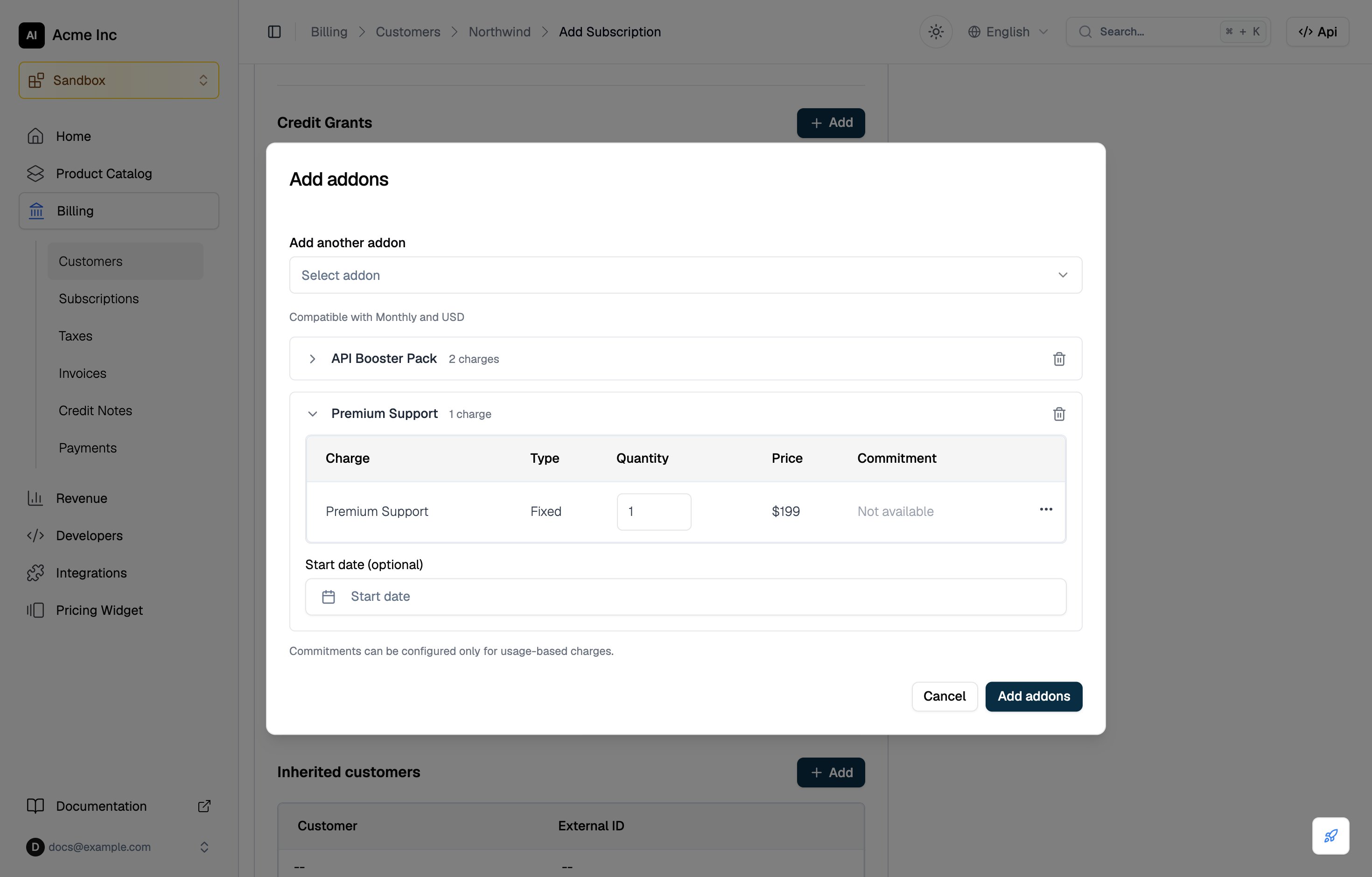
After you select a plan in the subscription form, an Addons section appears. Click Add to open the Add addons dialog:- Pick an addon under Addon. It opens as a card listing the charges compatible with the subscription’s billing period and currency. To add more, pick them under Add another addon; each gets its own card, and an addon you picked leaves the list.
- Set the Quantity on each fixed charge. Usage charges show “pay as you go”.
- Use a charge’s row menu for Override Price, or Configure Commitment on usage charges.
- Optionally set a Start date on each card, then click Add addons.
On an existing subscription
The Addons card on the subscription details page is read-only. To manage addons, choose Edit Subscription from the menu on the Subscription details card; the option is unavailable for cancelled and inherited subscriptions. On the edit page, the Addons card shows Add while the subscription has no addons and Modify once it has some. Both open one dialog that collects every attach and removal and sends them as a singleaddon_bulk_params request when you click Add or Save:
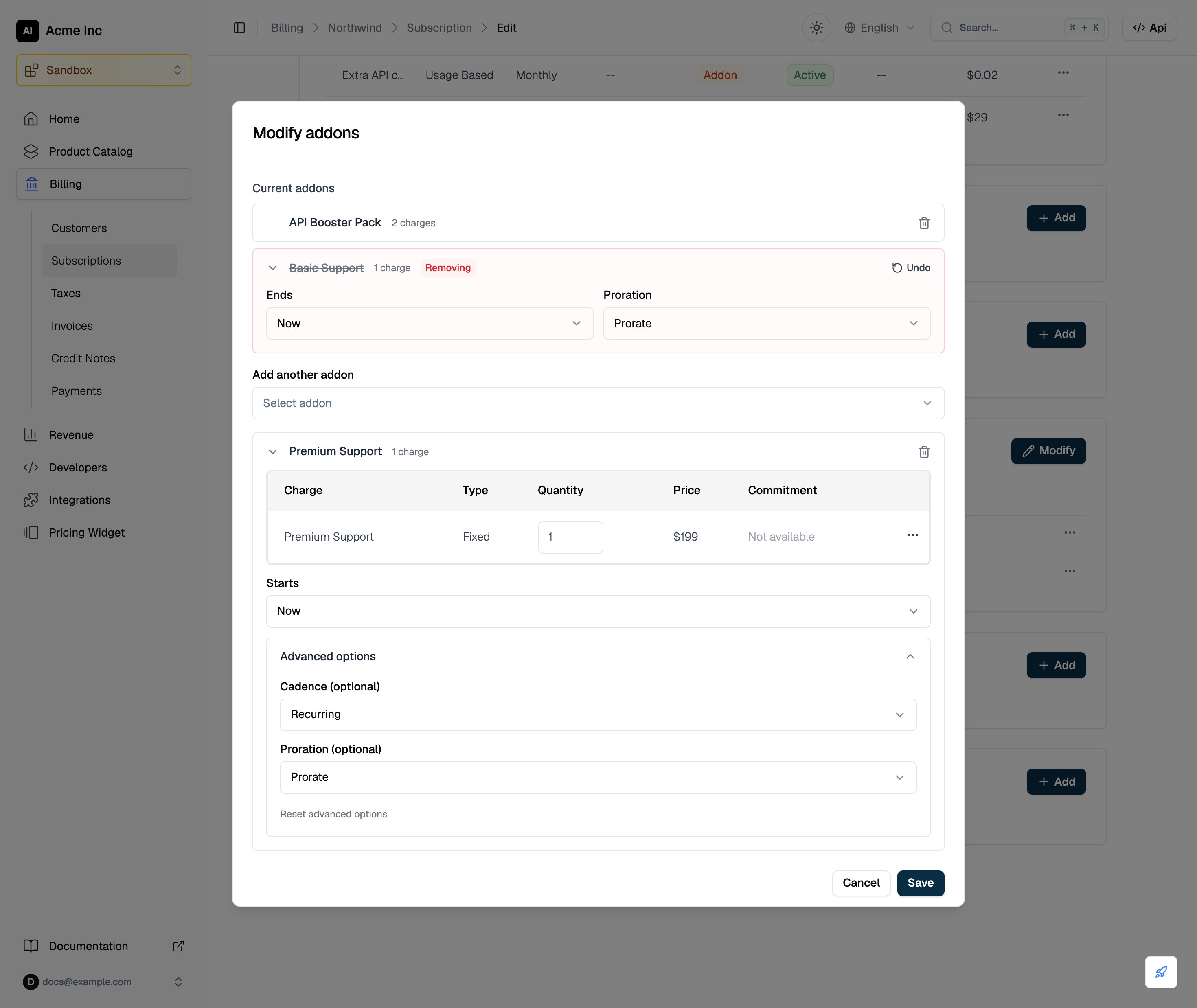
- Remove: under Current addons, the trash icon marks an addon for removal. The row is tagged Removing and asks when it Ends: End of current period (preset), Now, or a Custom date inside the current period. Its Proration is preset to No proration; choose Prorate to credit unused time. Undo keeps the addon. An addon already scheduled to end shows its end date and cannot be marked.
- Attach: pick an addon under Addon (labelled Add addon once the subscription has addons), and more under Add another addon. Each opens as a card with its charges, quantities, overrides, and commitments, as in the subscription form. Starts sets Now (preset), End of current period, or a Custom date. Advanced options holds the Cadence (Recurring or One-time) and Proration (Prorate or No proration); opening it presets Recurring and No proration.
change_at, and a custom date as start_date or effective_date. One change holds at most 20 addons across attaches and removals. Each addon can be picked once per change; to sell two, raise its Quantity, or attach it again in a later change.
The example below makes the swap from Attach and remove addons in one request: Basic Support ends Now and Premium Support starts Now, both with Prorate.
- Configure: changes the addon’s charges on this subscription. A fixed charge takes a new quantity, a new price on a flat-fee charge without a custom price unit, and an effective date; click Preview to see the resulting charges or credits, then Apply changes. A usage charge opens a price override with an optional effective date and the charge’s commitment settings. An addon with several charges lists them first.
- Cancel: removes that one addon. It asks for an Effective end date (preset to the current period end and limited to the current period) and a Proration choice, preset to None.
Legacy addon requests
Two older ways to change addons still work, and both run through the same batch logic:addon_paramson the modification API changes one addon per request:"action": "add"with the attach fields underadd, or"action": "remove"with the removal fields underremove. It is applied as a batch of one entry. It cannot be sent together withaddon_bulk_params, and a removal sent this way cannot carrycheckout.POST /v1/subscriptions/addonandDELETE /v1/subscriptions/addonare deprecated.POSTtakes the attach fields plussubscription_idand an optional inlinecheckout;DELETEtakes the removal fields and finds the subscription from the association.
addon_bulk_params for new integrations: a single attach or removal is a request with one entry. Unlike the deprecated endpoints, the modification API also offers previews and reports every change in one response.