

This page covers consolidated billing and delegated invoicing. Flexprice now has a dedicated Billing Workflows section with full coverage of all four workflows, including grouped invoicing.
Overview
Customer Hierarchy is an enterprise feature for configuring billing relationships on each subscription. Flexprice keeps customers flat (no parent fields on customer records). All hierarchy behavior lives on the subscription, so you can mix models per contract without restructuring customer data. With Customer Hierarchy you can:- Send invoices to a different customer than the one using the service (delegated payer)
- Cover many customers with one parent subscription and roll up usage into a single invoice (consolidated subscription)
- Change how a subscription bills without editing customer records
Two ways to use Customer Hierarchy
Customer Hierarchy supports two independent patterns. Pick one based on who owns the plan and line items:These two modes are mutually exclusive. You cannot combine
external_customer_ids_to_inherit_subscription and
invoicing_customer_external_id in the same subscription.How it works
Every subscription has asubscription_type that describes its role in a hierarchy:
Customers remain flat entities. There are no parent fields on a customer record; hierarchy is configured only on subscriptions.
Key design principles (consolidated mode) Hierarchy lives at the
subscription layer, not on customer records. That gives you clear
billing ownership, centralized wallet management, and scalable
multi-tenant usage tracking on a single parent contract. The tradeoff:
child-level isolation is logical (you can still break out analytics per
child), not financial. Children with only inherited subscriptions are not
separate billing entities for usage summary, wallet balance, or invoices.
Visual flow (consolidated subscription)
The diagrams and screenshots below apply to consolidated subscription mode: aparent subscription plus inherited skeleton subscriptions for each child.
End-to-end flow
Dashboard: add customers to inherit
Use the Add customers to inherit flow when linking child customers to the parent subscription (wording and entry point may vary slightly by dashboard version).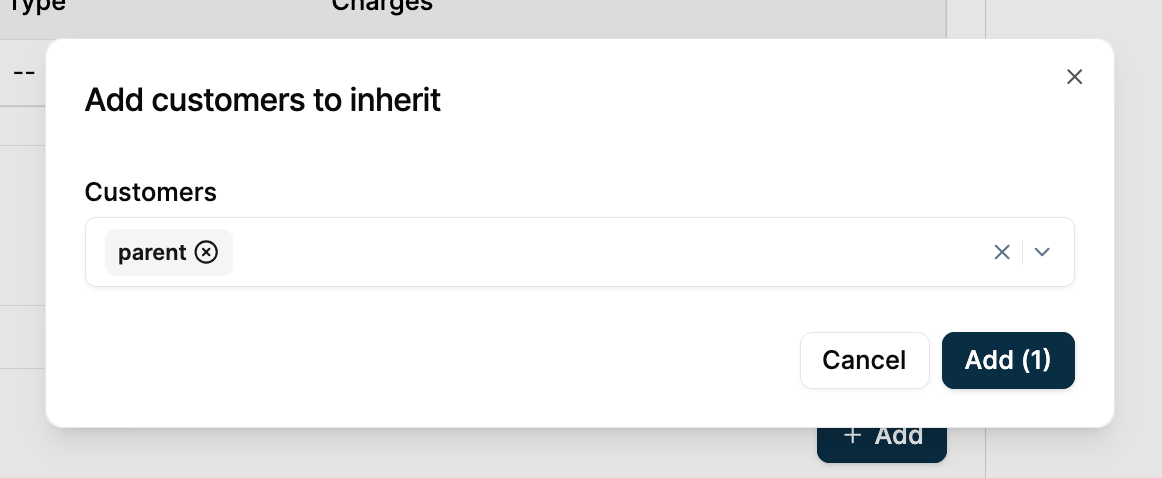
Dashboard: inherited subscription on a child
On a child customer, the Inherited subscriptions view shows the parent they inherit from, the plan, and key dates.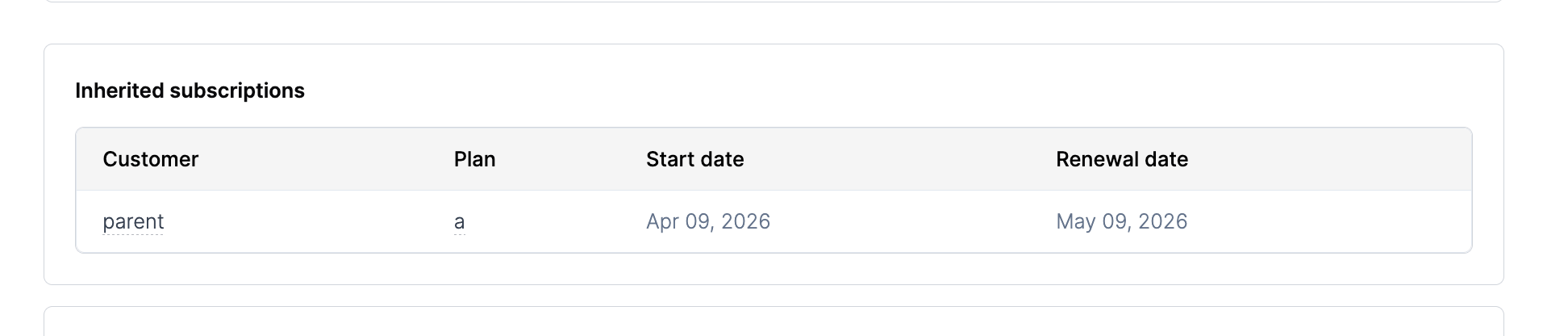
Usage tracking behavior (inherited subscriptions)
For consolidated subscription setups only (not delegated payer):- Usage for billing is tracked at the parent subscription. Inherited children do not keep a separate billing usage ledger.
- Get customer usage summary (
getCustomerUsageSummary,GET /customers/usage) for a child customer that only has an inherited subscription returns no billable usage on that child. Usage is attributed to the parent contract. - Get wallet balance (
getWalletBalance,GET /wallets/{id}/balance/real-time) does not represent an independent prepaid balance for inherited-only children. Query the parent customer’s wallet for consolidated billing state.
Analytics behavior
Analytics are more flexible than billing aggregates:- Per-child contribution: call Get usage analytics (
getUsageAnalytics,POST /events/analytics) with the childexternal_customer_id(and any filters you already use, such as time range orgroup_by). - Aggregated view at the parent: use the same endpoint scoped to the parent and include child usage in the aggregation:
external_customer_id, start_time, end_time, and group_by).
Wallet and balance semantics (consolidated mode)
In consolidated subscription mode:- The wallet used for settlement is the parent customer’s wallet (the invoicing customer for the parent subscription).
- Balance reflects credits and drawdowns aggregated across all children covered by that parent subscription.
- Wallet-related APIs therefore reflect global parent-level state, not a separate financial balance per inherited child.
Invoice behavior (consolidated mode)
In consolidated subscription mode:- Invoices are generated only for the parent customer.
- The invoice structure is one line item per feature (or priced line), with usage from all children aggregated into that line item.
- There are no child-level invoices for inherited skeleton subscriptions.
Consolidated subscription
Use this when one plan covers multiple customers and you want one invoice to the parent (usage roll-up on a single contract). Flexprice implements this with a parent subscription plus inherited skeleton subscriptions for each child. Inherited subscriptions have no line items of their own; usage from child customers is matched and aggregated through the parent. Example: Global Corp HQ purchases an enterprise plan. APAC Team and EMEA Team each generate usage, but HQ receives one invoice.Step 1: Create customers
Create the parent customer and each child customer through the Dashboard or API. Customer records have no hierarchy fields; they stay flat.Step 2: Create the parent subscription
- Dashboard
- API
- Navigate to Subscriptions and click Create Subscription
- Select the parent customer and choose a plan
- In the Customer Hierarchy section, add the external IDs of the child customers who will inherit this subscription
- Click Create Subscription
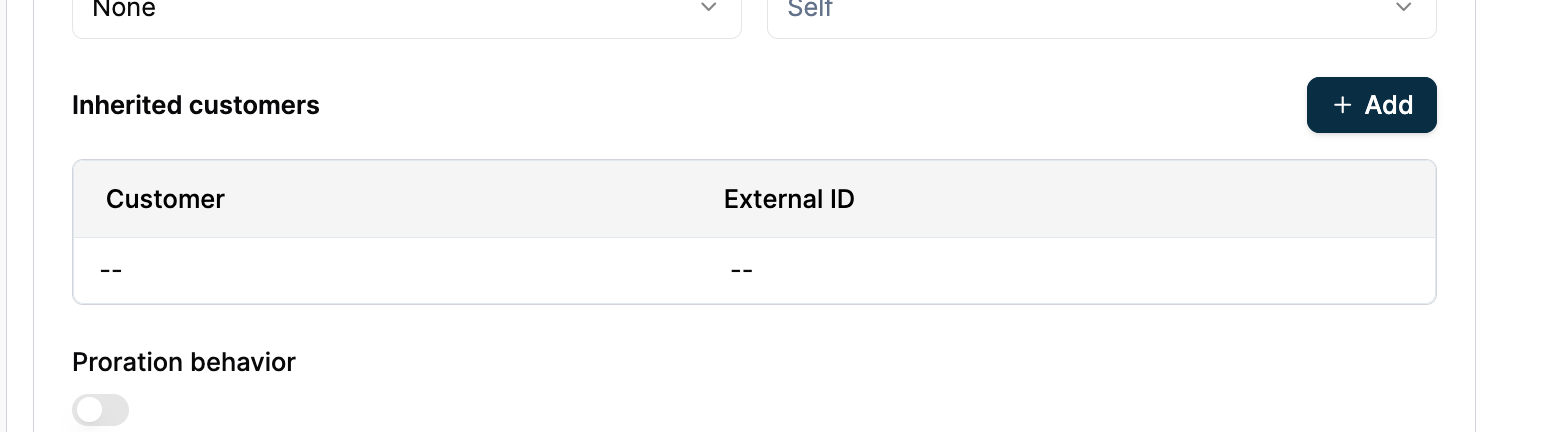
What Flexprice creates
When you submit the request above, Flexprice:- Creates the parent subscription with
subscription_type: parentfor the HQ customer - Auto-creates an inherited skeleton subscription (
subscription_type: inherited) for each child external ID - Keeps inherited subscriptions free of plan line items; usage events from child customers are matched and aggregated via the parent subscription
Step 3: Verify
Open the parent subscription’s detail page. Child skeleton subscriptions appear under it.Delegated payer
Use this when each end customer has their own subscription (plan, line items, and usage on the child), but a different customer should be the bill-to party: invoices, tax, and wallet drawdown follow that delegated payer (for example a parent company or reseller). Example: A reseller manages 10 end customers, each on their own starter plan. The reseller receives and pays all related invoices centrally.Step 1: Create customers
Create the subscription owner (child) and the billing customer separately. Neither customer record has hierarchy fields.Step 2: Create the subscription with a delegated payer
- Dashboard
- API
- Navigate to Subscriptions and click Create Subscription
- Select the child customer as the subscription owner
- Choose a plan
- In the Invoice To field, select or enter the delegated payer’s external ID (the customer who will receive the invoice)
- Click Create Subscription
What Flexprice creates
- Subscription is created with
subscription_type: standaloneon the child customer - Plan, line items, entitlements, and usage tracking all remain on the child
- Invoices are issued to the delegated payer (
ext-reseller) - The delegated payer’s wallet and payment methods are used for settlement
The invoicing customer is set at subscription creation and cannot be changed
afterwards. If you need to change it, cancel the subscription and create a new
one.
Invoice and payment behavior
Use cases
Enterprise with subsidiaries (Consolidated subscription) Global HQ purchases a plan. Regional divisions (APAC, EMEA, Americas) each generate usage independently, but HQ receives one consolidated invoice to the parent, typically one line item per feature with usage aggregated across divisions (use analytics withinclude_children or per-child queries to see each division’s contribution).
Reseller / partner model (Delegated payer)
A reseller signs up their clients as separate customers in Flexprice. Each client has their own subscription and usage tracking, but the reseller receives and pays all invoices.
Department-level billing (Consolidated subscription or delegated payer)
A company’s central IT or Finance team handles vendor payments. Engineering, Marketing, and Sales each track their own usage, and invoices roll up to the central team (or the central team is set as the delegated payer, depending on your model).
Multi-brand holding company (Consolidated subscription)
A holding company owns multiple brands. Each brand operates independently as a customer with its own subscriptions. The holding company’s finance department receives all invoices.
Frequently asked questions
Can parent and child subscriptions use different currencies?
Can parent and child subscriptions use different currencies?
In consolidated subscription mode, currency is set on the parent subscription and applies to all invoices generated for it. Child inherited subscriptions use the parent’s currency.In delegated payer mode, each subscription sets its own currency independently, since each child owns a full subscription.
How does tax work?
How does tax work?
Tax uses the invoicing customer’s billing details: the parent customer in
consolidated subscription mode, or the delegated payer in delegated payer
mode. The subscription owner’s billing address is not used for tax in either
pattern.
How does wallet drawdown work?
How does wallet drawdown work?
The wallet is deducted from the invoicing customer’s balance, not the
subscription owner’s. In consolidated subscription mode, the parent customer’s
wallet is drawn down (balance reflects aggregated usage across inherited
children). In delegated payer mode, the delegated payer’s wallet is used.
Why does getCustomerUsageSummary show no usage for my child customer?
Why does getCustomerUsageSummary show no usage for my child customer?
In consolidated subscription mode, billable usage is attributed to the
parent subscription. A child with only an inherited subscription does
not have a separate billing usage ledger, so usage-summary APIs for that child
can correctly return no usage. Use the parent customer for billing
summaries, or use Get usage
analytics for per-child
breakdowns (and
include_children when querying the parent for a rolled-up
analytics view).What happens when the parent subscription is upgraded or downgraded?
What happens when the parent subscription is upgraded or downgraded?
Plan changes apply to the parent subscription only. Inherited skeleton
subscriptions are not directly affected; they keep routing usage events to the
updated parent. (This applies to consolidated subscription setups with a
parent subscription.)What happens when the parent subscription is cancelled?
What happens when the parent subscription is cancelled?
A final invoice is generated for the invoicing customer. Inherited skeleton
subscriptions linked to the parent are cancelled at the same time. (This
applies to consolidated subscription mode.)
Can I change the invoicing customer after a subscription is created?
Can I change the invoicing customer after a subscription is created?
No. The invoicing customer is set at creation time and is immutable. To change it, cancel the existing subscription and create a new one with the correct
invoicing_customer_external_id.