

Overview
What is wallet conversion rate?
Wallet conversion rate tells you how much money one credit is worth in your wallet’s currency.- The wallet stores balance in credits only. Currency is used only for calculation and display. Formula: amount in currency = credits × conversion rate.
- Example: Conversion rate 0.01, wallet in USD. Then 1 credit = 0.01 USD. So 100 credits = 1 USD, and 1000 credits show as a 10 USD balance.
- You can set two rates on a wallet:
- Conversion rate — used when you spend (debit) and when balance is shown in currency.
- Top-up conversion rate — used only when you add credits (top-up). If you don’t set it, top-ups use conversion rate.
What is conversion rate?
It is the number that links your unit to base currency. It appears in two places:
So: 1 credit = conversion_rate in currency. Examples: rate 1 → 1 USD = 1 credit; rate 2 → 1 USD = 0.5 credits; rate 0.5 → 1 USD = 2 credits.
How it works internally
- Price unit: Has
base_currencyandconversion_rate. Billing converts price unit amounts into that base currency for invoicing. - Wallet: Balance is stored in credits. To show it in currency: amount = credits × conversion rate.
When conversion is used
1
Wallet top-up (amount to credits)
Uses
topup_conversion_rate (or conversion_rate if not set). If you send amount and not credits_to_add, credits = amount ÷ rate. If both are sent, credits_to_add wins and amount is ignored.2
Wallet debit (currency to credits)
Uses
conversion_rate (e.g. invoice payment). Manual debit uses credits directly; no conversion.3
Balance in currency
Uses conversion_rate: currency = credits × rate; credits = currency ÷ rate.
Conversion during credit
1
Which rate
Top-up uses topup_conversion_rate. If not set, it uses conversion_rate.
2
Top-up by amount
Send
amount (in wallet currency). System works out credits_to_add = amount ÷ topup_conversion_rate and adds that many credits to the wallet.3
Top-up by credits
Send
credits_to_add. That many credits are added to the wallet.4
Example
Wallet in USD, conversion rate (1 credit = 2 USD). Top-up with amount 10 USD → credits added = 10 ÷ 2 = 5. Wallet balance goes up by 5 credits.
Conversion during debit
1
Which rate
Debits use conversion_rate. Not the top-up rate.
2
Invoice payment
Amount in currency is turned into credits:
credits = amount ÷ conversion_rate. That many credits are taken out.3
Manual debit
Send
credits. No conversion. That many credits are taken out.4
Example
Same wallet (rate 2). Debit 5 credits → 10 USD worth taken out (5 × 2 = 10).
Configuration
Set conversion rate on a wallet
1
Open the customer
Go to Customers → select the customer → Wallets tab.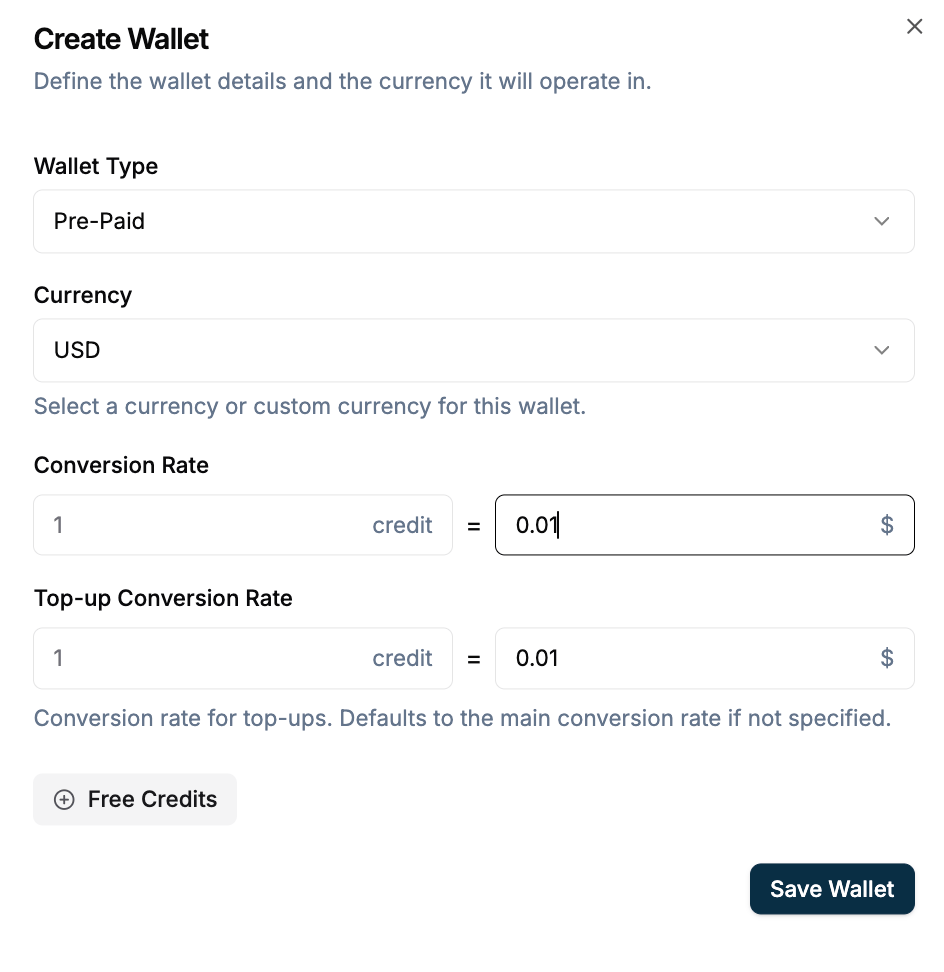
2
Create wallet
Click Create Wallet (or + Add). For Custom currency, select a price unit — Currency and Conversion rate are set from that unit. For fiat, enter Conversion rate and optionally Top-up conversion rate.
Set conversion rate via API
1
Create wallet
POST /v1/wallets — send currency (required), conversion_rate (optional, default "1"), topup_conversion_rate (optional), or price_unit (then currency and conversion_rate come from the price unit).Create wallet with explicit rates:2
Top-up wallet
POST /v1/wallets/{id}/top-up — send amount (converted with top-up rate) or credits_to_add; if both, credits are used.
Top-up by amount (uses top-up rate):Validation
- Wallet:
conversion_ratedefaults to"1". If you set it, it must be > 0.topup_conversion_ratemust be > 0 if you set it. When you useprice_unit, that price unit must be Active.
Use cases
1
Show credits, bill in USD
Show and charge in credits. Invoice in one currency (e.g. USD).
2
Promotional top-up
Set
topup_conversion_rate so users get more credits per 1 USD. conversion_rate is still used for spending and for showing balance.3
Discounted top-up
Set Top-up conversion rate lower than Conversion rate so 1 USD buys more credits when users top up. Spending and balance still use Conversion rate. Example: conversion rate 0.01, top-up rate 0.008 → 1 USD = 125 credits on top-up.
Edge cases
Examples
1
Wallet
conversion_rate = "0.01". So 1 credit = 0.01 USD. Top-up 10 USD (same top-up rate) adds 1000 credits. Manual debit 500 credits takes out 5 USD worth.2
Two rates (promo top-up)
conversion_rate = "0.01", topup_conversion_rate = "0.008". Normal spend: 1 credit = 0.01 USD. Top-up: 1 USD = 125 credits.