

Send usage events with the Ingest event and Bulk ingest events endpoints, the SDKs, or the Flexprice Collector when events already flow through a stream such as Kafka. For requests, code samples, and responses, see Send Usage Events with the API and SDKs.
Usage event structure
A usage event is a JSON object:-
event_nameFlexprice counts the event toward the metered features whose event name matches it exactly, including case. An event whose name matches no feature is still accepted with202, so a typo fails silently. A feature’s event name can’t be changed after the feature is created. -
external_customer_idYour identifier for the customer: the same value as the customer’s External ID in Flexprice. Events for an external ID that has no customer yet are stored, and count once a customer with that External ID exists. See Sending usage events before the customer exists. -
event_idA unique ID for this piece of usage. Flexprice generates one when you leave it out, but set your own from the usage itself, such as a request ID or a job ID, so that a resent event carries the same ID. Together withtimestamp, it’s how Flexprice recognizes a copy of an event. See Making usage events idempotent. -
timestampWhen the usage happened, as an RFC 3339 string with a timezone, such as2026-10-10T14:03:00Zor2026-10-10T19:33:00+05:30. A timestamp in any other format, or without a timezone, fails the whole request with400. Flexprice stores the time in UTC and uses it to place the usage in a billing period. When you leave it out, Flexprice uses the time it received the request, so a retried event gets a new timestamp and counts twice. There is no limit on how old a timestamp can be, which is how backfills work. -
propertiesKey-value pairs that features aggregate (Sum, Max, Latest, and the other aggregation types) and filter on. Send numeric values as JSON numbers or numeric strings. A missing or non-numeric value counts as0, and so does a negative value. Send more properties than your pricing uses today, such as region or model: a feature added later can only filter on properties that the events already carry. -
sourceFree text naming the system that sent the event. The Event Debugger filters on it, which helps when several services send the same event name.
Queuing and retrying usage events
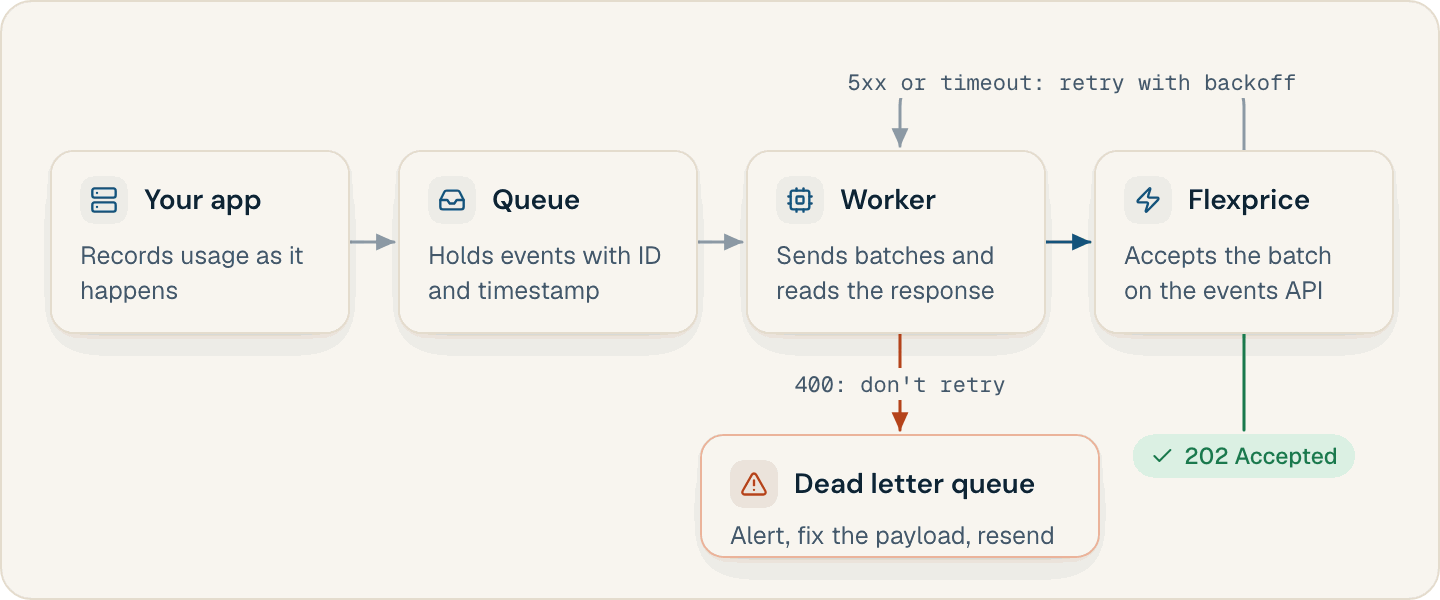
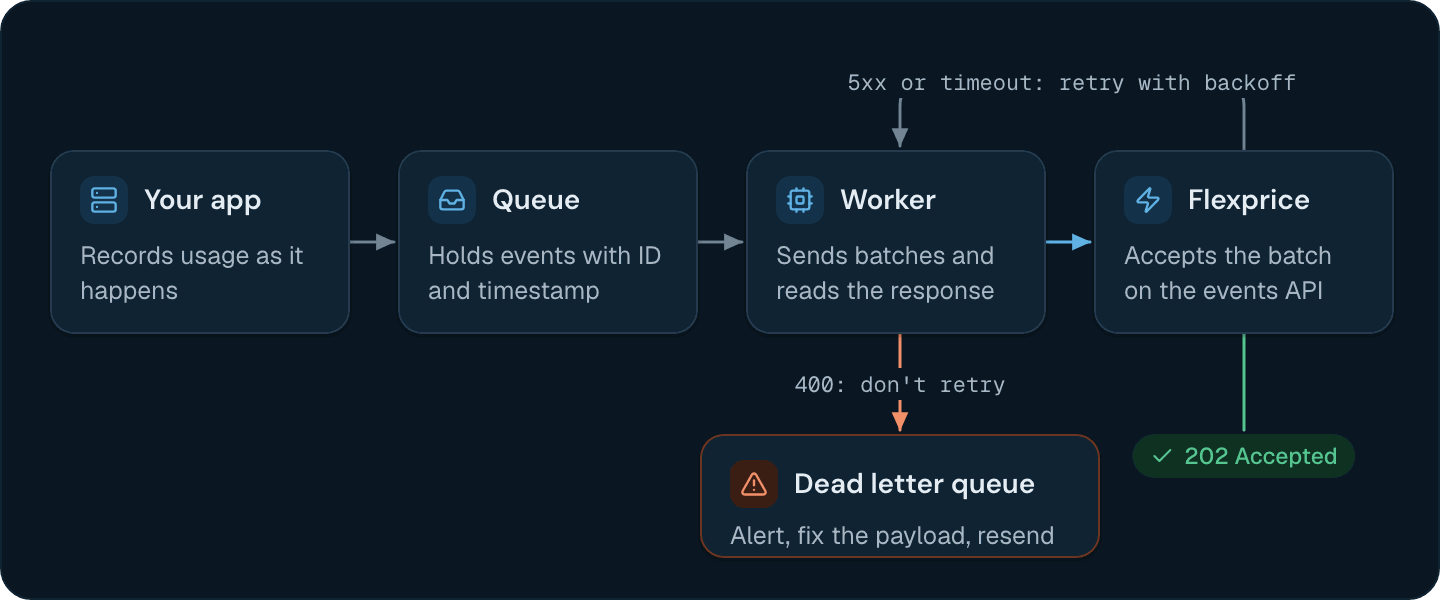
If your service sends events inline and the call fails, or the process crashes before it sends, that usage is gone. Put each event on a durable queue such as Amazon SQS, Kafka, or RabbitMQ when the usage happens, with itsevent_id and timestamp already set, and have a worker send events from the queue to Flexprice.
- Retry network errors, timeouts, and
5xxresponses with exponential backoff until you get202. Resend the whole request: copies of an event that share itsevent_idandtimestampcollapse into one. - Turn on SDK retries. They are off by default in every SDK: see Retrying failed SDK requests.
- Expect partly accepted bulk requests. A
400caused by one event missing a required field can arrive after earlier events in the same array were accepted. Fix that event and resend the whole batch.
Making usage events idempotent
The same usage often reaches Flexprice more than once: a retry after a timeout, a queue that redelivers a message, a heartbeat that fires twice. Flexprice collapses copies of an event into one when they carry the sameevent_id and timestamp, so set both on every event:
- Set both when the usage happens. Store them with the event in your queue, and never regenerate either one on a retry.
- Derive
event_idfrom the usage, not from the attempt to send it: an API gateway’s request ID, a batch job’s ID plus its chunk number, or an LLM provider’s response ID. - Never leave either field out. Flexprice fills in a missing
event_idortimestampwith a new value for each copy, so a resent copy counts again.
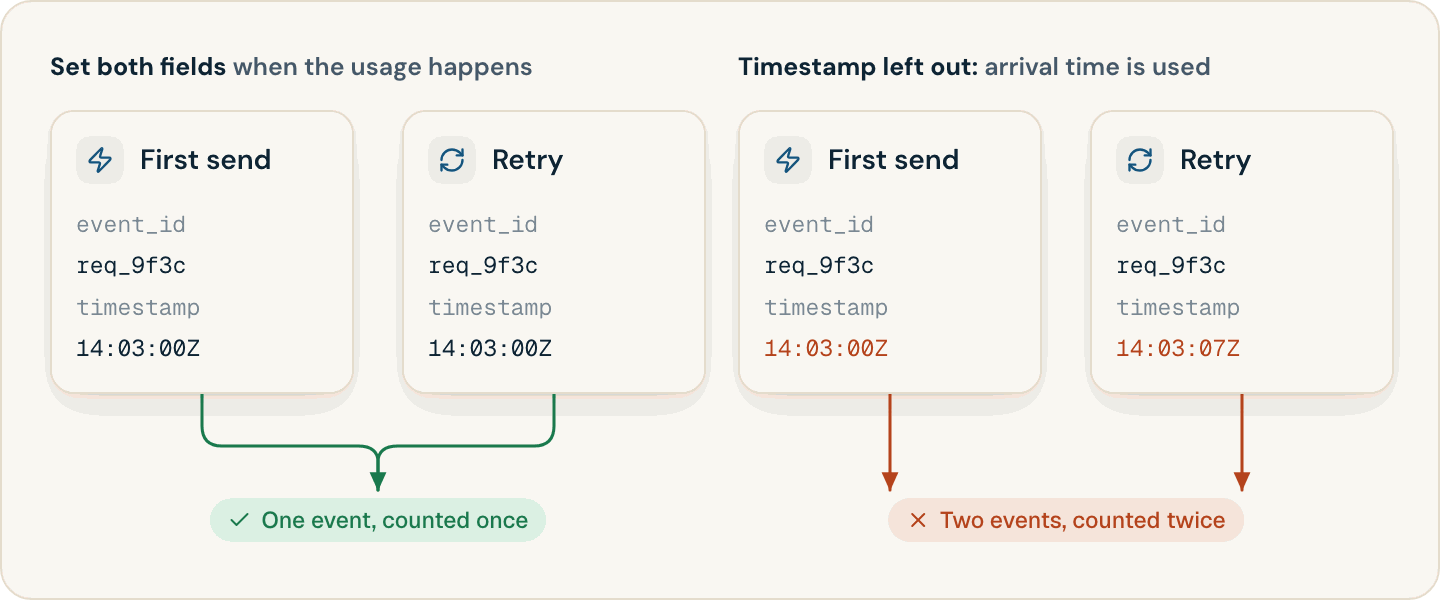
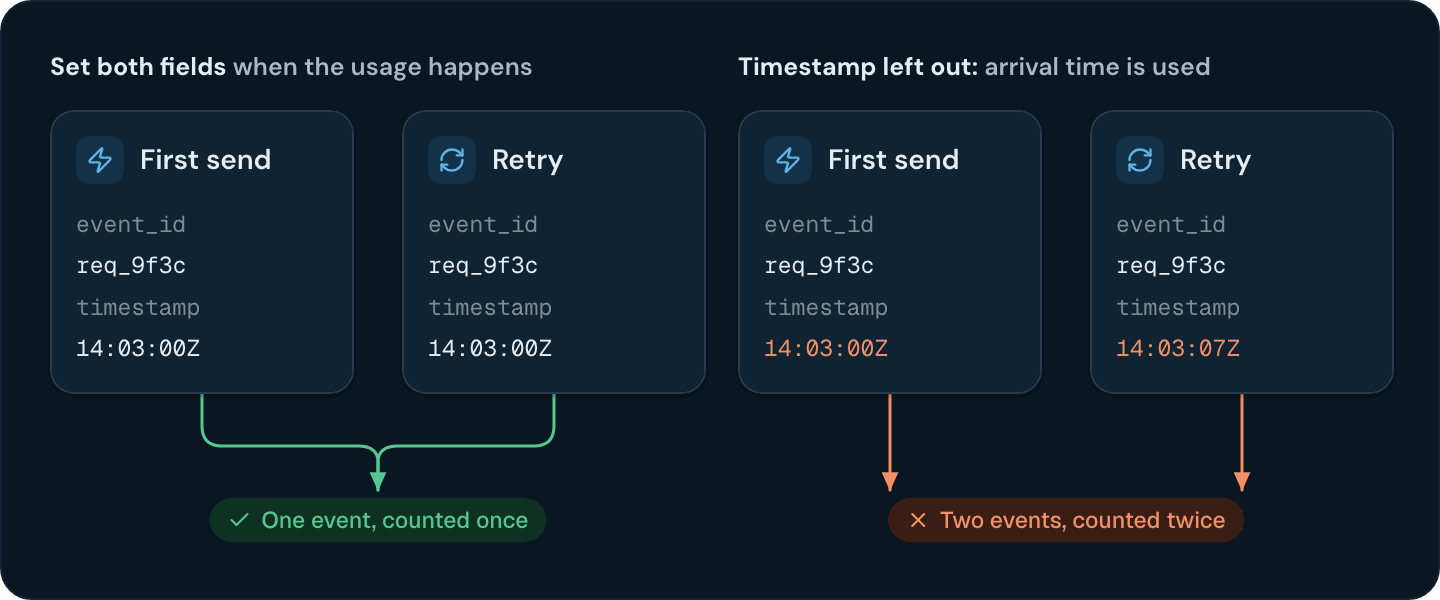
202, and copies collapse later, in storage. Idempotency and Deduplication covers what happens when either field is missing and where a copy can show up before it collapses.
Making heartbeat events idempotent
Some usage events report state on a schedule instead of an action: a node reporting its CPU cores every minute, or a nightly snapshot of storage. Make every heartbeat sent in the same measurement period a copy of the same event. Build theevent_id from the source and the start of the period, and set timestamp to that same period start:
Logging the usage events you send
Log every event your worker sends, with the response status, while you integrate and after any change to your events. That log is your record of what Flexprice received: compare it with the Event Debugger or usage analytics when a count looks wrong.Sending usage events before the customer exists
Flexprice stores events for anexternal_customer_id that has no customer yet, and counts them once a customer with that External ID exists. Signup in your product doesn’t have to wait for Flexprice: create the customer in your own system, start sending usage, and create the Flexprice customer asynchronously. The usage is billed once the customer has a subscription whose billing period covers each event’s timestamp.
Changing the shape of usage events
Send Usage Events with the API and SDKs
Authentication, single and bulk requests, and the responses to handle.
Idempotency and Deduplication
How Flexprice recognizes a copy of an event, and how to make retries and heartbeats safe.
High-Volume Ingestion
Batch events with the bulk endpoint, the SDKs, or the Flexprice Collector.
Backfill Past Usage
Load historical usage and get it onto draft or finalized invoices.