

A line-item commitment applies for the full 24 hours of every day in the billing period. Time-of-day buckets let you override that commitment for specific hour ranges — each bucket carries its own price, commitment value, overage factor, and true-up flag. Usage that falls inside a bucket is billed under the bucket’s terms; usage that falls outside every bucket continues to be billed under the line item’s all-day commitment. When to use buckets:
  • Peak / off-peak pricing — Higher commitment and rate during business hours, lower outside.
  • Reserved windows — Reserved capacity at a guaranteed rate inside a fixed window, standard pricing elsewhere.
  • Tiered SLAs — Different minimum spends for production hours versus maintenance windows.
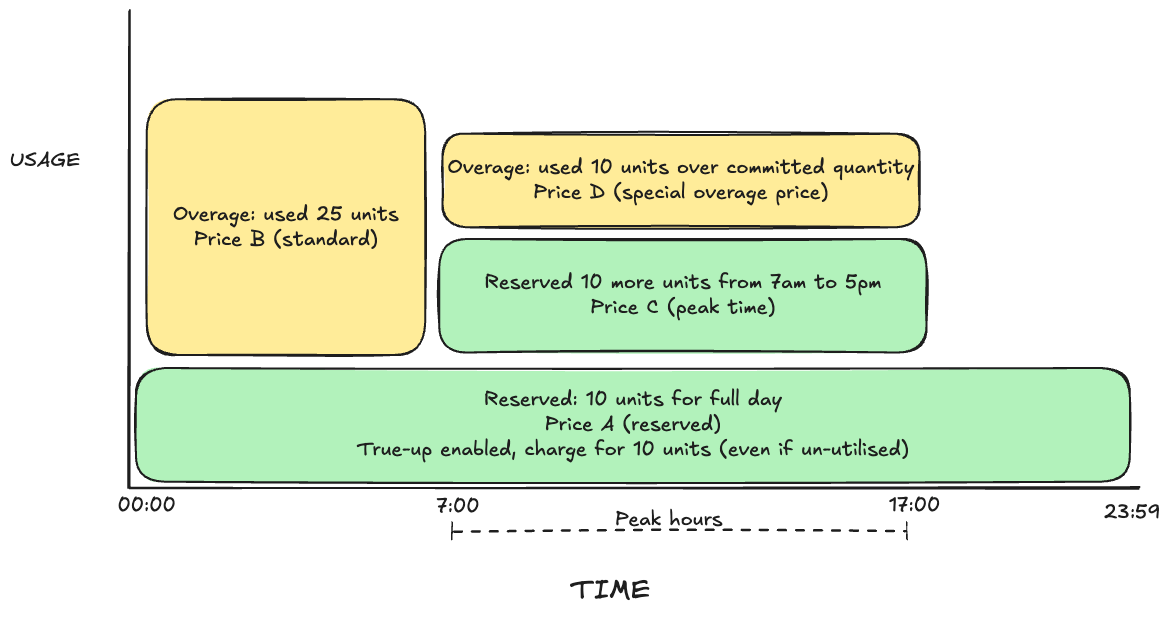
Peak hours bucket layered on top of a full-day reserved commitment, with separate overage prices inside and outside the bucket
The diagram shows four pricing layers in a single day, each mapped to a configuration field on the line item:
LayerTimeConfigured onBehavior
Reserved 10 units, Price A00:00–23:59Line item (commitment_value: 10, commitment_true_up_enabled: true)The line-item commitment reserves 10 units across the full day. True-up bills the full 10 units even when usage is lower.
Reserved 10 more units, Price C07:00–17:00Bucket (commitment_value: 10, price = Price C)The bucket reserves an additional 10 units at peak time. Inside the bucket window the customer has 20 reserved units total.
Overage 25 units, Price B00:00–07:00 (outside bucket)Line item base priceUsage above the line-item commitment outside any bucket is billed at the line-item base price.
Overage 10 units, Price D07:00–17:00 (inside bucket)Bucket base price + overage_factorUsage above the bucket commitment inside the bucket is billed at the bucket’s price multiplied by its overage factor.

How Buckets Override the Line Item

A subscription line item carries a base price and an optional base commitment that apply across the entire billing period. A bucket attaches to that line item and overrides three things — but only for usage whose timestamp falls inside the bucket’s [start, end) range:
FieldInside a bucketOutside every bucket
PriceBucket priceLine-item base price
Commitment valueBucket commitmentLine-item commitment
Overage factorBucket overage factorLine-item overage factor
True-upBucket true_up_enabledLine-item commitment_true_up_enabled
You can attach as many buckets as you need to one line item. Buckets are stored in the order they are provided and matched at billing time by checking each window’s start timestamp against bucket ranges.
All bucket times are interpreted in UTC. Convert your local peak hours to UTC before configuring buckets.

Example scenario

A line item meters API calls with:
  • Base price: $1.00 per call
  • Base commitment: 10 reserved units per window, true-up enabled (Price A)
The customer adds a peak bucket from 07:00 to 17:00 UTC reserving 10 more units at Price C, and configures overage prices for both regions of the day (Price B outside the bucket, Price D inside). The resulting billing surface looks like this within a single day:
UTC timePrice appliedCommitment in effectCharged for
00:00–07:00Price A (reserved) + Price B (overage)10 units, true-up onReserved 10 units + 25 overage units at Price B
07:00–17:00Price A (reserved) + Price C (bucket reserved) + Price D (bucket overage)10 + 10 = 20 unitsReserved 10 + bucket-reserved 10 + 10 overage at Price D
17:00–23:59Price A (reserved) + Price B (overage)10 units, true-up onReserved 10 units, overage at Price B if exceeded
The line item’s reserved 10 units (Price A) and true-up apply across the full day. The bucket layers an additional 10 reserved units at Price C only during 07:00–17:00, with its own overage at Price D for usage exceeding the bucket commitment.

Constraints

1. The meter must be bucketed

A bucket can only be attached to a line item whose meter has an aggregation window — a “bucketed” meter that applies commitment per window rather than once per billing cycle. The line item must have commitment_windowed: true.
Attaching commitment_time_buckets to a line item with commitment_windowed: false returns a validation error: commitment_time_buckets requires commitment_windowed=true.

2. Bucket duration must be at least one meter window

If the meter aggregates per hour, a bucket cannot be shorter than 1 hour. A bucket that spans less than one full meter window cannot accumulate a complete usage measurement.

3. Bucket duration must be an exact multiple of the meter window

end - start must be divisible by the meter’s window size. If the meter window is HOUR, the bucket 12:00 → 13:30 is rejected: the 90-minute duration leaves 30 minutes of a second meter window unaccounted for.
Meter windowBucket [start, end)DurationValid?
HOUR (60 min)09:00 → 10:0060 minYes (1× window)
HOUR (60 min)09:00 → 12:00180 minYes (3× window)
HOUR (60 min)09:00 → 10:3090 minNo — not a multiple
HOUR (60 min)09:30 → 10:3060 minNo — start not aligned to the hour
15-min09:00 → 09:4545 minYes (3× window)
DAY (1440 min)00:00 → 24:001440 minYes (1× window)
The bucket start must also align to the meter window grid — for an hourly meter, the start minute-of-day must be divisible by 60.

4. Buckets cannot overlap

Two buckets on the same line item cannot share any minute of the day. Adjacent buckets are allowed because ranges are half-open [start, end):
  • [09:00, 12:00) and [12:00, 17:00)valid (adjacent, no shared minute).
  • [09:00, 12:00) and [11:00, 14:00)invalid (overlap on 11:00–12:00).
If a use case genuinely needs different rates for the same period (for example, a tiered surcharge that stacks on top of a base bucket), model that as slab pricing within a single bucket and register it as one window — not as overlapping buckets.

5. Outside a bucket, the line-item commitment continues to apply

Buckets are an override, not a replacement. Any usage window whose start timestamp falls outside every configured bucket is billed at the line item’s base price and base commitment, with the line item’s overage factor and true-up flag. If the line item has no base commitment, out-of-bucket usage is billed at the base rate only.

Midnight-wrapping ranges

A bucket can wrap midnight. { "start": { "hour": 22, "minute": 0 }, "end": { "hour": 6, "minute": 0 } } covers 22:00–23:59 and 00:00–05:59 in UTC. The 24:00 end value is allowed only with minute: 0 and represents end-of-day.

Bucket Fields

FieldDescription
start{ "hour": 0-24, "minute": 0-59 }. The first minute the bucket applies.
end{ "hour": 0-24, "minute": 0-59 }. The first minute the bucket no longer applies. 24:00 is the only allowed end-of-day value.
priceInline subscription-scoped price. Required when creating a new bucket; omit on updates when keeping the existing price.
idServer-assigned bucket ID (cmt_bkt_…). Provide it on updates to keep the existing bucket and its price.
commitment_typeamount or quantity. Matches the line-item commitment type.
commitment_valueMinimum spend (when commitment_type is amount) or minimum quantity (when commitment_type is quantity) for usage windows inside the bucket. Must be > 0.
overage_factorMultiplier applied to usage above the bucket commitment. Must be ≥ 1.0.
true_up_enabledWhen true, the shortfall against commitment_value is billed at the last window of the commitment period.

Example: Peak and Off-Peak Commitment

The line item meters API calls with an hourly window. Peak hours 09:00–17:00 UTC carry a higher reserved commitment and rate; off-peak hours carry a lower commitment, a discounted price, and true-up.
{
  "commitment_type": "amount",
  "commitment_windowed": true,
  "commitment_duration": "DAY",
  "commitment_time_buckets": [
    {
      "start": { "hour": 9, "minute": 0 },
      "end":   { "hour": 17, "minute": 0 },
      "commitment_type": "amount",
      "commitment_value": "500.00",
      "overage_factor": "1.5",
      "true_up_enabled": false,
      "price": {
        "type": "USAGE",
        "billing_model": "FLAT_FEE",
        "billing_period": "DAY",
        "billing_period_count": 1,
        "invoice_cadence": "ARREAR",
        "amount": "0.10"
      }
    },
    {
      "start": { "hour": 17, "minute": 0 },
      "end":   { "hour": 9,  "minute": 0 },
      "commitment_type": "amount",
      "commitment_value": "100.00",
      "overage_factor": "1.2",
      "true_up_enabled": true,
      "price": {
        "type": "USAGE",
        "billing_model": "FLAT_FEE",
        "billing_period": "DAY",
        "billing_period_count": 1,
        "invoice_cadence": "ARREAR",
        "amount": "0.04"
      }
    }
  ]
}
In this configuration the second bucket wraps midnight: [17:00, 09:00) covers 17:00–23:59 and 00:00–08:59 UTC. Together the two buckets tile the full day, so every usage window matches exactly one bucket and the line-item base commitment is never consulted.

Billing walk-through

With an hourly meter and the configuration above, consider three windows in a single day:
Window start (UTC)CallsBucket matchedBucket priceBucket commitmentCharge
09:006,000Peak$0.10$500500+(500 + (600 − 500)×1.5=500) × 1.5 = 650
14:005,000Peak$0.10$500$500 (usage exactly meets commitment)
23:001,000Night$0.04$100100viatrueup(100 via true-up (40 actual + $60 shortfall)
The billing engine picks the bucket whose [start, end) range contains the window start timestamp, then runs the standard commitment/overage/true-up calculation against that bucket’s values.

Updating Buckets

On PATCH of a subscription line item, the commitment_time_buckets array replaces the existing array:
  • Keep an existing bucket — include its id and omit price. Commitment fields are read from the request, so you can change commitment_value, overage_factor, or true_up_enabled while keeping the original price.
  • Add a new bucket — omit id and include an inline price. The server creates a subscription-scoped price and assigns a bucket ID.
  • Remove all buckets — send "commitment_time_buckets": []. Omitting the field entirely keeps the existing buckets unchanged.
A single bucket entry cannot include both id and price. Provide id to reuse an existing bucket’s price, or provide price to create a new bucket.

Validation Errors

ConditionError
Buckets exist on a non-windowed line itemcommitment_time_buckets requires commitment_windowed=true
Buckets exist but the meter has no aggregation windowbuckets require a windowed meter
Meter window is larger than a daymeter window must be <= 1 day when using buckets
end - start is not a multiple of the meter windowbucket duration must be a multiple of the meter window
start is not aligned to the meter window gridbucket start alignment error: start must be on the meter window grid
Two buckets share any minute of the daybuckets overlap
start equals endbucket start must differ from end
commitment_value ≤ 0commitment_value must be > 0
overage_factor is missing or < 1.0overage_factor must be at least 1.0
Buckets combined with a cumulative subscription-level commitmentper-bucket commitment cannot be combined with cumulative subscription commitment

Commitment Overview