

- Rolling limits: quotas measured in hours, days, or weeks instead of the billing period
- Parallel limits: stack independent windows on one feature, such as an hourly limit and a weekly limit
- Amount-based quotas: cap spend in currency, priced through your existing billing pipeline
- Exhaustion webhooks:
entitlement.grant.exhaustedfires when a window’s quota is used up - Overage billing: usage beyond the quota lands on the arrears invoice automatically
Concepts
Steps to set up a grant
Entitlements are supported at the plan and addon level, with the same fields on both. The steps below configure a plan’s entitlement.1
Open the plan's entitlements
Go to Product Catalog and open the plan, then the Entitlements section. Click Add.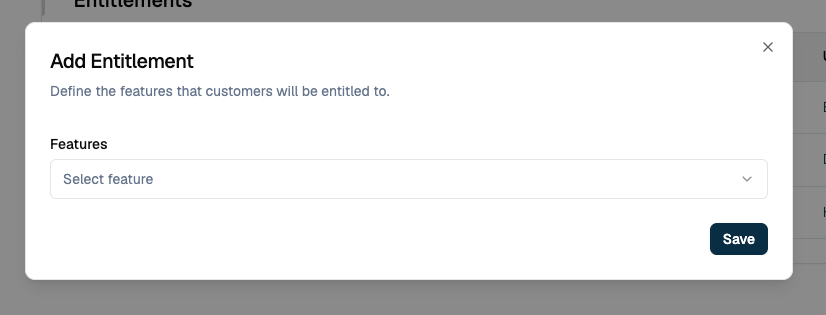
2
Pick the feature and set the value
Select the metered feature you want to grant a recurring value for. The value fields appear once it is chosen.Value Type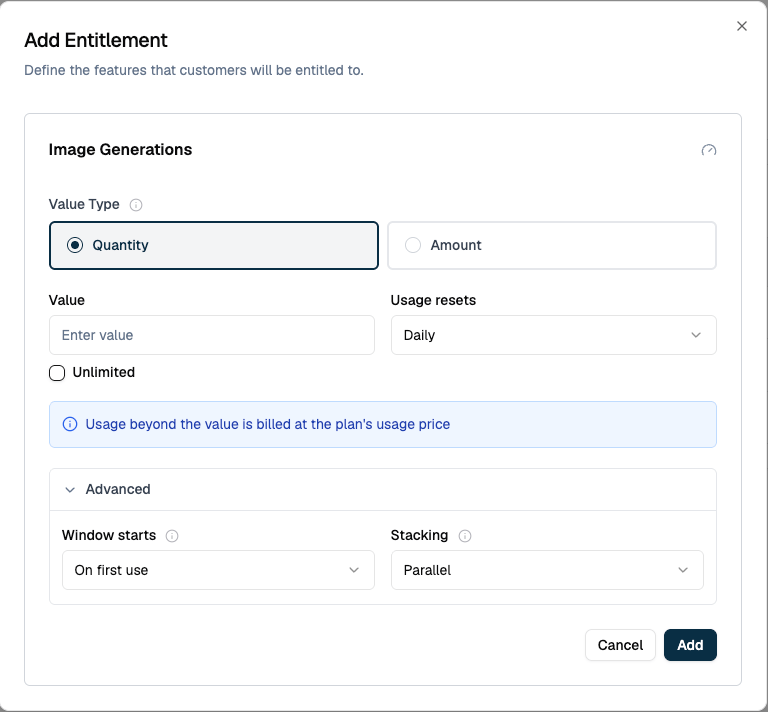
- Quantity counts meter units, such as tokens or images.
- Amount caps spend in currency, priced through the meter’s existing prices.
- The amount granted in each window.
Switch on Unlimited to grant a value with no ceiling. Usage is still tracked and shown, but nothing is ever exhausted and no overage is billed.
3
Choose how often it resets
Usage resets sets the cadence: Hourly, Daily, Weekly, or Every billing period. This is what makes the allowance recurring rather than a single limit for the cycle.
4
Set the advanced options if you need them
Under Advanced, Window starts decides where each window begins and Stacking decides how this value combines with others on the same feature. See Where a Window Starts and Stacking.
5
Save
Click Add, then save the plan. The value applies to every customer on the plan, now and on every later subscription.
API Fields
Every setting above is a field on the create entitlement and update entitlement endpoints.Validation Rules
An allowance is checked when you save it, and refused if it breaks any of these.Unlimited Allowances
Switch on Unlimited to give a customer an uncapped allowance for the billing cycle. The entitlement still reports usage and still appears in the ledger, but no quota is enforced, nothing is ever exhausted, and no overage is billed. This is how you remove a ceiling from a metered entitlement. Use it in place of the legacyusage_limit and usage_reset_period fields, which metered entitlements are moving off.
Where a Window Starts
Window starts decides how each new window is anchored:- On first use (
first_usage) starts the window at the customer’s first event past the covered range. An event at 2:07 opens a window that runs 2:07 to 7:07 for a five-hour allowance, so each customer’s windows follow their own activity. - Calendar boundary (
unit_start) rounds the start down to the hour, day or week. That same event at 2:07 opens a window running 2:00 to 7:00. Use it when every customer should see the allowance reset on the clock.
Changing an Allowance Mid-Cycle
Editing an entitlement that customers are already using does not always take effect at once, because a window that is open has usage measured against it already.
Usage already recorded in the open window still counts. A customer on a 1,000 unit hourly allowance who has spent 400 and is moved to 600 has 200 left, not 600. Moved to 300 instead, they have nothing left, and every unit they use for the rest of the window bills as overage. These timings are for additive stacking, the default. For a cadence, value type or stacking change, the dashboard shows when the new rule starts before you save.
How Grant Windows Work
Windows are usage-anchored. Flexprice does not open a window on a fixed schedule; it opens one when usage arrives:- The first usage event past the covered range opens a window, anchored according to Window starts.
- The window runs for the configured cadence.
- When the window ends, nothing happens until the next usage event. Idle periods open no windows, so an inactive customer accumulates nothing.
- Windows never straddle billing cycles. A window that would end within an hour of the cycle boundary stretches to the boundary instead of leaving a short stub.
Usage is measured against the window’s own time range, not accumulated as events arrive. An event that reaches Flexprice late counts against the window its timestamp falls in, so a backfill can change what a window that has already closed reports, and can exhaust it after the fact.
Viewing Usage and Windows
A customer’s Entitlements table lists what they hold and how much of it they have spent.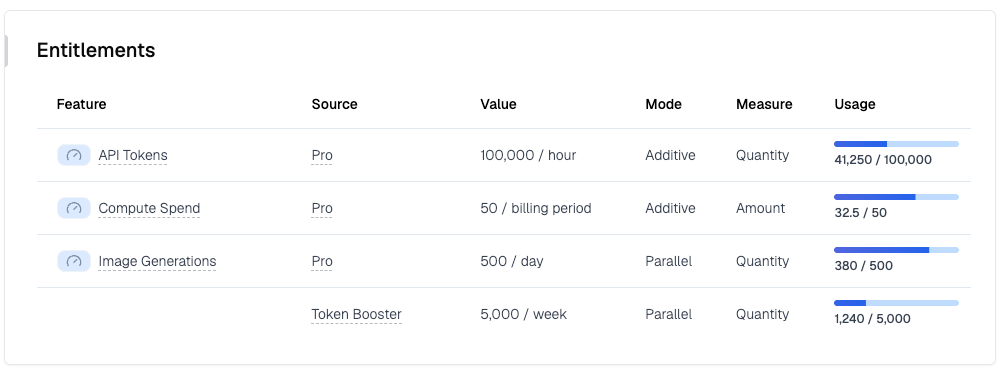
A parallel feature gets one row per budget, since no single pair of numbers describes them together. In the example above, Image Generations carries 500 per day from the Pro plan and 5,000 per week from the Token Booster addon, each metering the same usage on its own clock.
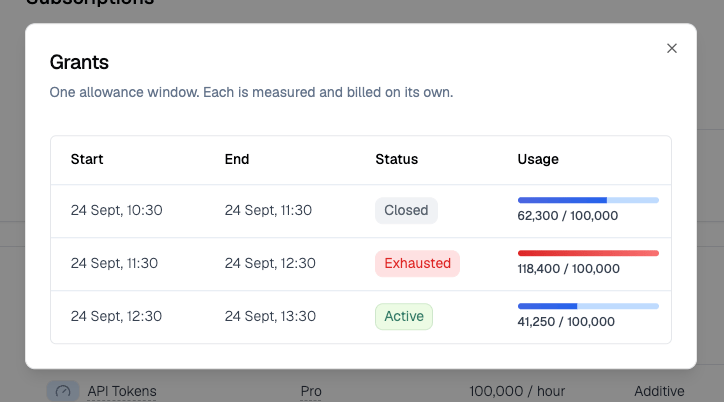
Selecting a row opens Grants, the ledger of windows behind that number.
Reading Windows Over the API
Get customer usage summary returns the grant config for each feature plus agrant_state.allowances array, one entry per window:
Only the current billing period is returned, capped at the three most recent windows per entitlement.
A parallel feature also carries a
buckets array, one entry per budget with its own quota, cadence and value type. Read those instead of total_limit when buckets is present.
Allowances are listed per subscription rather than merged, so a customer holding one feature on two subscriptions sees two sets of windows. Tell them apart with entitlement_id. Inherited subscriptions carry none of their own; their usage belongs to the parent.
Stacking
When a customer holds more than one allowance on the same feature, such as a plan entitlement plus an addon entitlement, Stacking decides how they combine.Additive
All allowances merge into one window whose quota is their sum. Use this when an addon should top up the base allowance. Example: The Pro plan grants 100K tokens per day. A booster addon grants another 50K per day. The customer gets one daily window with a 150K quota.Parallel
Each allowance opens its own window on its own clock. All of them meter the same usage stream. A request is within limits only while every applicable window has quota left; exhausting any one window puts the feature into overage for the remainder of that window. Example: 1M tokens per 5 hours and 5M tokens per week, as two parallel allowances. Heavy use exhausts the 5-hour window first; sustained use over days exhausts the weekly window even though no single 5-hour burst did.Use Cases
Rolling Rate Limits for an AI Product
Cap token consumption in a rolling window that has nothing to do with the monthly invoice, the pattern used by AI assistants that advertise “resets every 5 hours”.
Create this allowance through the API with
grant_duration_unit: "hour" and grant_duration_value: 5. The dashboard’s Hourly option always creates a one-hour window, so it cannot set up a five-hour one.
Add a second parallel allowance that resets weekly to layer a sustained ceiling on top of the burst limit.
Daily Spend Cap
Cap what a customer’s usage costs rather than how many units they consume. An amount allowance prices usage through your existing meter prices, so a mid-window price change is respected.
The customer gets $50 of compute per day. Alert on exhaustion, or let usage continue and bill the excess as overage.
Plan Plus Booster Addon
Sell top-ups without new plumbing. The plan carries an allowance; the addon carries another on the same feature with Additive stacking. Buying the addon raises the shared window’s quota by the addon’s amount. With Parallel instead, the addon grants a separate window, useful when its allowance runs on its own clock.Soft Limits With Billed Overage
Grants implement soft limits: usage is never blocked. When a window’s quota is crossed, usage recorded after the crossing is billed as overage on the subscription’s arrears invoice. Quantity overage is priced as billable units; amount overage lands directly as a charge. With parallel windows, overlapping overage periods are merged so a unit of usage is never billed twice.Overage folding skips line items with tiered prices, commitments, or true-up. Those price against the full cycle, so grant overage on them falls back to the standard billing calculation.
Exhaustion Alerts
Usage is measured shortly after events arrive, within roughly five minutes. When a window’s usage reaches its quota the window turns exhausted and a webhook fires, once per window. There is no recovery event: a fresh window with a fresh quota simply opens when the next one starts.Webhook Payload
Event type:entitlement.grant.exhausted
Webhook Fields
Link features to plans
Attach a feature to a plan or addon as an entitlement.
Webhooks
Subscribe to
entitlement.grant.exhausted and the rest of the event catalogue.