

Prerequisites
Before you begin, ensure you have the following:An AWS account with administrator or equivalent
permissions to create VPCs, ECS, RDS, MSK, EKS, S3, IAM roles, and CloudWatch
resources
AWS CLI v2 installed and configured with
credentials (
aws configure)Docker installed (for building and pushing images
to ECR)
kubectl installed (for
EKS/ClickHouse management)
eksctl installed (optional but recommended for EKS
cluster creation)
Helm installed (for ClickHouse deployment)
Region selection
Choose an AWS region that:- Has all required services (see Cost estimation for the list)
- Is geographically close to your users for lower latency
- Meets your compliance requirements (e.g., GDPR for EU data)
us-east-1 as the example region. Replace with your preferred region.
Cost estimation
We provide two configurations: a development setup for testing and a production setup for high-throughput workloads (100M+ events/month).- Production (~$5,500/month)
- Development ($550-700/month)
Costs vary by region and usage. Use the AWS Pricing
Calculator for accurate estimates. ARM64/Graviton
instances provide ~20% cost savings over x86.
Sizing for 100M events/month
Traffic and storage estimates:
- 100M events/month = ~38.5 events/second average
- Peak traffic: 150-200 events/second (4-5x burst)
- ClickHouse storage: ~50 GB/month growth
- DynamoDB: ~20 GB/month growth
Architecture overview
Flexprice on AWS runs with the following production architecture: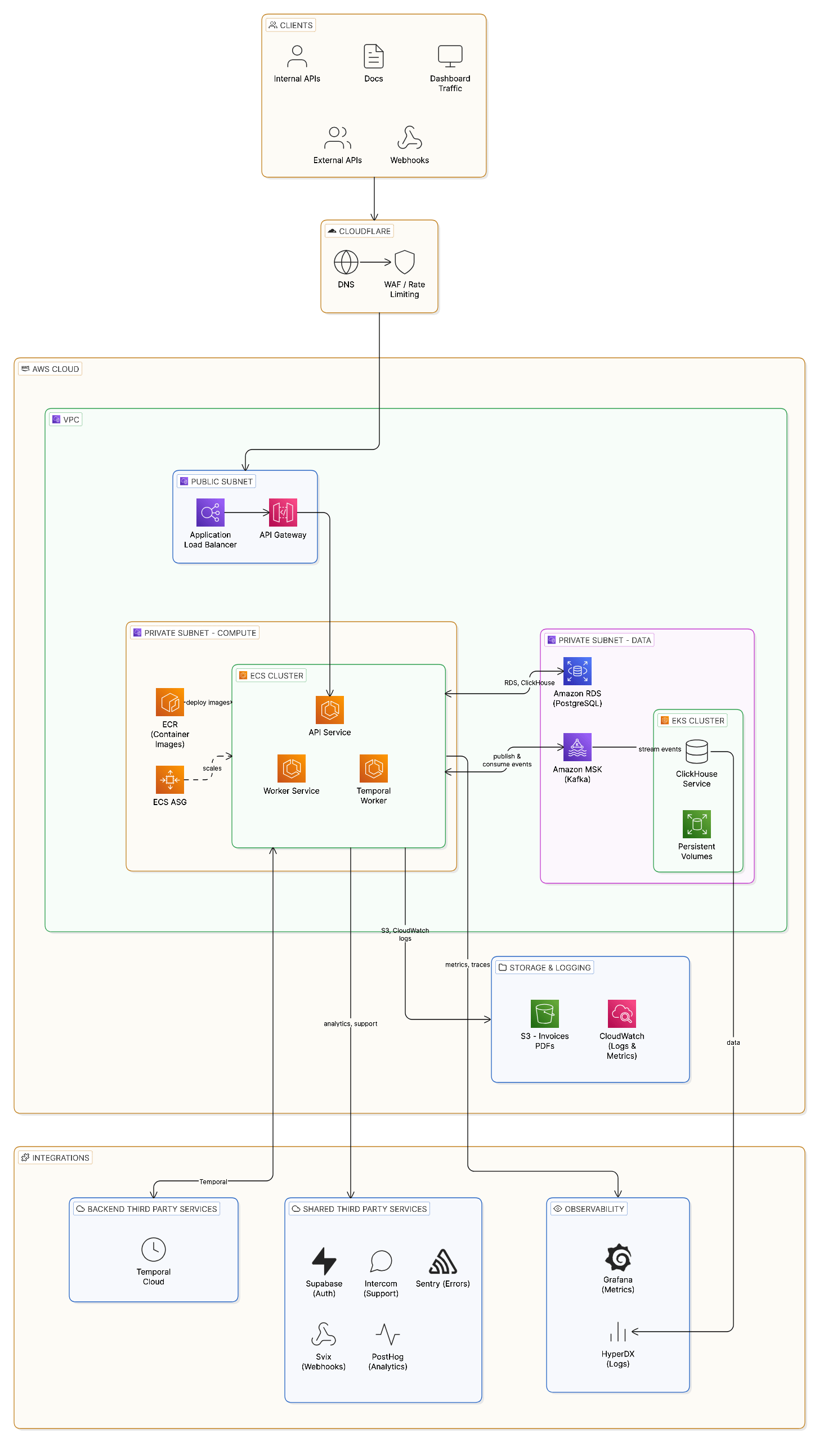
- Clients → Cloudflare (DNS, WAF, rate limiting) → ALB → ECS (API, Consumer, Temporal Worker)
- API writes to Aurora PostgreSQL, publishes events to MSK (Kafka) and DynamoDB
- Consumer reads from Kafka and writes to ClickHouse (on EKS) for analytics
- Temporal Worker connects to Temporal Cloud for workflow orchestration
- ElastiCache Redis provides caching in cluster mode
- S3 stores invoice PDFs; CloudWatch and Grafana Cloud collect logs and metrics
This guide uses Temporal Cloud (recommended for production). You can also
self-host Temporal, but it requires additional infrastructure. Cloudflare is
optional but recommended for DNS and WAF.
Component summary
Step 1: VPC and networking
Create a VPC with public and private subnets across two Availability Zones for high availability. Unless otherwise specified, create each resource in this guide via AWS Console, CLI, or IaC using the configuration described in the tables.VPC configuration
Create VPC with AWS CLI
Create the VPC, enable DNS hostnames, and attach an Internet Gateway.Create subnets
Create public and private subnets in two Availability Zones using the CIDRs in the VPC configuration table.Create NAT Gateway
Create an Elastic IP and NAT Gateway in a public subnet.Create route tables
Create public and private route tables and associate subnets (public: default route to Internet Gateway; private: default route to NAT Gateway).Create security groups
Create security groups for ALB, ECS, RDS, MSK, and EKS. Use the rules in the summary table below.Security group rules summary
Step 2: IAM roles and policies
Create IAM roles for ECS task execution and task runtime permissions.ECS Task Execution Role
This role allows ECS to pull container images and write logs. Create the role and attach the managed policyAmazonECSTaskExecutionRolePolicy plus an inline policy for Secrets Manager access.
ECS Task Role
This role grants permissions for the Flexprice application at runtime (S3, CloudWatch Logs, Secrets Manager). Create the task role and attach the inline policy.Step 3: Secrets Manager
Store sensitive configuration in AWS Secrets Manager.Create secrets
Create secrets for PostgreSQL, ClickHouse, Kafka (SASL), auth, and Temporal Cloud. Store postgres (host, username, password, database), clickhouse (username, password), kafka (username, password), auth (64-char hex secret), and temporal (API key, key name, namespace) as needed.Step 4: Aurora PostgreSQL
Create an Aurora PostgreSQL cluster for Flexprice’s primary database. Aurora provides higher availability and performance compared to standard RDS.- Production (Aurora)
- Development (RDS)
Create a DB subnet group, Aurora cluster (with Secrets Manager managed
credentials), writer instance (db.r8g.xlarge), and reader instance in the
other AZ. Retrieve the cluster writer and reader endpoints for application
configuration.
Aurora configuration summary
Update Secrets Manager with Aurora endpoints
Update the postgres secret in Secrets Manager with the Aurora writer and reader endpoints and the managed master password ARN.Run database migrations
You can run migrations using a one-off ECS task or from a bastion host. Create a migration task definition and run it via ECS (or runflexprice migrate up from a host with DB access) using the configuration described above.
Step 5: Amazon MSK (Kafka)
Create an Amazon MSK cluster for event streaming.Create MSK configuration
Create an MSK configuration (server properties) and register it.Create MSK cluster
Create the MSK cluster with 2 brokers (1 per AZ), kafka.m5.large (4 vCPU, 8 GB) instance type, and 1024 GB (1 TB) storage per broker. Enable SASL/SCRAM, TLS, encryption at rest, and enhanced monitoring.Create SASL/SCRAM secret for MSK
Create a secret in Secrets Manager with the prefixAmazonMSK_ and associate it with the MSK cluster.
Get MSK bootstrap brokers
Retrieve the SASL/SCRAM bootstrap broker string from the MSK cluster (AWS Console or CLI) for application configuration.Create Kafka topics
Use a bastion host or an EC2 instance with Kafka CLI tools to create theevents and events-dlq topics (e.g. 6 partitions, replication factor 2). Use SASL_SSL and SCRAM-SHA-512 in client configuration.
MSK configuration summary
Step 6: EKS with ClickHouse
Create an EKS cluster and deploy ClickHouse for analytics storage. For production (100M+ events/month), use m5.8xlarge nodes for the ClickHouse node group.Create EKS cluster with eksctl
Create an EKS cluster with a managed node group (m5.8xlarge for production) via eksctl or IaC. Use private subnets and attach the EKS security group.Create gp3 StorageClass
Create a gp3 StorageClass (EBS CSI driver, encrypted, Retain, WaitForFirstConsumer) via kubectl or IaC.Create ClickHouse namespace and secrets
Create theclickhouse namespace and a Kubernetes secret with credentials from Secrets Manager via kubectl or IaC.
Deploy ClickHouse with Helm
Add the Altinity ClickHouse Helm repo and install the ClickHouse Operator in theclickhouse namespace via Helm.
Create ClickHouse cluster
Deploy a ClickHouseInstallation (Altinity operator) with the credentials secret, gp3 storage, and appropriate resources via kubectl or Helm.Create ClickHouse service for ECS access
Create a ClusterIP Service for ClickHouse (ports 9000, 8123) targeting the ClickHouse installation via kubectl or IaC.Get ClickHouse endpoint
For ECS tasks to access ClickHouse, you have several options:- Internal NLB (recommended): Create an internal Network Load Balancer pointing to the ClickHouse service
- VPC peering/Transit Gateway: If ECS and EKS are in separate VPCs
- AWS PrivateLink: For cross-account access
Initialize ClickHouse database
Connect to ClickHouse (e.g. via port-forward or the NLB) and create theflexprice database using clickhouse-client.
Step 7: ElastiCache Redis
Create an ElastiCache Redis cluster for caching and session management.Create Redis subnet group
Create a cache subnet group in the data subnets.Create Redis security group
Create a security group for Redis allowing TCP 6379 from the ECS security group.Create Redis replication group (cluster mode)
- Production (Cluster Mode)
- Development (Single Node)
Create a Redis replication group with cache.r6g.large, cluster mode,
multi-node (e.g. multiple node groups for ~$600/month), TLS and at-rest
encryption, and multi-AZ.
Redis configuration summary
Step 8: DynamoDB
Create a DynamoDB table for durable event storage alongside ClickHouse.Create events table
Create a DynamoDB table namedevents with partition key pk (String) and sort key sk (String), on-demand billing.
Enable Point-in-Time Recovery
Enable point-in-time recovery (continuous backups) on the events table.DynamoDB configuration summary
DynamoDB is used alongside ClickHouse for durable event storage. Events are
written to both DynamoDB (for durability) and ClickHouse (for analytics).
Step 9: S3 and CloudWatch
Create S3 bucket for invoices
Create an S3 bucket for invoice PDFs with versioning, AES256 encryption, block public access, and optional lifecycle rules (e.g. transition to STANDARD_IA after 90 days).Create CloudWatch log groups
Create log groups for ECS services (api, worker, temporal-worker, migration) with a retention policy (e.g. 30 days).Create CloudWatch alarms
Create alarms for ECS API CPU, RDS CPU, and RDS connections (e.g. threshold 80%, 2 evaluation periods) and associate with an SNS topic for alerts.Step 10: ECR and container images
Create ECR repositories
Create ECR repositories for api, worker, and temporal-worker with scan-on-push and AES256 encryption.Build and push images
Build Flexprice container images (api, worker, temporal-worker), authenticate to ECR, tag and push to your ECR repositories.Step 11: ECS cluster and services
Create ECS cluster
- Production (EC2/ARM64)
- Development (Fargate)
For production (100M+ events/month), create an ECS cluster with EC2
capacity: launch template with m6g.xlarge (ARM64/Graviton), Auto Scaling
Group with 10 nodes (min/max as needed), capacity provider with managed
scaling, and associate with the cluster.
Create API task definition
Register an ECS task definition for the API service: production uses EC2/ARM64 (768 CPU, 1536 memory) with bridge network; development uses Fargate (1024 CPU, 2048 memory). Include environment variables and secrets from Secrets Manager (auth, postgres, clickhouse, kafka, temporal). Set FLEXPRICE_DEPLOYMENT_MODE=api, health check on :8080/health, and CloudWatch log group. See Step 12 for the full environment variable reference.Create Worker task definition
Register an ECS task definition for the Consumer (worker) service: FLEXPRICE_DEPLOYMENT_MODE=consumer, postgres/clickhouse/kafka secrets from Secrets Manager. For production use 30 tasks (100M events/month). See Step 12 for environment variables.Create Temporal Worker task definition
Register an ECS task definition for the Temporal Worker: FLEXPRICE_DEPLOYMENT_MODE=temporal_worker, postgres/clickhouse/kafka/temporal secrets. See Step 12 for environment variables.Create Application Load Balancer
Create an internet-facing Application Load Balancer in the public subnets, a target group (HTTP 8080, health check /health), an HTTPS listener with an ACM certificate, and an HTTP listener that redirects to HTTPS.Create ECS services
Create ECS services for API (desired count 6 for production), Worker/Consumer (desired count 30 for production), and Temporal Worker (e.g. 3 tasks). Attach the API service to the ALB target group. Use private subnets and the ECS security group.Configure Auto Scaling
Register scalable targets and target-tracking scaling policies for the API (and optionally Worker) services (e.g. min/max desired count, CPU target 70%).Step 12: Environment variables reference
Below is a complete reference of environment variables for each service. Variables marked with (secret) should be stored in AWS Secrets Manager.API service
Worker and Temporal Worker services
Worker and Temporal Worker use the same variables as API, withFLEXPRICE_DEPLOYMENT_MODE set to consumer or temporal_worker respectively; omit FLEXPRICE_SERVER_ADDRESS for both.
Additional environment variables (Production)
These variables are used in production deployments:Step 13: Temporal Cloud configuration
Temporal Cloud is the recommended workflow orchestration service for production deployments.Sign up for Temporal Cloud
- Go to temporal.io/cloud
- Create an account and organization
- Create a namespace (e.g.,
flexprice-prod-usa)
Create service account and API key
- In Temporal Cloud console, go to Settings > API Keys
- Create a new API key with appropriate permissions
- Note the API key and key name
Store Temporal credentials
Temporal environment variables
Temporal Cloud provides managed infrastructure, automatic upgrades, and 99.99%
SLA. For self-hosted Temporal, refer to the Temporal
documentation.
Step 14: Third-party integrations (Optional)
Configure optional third-party services for enhanced functionality.Supabase (Authentication)
If using Supabase for authentication:Svix (Webhooks)
For webhook delivery via Svix:Sentry (Error Tracking)
For error tracking with Sentry:Grafana Cloud (Observability)
For profiling with Pyroscope on Grafana Cloud:FluentD (Log Aggregation)
For centralized logging with FluentD:Resend (Email)
For transactional emails via Resend:Third-party cost summary
Breakdown below; production total is in the Cost estimation table above.Deployment checklist
Use this checklist to verify your deployment:1
VPC and Networking
- VPC created with correct CIDR
- 2 public subnets created
- 4 private subnets created (2 compute, 2 data)
- Internet Gateway attached
- NAT Gateway(s) created and running
- Route tables configured correctly
- Security groups created with correct rules
2
IAM
- ECS Task Execution Role created
- ECS Task Role created
- Policies attached correctly (S3, Secrets Manager, CloudWatch, DynamoDB)
3
Secrets Manager
- PostgreSQL/Aurora credentials stored
- ClickHouse credentials stored
- Kafka SASL credentials stored
- Auth secret stored
- Temporal Cloud credentials stored
- Third-party credentials stored (Supabase, Svix, etc.)
4
Aurora PostgreSQL
- DB subnet group created
- Aurora cluster created and available
- Writer and Reader instances running
- Security group allows ECS access
- Secrets Manager updated with endpoints
- Database migrations completed
5
Amazon MSK
- MSK cluster created and active
- SASL/SCRAM secret associated
- Topics created (events, events_lazy, events-dlq)
- Security group allows ECS access
- Prometheus exporters enabled
6
EKS and ClickHouse
- EKS cluster created
- Node group running
- gp3 StorageClass created
- ClickHouse operator installed
- ClickHouse cluster deployed
- NLB created for ClickHouse access
- Database initialized
7
ElastiCache Redis
- Redis subnet group created
- Redis replication group created
- Cluster mode enabled (production)
- TLS encryption enabled
- Security group allows ECS access
8
DynamoDB
- Events table created
- Point-in-time recovery enabled
- IAM policy allows ECS access
9
S3 and CloudWatch
- S3 bucket created with encryption
- CloudWatch log groups created
- CloudWatch alarms configured
10
ECR and Images
- ECR repositories created
- Container images built and pushed
11
ECS
- ECS cluster created
- Task definitions registered
- ALB created with HTTPS listener
- Target group configured
- Services created and healthy
- Auto Scaling configured
12
Verification
- API health check passing
- Worker consuming from Kafka
- Temporal workflows executing
- Logs appearing in CloudWatch
Troubleshooting
API unreachable
-
Check ALB health checks:
-
Check ECS task status:
-
Check ECS task logs:
-
Verify security groups:
- ALB SG allows inbound 443 from internet
- ECS SG allows inbound 8080 from ALB SG
- ECS SG allows outbound to RDS, MSK, ClickHouse
Worker not consuming
-
Check Kafka connectivity:
- Check consumer lag in MSK CloudWatch metrics
-
Verify SASL credentials:
- Ensure
AmazonMSK_prefixed secret is associated with cluster - Verify username/password match in Secrets Manager
- Ensure
-
Check security group:
- MSK SG allows inbound 9094/9096 from ECS SG
Temporal workflows failing
-
Check Temporal Worker logs:
-
Verify Temporal Cloud connection:
- Correct
FLEXPRICE_TEMPORAL_ADDRESS - Valid API key and namespace
- TLS enabled
- Correct
- Check Temporal Cloud UI for workflow history and errors
ClickHouse connection errors
-
Verify ClickHouse pods are running:
-
Check ClickHouse logs:
-
Verify NLB is healthy:
-
Test connectivity from ECS:
- Ensure EKS SG allows inbound 9000 from ECS SG
- Verify NLB DNS resolves correctly
RDS connection issues
-
Verify RDS is available:
-
Check security group:
- RDS SG allows inbound 5432 from ECS SG
-
Verify credentials:
- Check Secrets Manager values match RDS configuration
-
Test from bastion:
Scaling guidelines
Scale when metrics exceed the thresholds below.Cost optimization
Reserved instances
- RDS: Purchase Reserved Instances for 1-3 year commitment (up to 72% savings)
- MSK: Not available; consider Kafka on EC2 with Reserved Instances for significant savings
Fargate Spot
Use Fargate Spot for non-critical workloads:S3 lifecycle policies
Already configured to transition to IA after 90 days. Consider:- Glacier for archives > 1 year
- Intelligent-Tiering for unpredictable access patterns
CloudWatch log retention
Set appropriate retention periods:- Production: 30-90 days
- Development: 7-14 days
- Archive to S3 for long-term storage
Additional resources
Configuration Reference
Complete list of Flexprice environment variables
Architecture Overview
Understand Flexprice’s internal architecture
Monitoring
Set up monitoring and observability
Troubleshooting
Common issues and solutions
Need help?
If you encounter issues during deployment:- Check our GitHub Issues for similar problems
- Join our Slack community for real-time support
- Contact us at support@flexprice.io