

Overview
Resend does this with tiers (Free, Pro, Scale, Enterprise): each tier has a recurring fee, usage charges (emails sent or contacts stored), and feature gating (retention, domains, support, analytics). In Flexprice you use one plan with recurring + usage-based charges and features linked via entitlements.Pricing Breakdown

1. Key Chargeable Features in Resend
Resend charges by usage (emails sent or contacts stored) and gates features by plan (data retention, domains, support, analytics, dedicated IP). Two tracks run in parallel; this cookbook uses the Transactional track for the Flexprice setup.A. Transactional Emails
How pricing is applied: You are charged by emails sent per month. Plans scale by volume; unit cost drops at higher tiers. Each tier also defines how many domains you can use, data retention for logs, support channel, and whether dedicated IP is available. Pricing (volume tiers):- Transactional Scale: 100,000 emails = 0.90 per 1,000 emails
- Transactional Scale: 1,000,000 emails/month = 0.65 per 1,000 emails
- Transactional Pro: e.g. $20/mo for 50k emails (common entry point)
Transactional emails are API-triggered (password resets, verification, order confirmations). In Flexprice you model this as a metered feature (e.g. Emails Sent) with event name and aggregation.
B. Marketing Emails
How pricing is applied: You are charged by contacts stored (not by emails sent). Sends can be unlimited; cost scales with contact list size. Tiers control number of audiences, analytics, and dedicated IP (e.g. included on Enterprise for Marketing).
Marketing use cases include newsletters, onboarding campaigns, and promotions. For Flexprice, add a second metered feature (e.g. Contacts Stored) with its own event name if you model the Marketing track.
2. Subscription and Entitlement Model
Plan tiers (Free, Pro, Scale, Enterprise) control both volume/price and which features the customer can use. Features and limits vary by tier:
In Flexprice you control this by linking features to plans (entitlements): set included quantity, usage reset, and soft or hard limits for metered features; grant or restrict boolean/static features per plan. For more, see Linking features to plans.
3. Overage and Upgrade Logic
Resend does not automatically charge for excess usage. When you exceed your monthly quota, you are notified and prompted to upgrade; if you repeatedly exceed limits without upgrading, Resend may temporarily pause sending. In Flexprice you can choose soft limit (overage allowed, with or without extra charge) or hard limit (strict cap). Configure limits and overage per plan when linking features to plans.Concepts and Terms
- Subscription: A customer attached to a plan. The subscription determines billing and which entitlements the customer has.
- Plan: A set of pricing rules: recurring charges (flat fee per billing period) and optionally usage-based charges (metered). A plan that has both is hybrid in Flexprice.
- Feature: Something you track or gate—Metered (usage, e.g. emails sent), Boolean (on/off access), or Static (fixed attribute).
- Entitlement: A feature linked to a plan with access rules: for metered features, included quantity, reset period, and soft or hard limit; for boolean/static, grant or restrict. Entitlements are free.
Complete Flow Summary
The end-to-end flow for hybrid (subscription + entitlement) pricing in Flexprice:1
Create metered features
Define the usage dimensions (e.g. Emails Sent) as metered features with event names and aggregation.
2
Create plan with hybrid charges
Create a plan (e.g. Transactional Pro). Add a recurring charge (e.g. $20/month) and usage-based charge(s) for the metered feature(s) (e.g. included 50k emails, then overage or tiered pricing).
3
Set entitlements
Link features to the plan. Set included quantity, usage reset (e.g. monthly), and soft or hard limit for metered features. Add boolean/static features if you gate capabilities by tier.
4
Create customer
Create a customer (name, External ID) in Customer Management.
5
Create subscription
Add subscription for the customer and select the plan. Start date determines billing and when entitlements apply.
6
Usage and billing
Send usage events that match the metered feature event names. Usage is billed per the plan’s usage-based charges and respects entitlements. Invoices are generated per billing cycle.
Flexprice Set-up
To implement Resend-style hybrid pricing in Flexprice (Transactional track), follow these steps in order.1
Step 1: Create metered features
Navigate to Flexprice Dashboard → Product Catalog → Features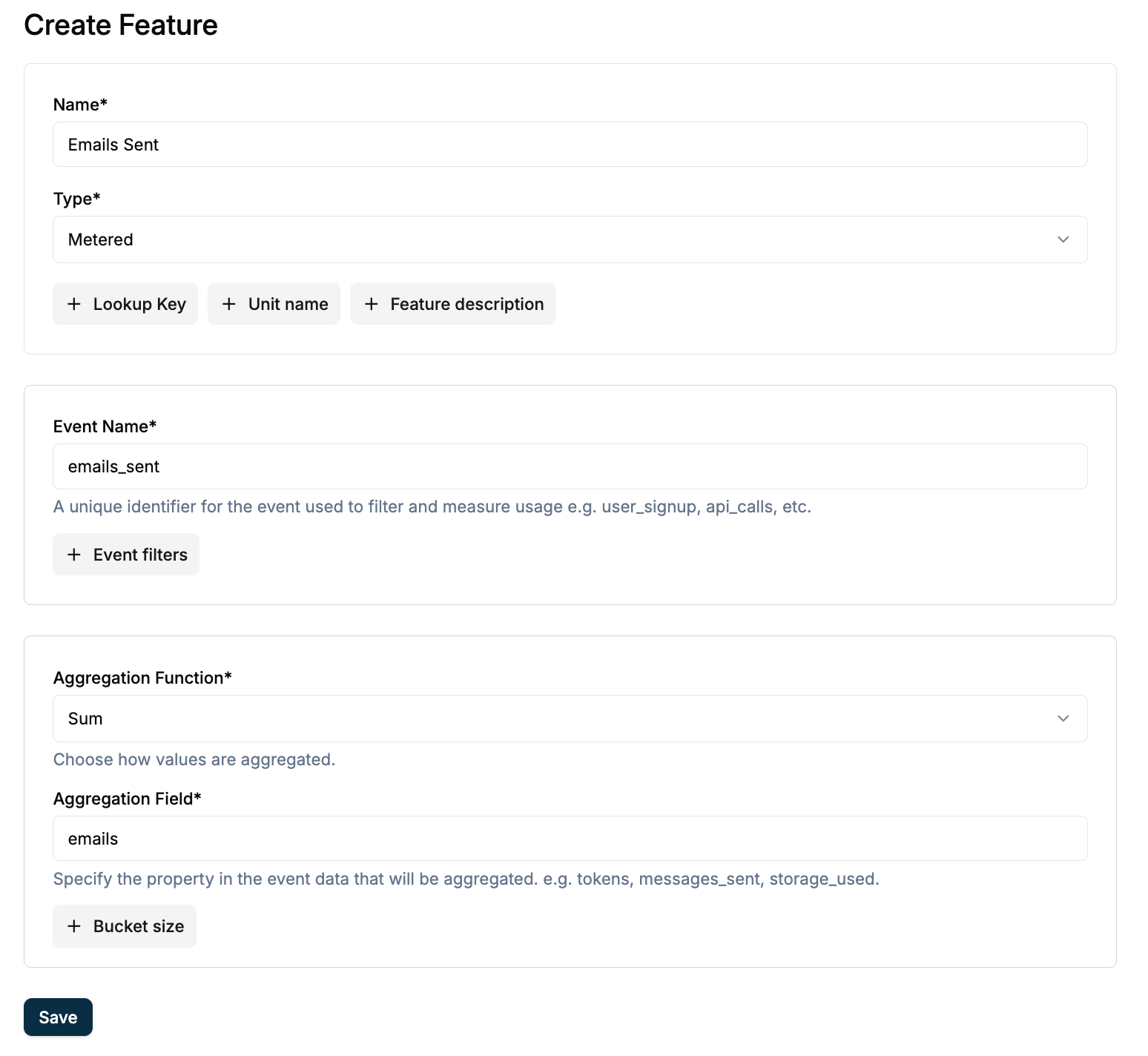
- Feature Name:
Emails Sent - Feature Lookup Key:
emails_sent(immutable, unique) - Feature Type:
Metered - Event Name: e.g.
emails.sent(must match exactly when sending events) - Aggregation:
Count(e.g. overSumoremails) - Unit:
emailoremails
Note: The Event Name must match exactly when you send usage events via API. Save it for later use.For a second track (Marketing), add a feature such as Contacts Stored with its own event name and aggregation. This guide uses one metered feature: Emails Sent.For more, check-out Creating a feature.
2
Step 2: Create plan with hybrid charges
Navigate to Flexprice Dashboard → Product Catalog → Plans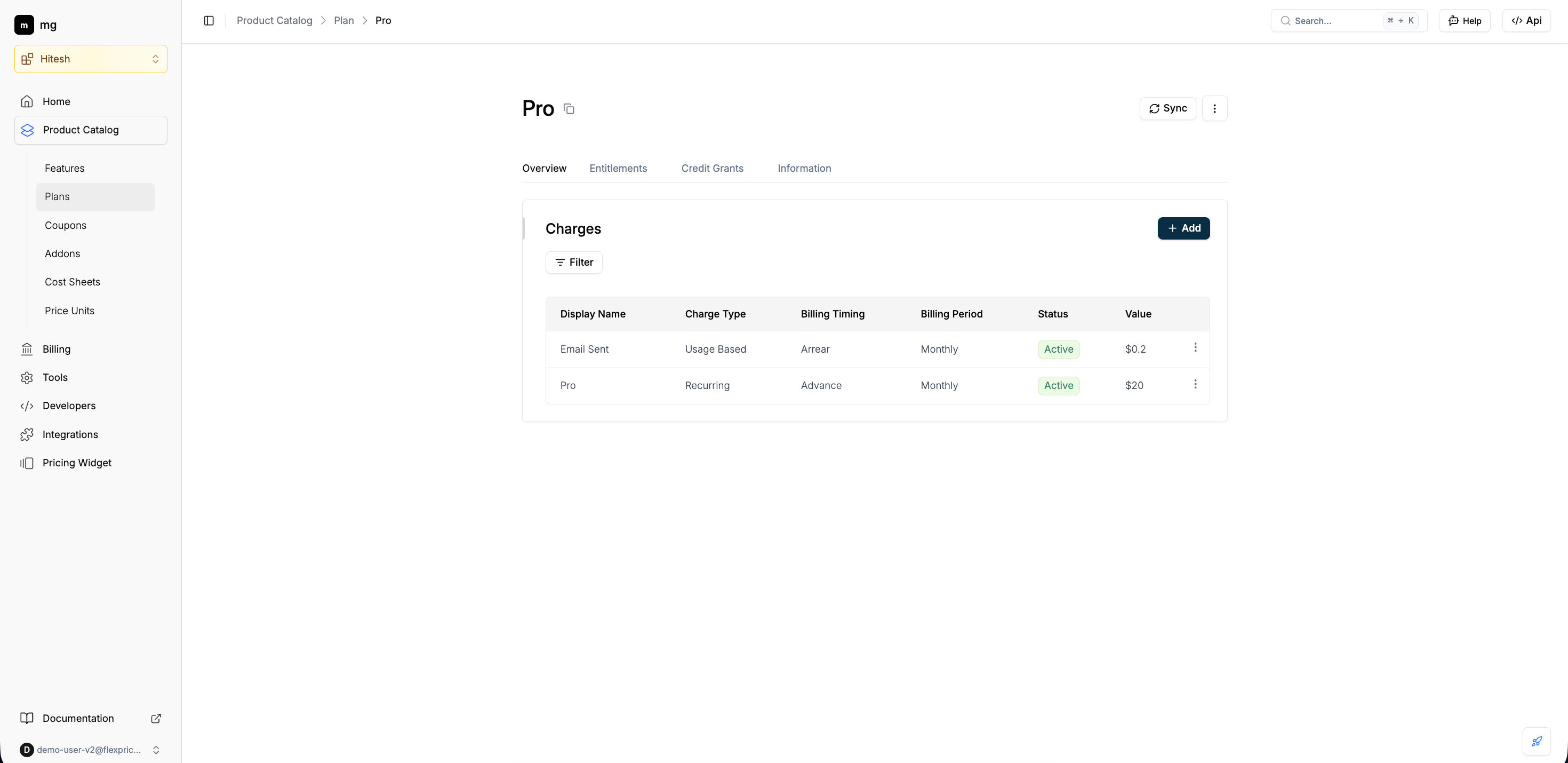
- Plan Name:
Pro - Lookup Key: e.g.
plan-pro(Auto-generated) - Billing period: e.g. Monthly
- Recurring charge: Add a recurring charge (e.g. $20/month). This is the base subscription fee for the tier. Click Add to save.
- Usage-based charge: Add a usage-based charge for the metered feature Emails Sent. Set pricing (e.g. flat fee per email, or package/tiered with included quantity and overage). Example: first 50,000 emails included, then $0.2 per 1,000 emails. Click Add, then Save to finalize the plan.
3
Step 3: Set entitlements
Open the plan you created → Entitlements section. Click Add to link features to the plan.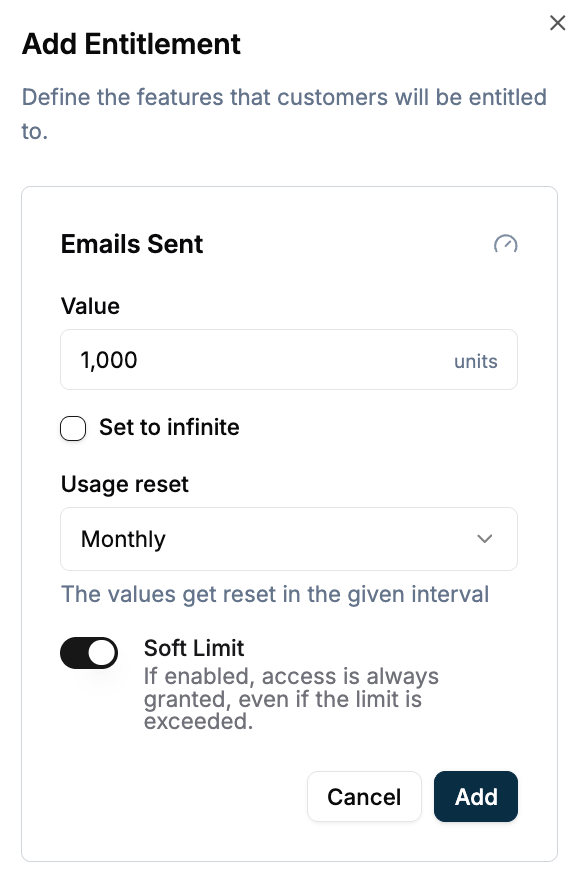
- Set included quantity (e.g. 50,000 emails per month) or leave uncapped.
- Set usage reset (e.g. monthly) so limits reset each billing period.
- Choose soft limit (overage allowed, with billing per plan) or hard limit (strict cap).
4
Step 4: Create customer
Navigate to Flexprice Dashboard → Customer Management → CustomersClick Add Customer. Enter Customer Name and External ID (your system’s identifier; use this in APIs for usage and lookups).Required:
- Customer Name: e.g.
flexprice organisation - External ID: e.g.
cust-flexprice-organisation
5
Step 5: Create subscription
Open the customer you created, then click Add Subscription.
- Select plan: Choose Transactional Pro (or the plan you created).
- Start date: Set subscription start (billing and entitlements apply from this date).
6
Step 6: Usage and billing
Send usage events to Flexprice with the same event name as the metered feature (e.g. 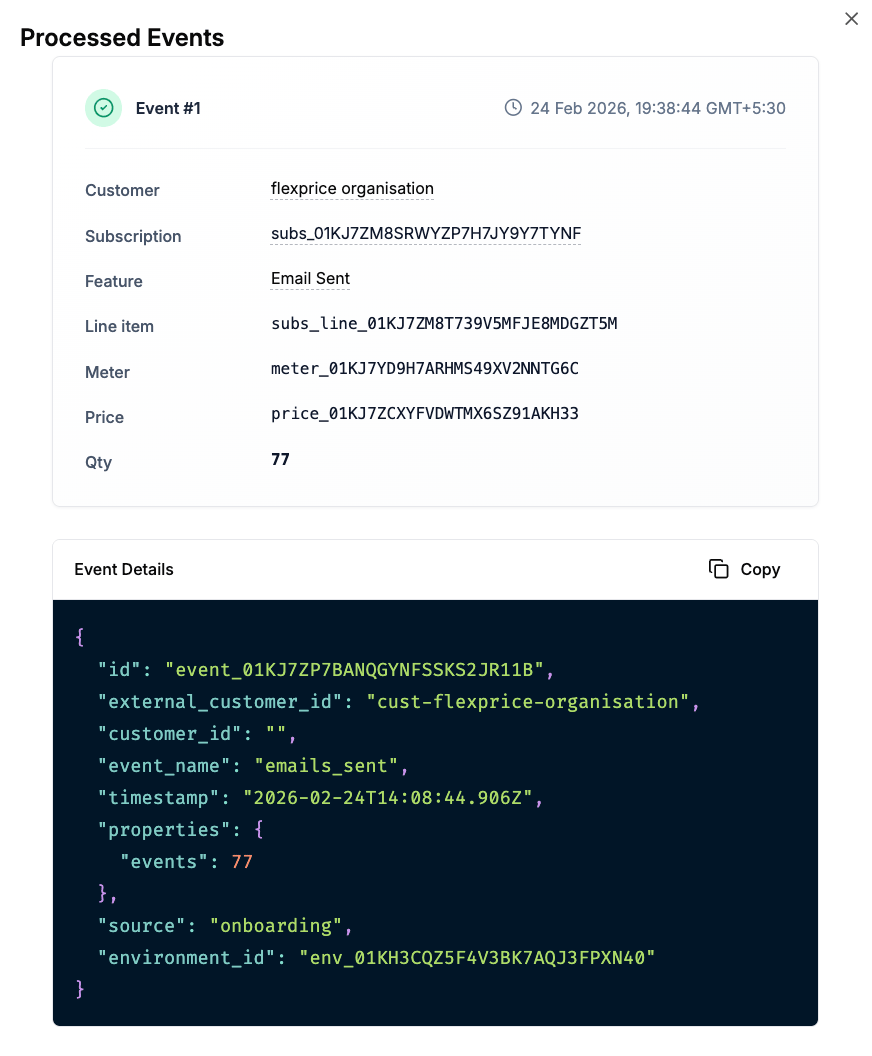
emails.sent). Usage is aggregated and billed according to the plan’s usage-based charges and respects the entitlements (included quantity, soft/hard limit).- Verify events: Use the Event Debugger or usage views to confirm events are received and attributed to the customer.
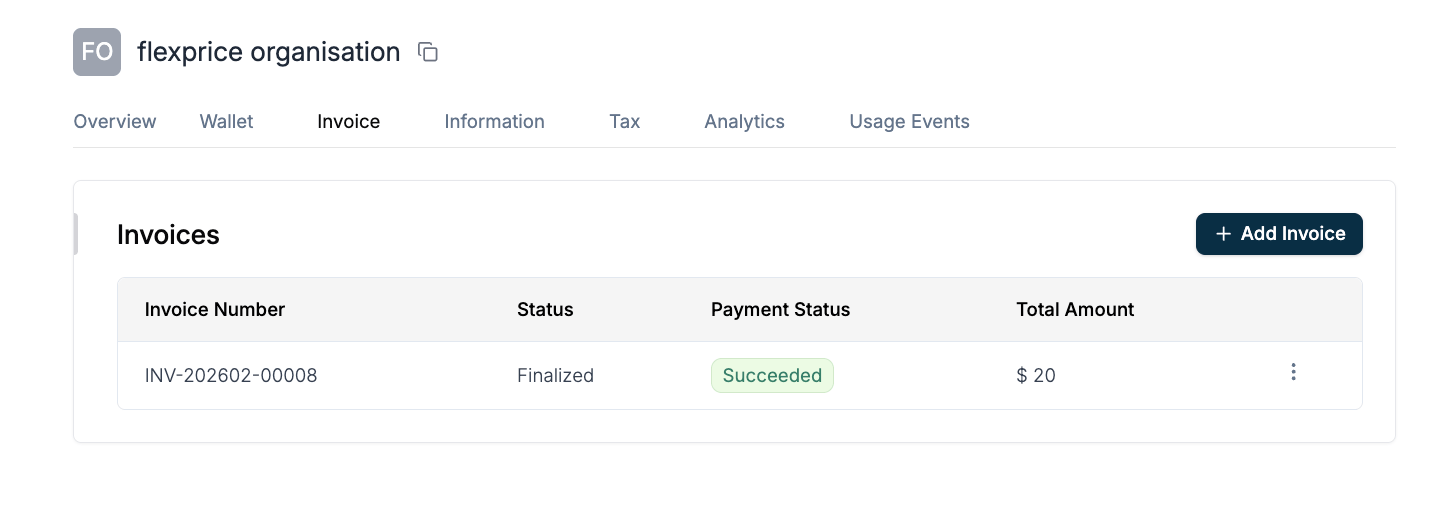
- Invoices: Generated at the end of each billing cycle; they include the recurring fee and usage-based line items.
Next Steps
- Map your app to Flexprice: Emit usage events that match the metered feature event names (e.g.
emails.sent) and associate them with the customer (e.g. via External ID). - Configure overage and limits: Use Linking features to plans to set soft vs hard limits and overage pricing per plan.
- Add more plans: Create Free, Scale, and Enterprise plans with different recurring fees, usage tiers, and entitlements (e.g. analytics, retention) to mirror Resend’s tiers.