

Overview
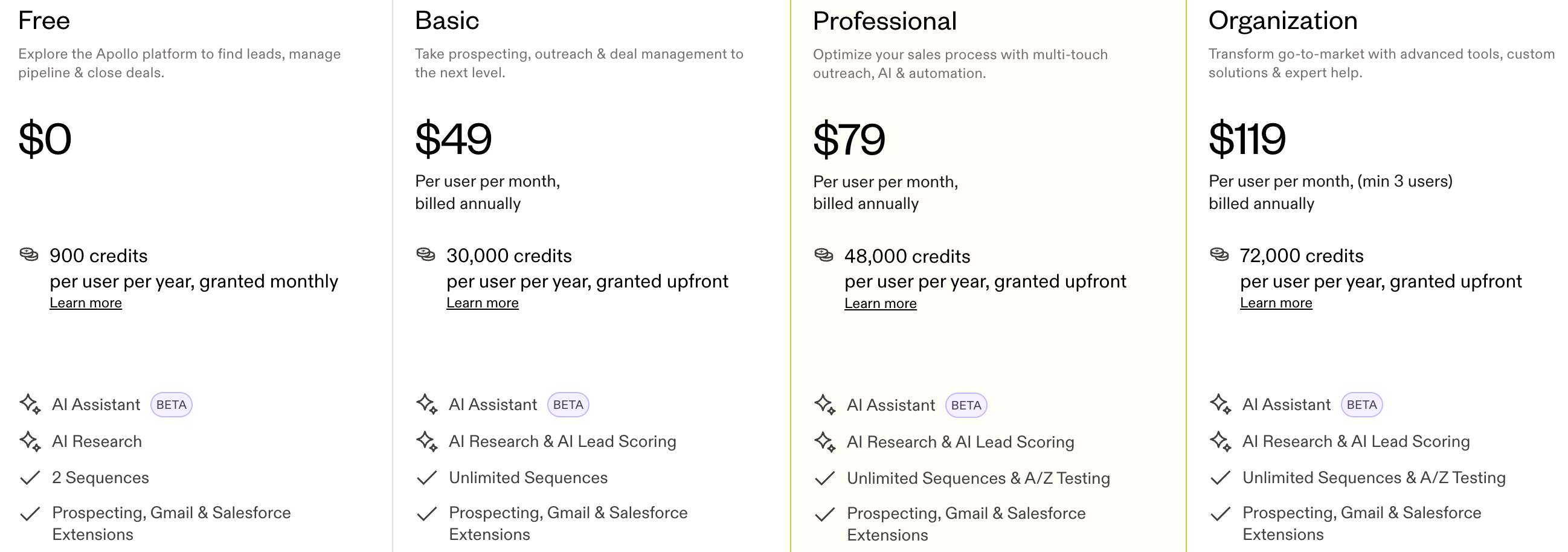
Apollo.io uses a credit-based pricing model where users spend credits to access contact data (like emails, phone numbers, and exports), with higher plans offering more monthly credits. This guide shows how to build the same model in Flexprice.Pricing Breakdown
1. Key Chargeable Features in Apollo
In this model, credits are deducted when the user does an action (e.g. unlock email, export). In Flexprice you will map each action to a credit cost and debit the wallet.A. Contact Data Unlock & Enrichment
How Credits Are Applied
Prepaid allocation: When a user subscribes, they receive credits up to the plan limit. You configure this as recurring grants on the plan. Plans can be billed annually with recurring grants (e.g. credits per month).- Professional plan → 48,000 credits/year (or e.g. 4,000/month as recurring grants)
- Basic → 30,000 credits/year (or e.g. 2,500/month as recurring grants)
B. Email Sending & AI Outreach Credits
How Credits Are Applied
Email Sending Model: Depending on plan, choose one: daily send limits per mailbox or credits per email sent. When you set up features, create a metered feature (e.g. Emails Sent) and set the credit cost per use.2. Apollo-Style Credit Model
Key Behaviors
1
Set cost per action
Define a credit cost for each action (e.g. 1 for search, 5 for export) in your app or feature config.
2
Purchase credits
Let users purchase credits (packages or add-ons) by topping up their wallet.
3
Enforce balance
If balance is zero, block the action and prompt the user to buy more credits or upgrade.
Example: Credit Cost per Action
Example: Credit Packages (Prepaid)
You decide: Credits can reset monthly, never expire, or expire after N days. Configure this in your plan or billing logic.
To charge overage: In Flexprice, configure overage on the plan or charge (e.g. 1.00 USD per extra credit). Usage above the included grant is then billed automatically.
3. When to Use Credit-Based Pricing
1
Different cost per action
Use credit-based pricing when each action has a different cost (e.g. 1 credit to unlock an email vs 10 credits to reveal a phone number).
2
Variable usage
Use it when usage varies a lot per customer and a fixed plan doesn’t fit.
3
Flexible consumption
Use it when you want flexible consumption and optional add-ons or top-ups.
4. Complete Flow Summary
High level, you will:1
Create Features
Create metered features for each action that costs credits. Link each feature to plans via entitlements; there you set which features each plan gets and optional free usage (e.g. 50 free, then deduct from credits). See Linking features to plans.
2
Create Plan
Create a Plan with credit packages or usage charges (e.g. annually billed with recurring credit grants per month).
3
Create Customer
Create a Customer (with External ID for your system).
4
Credit grant and entitlement
For plan-based credits: Add Subscription → choose the plan. The customer gets the plan’s credit grants and feature access. For direct purchase only, skip this and top up the wallet in the next step.
Flexprice Set-up
To implement Apollo-style credit-based pricing in Flexprice, follow these steps in order.1
Step 1: Create Features (Metered)
Navigate to Flexprice Dashboard → Product Catalog → Features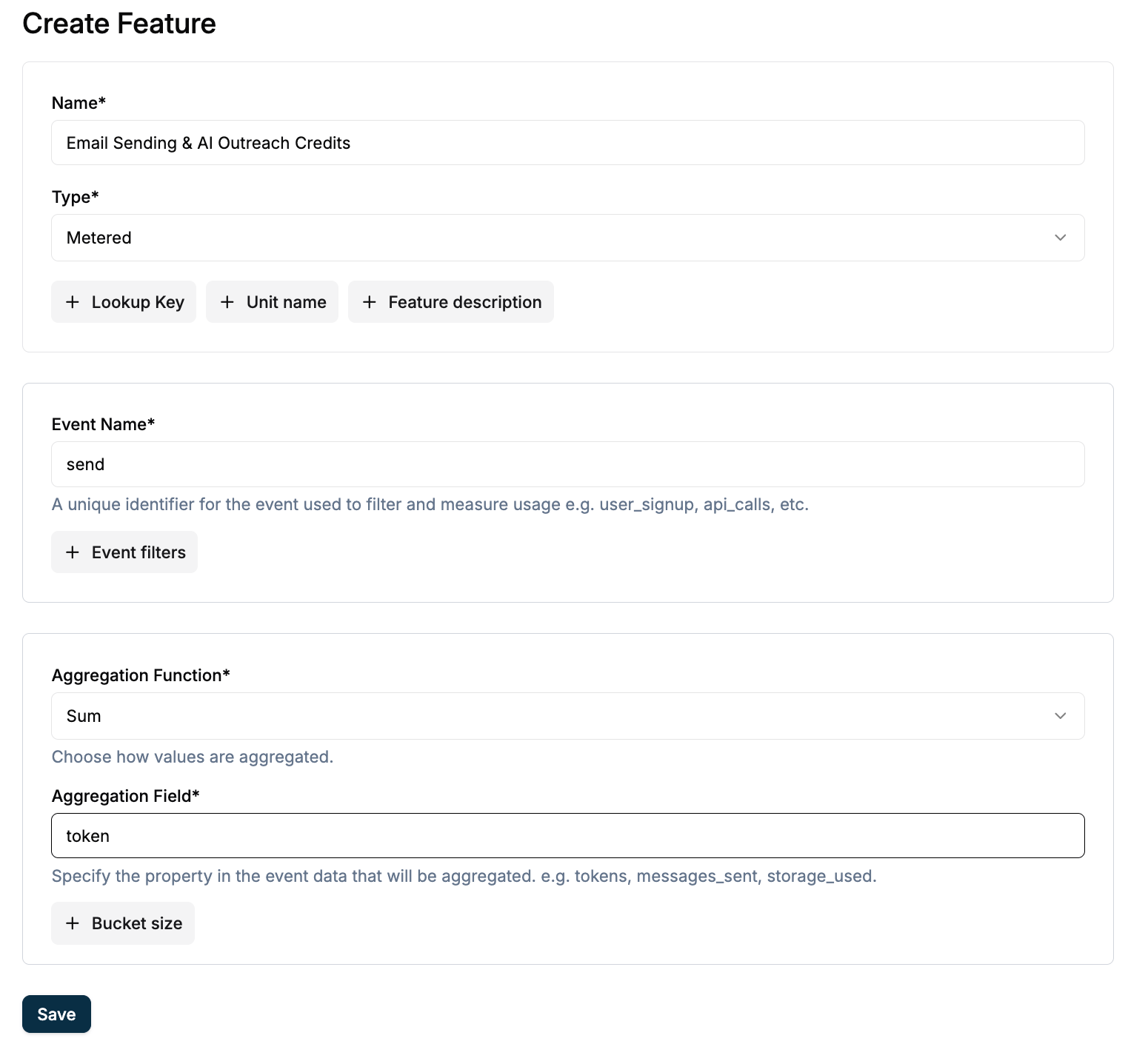
2
Step 2: Create Plan (with Credits or Recurring Grants)
Navigate to Flexprice Dashboard → Product Catalog → Plans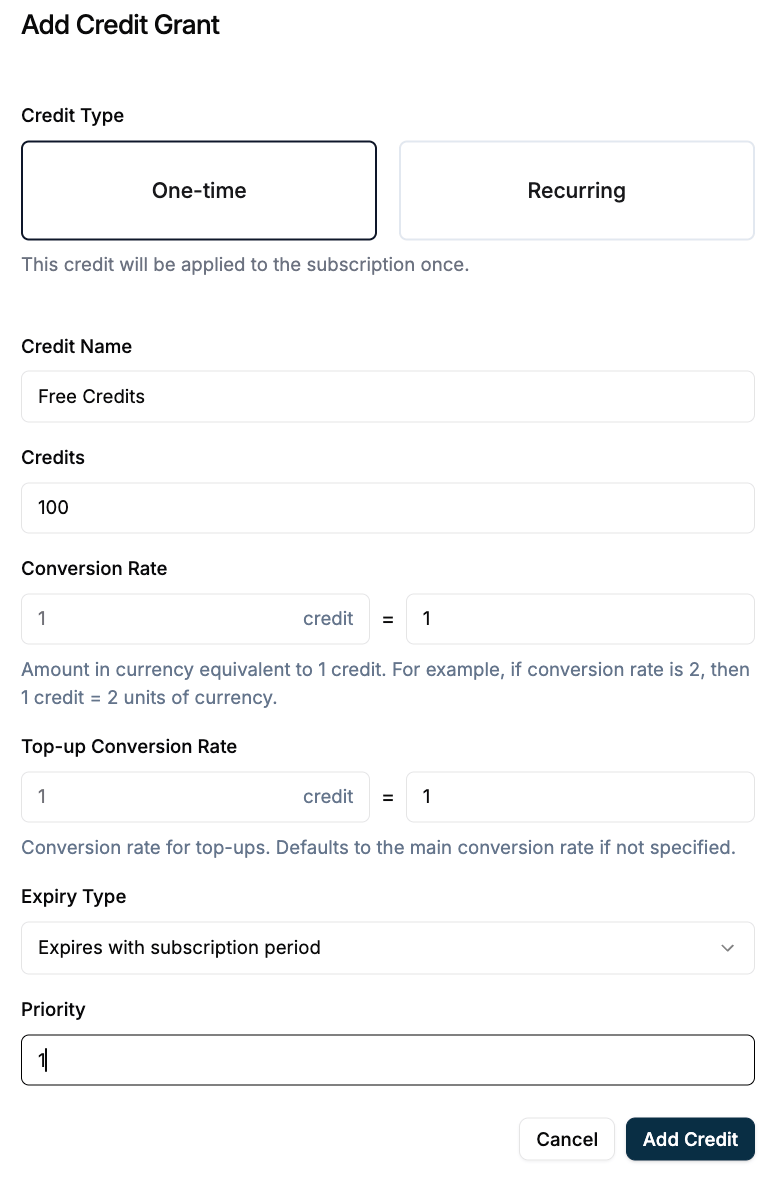
3
Step 3: Credit Grant and Entitlement (Plan-Based Path)
Do this: Open the customer → Add Subscription → select your plan. Result: The customer gets the plan’s credit grants (e.g. monthly) and access to the features you linked to that plan (including any free usage you set).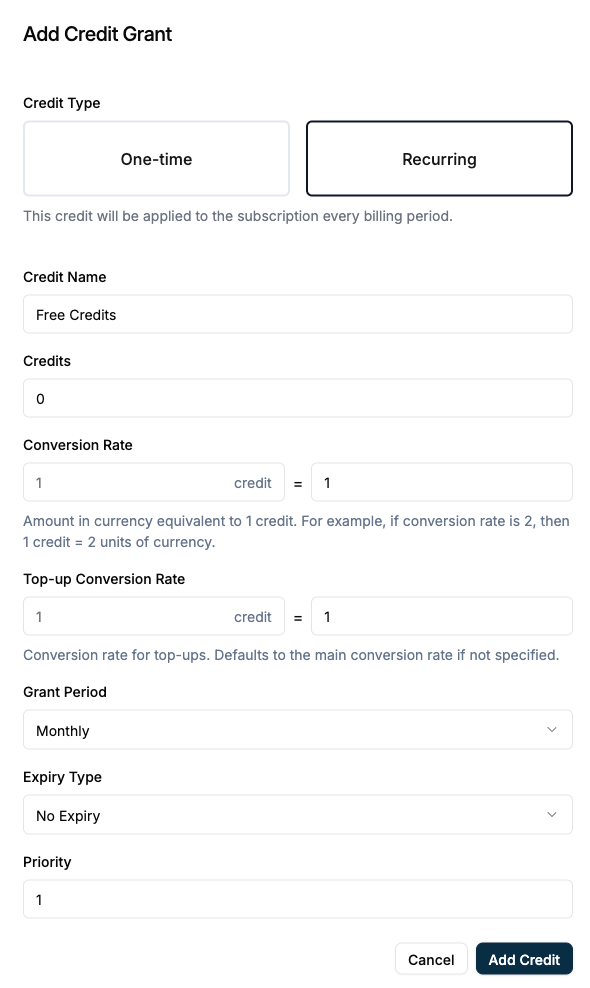
4
Step 4: Create Customer
Navigate to Flexprice Dashboard → Customer Management → Customers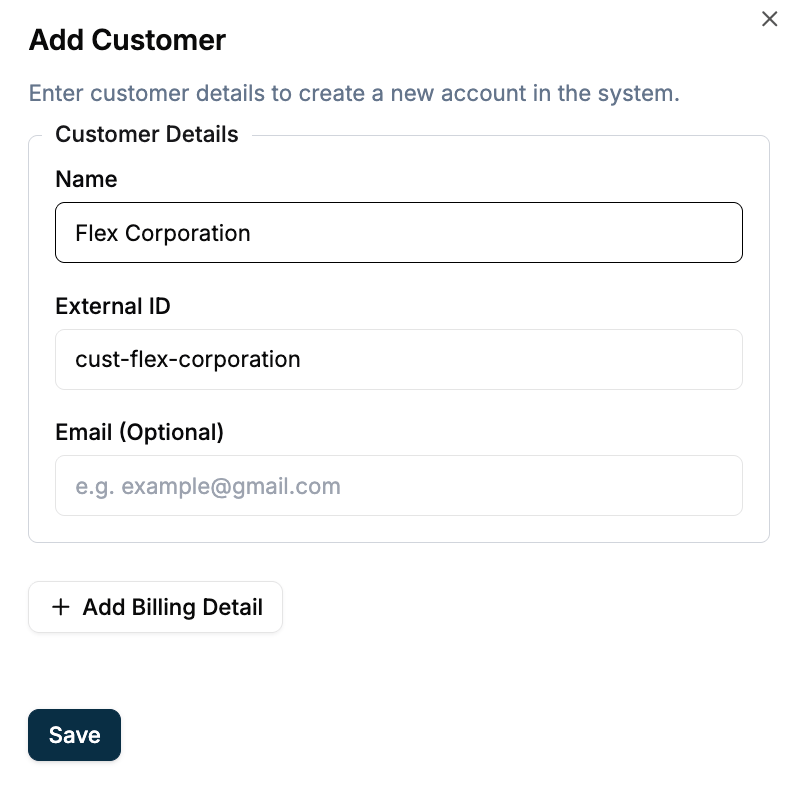
Flex Corporation). Add External ID if you use it for API lookups.For details, see Customer Management.5
Step 5: Get wallet balance and validate before action
Before allowing the user to perform a credit-consuming action, call the Get Wallet Balance API (e.g. with customer identifier or wallet ID). If balance is available and sufficient for the action cost, proceed. If not, do not proceed—block the action or prompt the user to top up, then leave.
6
Step 6: Top Up the Wallet (Initial or Add-On Credits)
On the customer’s Wallet tab, click Top-up Wallet.
- Choose the credit type that matches your Price Unit (Custom → Credits).
- Enter the amount in credits (e.g. 1,000).
- Complete the top-up (e.g. Add Credits or link to payment).
7
Step 7: Debit Wallet When User Performs an Action
Each time a user does an action (search, export, enrichment), do the following in your app or backend:Debit via API: Call the wallet debit endpoint with the customer identifier (e.g. External ID) and the amount in credits.Debit via Dashboard: Customer → Wallet → Manual Debit; enter the amount in credits and reason (e.g. “Contact export – 5 credits”).For more, see Manual Debit.
1
Check entitlement
Check entitlement: Does this customer’s plan allow this feature? (You set this when linking features to plans.) If not, block the action.
2
Look up credit cost
Look up credit cost: Use your mapping (e.g. the tables in Key Chargeable Features in Apollo above) and get the cost for this action.
3
Check balance
Check balance: Call the Flexprice API or open the dashboard and read the customer’s wallet balance.
4
Debit if sufficient
If balance ≥ cost, call the Flexprice API to debit the wallet by that amount, then perform the action.
5
Reject or prompt if insufficient
If balance < cost, return an error or prompt to purchase more credits.
Next Steps
After setup, do this:1
Map actions to credit costs
Map actions to credit costs in your application (e.g. 1 credit per search, 5 per export) and call the debit API (or Manual Debit) after each action.
2
Monitor wallet balances
Optional: Set low-balance alerts; see Low balance alert.
3
Review invoices
Check that invoices show credit top-ups and usage correctly in base currency.
4
Optional: Plans with credit packages
Add more plans with credit packages (recurring or one-time) using the same Price Unit; see Custom pricing use cases.